【GitHub API・Next.js】Zennの記事をGitHub APIで取得してみよう






はじめに
前回Zenn APIを活用して、記事データを取得しました。しかし、現状のZenn APIではTopicsを取得することはできません。
ZennはGitHubと連携して記事をデプロイすることができます。そこでGitHub APIを使用することで、Topicsを含めた記事情報を取得することができます。
※既にブラウザ上でZennの記事を作成している場合、Zenn CLIのセットアップや過去記事のエクスポート等を行う必要があります。
また、GitHub APIの中でもREST APIとGraphQL APIがあり、両方のAPIの比較検証も行いました。
GitHub連携 / データ移行 / Zenn CLIの導入
GitHub連携とZenn CLIの使用方法は公式の記事がありますので、そちらを参照ください。
過去記事をGitHubへ移行する手順として、一括エクスポート機能があります。
こちらを使用すれば簡単に移行ができます。
GitHub APIとは
GitHub APIには主にREST APIとGraphQL APIの2つの形式があり、それぞれ異なる特徴があります。
REST API
各エンドポイントが固定されたデータ構造を返すため、不要な情報も含まれることがあります。
また、各記事でエンドポイントが異なる為、全記事の情報を取得するためには、記事ごとにリクエストする必要があり、レスポンスに時間がかかってしまいます。
記事のエンドポイント
https://api.github.com/repos/{githubUsername}/{repoName}/contents/{path}
GraphQL API
単一のエンドポイントで、1回のクエリで必要なデータをすべて取得できます。
必要なフィールドだけを指定して取得できるため、効率的です。例えば、リポジトリ名と記事のタイトルだけが欲しい場合、それらのフィールドのみをリクエストできます。
エンドポイント
https://api.github.com/graphql
実装
環境変数
GITHUB_TOKEN=アクセストークン
Markdownファイルを処理するためのライブラリをインストールします。
npm install gray-matter remark remark-html
REST API
API取得 ts
import matter from 'gray-matter';
import { remark } from 'remark';
import html from 'remark-html';

export interface ZennMarkdownData {
  slug: string;
  title: string;
  emoji: string;
  type: 'tech' | 'idea';
  topics: string[];
  published: boolean;
  published_at: string;
  content: string;
  htmlContent: string;
}

export async function getMarkdownArticles(
  githubUsername: string,
  repoName: string = 'Zenn'
): Promise<ZennMarkdownData[]> {
  const token = process.env.GITHUB_TOKEN;

  try {
    // GitHubのarticlesディレクトリを取得
    const response = await fetch(
      `https://api.github.com/repos/${githubUsername}/${repoName}/contents/articles`,
      {
        headers: {
          'Authorization': `Bearer ${token}`,
          'Accept': 'application/vnd.github.v3+json',
        },
      }
    );

    if (!response.ok) {
      throw new Error(`GitHub API Error: ${response.status}`);
    }

    const files = await response.json();
    const articles: ZennMarkdownData[] = [];

    // .mdファイルのみを処理
    const markdownFiles = files.filter((file: any) =>
      file.name.endsWith('.md') && file.type === 'file'
    );

    for (const file of markdownFiles) {
      try {
        // ファイル内容を取得
        const fileResponse = await fetch(file.download_url);
        const markdownContent = await fileResponse.text();

        // Front Matterを解析
        const { data, content } = matter(markdownContent);

        // MarkdownをHTMLに変換
        const processedContent = await remark()
          .use(html)
          .process(content);
        const htmlContent = processedContent.toString();

        articles.push({
          slug: file.name.replace('.md', ''),
          title: data.title || 'Untitled',
          emoji: data.emoji || '📝',
          type: data.type || 'tech',
          topics: data.topics || [],
          published: data.published !== false,
          published_at: data.published_at || '',
          content,
          htmlContent,
        });
      } catch (error) {
        console.error(`ファイル処理エラー: ${file.name}`, error);
      }
    }

    // 公開日時でソート
    return articles
      .filter(article => article.published)
      .sort((a, b) => new Date(b.published_at).getTime() - new Date(a.published_at).getTime());

  } catch (error) {
    console.error('GitHub記事取得エラー:', error);
    return [];
  }
}
ページ表示ts
import { getMarkdownArticles } from '@/lib/markdownParser';

export default async function GitHubArticlesPage() {
  const githubUsername = 'GitHubのユーザー名';
  const articles = await getMarkdownArticles(githubUsername);

  return (
    <main className="container mx-auto px-4 py-8">
      <h1 className="text-3xl font-bold mb-8">
        GitHub記事 ({articles.length}件)
      </h1>

      <div className="grid gap-6 md:grid-cols-2 lg:grid-cols-3">
        {articles.map((article) => (
          <div
            key={article.slug}
            className="bg-white border rounded-lg p-6 hover:shadow-lg"
          >

            <a
              href={`https://zenn.dev/${githubUsername}/articles/${article.slug}`}
              target="_blank"
              rel="noopener noreferrer"
              className="block"
            >
              <h3 className="font-bold text-lg mb-3 hover:text-blue-600 transition-colors">
                {article.emoji} {article.title}
              </h3>

              <div className="flex flex-wrap gap-2 mb-4">
                <span className={`px-2 py-1 rounded text-xs ${
                  article.type === 'tech'
                    ? 'bg-blue-100 text-blue-800'
                    : 'bg-green-100 text-green-800'
                }`}>
                  {article.type}
                </span>

                {article.topics.map((topic, index) => (
                  <span
                    key={index}
                    className="bg-gray-100 text-gray-700 px-2 py-1 rounded text-xs"
                  >
                    #{topic}
                  </span>
                ))}
              </div>

              <p className="text-sm text-gray-500 mb-2">
                {new Date(article.published_at).toLocaleDateString('ja-JP')}
              </p>

              <p className="text-blue-600 text-sm font-medium">
                記事を読む →
              </p>
            </a>
          </div>
        ))}
      </div>
    </main>
  );
}

取得できてますね!
ただ約60件で14秒くらい取得に時間が掛かっています。
GraphQL API
こちらは型定義を分けています。
型定義
// GitHubのGraphQLレスポンス型
export interface GraphQLEntry {
  name: string;
  type: string;
  object?: {
    text?: string;
  };
}

export interface GraphQLResponse {
  data?: {
    repository?: {
      object?: {
        entries?: GraphQLEntry[];
      };
    };
  };
  errors?: Array<{ message: string }>;
}

// 記事データの型
export interface GitHubArticle {
  slug: string;
  title: string;
  emoji: string;
  type: 'tech' | 'idea';
  topics: string[];
  published: boolean;
  published_at: string;
}

// Front Matter型
export interface ZennFrontMatter {
  title?: string;
  emoji?: string;
  type?: 'tech' | 'idea';
  topics?: string[];
  published?: boolean;
  published_at?: string;
}
API取得 ts
import matter from 'gray-matter';
import {
  GitHubArticle,
  GraphQLResponse,
  GraphQLEntry,
  ZennFrontMatter
} from '@/types/github';

export async function getArticlesWithGraphQL(
  username: string,
  repo: string = 'Zenn'
): Promise<GitHubArticle[]> {
  const token = process.env.GITHUB_TOKEN;

  if (!token) {
    console.error('GITHUB_TOKEN が設定されていません');
    return [];
  }

  const query = `
    query($owner: String!, $name: String!) {
      repository(owner: $owner, name: $name) {
        object(expression: "HEAD:articles") {
          ... on Tree {
            entries {
              name
              type
              object {
                ... on Blob {
                  text
                }
              }
            }
          }
        }
      }
    }
  `;

  try {
    console.time('GraphQL取得');

    const response = await fetch('https://api.github.com/graphql', {
      method: 'POST',
      headers: {
        'Authorization': `Bearer ${token}`,
        'Content-Type': 'application/json',
      },
      body: JSON.stringify({
        query,
        variables: {
          owner: username,
          name: repo
        }
      })
    });

    if (!response.ok) {
      throw new Error(`GraphQL API Error: ${response.status}`);
    }

    const result: GraphQLResponse = await response.json();

    if (result.errors) {
      console.error('GraphQL Errors:', result.errors);
      return [];
    }

    const entries = result.data?.repository?.object?.entries || [];
    console.log(`${entries.length}個のファイルを取得`);

    const articles: GitHubArticle[] = entries
      .filter((entry: GraphQLEntry) =>
        entry.name.endsWith('.md') &&
        entry.type === 'blob' &&
        entry.object?.text
      )
      .map((entry: GraphQLEntry): GitHubArticle | null => {
        try {
          if (!entry.object?.text) return null;

          const { data: frontMatter }: { data: ZennFrontMatter } = matter(entry.object.text);

          return {
            slug: entry.name.replace('.md', ''),
            title: frontMatter.title || 'Untitled',
            emoji: frontMatter.emoji || '📝',
            type: frontMatter.type || 'tech',
            topics: frontMatter.topics || [],
            published: frontMatter.published !== false,
            published_at: frontMatter.published_at || '',
          };
        } catch (error) {
          console.error(`Front Matter解析エラー: ${entry.name}`, error);
          return null;
        }
      })
      .filter((article): article is GitHubArticle =>
        article !== null && article.published
      )
      .sort((a: GitHubArticle, b: GitHubArticle) =>
        new Date(b.published_at).getTime() - new Date(a.published_at).getTime()
      );

    console.timeEnd('GraphQL取得');
    console.log(`${articles.length}件の記事を処理完了`);

    return articles;

  } catch (error) {
    console.error('GraphQL取得エラー:', error);
    return [];
  }
}
ページ表示ts
import { getArticlesWithGraphQL } from '@/lib/githubGraphQL';
import { GitHubArticle } from '@/types/github';

export default async function GraphQLArticlesPage() {
  const githubUsername = 'GitHubのユーザー名';

  // GraphQLで記事を取得
  const articles: GitHubArticle[] = await getArticlesWithGraphQL(githubUsername);

  return (
    <main className="container mx-auto px-4 py-8">
      <div className="flex justify-between items-center mb-8">
        <h1 className="text-3xl font-bold">
          GraphQL記事取得 ({articles.length}件)
        </h1>
        <span className="text-sm text-gray-500 bg-green-100 px-3 py-1 rounded">
          高速版
        </span>
      </div>

      {articles.length === 0 ? (
        <div className="text-center py-12">
          <p className="text-gray-500 mb-2">記事が見つかりませんでした</p>
          <p className="text-sm text-gray-400">
            GitHub設定を確認してください
          </p>
        </div>
      ) : (
        <div className="grid gap-6 md:grid-cols-2 lg:grid-cols-3">
          {articles.map((article) => (
            <div
              key={article.slug}
              className="bg-white border rounded-lg p-6 hover:shadow-lg transition-shadow"
            >
              <a
                href={`https://zenn.dev/${githubUsername}/articles/${article.slug}`}
                target="_blank"
                rel="noopener noreferrer"
                className="block"
              >
                <h3 className="font-bold text-lg mb-3 hover:text-blue-600 transition-colors line-clamp-2">
                  {article.emoji} {article.title}
                </h3>

                <div className="flex flex-wrap gap-2 mb-4">
                  <span className={`px-2 py-1 rounded text-xs font-medium ${
                    article.type === 'tech'
                      ? 'bg-blue-100 text-blue-800'
                      : 'bg-green-100 text-green-800'
                  }`}>
                    {article.type}
                  </span>

                  {article.topics.map((topic, index) => (
                    <span
                      key={index}
                      className="bg-purple-100 text-purple-700 px-2 py-1 rounded text-xs font-medium"
                    >
                      #{topic}
                    </span>
                  ))}
                </div>

                {article.published_at && (
                  <p className="text-sm text-gray-500 mb-2">
                    {new Date(article.published_at).toLocaleDateString('ja-JP')}
                  </p>
                )}

                <p className="text-blue-600 text-sm font-medium">
                  記事を読む →
                </p>
              </a>
            </div>
          ))}
        </div>
      )}
    </main>
  );
}
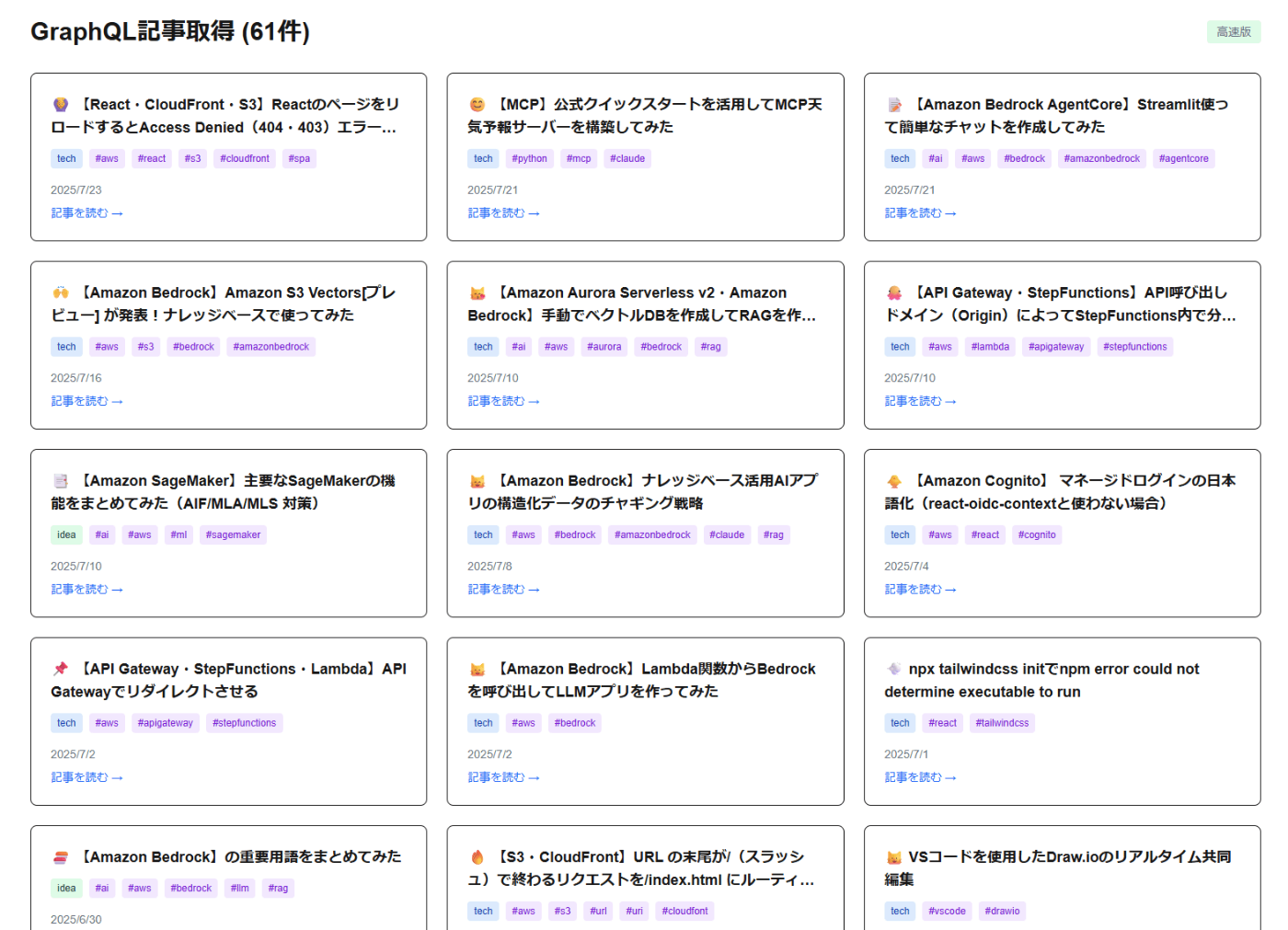
こちらもうまく取れました!
取得時間は2秒ほどに短縮できています。
取得時間検証
取得時間を検証するため、下記のログを設定しました。
  console.time('REST API');
  const restArticles = await getMarkdownArticles(githubUsername);
  console.timeEnd('REST API');

  console.time('GraphQL');
  const graphqlArticles = await getArticlesWithGraphQL(githubUsername);
  console.timeEnd('GraphQL');

だいぶ差ができましたね。
シンプルな操作にはREST、複雑なデータ取得や効率性を重視する場合にはGraphQLを使うと良いと思います。
おわりに
今回はGitHub APIを使ってZennの記事データを取得し、REST APIとGraphQL APIの実装比較を行いました。
パフォーマンス面ではGraphQLが圧倒的に優秀でしたが、実装の複雑さや学習コストを考慮すると、用途に応じた選択する必要がありそうです。
REST APIはHTTPキャッシュが活用しやすく、シンプルな操作には適しています。GraphQLは複雑な関連データの取得や効率性を重視する場面で真価を発揮します。
Discussion