WYSIWYG って地獄なの? -> 自作 GitHub Client で使おう!-> めちゃくちゃ地獄を見た件



作ったもの
| GitHub | My GitHub Client 🎉 |
|---|---|
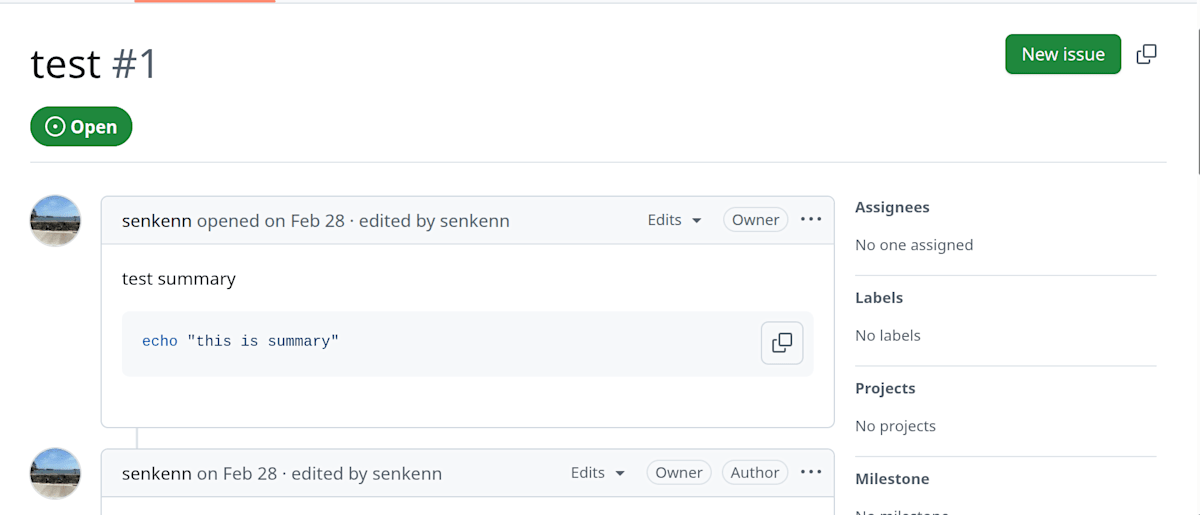 |
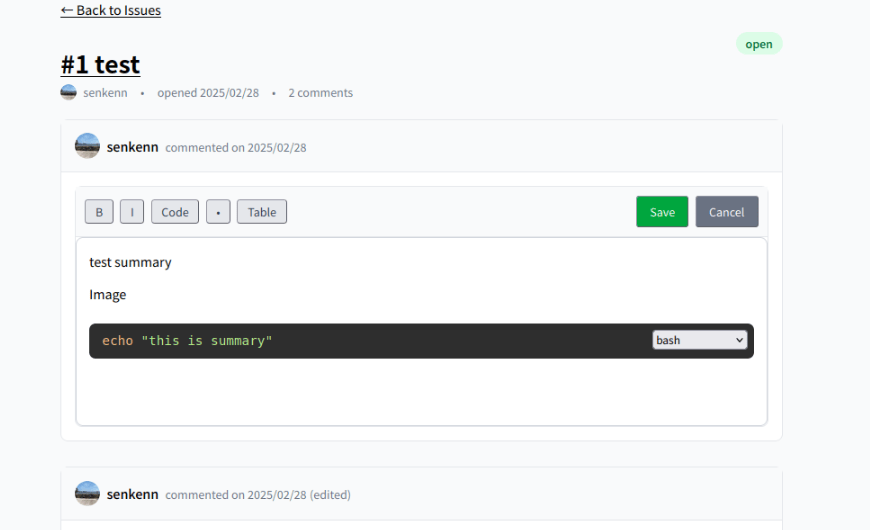 |
(気が向いたらスター :star: ください :pray:)
動機
- GitHub Issue での Markdown 操作がだるい
- GitHub Projects & Issues でタスク管理をしていた
- Markdown でいちいち編集に入る or Preview するのがめんどい
- WYSIWYG 辛いらしい?と興味を持った
- これをみてそんなに辛いのかと知った
【React】リッチテキストエディタ(Quill、Tiptap、Slate...)の考え方や前提知識 - 自分で実際に作らないと辛さわからないパターンと感じた
- これをみてそんなに辛いのかと知った
-> GitHub Client を WYSIWYG で作れば一石二鳥じゃね???
要件整理
- 機能面
- GitHub Issue コメントを WYSIWYG で編集できること
- ノーステップで編集に入れること
- UI: GitHub ライク
- GitHub にコピペした画像もプレビューできること(実装まだなし[1])
- 技術面
- wysiwyg editor: TipTap (上の記事見てなんか良さそうだったから)
- md to html: markdown-it (ゆうめいだったから)
- html to md: Turndown (ゆうめいだったから)
- おまけ技術
- Web フレームワーク・ライブラリ: React + Vite
- GitHub API クライアント: Octokit
- 認証:GitHub Access Token
-
gh auth tokenで発行できるの楽だよね
-
- ルーティング: Tanstack Router
- めっちゃ体験良かったですがこの記事では触れません
本題: WYSIWYG で地獄を見た
まずこの自作 GitHub Client を用いるケースはどんなパターンか
このアプリを用いる場合、大きく以下の2つのユースケースがあります。
- GitHub 上で書いたコメントを WYSIWYG Client で開くパターン
- この WYSIWYG 自作 Client でコメントを書いて、GitHub に反映するパターン
この両方のニーズを満たせないと使い物になりません。
どちらのほうが実装がつらかったか、2です。
1 が簡単なのは自明だと思います。GitHub 上で書いたコメントは Markdown 形式で保存されているので、 markdown-it で HTML に変換して TipTap に流し込むだけです。 GitHub の Markdown はそんなに特殊ではないので parse も簡単でした。
なぜ2がつらいのか、以下で説明。
なぜ WYSIWYG で書いたものを GitHub に反映するパターンがつらいのか
この場合、以下のような処理フローになります。
- TipTap のドキュメントを HTML 形式で取得
- HTML 形式を Markdown 形式に変換 (Turndown)
- GitHub API でコメントを更新
この中の html -> md が地獄です。今回ここを詳細に説明します。
まず html -> md の基本系はこちら。
export function htmlToMarkdown(html: string): string {
  const turndownService = new TurndownService();
  const markdown = turndownService.turndown(html);
  return markdown;
}
色々自分好みにカスタムしたくなると思います。 Turndown のオプションで色々指定できます。
export function htmlToMarkdown(html: string): string {
  const turndownService = new TurndownService({
+    headingStyle: "atx",
+    bulletListMarker: "-",
+    codeBlockStyle: "fenced",
  });
  const markdown = turndownService.turndown(html);
  return markdown;
}
あれ、簡単じゃーん!
...
あれ、変換後の markdown に謎にスペースが入るな??
あれ、その設定がオプションにないのか。
じゃあしょうがない。正規表現で頑張るか。
export function htmlToMarkdown(html: string): string {
  const turndownService = new TurndownService({
    headingStyle: "atx",
    bulletListMarker: "-",
    codeBlockStyle: "fenced",
  });
  const markdown = turndownService
    .turndown(html)
+    // Trim trailing spaces and normalize line endings
+    // example: `hello  ` -> `hello`
+    .replace(/[ ]+$/gm, "")
  return markdown;
}
あれ、リストのときもスペースが入るのか。
export function htmlToMarkdown(html: string): string {
  const turndownService = new TurndownService({
    headingStyle: "atx",
    bulletListMarker: "-",
    codeBlockStyle: "fenced",
  });
  const markdown = turndownService
    .turndown(html)
    // Trim trailing spaces and normalize line endings
    // example: `hello  ` -> `hello`
    .replace(/[ ]+$/gm, "")
+    // Convert 4-space indentation to 2-space for unordered lists
+    // example: `    - ` -> `  - `
+    .replace(/^[ ]{4}(-\s)/gm, "  $1")
  return markdown;
}
ordered lists のときもか、、、
export function htmlToMarkdown(html: string): string {
  const turndownService = new TurndownService({
    headingStyle: "atx",
    bulletListMarker: "-",
    codeBlockStyle: "fenced",
  });
  const markdown = turndownService
    .turndown(html)
    // Trim trailing spaces and normalize line endings
    // example: `hello  ` -> `hello`
    .replace(/[ ]+$/gm, "")
    // Convert 4-space indentation to 2-space for unordered lists
    // example: `    - ` -> `  - `
    .replace(/^[ ]{4}(-\s)/gm, "  $1")
+    // Convert 4-space indentation to 3-space for ordered lists
+    // example: `    1. ` -> `   1. `
+    .replace(/^[ ]{4}(\d+\.\s)/gm, "   $1")
  return markdown;
}
バレットや番号のあとにもスペース、、、、、、、、、
export function htmlToMarkdown(html: string): string {
  const turndownService = new TurndownService({
    headingStyle: "atx",
    bulletListMarker: "-",
    codeBlockStyle: "fenced",
  });
  const markdown = turndownService
    .turndown(html)
    // Trim trailing spaces and normalize line endings
    // example: `hello  ` -> `hello`
    .replace(/[ ]+$/gm, "")
    // Convert 4-space indentation to 2-space for unordered lists
    // example: `    - ` -> `  - `
    .replace(/^[ ]{4}(-\s)/gm, "  $1")
    // Convert 4-space indentation to 3-space for ordered lists
    // example: `    1. ` -> `   1. `
    .replace(/^[ ]{4}(\d+\.\s)/gm, "   $1")
+    // Normalize unordered list spacing: ensure single space after bullet
+    // example: `-  item` -> `- item`
+    .replace(/^(\s*)-\s+/gm, "$1- ")
+    // Normalize ordered list spacing: ensure single space after number
+    // example: `1.  item` -> `1. item`
+    .replace(/^(\s*)(\d+)\.\s+/gm, "$1$2. ");
  return markdown;
}
この時点で結構心が折れかけました。ここまできたらもう正規表現ではなく、ほんとは自分で parser や generator を実装したほうがいいです。
でも parser はいやだ parser はいやだ、、、
あとはネストのリストやテーブルのサポートなど色々あり、最終的に以下のように。
export function htmlToMarkdown(html: string): string {
  // TODO: html -> markdown の変換に使っている Turndown のオプションを調整できるようにする
  const turndownService = new TurndownService({
    headingStyle: "atx",
    bulletListMarker: "-",
    codeBlockStyle: "fenced",
  });

  // カスタムテーブルルールを追加
  turndownService.addRule("tables", {
    filter: "table",
    replacement: (_content, node) => {
      const table = node as HTMLTableElement;
      let markdown = "\n";
      // hasProcessedHeader is reset for each table since this function is called once per table
      let hasProcessedHeader = false;
      let headerCells: Element[] = [];

      // ヘッダー行の処理(theadから探す)
      const thead = table.querySelector("thead");
      if (thead) {
        const headerRow = thead.querySelector("tr");
        if (headerRow) {
          headerCells = Array.from(headerRow.querySelectorAll("th"));
          markdown += renderMarkdownTableHeader(headerCells);
          hasProcessedHeader = true;
        }
      }

      // ボディ行の処理
      const tbody = table.querySelector("tbody");
      if (tbody) {
        const rows = Array.from(tbody.querySelectorAll("tr"));
        for (const row of rows) {
          // 最初の行にthが含まれている場合はヘッダー行として処理
          const thCells = Array.from(row.querySelectorAll("th"));
          const tdCells = Array.from(row.querySelectorAll("td"));

          if (thCells.length > 0 && !hasProcessedHeader) {
            // tbody内のthをヘッダーとして処理
            markdown += renderMarkdownTableHeader(thCells);
            hasProcessedHeader = true;
          } else if (tdCells.length > 0) {
            // 通常のデータ行として処理
            markdown += "|";
            for (const cell of tdCells) {
              markdown += ` ${cell.textContent || ""} |`;
            }
            markdown += "\n";
          }
        }
      }

      return markdown;
    },
  });

  let markdown = turndownService
    .turndown(html)
    // Trim trailing spaces and normalize line endings
    // example: `hello  ` -> `hello`
    .replace(/[ ]+$/gm, "")
    // Convert 4-space indentation to 2-space for unordered lists
    // example: `    - ` -> `  - `
    .replace(/^[ ]{4}(-\s)/gm, "  $1")
    // Convert 4-space indentation to 3-space for ordered lists
    // example: `    1. ` -> `   1. `
    .replace(/^[ ]{4}(\d+\.\s)/gm, "   $1")
    // Normalize unordered list spacing: ensure single space after bullet
    // example: `-  item` -> `- item`
    .replace(/^(\s*)-\s+/gm, "$1- ")
    // Normalize ordered list spacing: ensure single space after number
    // example: `1.  item` -> `1. item`
    .replace(/^(\s*)(\d+)\.\s+/gm, "$1$2. ");

  // Handle mixed nested lists by checking context
  const lines = markdown.split("\n");
  let inOrderedList = false;
  for (let i = 0; i < lines.length; i++) {
    const line = lines[i];

    // Check if we're in an ordered list context
    if (/^\d+\.\s/.test(line)) {
      inOrderedList = true;
    } else if (line.trim() === "" || /^[^\s]/.test(line)) {
      inOrderedList = false;
    }

    // If we're in an ordered list context and this is a nested unordered list item
    if (inOrderedList && /^[ ]{2}-\s/.test(line)) {
      lines[i] = line.replace(/^[ ]{2}/, "   ");
    }
  }
  markdown = lines.join("\n");

  return markdown;
}
😇😇😇😇😇😇
まとめ
おそらく世間一般の WYSIWYG エディタでは私のように Markdown では保存せず、 HTML or JSON 形式で管理することが一般的かと思います。
ただ、その場合でも同じように WYSIWYG ライブラリの挙動に悩まされ、顧客から「拡張表現を使わせろ!」「もっと便利にしろ!」のような要望を適当に受け入れていると指数関数的に負債が膨れ上がるでしょうね、、
WYSIWYG に限らず、リッチテキストエディタや拡張表現の仕様が降ってきた場合は、そのコストとリターンを見極めましょうね、という学びが得られました。おわり。
-
画像ハンドリングも結構厄介で、まず Issue のようなコメントで画像をアップロードすると
https://github.com/user-attachments/assets/{UUIDv4}のような URL が発行されます。
そして、Public なリポジトリはこれは普通に見れますが Private リポジトリ上の画像は認証が必要です。 Octokit ではこの URL をハンドリングするような機構はサポートされていないので、たとえば CDP (Chromium Devetools Protocol) を用いて Chrome の Cookie を読み出し、 Vite のミドルウェアで代理取得、、、みたいな実装する必要がありました。
わざわざユーザーに CDP 接続できるようにブラウザを起動してもらうのもどうなの?って感じですし、アップロードは?Network を watch して得たドキュメントにない API を使うの?とかあり、結局画像対応は実装断念となりました、、 ↩︎
Discussion