





はじめに
Raspberry Pi Pico WH とE-Paper(電子ペーパー)で、天気予報を表示するディスプレイを作ってみた記録です!
作ろうと思ったきっかけ
毎朝天気予報をチェックする習慣があり、iPhoneにも常に天気を表示しています。
妻から天気を聞かれても、いつも自信満々で即答しています。
ですが時々予報を確認し忘れることがあり、そのタイミングで聞かれると「自分で見てよ…」と思う瞬間があります。
普段からドヤ顔で答えているので、口が裂けても言えない
そんな思いを正直に(優しく)打ち明けてみると、「すぐに天気予報を確認できる方法はないかな?」と、妻から相談。
確かに...無ければ作ってしまおう!と、思い立って作ってみました。
完成したもの
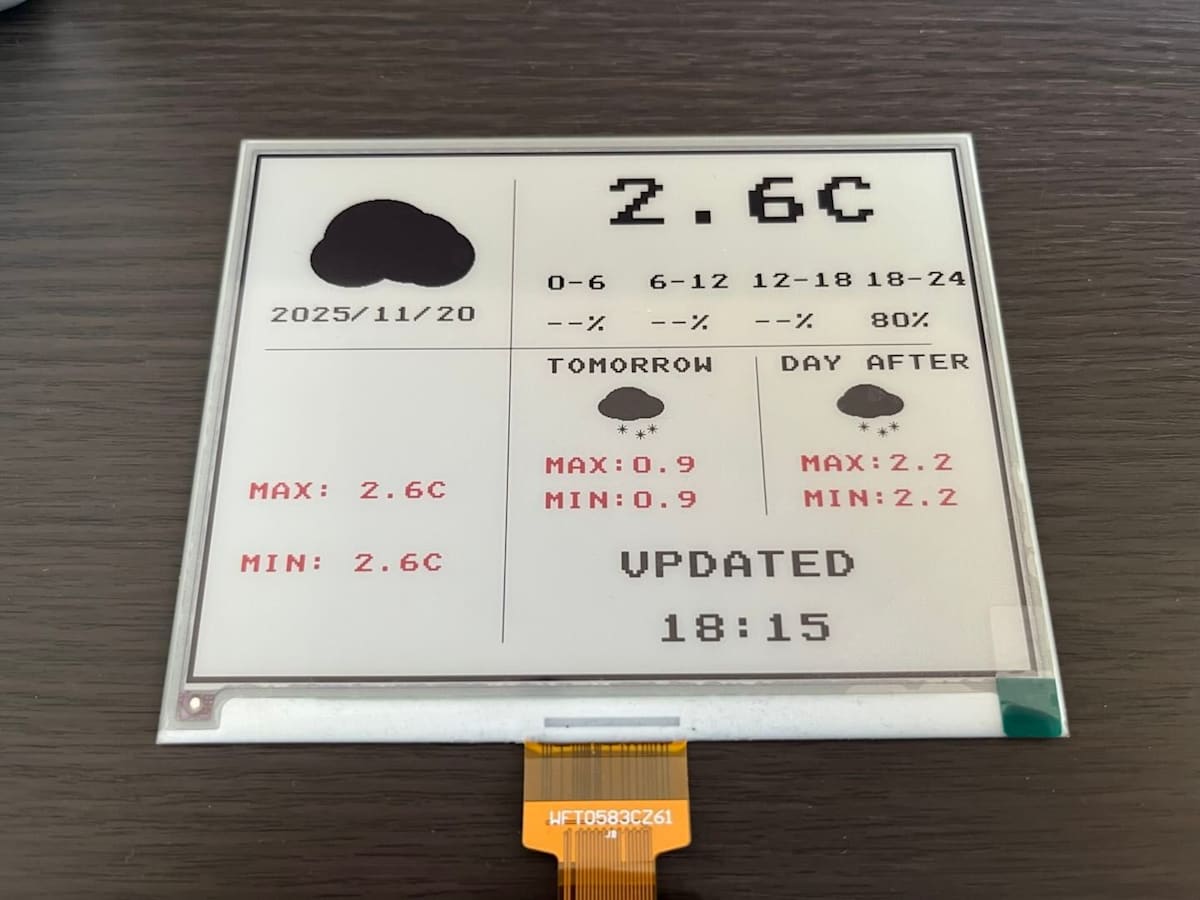
電子ペーパーに天気・気温・更新時刻などを表示
用意したもの
-
Raspberry Pi Pico WH
- はんだ付けが不要なタイプを購入
- e-paper(電子ペーパー)
- ケーブル類など
- 合計費用はおよそ12,000円(これで家庭内の平和が守られる...?)
技術スタック
ソフトウェア / 開発環境
- Python(MicroPython)
- VSCode
- MicroPico(VSCode拡張機能)
使用技術
- Wi-Fi通信(天気予報API取得)
- e-paper描画処理
環境構築
環境構築は以下記事を参考にさせていただきながら進めました。
本記事では割愛します。
拡張機能
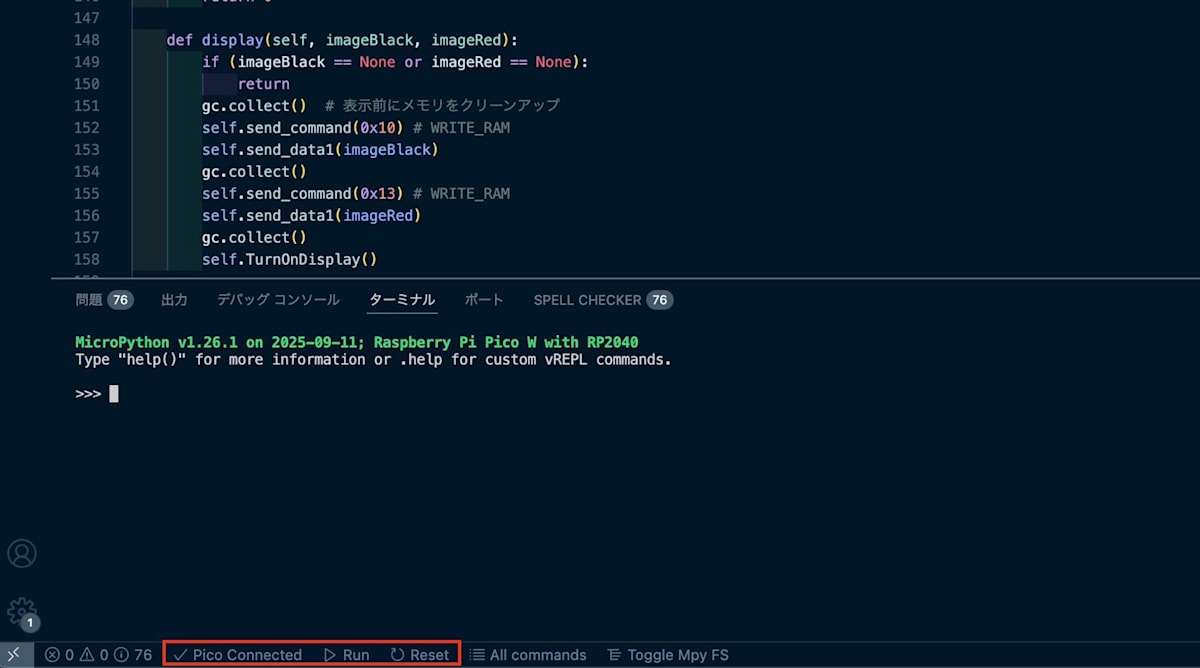
今回は、MicroPicoというVSCodeの拡張機能を使用して開発しました。
VSCode上からラズパイへファイルのアップロード、実行などできるのでとても便利です。
詰まったこと
物理的な問題
- 2024年11月の購入当初、サンプルコードが動かずディスプレイに何も表示されない
→放置 - 今年の8月から重い腰を上げて再開
- 原因は「ピンを十分に深く刺せていなかった」ことだと判明(恥ずかしい)
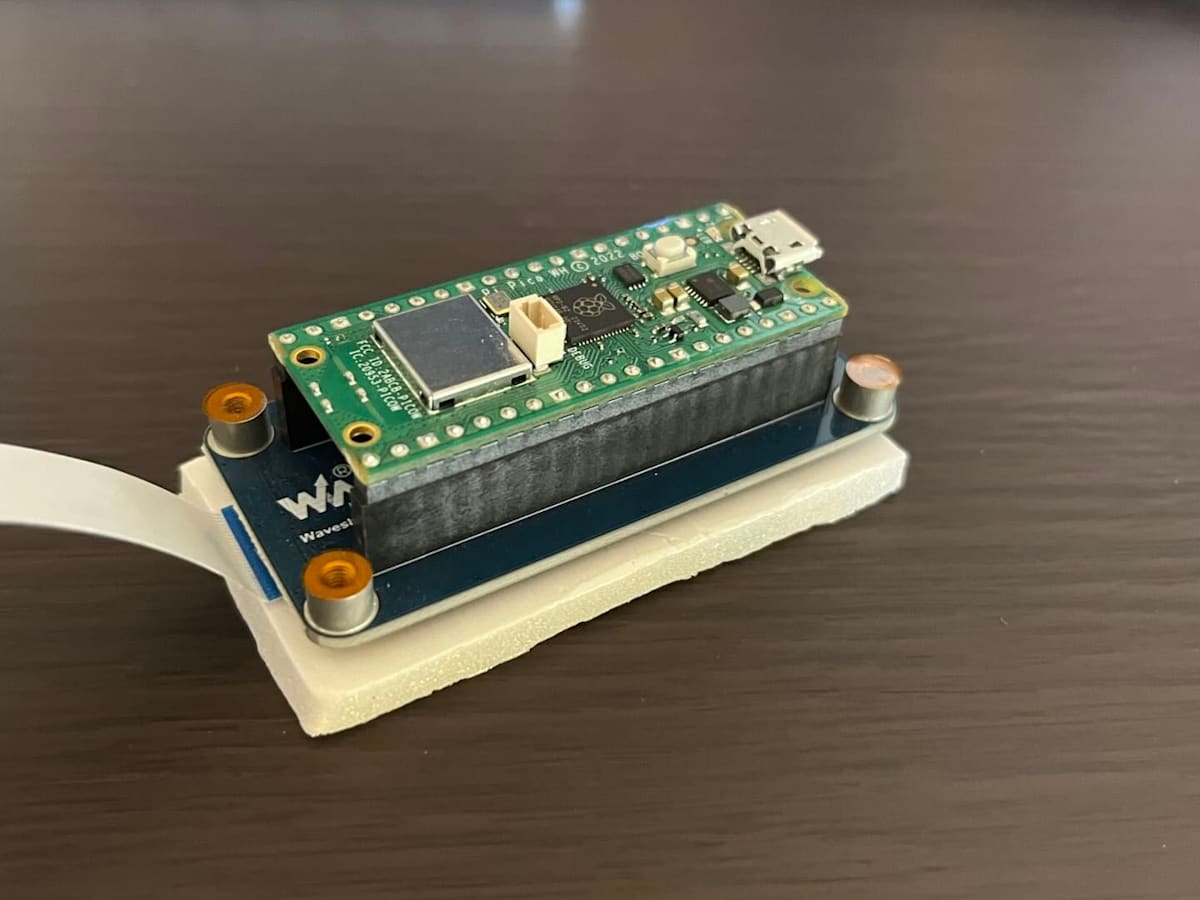
ピンの根本まで刺す必要があったらしい
アップロードし忘れ
- コード編集後はラズパイに対して変更内容を保存してあげる必要がある
- あれ?変更されていない?となることが多々あり、アップロードし忘れるということを繰り返してしまった...
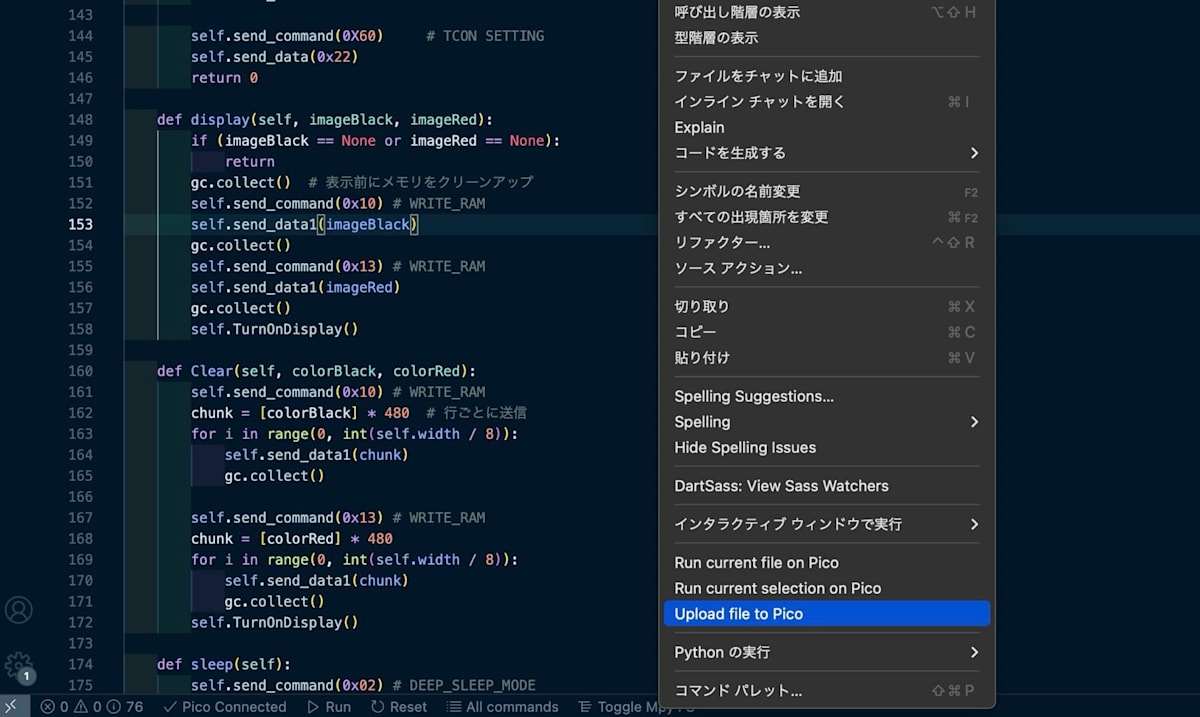
拡張機能を入れると右クリックしてアップロードできる
開発の経過

サンプルコードを表示してみる
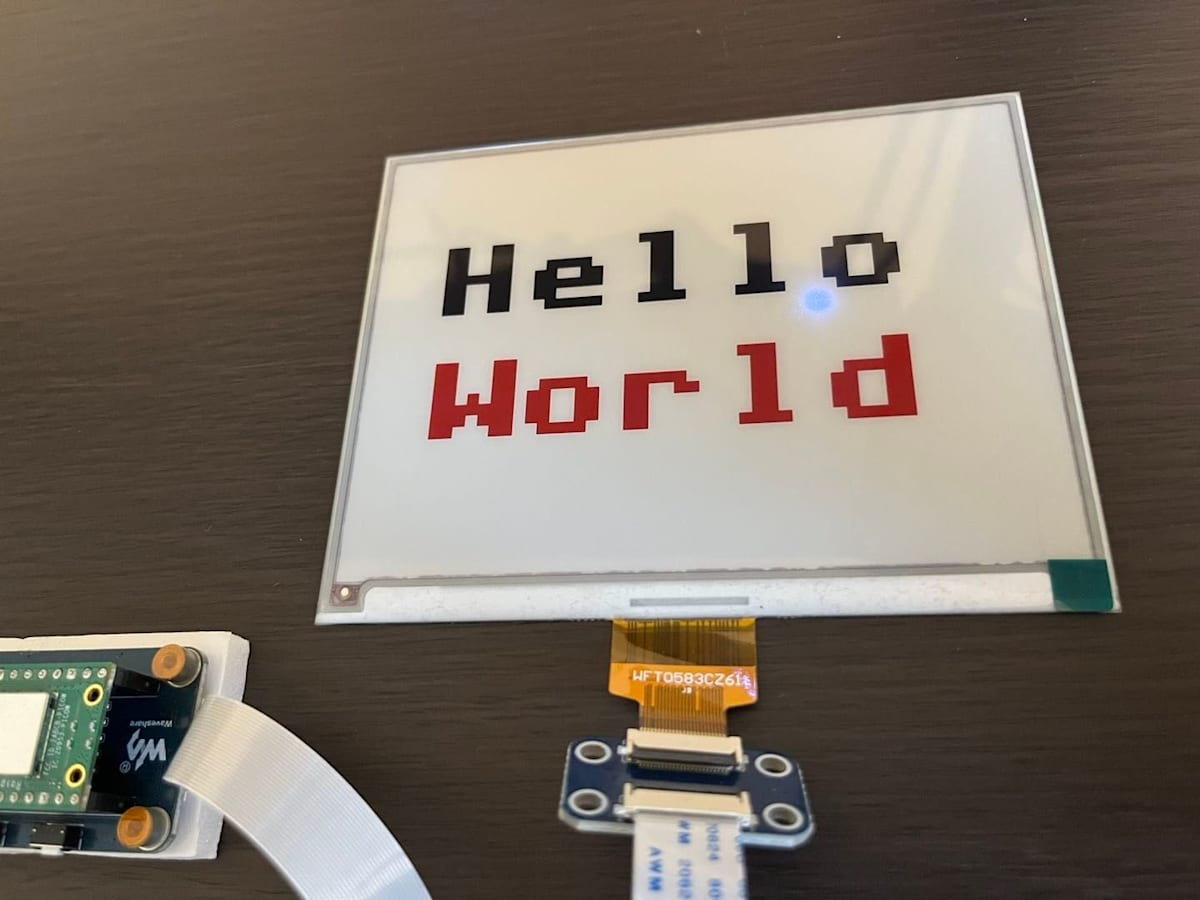
文字を大きくしてみる
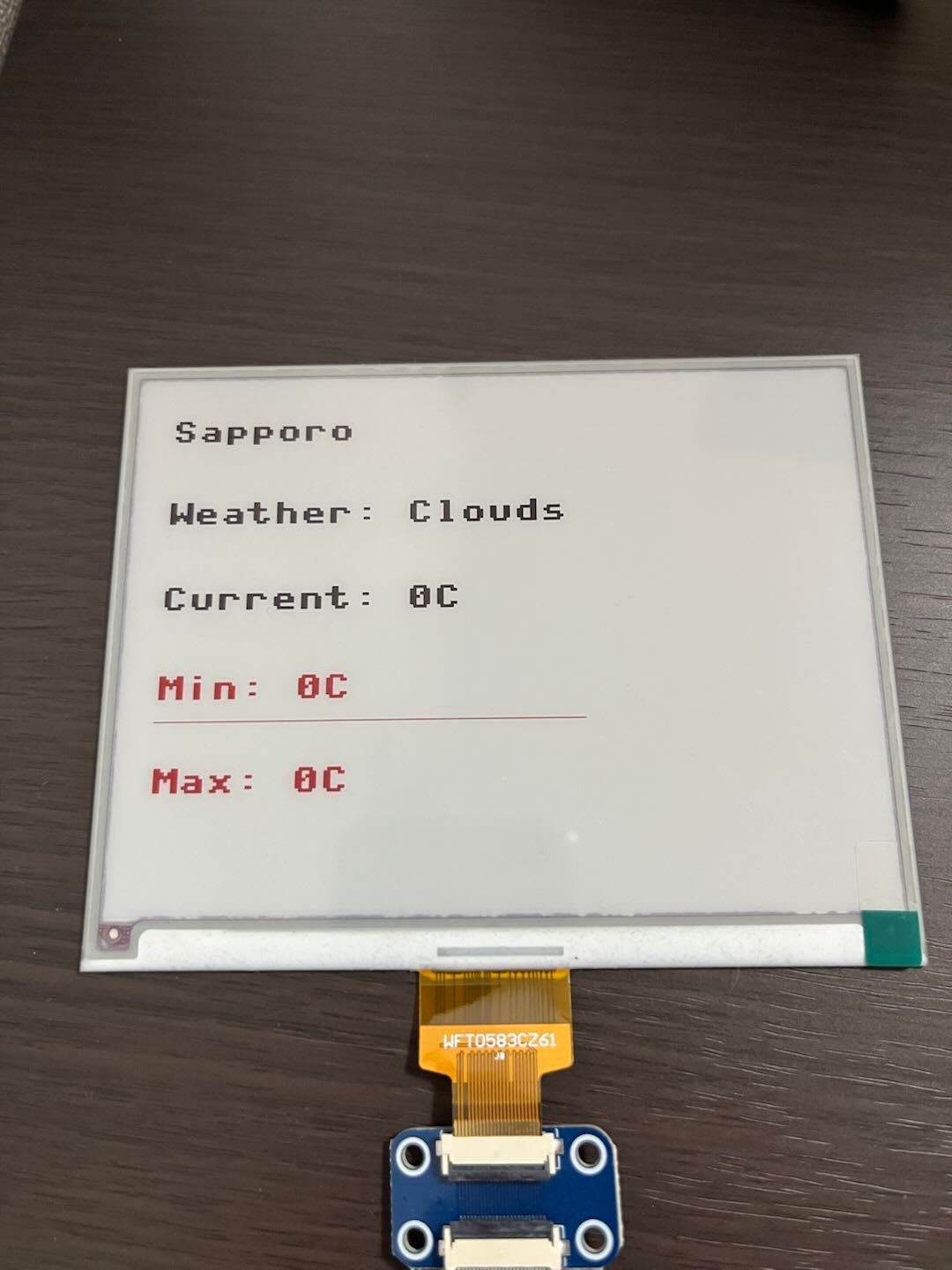
API実行・線の描画
最終的なソースコード
ディレクトリ構成
pico-weather/
├─ main.py
└─ secrets.py
secrets.py
SSID = "YOUR_SSID"
PASSWORD = "YOUR_PASSWORD"
OPENWEATHER_API_KEY = "YOUR_OPENWEATHER_API_KEY"
main.py
main.py
from machine import Pin, SPI, RTC
import framebuf
import utime
import network
import urequests
import secrets
import gc

# ===== 設定エリア =====
SSID = secrets.SSID
PASSWORD = secrets.PASSWORD
API_KEY = secrets.OPENWEATHER_API_KEY

# Display resolution
EPD_WIDTH       = 648
EPD_HEIGHT      = 480

RST_PIN         = 12
DC_PIN          = 8
CS_PIN          = 9
BUSY_PIN        = 13

class EPD_5in83_B():
    def __init__(self):
        self.reset_pin = Pin(RST_PIN, Pin.OUT)
        self.busy_pin = Pin(BUSY_PIN, Pin.IN, Pin.PULL_UP)
        self.cs_pin = Pin(CS_PIN, Pin.OUT)
        self.width = EPD_WIDTH
        self.height = EPD_HEIGHT
        self.spi = SPI(1)
        self.spi.init(baudrate=4000_000)
        self.dc_pin = Pin(DC_PIN, Pin.OUT)

        # バッファサイズを計算してメモリを節約
        buffer_size = self.height * self.width // 8
        print(f"Buffer size: {buffer_size} bytes")

        try:
            self.buffer_black = bytearray(buffer_size)
            gc.collect()  # ガベージコレクション実行
            self.buffer_red = bytearray(buffer_size)
            gc.collect()
        except MemoryError:
            print("Memory allocation failed for buffers")
            raise

        self.imageblack = framebuf.FrameBuffer(self.buffer_black, self.width, self.height, framebuf.MONO_HLSB)
        self.imagered = framebuf.FrameBuffer(self.buffer_red, self.width, self.height, framebuf.MONO_HLSB)
        self.init()

    def digital_write(self, pin, value):
        pin.value(value)

    def digital_read(self, pin):
        return pin.value()

    def delay_ms(self, delaytime):
        utime.sleep(delaytime / 1000.0)

    def spi_writebyte(self, data):
        self.spi.write(bytearray(data))

    def module_exit(self):
        self.digital_write(self.reset_pin, 0)

    # Hardware reset
    def reset(self):
        self.digital_write(self.reset_pin, 1)
        self.delay_ms(50)
        self.digital_write(self.reset_pin, 0)
        self.delay_ms(2)
        self.digital_write(self.reset_pin, 1)
        self.delay_ms(50)

    def send_command(self, command):
        self.digital_write(self.dc_pin, 0)
        self.digital_write(self.cs_pin, 0)
        self.spi_writebyte([command])
        self.digital_write(self.cs_pin, 1)

    def send_data(self, data):
        self.digital_write(self.dc_pin, 1)
        self.digital_write(self.cs_pin, 0)
        self.spi_writebyte([data])
        self.digital_write(self.cs_pin, 1)

    def send_data1(self, data):
        self.digital_write(self.dc_pin, 1)
        self.digital_write(self.cs_pin, 0)
        # 大きなデータを分割して送信
        chunk_size = 1024  # 1KB単位で分割
        for i in range(0, len(data), chunk_size):
            chunk = data[i:i + chunk_size]
            self.spi_writebyte(chunk)
            gc.collect()  # 各チャンクの後でガベージコレクション
        self.digital_write(self.cs_pin, 1)

    def ReadBusy(self):
        print("e-Paper busy")
        while(self.digital_read(self.busy_pin) == 0):      # 1: idle, 0: busy
            self.delay_ms(10)
        print("e-Paper busy release")

    def TurnOnDisplay(self):
        self.send_command(0x12)
        self.delay_ms(100)
        self.ReadBusy()

    def init(self):
        self.reset()
        self.send_command(0x01)     # POWER SETTING
        self.send_data (0x07)
        self.send_data (0x07)       # VGH=20V,VGL=-20V
        self.send_data (0x3f)       # VDH=15V
        self.send_data (0x3f)       # VDL=-15V

        self.send_command(0x04) # POWER ON
        self.delay_ms(100)
        self.ReadBusy()

        self.send_command(0X00)     # PANEL SETTING
        self.send_data(0x0F)

        self.send_command(0x61)     # tres
        self.send_data (0x02)       # source 648
        self.send_data (0x88)
        self.send_data (0x01)       # gate 480
        self.send_data (0xe0)

        self.send_command(0X15)
        self.send_data(0x00)

        self.send_command(0X50)     # VCOM AND DATA INTERVAL SETTING
        self.send_data(0x11)
        self.send_data(0x07)

        self.send_command(0X60)     # TCON SETTING
        self.send_data(0x22)
        return 0

    def display(self, imageBlack, imageRed):
        if (imageBlack == None or imageRed == None):
            return
        gc.collect()  # 表示前にメモリをクリーンアップ
        self.send_command(0x10) # WRITE_RAM
        self.send_data1(imageBlack)
        gc.collect()
        self.send_command(0x13) # WRITE_RAM
        self.send_data1(imageRed)
        gc.collect()
        self.TurnOnDisplay()

    def Clear(self, colorBlack, colorRed):
        self.send_command(0x10) # WRITE_RAM
        chunk = [colorBlack] * 480  # 行ごとに送信
        for i in range(0, int(self.width / 8)):
            self.send_data1(chunk)
            gc.collect()

        self.send_command(0x13) # WRITE_RAM
        chunk = [colorRed] * 480
        for i in range(0, int(self.width / 8)):
            self.send_data1(chunk)
            gc.collect()
        self.TurnOnDisplay()

    def sleep(self):
        self.send_command(0x02) # DEEP_SLEEP_MODE
        self.ReadBusy()
        self.send_command(0x07)
        self.send_data(0xa5)
        self.delay_ms(2000)
        self.module_exit()

# ===== Wi-Fi接続 =====
def connect_wifi():
    wlan = network.WLAN(network.STA_IF)
    wlan.active(True)
    wlan.connect(SSID, PASSWORD)
    while not wlan.isconnected():
        utime.sleep(1)

# ===== 簡素化されたアイコン描画 =====
def draw_simple_weather_icon(fb, weather_main, x, y, color):
    """詳細な天気アイコンを描画(2倍サイズに拡大)"""
    print(f"Drawing icon for weather: {weather_main} at ({x}, {y})")

    if weather_main == "Clear":
        # 太陽(2倍に拡大)
        fb.ellipse(x+60, y+60, 50, 50, color, True)
        # 8方向の光線(2倍)
        fb.line(x+110, y+60, x+150, y+60, color)
        fb.line(x+10, y+60, x+50, y+60, color)
        fb.line(x+60, y+10, x+60, y+50, color)
        fb.line(x+60, y+110, x+60, y+150, color)
        fb.line(x+96, y+24, x+124, y-4, color)
        fb.line(x+24, y+96, x-4, y+124, color)
        fb.line(x+96, y+96, x+124, y+124, color)
        fb.line(x+24, y+24, x-4, y-4, color)

    elif weather_main == "Clouds":
        # 雲(2倍に拡大)
        fb.ellipse(x+30, y+70, 40, 30, color, True)
        fb.ellipse(x+50, y+50, 50, 40, color, True)
        fb.ellipse(x+80, y+60, 44, 36, color, True)
        fb.ellipse(x+100, y+70, 36, 30, color, True)

    elif weather_main == "Rain" or weather_main == "Drizzle":
        # 雨(雲+多くの雨粒、2倍)
        fb.ellipse(x+30, y+40, 36, 24, color, True)
        fb.ellipse(x+50, y+30, 44, 30, color, True)
        fb.ellipse(x+80, y+40, 40, 24, color, True)
        fb.ellipse(x+100, y+50, 30, 20, color, True)
        # 雨粒(2倍)
        for i in range(6):
            rain_x = x+30+i*20
            rain_y = y+70
            fb.line(rain_x, rain_y, rain_x, rain_y+40, color)
            if i % 2 == 0:  # 交互に長さを変える
                fb.line(rain_x, rain_y+50, rain_x, rain_y+70, color)

    elif weather_main == "Snow":
        # 雪(雲+雪の結晶、2倍)
        fb.ellipse(x+30, y+40, 36, 24, color, True)
        fb.ellipse(x+50, y+30, 44, 30, color, True)
        fb.ellipse(x+80, y+40, 40, 24, color, True)
        # 雪の結晶を雲と同じ位置に配置(2倍)
        snow_positions = [
            (x+40, y+70),
            (x+70, y+80),
            (x+100, y+70),
        ]
        for sx, sy in snow_positions:
            # 十字の線(2倍)
            fb.line(sx-8, sy, sx+8, sy, color)
            fb.line(sx, sy-8, sx, sy+8, color)
            # 斜めの線(2倍)
            fb.line(sx-7, sy-7, sx+7, sy+7, color)
            fb.line(sx-7, sy+7, sx+7, sy-7, color)

    elif weather_main == "Thunderstorm":
        # 雷雲(2倍)
        fb.ellipse(x+30, y+30, 36, 24, color, True)
        fb.ellipse(x+50, y+20, 44, 30, color, True)
        fb.ellipse(x+80, y+30, 40, 24, color, True)
        # 雷のジグザグ(2倍)
        fb.line(x+70, y+60, x+60, y+80, color)
        fb.line(x+60, y+80, x+80, y+90, color)
        fb.line(x+80, y+90, x+70, y+110, color)

    else:
        # 不明な天気(?マーク、2倍)
        fb.ellipse(x+60, y+60, 50, 50, color, False)
        fb.ellipse(x+50, y+40, 20, 30, color, False)
        fb.pixel(x+60, y+100, color)

# ===== OpenWeatherMap APIから天気を取得 =====
def get_weather():
    lat = 43.0678  # 札幌の緯度
    lon = 141.3505  # 札幌の経度
    # 現在の天気と5日間予報を同時に取得
    current_url = f"https://api.openweathermap.org/data/2.5/weather?lat={lat}&lon={lon}&appid={API_KEY}&units=metric"
    forecast_url = f"https://api.openweathermap.org/data/2.5/forecast?lat={lat}&lon={lon}&appid={API_KEY}&units=metric"

    try:
        # 現在の天気を取得
        res = urequests.get(current_url)
        current_data = res.json()
        res.close()
        gc.collect()

        title = "Sapporo"
        telop_en = current_data["weather"][0]["main"]
        icon_code = current_data["weather"][0]["icon"]
        temp_current = current_data["main"]["temp"]
        temp_min = current_data["main"]["temp_min"]
        temp_max = current_data["main"]["temp_max"]

        # 明日と明後日の天気予報を取得
        res = urequests.get(forecast_url)
        forecast_data = res.json()
        res.close()
        gc.collect()

        # 明日の予報データを抽出(24時間後の予報を取得)
        tomorrow_forecast = forecast_data["list"][8]  # 3時間毎の予報なので8番目が24時間後
        tomorrow_weather = tomorrow_forecast["weather"][0]["main"]
        tomorrow_temp_min = tomorrow_forecast["main"]["temp_min"]
        tomorrow_temp_max = tomorrow_forecast["main"]["temp_max"]

        # 明後日の予報データを抽出(48時間後の予報を取得)
        day_after_tomorrow_forecast = forecast_data["list"][16]  # 16番目が48時間後
        day_after_tomorrow_weather = day_after_tomorrow_forecast["weather"][0]["main"]
        day_after_tomorrow_temp_min = day_after_tomorrow_forecast["main"]["temp_min"]
        day_after_tomorrow_temp_max = day_after_tomorrow_forecast["main"]["temp_max"]

        print("=== Weather Debug ===")
        print("City:", title)
        print("Today Weather:", telop_en)
        print("Current Temp:", temp_current)
        print("Tomorrow Weather:", tomorrow_weather)
        print("Tomorrow Min/Max:", tomorrow_temp_min, "/", tomorrow_temp_max)
        print("Day After Tomorrow Weather:", day_after_tomorrow_weather)
        print("Day After Tomorrow Min/Max:", day_after_tomorrow_temp_min, "/", day_after_tomorrow_temp_max)
        print("====================")

        # 小数点1位までの値として返す(明後日のデータも追加)
        return (title, telop_en, icon_code, round(temp_current, 1), round(temp_min, 1), round(temp_max, 1),
                tomorrow_weather, round(tomorrow_temp_min, 1), round(tomorrow_temp_max, 1),
                day_after_tomorrow_weather, round(day_after_tomorrow_temp_min, 1), round(day_after_tomorrow_temp_max, 1))

    except Exception as e:
        print("Weather API Error:", e)
        return "Sapporo", "Unknown", "01d", "-", "-", "-", "Unknown", "-", "-", "Unknown", "-", "-"

# ===== 現在の時刻を取得する関数を追加 =====
def get_current_time():
    try:
        rtc = RTC()
        year, month, day, weekday, hours, minutes, seconds, subseconds = rtc.datetime()
        return f"{hours:02d}:{minutes:02d}"
    except:
        return "00:00"

# ===== 現在の日付を取得する関数 =====
def get_current_date():
    try:
        rtc = RTC()
        year, month, day, weekday, hours, minutes, seconds, subseconds = rtc.datetime()
        return f"{year:04d}/{month:02d}/{day:02d}"
    except:
        return "2025/11/14"

# ===== 最小限のフォント描画関数 =====
def draw_big_text(fb, text, x, y, color, scale=1):
    """メモリ効率を重視した簡素なフォント描画"""
    # 最小限の文字パターンのみ定義
    font_minimal = {
        '0': [0x3E, 0x63, 0x63, 0x63, 0x63, 0x63, 0x3E, 0x00],
        '1': [0x18, 0x38, 0x18, 0x18, 0x18, 0x18, 0x7E, 0x00],
        '2': [0x3E, 0x63, 0x06, 0x0C, 0x18, 0x30, 0x7F, 0x00],
        '3': [0x3E, 0x63, 0x06, 0x1C, 0x06, 0x63, 0x3E, 0x00],
        '4': [0x0E, 0x1E, 0x36, 0x66, 0x7F, 0x06, 0x0F, 0x00],
        '5': [0x7F, 0x60, 0x7E, 0x03, 0x03, 0x63, 0x3E, 0x00],
        '6': [0x1E, 0x30, 0x60, 0x7E, 0x63, 0x63, 0x3E, 0x00],
        '7': [0x7F, 0x06, 0x0C, 0x18, 0x30, 0x30, 0x30, 0x00],
        '8': [0x3E, 0x63, 0x63, 0x3E, 0x63, 0x63, 0x3E, 0x00],
        '9': [0x3E, 0x63, 0x63, 0x3F, 0x03, 0x06, 0x3C, 0x00],
        'A': [0x1C, 0x36, 0x63, 0x63, 0x7F, 0x63, 0x63, 0x00],
        'B': [0x7E, 0x63, 0x63, 0x7E, 0x63, 0x63, 0x7E, 0x00],
        'C': [0x1E, 0x33, 0x60, 0x60, 0x60, 0x33, 0x1E, 0x00],
        'D': [0x7C, 0x66, 0x63, 0x63, 0x63, 0x66, 0x7C, 0x00],
        'E': [0x7F, 0x60, 0x60, 0x7E, 0x60, 0x60, 0x7F, 0x00],
        'F': [0x7F, 0x60, 0x60, 0x7E, 0x60, 0x60, 0x60, 0x00],
        'G': [0x1E, 0x33, 0x60, 0x6F, 0x63, 0x33, 0x1F, 0x00],
        'H': [0x63, 0x63, 0x63, 0x7F, 0x63, 0x63, 0x63, 0x00],
        'I': [0x3C, 0x18, 0x18, 0x18, 0x18, 0x18, 0x3C, 0x00],
        'J': [0x1F, 0x0C, 0x0C, 0x0C, 0x6C, 0x6C, 0x38, 0x00],
        'K': [0x63, 0x66, 0x6C, 0x78, 0x6C, 0x66, 0x63, 0x00],
        'L': [0x60, 0x60, 0x60, 0x60, 0x60, 0x60, 0x7F, 0x00],
        'M': [0x63, 0x77, 0x7F, 0x6B, 0x63, 0x63, 0x63, 0x00],
        'N': [0x63, 0x73, 0x7B, 0x6F, 0x67, 0x63, 0x63, 0x00],
        'O': [0x1C, 0x36, 0x63, 0x63, 0x63, 0x36, 0x1C, 0x00],
        'P': [0x7E, 0x63, 0x63, 0x7E, 0x60, 0x60, 0x60, 0x00],
        'Q': [0x1C, 0x36, 0x63, 0x63, 0x6B, 0x36, 0x1B, 0x00],
        'R': [0x7E, 0x63, 0x63, 0x7E, 0x6C, 0x66, 0x63, 0x00],
        'S': [0x1E, 0x33, 0x30, 0x1C, 0x06, 0x66, 0x3C, 0x00],
        'T': [0x7F, 0x18, 0x18, 0x18, 0x18, 0x18, 0x18, 0x00],
        'U': [0x63, 0x63, 0x63, 0x63, 0x63, 0x36, 0x1C, 0x00],
        'V': [0x63, 0x63, 0x63, 0x36, 0x36, 0x1C, 0x1C, 0x00],
        'W': [0x63, 0x63, 0x63, 0x6B, 0x7F, 0x77, 0x63, 0x00],
        'X': [0x63, 0x36, 0x1C, 0x1C, 0x1C, 0x36, 0x63, 0x00],
        'Y': [0x63, 0x63, 0x36, 0x1C, 0x18, 0x18, 0x18, 0x00],
        'Z': [0x7F, 0x06, 0x0C, 0x18, 0x30, 0x60, 0x7F, 0x00],
        ':': [0x00, 0x18, 0x18, 0x00, 0x18, 0x18, 0x00, 0x00],
        '-': [0x00, 0x00, 0x00, 0x7E, 0x00, 0x00, 0x00, 0x00],
        '/': [0x06, 0x0C, 0x18, 0x30, 0x60, 0xC0, 0x80, 0x00],
        '%': [0x63, 0x66, 0x0C, 0x18, 0x30, 0x66, 0xC6, 0x00],
        '.': [0x00, 0x00, 0x00, 0x00, 0x00, 0x18, 0x18, 0x00],
        ' ': [0x00, 0x00, 0x00, 0x00, 0x00, 0x00, 0x00, 0x00],
    }

    default_char = [0xFF, 0x81, 0x81, 0x81, 0x81, 0x81, 0x81, 0xFF]

    cursor_x = x
    for char in text.upper():
        pattern = font_minimal.get(char, default_char)

        for row in range(8):
            for col in range(8):
                if pattern[row] & (1 << (7 - col)):
                    for sy in range(scale):
                        for sx in range(scale):
                            px = cursor_x + col * scale + sx
                            py = y + row * scale + sy
                            if 0 <= px < EPD_WIDTH and 0 <= py < EPD_HEIGHT:
                                fb.pixel(px, py, color)

        cursor_x += 8 * scale + scale

# ===== 降水確率を取得する関数 =====
def get_precipitation_forecast():
    url = "https://weather.tsukumijima.net/api/forecast/city/016010"

    try:
        res = urequests.get(url)
        data = res.json()
        res.close()
        gc.collect()

        today_forecast = data["forecasts"][0]
        rain_chance = today_forecast["chanceOfRain"]

        time_periods = [
            ("0-6", rain_chance.get("T00_06", "--%")),
            ("6-12", rain_chance.get("T06_12", "--%")),
            ("12-18", rain_chance.get("T12_18", "--%")),
            ("18-24", rain_chance.get("T18_24", "--%"))
        ]

        return time_periods

    except Exception as e:
        print("Precipitation API Error:", e)
        return [("0-6", "--%"), ("6-12", "--%"), ("12-18", "--%"), ("18-24", "--%")]

    # ===== 明日用の小さなアイコン描画関数を追加 =====
def draw_small_weather_icon(fb, weather_main, x, y, color):
    """明日用の小さなアイコンを描画"""
    if weather_main == "Clear":
        # 太陽(小さめ)
        fb.ellipse(x+15, y+15, 12, 12, color, True)
        fb.line(x+25, y+15, x+35, y+15, color)  # 右
        fb.line(x+5, y+15, x+10, y+15, color)   # 左
        fb.line(x+15, y+5, x+15, y+10, color)   # 上
        fb.line(x+15, y+25, x+15, y+30, color)  # 下

    elif weather_main == "Clouds":
        # 雲(小さめ)
        fb.ellipse(x+8, y+15, 10, 6, color, True)
        fb.ellipse(x+15, y+12, 12, 8, color, True)
        fb.ellipse(x+25, y+15, 10, 6, color, True)

    elif weather_main == "Rain" or weather_main == "Drizzle":
        # 雨(小さめ)
        fb.ellipse(x+8, y+10, 10, 6, color, True)
        fb.ellipse(x+15, y+8, 12, 8, color, True)
        fb.ellipse(x+25, y+10, 10, 6, color, True)
        for i in range(3):
            fb.line(x+10+i*8, y+20, x+10+i*8, y+28, color)

    else:
        # その他の天気
        fb.ellipse(x+15, y+15, 12, 12, color, False)

def draw_medium_weather_icon(fb, weather_main, x, y, color):
    """明日・明後日用の中サイズアイコンを描画"""
    if weather_main == "Clear":
        # 太陽(中サイズ)
        fb.ellipse(x+20, y+20, 18, 18, color, True)
        # 8方向の光線
        fb.line(x+35, y+20, x+50, y+20, color)    # 右
        fb.line(x+5, y+20, x+15, y+20, color)     # 左
        fb.line(x+20, y+5, x+20, y+15, color)     # 上
        fb.line(x+20, y+35, x+20, y+50, color)    # 下
        fb.line(x+32, y+8, x+42, y-2, color)      # 右上
        fb.line(x+8, y+32, x-2, y+42, color)      # 左下
        fb.line(x+32, y+32, x+42, y+42, color)    # 右下
        fb.line(x+8, y+8, x-2, y-2, color)        # 左上

    elif weather_main == "Clouds":
        # 雲(中サイズ)
        fb.ellipse(x+10, y+25, 15, 10, color, True)
        fb.ellipse(x+20, y+20, 20, 15, color, True)
        fb.ellipse(x+35, y+25, 15, 10, color, True)

    elif weather_main == "Rain" or weather_main == "Drizzle":
        # 雨(中サイズ)
        fb.ellipse(x+10, y+15, 15, 10, color, True)
        fb.ellipse(x+20, y+12, 20, 15, color, True)
        fb.ellipse(x+35, y+15, 15, 10, color, True)
        # 雨粒
        for i in range(4):
            fb.line(x+12+i*8, y+30, x+12+i*8, y+45, color)

    elif weather_main == "Snow":
        # 雪(中サイズ)
        fb.ellipse(x+10, y+15, 15, 10, color, True)
        fb.ellipse(x+20, y+12, 20, 15, color, True)
        fb.ellipse(x+35, y+15, 15, 10, color, True)
        # 雪の結晶
        snow_positions = [(x+15, y+35), (x+30, y+40), (x+40, y+35)]
        for sx, sy in snow_positions:
            fb.line(sx-4, sy, sx+4, sy, color)
            fb.line(sx, sy-4, sx, sy+4, color)
            fb.line(sx-3, sy-3, sx+3, sy+3, color)
            fb.line(sx-3, sy+3, sx+3, sy-3, color)

    elif weather_main == "Thunderstorm":
        # 雷雲(中サイズ)
        fb.ellipse(x+10, y+12, 15, 10, color, True)
        fb.ellipse(x+20, y+8, 20, 15, color, True)
        fb.ellipse(x+35, y+12, 15, 10, color, True)
        # 雷のジグザグ
        fb.line(x+25, y+25, x+20, y+35, color)
        fb.line(x+20, y+35, x+30, y+40, color)
        fb.line(x+30, y+40, x+25, y+50, color)

    else:
        # 不明な天気(?マーク)
        fb.ellipse(x+20, y+20, 18, 18, color, False)
        fb.ellipse(x+16, y+15, 8, 10, color, False)
        fb.pixel(x+20, y+35, color)

# ===== メイン処理 =====
if __name__=='__main__':
    print("メモリ使用量(開始時):", gc.mem_free())

    connect_wifi()
    gc.collect()

    epd = EPD_5in83_B()
    epd.Clear(0xff, 0x00)

    # 初回データ取得と描画
    def update_display():
        print("データ更新中...")
        # データ取得(明日と明後日の天気予報も含む)
        title, telop, icon_code, temp_current, tmin, tmax, tomorrow_weather, tomorrow_tmin, tomorrow_tmax, day_after_tomorrow_weather, day_after_tomorrow_tmin, day_after_tomorrow_tmax = get_weather()
        rain_periods = get_precipitation_forecast()
        current_date = get_current_date()
        current_time = get_current_time()  # 現在時刻を取得

        print("メモリ使用量(データ取得後):", gc.mem_free())

        # 描画
        epd.imageblack.fill(0xff)
        epd.imagered.fill(0x00)

        # ディスプレイの外側に太めの囲い線を追加
        # 上辺の太い線(5ピクセル)
        for i in range(5):
            epd.imageblack.line(0, i, EPD_WIDTH-1, i, 0x00)

        # 下辺の太い線(5ピクセル)
        for i in range(5):
            epd.imageblack.line(0, EPD_HEIGHT-1-i, EPD_WIDTH-1, EPD_HEIGHT-1-i, 0x00)

        # 左辺の太い線(5ピクセル)
        for i in range(5):
            epd.imageblack.line(i, 0, i, EPD_HEIGHT-1, 0x00)

        # 右辺の太い線(5ピクセル)
        for i in range(5):
            epd.imageblack.line(EPD_WIDTH-1-i, 0, EPD_WIDTH-1-i, EPD_HEIGHT-1, 0x00)

        # レイアウト定数
        ICON_X = 70
        ICON_Y = 40
        DATE_X = 30
        DATE_Y = 160
        DIVIDER_X = 240
        TEMP_CURRENT_X = 320
        TEMP_CURRENT_Y = 60

        # 更新時間表示用のレイアウト定数
        UPDATED_TEXT_X = 330
        UPDATED_TEXT_Y = 380
        UPDATED_TIME_X = 360
        UPDATED_TIME_Y = 430

        # 降水確率の新しいレイアウト定数
        RAIN_START_X = 270        # 現在の気温と同じX位置
        RAIN_START_Y = 130        # 現在の気温の下に配置
        RAIN_COLUMN_WIDTH = 90    # 各時間帯の列の幅

        # 明日と明後日の天気予報用のレイアウト定数
        TOMORROW_TEXT_X = 270      # TOMORROWテキストを右に移動
        TOMORROW_ICON_X = 320      # アイコンも右に移動
        TOMORROW_ICON_Y = 240      # アイコン位置
        TOMORROW_TEMP_X = 270      # 気温位置を左に移動
        TOMORROW_TEMP_Y = 300      # 気温位置を下に移動

        FORECAST_DIVIDER_X = 450   # 明日と明後日の境界線を右に移動

        DAY_AFTER_TEXT_X = 470     # DAY AFTERテキストを右に移動
        DAY_AFTER_ICON_X = 520     # アイコンも右に移動
        DAY_AFTER_ICON_Y = 240     # アイコン位置
        DAY_AFTER_TEMP_X = 480     # 気温位置も右に移動
        DAY_AFTER_TEMP_Y = 300     # 気温位置を下に移動

        # デバッグ情報を出力
        print(f"Today's weather: {telop}")
        print(f"Tomorrow's weather: {tomorrow_weather}")
        print(f"Day after tomorrow's weather: {day_after_tomorrow_weather}")

        # 今日の天気描画(1.5倍サイズ)
        print("Drawing today's weather icon...")
        draw_simple_weather_icon(epd.imageblack, telop, ICON_X, ICON_Y, 0x00)

        draw_big_text(epd.imageblack, current_date, DATE_X, DATE_Y, 0x00, scale=2)
        epd.imageblack.line(DIVIDER_X, 30, DIVIDER_X, 450, 0x00)

        # 更新時間を描画(通常の黒文字に変更)
        draw_big_text(epd.imageblack, "UPDATED", UPDATED_TEXT_X, UPDATED_TEXT_Y, 0x00, scale=3)
        draw_big_text(epd.imageblack, current_time, UPDATED_TIME_X, UPDATED_TIME_Y, 0x00, scale=3)

        # 気温表示(小数点1位まで表示)
        draw_big_text(epd.imageblack, f"{temp_current:.1f}C", TEMP_CURRENT_X, TEMP_CURRENT_Y - 30, 0x00, scale=7)

        # 降水確率を横並び2行で表示
        # 1行目:時間帯
        for i, (time_period, chance) in enumerate(rain_periods):
            # 18-24の項目だけ右にずらす
            offset = 10 if time_period == "18-24" else 0
            x_pos = RAIN_START_X + i * RAIN_COLUMN_WIDTH + offset
            draw_big_text(epd.imageblack, time_period, x_pos, RAIN_START_Y, 0x00, scale=2)

        # 2行目:降水確率
        for i, (time_period, chance) in enumerate(rain_periods):
            # 18-24の項目だけ右にずらす
            offset = 10 if time_period == "18-24" else 0
            x_pos = RAIN_START_X + i * RAIN_COLUMN_WIDTH + offset
            draw_big_text(epd.imageblack, chance, x_pos, RAIN_START_Y + 40, 0x00, scale=2)

        # 最高/最低気温(小数点1位まで表示)
        epd.imageblack.line(30, 200, 600, 200, 0x00)
        draw_big_text(epd.imagered, f"MAX: {tmax:.1f}C", 30, 320, 0xff, scale=2)
        draw_big_text(epd.imagered, f"MIN: {tmin:.1f}C", 30, 380, 0xff, scale=2)

        # 明日と明後日の天気予報エリア用の縦線
        epd.imageblack.line(FORECAST_DIVIDER_X, 210, FORECAST_DIVIDER_X, 350, 0x00)  # 330→350に拡張

        # 明日の天気予報を描画(左側)
        draw_big_text(epd.imageblack, "TOMORROW", TOMORROW_TEXT_X, 210, 0x00, scale=2)
        print("Drawing tomorrow's weather icon...")
        draw_medium_weather_icon(epd.imageblack, tomorrow_weather, TOMORROW_ICON_X, TOMORROW_ICON_Y, 0x00)  # 新しい関数を使用
        draw_big_text(epd.imagered, f"MAX:{tomorrow_tmax:.1f}", TOMORROW_TEMP_X, TOMORROW_TEMP_Y, 0xff, scale=2)
        draw_big_text(epd.imagered, f"MIN:{tomorrow_tmin:.1f}", TOMORROW_TEMP_X, TOMORROW_TEMP_Y + 30, 0xff, scale=2)

        # 明後日の天気予報を描画(右側)
        draw_big_text(epd.imageblack, "DAY AFTER", DAY_AFTER_TEXT_X, 210, 0x00, scale=2)
        print("Drawing day after tomorrow's weather icon...")
        draw_medium_weather_icon(epd.imageblack, day_after_tomorrow_weather, DAY_AFTER_ICON_X, DAY_AFTER_ICON_Y, 0x00)  # 新しい関数を使用
        draw_big_text(epd.imagered, f"MAX:{day_after_tomorrow_tmax:.1f}", DAY_AFTER_TEMP_X, DAY_AFTER_TEMP_Y, 0xff, scale=2)
        draw_big_text(epd.imagered, f"MIN:{day_after_tomorrow_tmin:.1f}", DAY_AFTER_TEMP_X, DAY_AFTER_TEMP_Y + 30, 0xff, scale=2)

        print("メモリ使用量(描画後):", gc.mem_free())

        epd.display(epd.buffer_black, epd.buffer_red)
        print("ディスプレイ更新完了")

    try:
        # 無限ループで更新を続ける
        while True:
            update_display()
            print("30分後に再更新します...")

            # 30分待機(1800秒)、キーボード割り込みで停止可能
            for i in range(1800):
                utime.sleep(1)
                # 10秒ごとに生存確認メッセージを出力
                if i % 10 == 0:
                    print(f"待機中... 残り{1800-i}秒")

    except KeyboardInterrupt:
        print("プログラムが停止されました")

    finally:
        # 終了処理
        print("ディスプレイをクリアして終了します")
        epd.Clear(0xff, 0x00)
        epd.sleep()
        print("メモリ使用量(終了時):", gc.mem_free())
天気予報API
主な天気予報は以下から取得しています。
降水確率は以下から取得しました。
やり残していること
- リファクタリング
- 全体的にレイアウトがいまいち
- 日本語だと文字化けしてしまう
- Weather APIの精度が怪しい...気がする...
- 天気予報APIは一本化したい
- 愛用しているOura Ringのスコアを表示させたい
- JRの運休情報も表示したい
- 写真立てを購入し、リビングの壁に設置したい
まとめ
- 試行錯誤しながら、目の前で手に触れるものが変化していくのはとても楽しい!!
- Raspberry Pi Picoは安価なため、年末年始にまた何か作りたい(気が向けば)
- 初めてブラウザに「Hello World」を表示できたときの喜びを思い出した
- AIのおかげで “作りきる” 経験ができたのは大きな収穫
- サンプルコードが動かずに1年近く放置してたけど諦めなくてよかった
参考リンク
余談:技適マークについて
Raspberry Pi Pico WH購入時に最初はamazonで1番安いものを適当に買ったところ、「技適マーク」がついていませんでした...
技適マークがない状態のものを使用すると、
- 電波法違反になる可能性
- 罰則の可能性
など色々リスクがあるようなので、信頼できるところから購入するのをおすすめします!

Discussion