






はじめに
初めまして!AWS Japan に 2025/10/1 に入社した AI/ML Specialist Solutions Architect の Kujirada です。
2025 年、MCP は Agent と外部システムを接続し、Tool として利用するためのプロトコルとして急速に普及しています。エンタープライズ利用の需要に伴い、Local MCP から Remote MCP への移行が進んでいます。Remote MCP は、利用者自身での Local MCP サーバーの管理が不要になるため、広範なユーザーへのサービス提供を可能にします。
AWS マネージドサービスを利用して Remote MCP サーバーを実現する方法として、(1) AgentCore Runtime 上でホストする方法と、(2) AgentCore Gateway + Lambad 上でホストする方法が考えられます。

(1) AgentCore Runtime を利用した MCP サーバー

(2) AgentCore Gateway を利用した MCP サーバー
しかし、(1) と (2) について、どのようなケースでどちらの手法を採用すれば良いのでしょうか?本稿では、両手法について実際に実装・検証することで、仕組みや差分、メリット・デメリットを明らかにすることを目的とします。
本ブログは AWS AI Agent ブログ祭り (Zenn: #awsaiagentblogfes, X: #AWS_AI_AGENT_ブログ祭り) の第 20 日目です。
検証内容
- AWS CDK を利用し、AgentCore Gateway や AgentCore Runtime を利用した MCP サーバーを実装
- 以下の観点で両手法を徹底比較
- 開発・運用の容易性
- 実行環境(スペック)
- 運用コスト
- レイテンシー
実装内容
AWS リソースは全て CDK で実装しております。基本的に該当ディレクトリ内にて、npm ci && npx cdk deploy を実行するだけで、Remote MCP サーバーを構築することができます。本アセットをテンプレートとして、カスタマイズすることも可能です。
- 実行環境: Ubuntu 22.04.5 LTS (Mac でも動作確認済み)
- Region: us-east-1
検証 1: AgentCore Gateway + Lambda で MCP サーバーをホスト
本検証では、AgentCore Gateway と Lambda を利用することで、Remote MCP サーバーをホストします。この際、MCP サーバーにインバウンドの OAuth 認証を付与するため、Amazon Cognito を利用しました。そして、Cognito の OAuth2 トークンの取得と管理を簡素化するために、AgentCore Identity を利用しました。検証で構築した AWS アーキテクチャを以下に示します。

上記の構成は、AWS CDK と boto3 を利用して再現できるようにしております。CDK の実装は本リポジトリのディレクトリ cdk-gateway をご参照下さい。
本節では、Lambda 関数や AgnetCore Gateway を含む CDK の実装、Identity の作成コードを解説し、実際に Local 上の Agent から Remote MCP サーバーを呼び出す方法を解説します。
Lambda 関数の実装
MCP サーバーの Tool のロジックを Lambda 関数 (index.py) 上に実装します。Tool の内容としては、OpenAI の GPT-5 と Web search を利用し、ユーザーの質問に対して最新情報を調査・整理する機能を実装しております。
lambda 関数の実装内容
from openai import OpenAI

INSTRUCTIONS = """
- You must answer the question using web_search tool.
- You must respond in japanese.
"""


def openai_o3_web_search(question: str) -> str:
    """An AI agent with advanced web search capabilities. Useful for finding the latest information,
    troubleshooting errors, and discussing ideas or design challenges. Supports natural language queries.

    Args:
        question: The search question to perform.

    Returns:
        str: The search results with advanced reasoning and analysis.
    """
    client = OpenAI()
    response = client.responses.create(
        model="gpt-5",
        tools=[{"type": "web_search_preview"}],
        instructions=INSTRUCTIONS,
        input=question,
    )
    return response.output_text


def lambda_handler(event, context):
    try:
        result = openai_o3_web_search(event.get("question"))
        return {"statusCode": 200, "body": result}
    except Exception as e:
        return {"statusCode": 500, "body": f"Error occurred: {str(e)}"}
CDK で MCP サーバー (AgentCore Gateway) をデプロイ
実装した CDK の Stack では、以下のリソースを定義しています。
- Lambda
- Lambda Layer
- Cognito
- AgentCore Gateway
- AgentCore Gateway Target
CDK Stack の実装内容
import * as cdk from "aws-cdk-lib";
import * as lambda from "aws-cdk-lib/aws-lambda";
import * as iam from "aws-cdk-lib/aws-iam";
import * as cognito from "aws-cdk-lib/aws-cognito";
import * as agentcore from "aws-cdk-lib/aws-bedrockagentcore";
import { Construct } from "constructs";
import * as path from "path";

export interface AgentCoreGatewayLambdaMCPStackProps extends cdk.StackProps {
  openaiApiKey: string;
  gatewayTargetName: string;
}

export class AgentCoreGatewayLambdaMCPStack extends cdk.Stack {
  constructor(
    scope: Construct,
    id: string,
    props: AgentCoreGatewayLambdaMCPStackProps
  ) {
    super(scope, id, props);

    // Validate required configuration
    if (!props.openaiApiKey) {
      throw new Error(
        "openaiApiKey must be provided in stack props. Please set OPENAI_API_KEY in your .env file."
      );
    }

    // Lambda Layer for dependencies
    const layer = new lambda.LayerVersion(this, "DependenciesLayer", {
      code: lambda.Code.fromAsset(path.join(__dirname, "../lambda/layers"), {
        bundling: {
          image: lambda.Runtime.PYTHON_3_13.bundlingImage,
          command: [
            "bash",
            "-c",
            "pip install -r requirements.txt -t /asset-output/python/",
          ],
        },
      }),
      compatibleRuntimes: [lambda.Runtime.PYTHON_3_13],
    });

    // Lambda Function
    const openAIFunction = new lambda.Function(
      this,
      "OpenAIWebSearchFunction",
      {
        runtime: lambda.Runtime.PYTHON_3_13,
        handler: "index.lambda_handler",
        code: lambda.Code.fromAsset(path.join(__dirname, "../lambda/src")),
        layers: [layer],
        timeout: cdk.Duration.minutes(10),
        environment: {
          OPENAI_API_KEY: props.openaiApiKey,
        },
      }
    );

    // ========================================
    // IAM Role for AgentCore Gateway
    // ========================================
    const agentCoreRole = new iam.Role(this, "AgentCoreGatewayRole", {
      assumedBy: new iam.ServicePrincipal("bedrock-agentcore.amazonaws.com", {
        conditions: {
          StringEquals: {
            "aws:SourceAccount": this.account,
          },
          ArnLike: {
            "aws:SourceArn": `arn:aws:bedrock-agentcore:${this.region}:${this.account}:*`,
          },
        },
      }),
      description:
        "IAM role for AgentCore Gateway to access Bedrock and Lambda",
    });

    // Attach inline policy to the role
    // Note: This policy uses broad permissions for simplicity.
    // In production, consider restricting resources to specific ARNs.
    agentCoreRole.addToPolicy(
      new iam.PolicyStatement({
        sid: "AgentCorePermissions",
        effect: iam.Effect.ALLOW,
        actions: [
          "bedrock-agentcore:*",
          "bedrock:*",
          "agent-credential-provider:*",
          "iam:PassRole",
          "secretsmanager:GetSecretValue",
          "lambda:InvokeFunction",
        ],
        resources: ["*"],
      })
    );

    // ========================================
    // Cognito User Pool
    // ========================================
    const userPool = new cognito.UserPool(this, "AgentCoreUserPool", {
      selfSignUpEnabled: false,
      signInAliases: {
        email: false,
        username: true,
      },
      removalPolicy: cdk.RemovalPolicy.DESTROY, // For dev/test environments
    });

    // Create User Pool Domain
    const userPoolDomain = userPool.addDomain("AgentCoreUserPoolDomain", {
      cognitoDomain: {
        domainPrefix: `agentcore-${id.toLowerCase()}`,
      },
    });

    // ========================================
    // Cognito Resource Server
    // ========================================
    const resourceServer = new cognito.UserPoolResourceServer(
      this,
      "AgentCoreResourceServer",
      {
        userPool: userPool,
        identifier: "agentcore-gateway-m2m-server",
        scopes: [
          {
            scopeName: "gateway:read",
            scopeDescription: "Read access to the gateway",
          },
          {
            scopeName: "gateway:write",
            scopeDescription: "Write access to the gateway",
          },
        ],
      }
    );

    // ========================================
    // Cognito User Pool Client (M2M)
    // ========================================
    const userPoolClient = new cognito.UserPoolClient(
      this,
      "AgentCoreM2MClient",
      {
        userPool: userPool,
        userPoolClientName: "sample-agentcore-gateway-client",
        generateSecret: true,
        oAuth: {
          flows: {
            clientCredentials: true,
          },
          scopes: [
            cognito.OAuthScope.resourceServer(resourceServer, {
              scopeName: "gateway:read",
              scopeDescription: "Read access to the gateway",
            }),
            cognito.OAuthScope.resourceServer(resourceServer, {
              scopeName: "gateway:write",
              scopeDescription: "Write access to the gateway",
            }),
          ],
        },
        authFlows: {
          userPassword: false,
          userSrp: false,
          custom: false,
        },
        supportedIdentityProviders: [
          cognito.UserPoolClientIdentityProvider.COGNITO,
        ],
      }
    );

    // ========================================
    // AgentCore Gateway
    // ========================================
    const gateway = new agentcore.CfnGateway(this, "Gateway", {
      name: `AgentCoreGateway-${id}`,
      description: "Gateway for OpenAI Web Search Lambda",
      protocolType: "MCP",
      protocolConfiguration: {
        mcp: {
          searchType: "SEMANTIC",
        },
      },
      authorizerType: "CUSTOM_JWT", // Inbound authentication using Cognito JWT
      authorizerConfiguration: {
        customJwtAuthorizer: {
          discoveryUrl: `https://cognito-idp.${this.region}.amazonaws.com/${userPool.userPoolId}/.well-known/openid-configuration`,
          allowedClients: [userPoolClient.userPoolClientId],
        },
      },
      roleArn: agentCoreRole.roleArn,
      exceptionLevel: "DEBUG",
    });

    // ========================================
    // AgentCore Gateway Target
    // ========================================
    new agentcore.CfnGatewayTarget(this, "OpenAIWebSearchTarget", {
      name: props.gatewayTargetName,
      description: "Lambda Target",
      gatewayIdentifier: gateway.attrGatewayIdentifier,
      credentialProviderConfigurations: [
        {
          credentialProviderType: "GATEWAY_IAM_ROLE", // Outbound authentication using IAM Role
        },
      ],
      targetConfiguration: {
        mcp: {
          lambda: {
            lambdaArn: openAIFunction.functionArn,
            toolSchema: {
              // https://docs.aws.amazon.com/AWSCloudFormation/latest/TemplateReference/aws-properties-bedrockagentcore-gatewaytarget-tooldefinition.html
              inlinePayload: [
                {
                  name: "openai_web_search",
                  description:
                    "An AI agent with advanced web search capabilities. Useful for finding the latest information, troubleshooting errors, and discussing ideas or design challenges. Supports natural language queries.",
                  inputSchema: {
                    type: "object",
                    properties: {
                      question: {
                        type: "string",
                        description:
                          "Question text to send to OpenAI o3. It supports natural language queries. Write in Japanese. Be direct and specific about your requirements. Avoid chain-of-thought instructions like `think step by step` as o3 handles reasoning internally.",
                      },
                    },
                    required: ["question"],
                  },
                },
              ],
            },
          },
        },
      },
    });

    // ========================================
    // CloudFormation Outputs
    // ========================================
    new cdk.CfnOutput(this, "UserPoolClientId", {
      value: userPoolClient.userPoolClientId,
      description: "Cognito User Pool Client ID",
    });

    // This secret should not be exposed in production environments
    new cdk.CfnOutput(this, "UserPoolClientSecret", {
      value: userPoolClient.userPoolClientSecret.unsafeUnwrap(),
    });

    // Custom Scopes Output
    new cdk.CfnOutput(this, "CustomScopeRead", {
      value: `${resourceServer.userPoolResourceServerId}/gateway:read`,
      description: "Custom scope for read access",
    });

    new cdk.CfnOutput(this, "CustomScopeWrite", {
      value: `${resourceServer.userPoolResourceServerId}/gateway:write`,
      description: "Custom scope for write access",
    });

    new cdk.CfnOutput(this, "CognitoDiscoveryUrl", {
      value: `https://cognito-idp.${this.region}.amazonaws.com/${userPool.userPoolId}/.well-known/openid-configuration`,
      description: "Cognito OpenID Discovery URL",
    });

    new cdk.CfnOutput(this, "GatewayUrl", {
      value: gateway.attrGatewayUrl,
      description: "URL of the AgentCore Gateway",
    });
  }
}
以降、AgentCore Gateway に焦点を絞り解説します。
AgentCore Gateway の設定
L1 Construct を利用し、AgentCore Gateway を実装しています。検証のため、protocolConfiguration では、Semantic Search を有効化しました。Semantic Search は、ユーザーの自然言語のクエリに関連する Tool の情報のみを取得する機能です。大量の Tool が Gateway に登録されている場合に、LLM のコンテキストウィンドウが逼迫して精度劣化してしまう課題を回避することができます。本機能は、以下の Anthropic のブログで解説されている Progressive disclosure (必要な情報だけを必要に応じて LLM が読み込む Agent Skills の設計原則) と同等のアプローチです。
const gateway = new agentcore.CfnGateway(this, "Gateway", {
  name: `AgentCoreGateway-${id}`,
  description: "Gateway for OpenAI Web Search Lambda",
  protocolType: "MCP",
  protocolConfiguration: {
    mcp: {
      searchType: "SEMANTIC",
    },
  },
  authorizerType: "CUSTOM_JWT", // Inbound authentication using Cognito JWT
  authorizerConfiguration: {
    customJwtAuthorizer: {
      discoveryUrl: `https://cognito-idp.${this.region}.amazonaws.com/${userPool.userPoolId}/.well-known/openid-configuration`,
      allowedClients: [userPoolClient.userPoolClientId],
    },
  },
  roleArn: agentCoreRole.roleArn,
  exceptionLevel: "DEBUG",
});
AgentCore Gateway Target の Tool Schema の設定
AgentCore Gateway Target に Lambda を登録することで、Lambda 関数を MCP サーバーとして利用することができます。この際、Target に Tool 説明を定義するための Tool Schema を設定する必要があります。
Tool Schema には、MCP の Tools リクエストのレスポンスと同様の形式で、以下の情報を定義します。通常の MCP サーバーの実装と異なり、Tool の実装と Tool の説明が分離している点が特徴です。具体的には、Tool の実装は Lambda 上で定義し、Tool の説明は AgentCore Gateway Target 上で定義しております。
- Lambda 関数の名前
- Lambda 関数の説明
- Lambda 関数の引数の説明
以下の実装では、Tool 名は openai_web_search, 引数は question としています。
new agentcore.CfnGatewayTarget(this, "OpenAIWebSearchTarget", {
  name: props.gatewayTargetName,
  description: "Lambda Target",
  gatewayIdentifier: gateway.attrGatewayIdentifier,
  credentialProviderConfigurations: [
    {
      credentialProviderType: "GATEWAY_IAM_ROLE", // Outbound authentication using IAM Role
    },
  ],
  targetConfiguration: {
    mcp: {
      lambda: {
        lambdaArn: openAIFunction.functionArn,
        toolSchema: {
          // https://docs.aws.amazon.com/AWSCloudFormation/latest/TemplateReference/aws-properties-bedrockagentcore-gatewaytarget-tooldefinition.html
          inlinePayload: [
            {
              name: "openai_web_search",
              description:
                "An AI agent with advanced web search capabilities. Useful for finding the latest information, troubleshooting errors, and discussing ideas or design challenges. Supports natural language queries.",
              inputSchema: {
                type: "object",
                properties: {
                  question: {
                    type: "string",
                    description:
                      "Question text to send to OpenAI o3. It supports natural language queries. Write in Japanese. Be direct and specific about your requirements. Avoid chain-of-thought instructions like `think step by step` as o3 handles reasoning internally.",
                  },
                },
                required: ["question"],
              },
            },
          ],
        },
      },
    },
  },
});
AgentCore Identity の構築
執筆時点 (2025/11/18) では、AgentCore Identity は CDK を利用してデプロイできないため、boto3 経由でデプロイします。下記実装ではoauth2ProviderConfigInput にて、CDK でデプロイした Cognito の情報を設定しています。
AgentCore Identity デプロイコード
import os

import boto3
from dotenv import load_dotenv


def create_oauth2_provider(
    name: str,
    client_id: str,
    client_secret: str,
    discovery_url: str,
    region: str = "us-east-1",
) -> None:
    identity_client = boto3.client("bedrock-agentcore-control", region_name=region)

    oauth2_config = {
        "customOauth2ProviderConfig": {
            "clientId": client_id,
            "clientSecret": client_secret,
            "oauthDiscovery": {"discoveryUrl": discovery_url},
        }
    }
    try:
        response = identity_client.create_oauth2_credential_provider(
            name=name,
            credentialProviderVendor="CustomOauth2",
            oauth2ProviderConfigInput=oauth2_config,
        )
        print(response)
    except Exception as e:
        print(f"Error creating OAuth2 provider: {e}")


def main():
    load_dotenv(override=True)
    create_oauth2_provider(
        name=os.getenv("OAUTH2_PROVIDER_NAME", ""),
        client_id=os.getenv("OAUTH2_CLIENT_ID", ""),
        client_secret=os.getenv("OAUTH2_CLIENT_SECRET", ""),
        discovery_url=os.getenv("OAUTH2_DISCOVERY_URL", ""),
    )


if __name__ == "__main__":
    main()
Local の Agent から MCP へアクセス
動作確認のため、Local 上で Remote MCP サーバーの Tool の一覧を取得し、Agent から MCP サーバーを利用します。
Tool の一覧を確認
Remote MCP サーバーの Tool の一覧取得のためのコードを実行すると、実行結果として 2 つの Tool の情報 (x_amz_bedrock_agentcore_search と LambdaTarget___openai_web_search) を取得できます。AgentCore Gateway の Semantic Search を有効化しているため、Tool 一覧に x_amz_bedrock_agentcore_search という検索用の Tool が追加されていることが確認できます。
Tool 一覧取得のコード
import asyncio
import os

from bedrock_agentcore.identity.auth import requires_access_token
from dotenv import load_dotenv
from mcp import ClientSession
from mcp.client.streamable_http import streamablehttp_client

load_dotenv(override=True, dotenv_path="../../agentcore-identity/.env")


@requires_access_token(
    provider_name=os.getenv("OAUTH2_PROVIDER_NAME"),
    scopes=[
        os.getenv("OAUTH2_SCOPE_READ"),
        os.getenv("OAUTH2_SCOPE_WRITE"),
    ],
    auth_flow="M2M",
)
async def get_access_token(*, access_token: str) -> str:
    return access_token


def validate_env_vars():
    required = ["GATEWAY_ENDPOINT_URL", "OAUTH2_PROVIDER_NAME", "OAUTH2_SCOPE_READ", "OAUTH2_SCOPE_WRITE"]
    missing = [var for var in required if not os.getenv(var)]
    if missing:
        raise ValueError(f"Missing required environment variables: {', '.join(missing)}")


def print_tool_info(tool):
    print(f"🔧 {tool.name}")
    print(f"   Description: {tool.description}")
    if hasattr(tool, "inputSchema") and tool.inputSchema:
        properties = tool.inputSchema.get("properties", {})
        if properties:
            print(f"   Parameters: {list(properties.keys())}")
    print()


async def list_tools(endpoint: str, access_token: str):
    headers = {"Authorization": f"Bearer {access_token}"}

    async with streamablehttp_client(
        endpoint, headers, timeout=120, terminate_on_close=False
    ) as (read_stream, write_stream, _):
        async with ClientSession(read_stream, write_stream) as session:
            await session.initialize()
            tool_result = await session.list_tools()
            for tool in tool_result.tools:
                print_tool_info(tool)


async def main():
    validate_env_vars()

    access_token = await get_access_token(access_token="")
    mcp_endpoint = os.getenv("GATEWAY_ENDPOINT_URL", "")

    await list_tools(mcp_endpoint, access_token)


if __name__ == "__main__":
    asyncio.run(main())
🔧 x_amz_bedrock_agentcore_search
   Description: A special tool that returns a trimmed down list of tools given a context. Use this tool only when there are many tools available and you want to get a subset that matches the provided context.
   Parameters: ['query']

🔧 LambdaTarget___openai_web_search
   Description: An AI agent with advanced web search capabilities. Useful for finding the latest information, troubleshooting errors, and discussing ideas or design challenges. Supports natural language queries.
   Parameters: ['question']
また、MCP クライアント側に表示されるTool の命名規則は、${target_name}__${tool_name} です。今回の検証では、AgentCore Gateay Target 名は LambdaTarget、Tool 名は openai_web_search としているので、LambdaTarget___openai_web_search という Tool 名が MCP クライアントに提示されます。
以下のブログでも言及がありますが、AgentCore Gateway Target 名と MCP の Tool 名を組み合わせることで、MCP サーバー間の Tool 名の衝突問題は回避されるメリットがあります。しかし、Target 名を含めて LLM のコンテキストとして利用されるので、Target の命名を Tool と関連性のあるものにすべき点に注意が必要です。
Agent 経由で MCP サーバーを実行
Strands Agents から MCP サーバーを呼び出します。Strands Agents が提供するクラス MCPClient を利用することで,Agent 経由で簡単に MCP サーバーを利用することができます。下記コードの実行結果として、先月公開された Claude Skills に関する情報を取得できます。
Agent の実装内容
import asyncio
import os
import sys

from bedrock_agentcore.identity.auth import requires_access_token
from dotenv import load_dotenv
from mcp.client.streamable_http import streamablehttp_client
from strands import Agent
from strands.tools.mcp import MCPClient

load_dotenv(override=True, dotenv_path="../../agentcore-identity/.env")


@requires_access_token(
    provider_name=os.getenv("OAUTH2_PROVIDER_NAME"),
    scopes=[
        os.getenv("OAUTH2_SCOPE_READ"),
        os.getenv("OAUTH2_SCOPE_WRITE"),
    ],
    auth_flow="M2M",
)
async def get_access_token(*, access_token: str) -> str:
    return access_token


def validate_env_vars():
    required = ["GATEWAY_ENDPOINT_URL", "OAUTH2_PROVIDER_NAME", "OAUTH2_SCOPE_READ", "OAUTH2_SCOPE_WRITE"]
    missing = [var for var in required if not os.getenv(var)]
    if missing:
        raise ValueError(f"Missing required environment variables: {', '.join(missing)}")


def create_mcp_client(endpoint: str, access_token: str) -> MCPClient:
    headers = {"Authorization": f"Bearer {access_token}"}
    return MCPClient(
        lambda: streamablehttp_client(endpoint, headers=headers, timeout=300)
    )


def run_agent(mcp_client: MCPClient, prompt: str):
    with mcp_client:
        tools = mcp_client.list_tools_sync()
        for tool in tools:
            print(f"Loaded tool: {tool._agent_tool_name}")
        agent = Agent(tools=tools)
        agent(prompt)


async def main():
    validate_env_vars()
    prompt = sys.argv[1] if len(sys.argv) > 1 else "Claude Skillsについて調べて。"
    access_token = await get_access_token(access_token="")
    mcp_endpoint = os.getenv("GATEWAY_ENDPOINT_URL")

    mcp_client = create_mcp_client(mcp_endpoint, access_token)
    run_agent(mcp_client, prompt)


if __name__ == "__main__":
    asyncio.run(main())
実行結果 (例)
Loaded tool: x_amz_bedrock_agentcore_search
Loaded tool: LambdaTarget___openai_web_search
Claude Skillsについて調べてみますね。
Tool #1: LambdaTarget___openai_web_search
Claude Skillsについて詳しい情報をまとめました:

## Claude Skillsとは

**Claude Skills**は、2025年10月16日にAnthropicが正式発表した機能で、Claudeに特定タスク用の知識・手順・スクリプト・リソースをパッケージ化して読み込ませる拡張機能です。

## 主な特徴

### 1. **自動起動と合成**
- 複数のスキルを状況に応じて組み合わせて使用
- ユーザーが手動で選択する必要がない

### 2. **ポータブル性**
- ClaudeのWebアプリ、Claude Code、API全体で共通フォーマットで利用可能
- 一度作成すれば、どの環境でも同じ形式で使える

### 3. **効率的な処理**
- 段階的開示により、必要最小限の情報のみをロード
- メタデータから必要部分の指示/リソースの順に読み込み

## 利用可能なプラン
- **対象プラン**: Pro/Max/Team/Enterprise
- **前提条件**: コード実行とファイル作成の有効化が必要

## 主なユースケース

1. **ブランドガイドに沿った資料・文書の自動生成**
2. **Excelでの高度な表計算・分析**
3. **法務・広報テンプレに沿った文面生成**
4. **企業内フォーマットの議事録・レポート作成**

## 使い方

### Claudeアプリ
1. Settings > Capabilitiesで「Code execution」「File creation」をオン
2. Skillsセクションで個別トグル
3. 必要に応じて「Upload skill」でカスタムスキルを追加

### Claude Code
- プロジェクト配下の「.claude/skills/」にスキルディレクトリを配置
- Anthropicの公式サンプルをプラグインとして一括導入可能

### API
- ベータヘッダーを付与してMessages APIを使用
- スキル管理用のAPIエンドポイントも提供

## ビルトインスキル

Anthropicが提供する標準スキル:
- **文書系4種**: docx, pptx, xlsx, pdf

## カスタムスキルの作成

### 基本構造
- 最低限「SKILL.md」ファイル(YAMLフロントマターにname/descriptionが必須)
- 任意の参照ファイルやスクリプト

### 作成方法
1. **会話から作成**: 「skill-creator」スキルを使用
2. **手動作成**: スキルフォルダをZIP化してアップロード

## 公式リソース

- **GitHub**: [anthropics/skills](https://github.com/anthropics/skills)(Apache 2.0ライセンス)
- **導入企業例**: Box、Rakuten、Canvaなど

Claude Skillsは、繰り返し作業の自動化や企業固有のワークフローの標準化に特に有効で、AI活用の幅を大きく広げる機能となっています。
検証 2: AgentCore Runtime で MCP サーバーをホスト
本検証では、AgentCore Runtime を利用して、MCP サーバーをホストします。この際、検証 1 と同様に、MCP サーバーにインバウンドの OAuth 認証を付与するため、Amazon Cognito を利用し、Cognito の OAuth2 トークンの取得と管理を簡素化するため、AgentCore Identity を利用しました。検証で構築した AWS アーキテクチャを以下に示します。
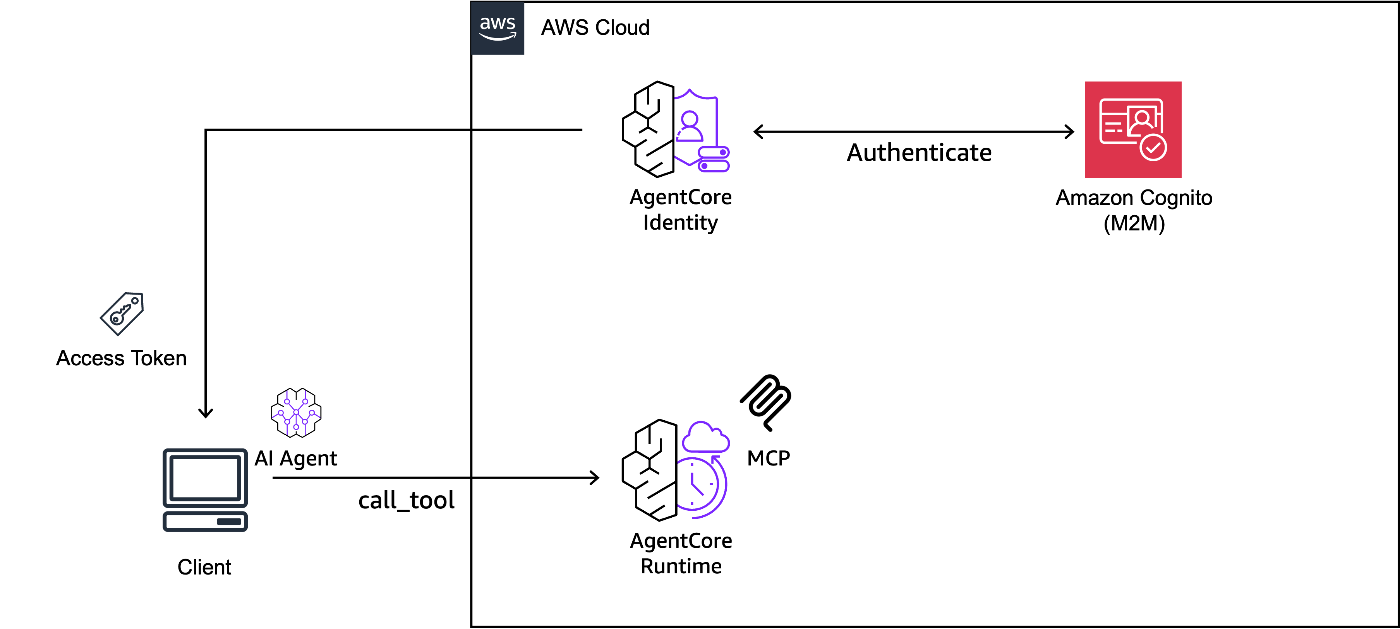
上記の構成は、AWS CDK と boto3 を利用して再現できるようにしております。CDK の実装は本リポジトリのディレクトリ cdk-runtime-mcp をご参照下さい。
本節では、AgentCore Runtime にデプロイする MCP サーバー自体の実装や、AgentCore Runtime を含む CDK の実装、Identity の作成コードを解説し、実際に Local 上の Agent から MCP サーバーを呼び出す方法を解説します。
MCP サーバーの実装
FastMCP を利用し、MCP サーバーを実装しました。内容としては、検証 1 と同様に、OpenAI の GPT-5 と Web search を利用し、ユーザーの質問に対して最新情報を調査・整理する機能を実装しております。
MCP サーバーの実装内容
from mcp.server.fastmcp import FastMCP
from openai import OpenAI
from pydantic import Field

INSTRUCTIONS = """
- You must answer the question using web_search tool.
- You must respond in japanese.
"""

mcp = FastMCP(name="openai-web-search-mcp-server", host="0.0.0.0", stateless_http=True)


@mcp.tool()
def openai_web_search(
    question: str = Field(
        description="""Question text to send to OpenAI o3. It supports natural language queries.
        Write in Japanese. Be direct and specific about your requirements.
        Avoid chain-of-thought instructions like "think step by step" as o3 handles reasoning internally."""
    ),
) -> str:
    """An AI agent with advanced web search capabilities. Useful for finding the latest information,
    troubleshooting errors, and discussing ideas or design challenges. Supports natural language queries.

    Args:
        question: The search question to perform.

    Returns:
        str: The search results with advanced reasoning and analysis.
    """
    try:
        client = OpenAI()
        response = client.responses.create(
            model="gpt-5",
            tools=[{"type": "web_search"}],
            instructions=INSTRUCTIONS,
            input=question,
        )
        return response.output_text
    except Exception as e:
        return f"Error occurred: {str(e)}"


if __name__ == "__main__":
    mcp.run(transport="streamable-http")
CDK で MCP サーバー (on AgentCore Runtime) をデプロイ
実装した CDK の Stack では、以下のリソースを定義しています。
- ECR
- Amazon Cognito
- AgentCore Runtime
CDK Stack の実装内容
import * as cdk from "aws-cdk-lib/core";
import { Construct } from "constructs";
import * as cognito from "aws-cdk-lib/aws-cognito";
import { Platform } from "aws-cdk-lib/aws-ecr-assets";
import { ContainerImageBuild } from "deploy-time-build";
import * as agentcore from "@aws-cdk/aws-bedrock-agentcore-alpha";
import * as path from "path";
import { ProtocolType } from "@aws-cdk/aws-bedrock-agentcore-alpha";

export interface AgentcoreRuntimeMcpStackProps extends cdk.StackProps {
  openaiApiKey: string;
}

export class AgentcoreRuntimeMcpStack extends cdk.Stack {
  constructor(
    scope: Construct,
    id: string,
    props: AgentcoreRuntimeMcpStackProps
  ) {
    super(scope, id, props);

    // Validate required configuration
    if (!props.openaiApiKey) {
      throw new Error(
        "openaiApiKey must be provided in stack props. Please set OPENAI_API_KEY in your .env file."
      );
    }

    // ========================================
    // Cognito User Pool
    // ========================================
    const userPool = new cognito.UserPool(this, "AgentCoreUserPool", {
      selfSignUpEnabled: false,
      signInAliases: {
        email: false,
        username: true,
      },
      removalPolicy: cdk.RemovalPolicy.DESTROY, // For dev/test environments
    });

    // Create User Pool Domain
    const userPoolDomain = userPool.addDomain("AgentCoreUserPoolDomain", {
      cognitoDomain: {
        domainPrefix: `agentcore-${id.toLowerCase()}`,
      },
    });

    // ========================================
    // Cognito Resource Server
    // ========================================
    const resourceServer = new cognito.UserPoolResourceServer(
      this,
      "AgentCoreResourceServer",
      {
        userPool: userPool,
        identifier: `agentcore-gateway-m2m-server`,
        scopes: [
          {
            scopeName: "gateway:read",
            scopeDescription: "Read access to the gateway",
          },
          {
            scopeName: "gateway:write",
            scopeDescription: "Write access to the gateway",
          },
        ],
      }
    );

    // ========================================
    // Cognito User Pool Client (M2M)
    // ========================================
    const userPoolClient = new cognito.UserPoolClient(
      this,
      "AgentCoreM2MClient",
      {
        userPool: userPool,
        userPoolClientName: "sample-agentcore-gateway-client",
        generateSecret: true,
        oAuth: {
          flows: {
            clientCredentials: true,
          },
          scopes: [
            cognito.OAuthScope.resourceServer(resourceServer, {
              scopeName: "gateway:read",
              scopeDescription: "Read access to the gateway",
            }),
            cognito.OAuthScope.resourceServer(resourceServer, {
              scopeName: "gateway:write",
              scopeDescription: "Write access to the gateway",
            }),
          ],
        },
        authFlows: {
          userPassword: false,
          userSrp: false,
          custom: false,
        },
        supportedIdentityProviders: [
          cognito.UserPoolClientIdentityProvider.COGNITO,
        ],
      }
    );

    // ========================================
    // ECR
    // ========================================
    // Build and publish Docker image to ECR
    const image = new ContainerImageBuild(this, "Image", {
      directory: path.join(__dirname, "../mcp_server"),
      platform: Platform.LINUX_ARM64,
    });

    // ========================================
    // AgentCore Runtime
    // ========================================
    const agentRuntimeArtifact =
      agentcore.AgentRuntimeArtifact.fromEcrRepository(
        image.repository,
        image.imageTag
      );

    // AgentCore Runtime (L2 Construct)
    const runtime = new agentcore.Runtime(this, "RuntimeMCP", {
      runtimeName: `runtimeMcp_${id.toLowerCase()}`,
      agentRuntimeArtifact: agentRuntimeArtifact,
      description: "MCP Server",
      environmentVariables: {
        OPENAI_API_KEY: props.openaiApiKey,
      },
      protocolConfiguration: ProtocolType.MCP,
      authorizerConfiguration:
        agentcore.RuntimeAuthorizerConfiguration.usingCognito(
          userPool.userPoolId,
          userPoolClient.userPoolClientId
        ),
    });

    // ========================================
    // CloudFormation Outputs
    // ========================================
    new cdk.CfnOutput(this, "UserPoolClientId", {
      value: userPoolClient.userPoolClientId,
      description: "Cognito User Pool Client ID",
    });

    // This secret should not be exposed in production environments
    new cdk.CfnOutput(this, "UserPoolClientSecret", {
      value: userPoolClient.userPoolClientSecret.unsafeUnwrap(),
    });

    // Custom Scopes Output
    new cdk.CfnOutput(this, "CustomScopeRead", {
      value: `${resourceServer.userPoolResourceServerId}/gateway:read`,
      description: "Custom scope for read access",
    });

    new cdk.CfnOutput(this, "CustomScopeWrite", {
      value: `${resourceServer.userPoolResourceServerId}/gateway:write`,
      description: "Custom scope for write access",
    });

    new cdk.CfnOutput(this, "CognitoDiscoveryUrl", {
      value: `https://cognito-idp.${this.region}.amazonaws.com/${userPool.userPoolId}/.well-known/openid-configuration`,
      description: "Cognito OpenID Discovery URL",
    });

    new cdk.CfnOutput(this, "RuntimeArn", {
      value: runtime.agentRuntimeArn,
      description: "ARN of the AgentCore Runtime",
    });
  }
}
以降、AgentCore Runtime に焦点を絞り解説します。
deploy-time-build の利用
AgentCore Runtime では、Docker コンテナをホストすることで、Agent や MCP をサーバーレスに利用することができます。Remote MCP サーバーの Docker コンテナをビルドし、ECR に Docker イメージを登録するために、deploy-time-build という L3 Construct を利用しました。
deploy-time-build を利用することで、cdk deploy 実行時に、CodeBuild 上で Docker Image をビルドすることが可能です。この際、CodeBuild で利用する CPU アーキテクチャ(x86 or arm) を指定できるので、cdk deploy を実行する環境に依存せず、ターゲット環境に合わせたイメージビルドが容易になります。
// Build and publish Docker image to ECR
const image = new ContainerImageBuild(this, "Image", {
  directory: path.join(__dirname, "../mcp_server"),
  platform: Platform.LINUX_ARM64,
});
deploy-time-build の詳細な使い方は、以下のブログが参考になります。
AgentCore Runtime の設定
Amazon Bedrock AgentCore の L2 Construct (alpha モジュール) を利用しています。L2 Construct を利用することで、Bedrock AgentCore Starter Toolkit と同様に Agent を容易にデプロイ・運用することが可能です。以下に各種設定の説明を示します。
- agentRuntimeArtifact: 利用する ECR の URI を記載 (deploy-time-build の結果をそのまま指定)
- agentRuntimeArtifact: 環境変数を指定 (OpenAI API Key を指定)
- protocolConfiguration: 利用するプロトコルを指定 (HTTP or MCP)
- agentRuntimeArtifact: Inbound 認証で利用する認証サービスを指定 (CDK で定義済みの Cognito を指定)
const agentRuntimeArtifact = agentcore.AgentRuntimeArtifact.fromEcrRepository(
  image.repository,
  image.imageTag
);

// AgentCore Runtime (L2 Construct)
const runtime = new agentcore.Runtime(this, "RuntimeMCP", {
  runtimeName: `runtimeMcp_${id.toLowerCase()}`,
  agentRuntimeArtifact: agentRuntimeArtifact,
  description: "MCP Server",
  environmentVariables: {
    OPENAI_API_KEY: props.openaiApiKey,
  },
  protocolConfiguration: ProtocolType.MCP,
  authorizerConfiguration:
    agentcore.RuntimeAuthorizerConfiguration.usingCognito(
      userPool.userPoolId,
      userPoolClient.userPoolClientId
    ),
});
AgentCore Identity の構築
執筆時点 (2025/11/18) では、AgentCore Identity は CDK を利用してデプロイできないため、boto3 経由でデプロイします。デプロイ手順、および利用するコードは、検証 1 - AgentCore Identity の構築 と同じです。
AgentCore Identity デプロイコード
import os

import boto3
from dotenv import load_dotenv


def create_oauth2_provider(
    name: str,
    client_id: str,
    client_secret: str,
    discovery_url: str,
    region: str = "us-east-1",
) -> None:
    identity_client = boto3.client("bedrock-agentcore-control", region_name=region)

    oauth2_config = {
        "customOauth2ProviderConfig": {
            "clientId": client_id,
            "clientSecret": client_secret,
            "oauthDiscovery": {"discoveryUrl": discovery_url},
        }
    }
    try:
        response = identity_client.create_oauth2_credential_provider(
            name=name,
            credentialProviderVendor="CustomOauth2",
            oauth2ProviderConfigInput=oauth2_config,
        )
        print(response)
    except Exception as e:
        print(f"Error creating OAuth2 provider: {e}")


def main():
    load_dotenv(override=True)
    create_oauth2_provider(
        name=os.getenv("OAUTH2_PROVIDER_NAME", ""),
        client_id=os.getenv("OAUTH2_CLIENT_ID", ""),
        client_secret=os.getenv("OAUTH2_CLIENT_SECRET", ""),
        discovery_url=os.getenv("OAUTH2_DISCOVERY_URL", ""),
    )


if __name__ == "__main__":
    main()
Local の Agent から MCP へアクセス
動作確認のため、Local 上で Remote MCP サーバーの Tool の一覧を取得し、Agent から MCP サーバーを利用します。
Tool の一覧を確認
Remote MCP サーバーの Tool の一覧取得のためのコードを実行し、AgentCore Runtime 上の MCP サーバーの Tool の情報を取得します。
この際、MCP サーバーのエンドポイントは以下の形式である必要があります。
https://bedrock-agentcore.<region>.amazonaws.com/runtimes/<encoded-agent-arn>/invocations?qualifier=DEFAULT
また、<encoded-agent-arn> の部分は,URL エンコードされた AgentCore Runtime の ARN である必要があります。具体的には、: を %3A に、/ を %2F に置換する必要があります。コードでは、以下の関数でエンコードしています。
def get_mcp_endpoint(runtime_arn: str, region: str = "us-east-1") -> str:
    encoded_arn = runtime_arn.replace(":", "%3A").replace("/", "%2F")
    return f"https://bedrock-agentcore.{region}.amazonaws.com/runtimes/{encoded_arn}/invocations?qualifier=DEFAULT"
Tool 一覧取得のコード
import asyncio
import os

from bedrock_agentcore.identity.auth import requires_access_token
from dotenv import load_dotenv
from mcp import ClientSession
from mcp.client.streamable_http import streamablehttp_client

load_dotenv(override=True, dotenv_path="../../agentcore-identity/.env")


@requires_access_token(
    provider_name=os.getenv("OAUTH2_PROVIDER_NAME"),
    scopes=[
        os.getenv("OAUTH2_SCOPE_READ"),
        os.getenv("OAUTH2_SCOPE_WRITE"),
    ],
    auth_flow="M2M",
)
async def get_access_token(*, access_token: str) -> str:
    return access_token


def validate_env_vars():
    required = ["RUNTIME_ARN", "OAUTH2_PROVIDER_NAME", "OAUTH2_SCOPE_READ", "OAUTH2_SCOPE_WRITE"]
    missing = [var for var in required if not os.getenv(var)]
    if missing:
        raise ValueError(f"Missing required environment variables: {', '.join(missing)}")


def get_mcp_endpoint(runtime_arn: str, region: str = "us-east-1") -> str:
    encoded_arn = runtime_arn.replace(":", "%3A").replace("/", "%2F")
    return f"https://bedrock-agentcore.{region}.amazonaws.com/runtimes/{encoded_arn}/invocations?qualifier=DEFAULT"


def print_tool_info(tool):
    print(f"🔧 {tool.name}")
    print(f"   Description: {tool.description}")
    if hasattr(tool, "inputSchema") and tool.inputSchema:
        properties = tool.inputSchema.get("properties", {})
        if properties:
            print(f"   Parameters: {list(properties.keys())}")
    print()


async def list_tools(endpoint: str, access_token: str):
    headers = {"Authorization": f"Bearer {access_token}"}

    async with streamablehttp_client(
        endpoint, headers, timeout=120, terminate_on_close=False
    ) as (read_stream, write_stream, _):
        async with ClientSession(read_stream, write_stream) as session:
            await session.initialize()
            tool_result = await session.list_tools()
            for tool in tool_result.tools:
                print_tool_info(tool)


async def main():
    validate_env_vars()

    access_token = await get_access_token(access_token="")
    runtime_arn = os.getenv("RUNTIME_ARN", "")
    mcp_endpoint = get_mcp_endpoint(runtime_arn)

    await list_tools(mcp_endpoint, access_token)


if __name__ == "__main__":
    asyncio.run(main())
実行結果
🔄 Listing available tools...
🔧 openai_web_search
   Description: An AI agent with advanced web search capabilities. Useful for finding the latest information,
    troubleshooting errors, and discussing ideas or design challenges. Supports natural language queries.

    Args:
        question: The search question to perform.

    Returns:
        str: The search results with advanced reasoning and analysis.

   Parameters: ['question']
Agent 経由で MCP サーバーを実行
Strands Agents から MCP サーバーを呼び出します。Strands Agents が提供するクラス MCPClient を利用することで,Agent 経由で簡単に MCP サーバーを利用することができます。結果として、先月公開された Claude Skills に関する情報を取得できています。
Agent の実装内容
import asyncio
import os
import sys

from bedrock_agentcore.identity.auth import requires_access_token
from dotenv import load_dotenv
from mcp.client.streamable_http import streamablehttp_client
from strands import Agent
from strands.tools.mcp import MCPClient

load_dotenv(override=True, dotenv_path="../../agentcore-identity/.env")


@requires_access_token(
    provider_name=os.getenv("OAUTH2_PROVIDER_NAME"),
    scopes=[
        os.getenv("OAUTH2_SCOPE_READ"),
        os.getenv("OAUTH2_SCOPE_WRITE"),
    ],
    auth_flow="M2M",
)
async def get_access_token(*, access_token: str) -> str:
    return access_token


def validate_env_vars():
    required = [
        "RUNTIME_ARN",
        "OAUTH2_PROVIDER_NAME",
        "OAUTH2_SCOPE_READ",
        "OAUTH2_SCOPE_WRITE",
    ]
    missing = [var for var in required if not os.getenv(var)]
    if missing:
        raise ValueError(
            f"Missing required environment variables: {', '.join(missing)}"
        )


def get_mcp_endpoint(runtime_arn: str, region: str = "us-east-1") -> str:
    encoded_arn = runtime_arn.replace(":", "%3A").replace("/", "%2F")
    return f"https://bedrock-agentcore.{region}.amazonaws.com/runtimes/{encoded_arn}/invocations?qualifier=DEFAULT"


def create_mcp_client(endpoint: str, access_token: str) -> MCPClient:
    headers = {"Authorization": f"Bearer {access_token}"}
    return MCPClient(
        lambda: streamablehttp_client(endpoint, headers=headers, timeout=300)
    )


def run_agent(mcp_client: MCPClient, prompt: str):
    with mcp_client:
        tools = mcp_client.list_tools_sync()
        for tool in tools:
            print(f"Loaded tool: {tool._agent_tool_name}")
        agent = Agent(tools=tools)
        agent(prompt)


async def main():
    validate_env_vars()
    prompt = sys.argv[1] if len(sys.argv) > 1 else "Claude Skillsについて調べて。"
    access_token = await get_access_token(access_token="")
    runtime_arn = os.getenv("RUNTIME_ARN", "")
    mcp_endpoint = get_mcp_endpoint(runtime_arn)

    mcp_client = create_mcp_client(mcp_endpoint, access_token)
    run_agent(mcp_client, prompt)


if __name__ == "__main__":
    asyncio.run(main())
実行結果
Loaded tool: openai_web_search
Claude Skillsについて調べてみますね。
Tool #1: openai_web_search
Claude Skillsについて詳しく調べました。以下が主要な情報です:

## Claude Skillsとは

Claude Skillsは、特定の業務や作業に特化した「スキルフォルダ」をClaudeが自動で選択・実行する仕組みです。2025年10月16日に「Agent Skills」として正式発表されました。

## 主な機能・特徴

### 1. **自動選択と合成**
- ユーザーの指示内容から関連するスキルを自動で判断
- 複数のスキルを組み合わせて使用可能
- 必要最小限の情報のみをロードして効率的に実行

### 2. **公式スキル**
Anthropicが提供する標準スキル:
- **Excel (xlsx)**: スプレッドシート作成・加工
- **Word (docx)**: 文書作成・編集
- **PowerPoint (pptx)**: プレゼンテーション作成
- **PDF**: PDF処理・生成

### 3. **カスタムスキル**
- 自社や個人用の手順書・基準をスキル化
- ブランドガイドライン、チェックリストなどを組み込み可能
- SKILL.mdファイルを含むフォルダ構成で作成

## 利用条件

- **対象プラン**: Pro/Max/Team/Enterprise
- **必要設定**: 「コード実行」と「ファイル作成」を有効化
- **組織プラン**: 管理者による有効化が必要

## 使い方

### Claudeアプリでの使用
1. 設定 > Capabilities で「Code execution」と「File creation」を有効化
2. Skillsセクションで必要なスキルをON
3. カスタムスキルがある場合は「Upload skill」でZIPファイルをアップロード
4. 通常通り指示すると、Claudeが適切なスキルを自動選択

### API使用
- containerパラメータでskill_id、type(anthropic/custom)、versionを指定
- Skills APIのベータヘッダーを付与して利用

## カスタムスキル作成

### 基本構成
- フォルダ直下に「SKILL.md」ファイルを配置
- YAMLフロントマターで名前と説明を記述
- 具体的な手順やガイドラインを記載

### 制約事項
- スキル名: 英小文字・数字・ハイフン、64文字以内
- 説明: 1024文字以内
- 用途を明確に記述することが重要

## 主なユースケース

- **ドキュメント作成**: 財務レポート、議事録、提案書の自動生成
- **業務標準化**: 品質チェックやブランド基準の統一
- **データ処理**: Excelでの計算やグラフ作成
- **プレゼン作成**: テンプレートを使った資料作成

ClaudeSession termination failed: 404
 Skillsは、繰り返し作業の自動化や品質の標準化に非常に有効な機能です。特定の業務でお困りのことがあれば、カスタムスキルの作成についてもサポートできます。
考察
本節では、これまでの検証結果を踏まえ、AgentCore Runtime および AgentCore Gateway + Lambda のどちらで MCP サーバーをホストすべきかという疑問について、以下の 4 つの観点で比較を行うことで、どのようなユースケースでどちらの手法が適しているかを考察します。なお、(2) と (3) の観点では、AgentCore Runtime と Lambda の実行環境・コストに焦点を当て比較を行っております。
- (1) MCP サーバーの開発・運用の容易性
- (2) MCP サーバーの実行環境の仕様
- (3) 運用コスト
- (4) レイテンシー
MCP サーバーの開発・運用の容易性の比較
AgentCore Runtime と AgentCore Gateway における、MCP サーバーの開発・運用の容易性を比較した結果を以下に示します。比較結果から、MCP サーバーを新規開発する場合や、開発段階で頻繁に試行錯誤して修正する場合、AgentCore Runtime の方が適していると考えられます。AgentCore Gateway + Lambda で MCP サーバーをホストする場合、Tool の実装と Tool の説明が Lambda と AgentCore Gateway Target に分離してしまうため、試行錯誤の度に 2 つのリソースをそれぞれ修正・管理していく必要があるためです。また、AgentCore Gateway + Lambda の構成では、ローカル上で MCP サーバーの動作確認をクイックに行うこともできません。
一方、既存で利用している Lambda 関数があり、Agent に Tool として流用させたい場合は AgentCore Gateway + Lambda が適していると考えられます。
| 項目 | AgentCore Runtime | AgentCore Gateway + Lambda |
|---|---|---|
| デプロイの容易さ | ○ AgentCore Runtime 単体で完結 | △ AgentCore Gateway に加え、別途 Lambda をデプロイする必要あり。 |
| 修正の容易さ | ○ MCP サーバーの実装のみ修正 | △ Lambda のコードと AgentCore Gateway Target の Inline Schema の修正・デプロイが必要 |
| テストの容易さ | ○ Local で簡単に動作確認可能 | △ Lambda のデプロイと AgentCore Gateway Target の Inline Schema の更新が都度必要 |
| 実装の容易さ | △ FastMCP サーバーの実装などの学習コストあり | ○ Lambda の実装と Inline Schema の実装が必要 (既存の Lambda があれば流用可能) |
MCP サーバーの実行環境の仕様比較
AgentCore Runtime と Lambda の仕様 (スペック) の比較結果を以下に示します。比較結果から、MCP サーバーを柔軟に設計したい場合、AgentCore Runtime の方が適している考えられます。例えば、画像分析タスクや画像生成タスクを MCP サーバーとして実行する場合、Lambda ではペイロードサイズが不足してしまう可能性があります。また、OpenAI の Deep Research のような、実行時間が長い調査タスクを MCP サーバーとして実行する場合、Lambda では 15 分の実行時間の制約で失敗してしまう可能性があります。
一方、より高い CPU スペックが求められる場合、AgentCore Gateway + Lambda の方が適していると考えられます。
| 項目 | AgentCore Runtime | Lambda |
|---|---|---|
| 入出力ペイロードサイズ | ○ 100MB | △ 6MB |
| CPU | △ 2 vCPU | ○ 最大 6 vCPU |
| メモリ | ○ 8GB | ○ 128 MB ~ 最大 10GB まで |
| コンテナサイズ | △ 最大 1 GB | ○ 最大 10 GB |
| 実行時間 | ○ 同期リクエストは最大 15 分 ストリーミングは最大 60 分 非同期ジョブは最大 8 時間 |
△ 最大 15 分 |
運用コスト比較
AgentCore Runtime および Lambda を合計 1 時間起動した場合におけるコストの比較結果を以下に示します。比較結果から、両者でほぼ大差ない結果であり、運用コスト削減の観点ではどちらの手法でも問題ないと考えられます。なお、執筆時点 (2025/11/18) の情報でコストを算出しております。また、簡単のため、AgentCore Gateway の API Invocations のコストは無視しており、コストの小数第四位以降は切り捨てています。その他、比較条件 (利用する Region や CPU, Memory サイズ) は以下に記載しております。
- Region: ap-northeast-1
- Architecture: x86
- Memory: 1.73 GB (Lambda では 1,769MB 割り当てると 1vCPU 利用できるため)
- CPU: 1 vCPU
| 項目 | AgentCore Runtime | Lambda |
|---|---|---|
| CPU | $0.0895 / hour (単価: $0.0895 / vCPU-hour) |
- |
| メモリ | $0.0163 / hour (単価: $0.00945 / GB-hour) |
$0.1038 / hour (単価: $0.000016667 / GB-second) |
| 合計 | $0.1058 / hour | $0.1038 / hour |
レイテンシー比較
AgentCore Runtime および AgentCore Gateway で Remote MCP サーバーを呼び出す際のレイテンシーを比較することを目的とし、比較実験を行いました。実験内容として、MCP クライアント - MCP サーバー間の処理 (initialize, list_tools, call_tools) のレイテンシーを計測しました。
実験設定として、以下のテスト用の MCP サーバーと Lambda, Inline Schema の実装を利用することで、AgentCore Runtime および AgentCore Gateway + Lambda 間での MCP サーバーの挙動が同一になるようにしています。なお、テスト用の MCP サーバーでは、ユーザーの名前を入力として、ユーザー名を含んだ挨拶文 Hello, ${name}! Nice to meet you. This is a test message. を返却するように実装しています。
AgentCore Runtime 用のテスト用の MCP サーバーの実装
from mcp.server.fastmcp import FastMCP
from pydantic import Field

mcp = FastMCP(name="test-greet-mcp-server", host="0.0.0.0", stateless_http=True)


@mcp.tool()
def greet_user(
    name: str = Field(description="The name of the person to greet"),
) -> str:
    """Greet a user by name
    Args:
        name: The name of the user.
    """
    return f"Hello, {name}! Nice to meet you. This is a test message."


if __name__ == "__main__":
    mcp.run(transport="streamable-http")
AgentCore Gateway 用のテスト用の Lambda 関数の実装
def greet_user(name: str) -> str:
    """Greet a user by name
    Args:
        name: The name of the user.
    """
    return f"Hello, {name}! Nice to meet you. This is a test message."


def lambda_handler(event, context):
    try:
        result = greet_user(event.get("name"))
        return {"statusCode": 200, "body": result}
    except Exception as e:
        return {"statusCode": 500, "body": f"Error occurred: {str(e)}"}
AgentCore Gateway 用の Inline Schema の実装
{
  "name": "greet_user",
  "description": "Greet a user by name",
  "inputSchema": {
    "type": "object",
    "properties": {
      "name": {
        "type": "string",
        "description": "The name of the user."
      }
    },
    "required": ["name"]
  }
}
性能評価指標としては、50 試行中における MCP クライアント - MCP サーバー間の以下の処理の平均実行時間 (ms) と標準偏差、全体の実行時間 (ms) としました。ここで、全体の実行時間とは、MCP クライアントが MCP サーバーへの接続を確立してから、initialize、list_tools、call_tools の一連の処理を同期的に実行し完了するまでの総経過時間です。計測に利用したコードを以下に示します。
AgentCore Runtime 実行時間計測用のコード
import asyncio
import os
import time
from statistics import mean, median, stdev

from bedrock_agentcore.identity.auth import requires_access_token
from dotenv import load_dotenv
from mcp import ClientSession
from mcp.client.streamable_http import streamablehttp_client

load_dotenv(override=True, dotenv_path="../../agentcore-identity/.env")


@requires_access_token(
    provider_name=os.getenv("OAUTH2_PROVIDER_NAME"),
    scopes=[
        os.getenv("OAUTH2_SCOPE_READ"),
        os.getenv("OAUTH2_SCOPE_WRITE"),
    ],
    auth_flow="M2M",
)
async def get_access_token(*, access_token: str) -> str:
    return access_token


def validate_env_vars():
    required = [
        "RUNTIME_ARN",
        "OAUTH2_PROVIDER_NAME",
        "OAUTH2_SCOPE_READ",
        "OAUTH2_SCOPE_WRITE",
    ]
    missing = [var for var in required if not os.getenv(var)]
    if missing:
        raise ValueError(
            f"Missing required environment variables: {', '.join(missing)}"
        )


def get_mcp_endpoint(runtime_arn: str, region: str = "us-east-1") -> str:
    encoded_arn = runtime_arn.replace(":", "%3A").replace("/", "%2F")
    return f"https://bedrock-agentcore.{region}.amazonaws.com/runtimes/{encoded_arn}/invocations?qualifier=DEFAULT"


def print_iteration_results(iteration: int, total: int, times: dict):
    print(f"\n📊 Iteration {iteration}/{total}")
    print(f"  Connection: {times['connection'] * 1000:.2f}ms")
    print(f"  Initialize: {times['initialize'] * 1000:.2f}ms")
    print(f"  List Tools: {times['list_tools'] * 1000:.2f}ms")
    if times.get("call_tool"):
        print(f"  Call Tool:  {times['call_tool'] * 1000:.2f}ms")
    print(f"  Total: {times['total'] * 1000:.2f}ms")


def print_statistics(latencies: dict):
    print("\n" + "=" * 50)
    print("📈 LATENCY STATISTICS (ms)")
    print("=" * 50)

    for operation, times in latencies.items():
        times_ms = [t * 1000 for t in times]
        print(f"\n{operation.upper()}:")
        print(f"  Mean:   {mean(times_ms):.2f}ms")
        print(f"  Median: {median(times_ms):.2f}ms")
        print(f"  Min:    {min(times_ms):.2f}ms")
        print(f"  Max:    {max(times_ms):.2f}ms")
        if len(times_ms) > 1:
            print(f"  StdDev: {stdev(times_ms):.2f}ms")


async def run_mcp_operations(session: ClientSession, test_args: dict):
    times = {}

    start = time.perf_counter()
    await session.initialize()
    times["initialize"] = time.perf_counter() - start

    start = time.perf_counter()
    tools = await session.list_tools()
    times["list_tools"] = time.perf_counter() - start

    if tools.tools:
        start = time.perf_counter()
        await session.call_tool(tools.tools[0].name, arguments=test_args)
        times["call_tool"] = time.perf_counter() - start

    return times


async def run_single_iteration(endpoint: str, access_token: str, test_args: dict):
    headers = {"Authorization": f"Bearer {access_token}"}

    start_total = time.perf_counter()

    async with streamablehttp_client(
        endpoint, headers, timeout=120, terminate_on_close=False
    ) as (read_stream, write_stream, _):
        conn_time = time.perf_counter() - start_total

        async with ClientSession(read_stream, write_stream) as session:
            operation_times = await run_mcp_operations(session, test_args)

    return {
        "connection": conn_time,
        "total": time.perf_counter() - start_total,
        **operation_times,
    }


async def measure_latency(
    endpoint: str, access_token: str, iterations: int, test_args: dict
):
    latencies = {
        "connection": [],
        "initialize": [],
        "list_tools": [],
        "call_tool": [],
        "total": [],
    }

    for i in range(iterations):
        times = await run_single_iteration(endpoint, access_token, test_args)

        latencies["connection"].append(times["connection"])
        latencies["initialize"].append(times["initialize"])
        latencies["list_tools"].append(times["list_tools"])
        latencies["total"].append(times["total"])
        if times.get("call_tool"):
            latencies["call_tool"].append(times["call_tool"])

        print_iteration_results(i + 1, iterations, times)
        time.sleep(2)

    print_statistics(latencies)


async def main():
    validate_env_vars()

    access_token = await get_access_token(access_token="")
    runtime_arn = os.getenv("RUNTIME_ARN", "")
    mcp_endpoint = get_mcp_endpoint(runtime_arn)
    test_args = {"name": "Jack"}

    await measure_latency(
        mcp_endpoint, access_token, iterations=50, test_args=test_args
    )


if __name__ == "__main__":
    asyncio.run(main())
AgentCore Gateway + Lambda 実行時間計測用のコード
import asyncio
import os
import time
from statistics import mean, median, stdev

from bedrock_agentcore.identity.auth import requires_access_token
from dotenv import load_dotenv
from mcp import ClientSession
from mcp.client.streamable_http import streamablehttp_client

load_dotenv(override=True, dotenv_path="../../agentcore-identity/.env")


@requires_access_token(
    provider_name=os.getenv("OAUTH2_PROVIDER_NAME"),
    scopes=[
        os.getenv("OAUTH2_SCOPE_READ"),
        os.getenv("OAUTH2_SCOPE_WRITE"),
    ],
    auth_flow="M2M",
)
async def get_access_token(*, access_token: str) -> str:
    return access_token


def validate_env_vars():
    required = [
        "GATEWAY_ENDPOINT_URL",
        "OAUTH2_PROVIDER_NAME",
        "OAUTH2_SCOPE_READ",
        "OAUTH2_SCOPE_WRITE",
    ]
    missing = [var for var in required if not os.getenv(var)]
    if missing:
        raise ValueError(
            f"Missing required environment variables: {', '.join(missing)}"
        )


def print_iteration_results(iteration: int, total: int, times: dict):
    print(f"\n📊 Iteration {iteration}/{total}")
    print(f"  Connection: {times['connection'] * 1000:.2f}ms")
    print(f"  Initialize: {times['initialize'] * 1000:.2f}ms")
    print(f"  List Tools: {times['list_tools'] * 1000:.2f}ms")
    if times.get("call_tool"):
        print(f"  Call Tool:  {times['call_tool'] * 1000:.2f}ms")
    print(f"  Total: {times['total'] * 1000:.2f}ms")


def print_statistics(latencies: dict):
    print("\n" + "=" * 50)
    print("📈 LATENCY STATISTICS (ms)")
    print("=" * 50)

    for operation, times in latencies.items():
        times_ms = [t * 1000 for t in times]
        print(f"\n{operation.upper()}:")
        print(f"  Mean:   {mean(times_ms):.2f}ms")
        print(f"  Median: {median(times_ms):.2f}ms")
        print(f"  Min:    {min(times_ms):.2f}ms")
        print(f"  Max:    {max(times_ms):.2f}ms")
        if len(times_ms) > 1:
            print(f"  StdDev: {stdev(times_ms):.2f}ms")


async def run_mcp_operations(
    session: ClientSession, test_args: dict, tool_index: int = 0
):
    times = {}

    start = time.perf_counter()
    await session.initialize()
    times["initialize"] = time.perf_counter() - start

    start = time.perf_counter()
    tools = await session.list_tools()
    times["list_tools"] = time.perf_counter() - start

    if tools.tools and len(tools.tools) > tool_index:
        start = time.perf_counter()
        await session.call_tool(tools.tools[tool_index].name, arguments=test_args)
        times["call_tool"] = time.perf_counter() - start

    return times


async def run_single_iteration(
    endpoint: str, access_token: str, test_args: dict, tool_index: int = 0
):
    headers = {"Authorization": f"Bearer {access_token}"}

    start_total = time.perf_counter()

    async with streamablehttp_client(
        endpoint, headers, timeout=120, terminate_on_close=False
    ) as (read_stream, write_stream, _):
        conn_time = time.perf_counter() - start_total

        async with ClientSession(read_stream, write_stream) as session:
            operation_times = await run_mcp_operations(session, test_args, tool_index)

    return {
        "connection": conn_time,
        "total": time.perf_counter() - start_total,
        **operation_times,
    }


async def measure_latency(
    endpoint: str,
    access_token: str,
    iterations: int,
    test_args: dict,
    tool_index: int = 0,
):
    latencies = {
        "connection": [],
        "initialize": [],
        "list_tools": [],
        "call_tool": [],
        "total": [],
    }

    for i in range(iterations):
        times = await run_single_iteration(
            endpoint, access_token, test_args, tool_index
        )

        latencies["connection"].append(times["connection"])
        latencies["initialize"].append(times["initialize"])
        latencies["list_tools"].append(times["list_tools"])
        latencies["total"].append(times["total"])
        if times.get("call_tool"):
            latencies["call_tool"].append(times["call_tool"])

        print_iteration_results(i + 1, iterations, times)
        time.sleep(2)

    print_statistics(latencies)


async def main():
    validate_env_vars()

    access_token = await get_access_token(access_token="")
    mcp_endpoint = os.getenv("GATEWAY_ENDPOINT_URL", "")
    test_args = {"name": "Jack"}

    await measure_latency(
        mcp_endpoint, access_token, iterations=50, test_args=test_args, tool_index=1
    )


if __name__ == "__main__":
    asyncio.run(main())
AgentCore Runtime および AgentCore Gateway + Lambda にて、50 試行 MCP クライアント - MCP サーバー間で initialize、list_tools、call_tools の実行を行った際の実行時間を以下に示します。実験結果から、AgentCore Gateway + Lambda の方が、AgentCore Runtime よりも約 2 倍ほどレイテンシーが低いことが確認できます。
| 項目 | AgentCore Runtime | AgentCore Gateway + Lambda |
|---|---|---|
| initialize | 1111.33 ± 87.22 (ms) | 568.73 ± 16.72 (ms) |
| list_tools | 1659.05 ± 79.43 (ms) | 804.42 ± 20.73 (ms) |
| call_tools | 824.00 ± 43.84 (ms) | 338.32 ± 14.08 (ms) |
| 全体の実行時間 | 3602.22 ± 124.86 (ms) | 1719.21 ± 30.33 (ms) |
AgentCore Runtime を利用した場合にレイテンシーが高い理由としては、AgentCore Runtime の仮想環境上での MCP サーバーの起動や処理性能がボトルネックになっている可能性が考えられます。経験的にも、ローカル上で MCP サーバーを起動すると、体感 1 秒ほど要してしまうことが多いです。
一方、AgentCore Gateway + Lambda の構成では、MCP サーバー自体の起動や初期化は不要であり、list_tools の動作としては、AgentCore Gateway Target に登録 (キャッシュ) された Tools の説明を取得するだけです。この点については、以下の AWS ブログの「MCP ターゲットの ListTools の動作」にも記載があります。
AgentCore Gateway の ListTools 操作は、MCP ターゲットから以前に同期されたツール定義へのアクセスを提供し、パフォーマンスと信頼性を優先するキャッシュファーストアプローチに従います。
クライアントが ListTools を呼び出すと、ゲートウェイは MCP サーバーへのリアルタイム呼び出しを行うのではなく、永続ストレージからツール定義を取得します。
また、AgentCore Gateway の call_tools の動作としても、今回の構成では Lambda を実行するだけなので、レイテンシーが低くなっている点が考えられます。仮に AgentCore Gateway Target に remote MCP サーバーを直接登録している場合、call_tools を実行すると remote MCP サーバーに対する initialize の処理が発生するので、逆に時間がかかってしまうことが予想されます。
以上の実験結果から、極限までレイテンシーを低くしたいケースでは、AgetnCore Gateway + Lambda の構成が適していると考えられます。
おわりに
本稿では、Amazon Bedrock AgentCore で Remote MCP サーバーをホストする際、 (1) AgentCore Runtime と (2) AgentCore Gateway + Lambda のどちらを利用すべきかという点について、CDK での実装例を提示しつつ、比較検証を行いました。検証では、OpenAI の GPT5 を利用した Web Search を行う Remote MCP サーバーを実装し、(1) と (2) の両手法の開発手順やデプロイ手順を確認しました。
考察として、(1) MCP サーバーの開発・運用の容易性、(2) 実行環境のスペック、(3) コスト、(4) レイテンシーの観点で比較しました。結論としては、MCP サーバーを新規開発する場合は AgentCore Runtime を利用すべきであると考えます。その理由としては、(1) MCP サーバーの Tool の実装と Tool の説明が Lambda と AgentCore Gateway Target に分離しており、開発効率が低い (2) 入力ペイロードサイズが小さい点や、実行可能時間の観点で柔軟性が低い (3) コスト的にも大差がないためです。加え、AgentCore Gateway + Lambda の構成では、ローカル上で MCP サーバーのテスト実行もすることができません。
一方、既存の Lambda を Agent のツールとして流用したい場合や低レイテンシーが求められる場合は、 AgentCore Gateway + Lambda を利用すべきであると考えます。AgentCore Gateway Target に Lambda を登録し、Tool Schema を設定するだけで、簡単に Lambda を Remote MCP サーバーとして流用できる点は、開発工数削減の観点では大きなメリットです。また、考察実験では、AgentCore Runtime よりも約 2 倍の低レイテンシーを実現できることを確認できました。
その他、AgentCore Gateway には、複数の MCP サーバーの集約や認証の一元化、組織間での Tool 群の共有、Semantic Search など、様々なメリットがあります。また、AgentCore Runtime でホストしている Remote MCP サーバーを AgentCore Gateway に統合することも可能です。両者のメリットを理解し、適宜使い分ける・併用することが重要です。
最後に、Remote MCP サーバーを AWS でホストする上で、本稿が技術選定の一助となれば幸いです。
参考

この Publication に投稿している記事は、アマゾン ウェブ サービス ジャパン合同会社または Amazon Web Services, Inc. 所属社員による個人の見解であり、所属する組織の公式見解ではありません。参加したい従業員の方は、Sugiyama Suguru までお知らせください。
Discussion