






この記事は2025 ZAICO アドベントカレンダーの15日目の記事です。
はじめに
これまで弊社iOS版zaicoアプリのリリース作業はiOS開発メンバーが手動で行っていました。
- 地味に手順が多くヒューマンエラーが起こりやすい
- 大幅ではないが作業時間を要する
- Hotfix対応時は作業自体の緊急性も高く精神的にもミスを誘発しやすい状態になる
といった理由から、自動化できる部分は可能な限り自動化することにしました。
この記事では、Slackのスラッシュコマンドを起点としてiOSアプリのビルド〜リリースまで完了する仕組みを構築した内容をまとめます。
構成
今回の自動化は以下のコンポーネントで構成しました。
- Slack
- Google Apps Script(GAS)
- Cloud Functions
- GitHub Actions
- Xcode Cloud
役割
Slack
- スラッシュコマンドを作成しSlack内の特定のチャンネル内で実行
- GASのプログラムを実行
スラッシュコマンドの作成
- Slack APIでアプリを作成
- Slash Commandsを有効化
- コマンドを作成:
- Command:
- 通常リリース用コマンド
/ios_releases - Hotfix用コマンド
/ios_hotfix
- 通常リリース用コマンド
- Request URL: GASのWebアプリURL
- Command:
- アプリをワークスペースにインストール
Google Apps Script(GAS)
- SlackからのPOSTを受け取り、一旦Slackに返信
- 3秒以内に応答しないとエラーとなるため
- 非同期でCloud Functionsを呼び出す
1. GASプロジェクトの作成
- Google Apps Scriptで新規プロジェクトを作成
- 以下スクリプトファイルを作成
※必要に応じてスクリプトプロパティの設定内でカスタムプロパティを定義してください
main.gs
ポイント
- Slackのスラッシュコマンドは3秒以内に応答する必要があるため、即座に応答を返す
- 実際の処理は非同期トリガーで実行するため、タイムアウトを回避
- パラメータをスクリプトプロパティに保存し、トリガー関数で取得
// iOSリリースのメイン処理
function doPost(e) {
  const body = e.parameter;
  const isHotfix = body.command === '/ios_hotfix';
  const responseUrl = body.response_url;
  const userId = body.user_id || '';

  // Slackへの即時応答処理
  const releaseType = isHotfix ? 'Hotfixリリース' : 'リリース';
  const ackResponse = ContentService.createTextOutput(
    JSON.stringify(setSlackResponse(`🚀 ${releaseType}準備を開始しました…`))
  ).setMimeType(ContentService.MimeType.JSON);

  // 非同期トリガーの作成
  ScriptApp.newTrigger('execCloudFunction')
    .timeBased()
    .after(1000)
    .create();

  // execCloudFunctionに渡すパラメータをプロパティに保存
  PropertiesService.getScriptProperties().setProperty(
    'CLOUD_FUNCTION_PARAMS',
    JSON.stringify({ responseUrl, isHotfix, userId })
  );

  return ackResponse;
}

// Slackへのレスポンスを設定
function setSlackResponse(message) {
  return {
    response_type: "in_channel",
    text: message
  };
}
exec_cloud_function.gs
ポイント
- サービスアカウントを使用してCloud Functionを認証付きで呼び出し
- IDトークンを取得する際は、IAM Credentials APIを使用
- トリガーは実行後に削除し、重複実行を防止
// Cloud Function実行処理
function execCloudFunction() {
  // 保存したパラメータを取得
  const params = JSON.parse(
    PropertiesService.getScriptProperties().getProperty('CLOUD_FUNCTION_PARAMS')
  );
  const response_url = params.responseUrl;
  const is_hotfix = params.isHotfix;
  const user_id = params.userId;
  const id_token = getServiceAccountIdToken();

  // Cloud Functionの呼び出し
  const scriptProperties = PropertiesService.getScriptProperties();
  const cloudFunctionUrl = scriptProperties.getProperty("CLOUD_FUNCTION_URL");

  UrlFetchApp.fetch(cloudFunctionUrl, {
    method: "post",
    headers: {
      "Authorization": "Bearer " + id_token,
      "Content-Type": "application/json"
    },
    payload: JSON.stringify({
      "response_url": response_url,
      "is_hotfix": is_hotfix,
      "user_id": user_id
    }),
    muteHttpExceptions: true
  });

  // トリガーの削除
  const triggers = ScriptApp.getProjectTriggers();
  for (const trigger of triggers) {
    if (trigger.getHandlerFunction() === 'execCloudFunction') {
      ScriptApp.deleteTrigger(trigger);
    }
  }
}

// ========================================
// 認証関連処理
// ========================================
// Cloud FunctionにアクセスするためのIDトークン取得処理
function getServiceAccountIdToken() {
  const scriptProperties = PropertiesService.getScriptProperties();
  const keyJson = scriptProperties.getProperty("SERVICE_ACCOUNT_KEY");
  const cloudFunctionUrl = scriptProperties.getProperty("CLOUD_FUNCTION_URL");

  if (!keyJson) throw new Error("Service account key not set");

  const key = JSON.parse(keyJson);

  // IAM Credentials APIを使用してIDトークンを取得
  const tokenResponse = UrlFetchApp.fetch(
    `https://iamcredentials.googleapis.com/v1/projects/-/serviceAccounts/${key.client_email}:generateIdToken`,
    {
      method: "POST",
      headers: {
        "Authorization": "Bearer " + getAccessToken(),
        "Content-Type": "application/json"
      },
      payload: JSON.stringify({
        "audience": cloudFunctionUrl,
        "includeEmail": true
      }),
      muteHttpExceptions: true
    }
  );

  const responseText = tokenResponse.getContentText();
  return JSON.parse(responseText).token;
}

// IAM Credentials APIを使用するためのアクセストークン取得処理
function getAccessToken() {
  const scriptProperties = PropertiesService.getScriptProperties();
  const keyJson = scriptProperties.getProperty("SERVICE_ACCOUNT_KEY");
  const key = JSON.parse(keyJson);
  const iat = Math.floor(Date.now() / 1000);
  const exp = iat + 3600;

  // JWTヘッダーとペイロードの作成
  const header = Utilities.base64EncodeWebSafe(
    JSON.stringify({ "alg": "RS256", "typ": "JWT" })
  );
  const payload = Utilities.base64EncodeWebSafe(
    JSON.stringify({
      "iss": key.client_email,
      "sub": key.client_email,
      "aud": "https://oauth2.googleapis.com/token",
      "iat": iat,
      "exp": exp,
      "scope": "https://www.googleapis.com/auth/iam"
    })
  );

  // JWT署名の作成
  const input = header + "." + payload;
  const signature = Utilities.computeRsaSha256Signature(input, key.private_key);
  const jwt = input + "." + Utilities.base64EncodeWebSafe(signature);

  // アクセストークンの取得
  const tokenResponse = UrlFetchApp.fetch(
    "https://oauth2.googleapis.com/token",
    {
      method: "POST",
      payload: {
        "grant_type": "urn:ietf:params:oauth:grant-type:jwt-bearer",
        "assertion": jwt
      }
    }
  );

  return JSON.parse(tokenResponse.getContentText()).access_token;
}
2. サービスアカウントの設定
- Google Cloud Consoleでサービスアカウントを作成
- 必要な権限を付与:
Cloud Functions 起動元Service Account Token Creator
- JSONキーをダウンロード
3. プロパティの設定
| プロパティ名 | 説明 |
|---|---|
CLOUD_FUNCTION_URL |
Cloud FunctionのエンドポイントURL |
SERVICE_ACCOUNT_KEY |
サービスアカウントのキー(JSON文字列) |
4. デプロイ
- GASエディタで「デプロイ」→「新しいデプロイ」
- 種類: Webアプリ
- 実行ユーザー: 自分
- アクセスできるユーザー: 全員
- デプロイしてURLを取得
Cloud Functions
- GitHub Actionsのworkflow_dispatch APIを実行
- ポーリング処理にてワークフローの実行状況を監視
- GitHub Actionsのワークフロー完了後にGAS経由でSlackへ通知
Cloud Functionsを準備
以下ファイルを作成し、デプロイしてください。
Cloud Functionを非公開にする場合、GASからのアクセスには認証が必要です。
サービスアカウントを作成し、Cloud Functions起動元の権限を付与してください。
また、Cloud Functionの設定内でConfig.phpで取得する環境変数の定義を行ってください。
GitHub Personal Access Tokenの作成
GitHub上で必要な権限を付与しトークンを作成してください。
ファイル構成
├── index.php              # エントリーポイント
├── Config.php             # 設定管理
├── RequestHandler.php     # リクエスト処理
├── GitHubClient.php       # GitHub API連携
├── SlackNotifier.php      # Slack通知
├── WorkflowMonitor.php    # ワークフロー監視
└── HttpClient.php         # HTTP通信
index.php
<?php
use Psr\Http\Message\ServerRequestInterface;
use Psr\Http\Message\ResponseInterface;
use App\RequestHandler;

require_once __DIR__ . '/vendor/autoload.php';

function triggerGitHubWorkflow(ServerRequestInterface $request): ResponseInterface {
    $handler = new RequestHandler();
    return $handler->handle($request);
}
Config.php
<?php
namespace App;

class Config
{
    public static function getGitHubToken(): string
    {
        return getenv('GITHUB_TOKEN') ?: '';
    }

    public static function getRepoOwner(): string
    {
        return getenv('GITHUB_REPO_OWNER') ?: 【リポジトリ管理ユーザー】;
    }

    public static function getRepoName(): string
    {
        return getenv('GITHUB_REPO_NAME') ?: 【リポジトリ名】;
    }

    public static function getWorkflowIdForRelease(): string
    {
        return getenv('GITHUB_WORKFLOW_ID_AUTO_RELEASE') ?: 'auto_release.yml';
    }

    public static function getWorkflowIdForHotfix(): string
    {
        return getenv('GITHUB_WORKFLOW_ID_AUTO_RELEASE_HOTFIX') ?: 'auto_release_hotfix.yml';
    }

    public static function getDefaultBranch(): string
    {
        return getenv('GITHUB_DEFAULT_BRANCH') ?: 'develop';
    }

    public static function getPollingMaxTries(): int
    {
        return (int)(getenv('POLLING_MAX_TRIES') ?: 30);
    }

    public static function getPollingDelaySeconds(): int
    {
        return (int)(getenv('POLLING_DELAY_SECONDS') ?: 5);
    }

    public static function getHttpTimeout(): int
    {
        return (int)(getenv('HTTP_TIMEOUT') ?: 30);
    }

    public static function getHttpConnectTimeout(): int
    {
        return (int)(getenv('HTTP_CONNECT_TIMEOUT') ?: 10);
    }
}
RequestHandler.php
<?php
namespace App;

use Psr\Http\Message\ServerRequestInterface;
use Psr\Http\Message\ResponseInterface;
use RingCentral\Psr7\Response;

class RequestHandler
{
    private GitHubClient $githubClient;
    private SlackNotifier $slackNotifier;
    private WorkflowMonitor $workflowMonitor;
    private string $workflowId;
    private string $ref;

    public function __construct()
    {
        // GitHub設定をConfigクラスから取得
        $githubToken = Config::getGitHubToken();
        $repoOwner = Config::getRepoOwner();
        $repoName = Config::getRepoName();
        $this->workflowId = Config::getWorkflowIdForRelease();
        $this->ref = Config::getDefaultBranch();

        // 依存関係の初期化
        $this->githubClient = new GitHubClient($githubToken, $repoOwner, $repoName);
        $this->slackNotifier = new SlackNotifier();
        $this->workflowMonitor = new WorkflowMonitor(
            $this->githubClient,
            Config::getPollingMaxTries(),
            Config::getPollingDelaySeconds()
        );
    }

    public function handle(ServerRequestInterface $request): ResponseInterface
    {
        // リクエストボディから必要な情報を取得
        $data = json_decode($request->getBody()->getContents(), true);
        $responseUrl = $data['response_url'] ?? null;
        $isHotfix = isset($data['is_hotfix']) ? (bool)$data['is_hotfix'] : false;
        $userId = $data['user_id'] ?? null;

        // ワークフローIDの決定(通常リリースかHotfixか)
        $workflowId = $isHotfix ? Config::getWorkflowIdForHotfix() : $this->workflowId;

        // GASへ即座にレスポンスを返却
        header('Content-Type: text/plain');
        http_response_code(200);
        echo 'Received';
        ob_flush();
        flush();

        // GitHub Actionsワークフローをトリガー
        $triggerResult = $this->githubClient->triggerWorkflow($workflowId, $this->ref);

        // トリガー失敗時の処理
        if ($triggerResult['httpCode'] !== 204) {
            if ($responseUrl) {
                $this->slackNotifier->notifyTriggerFailure(
                    $responseUrl,
                    $triggerResult['httpCode'],
                    $triggerResult['response'],
                    $triggerResult['errorMessage']
                );
            }
            return new Response(204);
        }

        // ワークフロー完了をポーリング
        $workflowResult = $this->workflowMonitor->waitForCompletion($this->ref);

        // Slack通知(成功・失敗)
        if ($responseUrl && $workflowResult !== null) {
            $runDetail = $this->githubClient->getWorkflowRunDetail($workflowResult['workflowRunId']);
            $htmlUrl = $runDetail['html_url'] ?? '(ログURL不明)';

            if ($workflowResult['conclusion'] === 'success') {
                $this->slackNotifier->notifySuccess($responseUrl, $htmlUrl, $userId);
            } else {
                $this->slackNotifier->notifyError($responseUrl, $htmlUrl, $userId);
            }
        }

        return new Response(204);
    }
}
GitHubClient.php
<?php
namespace App;

class GitHubClient
{
    private string $githubToken;
    private string $repoOwner;
    private string $repoName;
    private array $headers;
    private HttpClient $httpClient;

    public function __construct(string $githubToken, string $repoOwner, string $repoName)
    {
        $this->githubToken = $githubToken;
        $this->repoOwner = $repoOwner;
        $this->repoName = $repoName;
        $this->headers = [
            "Authorization: Bearer {$this->githubToken}",
            "Accept: application/vnd.github.v3+json",
            "User-Agent: Cloud-Function-Agent"
        ];
        $this->httpClient = new HttpClient();
    }

    /**
     * GitHub Actionsワークフローをトリガー
     */
    public function triggerWorkflow(string $workflowId, string $ref): array
    {
        $dispatchUrl = "https://api.github.com/repos/{$this->repoOwner}/{$this->repoName}/actions/workflows/{$workflowId}/dispatches";
        $payload = [
            'ref' => $ref
        ];

        return $this->httpClient->post($dispatchUrl, $this->headers, $payload);
    }

    /**
     * ワークフロー実行一覧を取得
     */
    public function getWorkflowRuns(): array
    {
        $runApiUrl = "https://api.github.com/repos/{$this->repoOwner}/{$this->repoName}/actions/runs";

        $result = $this->httpClient->get($runApiUrl, $this->headers);

        if ($result['httpCode'] === 200) {
            return json_decode($result['response'], true);
        }

        return [];
    }

    /**
     * ワークフロー実行の詳細を取得
     */
    public function getWorkflowRunDetail(int $workflowRunId): array
    {
        $runDetailUrl = "https://api.github.com/repos/{$this->repoOwner}/{$this->repoName}/actions/runs/{$workflowRunId}";

        $result = $this->httpClient->get($runDetailUrl, $this->headers);

        if ($result['httpCode'] === 200) {
            return json_decode($result['response'], true);
        }

        return [];
    }
}
WorkflowMonitor.php
ポイント
- ポーリング方式でワークフローの完了を監視
<?php
namespace App;

class WorkflowMonitor
{
    private GitHubClient $githubClient;
    private int $maxTries;
    private int $delaySeconds;

    public function __construct(GitHubClient $githubClient, int $maxTries = 30, int $delaySeconds = 5)
    {
        $this->githubClient = $githubClient;
        $this->maxTries = $maxTries;
        $this->delaySeconds = $delaySeconds;
    }

    /**
     * ワークフローの完了を待機
     *
     * @return array|null ['workflowRunId' => int, 'conclusion' => string] or null
     */
    public function waitForCompletion(string $ref): ?array
    {
        for ($i = 0; $i < $this->maxTries; $i++) {
            sleep($this->delaySeconds);

            $runs = $this->githubClient->getWorkflowRuns();

            foreach ($runs['workflow_runs'] as $run) {
                // 指定ブランチで完了したワークフローを探す
                if ($run['head_branch'] === $ref && $run['status'] === 'completed') {
                    return [
                        'workflowRunId' => $run['id'],
                        'conclusion' => $run['conclusion']
                    ];
                }
            }
        }

        // タイムアウト
        return null;
    }
}
SlackNotifier.php
ポイント
- Slackのresponse_urlを使用して通知
- ユーザーメンションに対応
- トリガー失敗、成功、エラー時の通知
<?php
namespace App;

class SlackNotifier
{
    private HttpClient $httpClient;

    public function __construct()
    {
        $this->httpClient = new HttpClient();
    }

    /**
     * Slackへメッセージを送信
     */
    public function notify(string $responseUrl, string $text): void
    {
        $payload = [
            'response_type' => "in_channel",
            'text' => $text
        ];

        $headers = ["Content-Type: application/json"];

        $this->httpClient->post($responseUrl, $headers, $payload);
    }

    /**
     * ワークフロートリガー失敗通知
     */
    public function notifyTriggerFailure(
        string $responseUrl,
        int $httpCode,
        string $response,
        string $errorMessage,
        ?string $userId = null
    ): void {
        $mention = $userId ? "<@{$userId}> " : "";

        $text = "{$mention}\n"
              . "❌ GitHub Actionsのトリガーに失敗しました ⚠️\n"
              . "HTTPステータス: {$httpCode}\n"
              . "レスポンス: `{$response}`\n"
              . "エラー: `{$errorMessage}`";

        $this->notify($responseUrl, $text);
    }

    /**
     * ワークフロー成功通知
     */
    public function notifySuccess(string $responseUrl, string $htmlUrl, ?string $userId = null): void
    {
        $mention = $userId ? "<@{$userId}> " : "";

        $text = "{$mention}\n"
              . "✅ リリース準備が完了しました 🎉\n"
              . "<{$htmlUrl}|ログを見る>";

        $this->notify($responseUrl, $text);
    }

    /**
     * ワークフローエラー通知
     */
    public function notifyError(string $responseUrl, string $htmlUrl, ?string $userId = null): void
    {
        $mention = $userId ? "<@{$userId}> " : "";

        $text = "{$mention}\n"
              . "❌ Auto Releaseワークフローでエラーが発生しました ⚠️\n"
              . "<{$htmlUrl}|GitHub Actions のログを確認してください>";

        $this->notify($responseUrl, $text);
    }
}
HttpClient.php
<?php
namespace App;

class HttpClient
{
    private int $timeout;
    private int $connectTimeout;

    public function __construct(?int $timeout = null, ?int $connectTimeout = null)
    {
        $this->timeout = $timeout ?? Config::getHttpTimeout();
        $this->connectTimeout = $connectTimeout ?? Config::getHttpConnectTimeout();
    }

    /**
     * POSTリクエストを送信
     */
    public function post(string $url, array $headers, $data): array
    {
        $ch = curl_init($url);

        $options = [
            CURLOPT_RETURNTRANSFER => true,
            CURLOPT_POST => true,
            CURLOPT_HTTPHEADER => $headers,
            CURLOPT_TIMEOUT => $this->timeout,
            CURLOPT_CONNECTTIMEOUT => $this->connectTimeout
        ];

        // データの形式に応じて適切に設定
        if (is_array($data) || is_object($data)) {
            $options[CURLOPT_POSTFIELDS] = json_encode($data);
        } else {
            $options[CURLOPT_POSTFIELDS] = $data;
        }

        curl_setopt_array($ch, $options);

        $response = curl_exec($ch);
        $httpCode = curl_getinfo($ch, CURLINFO_HTTP_CODE);
        $errorMessage = curl_error($ch);
        curl_close($ch);

        return [
            'httpCode' => $httpCode,
            'response' => $response,
            'errorMessage' => $errorMessage
        ];
    }

    /**
     * GETリクエストを送信
     */
    public function get(string $url, array $headers = []): array
    {
        $ch = curl_init($url);

        curl_setopt_array($ch, [
            CURLOPT_RETURNTRANSFER => true,
            CURLOPT_HTTPHEADER => $headers,
            CURLOPT_TIMEOUT => $this->timeout,
            CURLOPT_CONNECTTIMEOUT => $this->connectTimeout
        ]);

        $response = curl_exec($ch);
        $httpCode = curl_getinfo($ch, CURLINFO_HTTP_CODE);
        $errorMessage = curl_error($ch);
        curl_close($ch);

        return [
            'httpCode' => $httpCode,
            'response' => $response,
            'errorMessage' => $errorMessage
        ];
    }
}
GitHub Actions
- developブランチからreleases/【バージョン情報】ブランチを作成
- Hotfix時はmasterからreleases/hotfix/【バージョン情報】ブランチを作成
- Xcodeプロジェクトのバージョンを更新し、変更をコミット&プッシュ
- develop/masterへのマージプルリクを作成
- 前回のリリースノートからバージョンを取得しバージョニング
ワークフロー
通常リリース時のワークフローのみご紹介します
Auto Release
on:
  workflow_dispatch:

jobs:
  prepare-release:
    runs-on: macos-latest
    outputs:
      version: ${{ steps.milestone.outputs.version }}
    steps:
      - name: チェックアウト(developブランチ)
        uses: actions/checkout@v4
        with:
          ref: develop
          fetch-depth: 0

      - name: Get latest milestone
        id: milestone
        uses: actions/github-script@v7
        with:
          script: |
            const milestones = await github.rest.issues.listMilestones({
              owner: context.repo.owner,
              repo: context.repo.repo,
              state: 'open',
              sort: 'due_on',
              direction: 'asc'
            });

            if (milestones.data.length === 0) {
              core.setFailed('No open milestones found');
              return;
            }

            const latestMilestone = milestones.data[0];
            let version = latestMilestone.title;

            if (!version.match(/^(v)?\d+\.\d+\.\d+$/)) {
              core.setFailed(`Invalid milestone version format: ${version}`);
              return;
            }

            if (version.startsWith('v')) {
              version = version.substring(1);
            }

            console.log(`Latest milestone version: ${version}`);
            core.setOutput('version', version);

      - name: 環境変数の定義
        run: |
          echo "RELEASE_BRANCH=releases/v${{ steps.milestone.outputs.version }}" >> $GITHUB_ENV
          echo "VERSION=${{ steps.milestone.outputs.version }}" >> $GITHUB_ENV

      - name: リリースブランチ作成
        run: |
          git checkout -b $RELEASE_BRANCH

      - name: Xcodeプロジェクトのバージョンを更新
        run: |
          PLIST_FILE="【自身のプロジェクト名】.xcodeproj/project.pbxproj"
          sed -i '' "s/MARKETING_VERSION = [0-9.]*;/MARKETING_VERSION = ${VERSION};/" ${PLIST_FILE}

      - name: 修正ファイルの差分確認
        run: |
          git status
          git diff

      - name: コミット&プッシュ
        run: |
          git config --global user.name "github-actions"
          git config --global user.email "github-actions@github.com"
          git add "【自身のプロジェクト名】.xcodeproj/project.pbxproj"
          git commit -m "Update app version to v${VERSION}"
          git push origin $RELEASE_BRANCH

  create-pull-requests:
    needs: prepare-release
    runs-on: ubuntu-latest
    steps:
      - name: チェックアウト
        uses: actions/checkout@v4

      - name: GitHub CLIセットアップ
        run: |
          echo "${{ secrets.GITHUB_TOKEN }}" | gh auth login --with-token

      - name: develop向けPR作成
        run: |
          gh pr create \
            --base develop \
            --head releases/v${{ needs.prepare-release.outputs.version }} \
            --title "Merge releases/v${{ needs.prepare-release.outputs.version }} into develop" \
            --body "This PR merges releases/v${{ needs.prepare-release.outputs.version }} into develop." \
            --label "🚀 release"

      - name: master向けPR作成
        run: |
          gh pr create \
            --base master \
            --head releases/v${{ needs.prepare-release.outputs.version }} \
            --title "Merge releases/v${{ needs.prepare-release.outputs.version }} into master" \
            --body "This PR merges releases/v${{ needs.prepare-release.outputs.version }} into master." \
            --label "🚀 release"
Xcode Cloud
- UnitTest/UITestの実行
- TestFlightへのアップロード
- 配布用アプリのアップロード
ワークフローの設定
対象アプリでXcode Cloudをタップし新規のワークフローを作成します。
- プライマリリポジトリを対象のAppプロジェクトのリポジトリに設定

- 開始条件を
releases/で始まるブランチに設定- releases/にプッシュされるとCIが回る

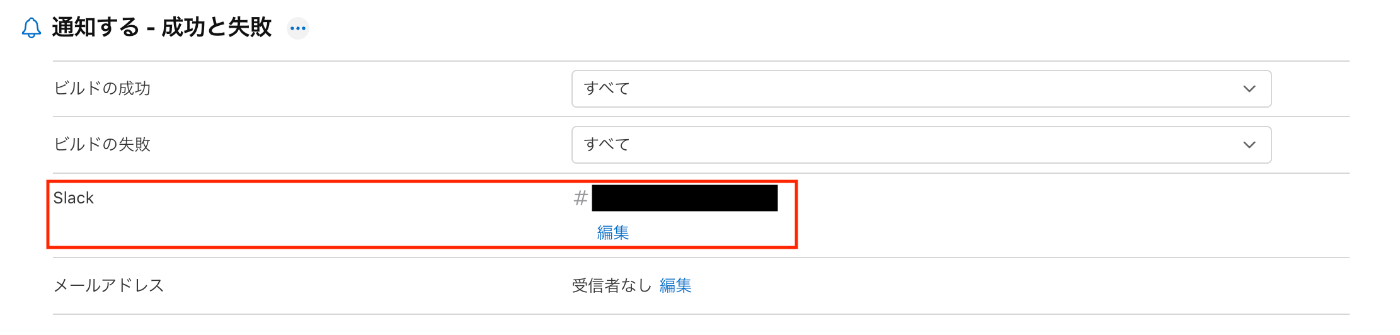
- 「通知アクション」でSlackのチャンネルを指定すると
- ビルドが完了すると通知が送信される
今後やりたいこと
今後自動化を進めたい部分は
- App Store Connect API を利用したApp Store バージョン作成の自動生成
- マイルストーンの自動作成
です。
上記のような細かい部分はまだ自動化できていないので今後進めていければと思っています。
おわりに
Slackを起点にした一連のリリース自動化により、通常リリース/Hotfix対応時の処理が劇的に楽になりました。
手動で行っていた頃はHotfix対応時に間違えてdevelopから修正ブランチを作成してしまった事で問題が発生した事もあったのですが、自動化した事で
- ヒューマンエラーの削減
- 作業時間の短縮
- 緊急対応(Hotfix)時の体力的・精神的な負担軽減
の心配がなくなり、余分な工数の削減と精神的なゆとりを確保する事ができたのではないかと思います。
同じように「リリース作業を自動化したい」と思っている方の参考になれば嬉しいです!
次回の担当はnobu09さんです!お楽しみに!

累計導入企業数18万社超の在庫管理システム「zaico」の運営・在庫管理を自動化するIoT重量計「ZAICON」の開発などを行う株式会社ZAICOのエンジニア・デザイナー・PdM・稀に代表など皆でわいわいと発信していきます。※ 各記事は筆者個人の見解であり、弊社の公式な意見を代表するものではありません
Discussion