Azure Boards + Daprでつくるサポートチケット管理と通知基盤




1. はじめに:Azure Boardsを「問い合わせ窓口」にしてしまう話
「サポートのチケットはAツール、開発のIssueはBツール」
…という構成、正直つらくないですか?
この記事では、 Azure Boards をサポート窓口のチケット管理に振り切って 使うパターンを紹介します。
ただの「ボード運用」ではなく、以下のような技術的なポイントにフォーカスします。
- Azure Boardsの カスタムプロセス で「Support Ticket」ワークアイテムを設計する
- そのワークアイテムに、 好きな属性を生やしてプロセスとして運用 する
- Azure DevOpsの Service Hooks → Azure Service Bus → Dapr on Container Apps でリアルタイム連携
- Azure Boardsのクエリを WIQL(作業項目クエリ言語) として呼び出し、Dapr Cronで定期レポート通知
「とりあえずBoardsでタスク管理」はすでにやっている方向けに、
“Azure DevOpsのプロセス&拡張ポイントをちゃんと使い倒す” という観点で書いていきます。
本記事の Azure Bicep や C#で実装したソースコードは、GitHub に登録しています。
2. Azure Boardsのプロセス設計とカスタムワークアイテム
2.1. なぜプロセスをいじるところから始めるのか
Azure Boardsは、プロジェクトごとに「プロセス」が紐づいています。
Scrum / Agile / Basic などおなじみのやつですね。
サポートチケット管理をきちんと設計するなら、ここをいじらない手はありません。
-
既存のTaskやBugに無理やりフィールドを足していくと、
後から「普通の開発タスク」と「サポートチケット」がごちゃ混ぜになります -
一方で、サポート専用のワークアイテムタイプを作ってしまえば 、
- 必要なフィールドだけに絞れる
- 状態(State)もサポートフロー専用にできる
- 後から分析しやすい(問い合わせ種別・顧客別集計など)
なのでまずは、
「Basic プロセスを継承したサポート専用カスタムプロセスを1つ作る」
というところからスタートします。
2.2. カスタムプロセスの作り方と権限
プロセスの編集は、プロジェクト管理者ではなく「プロセス管理者」ロール が必要です。
Azure DevOps だとだいたいこのあたりの権限が絡みます
- Project Collection Administrators
- もしくは、Organization Settings > Process でプロセスの管理を任されているロール
実務では、
- 「Azure Boards布教係」な人が1人プロセス管理者になっておく
- 各プロジェクトはその人の用意したカスタムプロセスを使う
という形にしておくと、プロジェクトごとにバラバラなプロセス地獄 を避けられます。
作業手順のイメージはこんな感じです
- Organization settings → Boards > Process
-
Basicを選択して「継承(Create inherited process)」を実行 - 名前を
Support Processなどにして作成 - サポート用のプロジェクトでは、このプロセスを使って新規 Project を作る

2.3 Support Ticket ワークアイテムを定義する
次に、このカスタムプロセスの中に 「Support Ticket」ワークアイテムタイプを追加します。

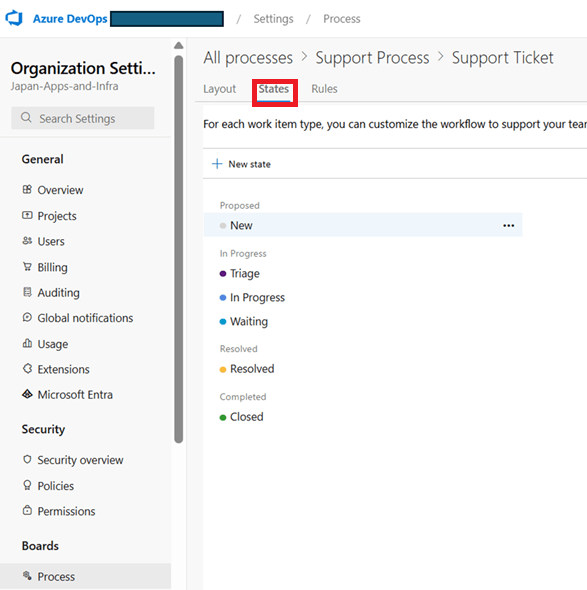
状態(State)の例
サポートフローっぽい状態を素直に並べるとこんな感じです。
- New
- Triage
- In Progress
- Waiting
- Resolved
- Closed
開発タスクと違って、
- Triage(一次切り分け中)
- Waiting(お客さんからの返事待ち)
があるのがポイントです。
この辺りは、実際のサポート運用に合わせて名前を変えても問題ありません。
自由に定義できる属性(フィールド)たち
Azure Boardsの良いところは、 フィールドを割と好き勝手に増やせる ところです。
今回のようなサポートチケットなら、例えばこんなフィールドを持たせます
-
CustomerName(顧客名) -
TenantId(Entra Tenant ID) SubscriptionId-
SupportCategory(料金 / 技術 / 契約 / その他 …) -
Severity(Critical / High / Normal / Low) -
DueDate(SLAを意識した期限) -
MsSupportTicketId(必要に応じてMSサポート連携用)
これらは カスタムフィールドとして追加 し、ワークアイテムのレイアウト上では
- 左段:タイトル・状態・担当者・Severity・DueDate
- 中段:顧客情報(CustomerName / TenantId / SubscriptionId)
- 右段:問い合わせ内容、対応履歴、MsSupportTicketId
のように、**「サポート担当が1画面で必要な情報にアクセスできる」**構成にしておきます。

3. リアルタイム通知を「ちゃんと作る」構成
3.1. なぜ標準のTeams/Slack連携では足りないのか
Azure DevOpsには、Teams/Slack向けの公式アプリがあります。
ただ、実際に使ってみるとこんなことを思いがちです
- 表示内容がだいたい固定で、通知のフォーマットを細かくいじれない
- ほしいフィールド(テナントIDやSeverityなど)を抜き出して並べたいのにできない
- 将来的にTeamsからのアクション(ボタンで状態変更など)を入れたくても拡張しづらい
「どうせやるなら通知もちゃんと設計したいよね」ということで、今回は
Service Hooks → Azure Service Bus → Dapr on Container Apps → Logic Apps → Teams/Slack
という少し本格的な構成にしています。
3.2. 全体アーキテクチャの流れ
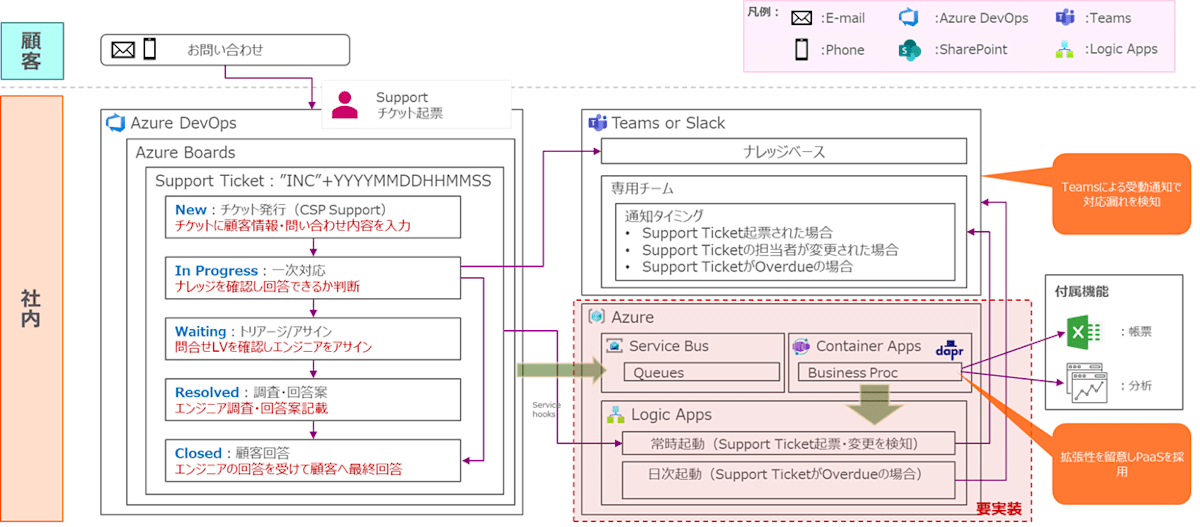
文章で書くとこんな感じです
- Azure BoardsでSupport Ticketが作成/更新される
- Azure DevOpsの Service Hooks がイベントをキャッチ
- Service Hooksが、Azure Service Bus のキュー/トピックにメッセージを投げる
- Azure Container Apps 上のアプリ(Dapr Service Busコンポーネントを使用)がメッセージを受信
- アプリがメッセージ内容から Adaptive Card JSON を生成
- 生成したカードを Logic Apps にHTTPで渡す
- Logic AppsがTeamsやSlackへ投稿
(Graph APIを直接叩いても良いが、Entra IDの権限制約により今回はLogic Appsを採用)
Teams/Slackへの「何を・どう見せるか」は、Container Apps内のプログラムが全部コントロール します。
ここが標準連携との一番大きな違いです。
3.3. Azure DevOps Service Hooks の設定ポイント
Service Hooks側は、以下のようなイベントをトリガーにします
- Work item created
- Work item updated
(特に、State・Assigned To・Severity・DueDate の変更を中心に)

Service Hooksの送信先としては、
今回は直接Teamsではなく Service Busのキュー を選びます。
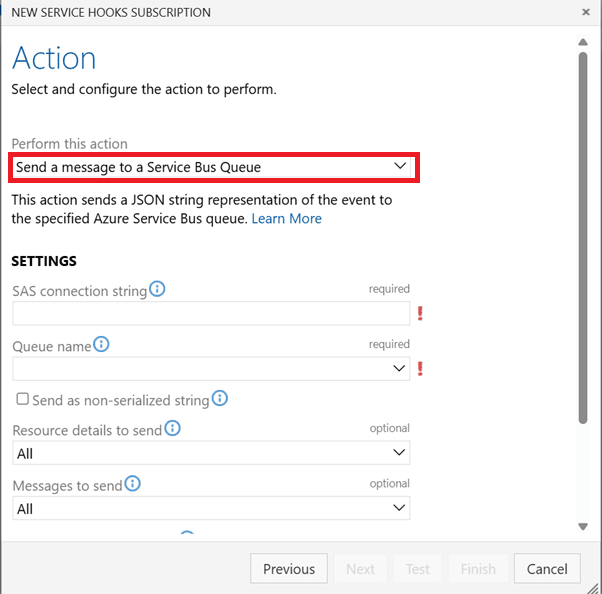
- キュー名例:
support-ticket-events - ペイロードには、「ワークアイテムID」「イベント種別」「フィールドの差分」などが含まれる
あくまでここでは 「イベントを投げるだけ」 に徹して、
中身の整形は後段のアプリに任せます。
3.4. Container Apps + Dapr でメッセージを受信・整形
Azure Container Apps に、Dapr有効なアプリを1つデプロイします。
このアプリが、「Service Busイベント→Adaptive Card JSON」 の変換担当です。
ざっくり書くと、やっていることはこんな感じです
- DaprのService Busコンポーネントを使って、
support-ticket-eventsを購読 - 受け取ったJSONから
workItemIdを取り出す - Azure DevOps REST API を叩いて、必要なフィールド(Severity, CustomerName, DueDateなど)を取得
- フィールドをもとに、Adaptive Card JSONを組み立てる
- Logic AppsのHTTPエンドポイントにPOSTする
Adaptive Cardの中身は完全にプログラムで生成するので、
- 日本語/英語混在
- 担当者へのメンション
- 状態によって色を変える
- TeamsとSlackで別フォーマット
など、かなり自由度高く作り込めます。
Controllers\AzDoStreamController.cs
using CspFoundation.Commons;
using CspFoundation.Models;
using CspFoundation.Services;
using Microsoft.AspNetCore.Mvc;
using Microsoft.Extensions.Options;
using Newtonsoft.Json;
using System.Text;

namespace CspFoundation.Api.Controllers
{
    [ApiController]
    [Route("azdo-stream")]
    public sealed class AzDoStreamController : ControllerBase
    {
        private readonly ILogger<AzDoStreamController> Logger;
        private readonly AppSettingsModel AppSettings;
        private readonly SecretSettingsModel SecretSettings;
        private readonly IMainService MainService;

        public AzDoStreamController(
            ILogger<AzDoStreamController> logger,
            IOptions<AppSettingsModel> optionsSettingsAccessor,
            IOptions<SecretSettingsModel> optionsKeyVaultAccessor,
            IMainService mainService)
        {
            this.Logger = logger;
            this.AppSettings = optionsSettingsAccessor.Value;
            this.SecretSettings = optionsKeyVaultAccessor.Value;
            this.MainService = mainService;
        }

        [HttpPost]
        public async Task<IActionResult> PostAsync()
        {
            using var reader = new StreamReader(Request.Body, Encoding.UTF8);
            var raw = await reader.ReadToEndAsync();

            this.Logger.LogInformation("Method:{Method};Message:-;Status:Start;", MethodHelper.GetCurrentMethod());
            var returnModel = new ReturnModel();
            try
            {
                await this.MainService.ExecuteAsync(raw);
            }
            catch (Exception ex)
            {
                returnModel.IsSucceed = false;
                returnModel.Exception = ex.ToString();
                this.Logger.LogError($"Method:{MethodHelper.GetCurrentMethod()};Message:{ex.ToString()};Status:Error;");
            }
            this.Logger.LogInformation("Method:{Method};Message:-;Status:End;", MethodHelper.GetCurrentMethod());

            return new ContentResult
            {
                Content = JsonConvert.SerializeObject(returnModel, Formatting.None),
                ContentType = "application/json; charset=utf-8",
                //StatusCode = 200
            };
        }

    }
}
Services\MainService.cs
using CspFoundation.Commons;
using Dapr.Client;
using HtmlAgilityPack;
using Microsoft.Extensions.Options;
using Microsoft.TeamFoundation.WorkItemTracking.WebApi.Models;
using Microsoft.VisualStudio.Services.WebApi;
using Newtonsoft.Json.Linq;
using System.Net;
using System.Text.RegularExpressions;

namespace CspFoundation.Services
{
    #region IMainService
    public interface IMainService
    {
        Task ExecuteAsync(string? receiveData);
        Task ExecuteOnCronAsync();
    }
    #endregion

    #region MainService
    public class MainService : IMainService
    {
        #region Variable・Const
        private readonly DaprClient DaprClient;
        private readonly ILogger<MainService> Logger;
        private readonly IStorageProvider StorageProvider;
        private readonly AppSettingsModel AppSettings;
        private readonly SecretSettingsModel SecretSettings;
        private readonly IWebhookClient WebhookClient;
        private readonly IAzureDevOpsClient AzureDevOpsClient;
        private readonly IWebHostEnvironment Env;
        #endregion

        #region Constructor
        public MainService(
            DaprClient daprClient,
            ILogger<MainService> logger,
            IStorageProvider storageProvider,
            IOptions<AppSettingsModel> appSettings,
            IOptions<SecretSettingsModel> secretSettings,
            IWebhookClient webhookClient,
            IAzureDevOpsClient azureDevOpsClient,
            IWebHostEnvironment env)
        {
            this.Logger = logger;
            this.AppSettings = appSettings.Value;
            this.SecretSettings = secretSettings.Value;
            this.DaprClient = daprClient;
            this.StorageProvider = storageProvider;
            this.WebhookClient = webhookClient;
            this.AzureDevOpsClient = azureDevOpsClient;
            this.Env = env;
        }
        #endregion

        #region Method
        #region ExecuteAsync
        public async Task ExecuteAsync(string? receiveData)
        {
            this.Logger.LogInformation("Method:{Method};Status:Start;", MethodHelper.GetCurrentMethod());

            var jsonText = ExtractJsonObject(receiveData);
            if (jsonText is null)
            {
                this.Logger.LogWarning("Invalid JSON structure.");
                return;
            }

            var src = JObject.Parse(jsonText);
            var eventType = src["eventType"]?.ToString();

            string? cardJson;
            switch (eventType)
            {
                case "workitem.created":
                    cardJson = CreateWorkitemCreatedCard(src);
                    break;
                case "workitem.updated":
                    cardJson = TryCreateWorkitemUpdatedCard(src);
                    break;
                case "workitem.deleted":
                    cardJson = null;
                    break;
                case "workitem.restored":
                    cardJson = null;
                    break;
                default:
                    cardJson = null;
                    break;
            }

            if (string.IsNullOrEmpty(cardJson))
            {
                this.Logger.LogInformation("No card generated for eventType={EventType}", eventType);
                return;
            }

            await this.WebhookClient.SendAsync(
                new Uri(this.SecretSettings.LogicAppsEndPointUrl), cardJson);

            this.Logger.LogInformation("Method:{Method};Status:End;", MethodHelper.GetCurrentMethod());

        }

        #region Card Generators
        private string CreateWorkitemCreatedCard(JObject src)
        {
            var (display, email) = ParseUser(
                src["resource"]?["fields"]?["System.AssignedTo"]?.ToString());

            var payload = new
            {
                id = src["resource"]?["id"]?.ToString(),
                assignedToDisplay = display,
                assignedToEmail = email,
                inquiryTopic = src["resource"]?["fields"]?["Custom.InquiryTopic"]?.ToString() ?? "(no topic)",
                companyName = src["resource"]?["fields"]?["Custom.CompanyName"]?.ToString() ?? "(no company)",
                organizationName = src["resource"]?["fields"]?["Custom.OrganizationName"]?.ToString() ?? "(no org)",
                contactName = src["resource"]?["fields"]?["Custom.ContactName"]?.ToString() ?? "(no contact)",
                description = HtmlToPlain(
                                       src["resource"]?["fields"]?["System.Description"]?.ToString() ?? string.Empty)
            };

            var templateJson = LoadTemplate("workitem-created-card.json");
            var template = new AdaptiveCards.Templating.AdaptiveCardTemplate(templateJson);
            return template.Expand(payload);
        }

        private string? TryCreateWorkitemUpdatedCard(JObject src)
        {
            var assignedToken = src["resource"]?["fields"]?["System.AssignedTo"];
            if (assignedToken is null) return null;

            var oldRaw = assignedToken["oldValue"]?.ToString();
            var newRaw = assignedToken["newValue"]?.ToString();
            if (string.Equals(oldRaw, newRaw, StringComparison.OrdinalIgnoreCase))
                return null; // 担当者変更なし

            var (oldDisplay, _) = ParseUser(oldRaw);
            var (newDisplay, newEmail) = ParseUser(newRaw);

            var payload = new
            {
                AzdoBaseUrl = this.SecretSettings.AzdoBaseUrl,
                AzdoOrganizationName = this.SecretSettings.OrganizatonName,
                AzdoProjectName = this.SecretSettings.ProjectName,
                id = src["resource"]?["workItemId"]?.ToString()
                                   ?? src["resource"]?["id"]?.ToString(),
                oldDisplay,
                newDisplay,
                newEmail,
                companyName = src["resource"]?["revision"]?["fields"]?["Custom.CompanyName"]?.ToString()
                                   ?? "(no company)",
                organizationName = src["resource"]?["revision"]?["fields"]?["Custom.OrganizationName"]?.ToString()
                                   ?? "(no org)",
                contactName = src["resource"]?["revision"]?["fields"]?["Custom.ContactName"]?.ToString()
                                   ?? "(no contact)",
                changedBy = src["resource"]?["revisedBy"]?["displayName"]?.ToString()
                                   ?? "(unknown)",
                description = HtmlToPlain(
                                       src["resource"]?["revision"]?["fields"]?["System.Description"]?.ToString() ?? string.Empty)

            };

            var templateJson = LoadTemplate("workitem-updated-card.json");
            var template = new AdaptiveCards.Templating.AdaptiveCardTemplate(templateJson);
            return template.Expand(payload);
        }
        #endregion

        private (string display, string email) ParseUser(string? raw)
        {
            if (string.IsNullOrWhiteSpace(raw))
                return ("(unassigned)", "(unassigned)");

            var m = Regex.Match(raw, @"^(.*?)\s*<([^>]+)>$");
            return m.Success
                ? (m.Groups[1].Value, m.Groups[2].Value)
                : (raw, raw);
        }

        private string HtmlToPlain(string html)
        {
            if (string.IsNullOrEmpty(html)) return string.Empty;

            // <br> → \n
            string tmp = Regex.Replace(html, @"<br\s*/?>", "\n",
                                       RegexOptions.IgnoreCase);
            var doc = new HtmlDocument();
            doc.LoadHtml(tmp);
            return WebUtility.HtmlDecode(doc.DocumentNode.InnerText).Trim();
        }

        /// 受信ボディから最初の JSON オブジェクト部分だけ抜き出す
        private string? ExtractJsonObject(string? input)
        {
            if (string.IsNullOrEmpty(input)) return null;
            int s = input.IndexOf('{'); if (s == -1) return null;
            int depth = 0;
            for (int i = s; i < input.Length; i++)
            {
                if (input[i] == '{') depth++;
                else if (input[i] == '}') depth--;
                if (depth == 0) return input.Substring(s, i - s + 1);
            }
            return null;
        }
        #endregion

        #region ExecuteOnCronAsync
        public async Task ExecuteOnCronAsync()
        {
            this.Logger.LogInformation("Method:{Method};Message:-;Status:Start;", MethodHelper.GetCurrentMethod());

            var queryResult = await this.AzureDevOpsClient.ExecuteSavedQueryAsync(new Guid(this.SecretSettings.WiqlId));
            var idList = queryResult.Select(x => x.Id).Where(id => id.HasValue).Select(id => id.Value).ToArray();

            var workItems = await this.AzureDevOpsClient.GetWorkItemsDetailsAsync(idList);
            var payload = CreateStaleItemsCard(workItems);

            await this.WebhookClient.SendAsync(new Uri(this.SecretSettings.LogicAppsEndPointUrl), payload);

            this.Logger.LogInformation("Method:{Method};Message:-;Status:End;", MethodHelper.GetCurrentMethod());
        }

        private string CreateStaleItemsCard(IReadOnlyList<WorkItem> items)
        {
            //var templateJson = System.IO.File.ReadAllText("Templates/stale-items-card.json");
            var templateJson = LoadTemplate("stale-items-card.json");

            var template = new AdaptiveCards.Templating.AdaptiveCardTemplate(templateJson);

            var payload = new
            {
                AzdoBaseUrl = this.SecretSettings.AzdoBaseUrl,
                AzdoOrganizationName = this.SecretSettings.OrganizatonName,
                AzdoProjectName = this.SecretSettings.ProjectName,
                itemCount = items.Count,
                items = items.Select(i =>
                {
                    i.Fields.TryGetValue("System.Id", out var idObj);
                    var id = idObj ?? "(no id)";

                    i.Fields.TryGetValue("System.Title", out var titleObj);
                    var title = titleObj ?? "(no title)";

                    // ------- AssignedTo (IdentityRef) -------
                    string assignedTo = "(unassigned)";
                    if (i.Fields.TryGetValue("System.AssignedTo", out var assigneeObj) &&
                        assigneeObj is IdentityRef identity)
                    {
                        // DisplayName が無ければ UniqueName を fallback
                        assignedTo = identity.DisplayName ?? identity.UniqueName ?? assignedTo;
                    }

                    i.Fields.TryGetValue("System.State", out var stateObj);
                    var state = stateObj ?? "(no state)";

                    string dueDate = "(no due date)";
                    if (i.Fields.TryGetValue("Microsoft.VSTS.Scheduling.DueDate", out var dueObj))
                    {
                        switch (dueObj)
                        {
                            case DateTime dt:
                                dueDate = dt.ToString("yyyy-MM-dd");
                                break;
                            case DateTimeOffset dto:
                                dueDate = dto.ToString("yyyy-MM-dd");
                                break;
                            case string s when DateTime.TryParse(s, out var parsed):
                                dueDate = parsed.ToString("yyyy-MM-dd");
                                break;
                        }
                    }

                    return new
                    {
                        id,
                        title,
                        assignedTo,
                        state,
                        dueDate
                    };
                })
                .OrderBy(i => i.dueDate)
                .ToList()
            };
            return template.Expand(payload);
        }
        #endregion
        #endregion

        #region Helpers
        private string LoadTemplate(string fileName)
            => File.ReadAllText(
                Path.Combine(this.Env.ContentRootPath, "_Templates", fileName));
        #endregion
    }
    #endregion
}
アダプティブカードはテンプレートを用意して、それを読み込み・整形して使います。
_Templates\workitem-created-card.json
{
  "$schema": "https://adaptivecards.io/schemas/adaptive-card.json",
  "type": "AdaptiveCard",
  "version": "1.5",

  "msteams": {
    "width": "Full",
    "entities": [
      {
        "type": "mention",
        "text": "<at>${assignedToDisplay}</at>",
        "mentioned": {
          "id": "${assignedToEmail}",
          "name": "${assignedToDisplay}"
        }
      }
    ]
  },

  "body": [
    {
      "type": "ColumnSet",
      "columns": [
        {
          "type": "Column",
          "width": "auto",
          "items": [
            {
              "type": "Image",
              "style": "Person",
              "url": "https://cdn.vsassets.io/ext/ms.vss-work-web/common-content/Content/Nav-Plan.XB8qU6.png",
              "size": "Small"
            }
          ]
        },
        {
          "type": "Column",
          "width": "auto",
          "spacing": "medium",
          "verticalContentAlignment": "center",
          "items": [
            {
              "type": "TextBlock",
              "weight": "Bolder",
              "wrap": true,
              "text": "<at>${assignedToDisplay}</at>"
            },
            {
              "type": "TextBlock",
              "weight": "Bolder",
              "wrap": true,
              "text": "${inquiryTopic} に対する問い合わせ (#${id})"
            }
          ]
        },
        {
          "type": "Column",
          "width": "stretch",
          "spacing": "medium",
          "verticalContentAlignment": "center",
          "items": [
            {
              "type": "TextBlock",
              "isSubtle": true,
              "wrap": true,
              "text": "${companyName}/${organizationName}/${contactName}"
            }
          ]
        }
      ]
    },
    {
      "type": "TextBlock",
      "wrap": true,
      "markdown": true,
      "text": "${description}"
    }
  ],

  "actions": [
    {
      "type": "Action.OpenUrl",
      "title": "Open in Azure DevOps",
      "url": "https://dev.azure.com/Japan-Apps-and-Infra/_workitems/edit/${id}",
      "iconUrl": "icon:Share,filled"
    },
    {
      "type": "Action.OpenUrl",
      "title": "担当者:${assignedToDisplay}",
      "url": "https://teams.microsoft.com/l/chat/0/0?users=${assignedToEmail}",
      "iconUrl": "icon:Chat,filled"
    }
  ]
}
3.5. なぜGraph APIではなくLogic Apps経由にしたのか
正直、通知だけなら Graph APIを直接叩いても いいです。
ただ現場感としては、
- Entra ID(旧Azure AD)でGraph API用アプリに「誰に・どのチームに・どこまで投稿してよいか」の権限付与が意外と重い
- セキュリティチームレビューで時間が溶ける
という事情が出がちです。
そこで今回は、
Container Apps → Logic Apps(HTTPトリガー) → Teams/Slackコネクタ
という構成にしています。
- Graph APIの細かい権限をアプリ側で持たせなくてよい
- Logic Apps側で標準のTeams/Slackコネクタを使えば、既存の運用フレームに乗せやすい
というのが採用理由です。
4. 定期通知とレポート:WIQL × Dapr Cron
リアルタイム通知とは別に、毎朝・毎週の「定期レポート」 も欲しくなります。
ここで効いてくるのが Azure Boards のクエリ機能です。
4.1. Azure Boards クエリをWIQLとして再利用する
Azure Boardsでは、GUIで作ったクエリを
内部的には WIQL(Work Item Query Language) として持っています。
やりたいことはシンプルで、
- GUIで欲しいクエリを作る
- 例:State <> Closed AND DueDate < @Today(期限切れチケット)
- 例:AssignedTo = @Me AND State <> Closed(自分担当)
- そのクエリを保存しておく
- Container Apps側から Azure DevOps REST API を使って WIQLを投げて結果を取得 する
という流れです。
この方法だと、
- 「条件式のメンテナンス」はGUIで完結する
- アプリ側は「クエリのID」を知っていればよい
ので、コードとクエリロジックの分離 ができて運用が楽になります。
4.2. Dapr Cronでの定期実行
定期実行は、Container Apps+Daprの Cron binding を使います。
- 毎朝9時に「期限切れチケット一覧」をTeamsに投げる
- 毎週月曜に「先週クローズした件数と平均対応時間」をまとめる
といった処理を、1つのアプリ内でスケジュール実行できます。
アプリ側の処理イメージ
- Dapr CronトリガーでHTTPエンドポイントが叩かれる
- Azure DevOps REST APIに対してWIQLでクエリ実行
- 返ってきたチケット一覧からサマリを作成
- 件数
- 顧客別内訳
- Severity別件数
- サマリ+詳細URL一覧を組み立てて、Logic AppsへPOST
- Logic AppsがTeams/Slackへ投稿すると同時に、必要ならストレージへCSVやHTMLレポートを保存
ここまでやると、
「毎朝、期限切れチケットがズラっと並んだ一覧がチャンネルに流れてくる」
という、ほどよくプレッシャーのかかった世界が出来上がります。
5. まとめ:Azure DevOpsは「開発ツール」以上に使える
最後に、この記事全体のメッセージを一言でまとめると、
Azure Boardsのプロセスと拡張ポイントをちゃんと触ると、
“問い合わせ窓口+通知基盤” まで普通に作れる
ということかなと思っています。
この構成でやってみて、個人的に「ここが効いているな」と感じたポイントを挙げると:
- プロセスレベルで Support Ticket ワークアイテム を定義したことで、
開発タスクとサポート問い合わせをきちんと分離しつつ、同じボード上で扱えるようになった -
Service Hooks → Service Bus → Dapr → Logic Apps というルーティングにしたことで、
通知のフォーマットや送り先を、あとからコードだけで柔軟に変えられるようになった - WIQL + Dapr Cron で定期レポートを自動化し、
「気づいたら期限切れだった」を人力で拾いにいかなくてよくなった
実装ステップをざっくり整理すると、次の 3 つです。
- Azure Boards 側の土台をつくる
- カスタムプロセスを作成し、Support Ticket ワークアイテムとフィールドを定義
- ボード・クエリ・イテレーションをサポート用に整える
- リアルタイム通知の流れをつくる
- Service Hooks で Service Bus にイベントを送る
- Container Apps(Dapr)でイベントを受け取り、Adaptive Card を生成
- Logic Apps 経由で Teams / Slack に通知
- 定期レポートと「見える化」をつくる
- Azure Boards のクエリを WIQL として再利用
- Dapr Cron で日次・週次のバッチを回し、一覧通知や簡単な帳票を自動生成
ここまでやると、
- 「サポートの世界」と「開発の世界」が 1 つのツールにまとまり、
- チケット → コード → デプロイ → レポート までが 1 本の線で追える
ようになります。
もし同じような課題感(サポートと開発の分断、通知の粒度が合わない、期限管理がつらい…)を持っている方がいれば、
この記事の構成をそのままテンプレートとして、自分たちのプロジェクトに合わせて少しずつ変えていってもらえると嬉しいです。
リファレンス
Discussion