VS Codeのフォルダ右クリックでdbt-osmosis refactorを実行する方法





はじめに
一人データエンジニアの悩みとして、dbt のメタデータが拡充がなおざりになる問題がある。
拡充が進まない一つの壁として、追加や更新したクエリの格納フォルダに対してdbt-osmosis yaml refactorコマンドを打つのがめんどくさいという理由がある気がする(言い訳)
そのめんどくささが解消する解決策の一つを今回提示する
今回は、選択したフォルダを右クリックし、そのフォルダパスを引数にdbt-osmosis yaml refactorコマンドを実行できるVS Code拡張を作成した過程を紹介します。
VS Code拡張の初歩的な作り方と、実際にコマンドをターミナルで動かす実装例がわかります。
- 選択したフォルダを右クリックして、「dbt-osmosis: Refactor YAML in this folder」のメニューを選択
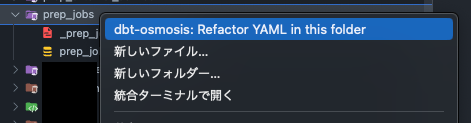
- そのフォルダパスを引数に
dbt-osmosis yaml refactorコマンドを実行される

早く使いたい人向け
下記のリポジトリからvsixファイルダウンロードして使ってください。
あくまで自分の環境用なので、ご自身の環境に合わせてコードの修正が必要なケースもあります。
VSCode拡張機能の作成
VSCode拡張機能のプロジェクト作成
基本下記の記事通りに実施すれば作成できます
# generator-codeをYoemanで使用するとVS Code拡張のプロジェクトの雛形を生成できます。
npm install -g generator-code

# generator-codeを使用してVS Code拡張のプロジェクト作成が開始されます。
npx yo code

# 項目を選択していきます。今回は下記で選択肢にしました。
? What type of extension do you want to create? New Extension (TypeScript)
? What's the name of your extension? dbt-osmosis-runner
? What's the identifier of your extension? dbt-osmosis-runner
? What's the description of your extension?
? Initialize a git repository? No
? Which bundler to use? unbundled
? Which package manager to use? npm

? Do you want to open the new folder with Visual Studio Code? Open with `code`
実行を完了すると、指定したエクステンション名のプロジェクトディレクトリが作成されます。

ファイル編集
基本的に下記に3つのファイルを編集していきます。
- dbt-osmosis-runner/src/extension.ts
- dbt-osmosis-runner/package.json
- dbt-osmosis-runner/README.md
extension.ts
dbt-osmosis yaml refactorコマンドは、dbt_project.ymlがある階層で実行する前提なので、dbt_project.ymlがある階層を探索して移動して、dbt-osmosis yaml refactorコマンドを実行する処理にしています。
dbt_project.ymlがルートにある場合は、このdbt_project.yml探索&移動処理はいらないと思います。
import * as vscode from 'vscode';
import * as cp from 'child_process';
import * as path from 'path';

export function activate(context: vscode.ExtensionContext) {
  let disposable = vscode.commands.registerCommand('dbt-osmosis-runner.refactorFolder', (uri: vscode.Uri) => {
    const workspaceFolder = vscode.workspace.getWorkspaceFolder(uri);

    if (!workspaceFolder) {
      vscode.window.showErrorMessage("Workspace folder not found.");
      return;
    }

    const workspacePath = workspaceFolder.uri.fsPath;

    const findCmd = `find . \
      -path "*/dbt_packages/*" -prune -o \
      -path "*/target/*" -prune -o \
      -name dbt_project.yml -print | head -n1`;
    let fullPath: string;

    try {
      fullPath = cp.execSync(findCmd, { encoding: 'utf-8', cwd: workspacePath }).trim();
      if (!fullPath) {
        vscode.window.showErrorMessage("dbt_project.yml not found.");
        return;
      }
    } catch (e) {
      vscode.window.showErrorMessage(`Failed to find dbt_project.yml: ${e}`);
      return;
    }

    const dirPath = path.dirname(fullPath);
    const relativePath = path.relative(dirPath, uri.fsPath);

    const terminal = vscode.window.createTerminal({
      name: "dbt-osmosis",
      cwd: workspacePath,
    });

    terminal.show();
    terminal.sendText(`cd ${dirPath}`);
    terminal.sendText(`dbt-osmosis yaml refactor ${relativePath}`);
  });

  context.subscriptions.push(disposable);
}

export function deactivate() {}
package.json
commandsとmenusだけの追記だけでいけた気がします。
{
  "name": "dbt-osmosis-runner",
  "displayName": "dbt-osmosis-runner",
  "description": "",
  "version": "0.0.1",
  "engines": {
    "vscode": "^1.102.0"
  },
  "categories": [
    "Other"
  ],
  "activationEvents": [],
  "main": "./out/extension.js",
  "contributes": {
    "commands": [
      {
        "command": "dbt-osmosis-runner.refactorFolder",
        "title": "dbt-osmosis: Refactor YAML in this folder"
      }
    ],
    "menus": {
      "explorer/context": [
        {
          "command": "dbt-osmosis-runner.refactorFolder",
          "when": "explorerResourceIsFolder",
          "group": "navigation"
        }
      ]
    }
  },
  "scripts": {
    "vscode:prepublish": "npm run compile",
    "compile": "tsc -p ./",
    "watch": "tsc -watch -p ./",
    "pretest": "npm run compile && npm run lint",
    "lint": "eslint src",
    "test": "vscode-test"
  },
  "devDependencies": {
    "@types/vscode": "^1.102.0",
    "@types/mocha": "^10.0.10",
    "@types/node": "20.x",
    "@typescript-eslint/eslint-plugin": "^8.31.1",
    "@typescript-eslint/parser": "^8.31.1",
    "eslint": "^9.25.1",
    "typescript": "^5.8.3",
    "@vscode/test-cli": "^0.0.11",
    "@vscode/test-electron": "^2.5.2"
  }
}
README.md
プロジェクトをパッケージにする際に、README.mdが編集されてないとエラーになるので編集
# dbt-osmosis-runner README

選択したフォルダ名で下記のコマンドが打てる

dbt-osmosis yaml refactor フォルダ名
動作確認
動作確認はVSCodeのデバッガー(F5押下)で実施可能です。
パッケージ作成
vsce packageを実行してプロジェクトをパッケージします。
npx vsce package
実行するとvsixファイルが作成されます。

パッケージの利用
今回は、パッケージの公開をしない方向で利用します。
利用方法は3つあります。
-
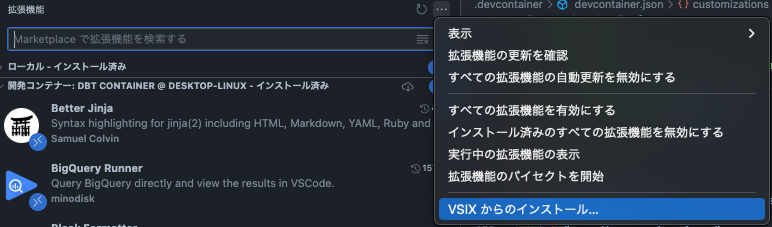
GUIでインストール
VSIX からのインストール...からファイル選択してインストールします。
-
コマンドでインストール
code --install-extension dbt-osmosis-runner-0.0.1.vsix
- devcontainer.jsonに記載(devcontainer利用者)
      "extensions": [
        // VSCodeのローカル拡張
        "${containerWorkspaceFolder}/dbt-osmosis-runner-0.0.1.vsix"
      ]
    }
これにより、フォルダを右クリックしたときに「dbt-osmosis: Refactor YAML in this folder」がメニューに表示されます。
おわりに
これで選択したフォルダを起点にdbt-osmosis yaml refactorを実行できるVSCode拡張機能が完成しました。
これで、少しはyamlを更新していけるはず(希望的観測)
参考
Discussion