



概要
LangExtract は、LLMを使って非構造テキストから構造化データを抽出する Python ライブラリです。
抽出結果には、元テキストの位置が付与され、それをブラウザでインタラクティブに確認することができます。
2025年8月15日現在、約11kスターを獲得しています。

NER(Named Entity Recognition)について
LangExtractはテキスト中から特定の種類の情報を自動的に抽出する機能を提供します。
こういった技術は従来の自然言語処理の文脈では、NER(Named Entity Recognition)、固有表現抽出と呼ばれます。
ルールベースや従来の機械学習で行われているものを最新のLLMで行おう、というのがLangExtractの試みです。
サンプルを動かしてみる
リポジトリに格納されている医療情報抽出のサンプルを動かしてみます。
実行コード
上記リポジトリのコードを一部改変したものです。
import langextract as lx

# 入力の非構造テキスト
input_text = "Patient took 400 mg PO Ibuprofen q4h for two days."

# 指示プロンプト
prompt_description = "Extract medication information including medication name, dosage, route, frequency, and duration in the order they appear in the text."

# 抽出例データを定義
examples = [
    lx.data.ExampleData(
        text="Patient was given 250 mg IV Cefazolin TID for one week.",
        extractions=[
            lx.data.Extraction(extraction_class="dosage", extraction_text="250 mg"),
            lx.data.Extraction(extraction_class="route", extraction_text="IV"),
            lx.data.Extraction(extraction_class="medication", extraction_text="Cefazolin"),
            lx.data.Extraction(extraction_class="frequency", extraction_text="TID"),  # TID = three times a day
            lx.data.Extraction(extraction_class="duration", extraction_text="for one week")
        ]
    )
]

# 抽出処理
result = lx.extract(
    text_or_documents=input_text,
    prompt_description=prompt_description,
    examples=examples,
    model_id="gemini-2.5-pro",
    api_key="your-api-key-here"
)

# 結果をjsonlファイルに保存
lx.io.save_annotated_documents([result], output_name="medical_ner_extraction.jsonl", output_dir=".")

# jsonlからhtmlを作成
html_content = lx.visualize("medical_ner_extraction.jsonl")
with open("medical_ner_visualization.html", "w") as f:
    f.write(html_content)
出力jsonl
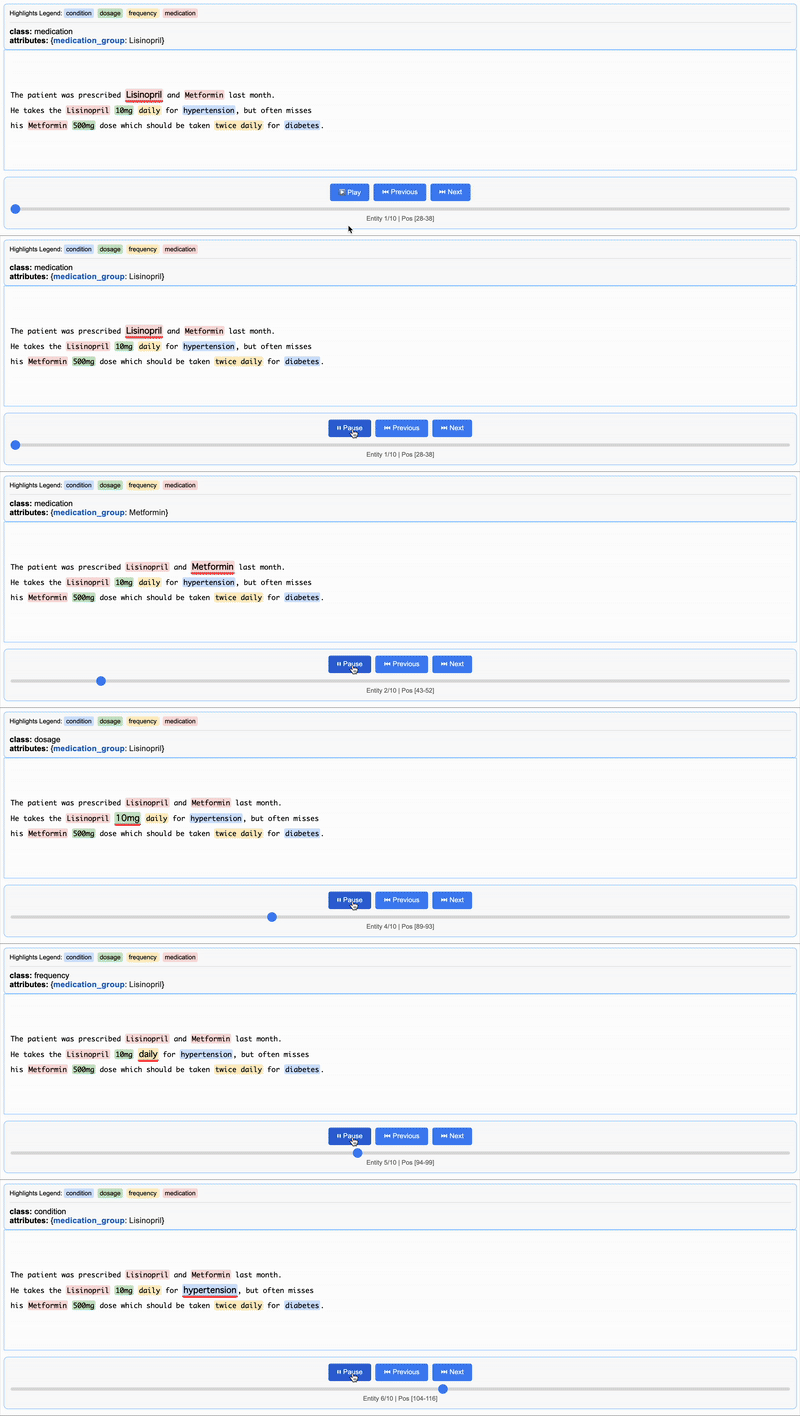
{"extractions": [{"extraction_class": "medication", "extraction_text": "Lisinopril", "char_interval": {"start_pos": 28, "end_pos": 38}, "alignment_status": "match_exact", "extraction_index": 1, "group_index": 0, "description": null, "attributes": {"medication_group": "Lisinopril"}}, {"extraction_class": "medication", "extraction_text": "Metformin", "char_interval": {"start_pos": 43, "end_pos": 52}, "alignment_status": "match_exact", "extraction_index": 2, "group_index": 1, "description": null, "attributes": {"medication_group": "Metformin"}}, {"extraction_class": "medication", "extraction_text": "Lisinopril", "char_interval": {"start_pos": 78, "end_pos": 88}, "alignment_status": "match_exact", "extraction_index": 3, "group_index": 2, "description": null, "attributes": {"medication_group": "Lisinopril"}}, {"extraction_class": "dosage", "extraction_text": "10mg", "char_interval": {"start_pos": 89, "end_pos": 93}, "alignment_status": "match_exact", "extraction_index": 4, "group_index": 3, "description": null, "attributes": {"medication_group": "Lisinopril"}}, {"extraction_class": "frequency", "extraction_text": "daily", "char_interval": {"start_pos": 94, "end_pos": 99}, "alignment_status": "match_exact", "extraction_index": 5, "group_index": 4, "description": null, "attributes": {"medication_group": "Lisinopril"}}, {"extraction_class": "condition", "extraction_text": "hypertension", "char_interval": {"start_pos": 104, "end_pos": 116}, "alignment_status": "match_exact", "extraction_index": 6, "group_index": 5, "description": null, "attributes": {"medication_group": "Lisinopril"}}, {"extraction_class": "medication", "extraction_text": "Metformin", "char_interval": {"start_pos": 139, "end_pos": 148}, "alignment_status": "match_exact", "extraction_index": 7, "group_index": 6, "description": null, "attributes": {"medication_group": "Metformin"}}, {"extraction_class": "dosage", "extraction_text": "500mg", "char_interval": {"start_pos": 149, "end_pos": 154}, "alignment_status": "match_exact", "extraction_index": 8, "group_index": 7, "description": null, "attributes": {"medication_group": "Metformin"}}, {"extraction_class": "frequency", "extraction_text": "twice daily", "char_interval": {"start_pos": 182, "end_pos": 193}, "alignment_status": "match_exact", "extraction_index": 9, "group_index": 8, "description": null, "attributes": {"medication_group": "Metformin"}}, {"extraction_class": "condition", "extraction_text": "diabetes", "char_interval": {"start_pos": 198, "end_pos": 206}, "alignment_status": "match_exact", "extraction_index": 10, "group_index": 9, "description": null, "attributes": {"medication_group": "Metformin"}}], "text": "\nThe patient was prescribed Lisinopril and Metformin last month.\nHe takes the Lisinopril 10mg daily for hypertension, but often misses\nhis Metformin 500mg dose which should be taken twice daily for diabetes.\n", "document_id": "doc_e91032f6"}
出力htmlを表示
サンプルを日本語にしてやってみる
内容を日本語に変換して確認してみます。
実行コード
import langextract as lx

# 複数の薬物への言及を含むテキスト
input_text = """
患者は先月、リシノプリルとメトホルミンを処方された。
彼は高血圧のためにリシノプリル10mgを毎日服用しているが、
糖尿病のために1日2回服用すべきメトホルミン500mgをよく飲み忘れる。
"""

# 抽出プロンプトの定義
prompt_description = """
関連情報をグループ化する属性を使用して、薬物とその詳細を抽出してください:

1. テキストに現れる順序でエンティティを抽出する
2. 各エンティティには、その薬物にリンクする'medication_group'属性が必要
3. 薬物に関するすべての詳細は同じmedication_group値を共有する必要がある
"""

# 薬物グループを含む例データの定義
examples = [
    lx.data.ExampleData(
        text="患者は心臓の健康のためにアスピリン100mgを毎日、就寝時にシンバスタチン20mgを服用している。",
        extractions=[
            # 最初の薬物グループ
            lx.data.Extraction(
                extraction_class="薬物名",
                extraction_text="アスピリン",
                attributes={"medication_group": "アスピリン"},  # グループ識別子
            ),
            lx.data.Extraction(
                extraction_class="用量",
                extraction_text="100mg",
                attributes={"medication_group": "アスピリン"},
            ),
            lx.data.Extraction(
                extraction_class="頻度",
                extraction_text="毎日",
                attributes={"medication_group": "アスピリン"},
            ),
            lx.data.Extraction(
                extraction_class="症状",
                extraction_text="心臓の健康",
                attributes={"medication_group": "アスピリン"},
            ),
            # 2番目の薬物グループ
            lx.data.Extraction(
                extraction_class="薬物名",
                extraction_text="シンバスタチン",
                attributes={"medication_group": "シンバスタチン"},
            ),
            lx.data.Extraction(
                extraction_class="用量",
                extraction_text="20mg",
                attributes={"medication_group": "シンバスタチン"},
            ),
            lx.data.Extraction(
                extraction_class="頻度",
                extraction_text="就寝時",
                attributes={"medication_group": "シンバスタチン"},
            ),
        ],
    )
]

result = lx.extract(
    text_or_documents=input_text,
    prompt_description=prompt_description,
    examples=examples,
    model_id="gemini-2.5-flash",
    api_key="your-api-key-here"
)


# Save and visualize the results
lx.io.save_annotated_documents(
    [result], output_name="medical_ner_extraction.jsonl", output_dir="."
)

# Generate the interactive visualization
html_content = lx.visualize("medical_ner_extraction.jsonl")
with open("medical_relationship_visualization.html", "w") as f:
    f.write(html_content)
出力jsonl
{"extractions": [{"extraction_class": "薬物名", "extraction_text": "リシノプリル", "char_interval": null, "alignment_status": null, "extraction_index": 1, "group_index": 0, "description": null, "attributes": {"medication_group": "リシノプリル"}}, {"extraction_class": "用量", "extraction_text": "10mg", "char_interval": {"start_pos": 43, "end_pos": 47}, "alignment_status": "match_exact", "extraction_index": 2, "group_index": 1, "description": null, "attributes": {"medication_group": "リシノプリル"}}, {"extraction_class": "頻度", "extraction_text": "毎日", "char_interval": null, "alignment_status": null, "extraction_index": 3, "group_index": 2, "description": null, "attributes": {"medication_group": "リシノプリル"}}, {"extraction_class": "症状", "extraction_text": "高血圧", "char_interval": null, "alignment_status": null, "extraction_index": 4, "group_index": 3, "description": null, "attributes": {"medication_group": "リシノプリル"}}, {"extraction_class": "薬物名", "extraction_text": "メトホルミン", "char_interval": null, "alignment_status": null, "extraction_index": 5, "group_index": 4, "description": null, "attributes": {"medication_group": "メトホルミン"}}, {"extraction_class": "用量", "extraction_text": "500mg", "char_interval": {"start_pos": 81, "end_pos": 86}, "alignment_status": "match_fuzzy", "extraction_index": 6, "group_index": 5, "description": null, "attributes": {"medication_group": "メトホルミン"}}, {"extraction_class": "頻度", "extraction_text": "1日2回", "char_interval": {"start_pos": 66, "end_pos": 69}, "alignment_status": "match_lesser", "extraction_index": 7, "group_index": 6, "description": null, "attributes": {"medication_group": "メトホルミン"}}, {"extraction_class": "症状", "extraction_text": "糖尿病", "char_interval": null, "alignment_status": null, "extraction_index": 8, "group_index": 7, "description": null, "attributes": {"medication_group": "メトホルミン"}}], "text": "\n患者は先月、リシノプリルとメトホルミンを処方された。\n彼は高血圧のためにリシノプリル10mgを毎日服用しているが、\n糖尿病のために1日2回服用すべきメトホルミン500mgをよく飲み忘れる。\n", "document_id": "doc_8096dee7"}
char_intervalがnullとなっており、位置が特定できなかったものが多数ありますね。
トークナイズの処理で日本語(UTF-8のマルチバイト文字?)をうまく扱えていないのかもしれません。
issueがすでに立っていました。
出力htmlを表示

jsonlの時点でchar_intervalが入っているものだけが出ています。
おわりに
今回はLangExtractを触ってみました!
htmlまで出力してくれて、抽出結果を検証しやすいのが大きな魅力ですね。
公式で謳っている通り、幅広い非構造テキストを対象としているので様々な分野で応用が可能です。
日本語の課題はありますが、引き続き注目しておこうと思います!
TRUSTART株式会社は、一緒に働くメンバーを募集しています!
インターンメンバーも大募集中です!
興味を持っていただいた方は、ぜひ弊社のページをご確認ください!!!

「人とデータで全てを可能にする」 不動産領域に関連する、あらゆるビジネスのDX化にチャレンジし、「テクノロジー×人」の力で社会課題を解決するTRUSTART株式会社のテックブログです! 採用情報はこちら:trustart.co.jp/recruit/
Discussion