Angularを使ってボードゲームの得点計算ツールを作った話



はじめに
Angular Advent Calendarの15日目の記事になります。
今回は作ったものを紹介できればと思います。
作ったもの
世界の七不思議というボードゲームの得点計算アプリを作成しました。
このゲームはサクサクプレイ可能で非常に面白いのですが、 「得点計算の複雑さ」 が最大のネックだと感じていました。
得点計算の元となるカテゴリが7つ(拡張を入れると最大9つ)もある上に、その中の一つである”科学シンボル(石板、歯車、コンパスの3種)”の計算式が特殊です。
「それぞれの個数の二乗」+「3種揃えるごとの固定ボーナス」という計算を求められます。
例えば手元に [石板3, 歯車2, コンパス1] がある場合、計算式は以下のようになります。
プレイ後に散らばったカードを数えながらこの暗算を行うのは脳トレをやらされるので非常に不便です。
そこで今回は簡単に入力できるツールを作ろうと思い開発を始めました。
ついでにAngular v10代の頃にはなかったような(or 自分がやっていなかった)新しくできることは試していこうと思い、技術スタックはそれをベースに選んでいます。
技術スタック
- ベース: Angular v21
- スタイリング: Tailwind CSS
- 状態管理: Signals
やったこと
その1: 状態管理にSignalsを使った
Angularの状態管理といえばNgRx!と思っていましたちょっと前の僕。
今回作成するにあたってNgRxは個人的には複雑だしどうしようか悩んでいたところ、Signalsを使って状態管理をするという記事を見ました。
SignalベースのAngularコンポーネント設計パターン
NgRxだとやりすぎだと感じる規模の時にAngular単体で状態管理ができるのは個人的に嬉しく、とりあえず使ってみました。
その2: 状態とそれを操作するクラスを分けた
出来るだけ綺麗な状態/設計を目指したく状態は状態でクラスにおいておき、それを使うclassを作成しました。
componentからは状態の方を直接参照しないような形にしています。
※上記の記事を大いに参考にさせていただいています。
具体的な実装としては以下の通りです。
| クラス | 責務 |
|---|---|
ScoreStateManager |
signalによる状態の保持と低レベルな更新操作 |
ScoreService |
ビジネスロジック(スコア計算)とコンポーネント向けのAPI提供 |
使う時は以下のようにコンポーネントはScoreServiceにのみ依存し、ScoreStateManagerを直接参照しません。
これにより、状態の更新方法が変わってもコンポーネントへの影響を最小限に抑えられます。
Component
    ↓ 依存
ScoreService(Facade:操作 + 算出ロジック)
    ↓ 依存
ScoreStateManager(状態保持)
その3: Tailwind CSSを使った
Tailwind CSS自体は初めて使うわけではないので、個人的な真新しさは無いですが導入が楽になったそうなので使ってみました。
できたもの
できたものは以下の通りです。
- 一覧画面: 参加プレイヤーと得点数がわかる画面
- 得点入力モーダル: ユーザの枠をクリックすると開く。科学スコア以外については得点を、科学スコアについてはシンボル数を入れることで計算されます
| 画面名 | スクショ |
|---|---|
| 一覧画面 | 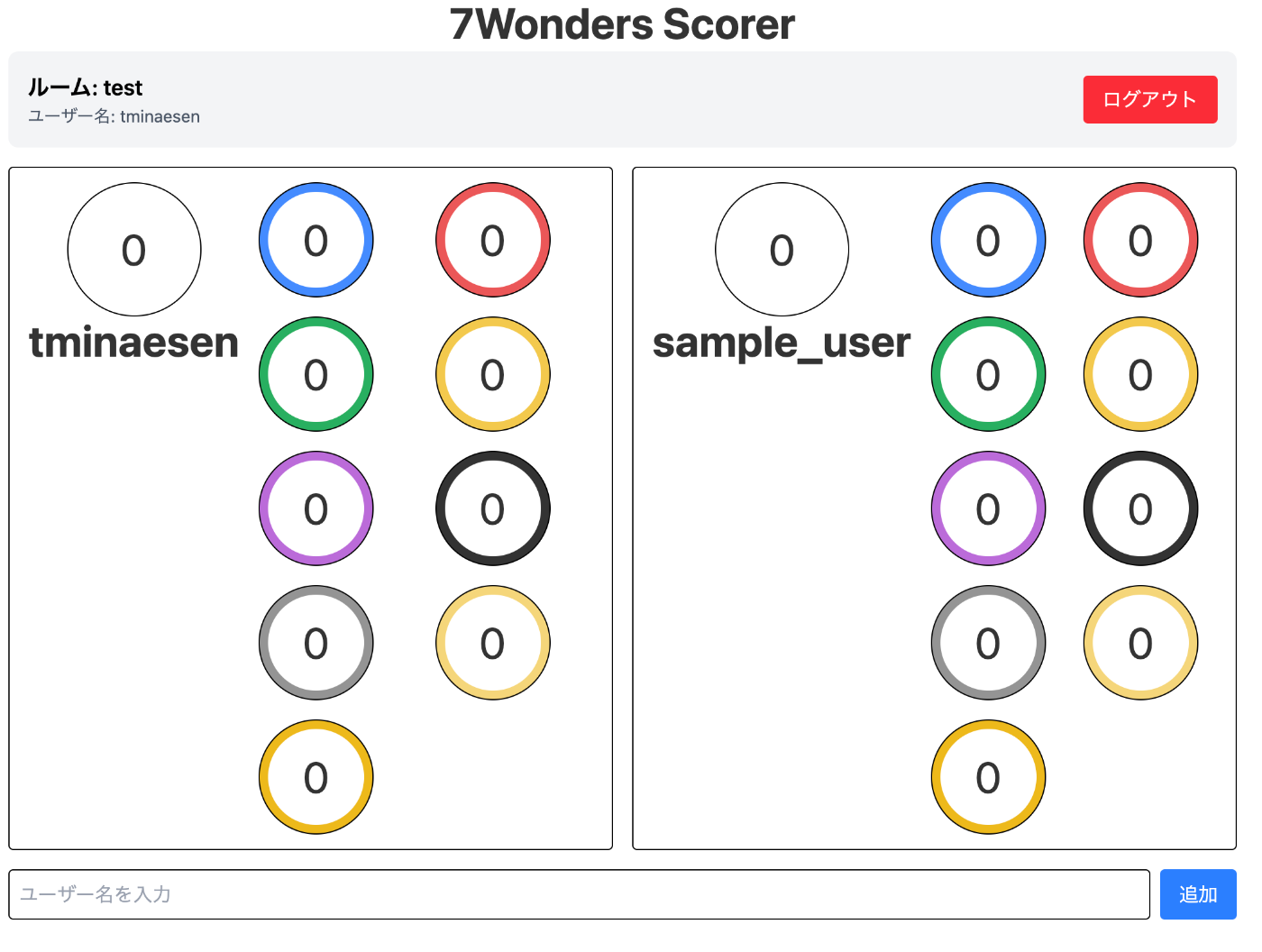 |
| 得点入力モーダル | 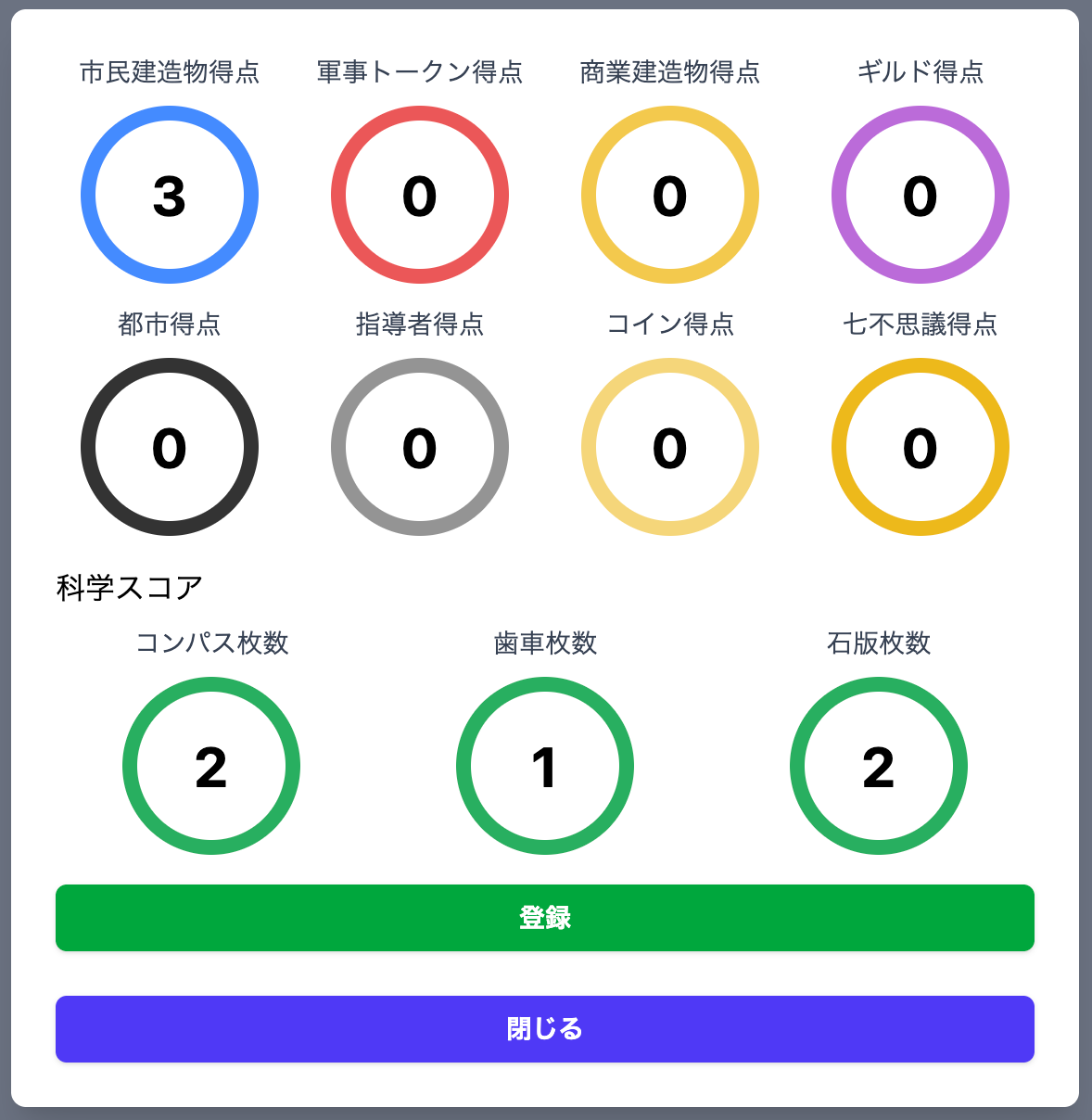 |
| 得点計算結果 |  |
各枠の色がカラフルなのは実際のカードと似たような色にしているためです。
カードがやたら黄色っぽいものが多く、似たような色が出てきてしまうのが悔しいポイントです。
得られた知見
その1: Signalsが便利
NgRxに比べ準備するものも少なく結構手軽に使えるので個人的にはとても使いやすかったです。
具体的には今回自分が作ったコードは以下で、
/** Signalsの例 */
export class ScoreStateManager {
  #scoreStateList = signal<ScoreState[]>([]);

  public addUser(username: string): void {
    const newUser: ScoreState = { username, civilScore: 0, /* 他のスコアも初期化 */ };
    this.#scoreStateList.update((scores) => [...scores, newUser]);
  }

  public removeUser(username: string): void {
    this.#scoreStateList.update((scores) => scores.filter((s) => s.username !== username));
  }

  public updateCivilScore(username: string, score: number): void {
    this.#scoreStateList.update((scores) =>
      scores.map((s) => (s.username === username ? { ...s, civilScore: score } : s))
    );
  }
  // 他のスコア更新メソッドも同様のパターン

  public asReadonly() {
    return { scores: this.#scoreStateList.asReadonly() };
  }
}
同じことをNgRxでやろうとしたら以下のようになります。
/** Action定義 */
export const ScoreActions = createActionGroup({
  source: 'Score',
  events: {
    'Add User': props<{ username: string }>(),
    'Remove User': props<{ username: string }>(),
    'Update Civil Score': props<{ username: string; score: number }>(),
    // 他のスコア更新Actionも同様に定義...
  },
});

/** Reducer定義 */
export const scoreReducer = createReducer(
  initialState,
  on(ScoreActions.addUser, (state, { username }) => ({
    ...state,
    scores: [...state.scores, { username, ...DEFAULT_SCORE }],
  })),
  on(ScoreActions.removeUser, (state, { username }) => ({
    ...state,
    scores: state.scores.filter((s) => s.username !== username),
  })),
  on(ScoreActions.updateCivilScore, (state, { username, score }) => ({
    ...state,
    scores: state.scores.map((s) =>
      s.username === username ? { ...s, civilScore: score } : s
    ),
  })),
  // 他のスコア更新も同様...
);
やったことその2で書いた分離については良かったかなと思っています。
ScoreStateManagerはsignalをprivateで保持し、asReadonly()経由でのみ外部に公開しています。
これにより意図しない状態変更を防ぎつつ、ScoreService側でcomputed()を使った派生状態(スコア合計など)を作成できています。
また、NgRxを使った場合以下の様になるかと思いますが、 ScoreStateManagerだけでやりたいことを実現できたのは良かったと思います。
**NgRx版**
Component → ScoreService(Facade) → Store + Actions + Reducers + Selectors

**Signals版**
Component → ScoreService(Facade) → ScoreStateManager
参考までにScoreServiceは以下のような実装をしていました。
@Injectable({ providedIn: 'root' })
export class ScoreService {
  readonly #state;
  readonly #computedScores: Signal<Score[]>;

  constructor(private readonly scoreStateManager: ScoreStateManager) {
    this.#state = scoreStateManager.asReadonly();
    // computedシグナルでスコア計算結果をメモ化
    this.#computedScores = this.#calculateScores();
  }

  // コンポーネント向けAPI
  public getScore(): Score[] {
    return this.#computedScores();
  }

  public updateScore(username: string, score: UpdateScore): void {
    this.scoreStateManager.updateCivilScore(username, score.civilScore);
    this.scoreStateManager.updateScienceScore(username, score.scienceScore);
    // 他のスコアも同様に更新...
  }

  // 科学スコアを含む合計点を算出
  #calculateScores(): Signal<Score[]> {
    return computed(() => {
      return this.#state.scores().map((score) => {
        // 3種セット数(最小値)× 7点のボーナス
        const scienceSet = Math.min(
          score.scienceScore.compass,
          score.scienceScore.gear,
          score.scienceScore.tablet,
        );
        // 各シンボルの二乗 + セットボーナス
        const scienceScoreSum =
          scienceSet * 7 +
          score.scienceScore.gear ** 2 +
          score.scienceScore.compass ** 2 +
          score.scienceScore.tablet ** 2;

        return {
          ...score,
          scienceScore: { ...score.scienceScore, sum: scienceScoreSum },
          sum: score.civilScore + score.militaryScore + scienceScoreSum + /* 他のスコア */,
        };
      });
    });
  }
}
きっちり作るのであれば全然問題ないと思うのですが、今回みたいな一人で作る野良ツールとなると過剰な場面もあると思うので、やっぱりAngular単体で気軽にできることはとても良かったです。
また、Signals使っていて体感的にはRxJSと同じ感覚で使っていましたが、Operatorsみたいなのが欲しくなった時に痒いところに手が届かないなと思いました。
多分これは考え方が違うだけだと思うので、慣れの問題と思っています。
その2: Tailwind CSSが便利
素のCSS(SCSS)でも良いのですが、書きやすくて良かったです。
セットアップ手軽にこれが使えるならこっちで良いかという感想です。
その3: AIフレンドリーになってる
触ったところと関係ないですが、やたらAIフレンドリーになっていて驚きました。
project作成するときに好みのAIツールを選べば、
? Which AI tools do you want to configure with Angular best practices? https://angular.dev/ai/develop-with-ai
 ◯ Windsurf       [ https://docs.windsurf.com/windsurf/cascade/memories#rules        ]
 ◯ None
 ◯ Agents.md      [ https://agents.md/                                               ]
❯◉ Claude         [ https://docs.anthropic.com/en/docs/claude-code/memory            ]
 ◯ Cursor         [ https://docs.cursor.com/en/context/rules                         ]
 ◯ Gemini         [ https://ai.google.dev/gemini-api/docs                            ]
 ◯ GitHub Copilot [ https://code.visualstudio.com/docs/copilot/copilot-customization ]
こんな感じにAIツールごとに以下の様なテンプレファイルを出力してくれます。
最初から良い感じにAIに指示出してくれるのは考えることが減ると思っているのでこれもありがたいです。
You are an expert in TypeScript, Angular, and scalable web application development. You write functional, maintainable, performant, and accessible code following Angular and TypeScript best practices.

## TypeScript Best Practices

- Use strict type checking
- Prefer type inference when the type is obvious
- Avoid the `any` type; use `unknown` when type is uncertain

## Angular Best Practices

- Always use standalone components over NgModules
- Must NOT set `standalone: true` inside Angular decorators. It's the default in Angular v20+.
- Use signals for state management
- Implement lazy loading for feature routes
- Do NOT use the `@HostBinding` and `@HostListener` decorators. Put host bindings inside the `host` object of the `@Component` or `@Directive` decorator instead
- Use `NgOptimizedImage` for all static images.
  - `NgOptimizedImage` does not work for inline base64 images.

## Accessibility Requirements

- It MUST pass all AXE checks.
- It MUST follow all WCAG AA minimums, including focus management, color contrast, and ARIA attributes.

### Components

- Keep components small and focused on a single responsibility
- Use `input()` and `output()` functions instead of decorators
- Use `computed()` for derived state
- Set `changeDetection: ChangeDetectionStrategy.OnPush` in `@Component` decorator
- Prefer inline templates for small components
- Prefer Reactive forms instead of Template-driven ones
- Do NOT use `ngClass`, use `class` bindings instead
- Do NOT use `ngStyle`, use `style` bindings instead
- When using external templates/styles, use paths relative to the component TS file.

## State Management

- Use signals for local component state
- Use `computed()` for derived state
- Keep state transformations pure and predictable
- Do NOT use `mutate` on signals, use `update` or `set` instead

## Templates

- Keep templates simple and avoid complex logic
- Use native control flow (`@if`, `@for`, `@switch`) instead of `*ngIf`, `*ngFor`, `*ngSwitch`
- Use the async pipe to handle observables
- Do not assume globals like (`new Date()`) are available.
- Do not write arrow functions in templates (they are not supported).

## Services

- Design services around a single responsibility
- Use the `providedIn: 'root'` option for singleton services
- Use the `inject()` function instead of constructor injection
(作ったアプリの)今後について
指定したルームに複数人入れるようにできればと思っています。
現状自分しか見れないリッチな電卓なので、その辺から改修していければと。
他にも科学シンボル以外は自前の暗算前提なのでそこも楽にしていきたいです。
やりたいことはたくさんあるので細々開発していきます。
まとめ
今回はAngularを用いて作成したアプリケーションを紹介してきました。
Angular v10代から飛んできた自分としては書きっぷりが変わったり完全に浦島太郎状態でしたが、前より使いやすくなっていると感じました。
今後もちょくちょく使っていければと思います。
Discussion