PlantUMLでER図を作成する



概要
先日、PlantUMLの導入記事を投稿しました。
普段、ER図を作成することが多いので、この記事ではPlantUMLでER図を作成する方法を書きます。
IE記法のおさらい
PlantUMLで生成されるER図は、IE 記法(Information Engineering)に基づいています。
IE 記法のリレーション(エンティティ間の関連性)の表現については、基本的な記号の理解が重要です。最初に整理しておきます。
IE記法で使用される基本的な記号は以下の3つです。
| 記号 | 意味 |
|---|---|
| ◯ | 0 |
| | | 1 |
| 鳥の足みたいなやつ | 多(2以上) |
これらの基本的な記号を組み合わせて、エンティティ同士の関連を表現します。
リレーションは、エンティティを結ぶ線の両端にこれらの記号を付けることで表現されます。最初の記号は、最小値(0か1)を表し、2つ目の記号は最大値(1か多)を表しています。それぞれ、オプショナリティ、カーディナリティ(多重度)と呼ばれます。
0か1のみ関連する
最小値:0 / 最大値:1 となり、0か1を表します。

必ず1つ関連する
最小値:1 / 最大値:1 となり、1を表します。
この場合は最小値が省略され、線が最大値の1本だけになることもあります。

0以上関連する(多)
最小値:0 / 最大値:多 となり、0以上を表します。

1以上関連する(多)
最小値:1 / 最大値:多 となり、1以上を表します。

リレーション種別ごとのER図の書き方
PlantUMLでは、IE 記法におけるリレーションを以下のように表現します。
--o| // 0か1のみ関連する
--|| // 必ず1つ関連する
--o{ // 0以上関連する(多)
--|{ // 1以上関連する(多)
下記で、具体例とともに見ていきます。
1 対 1 の関係
@startuml
entity "ユーザー" as User {
  + user_id : int
  --
  * name : string
  * email : string
}

entity "プロフィール" as Profile {
  + profile_id : int
  --
  * user_id : int
  * address : string
}

' 1対1の関係
User ||--|| Profile
@enduml

1 対 0か1 の関係
@startuml
entity "注文" as Order {
  + order_id : int
  --
  * order_date : date
  * total_amount : int
}

entity "クーポン" as Coupon {
  + coupon_id : int
  --
  * code : string
  * discount : int
  * expiration_date : date
}

Order ||--o| Coupon
@enduml

1 対 多(0以上) の関係
@startuml
entity "ユーザー" as User {
  + user_id : int
  --
  * name : string
  * email : string
}

entity "注文" as Order {
  + order_id : int
  --
  * order_date : date
  * user_id : int
}

User ||--o{ Order
@enduml

1 対 多(1以上) の関係
@startuml
entity "注文" as Order {
  + order_id : int
  --
  * order_date : date
  * user_id : int
}

entity "注文明細" as OrderDetail {
  + detail_id : int
  --
  * order_id : int
  * product_id : int
  * quantity : int
}

Order ||--|{ OrderDetail
@enduml

多 対 多 の関係
@startuml
entity "商品" as Product {
  + product_id : int
  --
  * name : string
  * price : int
}

entity "注文明細" as OrderDetail {
  + detail_id : int
  --
  * order_id : int
  * product_id : int
  * quantity : int
}

Product }|--|{ OrderDetail
@enduml

PlantUMLの便利機能
エンティティをカテゴリ別に分類したい
エンティティが増えてくると、カテゴリ別に分類をしたくなる時があります。そのような時に使えるのがpackageです。
packageで囲ったエンティティは、同じ四角で囲われてグループ化されます。関連の深いエンティティが視覚的にまとまって表示されるので、非常に見やすいです。

次のように書きます。
@startuml
package "注文" {
  entity "注文" as Order {
    + order_id : int
    --
    * order_date : date
    * user_id : int
  }

  entity "注文明細" as OrderDetail {
    + detail_id : int
    --
    * order_id : int
    * product_id : int
    * quantity : int
  }
}

package "商品" {
  entity "商品" as Product {
    + product_id : int
    --
    * name : string
    * price : int
  }
}

Order ||--|{ OrderDetail
Product }|--|{ OrderDetail
@enduml
ちなみに、rectangleやframeを使ってもpackageと同じようなことが実現可能です。
@startuml
rectangle "注文" {
  entity "注文" as Order {
    + order_id : int
    --
    * order_date : date
    * user_id : int
  }

  entity "注文明細" as OrderDetail {
    + detail_id : int
    --
    * order_id : int
    * product_id : int
    * quantity : int
  }
}

rectangle "商品" {
  entity "商品" as Product {
    + product_id : int
    --
    * name : string
    * price : int
  }
}

Order ||--|{ OrderDetail
Product }|--|{ OrderDetail
@enduml
描画結果としては、packageと大差ありません。見た目の好みの問題ですね。

エンティティ間の関係を横向きにしたい
デフォルトでは、関係は縦の線で表現されます。
left to right directionと記述することで、この向きを横向きに変更することができます。
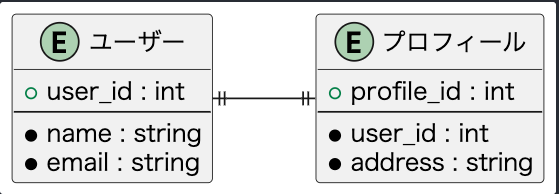
@startuml
left to right direction
entity "ユーザー" as User {
  + user_id : int
  --
  * name : string
  * email : string
}

entity "プロフィール" as Profile {
  + profile_id : int
  --
  * user_id : int
  * address : string
}

' 1対1の関係
User ||--|| Profile
@enduml
色を変更したい
packageやentityの色を変更することもできます。

@startuml
package "注文" #LightBlue {
  entity "注文" as Order {
    + order_id : int
    --
    * order_date : date
    * user_id : int
  }

  entity "注文明細" as OrderDetail {
    + detail_id : int
    --
    * order_id : int
    * product_id : int
    * quantity : int
  }
}

package "商品" #LightGreen {
  entity "商品" as Product {
    + product_id : int
    --
    * name : string
    * price : int
  }
}

Order ||--|{ OrderDetail
Product }|--|{ OrderDetail
@enduml
注釈を付けたい

@startuml
entity "ユーザー" as User {
  + user_id : int
  --
  * name : string
  * email : string
}

entity "注文" as Order {
  + order_id : int
  --
  * order_date : date
  * user_id : int
}

User ||--o{ Order
note left of User : ユーザーが注文を行う
@enduml
最後に
以上です。
普段、PlantUMLでER図を作成することが多いので、使い方を整理してみました。
他の図を作成する機会があれば、また記事にしたいと思います。
Discussion