macOS Emacs で Dired の ! コマンドの初期値が xdg-open ? open では?




はじめに
Emacs の Dired で ! はご存知でしょうか?
Dired バッファで、カーソルを対象ファイルに移動し、
! のキーを押すと、dired-do-shell-command が呼び出されます。
dired-do-shell-command が表示するプロンプト入力で、Enter を押すと、
対応したアプリケーションでそのファイルを開くことができます。
背景
私、macOS Emacs の Dired で、! をほとんど使っていなかったので、
いままで気が付かなかったのですが、
下記の画像のように、
ミニバッファのプロンプト中に、
! on ファイル名 {2 guess} [xdg-open]:
のように、xdg-open と表示されている事に気づきました。

macOS なのに Linux の xdg-open が表示されていて、
「なぜ?」となりました。
もちろん、open と入力すれば、対応したアプリケーションでそのファイルを開くことはできますが...
xdg-open に相当する macOS のコマンドは、open です。
なので、
! on ファイル名 {2 guess} [open]:
と表示されないのはどうしてなのか?
その原因調査と対処方法について記述しようと思いました。
対処方法
先に対処方法を書いておきます。
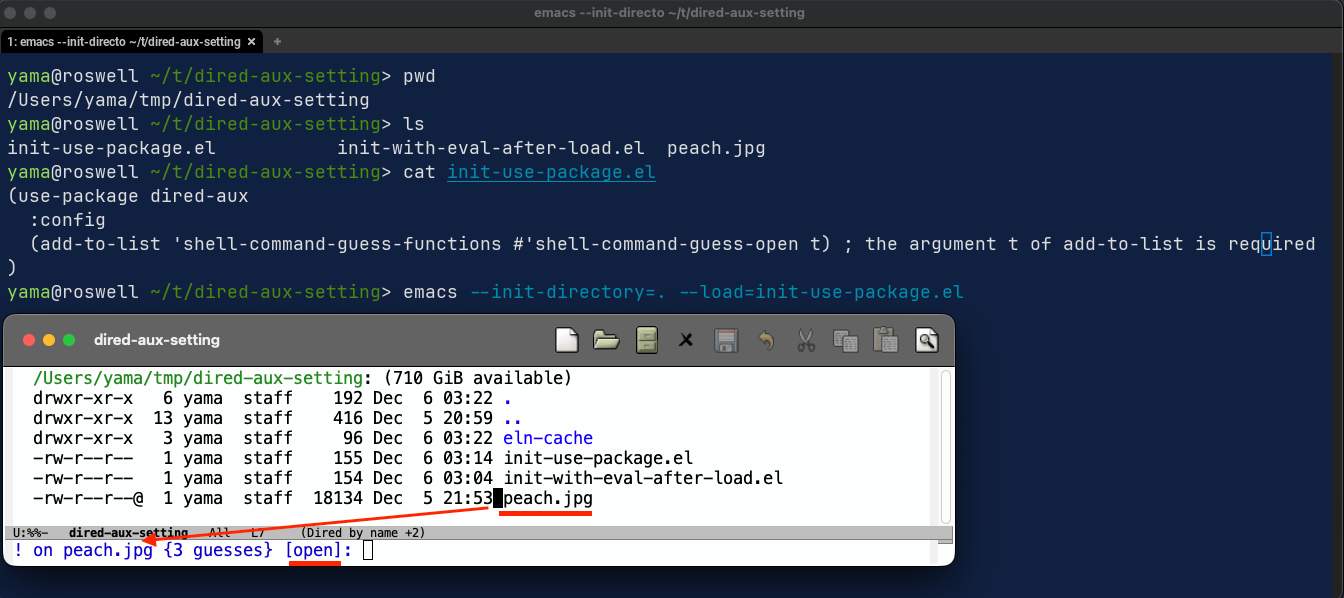
下記を init.el などに記述することで対処できます。
use-package 使用時
(use-package dired-aux
  :config
    (add-to-list 'shell-command-guess-functions #'shell-command-guess-open t) ; The argument t of add-to-list is required
)
use-package 未使用時
(with-eval-after-load 'dired-aux
  (add-to-list 'shell-command-guess-functions #'shell-command-guess-open t)) ; the argument t of add-to-list is required
確認画像は、use-package 使用時と同様なので割愛します。
xdg-open と open コマンドの簡易説明
xdg-open は、Linux などの XDG Base Directory Specification を
採用している Unix 系のコマンドでの、
open は、macOS での、
共に、ファイルに関連したアプリケーションで開くコマンドです。
以下に、それぞれのコマンドの man の抜粋を掲載しておきます。
man xdg-open
$ man xdg-open
       xdg-open {--help | --manual | --version}

DESCRIPTION
       xdg-open opens a file or URL in the user's preferred application. If a
       URL is provided the URL will be opened in the user's preferred web
       browser. If a file is provided the file will be opened in the preferred
       application for files of that type. xdg-open supports file, ftp, http
       and https URLs.
...
man open
$ man open
OPEN(1)                                                              General Commands Manual                                                             OPEN(1)

NAME
       open — open files and directories

SYNOPSIS
       open  [-e]  [-t]  [-f]  [-F]  [-W]  [-R]  [-n]  [-g]  [-j]  [-h]  [-u  URL]  [-s sdk] [-b bundle_identifier] [-a application] [--env VAR] [--stderr PATH]
            [--stdin PATH] [--stdout PATH] [--arch ARCH] [--args arg1 ...]

DESCRIPTION
       The open command opens a file (or a directory or URL), just as if you had double-clicked the file's icon. If no application name is  specified,  the  de‐
       fault application as determined via LaunchServices is used to open the specified files.

       If the file is in the form of a URL, the file will be opened as a URL.
...
Emacs Dired でのキーと関数バインディング
C-x C-f あるいは M-x dired でディレクトリを開き、
M-x describe-bindings を実行すると、
Key に対してどのような関数が Binding されているか確認できます。
! は、dired-do-shell-command に Binding されています。

原因
! キーにより、
dired-aux.el 中の
dired-do-shell-command
dired-read-shell-command
dired-guess-shell-command
shell-command-guess
が順に呼び出される。
(defun shell-command-guess (files)
  "Return a list of shell commands, appropriate for FILES.
The list is populated by calling functions from
`shell-command-guess-functions'.  Each function receives the list
of commands and the list of file names and returns the same list
after adding own commands to the composite list."
  (let ((commands nil))
    (run-hook-wrapped 'shell-command-guess-functions
                      (lambda (fun)
                        (setq commands (funcall fun commands files))
                        nil))
    commands))
shell-commands-guess 関数の中で、
shell-command-guess-functions という defcustom 変数に
設定された各関数
shell-command-guess-dired-optional
...
shell-command-guess-dired-user
を順に実行し、
dired-do-shell-command で使用する xdg-open 等の関数を設定します。
shell-command-guess-functions は、以下のような変数になっています。
(defcustom shell-command-guess-functions
  '(shell-command-guess-dired-optional
    shell-command-guess-mailcap
    shell-command-guess-xdg
    shell-command-guess-dired-default
    shell-command-guess-dired-user)
  "List of functions that guess shell commands for files.
Each function receives a list of commands and a list of file names
and should return the same list of commands with changes
such as new commands added to the beginning of the list.
In this case the commands from the last entry
will be at the top of the resulted list."
  :type '(repeat
          (choice (function-item shell-command-guess-dired-user)
                  (function-item shell-command-guess-dired-default)
                  (function-item shell-command-guess-dired-optional)
                  (function-item shell-command-guess-mailcap)
                  (function-item shell-command-guess-xdg)
                  (function-item shell-command-guess-open)
                  (function :tag "Custom function")))
  :group 'dired
  :version "30.1")
shell-command-guess-functions に設定されている関数には、
なぜか?...
shell-command-guess-open
が登録されていません。
これが、
macOS の Dired で ! 実行した際、
ミニバッファのプロンプトに xdg-open が表示される原因です!
なので、
対処方法は、shell-command-guess-functions に、
shell-command-gues-open を追加すれば良いのですが、
ディスクリプションに、
"List of functions that guess shell commands for files.
...
In this case the commands from the last entry
will be at the top of the resulted list.
とあるように、リストのエントリーの後ろの方が良いので、
リストの最後に、shell-command-guess-open 関数を追加するために、
(add-to-list 'shell-command-guess-functions #'shell-command-guess-open t) ; The argument t of add-to-list is required
と、add-to-list 関数の引数に t を指定し、
リストの 最後 に追加されるようにしました。
最後に追加するのが良いか?
それとも、
shell-command-guess-dired-user の 前 に追加するのが良いか?
今後の考慮が必要かと思います。
まとめ
macOS で Emacs Dired の ! dired-do-shell-command を使うなら、
shell-command-guess-open 関数を、
shell-command-guess-functions 変数のリストの後ろの方に追加しましょう!
この内容が、macOS の Emacs ユーザーの何らかのお役に立てれば、幸いです。
Discussion