


はじめに
プログデンスの圓佛です。Difyのバージョン1.10.1からは永続ボリュームの所有者に関する仕様が変更され、「UID=1001」が期待されるように変更されました。リリースノートの「Upgrade Guide」項には以下の記載があります。
Starting from 1.10.1, the Dify API image now runs as a non-root user (UID 1001) for improved security.
If you are using local filesystem storage (the default in community deployments), you must update the ownership of your mounted storage directories on the host machine, or the containers will fail to read/write files.
この記事ではDify1.10.1をエラー無く、起動する手順を説明します。また「Difyをバージョンアップしたら起動しなくなった…」という場合の解消方法も記載します。
この記事で分かること
- Dify1.10.1からはデフォルト状態の設定ファイルでコンテナを起動するとエラーになる
- エラーを解消するには永続ボリュームの所有者・権限を修正する必要がある
- 「旧バージョンからDifyをバージョンアップしたら起動しなくなった」際は設定ファイルのベースをDify本体に合わせる必要がある
検証環境
今回の検証ではDifyのオンプレミス版(コンテナ版)を利用しています。
| 対象 | バージョン |
|---|---|
| Dify | 1.10.1 |
バージョン1.10.1で発生するエラー
バージョン1.10.1で発生するエラーを確認します。GitHubからバージョン1.10.1をクローンし、Dockerコンテナ用のディレクトリへ移動したら設定ファイル(.env)を用意します。
git clone https://github.com/langgenius/dify.git --branch 1.10.1
cd dify/docker/
cp .env.example .env
Docker Composeでコンテナを起動します。
docker compose up -d
しかし、初期ユーザを登録しようとすると以下のようなエラーになってしまい、Difyへログインできません…
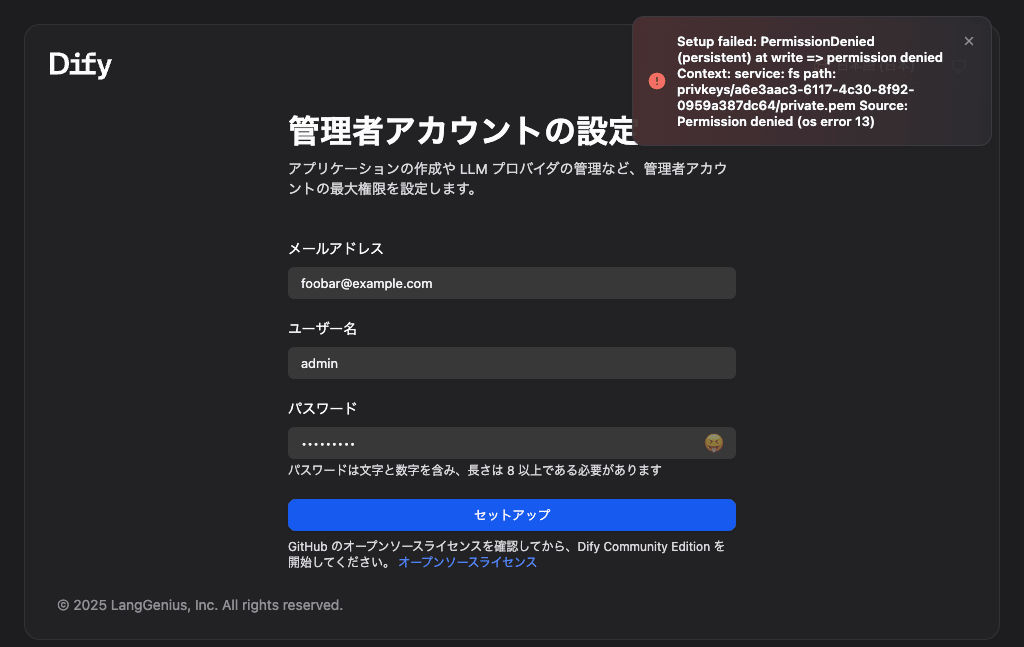
尚、この状態でも各コンテナは起動していました。
# docker compose ps -a
NAME                     IMAGE                                       COMMAND                  SERVICE         CREATED         STATUS                   PORTS
docker-api-1             langgenius/dify-api:1.10.1                  "/bin/bash /entrypoi…"   api             5 minutes ago   Up 5 minutes             5001/tcp
docker-db_postgres-1     postgres:15-alpine                          "docker-entrypoint.s…"   db_postgres     5 minutes ago   Up 5 minutes (healthy)   5432/tcp
docker-nginx-1           nginx:latest                                "sh -c 'cp /docker-e…"   nginx           5 minutes ago   Up 5 minutes             0.0.0.0:80->80/tcp, [::]:80->80/tcp, 0.0.0.0:443->443/tcp, [::]:443->443/tcp
docker-plugin_daemon-1   langgenius/dify-plugin-daemon:0.4.1-local   "/bin/bash -c /app/e…"   plugin_daemon   5 minutes ago   Up 5 minutes             0.0.0.0:5003->5003/tcp, [::]:5003->5003/tcp
docker-redis-1           redis:6-alpine                              "docker-entrypoint.s…"   redis           5 minutes ago   Up 5 minutes (healthy)   6379/tcp
docker-sandbox-1         langgenius/dify-sandbox:0.2.12              "/main"                  sandbox         5 minutes ago   Up 5 minutes (healthy)
docker-ssrf_proxy-1      ubuntu/squid:latest                         "sh -c 'cp /docker-e…"   ssrf_proxy      5 minutes ago   Up 5 minutes             3128/tcp
docker-weaviate-1        semitechnologies/weaviate:1.27.0            "/bin/weaviate --hos…"   weaviate        5 minutes ago   Up 5 minutes
docker-web-1             langgenius/dify-web:1.10.1                  "/bin/sh ./entrypoin…"   web             5 minutes ago   Up 5 minutes             3000/tcp
docker-worker-1          langgenius/dify-api:1.10.1                  "/bin/bash /entrypoi…"   worker          5 minutes ago   Up 5 minutes             5001/tcp
docker-worker_beat-1     langgenius/dify-api:1.10.1                  "/bin/bash /entrypoi…"   worker_beat     5 minutes ago   Up 5 minutes             5001/tcp
永続ボリューム用ディレクトリの所有者を変更する
このエラーを解消するにはリリースノートのUpgrade Guideに記載されている通り、永続ボリューム用ディレクトリ(dify/docker/volumes/app/storage)の所有者を「UID=1100」へ変更する必要があります。但し、GitHubからDifyをクローンした直後の状態では以下のようにディレクトリが存在しません。その為、後の手順でコンテナを起動する前に該当するディレクトリを作成します。
# tree volumes/
volumes/
├── myscale
│   └── config
│       └── users.d
│           └── custom_users_config.xml
├── oceanbase
│   └── init.d
│       └── vec_memory.sql
├── opensearch
│   └── opensearch_dashboards.yml
└── sandbox
    └── conf
        ├── config.yaml
        └── config.yaml.example
必ずしもグループとユーザを作成しておく必要は無いのですが、UID・GIDを直接書くのは人間から見て直感的では無く、分かり辛い為、予めグループとユーザを作成しておきます。
groupadd -g 1001 dify
useradd dify -u 1001 -g 1001 -s /sbin/nologin
同様にDifyをクローンし、設定ファイルを用意します。この際、前述の通り「必要なディレクトリを作成し、所有者を変更」します。ここまでを続けて記載すると以下の通りです。
git clone https://github.com/langgenius/dify.git --branch 1.10.1 && \
cd dify/docker/ && \
cp .env.example .env && \
mkdir -p volumes/app/storage && \
chown -R dify:dify volumes/app/storage
Docker Composeでコンテナを起動します。
docker compose up -d
これで初期ユーザの登録などでもエラーが発生せず、意図した通りにDifyを利用できるようになりました。

バージョン1.9.x → 1.10.1へバージョンアップする際の注意点
「Dify本体」と「設定ファイル(.env)」のバージョンが不一致だとDifyが起動しない場合があります。この問題は下記のIssueで報告されています。
以下は「バージョン1.9.2」と「1.10.1」の.env.exampleを比較した結果です。Difyが接続するデータベースのサービス名が変更されていることが分かります。
< DB_HOST=db
---
> DB_HOST=db_postgres
バージョン1.9.2と1.10.1の.env.example比較結果
% diff 1.9.2/.env.example 1.10.1/.env.example
26a27,31
> # Trigger external URL
> # used to display trigger endpoint API Base URL to the front-end.
> # Example: https://api.dify.ai
> TRIGGER_URL=http://localhost
>
151a157,162
> #
> # Warning: Changing this parameter requires disabling patching for
> # psycopg2 and gRPC (see `gunicorn.conf.py` and `celery_entrypoint.py`).
> # Modifying it may also decrease throughput.
> #
> # It is strongly discouraged to change this parameter.
158a170,175
> #
> # Warning: Changing this parameter requires disabling patching for
> # psycopg2 and gRPC (see `gunicorn_conf.py` and `celery_entrypoint.py`).
> # Modifying it may also decrease throughput.
> #
> # It is strongly discouraged to change this parameter.
202a220,223
>
> # Enable inline LaTeX rendering with single dollar signs ($...$) in the web frontend
> # Default is false for security reasons to prevent conflicts with regular text
> NEXT_PUBLIC_ENABLE_SINGLE_DOLLAR_LATEX=false
206,207c227,229
< # The database uses PostgreSQL. Please use the public schema.
< # It is consistent with the configuration in the 'db' service below.
---
> # The database uses PostgreSQL or MySQL. OceanBase and seekdb are also supported. Please use the public schema.
> # It is consistent with the configuration in the database service below.
> # You can adjust the database configuration according to your needs.
209a232,234
> # Database type, supported values are `postgresql` and `mysql`
> DB_TYPE=postgresql
>
212c237
< DB_HOST=db
---
> DB_HOST=db_postgres
214a240
>
274a301,306
>
> # MySQL Performance Configuration
> # Maximum number of connections to MySQL
> #
> # Default is 1000
> MYSQL_MAX_CONNECTIONS=1000
275a308,324
> # InnoDB buffer pool size
> # Default is 512M
> # Recommended value: 70-80% of available memory for dedicated MySQL server
> # Reference: https://dev.mysql.com/doc/refman/8.0/en/innodb-parameters.html#sysvar_innodb_buffer_pool_size
> MYSQL_INNODB_BUFFER_POOL_SIZE=512M
>
> # InnoDB log file size
> # Default is 128M
> # Reference: https://dev.mysql.com/doc/refman/8.0/en/innodb-parameters.html#sysvar_innodb_log_file_size
> MYSQL_INNODB_LOG_FILE_SIZE=128M
>
> # InnoDB flush log at transaction commit
> # Default is 2 (flush to OS cache, sync every second)
> # Options: 0 (no flush), 1 (flush and sync), 2 (flush to OS cache)
> # Reference: https://dev.mysql.com/doc/refman/8.0/en/innodb-parameters.html#sysvar_innodb_flush_log_at_trx_commit
> MYSQL_INNODB_FLUSH_LOG_AT_TRX_COMMIT=2
>
319c368
< # Use standalone redis as the broker, and redis db 1 for celery broker. (redis_username is usually set by defualt as empty)
---
> # Use standalone redis as the broker, and redis db 1 for celery broker. (redis_username is usually set by default as empty)
346a396,399
> # When the frontend and backend run on different subdomains, set COOKIE_DOMAIN to the site’s top-level domain (e.g., `example.com`). Leading dots are optional.
> COOKIE_DOMAIN=
> # When the frontend and backend run on different subdomains, set NEXT_PUBLIC_COOKIE_DOMAIN=1.
> NEXT_PUBLIC_COOKIE_DOMAIN=
466c519
< # Supported values are `weaviate`, `qdrant`, `milvus`, `myscale`, `relyt`, `pgvector`, `pgvecto-rs`, `chroma`, `opensearch`, `oracle`, `tencent`, `elasticsearch`, `elasticsearch-ja`, `analyticdb`, `couchbase`, `vikingdb`, `oceanbase`, `opengauss`, `tablestore`,`vastbase`,`tidb`,`tidb_on_qdrant`,`baidu`,`lindorm`,`huawei_cloud`,`upstash`, `matrixone`, `clickzetta`, `alibabacloud_mysql`.
---
> # Supported values are `weaviate`, `oceanbase`, `qdrant`, `milvus`, `myscale`, `relyt`, `pgvector`, `pgvecto-rs`, `chroma`, `opensearch`, `oracle`, `tencent`, `elasticsearch`, `elasticsearch-ja`, `analyticdb`, `couchbase`, `vikingdb`, `opengauss`, `tablestore`,`vastbase`,`tidb`,`tidb_on_qdrant`,`baidu`,`lindorm`,`huawei_cloud`,`upstash`, `matrixone`, `clickzetta`, `alibabacloud_mysql`.
473a527,528
> WEAVIATE_GRPC_ENDPOINT=grpc://weaviate:50051
> WEAVIATE_TOKENIZATION=word
474a530,546
> # For OceanBase metadata database configuration, available when `DB_TYPE` is `mysql` and `COMPOSE_PROFILES` includes `oceanbase`.
> # For OceanBase vector database configuration, available when `VECTOR_STORE` is `oceanbase`
> # If you want to use OceanBase as both vector database and metadata database, you need to set `DB_TYPE` to `mysql`, `COMPOSE_PROFILES` is `oceanbase`, and set Database Configuration is the same as the vector database.
> # seekdb is the lite version of OceanBase and shares the connection configuration with OceanBase.
> OCEANBASE_VECTOR_HOST=oceanbase
> OCEANBASE_VECTOR_PORT=2881
> OCEANBASE_VECTOR_USER=root@test
> OCEANBASE_VECTOR_PASSWORD=difyai123456
> OCEANBASE_VECTOR_DATABASE=test
> OCEANBASE_CLUSTER_NAME=difyai
> OCEANBASE_MEMORY_LIMIT=6G
> OCEANBASE_ENABLE_HYBRID_SEARCH=false
> # For OceanBase vector database, built-in fulltext parsers are `ngram`, `beng`, `space`, `ngram2`, `ik`
> # For OceanBase vector database, external fulltext parsers (require plugin installation) are `japanese_ftparser`, `thai_ftparser`
> OCEANBASE_FULLTEXT_PARSER=ik
> SEEKDB_MEMORY_LIMIT=2G
>
679,691d750
<
< # OceanBase Vector configuration, only available when VECTOR_STORE is `oceanbase`
< # Built-in fulltext parsers are `ngram`, `beng`, `space`, `ngram2`, `ik`
< # External fulltext parsers (require plugin installation) are `japanese_ftparser`, `thai_ftparser`
< OCEANBASE_VECTOR_HOST=oceanbase
< OCEANBASE_VECTOR_PORT=2881
< OCEANBASE_VECTOR_USER=root@test
< OCEANBASE_VECTOR_PASSWORD=difyai123456
< OCEANBASE_VECTOR_DATABASE=test
< OCEANBASE_CLUSTER_NAME=difyai
< OCEANBASE_MEMORY_LIMIT=6G
< OCEANBASE_ENABLE_HYBRID_SEARCH=false
< OCEANBASE_FULLTEXT_PARSER=ik
743a803,808
> # Comma-separated list of file extensions blocked from upload for security reasons.
> # Extensions should be lowercase without dots (e.g., exe,bat,sh,dll).
> # Empty by default to allow all file types.
> # Recommended: exe,bat,cmd,com,scr,vbs,ps1,msi,dll
> UPLOAD_FILE_EXTENSION_BLACKLIST=
>
971a1037,1039
>
> # Webhook request configuration
> WEBHOOK_REQUEST_BODY_MAX_SIZE=10485760
1007c1075
< # Environment Variables for db Service
---
> # Environment Variables for database Service
1016c1084
< # postgres data directory
---
> # Postgres data directory
1018a1087,1096
> # MySQL Default Configuration
> # The name of the default mysql user.
> MYSQL_USERNAME=${DB_USERNAME}
> # The password for the default mysql user.
> MYSQL_PASSWORD=${DB_PASSWORD}
> # The name of the default mysql database.
> MYSQL_DATABASE=${DB_DATABASE}
> # MySQL data directory
> MYSQL_HOST_VOLUME=./volumes/mysql/data
>
1178,1179c1256,1257
< # docker env var for specifying vector db type at startup
< # (based on the vector db type, the corresponding docker
---
> # docker env var for specifying vector db and metadata db type at startup
> # (based on the vector db and metadata db type, the corresponding docker
1183c1261
< COMPOSE_PROFILES=${VECTOR_STORE:-weaviate}
---
> COMPOSE_PROFILES=${VECTOR_STORE:-weaviate},${DB_TYPE:-postgresql}
1248a1327
> ENFORCE_LANGGENIUS_PLUGIN_SIGNATURES=true
1331a1411,1413
> # Maximum number of segments for dataset segments API (0 for unlimited)
> DATASET_MAX_SEGMENTS_PER_REQUEST=0
>
1340a1423,1429
> ENABLE_WORKFLOW_SCHEDULE_POLLER_TASK=true
> WORKFLOW_SCHEDULE_POLLER_INTERVAL=1
> WORKFLOW_SCHEDULE_POLLER_BATCH_SIZE=100
> WORKFLOW_SCHEDULE_MAX_DISPATCH_PER_TICK=0
>
> # Tenant isolated task queue configuration
> TENANT_ISOLATED_TASK_CONCURRENCY=1
\ No newline at end of file
これに気が付かず、「Dify本体はバージョン1.10.1」であるにも関わらず「設定ファイル(.env)がバージョの1.9.2ベース」のように不一致であるとプラグインデーモン(plugin_daemon)がデータベースサービスに接続できず、エラーとなり、Difyが正しく起動しません。この状態でDifyへアクセスするとバージョンアップにも関わらず「https://DIFY-ADDRESS/install」へリダイレクトされ、以下のように「Internal Server Error」表示から先に進めません。例えば手動で「/apps」などへアクセスしても「/install」へ戻されてしまいます…

このエラーに遭遇した場合、docker compose ps -aを実行してコンテナの状態を確認すると以下でした。「プラグインデーモンが再起動を繰り返している」ことが分かります。
# docker compose ps -a
NAME                   IMAGE                                       COMMAND                  SERVICE         CREATED         STATUS                          PORTS
1101-api-1             langgenius/dify-api:1.10.1                  "/bin/bash /entrypoi…"   api             4 minutes ago   Up 4 minutes                    5001/tcp
1101-nginx-1           nginx:latest                                "sh -c 'cp /docker-e…"   nginx           4 minutes ago   Up 4 minutes                    0.0.0.0:80->80/tcp, [::]:80->80/tcp, 0.0.0.0:443->443/tcp, [::]:443->443/tcp
1101-plugin_daemon-1   langgenius/dify-plugin-daemon:0.4.1-local   "/bin/bash -c /app/e…"   plugin_daemon   4 minutes ago   Restarting (2) 27 seconds ago
1101-redis-1           redis:6-alpine                              "docker-entrypoint.s…"   redis           4 minutes ago   Up 4 minutes (healthy)          6379/tcp
1101-sandbox-1         langgenius/dify-sandbox:0.2.12              "/main"                  sandbox         4 minutes ago   Up 4 minutes (healthy)
1101-ssrf_proxy-1      ubuntu/squid:latest                         "sh -c 'cp /docker-e…"   ssrf_proxy      4 minutes ago   Up 4 minutes                    3128/tcp
1101-weaviate-1        semitechnologies/weaviate:1.27.0            "/bin/weaviate --hos…"   weaviate        4 minutes ago   Up 4 minutes
1101-web-1             langgenius/dify-web:1.10.1                  "/bin/sh ./entrypoin…"   web             4 minutes ago   Up 4 minutes                    3000/tcp
1101-worker-1          langgenius/dify-api:1.10.1                  "/bin/bash /entrypoi…"   worker          4 minutes ago   Up 4 minutes                    5001/tcp
1101-worker_beat-1     langgenius/dify-api:1.10.1                  "/bin/bash /entrypoi…"   worker_beat     4 minutes ago   Up 4 minutes                    5001/tcp
docker compose logs plugin_daemonを実行してプラグインデーモンのログを確認すると以下のエラーが表示されていました。「hostname resolving error (lookup db on 127.0.0.11:53: server misbehaving)」という表示から「dbという名前の解決に失敗している」ことが分かります。
plugin_daemon-1  | 2025/12/03 02:10:18 /app/internal/db/pg/pg.go:30
plugin_daemon-1  | [error] failed to initialize database, got error failed to connect to `host=db user=postgres database=dify_plugin`: hostname resolving error (lookup db on 127.0.0.11:53: server misbehaving)
plugin_daemon-1  |
plugin_daemon-1  | 2025/12/03 02:10:18 /app/internal/db/pg/pg.go:34
plugin_daemon-1  | [error] failed to initialize database, got error failed to connect to `host=db user=postgres database=postgres`: hostname resolving error (lookup db on 127.0.0.11:53: server misbehaving)
plugin_daemon-1  | 2025/12/03 02:10:18 init.go:99: [PANIC]failed to init dify plugin db: failed to connect to `host=db user=postgres database=postgres`: hostname resolving error (lookup db on 127.0.0.11:53: server misbehaving)
plugin_daemon-1  | panic: [PANIC]failed to init dify plugin db: failed to connect to `host=db user=postgres database=postgres`: hostname resolving error (lookup db on 127.0.0.11:53: server misbehaving)
私の環境では「設定ファイルのベースをDify本体に揃える」ことで解消し、Difyが起動するようになりました。
バージョン1.9.x → 1.10.0は同じ設定ファイルでバージョンアップできる
バージョン1.9.2と1.10.0時点で既に設定ファイル、特にデータベース部分の変数名には差があります。ですが、1.9.xベースの設定ファイルであってもバージョンアップ先が「1.10.0」であればDifyはエラーなく、起動するようです(起動していました)。

株式会社プログデンス/BtoB向けのITソリューションを提供する企業です。 技術スタック: SASE / Prisma Access / Zscaler / Netskope / Cato Networks / Tanium / M365 / Cisco / Automation / Ansible