Closed4
vscode setting.json 言語別設定の指定方法


ピン留めされたアイテム
 okathira
vscode にて、言語別に設定をしたいときとかに必要になるアレ
JavaScript (.js) は javascript だけど、
TypeScript JSX (.tsx) だと typescriptreact で、
Visual Basic (.vb) だと vb だったりするアレ。
Language identifier
"Language identifier" らしい 日本語だと「言語識別子」?
言語識別子の一覧
予めサポートされてる言語識別子の一覧
ピン留めされたアイテム
okathira言語指定子の調べ方
対応したいファイルを開き、ウィンドウ左下の言語名を確認してクリック

カッコ内の文字列
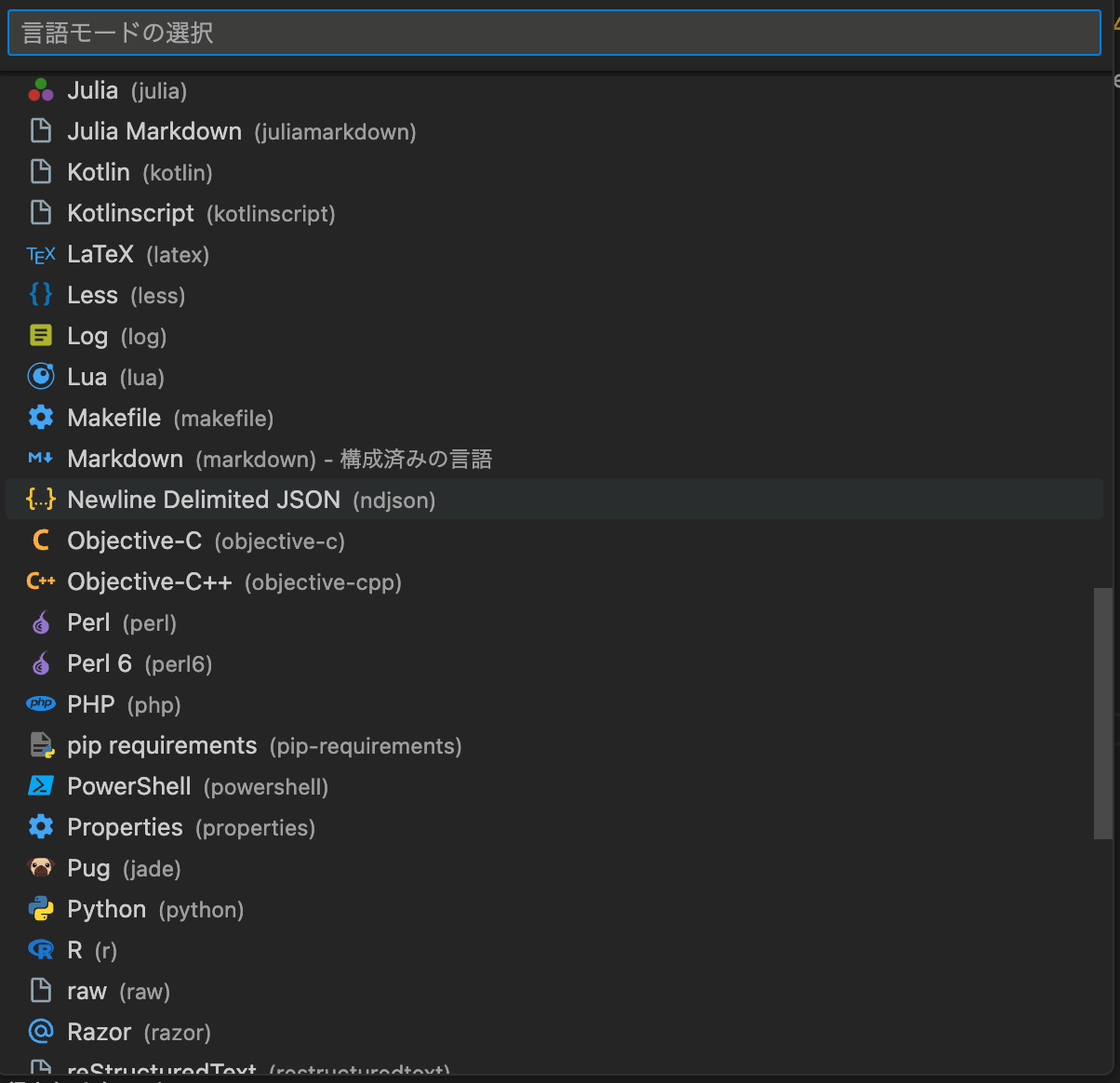
okathirasettings.json とかに書くとき
規定の言語識別子一覧
{
  "[abap]": {},
  "[bat]": {},
  "[bibtex]": {},
  "[clojure]": {},
  "[coffeescript]": {},
  "[c]": {},
  "[cpp]": {},
  "[csharp]": {},
  "[dockercompose]": {},
  "[css]": {},
  "[cuda-cpp]": {},
  "[diff]": {},
  "[dockerfile]": {},
  "[fsharp]": {},
  "[git-commit]": {},
  "[git-rebase]": {},
  "[go]": {},
  "[groovy]": {},
  "[handlebars]": {},
  "[haml]": {},
  "[html]": {},
  "[ini]": {},
  "[java]": {},
  "[javascript]": {},
  "[javascriptreact]": {},
  "[json]": {},
  "[jsonc]": {},
  "[latex]": {},
  "[less]": {},
  "[lua]": {},
  "[makefile]": {},
  "[markdown]": {},
  "[objective-c]": {},
  "[objective-cpp]": {},
  "[perl]": {},
  "[perl6]": {},
  "[php]": {},
  "[plaintext]": {},
  "[powershell]": {},
  "[jade]": {},
  "[pug]": {},
  "[python]": {},
  "[r]": {},
  "[razor]": {},
  "[ruby]": {},
  "[rust]": {},
  "[scss]": {},
  "[sass]": {},
  "[shaderlab]": {},
  "[shellscript]": {},
  "[slim]": {},
  "[sql]": {},
  "[stylus]": {},
  "[swift]": {},
  "[typescript]": {},
  "[typescriptreact]": {},
  "[tex]": {},
  "[vb]": {},
  "[vue]": {},
  "[vue-html]": {},
  "[xml]": {},
  "[xsl]": {},
  "[yaml]": {}
}
settings.json 自体は JSON with Comments なので "jsonc"
okathira一覧ページにはないやつ
要検証!
拡張機能や設定によって個人差がありそう
そもそも拡張子に対する言語の対応付けは個々人で変更できるっぽいので
{
  "[properties]": {}, // Properties: .npmrc とか .env もこれ
  "[ignore]": {}, // Ignore: .gitignore とか .*ignore 系
  "[editorconfig]": {}, // EditorConfig: .editorconfig
}このスクラップは2023/05/18にクローズされました