TauriでのHTTP要求に@tauri-apps/plugin-httpは極力避けるべき






TL;DR
- エラーがすべて
error sending request for url (http://…)という文字列になってしまう - バックエンドに処理を委譲し、
reqwestなどでリクエスト及び例外処理をさせるべき
例外動作の比較
@tauri-apps/plugin-httpを用いたフロントでのHTTP要求と、reqwestを用いたバックエンドでのHTTP要求で例外が発生したときの動作の違いを検証する。
事前準備
yarn、rustup、VSCodeインストール済み環境
プロジェクト作成
yarn create tauri-app
➤ YN0000: · Yarn 4.12.0
➤ YN0000: ┌ Resolution step
➤ YN0085: │ + create-tauri-app@npm:4.6.2, create-tauri-app-darwin-arm64@npm:4.6.2, and 10 more.
➤ YN0000: └ Completed
➤ YN0000: ┌ Fetch step
➤ YN0013: │ 2 packages were added to the project (+ 1.05 MiB).
➤ YN0000: └ Completed
➤ YN0000: ┌ Link step
➤ YN0000: └ Completed
➤ YN0000: · Done in 0s 127ms
? Project name (tauri-app) › tauri-http-test
? Identifier (com.***.tauri-http-test) ›
? Choose which language to use for your frontend ›
❯ TypeScript / JavaScript  (pnpm, yarn, npm, deno, bun)
  Rust
  .NET
? Choose your package manager ›
❯ yarn
  pnpm
  npm
  deno
  bun
? Choose your UI template ›
  Vanilla
❯ Vue  (https://vuejs.org/)
  Svelte
  React
  Solid
  Angular
  Preact
? Choose your UI flavor ›
❯ TypeScript
  JavaScript
Template created! To get started run:
  cd tauri-http-test
  yarn
  yarn tauri android init

For Desktop development, run:
  yarn tauri dev

For Android development, run:
  yarn tauri android dev
cd tauri-http-test
yarn
VSCode開発環境構築
- 推奨されている以下の拡張機能インストール
- TypeScript用フォーマッタ
- settings.json
{
  "[typescript][vue]": {
    "editor.defaultFormatter": "esbenp.prettier-vscode",
    "editor.formatOnSave": true,
    "prettier.tabWidth": 2,
    "editor.codeActionsOnSave": {
      "source.fixAll.eslint": "explicit",
      "source.organizeImports": "explicit"
    }
  },
  "[rust]": {
    "editor.defaultFormatter": "rust-lang.rust-analyzer",
    "editor.formatOnSave": true
  }
}
- launch.json
{
  "configurations": [
    {
      "type": "node",
      "request": "launch",
      "name": "Tauri Dev",
      "runtimeExecutable": "yarn",
      "runtimeArgs": ["tauri", "dev"],
      "cwd": "${workspaceFolder}",
      "console": "integratedTerminal"
    }
  ]
}
サンプルアプリの起動確認
F5で起動

検証用コードの実装
- @tauri-apps/plugin-httpインストール
yarn run tauri add http
- reqwestインストール
cd src-tauri
cargo add reqwest@0.12
- capabilities修正
{
  "$schema": "../gen/schemas/desktop-schema.json",
  "identifier": "default",
  "description": "Capability for the main window",
  "windows": ["main"],
  "permissions": [
    "core:default",
    "opener:default",
    {
      "identifier": "http:default",
      "allow": [{ "url": "http://localhost:*/*" }]
    }
  ]
}
※allowのパターンは実際の環境に合わせる。
- バックエンドでのHTTP処理実装
use reqwest::Client;
use std::{error::Error, time::Duration};

#[tauri::command]
async fn get_back(url: &str) -> Result<String, String> {
    let client = Client::builder()
        .timeout(Duration::from_secs(3))
        .build()
        .map_err(|e| e.to_string())?;
    match client.get(url).send().await {
        Ok(res) => match res.text().await {
            Ok(text) => Ok(text),
            Err(e) => Err(format!(
                "Failed to read body. URL:{} Source:{:?}",
                url,
                e.source()
            )),
        },
        Err(e) => Err(format!(
            "Failed to get. URL:{} Source:{:?}",
            url,
            e.source()
        )),
    }
}

#[cfg_attr(mobile, tauri::mobile_entry_point)]
pub fn run() {
    tauri::Builder::default()
        .plugin(tauri_plugin_http::init())
        .plugin(tauri_plugin_opener::init())
        .invoke_handler(tauri::generate_handler![get_back])
        .run(tauri::generate_context!())
        .expect("error while running tauri application");
}
- フロントエンドでのHTTP処理&バックエンド呼び出し実装
<script setup lang="ts">
import { invoke } from "@tauri-apps/api/core";
import { fetch } from "@tauri-apps/plugin-http";
import { ref } from "vue";

const url = ref("");
const responseMsg = ref("");

async function getFront() {
  try {
    const response = await fetch(url.value, {
      method: "GET",
      connectTimeout: 3000,
    });
    responseMsg.value = await response.text();
  } catch (e) {
    responseMsg.value = `Error type: ${typeof e} -> ${e}`;
  }
}

async function getBack() {
  try {
    const response = await invoke<string>("get_back", {
      url: url.value,
    });
    responseMsg.value = response;
  } catch (e) {
    responseMsg.value = `${e}`;
  }
}
</script>

<template>
  <main class="container">
    <p>
      <input id="url-input" v-model="url" placeholder="Input URL" />
    </p>
    <p>
      <button @click="getFront">Get by Frontend</button>
      <button @click="getBack">Get by Backend</button>
    </p>
    <p>{{ responseMsg }}</p>
  </main>
</template>
※<style scoped>以降は変更なし。
アプリ起動

存在しないアドレスへのHTTP要求
フロントエンドの場合
http://localhost:65535等と入力し、Get by Frontendを押下

Error type: string -> error sending request for url (http://localhost:65535/)となり固定エラーメッセージしか返ってこず、どのような例外が発生したかがわからない。
Errorインスタンスでもないただのstring型のため参考になる他のプロパティもなく、これ以上の情報を例外から得ることができない。
バックエンドの場合
Get by Backendを押下
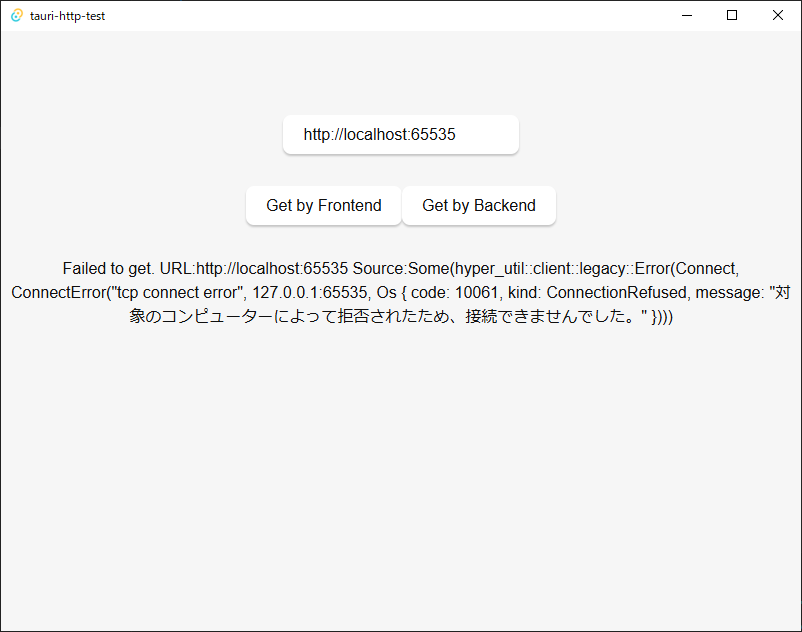
Failed to get. URL:http://localhost:65535 Source:Some(hyper_util::client::legacy::Error(Connect, ConnectError("tcp connect error", 127.0.0.1:65535, Os { code: 10061, kind: ConnectionRefused, message: "対象のコンピューターによって拒否されたため、接続できませんでした。" })))とメッセージはカスタマイズしているものの、e.source()の内容によりどのような例外が発生したかがわかる。
結論
どのような例外が発生したかを知る必要がないようなアプリであれば@tauri-apps/plugin-httpでも問題ないし実装も楽にはなるが、一切トレースすることはできない。
解析が必要になるようなアプリであれば@tauri-apps/plugin-httpは使わず、トレースしやすい例外を送出してくれるライブラリを使うべきである。
補足
error sending request for url (http://…)という例外がどのソースで吐かれているかは特定できなかった。(plugins-workspace/plugins/http at v2 · tauri-apps/plugins-workspace · GitHub)
また、より詳細の例外を吐くようなオプションも見当たらなかった。
一方ででreqwestのErrorは以下のように定義されている。
use std::error::Error as StdError;
・・・
pub struct Error {
    inner: Box<Inner>,
}

pub(crate) type BoxError = Box<dyn StdError + Send + Sync>;

struct Inner {
    kind: Kind,
    source: Option<BoxError>,
    url: Option<Url>,
}

impl Error {
    pub(crate) fn new<E>(kind: Kind, source: Option<E>) -> Error
    where
        E: Into<BoxError>,
    {
        Error {
            inner: Box::new(Inner {
                kind,
                source: source.map(Into::into),
                url: None,
            }),
        }
    }
・・・
impl StdError for Error {
    fn source(&self) -> Option<&(dyn StdError + 'static)> {
        self.inner.source.as_ref().map(|e| &**e as _)
    }
}
・・・
詳細は未確認だが、おそらくエラー発生個所でこのオブジェクトが作成され、その際にself.inner.sourceはエラー毎で異なるオブジェクトが設定されるので、例外送出時のエラーにバリエーションがあることになっていると思われる。
ちなみにサンプルでのself.inner.sourceの実体はhyper_util::client::legacy::Errorとなっている。
Discussion