firebase functions + tRPC メモ
 nbstsh
firebase functions に tRPC を乗っけたい。
手順をメモしていく。
nbstshfirebase init
firebase init
functions を init する。
nbstsh{
"name": "functions",
"scripts": {
"lint": "eslint --ext .js,.ts .",
"build": "tsc",
"build:watch": "tsc --watch",
"serve": "npm run build && firebase emulators:start --only functions",
"shell": "npm run build && firebase functions:shell",
"start": "npm run shell",
"deploy": "firebase deploy --only functions",
"logs": "firebase functions:log"
},
"engines": {
"node": "18"
},
"main": "lib/index.js",
"dependencies": {
"firebase-admin": "^12.1.0",
"firebase-functions": "^5.0.0"
},
"devDependencies": {
"@typescript-eslint/eslint-plugin": "^5.12.0",
"@typescript-eslint/parser": "^5.12.0",
"eslint": "^8.9.0",
"eslint-config-google": "^0.14.0",
"eslint-plugin-import": "^2.25.4",
"firebase-functions-test": "^3.1.0",
"typescript": "^4.9.0"
},
"private": true
}
tRPC setup
quickstart に従って tRPC v11 を setup していく。
nbstshinstall
2024/10/09 時点では、デフォで v10 が install されるので明示的に @next 指定。
npm install @trpc/server@next
  "dependencies": {
+    "@trpc/server": "^11.0.0-rc.566",
    "firebase-admin": "^12.1.0",
    "firebase-functions": "^5.0.0"
  },
app router 作成
import { initTRPC } from '@trpc/server';

/**
 * Initialization of tRPC backend
 * Should be done only once per backend!
 */
const t = initTRPC.create();
/**
 * Export reusable router and procedure helpers
 * that can be used throughout the router
 */
export const router = t.router;
export const publicProcedure = t.procedure;
import { publicProcedure, router } from './trpc';

const appRouter = router({
  hello: publicProcedure.query(() => {
    return 'Hello, world!';
  }),
});

// Export type router type signature,
// NOT the router itself.
export type AppRouter = typeof appRouter;
firebase functions に tRPC 組み込み
こいらの issue を参考にする
import { createHTTPHandler } from '@trpc/server/adapters/standalone';
import { onRequest } from 'firebase-functions/v2/https';
import { appRouter } from './trpc';

export const trpc = onRequest(createHTTPHandler({ router: appRouter }));
build したところ以下エラー出た
node_modules/@trpc/server/dist/adapters/standalone.d.ts:10:8 - error TS1192: Module '"http"' has no default export.

10 import http from 'http';
          ~~~~
esModuleInterop 有効化
tsconfig.json で esModuleInterop を true に設定すればOK。
{
  "compilerOptions": {
    "module": "commonjs",
    "noImplicitReturns": true,
    "noUnusedLocals": true,
    "outDir": "lib",
    "sourceMap": true,
    "strict": true,
    "target": "es2017",
+    "esModuleInterop": true
  },
  "compileOnSave": true,
  "include": ["src"]
}
動作確認
emulator 実行
npm run serve
問題なく動いた
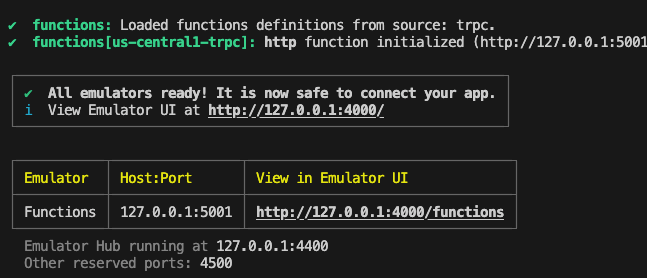
emulator endpoint から trpc router ににアクセスしてみる。(http://127.0.0.1:5001/your-project-id/us-central1/trpc/hello)

nbstshdeploy も問題なし
nbstshclient side への型の共有どうする?
monorepo
monorepo であれば、AppRouter の型を export して、client side から import できるようにすればOK
poly repo
poly repo は工夫が必要。公式 Doc に example repo ("Separate backend & frontend repositories
") が乗ってる。
server package で tRPC の型を export
tsup で client-side で必要になる型を export する entrypoint file を bundle してる。
server の entry point (src/index.ts)とは別に、"client-side 向けの tRPC の型を export する package" としての entry point を用意して、外部から package として利用できるようにしているっぽい?
client package で tRPC の型を import
script を実行して server package で用意した型を取得して内部にコピーしてるみたい。
Octkit (GitHub API Sdk) で repository 指定して file をコピーしてる↓
nbstshコピーしてるなら、server package の package.json で entrypoint として指定する必要なくないか...? library としても使えるようにしてるのか...?
nbstshやっぱりそうだな。
Easily set up a local development environment
- fork & clone repo
- npm install
- make changes to tRPC API & push - new package is released 📦 npm version
- install newly released package npm install trpc-api-boilerplate in any frontend app 🚀
基本は package として publish して import でOK
Avoid publishing package?
If for whatever reason publishing a package is not an option:
- privacy concerns
- faster development iterations - skip CI
- ...
Use repository to share types by running npm run trpc-api-export and push code changes.
In your frontend app consume types by running npm run trpc-api-import.
しかし、何かしらの理由で publish できない場合は、script 実行による import も可能だよ、とのこと
nbstshmonorepo 環境で利用する
pnpm workspace の monorepo 環境を用意。
server side は firebase functions とし、client side は rsbuild で作る。
nbstshserver package - Export tRPC types
型定義を export するための entry file を作成。
import type { AppRouter } from './trpc';

export type { AppRouter };
.d.ts を生成するよう tsconfig 変更
{
	"compilerOptions": {
		"module": "commonjs",
		"noImplicitReturns": true,
		"noUnusedLocals": true,
		"outDir": "lib",
		"sourceMap": true,
		"strict": true,
		"target": "es2017",
		"esModuleInterop": true,
+		"declaration": true,
+		"declarationMap": true
	},
	"compileOnSave": true,
	"include": ["src"]
}
	"main": "lib/index.js",
+	"types": "lib/trpc-types.d.ts",
trpc-types.ts が import された際に参照されるようにする。
nbstshclient package - Setup tRPC
tRPC + tanstack query で setup
install
pnpm add @trpc/client@next @trpc/react-query@next @tanstack/react-query@latest
pnpm add --save-dev @trpc/server@next
Add server package as devDependencies
  "devDependencies": {
    //...
+    "server-package-name": "workspace:*",
  }
Create tRPC hooks
import { createTRPCReact, httpBatchLink } from '@trpc/react-query';
import type { AppRouter } from 'server';

export const trpc = createTRPCReact<AppRouter>();

export const trpcClient = trpc.createClient({
  links: [
    httpBatchLink({
      url: import.meta.env.PUBLIC_TRPC_URL,
    }),
  ],
});
trpc Provider
import { QueryClient, QueryClientProvider } from '@tanstack/react-query';
import { trpc, trpcClient } from './uttils/trpc';

const queryClient = new QueryClient();

const Providers: React.FC<{ children: React.ReactNode }> = ({ children }) => {
  return (
    <trpc.Provider client={trpcClient} queryClient={queryClient}>
      <QueryClientProvider client={queryClient}>{children}</QueryClientProvider>
    </trpc.Provider>
  );
};

export default Providers;
import { QueryClient, QueryClientProvider } from '@tanstack/react-query';
import { trpc, trpcClient } from './uttils/trpc';

const queryClient = new QueryClient();

const Providers: React.FC<{ children: React.ReactNode }> = ({ children }) => {
  return (
    <trpc.Provider client={trpcClient} queryClient={queryClient}>
      <QueryClientProvider client={queryClient}>{children}</QueryClientProvider>
    </trpc.Provider>
  );
};

export default Providers;
import Providers from './providers';

const App = () => {
  return (
    <Providers>
      <AppContent />
    </Providers>
  );
};

export default App;
動作確認
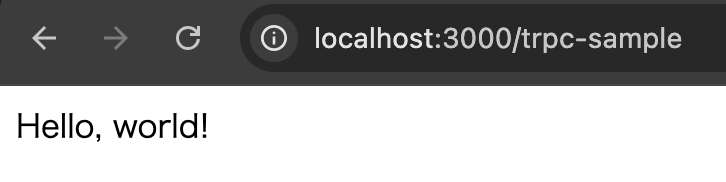
問題なく動いていること確認
function TrpcSample() {
  const [data] = trpc.hello.useSuspenseQuery();

  return <div>{data}</div>;
}