⚡
Azure OpenAI 40days Day8 — Functions × SignalR でリアルタイム配信(ローカル完走)





✍️ TL;DR
- 到達点: Functions(Python v1)+SignalR で LLM 応答を逐次配信し、ブラウザで体感できる状態にした
- 学び: SignalR 出力は
func.Out[str]に JSON、negotiateは **HTTP out (return)** 必須、`" - コスト: テストは短文+
gpt4o-mini-chatで極小(入出力トークン×単価)
🧭 今日のゴール
-
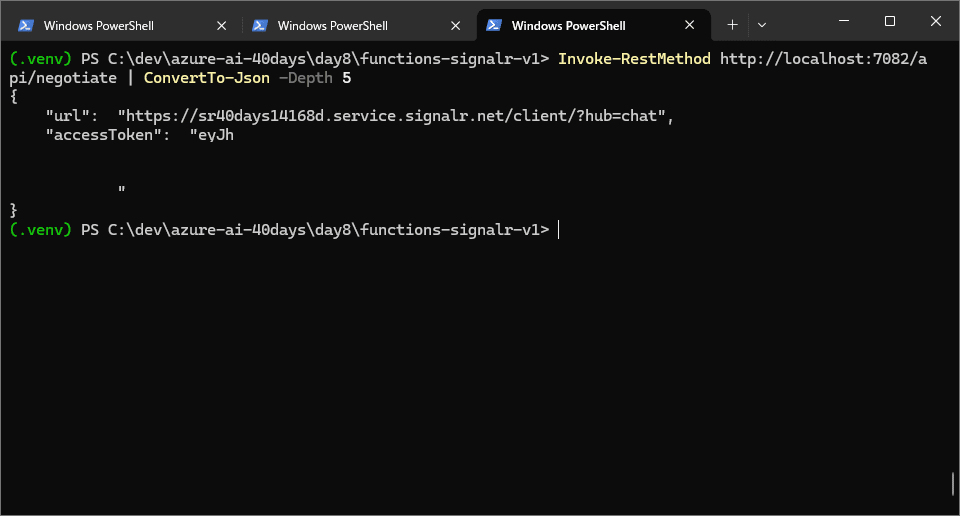
negotiateで{url, accessToken}を返す -
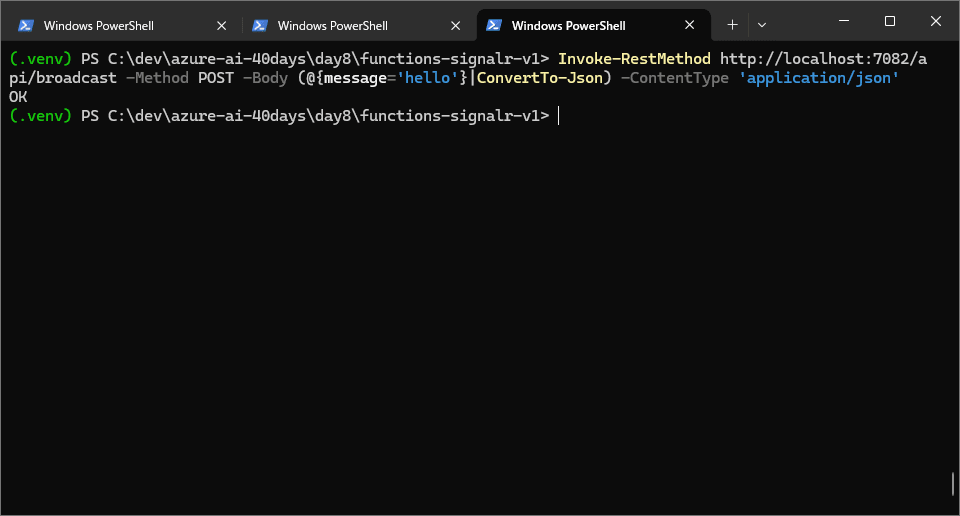
broadcastでメッセージ配信(200 OK) - ブラウザで トークンが少しずつ表示される
🎯 目的と背景
- 目的: Azure Functions から Azure OpenAI のストリームを受け、SignalR でフロントへ リアルタイム配信する最小構成を作る。
- 背景: 40days カリキュラムの中盤。Day8 は「リアルタイム応答」の土台作り。以降の RAG/監視に転用できるよう、動く最小に集中。
🛰️ SignalRとは
Azure SignalR Service は、WebSocket ベースのリアルタイム双方向通信を PaaS で提供するサービスです。サーバーのスケールや接続維持を任せ、アプリ側は「イベント(ターゲット)にメッセージを投げる/受け取る」だけに集中できます。
キーポイント
-
通信方式: 優先は WebSockets。クライアント側(
@microsoft/signalr)が自動で SSE/ロングポーリングにフォールバック。 - モード: 本ハンズオンは Serverless を使用。アプリサーバーは常時接続を持たず、Functions から出力バインディングで発行する構成に最適。
- 概念: Hub(論理的なチャネル)、Connection(クライアント接続)、Target(クライアントで受けるイベント名)、Groups(任意の購読グループ)。
Functions 連携(今回の実装と対応)
-
negotiate(HTTP +signalRConnectionInfo入力バインディング): クライアント用の{url, accessToken}を返す。 - フロント(
index.html):HubConnectionBuilder().withUrl(nego.url,{ accessTokenFactory: () => nego.accessToken })で接続。 -
broadcast(HTTP +signalR出力バインディング):[{ "target":"token", "arguments":[ text ] }]という JSON をfunc.Out[str]に流す → クライアントはconn.on("token", handler)で受信。 -
chat_streamは Azure OpenAI のストリームを読み、トークンごとに/broadcastへ転送。
ユースケース
- チャット、ライブダッシュボード、共同編集、通知・プッシュ、ゲームのロビー更新など、秒間多数の同報が必要な場面。
ハマりどころ
- Serverless 以外にすると Functions 連携の動作が不一致になりがち → Serverless を明示。
-
function.jsonのnameが空だとバインディングエラー("binding name is invalid")。 - トークン(
accessToken)をブラウザに露出するため、リーク禁止&有効期限は短い前提設計。
🔧 手順(そのまま実行可)
0) 前提
-
.env(既存)
AZURE_OPENAI_ENDPOINT=https://japaneast.api.cognitive.microsoft.com/
AZURE_OPENAI_KEY=****
AZURE_OPENAI_DEPLOYMENT=gpt4o-mini-chat
AZURE_OPENAI_API_VERSION=2024-02-15-preview
- Azurite(Storage エミュレータ)を起動:
azurite --silent
1) Functions (v1) 雛形
cd C:\dev\azure-ai-40days\day8
mkdir .\functions-signalr-v1; cd .\functions-signalr-v1
func init . --python --model V1
func new --name negotiate   --template "HTTP trigger" --authlevel "anonymous"
func new --name broadcast   --template "HTTP trigger" --authlevel "anonymous"
func new --name chat_stream --template "HTTP trigger" --authlevel "anonymous"
host.json
{
  "version": "2.0",
  "extensionBundle": { "id": "Microsoft.Azure.Functions.ExtensionBundle", "version": "[4.0.0, 5.0.0)" },
  "functions": [ "negotiate", "broadcast", "chat_stream" ]
}
local.settings.json(抜粋)
{
  "IsEncrypted": false,
  "Values": {
    "AzureWebJobsStorage": "UseDevelopmentStorage=true",
    "FUNCTIONS_WORKER_RUNTIME": "python",
    "AzureSignalRConnectionString": "Endpoint=...;AccessKey=...;Version=1.0;",
    "FUNCTIONS_BASE_URL": "http://localhost:7082"
  },
  "Host": { "LocalHttpPort": 7082, "CORS": "*", "CORSCredentials": false }
}
2) negotiate — 接続情報を返す
negotiate/function.json
{
  "scriptFile": "__init__.py",
  "entryPoint": "main",
  "bindings": [
    { "authLevel": "anonymous", "type": "httpTrigger", "direction": "in", "name": "req", "methods": ["get","post"] },
    { "type": "signalRConnectionInfo", "name": "connectionInfo", "hubName": "chat", "connectionStringSetting": "AzureSignalRConnectionString", "direction": "in" },
    { "type": "http", "direction": "out", "name": "$return" }
  ]
}
negotiate/__init__.py
import azure.functions as func

def main(req: func.HttpRequest, connectionInfo: str) -> func.HttpResponse:
    return func.HttpResponse(connectionInfo, mimetype="application/json")
3) broadcast — SignalR に配信
broadcast/function.json
{
  "scriptFile": "__init__.py",
  "entryPoint": "main",
  "bindings": [
    { "authLevel": "anonymous", "type": "httpTrigger", "direction": "in", "name": "req", "methods": ["post"] },
    { "type": "signalR", "direction": "out", "name": "signalRMessages", "hubName": "chat", "connectionStringSetting": "AzureSignalRConnectionString" },
    { "type": "http", "direction": "out", "name": "$return" }
  ]
}
broadcast/__init__.py
import json
import azure.functions as func

def main(req: func.HttpRequest, signalRMessages: func.Out[str]) -> func.HttpResponse:
    try:
        body = req.get_json()
    except ValueError:
        body = {}
    text = body.get("message", "")
    if text:
        payload = [ { "target": "token", "arguments": [ text ] } ]
        signalRMessages.set(json.dumps(payload))
    return func.HttpResponse("OK", status_code=200)
4) chat_stream — AOAI から逐次受け取り、/broadcast に転送
chat_stream/function.json
{
  "scriptFile": "__init__.py",
  "entryPoint": "main",
  "bindings": [
    { "authLevel": "anonymous", "type": "httpTrigger", "direction": "in", "name": "req", "methods": ["post"] },
    { "type": "http", "direction": "out", "name": "$return" }
  ]
}
chat_stream/__init__.py
import os, json, requests
from dotenv import load_dotenv
from openai import AzureOpenAI
import azure.functions as func

# ルート .env を明示ロード(ローカルのみ)
load_dotenv(r"C:\\dev\\azure-ai-40days\\.env")

client = AzureOpenAI(
    api_key=os.getenv("AZURE_OPENAI_KEY"),
    api_version=os.getenv("AZURE_OPENAI_API_VERSION", "2024-02-15-preview"),
    azure_endpoint=os.getenv("AZURE_OPENAI_ENDPOINT")
)

def main(req: func.HttpRequest) -> func.HttpResponse:
    data = req.get_json() if req.get_body() else {}
    prompt = data.get('prompt') or '日本語で自己紹介して'
    base = os.getenv('FUNCTIONS_BASE_URL', 'http://localhost:7082')
    bcast = f"{base}/api/broadcast"

    stream = client.chat.completions.create(
        model=os.getenv('AZURE_OPENAI_DEPLOYMENT', 'gpt4o-mini-chat'),
        stream=True,
        messages=[{'role':'user','content': prompt}]
    )
    for chunk in stream:
        delta = chunk.choices[0].delta.content if chunk.choices and chunk.choices[0].delta else None
        if delta:
            try:
                requests.post(bcast, json={'message': delta}, timeout=5)
            except Exception:
                pass
    requests.post(bcast, json={'message': '\n\n✅ 完了'}, timeout=5)
    return func.HttpResponse(json.dumps({'ok': True}), mimetype='application/json')
5) フロント(最小)
web-clean/index.html
<!doctype html>
<meta charset="utf-8" />
<title>Day8 Realtime Chat (clean)</title>
<style>
  body { font-family: ui-sans-serif, system-ui; padding: 20px; }
  #log { padding:12px; border:1px solid #ccc; border-radius:8px; min-height:160px; white-space:pre-wrap; }
</style>
<h1>Realtime Tokens (clean)</h1>
<label>Base URL:</label>
<input id="base" value="http://localhost:7082" style="width:280px"/>
<br/><br/>
<input id="prompt" value="俳句で自己紹介して" style="width:60%"/>
<button id="send">送信</button>
<button id="clear">クリア</button>
<pre id="log"></pre>
<script src="https://cdn.jsdelivr.net/npm/@microsoft/signalr@9.0.6/dist/browser/signalr.min.js"></script>
<script>
(async () => {
  const $ = (id) => document.getElementById(id);
  const log = (t) => { $("log").textContent += t; };
  $("clear").onclick = () => { $("log").textContent = ""; };
  async function connect() {
    const base = $("base").value.replace(/\/$/, "");
    const nego = await fetch(base+"/api/negotiate",{method:"POST"}).then(r=>r.json());
    const conn = new signalR.HubConnectionBuilder()
      .withUrl(nego.url,{ accessTokenFactory: () => nego.accessToken })
      .withAutomaticReconnect().build();
    conn.on("token", t => log(t));
    await conn.start();
    return { base };
  }
  let ctx = null; try { ctx = await connect(); } catch(e){ log("❌ "+e.message+"\n"); }
  $("send").onclick = async () => {
    const base = $("base").value.replace(/\/$/, "");
    const p = $("prompt").value; if(!p) return;
    log(">> "+p+"\n\n");
    await fetch(base+"/api/chat_stream",{ method:"POST", headers:{"Content-Type":"application/json"}, body: JSON.stringify({prompt:p})});
  };
})();
</script>
✅ 検証結果
-
リアルタイム配信の様子(必須)


-
negotiate の成功(任意)
-
Functions ホストの起動ログ(任意)

-
broadcast 200 OK(オプション)
🧯 つまずき&対処(実録)
-
binding name is invalid→function.jsonの"name"が空/SignalR 出力で$returnを使用 → SignalR 出力はsignalRMessagesにし、HTTP だけ$return。 -
AttributeError: azure.functions.SignalRMessage→ Python にそのクラス無し →func.Out[str]に JSON をset()。 -
TypeError: unable to encode TypedData (HttpResponse)→ HTTP out バインディングが無い →negotiateに$returnを追加。 -
127.0.0.1:10000 接続拒否→ Azurite 未起動。 - PowerShell 5.1 で
Test-Jsonなし →ConvertFrom-Jsonで代替。 -
"$return"が壊れる →@' ... '@(単一引用ヒアストリング)で JSON を保存。
💰 コストメモ
- SignalR Free/F1: ¥0(制限内)
- Functions (Consumption): 実行/GB秒で微少
- Azure OpenAI:
(入力+出力)トークン×単価 - 削減:
gpt4o-mini-chat継続、プロンプト短縮、max_tokens控えめ、テストは短文
📌 Day8でやったこと振り返り
- Functions(v1)に negotiate / broadcast / chat_stream を実装
- OpenAI のストリームを受け、SignalR でブラウザへ 逐次配信
-
web-clean/index.htmlで 体感できる UI を用意
🔮 次回の予告
- Day9:チャットUI改善(履歴の保持/送信中インジケーター/見た目の改善)
📚 参考リンク
- Azure Functions(Python)HTTP トリガー
- Azure SignalR Service と Functions バインディング
- Azure OpenAI Chat Completions(ストリーミング)
Discussion