






はじめに
Microsoft Azure 環境のセキュリティ対策の一環として、AWS で言うところの CloudTrail 証跡ログを使ったログ監視と同じようなことをするためには、どのログを使って何を監視すれば良いのかを考える機会がありました。今回はその際に検討した内容をまとめています。

本投稿で説明する内容
Azure で取得できる監査ログを Elastic Agent [1] で Elastic Cloud に取り込み、そのログを Kibana で分析できるようにします。
本投稿の対象ログ
そもそも CloudTrail 証跡ログでできる監視と同じレベルの監視とはどのようなもので、それにはどのログが必要になるのかを考えるところから調べる必要がありました。監視は Elastic SIEM [2] で実施することが決まっていました。
事前定義された監視ルールの調査
Elastic SIEM には Elastic 社によって事前定義された監視ルールが用意されています。
Cloud のカテゴリの中から「Azure」「Entra ID」「Microsoft Entra ID」などの関連しそうなキーワードが含まれるルールを中心に調査しました。
ルール名のリンクを開くと Rule indices に利用するログの種類を判断する上で有益な情報が得られます(下記画面だと logs-azure-signinlogs-* と記載されているため、サインインログであることがわかります)。

Rule indices
対象と思われるルールに記載されていたインデックス名は以下の通りでした。
- logs-azure.*
- logs-azure.activitylogs-*
- logs-azure.auditlogs-*
- logs-azure.signinlogs-*
- logs-azure.platformlogs-*
- logs-azure.graphactivitylogs-*
- logs-azure.identity_protection-*
Azure で使えそう監査ログに関する調査
次は logs-azure. から始まるインデックスに格納される Azure 監査ログにはどのようなものがあるのかを調査しました。
下記ページに Elastic Agent を使って取得可能な Azure のログについてまとまっています。
優先度の高そうな監視ルールの選定および調査した結果、今回は logs-azure.activitylogs, logs-azure.auditlogs, logs-azure.signinlogs を使うことにしました。
整理した結果、下記表のようになりました。
| Azure サービス名 | ログ名称 | 説明 | インデックス名 |
|---|---|---|---|
| Azure Monitor | アクティビティログ(Administrative) | Azure Resource Manager を通じて実行されるすべての作成、更新、削除、アクションの操作を記録します | logs-azure.activitylogs |
| Azure Monitor | アクティビティログ(Security) | Microsoft Defender for Cloud によって生成されたセキュリティアラートを記録します | logs-azure.activitylogs |
| Azure Monitor | アクティビティログ(ServiceHealth) | Azure サービスの正常性に関するイベントを記録します | logs-azure.activitylogs |
| Azure Monitor | アクティビティログ(Alert) | Azure アラートのアクティベーションを記録します | logs-azure.activitylogs |
| Azure Monitor | アクティビティログ(Recommendation) | Azure Advisor によって生成される推奨事項を記録します | logs-azure.activitylogs |
| Azure Monitor | アクティビティログ(Policy) | Azure Policy による評価と強制アクションの結果を記録します | logs-azure.activitylogs |
| Azure Monitor | アクティビティログ(Autoscale) | サブスクリプション内で定義された自動スケール設定に基づく、自動スケールエンジンの動作を記録します | logs-azure.activitylogs |
| Azure Monitor | アクティビティログ(ResourceHealth) | 個別リソースの正常性イベントを記録します | logs-azure.activitylogs |
| Entra ID | AuditLogs | Entra ID テナント内で発生したすべてのリソース(IAM やアプリ登録など)変更を記録する監査証跡になります | logs-azure.activitylogs |
| Entra ID | SignInLogs | ユーザーによる Entra の対話型サインイン(パスワード入力、MFA利用など)アクティビティを記録します | logs-azure.signinlogs |
| Entra ID | NonInteractiveUserSignInLogs | ユーザーに代わって実行される非対話型サインイン(トークン更新や SSO など)アクティビティを記録します | logs-azure.signinlogs |
| Entra ID | ServicePrincipalSignInLogs | カスタムアプリや 3rd SaaS のサービスプリンシパルによる非対話型サインインアクティビティを記録します | logs-azure.signinlogs |
| Entra ID | ManagedIdentitySignInLogs | Azure が資格情報を自動管理するマネージド ID によるサインインアクティビティを記録します | logs-azure.signinlogs |
| Entra ID | ProvisioningLogs | Entra ID と MS 以外のサービス間でユーザーやグループの自動プロビジョニング(作成・更新・削除)を記録します | (本件調査対象外) |
| Entra ID | ADFSSignInLogs | Active Directory Federation Services(AD FS)を通じた認証イベントを記録します | - |
| Entra ID | RiskyUsers | Entra ID Protection の Risky users(ユーザーのリスク状態)レポートのソースとなるログを記録します | logs-azure.identity_protection |
| Entra ID | UserRiskEvents | Entra ID Protection の Risk detections(リスク検出イベント詳細)レポートのソースとなるログを記録します | logs-azure.identity_protection |
| Entra ID | NetworkAccessTrafficLogs | Entra Internet Access / Entra Private Access を通過するすべてのネットワークトラフィックログになります | - |
| Entra ID | RiskyServicePrincipals | Workload Identity Protection で利用されるサービスプリンシパルの集約されたリスク状態を記録します | - |
| Entra ID | ServicePrincipalRiskEvents | Workload Identity Protection で利用される個別のサービスプリンシパルリスク検出イベントを記録します | - |
| Entra ID | EnrichedOffice365AuditLogs | Microsoft Global Secure Access サービスの一部として提供される強化された Office 365 監査ログになります | - |
| Entra ID | MicrosoftGraphActivityLogs | Microsoft Graph サービスがテナントに対して受信・処理したすべての HTTP リクエストの監査証跡になります | logs-azure.graphactivitylogs |
| Entra ID | RemoteNetworkHealthLogs | Global Secure Access を通じて構成されたリモートネットワークの健全性を監視するためのログになります | - |
| Entra ID | NetworkAccessAlerts | ネットワークアクセスに関連するセキュリティアラートと異常を記録します | - |
| Entra ID | NetworkAccessConnectionEvents | ネットワークトラフィック接続イベントの詳細を記録します | - |
| Entra ID | MicrosoftServicePrincipalSignInLogs | MS サービスのサービスプリンシパルによる非対話型サインインアクティビティを記録します | - |
| Entra ID | AzureADGraphActivityLogs | テナント内のリソースに対して Azure Active Directory Graph に対して行われた レガシ API 要求の詳細を記録します | - |
| Entra ID | NetworkAccessGenerativeAIInsights | ネットワークアクセスを介して生成された生成 AI の相互作用によって生成されるログになります | - |
前提
・取得するログは Azure Monitor アクティビティログ[3]、Entra ID 監査ログ[4] です
・上記ログを取得する上で Azure Logs Integration (v2 preview)[5] を利用します
・Elastic Agent を稼働させる Azure VM は Rocky Linux で作成済みです
・Elastic Cloud(Elasticsearch と Kibana)の Deployment は事前作成済みです
利用環境
各ソフトウェアのバージョンは以下の通りです。
| Product / Service | Version |
|---|---|
| Azure Logs Integration (v2 preview) | 1.28.7 |
| Elastic Agent | 8.17.10 |
| Linux OS | Rocky Linux 9.6 |
| Elastic Cloud | 8.17.2 (Subscription level: Gold) |
| Azure Region | (Asia Pacific) Japan East |
【構成図】
・Azure 監査ログはいずれも診断設定から Event Hubs に出力します
・Event Hubs に蓄積されたログを Elastic Agent を取得して Elastic Cloud に投入します
・Elastic Agent がどこまでログを取り込んだかを Azure Blob Storage に記録します
・Elastic Cloud では Elastic Agent からの通信を IP filter でホワイトリスト許可しています
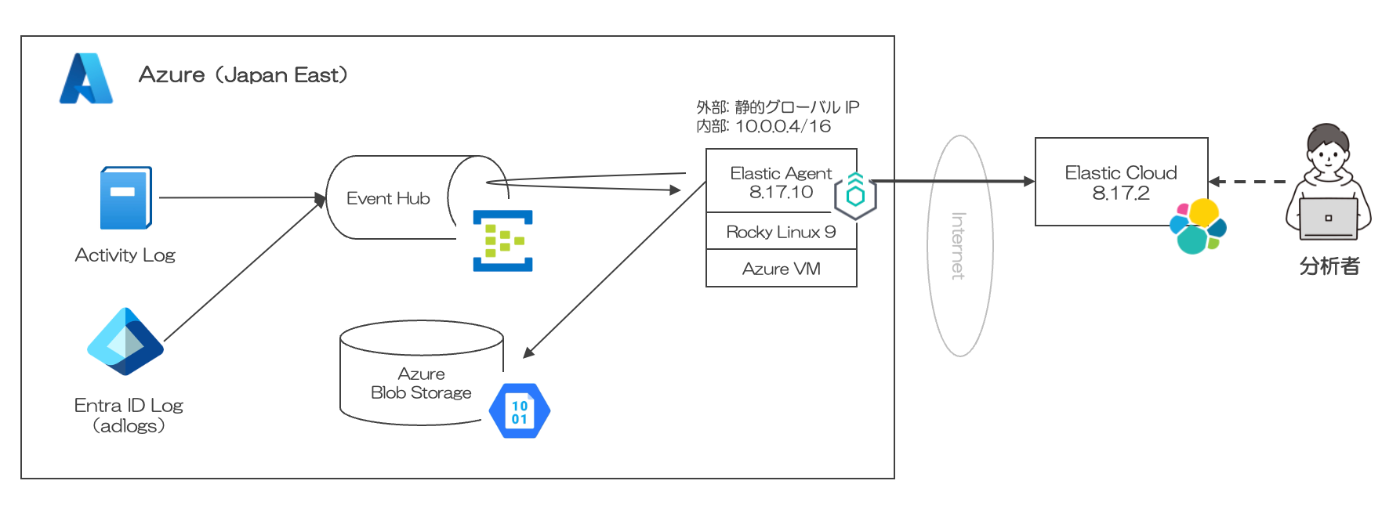
全体構成
・Azure Logs Integration (v2 preview) を利用すると Event Hubs は 1 つで済みます
・Azure Blob Storage のストレージコンテナも同様に 1 つで済みます

ログの流れ
実施内容
以下、実施手順になります。
- Event Hubs の設定
- Azure Blob Storage の設定
- 診断設定によるログ出力設定
- Elastic Agent での取得設定
- Elastic Cloud でのログ検索
1. Event Hubs の設定
Azure の監査ログを転送するため、イベントハブを作成します。
(Event Hubs の用語や機能の基礎知識については、参考 URL を参照ください)
【参考】
・Azure Event Hubs の機能と用語(公式ページ)
・Azure Event Hubs をいい感じにわかりやすくしたい
・Event Hubs を構成する(公式ページ)
1-1. リソースプロバイダーの登録
まず、Azure Portal にログインし、[サブスクリプション] を開きます。
利用するサブスクリプション名を開き、[設定] > [リソースプロバイダー] を選択します。
一覧から microsoft.insights を見つけ、[登録] します。
(状態が Registered になれば OK です)

microsoft.insightsの登録
1-2. 名前空間の作成
Azure Portal のホームで [Event Hubs] を選択し、[+作成] ボタンをクリックします。

名前空間の作成
下記の設定項目を設定し、画面下部の [確認および作成] ボタンを押します。
【設定内容】
| 項目 | 設定値 | 備考 |
|---|---|---|
| サブスクリプション | (任意) | 利用するサブスクリプションを指定 |
| リソースグループ | (任意) | 利用するリソースグループを指定 |
| 名前空間の名前 | azure-test2 | グローバルに一意であること |
| 場所 | (Asia Pacific)Japan East | 好きなリージョンを指定 |
| 価格レベル | Basic | 検証のため一番低いレベルを指定 |
| スループットユニット | 1 | デフォルト値のまま |
数分ほどすると 「デプロイが完了しました」と表示されます。
Event Hubs の中に作成した名前空間が表示(状態: アクティブ)されていれば OK です。
[共有アクセスポリシー] を開き、RootManageShareAccessKey をクリックします。
右側に開いた画面で [プライマリ接続文字列] をクリップボードにコピーしておきます。

プライマリ接続文字列のコピー
【参考】
・Event Hubs の接続文字列の取得(公式ページ)
1-3. イベントハブの作成
作成した名前空間を開き、[概要] ページの [+イベントハブ] ボタンをクリックします。

イベントハブの作成
下記の設定項目を設定し、画面下部の [確認および作成] ボタンを押します。
【設定内容】
| 項目 | 設定値 | 備考 |
|---|---|---|
| 名前 | azure-test2 | 好きな名前を入力 |
| パーティション数 | 1 | デフォルト値のまま |
| クリーンアップポリシー | 削除 | デフォルト値のまま |
| 保持時間(時間) | 1 | デフォルト値のまま |
[コンシューマーグループ] を開き、デフォルトで存在している名前($Default)をメモします。
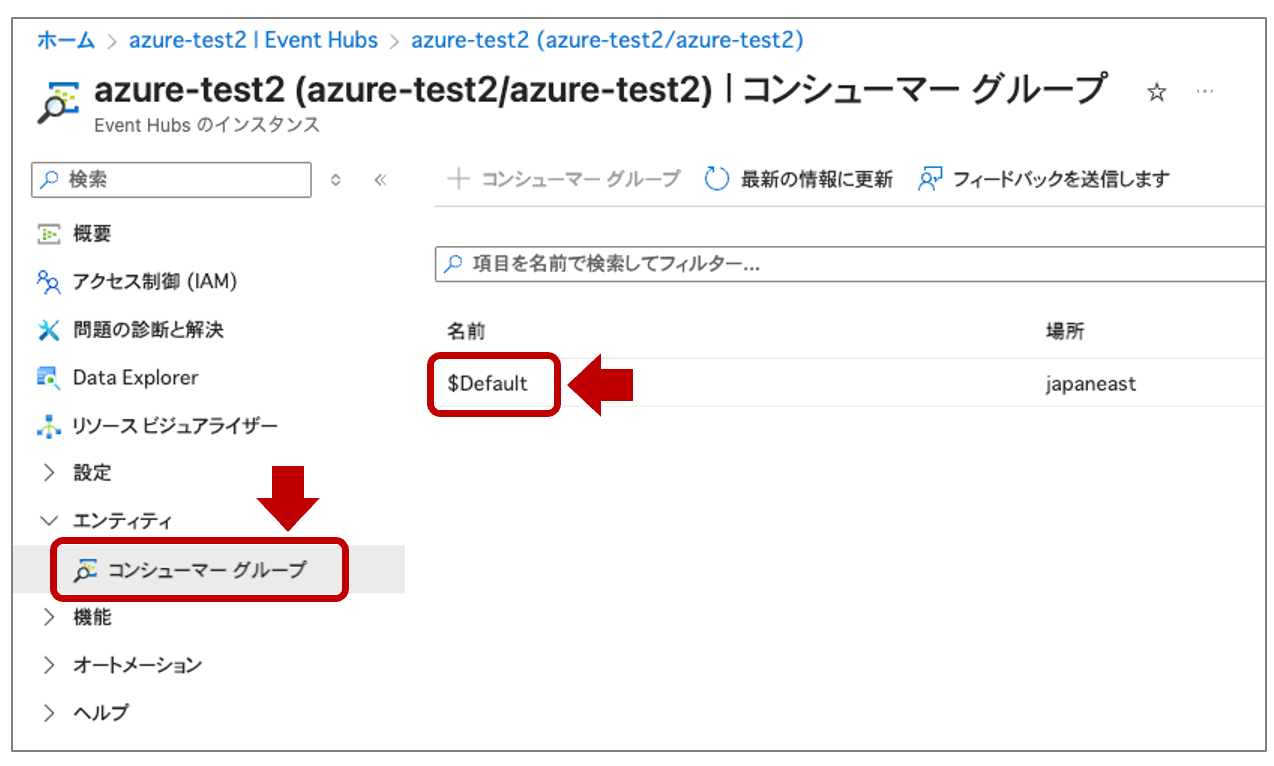
コンシューマーグループ名をメモ
2. Azure Blob Storage の設定
Elastic Agent が Event Hubs に蓄積しているログをどこまで読み取ったかを管理するオフセットファイルの保存場所(ストレージコンテナー)を作成します。
【参考】
・Azure Blob Storageとは?3種類のリソースやメリット・料金を解説
・Azure Portal を介した Azure Blob Storage の使い方(初心者向け)
・ストレージアカウントアクセスキーを管理する(公式ページ)
2-1. ストレージアカウントの作成
Azure Portal にアクセスします。
ホームで [ストレージアカウント] を選択し、[+作成] ボタンをクリックします。

ストレージアカウントの作成1
下記の設定項目を設定し、画面下部の [確認および作成] ボタンを押します。
【設定内容】
| 項目 | 設定値 | 備考 |
|---|---|---|
| サブスクリプション | (任意) | これまでの手順と同じものを利用 |
| リソースグループ | (任意) | これまでの手順と同じものを利用 |
| ストレージアカウント名 | azurelogtest99 | グローバルに一意であること |
| 地域 | (Asia Pacific)Japan East | これまでの手順と同じものを利用 |
| 優先ストレージの種類 | その他(テーブルとキュー) | オフセットとしての利用のため |
| パフォーマンス | Standard | 汎用 v2 アカウントで良いため |
| 冗長性 | ローカル冗長ストレージ(LRS) | 検証のため一番低いレベルを指定 |
作成後、ストレージアカウントの [セキュリティとネットワーク] > [アクセスキー] を開き、[キー] を表示した上でコピーします。

ストレージアカウントキーのコピー
2-2. ストレージコンテナの作成
作成したストレージアカウントを選択します。
[コンテナー] を開き、[+コンテナーの追加] ボタンをクリックします。
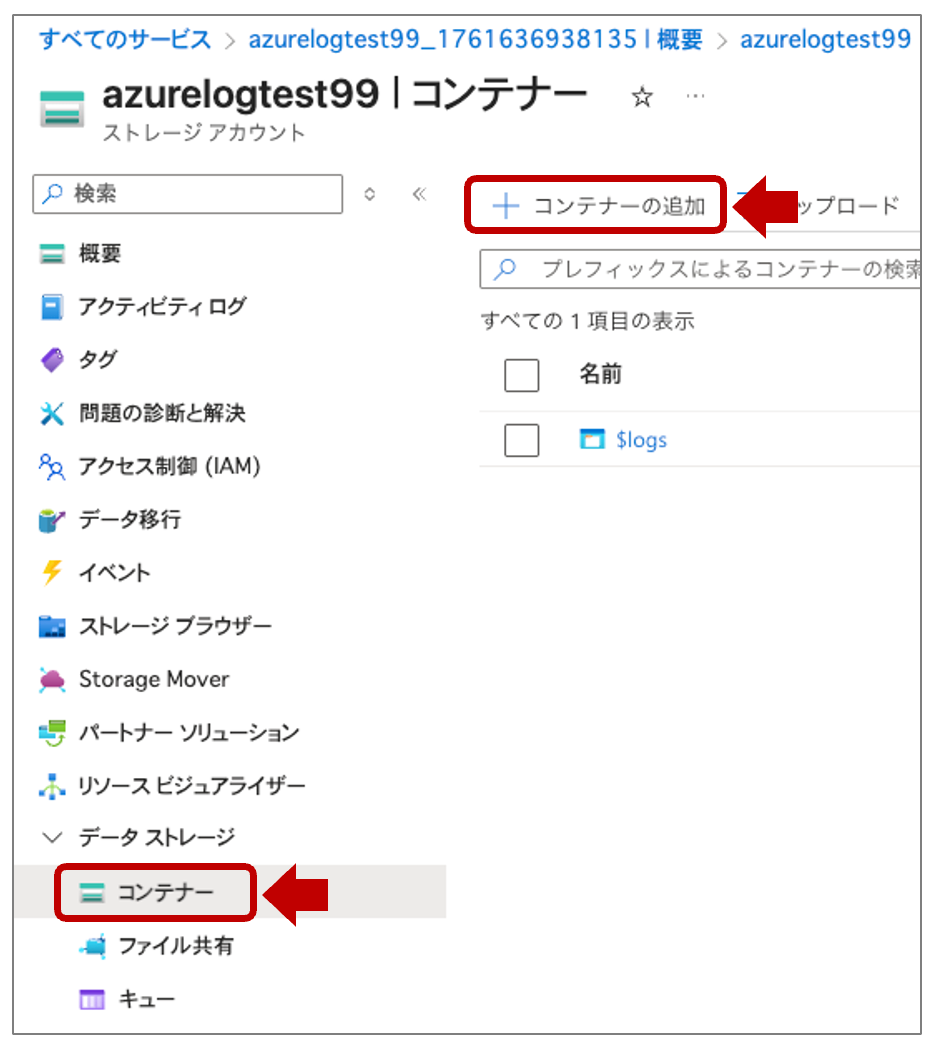
ストレージコンテナーの作成1
[名前] に好きな名前でストレージコンテナー名(azurelogcontainer01)を入力し、画面下部の [作成] ボタンを押します。
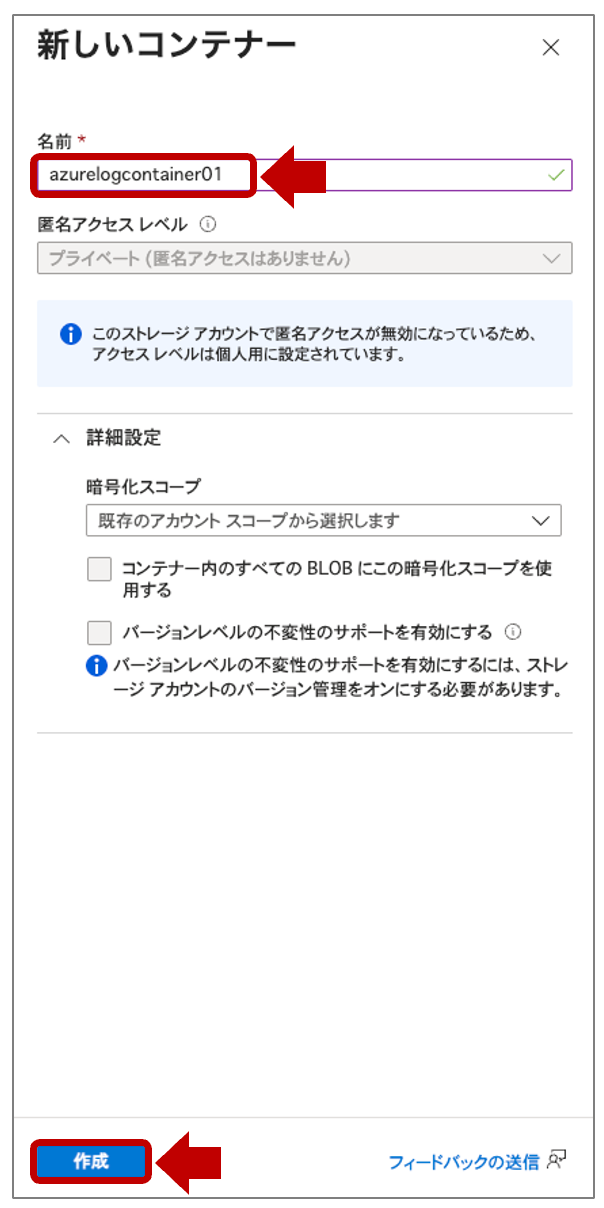
ストレージコンテナーの作成2
3. 診断設定によるログ出力設定
診断設定で作成した Event Hubs のイベントハブに対してログを出力します。
【参考】
・アクティビティログをイベントハブにストリーミングする方法
・アクティビティログについて Microsoft Entra 診断設定を構成する
3-1. Azure Monitor アクティビティログの診断設定
Azure Portal のホームで [アクティビティログ] を開き、[アクティビティログ] から [診断設定] をクリックします。

アクティビティログの診断設定を開く
[+ 診断設定を追加する] をクリックします。

アクティビティログの診断設定を追加する
❶ すべてのログカテゴリにチェックを入れます。
❷ 宛先の [イベントハブへのストリーム] にチェックを入れ、❸ 下記の設定項目を設定し、❹ [保存] を押します。

アクティビティログの診断設定の内容
【設定内容】
| 項目 | 設定値 | 備考 |
|---|---|---|
| サブスクリプション | (任意) | これまでの手順と同じものを利用 |
| イベントハブの名前空間 | azure-test2 | 前の手順で作成した名前空間を指定 |
| イベントハブの名前 | azure-test2 | 前の手順で作成したイベントハブ名を指定 |
| イベントハブポリシー名 | RootManageSharedAccessKey | 前の手順で作成されたポリシー名を指定 |
3-2. Entra ID の診断設定
Azure Portal のホームで [Microsoft Entra ID] を開き、[監視] > [診断設定] をクリックします。

Entra ID の診断設定を開く
[+ 診断設定を追加する] をクリックします。

Entra ID の診断設定を追加する
❶ 上から 5 つのログカテゴリにチェックを入れます。
❷、❸ はアクティビティログと同じ内容を設定し ❹ [保存] を押します。

Entra ID の診断設定の内容
4. Elastic Agent での取得設定
Elastic Agent のインストール先は Azure VM の Rocky Linux 9 になります。
今回は Fleet を利用せず、スタンドアローン方式で Elastic Agent をインストールします。
【参考】
・スタンドアローンでの Elastic Agent ポリシーの作成(公式ページ)
・スタンドアローンでの Elastic Agent インストール方法(公式ページ)
4-1. Integrations のポリシー設定
Elastic Agent で有効化する Integrations は elastic-agent.yml で設定します。
Kibana の Integrations 画面から elastic-agent.yml を作成します。
Kibana にログインし、左側のメニュー下部の [Management] > [Integrations] を開きます。
[Azure] > [Azure Logs(v2 preview)] を選択します。
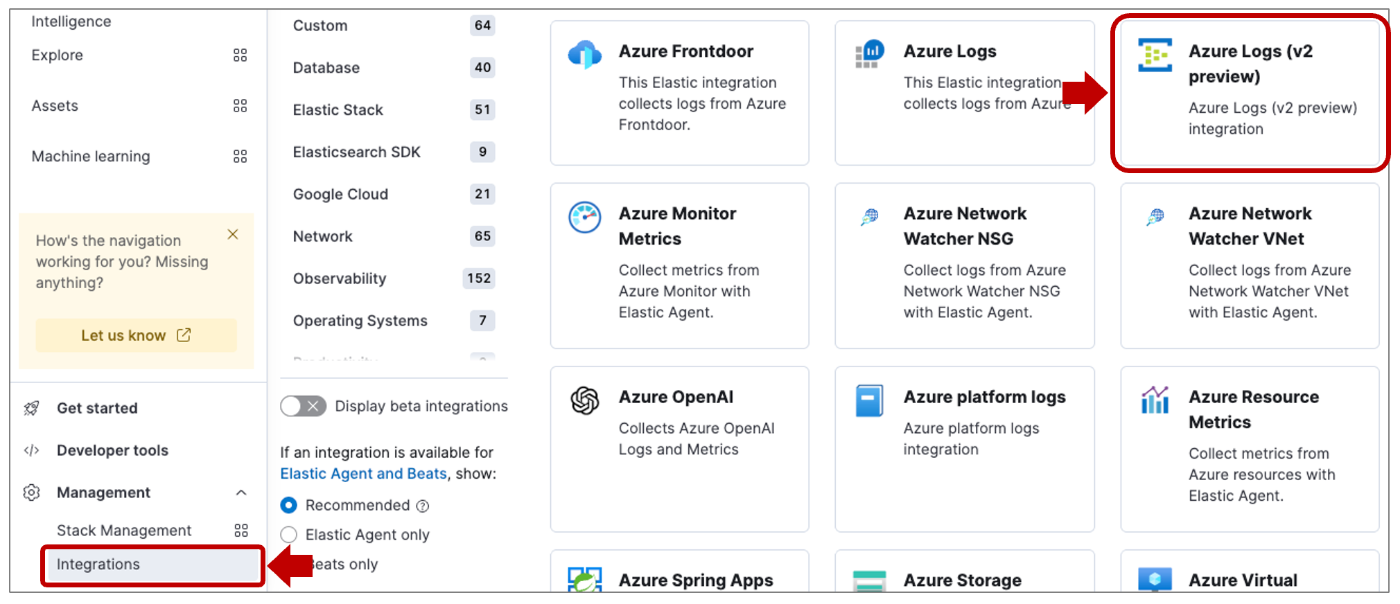
Integrations 画面
[+ Add Azure Logs(v2 preview)] をクリックします。
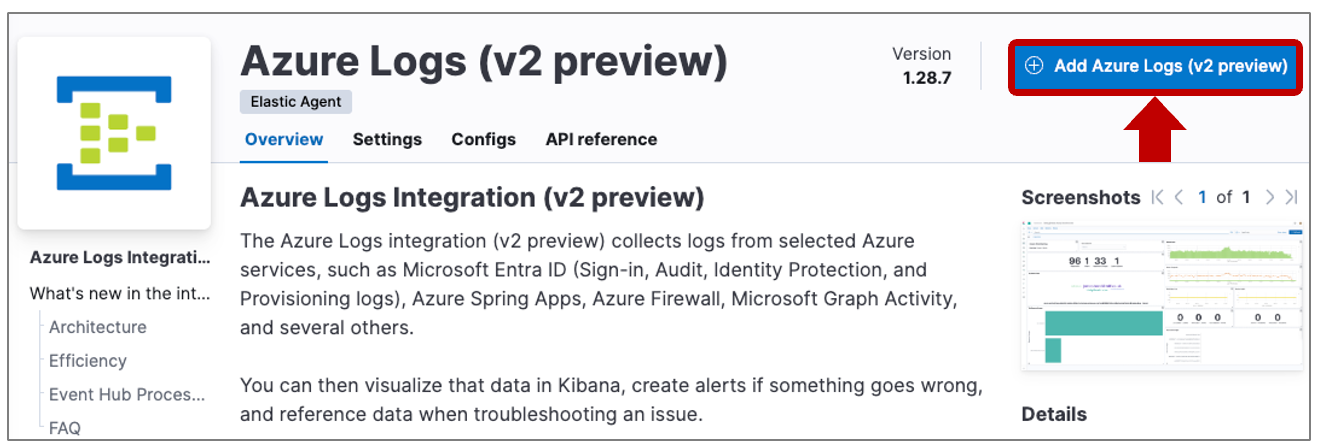
Azure Logs(v2 preview) の追加
画面下部に表示される [Add integration only (skip agent installation)] をクリックします。

skip agent installation
Configure integration でこれまで設定してきた Azure 側の設定値を下記のように設定します。
【設定内容】
| 項目 | 設定値 | 備考 |
|---|---|---|
| Integration name | azure-1 | 好きな名前を入力 |
| Event Hub Name | azure-test2 | 「イベントハブ名」を入力 |
| Consumer Group | $Default | 「コンシューマーグループ名」を入力 |
| Connection String | Endpoint=sb://••• | 「プライマリ接続文字列」を入力 |
| Storage Account | azurelogtest99 | 「ストレージアカウント名」を入力 |
| Storage Account Key | <ストレージアカウントキー> | ストレージアカウントの「アクセスキー」を入力 |
[Collect Azure Logs (v2 preview)] のスイッチをオンにします。
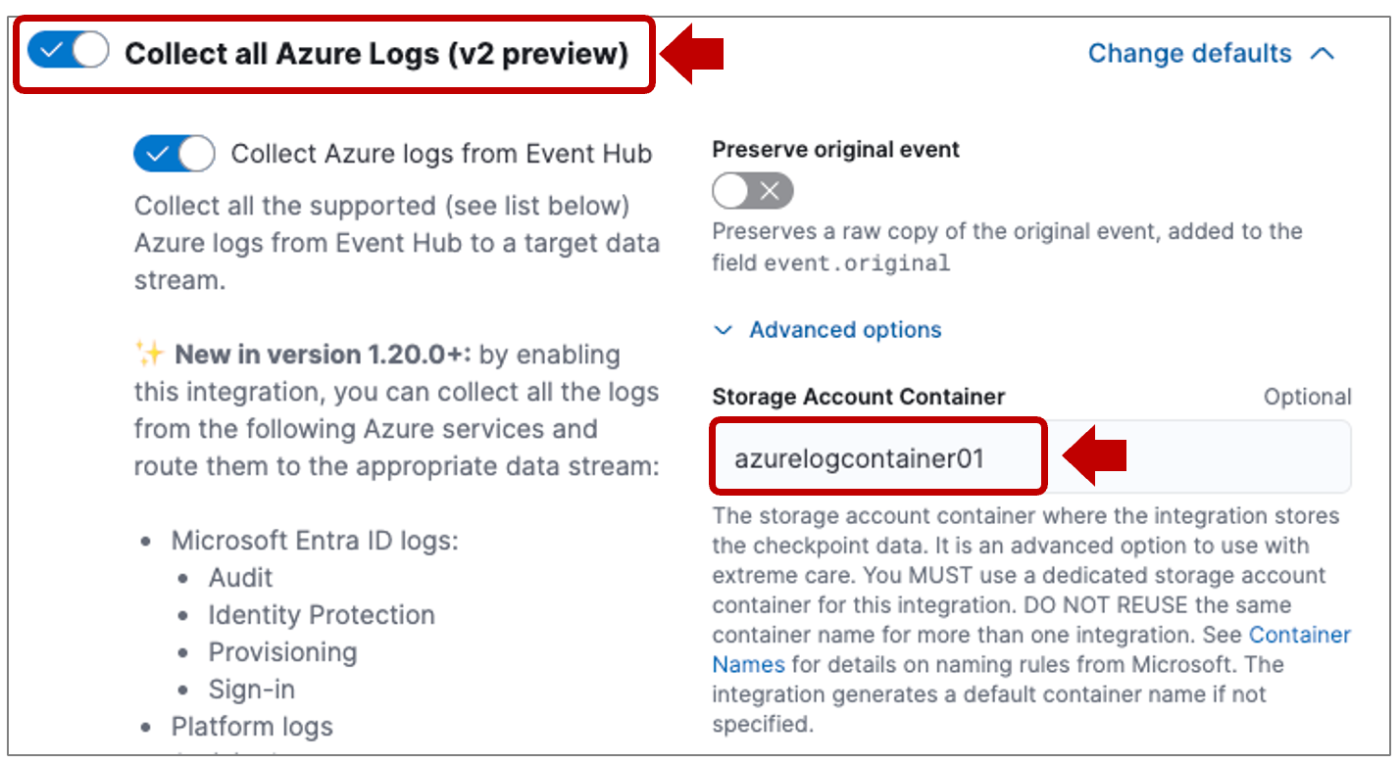
Collect Azure Logs (v2 preview) の設定
[Change defaults] > [Advanced options] を開き、下記項目を設定します。
| 項目 | 設定値 | 備考 |
|---|---|---|
| Storage Account Container | azurelogcontainer01 | 「ストレージコンテナー名」を入力 |
| Processor version | v2 | v1 を v2 に変更 |
[Collect system logs and metrics] のチェックを外し、[Save and continue] ボタンを押します。

設定の保存
下記画面が表示されれば、Integrations の設定は完了です。

Integrations の設定完了
[Add Elastic Agent to your hosts] をクリックし、インストールの準備をします。
今回はスタンドアローン方式でインストールするため、[Run standalone] を指定します。

Run standalone を選択
先ほどの Integrations の設定が反映された elastic-agent.yml が表示されています。
[Download Policy] をクリックして設定ファイルをダウンロードします。

Elastic Agent の設定ファイルのダウンロード
4-2. Elastic Agent のインストール
以下のコマンド操作で Rocky Linux 9 に Elastic Agent をインストールします。
まず、SSH キーを使って Azure VM にログインします。
ssh -i ~/.ssh/<キーの名前>.pem azureuser@<Azure VM のパブリック IP アドレス>
ログイン後、curl コマンドを使って、インターネット経由でインストーラーをダウンロードします。
$ sudo curl -L -O https://artifacts.elastic.co/downloads/beats/elastic-agent/elastic-agent-8.17.10-linux-x86_64.tar.gz
ダウンロードしたインストーラー(tar ファイル)を解凍します。
$ sudo tar xzvf elastic-agent-8.17.10-linux-x86_64.tar.gz
インストーラーの実行ファイルが置かれているディレクトリに移動します。
$ sudo cd elastic-agent-8.17.10-linux-x86_64
管理者権限で Elastic Agent のインストールを実行します。
$ sudo ./elastic-agent install
インストールするディレクトリが /opt/Elastic/Agent になるが継続するかと聞かれますが、Y(Yes) とします。
次に Fleet での管理を希望するか聞かれますが、今回は N(No) とします。
Elastic Agent will be installed at /opt/Elastic/Agent and will run as a service. Do you want to continue? [Y/n]:Y
Do you want to enroll this Agent into Fleet? [Y/n]:n
Copying files............... DONE
Installing service....... DONE
Starting service... DONE
Elastic Agent has been successfully installed.
4-3. Elastic Agent の設定
/opt/Elastic/Agent 配下に置かれている elastic-agent.yml を先ほど Kibana からダウンロードしたものに差し替えます。
$ sudo vi /opt/Elastic/Agent/elastic-agent.yml
Fleet での管理を前提とした設定となっているため、機密性の高い情報は変数化されています。
差し替え後、${SECRET_0}, ${SECRET_1} の計 3 箇所を書き換え、保存して閉じます。
      - id: azure-eventhub-azure.events-da557e6d-d699-421b-b2c9-80b48e70429b
        data_stream:
          dataset: azure.events
          type: logs
          elasticsearch:
            dynamic_dataset: true
            dynamic_namespace: true
        connection_string: ${SECRET_0}
        storage_account_container: azurelogcontainer01
        eventhub: azure-test2
        consumer_group: $Default
        storage_account: azurelogtest99
        storage_account_key: ${SECRET_1}
        storage_account_connection_string: >-
          DefaultEndpointsProtocol=https;AccountName=azurelogtest99;AccountKey=${SECRET_1};EndpointSuffix=core.windows.net
ファイル更新後、Elastic Agent のプロセスを起動します。
$ sudo systemctl start elastic-agent
プロセスが正常起動し、Elasticsearch に Index が作成されれば完了です。
$ sudo systemctl status elastic-agent
取り込みが開始されると Azure Blob Storage のストレージコンテナー内にオフセット値が記載されたファイルが生成されます。

オフセットファイル
ファイル名は Event Hubs のパーティション名になっています。(0番から順番)
5. Elastic Cloud でのログ検索
最後に Kibana にログインし、取り込んだログについて確認してみます。
5-1. Index の確認
Kibana メニューの [Stack Management] > [index Management] を開きます。
下記 3 つの Data Stream が生成されています。
logs-azure-activitylogs-defaultlogs-azure-auditlogs-defaultlogs-azure-signinlogs-default
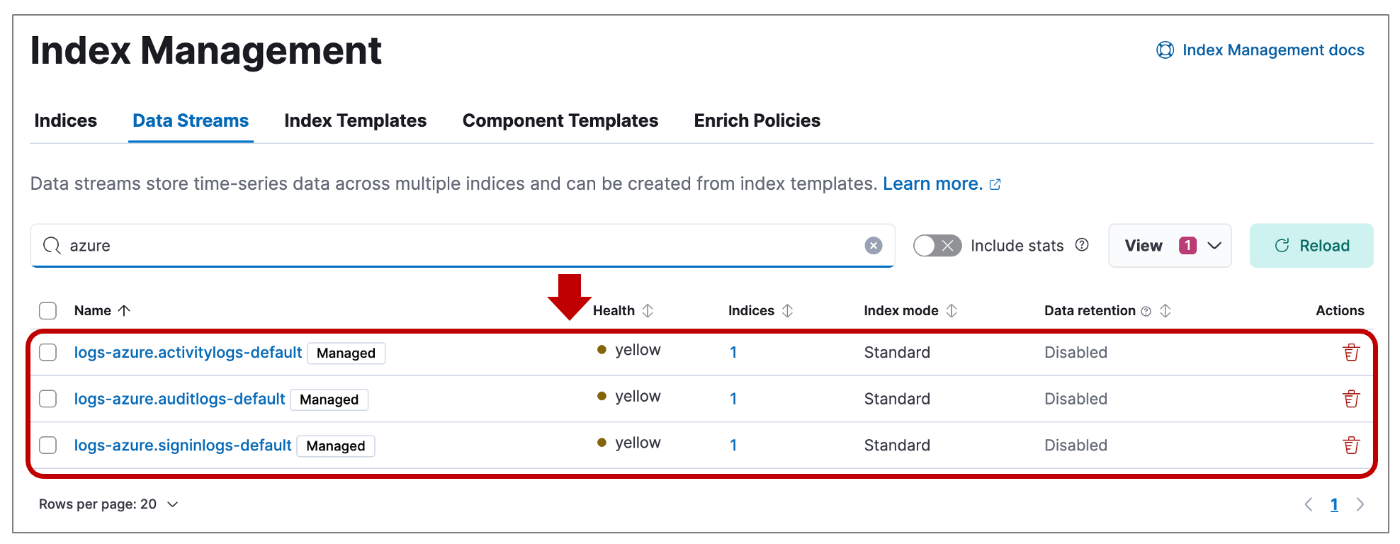
Azure 監査ログの Data Stream 名
上記の Data Stream に .ds-<Data Stream 名>-yyyy.mm.dd-00000x という Index が生成され、この中にログが格納されています。
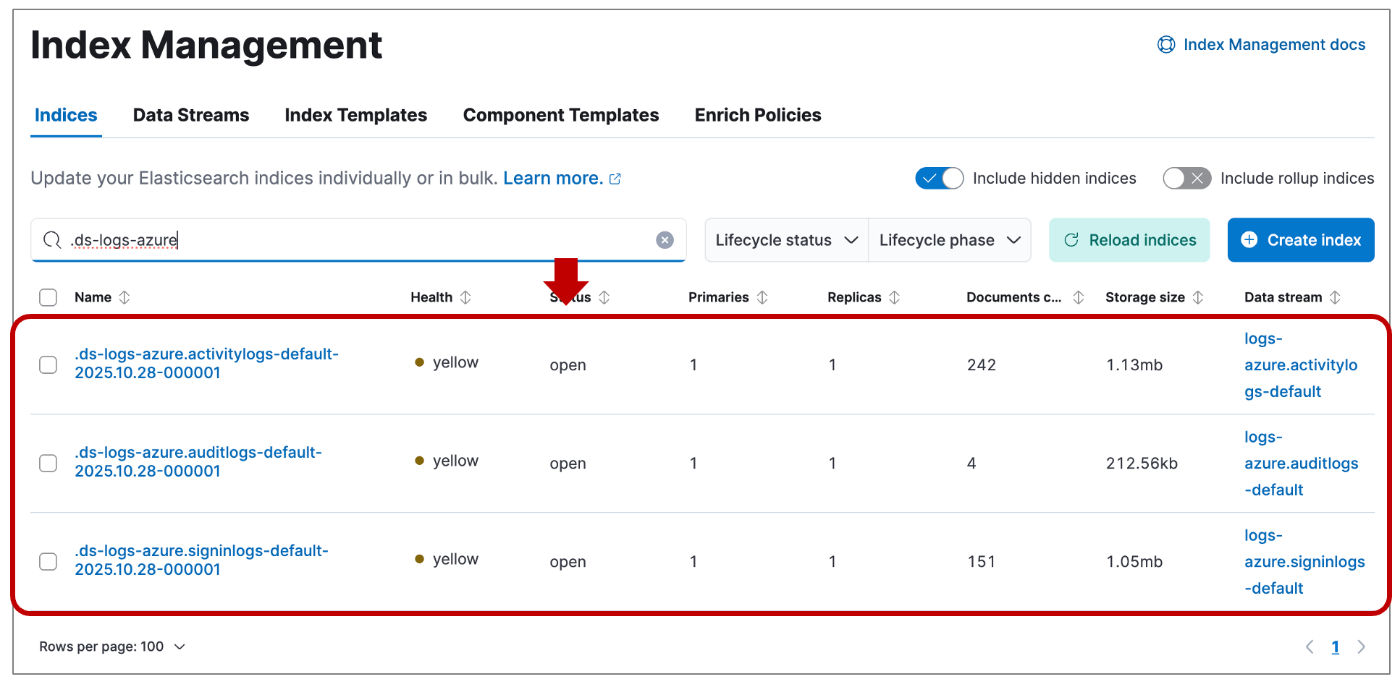
Azure 監査ログの Index 名
5-2. Discover でのログ検索
Kibana の [Discover] 画面を開き、Data views で [Create a data view] を開きます。
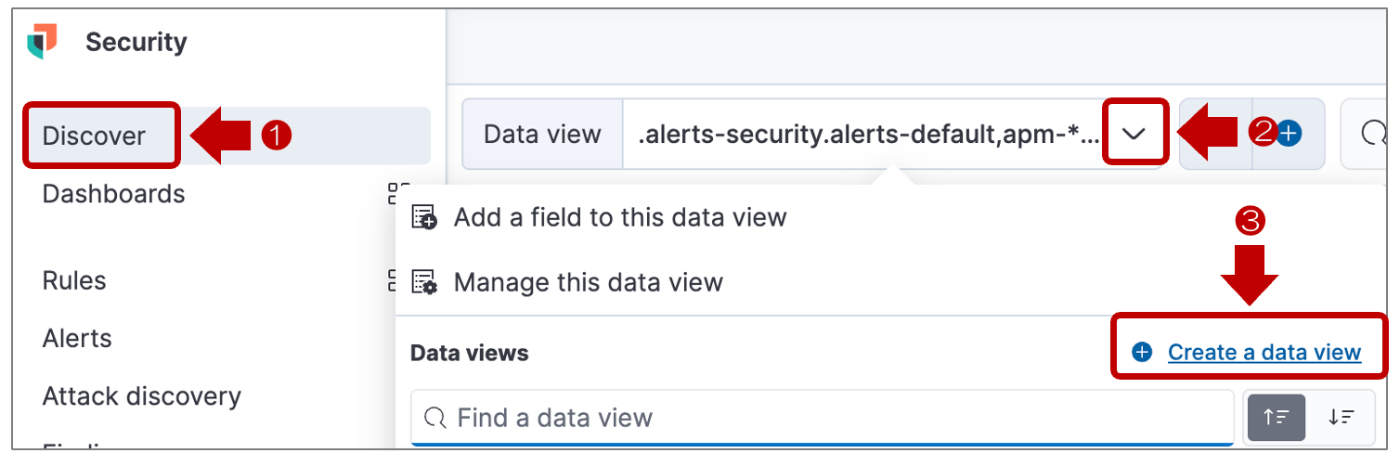
Create a data view 1
[Name] に azure、[Index Pattern] に logs-azure.* と入力し、下部の [Save data view to Kibana] で保存します。

Create a data view 2
以下、作成した azure Data view で SigningLogs で絞った画面になります。
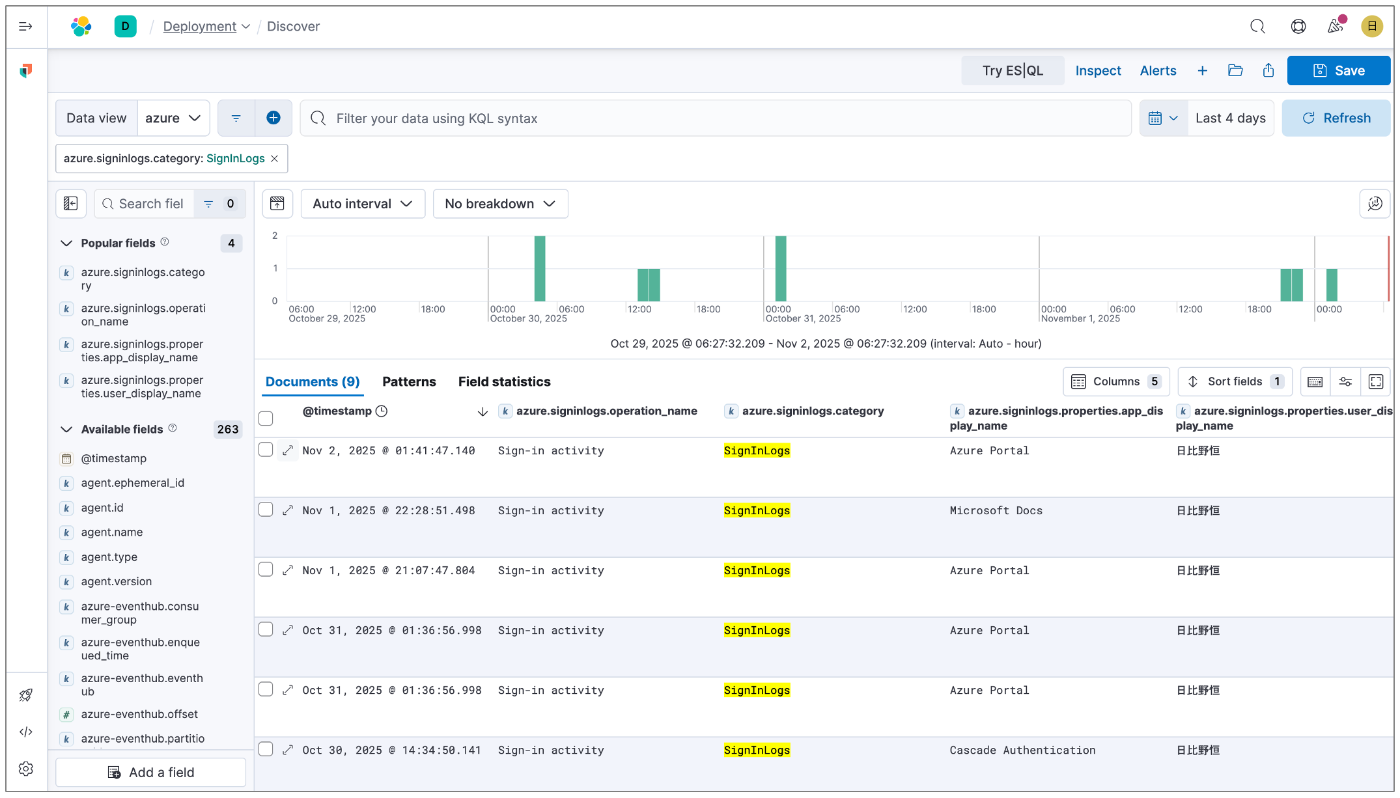
Entra ID のサインインログ
まとめ
いかがでしたでしょうか?
今回苦戦したのは、Azure だとどのログが CloudTrail 証跡ログに該当するのかを体系的に理解するところでした。
また、実装面で少しハマったのは、Fleet を使わずに Elastic Agent を設定したため、ダウンロードしたポリシーの機密性の高いデータが変数化されていたところでした。(キーのハードコーディングは良くないので、当然なんですが、今回は検証ということでご容赦ください)
Microsoft サービスのログを監視に利用する場合は、基本的に Event Hubs に出力するアーキテクチャになります。そういう意味では、過去に実施した Defender for Endpoint と実施していることはあまり変わりませんでした。
{
  "_index": ".ds-logs-azure.signinlogs-default-2025.10.28-000001",
  "_id": "7_JNQJoBQfauBiUzBXlX",
  "_version": 1,
  "_source": {
    "agent": {
      "name": "azure-log-poc",
      "id": "111fca11-1111-e1ec-c1eb-111a1ba11d11",
      "type": "filebeat",
      "ephemeral_id": "111fca11-1111-e1ec-c1eb-111a1ba11d11",
      "version": "8.17.10"
    },
    "log": {
      "level": "4"
    },
    "elastic_agent": {
      "id": "111fca11-1111-e1ec-c1eb-111a1ba11d11",
      "version": "8.17.10",
      "snapshot": false
    },
    "source": {
      "geo": {
        "continent_name": "Asia",
        "region_iso_code": "JP-13",
        "city_name": "Meguro City",
        "country_iso_code": "JP",
        "country_name": "Japan",
        "location": {
          "lon": 111.111,
          "lat": 55.5555
        },
        "region_name": "Tokyo"
      },
      "as": {
        "number": 9365,
        "organization": {
          "name": "kddi."
        }
      },
      "address": "111.111.111.111",
      "ip": "111.111.111.111"
    },
    "message": "MFA requirement satisfied by claim in the token",
    "azure-eventhub": {
      "sequence_number": 227,
      "partition_id": "0",
      "consumer_group": "$Default",
      "offset": 1224888,
      "eventhub": "azure-test2",
      "enqueued_time": "2025-11-01T16:42:46.842Z"
    },
    "tags": [
      "azure-eventhub",
      "forwarded"
    ],
    "cloud": {
      "instance": {
        "name": "azure-log-poc",
        "id": "111fca11-1111-e1ec-c1eb-111a1ba11d11"
      },
      "provider": "azure",
      "machine": {
        "type": "Standard_B2s"
      },
      "service": {
        "name": "Virtual Machines"
      },
      "region": "japaneast",
      "account": {
        "id": "111fca11-1111-e1ec-c1eb-111a1ba11d11"
      }
    },
    "geo": {
      "city_name": "Meguro-Ku",
      "country_iso_code": "JP",
      "region_name": "Tokyo",
      "location": {
        "lon": 111.11111111111111,
        "lat": 55.555555555555555
      }
    },
    "input": {
      "type": "azure-eventhub"
    },
    "@timestamp": "2025-11-01T16:41:47.140Z",
    "ecs": {
      "version": "8.11.0"
    },
    "related": {
      "ip": [
        "111.111.111.111"
      ],
      "user": [
        "111fca11-1111-e1ec-c1eb-111a1ba11d11",
        "h_hibino@example.onmicrosoft.com",
        "日比野恒"
      ],
      "entity": [
        "111fca11-1111-e1ec-c1eb-111a1ba11d11",
        "111fca11-1111-e1ec-c1eb-111a1ba11d11",
        "111fca11-1111-e1ec-c1eb-111a1ba11d11"
      ]
    },
    "data_stream": {
      "namespace": "default",
      "type": "logs",
      "dataset": "azure.signinlogs"
    },
    "client": {
      "ip": "111.111.111.111"
    },
    "event": {
      "duration": 0,
      "agent_id_status": "auth_metadata_missing",
      "ingested": "2025-11-01T16:43:00Z",
      "kind": "event",
      "action": "Sign-in activity",
      "id": "111fca11-1111-e1ec-c1eb-111a1ba11d11",
      "category": [
        "authentication"
      ],
      "type": [
        "info"
      ],
      "dataset": "azure.signinlogs",
      "outcome": "success"
    },
    "user": {
      "full_name": "日比野恒",
      "name": "h_hibino@example.onmicrosoft.com",
      "id": "111fca11-1111-e1ec-c1eb-111a1ba11d11",
      "email": "h_hibino@example.onmicrosoft.com"
    },
    "user_agent": {
      "original": "Mozilla/5.0 (Macintosh; Intel Mac OS X 10_15_7) AppleWebKit/537.36 (KHTML, like Gecko) Chrome/141.0.0.0 Safari/537.36",
      "os": {
        "name": "Mac OS X",
        "version": "10.15.7",
        "full": "Mac OS X 10.15.7"
      },
      "name": "Chrome",
      "device": {
        "name": "Mac"
      },
      "version": "141.0.0.0"
    },
    "azure": {
      "tenant_id": "111fca11-1111-e1ec-c1eb-111a1ba11d11",
      "signinlogs": {
        "result_type": "0",
        "operation_version": "1.0",
        "caller_ip_address": "111.111.111.111",
        "result_signature": "SUCCESS",
        "operation_name": "Sign-in activity",
        "identity": "日比野恒",
        "category": "SignInLogs",
        "properties": {
          "is_tenant_restricted": false,
          "risk_level_aggregated": "none",
          "agent": {
            "agent_type": "notAgentic"
          },
          "authentication_requirement_policies": [
            {
              "detail": "Security Defaults",
              "requirement_provider": "securityDefaults"
            }
          ],
          "authentication_protocol": "none",
          "user_type": "Member",
          "conditional_access_status": "notApplied",
          "authentication_requirement": "multiFactorAuthentication",
          "id": "111fca11-1111-e1ec-c1eb-111a1ba11d11",
          "app_id": "111fca11-1111-e1ec-c1eb-111a1ba11d11",
          "conditional_access_audiences": [
            "111fca11-1111-e1ec-c1eb-111a1ba11d11"
          ],
          "is_through_global_secure_access": false,
          "device_detail": {
            "browser": "Chrome 141.0.0",
            "operating_system": "MacOs"
          },
          "autonomous_system_number": 9365,
          "cross_tenant_access_type": "none",
          "user_principal_name": "h_hibino@example.onmicrosoft.com",
          "original_transfer_method": "none",
          "user_id": "111fca11-1111-e1ec-c1eb-111a1ba11d11",
          "app_owner_tenant_id": "111fca11-1111-e1ec-c1eb-111a1ba11d11",
          "user_display_name": "日比野恒",
          "status": {
            "error_code": 0
          },
          "tenant_id": "111fca11-1111-e1ec-c1eb-111a1ba11d11",
          "client_app_used": "Browser",
          "resource_owner_tenant_id": "111fca11-1111-e1ec-c1eb-111a1ba11d11",
          "resource_tenant_id": "111fca11-1111-e1ec-c1eb-111a1ba11d11",
          "applied_conditional_access_policies": [
            {
              "result": "success",
              "enforced_grant_controls": [
                "Mfa"
              ],
              "conditions_satisfied": 3,
              "conditions_not_satisfied": 0,
              "id": "SecurityDefaults",
              "display_name": "Security Defaults"
            }
          ],
          "created_at": "2025-11-01T16:40:35.1556656+00:00",
          "risk_level_during_signin": "none",
          "sign_in_token_protection_status": "none",
          "resource_service_principal_id": "111fca11-1111-e1ec-c1eb-111a1ba11d11",
          "token_issuer_type": "AzureAD",
          "original_request_id": "111fca11-1111-e1ec-c1eb-111a1ba11d11",
          "token_protection_status_details": {
            "sign_in_session_status": "unbound",
            "sign_in_session_status_code": 1002
          },
          "authentication_details": [
            {
              "authentication_method": "Previously satisfied",
              "authentication_step_result_detail": "First factor requirement satisfied by claim in the token",
              "status_sequence": 0,
              "authentication_step_date_time": "2025-11-01T16:40:35.1556656+00:00",
              "authentication_step_requirement": "Primary authentication",
              "request_sequence": 0,
              "succeeded": true
            },
            {
              "authentication_method": "Previously satisfied",
              "authentication_step_result_detail": "MFA requirement satisfied by claim in the token",
              "authentication_step_date_time": "2025-11-01T16:40:35.1556656+00:00",
              "authentication_step_requirement": "Primary authentication",
              "succeeded": true
            }
          ],
          "client_credential_type": "none",
          "is_interactive": true,
          "flagged_for_review": false,
          "app_display_name": "Azure Portal",
          "session_id": "111fca11-1111-e1ec-c1eb-111a1ba11d11",
          "home_tenant_id": "111fca11-1111-e1ec-c1eb-111a1ba11d11",
          "authentication_processing_details": {
            "Legacy TLS (TLS 1.0, 1.1, 3DES)": "False",
            "Is CAE Token": "False"
          },
          "risk_detail": "none",
          "resource_display_name": "Azure Resource Manager",
          "risk_state": "none",
          "incoming_token_type": "none",
          "processing_time_ms": 66,
          "resource_id": "111fca11-1111-e1ec-c1eb-111a1ba11d11",
          "correlation_id": "111fca11-1111-e1ec-c1eb-111a1ba11d11",
          "unique_token_identifier": "aaaa1as1a1aaa11aaaaaaa"
        }
      },
      "resource": {
        "provider": "Microsoft.aadiam",
        "id": "/tenants/111fca11-1111-e1ec-c1eb-111a1ba11d11/providers/Microsoft.aadiam"
      },
      "correlation_id": "111fca11-1111-e1ec-c1eb-111a1ba11d11"
    }
  },
  "fields": {
    "azure.signinlogs.properties.unique_token_identifier": [
      "aaaa1as1a1aaa11aaaaaaa"
    ],
    "azure.resource.id": [
      "/tenants/111fca11-1111-e1ec-c1eb-111a1ba11d11/providers/Microsoft.aadiam"
    ],
    "elastic_agent.version": [
      "8.17.10"
    ],
    "event.category": [
      "authentication"
    ],
    "user_agent.original.text": [
      "Mozilla/5.0 (Macintosh; Intel Mac OS X 10_15_7) AppleWebKit/537.36 (KHTML, like Gecko) Chrome/141.0.0.0 Safari/537.36"
    ],
    "azure.signinlogs.properties.agent.agent_type": [
      "notAgentic"
    ],
    "azure.signinlogs.properties.autonomous_system_number": [
      9365
    ],
    "azure.signinlogs.properties.token_protection_status_details.sign_in_session_status": [
      "unbound"
    ],
    "azure.signinlogs.properties.id": [
      "111fca11-1111-e1ec-c1eb-111a1ba11d11"
    ],
    "azure.signinlogs.properties.user_type": [
      "Member"
    ],
    "azure.signinlogs.properties.is_interactive": [
      true
    ],
    "agent.name.text": [
      "azure-log-poc"
    ],
    "source.geo.region_name": [
      "Tokyo"
    ],
    "user.full_name.text": [
      "日比野恒"
    ],
    "cloud.service.name.text": [
      "Virtual Machines"
    ],
    "source.ip": [
      "111.111.111.111"
    ],
    "agent.name": [
      "azure-log-poc"
    ],
    "azure.signinlogs.properties.device_detail.browser": [
      "Chrome 141.0.0"
    ],
    "event.agent_id_status": [
      "auth_metadata_missing"
    ],
    "azure.signinlogs.properties.risk_level_aggregated": [
      "none"
    ],
    "event.outcome": [
      "success"
    ],
    "source.geo.city_name": [
      "Meguro City"
    ],
    "azure.signinlogs.properties.home_tenant_id": [
      "111fca11-1111-e1ec-c1eb-111a1ba11d11"
    ],
    "user_agent.original": [
      "Mozilla/5.0 (Macintosh; Intel Mac OS X 10_15_7) AppleWebKit/537.36 (KHTML, like Gecko) Chrome/141.0.0.0 Safari/537.36"
    ],
    "cloud.region": [
      "japaneast"
    ],
    "user.id": [
      "111fca11-1111-e1ec-c1eb-111a1ba11d11"
    ],
    "azure.signinlogs.properties.risk_detail": [
      "none"
    ],
    "azure.signinlogs.properties.app_display_name": [
      "Azure Portal"
    ],
    "azure.signinlogs.operation_name": [
      "Sign-in activity"
    ],
    "input.type": [
      "azure-eventhub"
    ],
    "azure.signinlogs.properties.authentication_requirement": [
      "multiFactorAuthentication"
    ],
    "azure.signinlogs.properties.resource_display_name": [
      "Azure Resource Manager"
    ],
    "azure.signinlogs.properties.client_credential_type": [
      "none"
    ],
    "related.user": [
      "111fca11-1111-e1ec-c1eb-111a1ba11d11",
      "h_hibino@example.onmicrosoft.com",
      "日比野恒"
    ],
    "tags": [
      "azure-eventhub",
      "forwarded"
    ],
    "cloud.machine.type": [
      "Standard_B2s"
    ],
    "cloud.provider": [
      "azure"
    ],
    "agent.id": [
      "111fca11-1111-e1ec-c1eb-111a1ba11d11"
    ],
    "azure.signinlogs.identity": [
      "日比野恒"
    ],
    "azure.signinlogs.properties.client_app_used": [
      "Browser"
    ],
    "azure.signinlogs.properties.resource_tenant_id": [
      "111fca11-1111-e1ec-c1eb-111a1ba11d11"
    ],
    "source.as.number": [
      9365
    ],
    "azure.signinlogs.properties.is_through_global_secure_access": [
      false
    ],
    "azure.signinlogs.properties.correlation_id": [
      "111fca11-1111-e1ec-c1eb-111a1ba11d11"
    ],
    "related.entity": [
      "111fca11-1111-e1ec-c1eb-111a1ba11d11",
      "111fca11-1111-e1ec-c1eb-111a1ba11d11",
      "111fca11-1111-e1ec-c1eb-111a1ba11d11"
    ],
    "user_agent.os.full": [
      "Mac OS X 10.15.7"
    ],
    "user.name": [
      "h_hibino@example.onmicrosoft.com"
    ],
    "azure.signinlogs.properties.conditional_access_status": [
      "notApplied"
    ],
    "user_agent.os.name": [
      "Mac OS X"
    ],
    "azure.signinlogs.properties.flagged_for_review": [
      false
    ],
    "cloud.instance.id": [
      "111fca11-1111-e1ec-c1eb-111a1ba11d11"
    ],
    "agent.type": [
      "filebeat"
    ],
    "related.ip": [
      "111.111.111.111"
    ],
    "user.email": [
      "h_hibino@example.onmicrosoft.com"
    ],
    "azure-eventhub.eventhub": [
      "azure-test2"
    ],
    "azure.signinlogs.caller_ip_address": [
      "111.111.111.111"
    ],
    "azure.signinlogs.properties.app_owner_tenant_id": [
      "111fca11-1111-e1ec-c1eb-111a1ba11d11"
    ],
    "elastic_agent.snapshot": [
      false
    ],
    "azure.signinlogs.properties.is_tenant_restricted": [
      false
    ],
    "azure.signinlogs.properties.sign_in_token_protection_status": [
      "none"
    ],
    "azure-eventhub.offset": [
      1224888
    ],
    "azure.signinlogs.properties.tenant_id": [
      "111fca11-1111-e1ec-c1eb-111a1ba11d11"
    ],
    "elastic_agent.id": [
      "111fca11-1111-e1ec-c1eb-111a1ba11d11"
    ],
    "azure.correlation_id": [
      "111fca11-1111-e1ec-c1eb-111a1ba11d11"
    ],
    "azure.signinlogs.properties.session_id": [
      "111fca11-1111-e1ec-c1eb-111a1ba11d11"
    ],
    "azure-eventhub.enqueued_time": [
      "2025-11-01T16:42:46.842Z"
    ],
    "azure.signinlogs.properties.status.error_code": [
      0
    ],
    "azure.signinlogs.properties.authentication_processing_details": [
      {
        "Legacy TLS (TLS 1.0, 1.1, 3DES)": "False",
        "Is CAE Token": "False"
      }
    ],
    "event.duration": [
      0
    ],
    "azure.signinlogs.properties.authentication_protocol": [
      "none"
    ],
    "event.action": [
      "Sign-in activity"
    ],
    "event.ingested": [
      "2025-11-01T16:43:00.000Z"
    ],
    "@timestamp": [
      "2025-11-01T16:41:47.140Z"
    ],
    "user_agent.name.text": [
      "Chrome"
    ],
    "cloud.account.id": [
      "111a1111-aa11-1aa1-aa11-aaa1a1a11111"
    ],
    "data_stream.dataset": [
      "azure.signinlogs"
    ],
    "agent.ephemeral_id": [
      "111a1111-aa11-1aa1-aa11-aaa1a1a11111"
    ],
    "azure.signinlogs.properties.created_at": [
      "2025-11-01T16:40:35.155Z"
    ],
    "azure.signinlogs.properties.token_issuer_type": [
      "AzureAD"
    ],
    "event.id": [
      "111a1111-aa11-1aa1-aa11-aaa1a1a11111"
    ],
    "user_agent.device.name": [
      "Mac"
    ],
    "cloud.instance.name": [
      "azure-log-poc"
    ],
    "user.name.text": [
      "h_hibino@example.onmicrosoft.com"
    ],
    "azure.resource.provider": [
      "Microsoft.aadiam"
    ],
    "azure.signinlogs.properties.device_detail.operating_system": [
      "MacOs"
    ],
    "azure.signinlogs.properties.processing_time_ms": [
      66
    ],
    "azure.signinlogs.result_signature": [
      "SUCCESS"
    ],
    "geo.country_iso_code": [
      "JP"
    ],
    "user_agent.os.version": [
      "10.15.7"
    ],
    "azure.signinlogs.properties.incoming_token_type": [
      "none"
    ],
    "geo.location": [
      {
        "coordinates": [
          111.11111111111111,
          55.555555555555555
        ],
        "type": "Point"
      }
    ],
    "azure.signinlogs.properties.original_transfer_method": [
      "none"
    ],
    "log.level": [
      "4"
    ],
    "user_agent.version": [
      "141.0.0.0"
    ],
    "source.geo.region_iso_code": [
      "JP-13"
    ],
    "event.kind": [
      "event"
    ],
    "azure.signinlogs.properties.resource_id": [
      "111a1111-aa11-1aa1-aa11-aaa1a1a11111"
    ],
    "cloud.instance.name.text": [
      "azure-log-poc"
    ],
    "azure.signinlogs.properties.conditional_access_audiences": [
      "111a1111-aa11-1aa1-aa11-aaa1a1a11111"
    ],
    "azure.signinlogs.properties.resource_service_principal_id": [
      "11a11a11-1aaa-1111-a11a-11a1aa11111a"
    ],
    "azure.signinlogs.properties.user_id": [
      "11111111-111a-11aa-a11a-11aa1a11111a"
    ],
    "azure.signinlogs.properties.user_principal_name": [
      "h_hibino@example.onmicrosoft.com"
    ],
    "client.ip": [
      "111.111.111.111"
    ],
    "user_agent.name": [
      "Chrome"
    ],
    "data_stream.type": [
      "logs"
    ],
    "azure.signinlogs.properties.resource_owner_tenant_id": [
      "a1aaaa11-a11a-1a1a-11a1-1a111a11111a"
    ],
    "cloud.service.name": [
      "Virtual Machines"
    ],
    "ecs.version": [
      "8.11.0"
    ],
    "geo.city_name": [
      "Meguro-Ku"
    ],
    "user.full_name": [
      "日比野恒"
    ],
    "agent.version": [
      "8.17.10"
    ],
    "azure.signinlogs.properties.original_request_id": [
      "aa1a1a11-1a11-1a11-aa11-1a1aa1111a11"
    ],
    "azure.signinlogs.properties.authentication_details": [
      {
        "authentication_method": "Previously satisfied",
        "authentication_step_result_detail": "First factor requirement satisfied by claim in the token",
        "status_sequence": 0,
        "authentication_step_date_time": "2025-11-01T16:40:35.1556656+00:00",
        "authentication_step_requirement": "Primary authentication",
        "request_sequence": 0,
        "succeeded": true
      },
      {
        "authentication_method": "Previously satisfied",
        "authentication_step_result_detail": "MFA requirement satisfied by claim in the token",
        "authentication_step_date_time": "2025-11-01T16:40:35.1556656+00:00",
        "authentication_step_requirement": "Primary authentication",
        "succeeded": true
      }
    ],
    "azure.signinlogs.properties.cross_tenant_access_type": [
      "none"
    ],
    "source.geo.location": [
      {
        "coordinates": [
          111.111,
          55.5555
        ],
        "type": "Point"
      }
    ],
    "source.address": [
      "111.111.111.111"
    ],
    "azure.signinlogs.properties.token_protection_status_details.sign_in_session_status_code": [
      1002
    ],
    "user_agent.os.name.text": [
      "Mac OS X"
    ],
    "azure.signinlogs.operation_version": [
      "1.0"
    ],
    "azure.signinlogs.properties.risk_level_during_signin": [
      "none"
    ],
    "event.module": [
      "azure"
    ],
    "source.geo.country_iso_code": [
      "JP"
    ],
    "azure.signinlogs.properties.risk_state": [
      "none"
    ],
    "azure-eventhub.consumer_group": [
      "$Default"
    ],
    "azure.signinlogs.properties.user_display_name": [
      "日比野恒"
    ],
    "azure.tenant_id": [
      "11aa11a1-aa1a-1111-a111-1a11a1a111a1"
    ],
    "azure.signinlogs.category": [
      "SignInLogs"
    ],
    "source.as.organization.name.text": [
      "kddi."
    ],
    "azure.signinlogs.properties.authentication_requirement_policies": [
      {
        "detail": "Security Defaults",
        "requirement_provider": "securityDefaults"
      }
    ],
    "data_stream.namespace": [
      "default"
    ],
    "azure.signinlogs.properties.applied_conditional_access_policies": [
      {
        "result": "success",
        "enforced_grant_controls": "Mfa",
        "conditions_satisfied": 3,
        "conditions_not_satisfied": 0,
        "id": "SecurityDefaults",
        "display_name": "Security Defaults"
      }
    ],
    "geo.region_name": [
      "Tokyo"
    ],
    "source.as.organization.name": [
      "kddi."
    ],
    "source.geo.continent_name": [
      "Asia"
    ],
    "azure.signinlogs.result_type": [
      "0"
    ],
    "message": [
      "MFA requirement satisfied by claim in the token"
    ],
    "user_agent.device.name.text": [
      "Mac"
    ],
    "azure.signinlogs.properties.app_id": [
      "c11b1111-1aa0-11a1-a11a-111a11aaaf1a"
    ],
    "user_agent.os.full.text": [
      "Mac OS X 10.15.7"
    ],
    "azure-eventhub.sequence_number": [
      227
    ],
    "azure-eventhub.partition_id": [
      "0"
    ],
    "event.type": [
      "info"
    ],
    "source.geo.country_name": [
      "Japan"
    ],
    "event.dataset": [
      "azure.signinlogs"
    ]
  }
}
Discussion