Emacsでlibgccjit.so: error: error invoking gcc driverを解決する方法



環境
OS: macOS Sequoia(Version 15.5)
Emacs: emacs-plus@30, local-build(emacs 30.1)
エラー内容
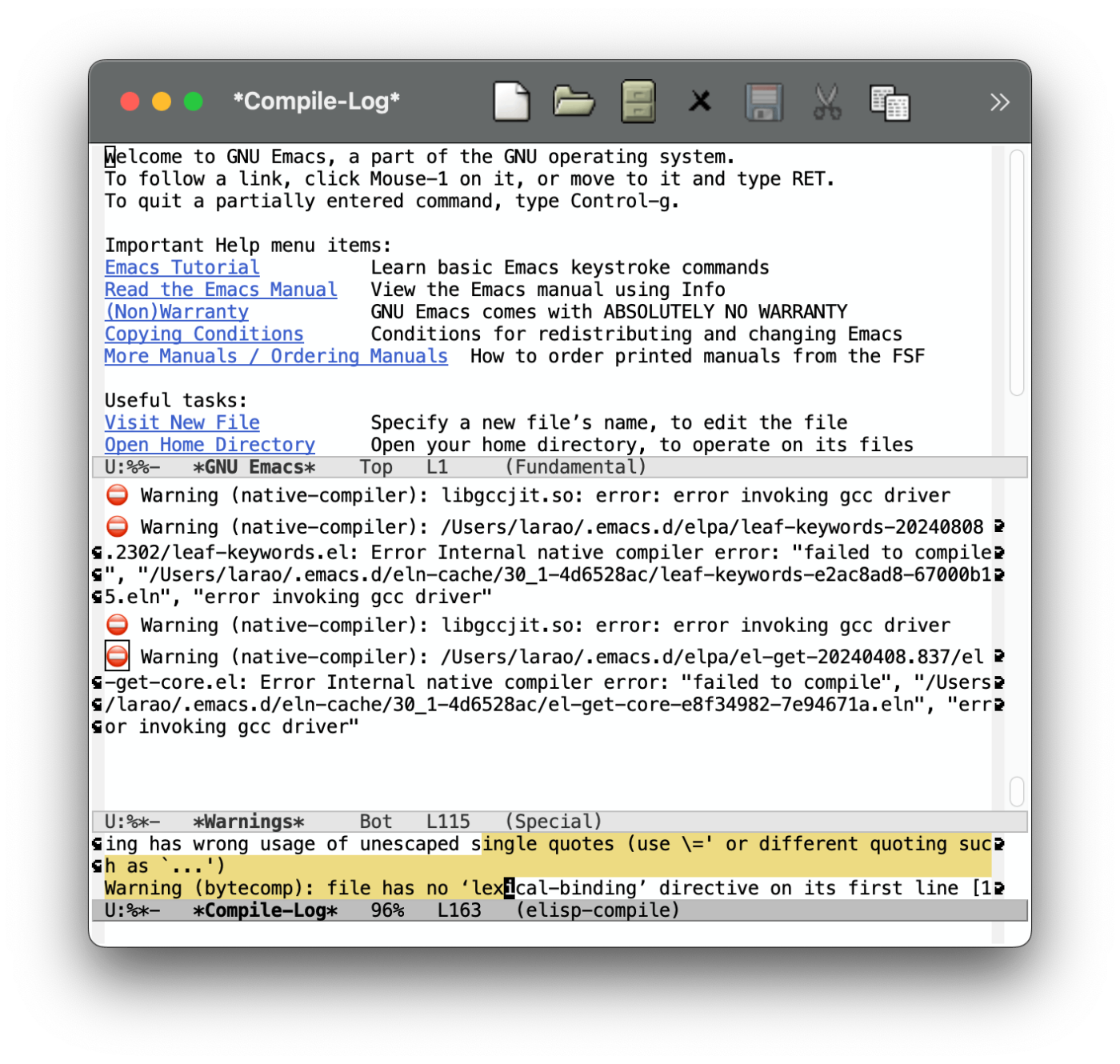
⛔ Warning (native-compiler): libgccjit.so: error: error invoking gcc driver
経緯
自分の場合はleaf.elの<leaf-install-code>をinit.elに追加したときに発生しました。
原因
そのままだけど一応書いておきます。
Native compilation 開始
↓
libgccjit ライブラリは存在する
↓
libgccjit が gcc driver (gccコマンド) を呼び出し
↓
gcc コマンドが PATH で見つからない
↓
"error invoking gcc driver" エラー
解決方法
~/.emacs.d/配下のearly-init.elもしくはinit.elの一番上に以下どちらかを追加する
1. brew --prefixを使用した解決方法
こちらの方が楽です。
brewに依存するのですが、emacs-plusの場合はこちらをおすすめします。
(defun homebrew-gcc-paths ()
  "Return GCC library paths from Homebrew installations.
Detects paths for gcc and libgccjit packages to be used in LIBRARY_PATH."
  (let* ((paths '())
         (brew-bin (or (executable-find "brew")
                       (let ((arm-path "/opt/homebrew/bin/brew")
                             (intel-path "/usr/local/bin/brew"))
                         (cond
                          ((file-exists-p arm-path) arm-path)
                          ((file-exists-p intel-path) intel-path))))))

    (when brew-bin
      ;; Get gcc paths
      (let* ((gcc-prefix (string-trim
                          (shell-command-to-string
                           (concat brew-bin " --prefix gcc"))))
             (gcc-lib-current (expand-file-name "lib/gcc/current" gcc-prefix)))
        (push gcc-lib-current paths)

        ;; Find apple-darwin directory
        (let* ((default-directory gcc-lib-current)
               (arch-dirs (file-expand-wildcards "gcc/*-apple-darwin*/*[0-9]")))
          (when arch-dirs
            (push (expand-file-name
                   (car (sort arch-dirs #'string>)))
                  paths))))

      ;; Get libgccjit paths
      (let* ((jit-prefix (string-trim
                          (shell-command-to-string
                           (concat brew-bin " --prefix libgccjit"))))
             (jit-lib-current (expand-file-name "lib/gcc/current" jit-prefix)))
        (push jit-lib-current paths)))

    (nreverse paths)))

(defun setup-macos-native-comp-library-paths ()
  "Set up LIBRARY_PATH for native compilation on macOS.
Includes Homebrew GCC paths and CommandLineTools SDK libraries."
  (let* ((existing-paths (split-string (or (getenv "LIBRARY_PATH") "") ":" t))
         (gcc-paths (homebrew-gcc-paths))
         (clt-paths '("/Library/Developer/CommandLineTools/SDKs/MacOSX.sdk/usr/lib"))
         (unique-paths (delete-dups
                        (append existing-paths gcc-paths clt-paths))))

    (setenv "LIBRARY_PATH" (mapconcat #'identity unique-paths ":"))))

;; Set up library paths for native compilation on macOS
(when (eq system-type 'darwin)
  (setup-macos-native-comp-library-paths))
2. 自分でLIBRARY_PATHに追加する
brewでgcc, libgccjitをインストールしている場合は下のコードの15の部分やaarch64-apple-darwin24に関してはお手元の環境に合わせて変更してください。
こちらの場合、brewでgcc, libgccjitをインストールしていない場合でも対応できます。ただPATH全体の変更が必要です。
15やaarch64-apple-darwin24について
↓一応イメージ湧きやすいように軽く説明を貼っておきます
15 -> GCCのメジャーバージョン番号
aarch64-apple-darwin24 -> コンピューターのプラットフォーム識別子
(setenv "LIBRARY_PATH"
        (string-join
         '("/opt/homebrew/opt/gcc/lib/gcc/15"
           "/opt/homebrew/opt/libgccjit/lib/gcc/15"
           "/opt/homebrew/opt/gcc/lib/gcc/15/gcc/aarch64-apple-darwin24/15")
         ":"))
別の提案
macOSの方ならemacs-macを使う。
最後に
自分は普段こういう記事は必要とする人が少なそうなので書かないのですが、少しでもEmacsに興味のある方の助けになりたいと思い、記事を書く練習も兼ねて書いてみました。
とりあえずの対応になりますがこちらで解決できるよ〜という記事でした。
いいリファレンスになれば幸いです。
良きEmacsライフを!!
参考
Discussion