🦋
SwiftUI: 画像を90度単位回転+左右/上下反転する




SwiftUIで画像を表示する際、ユーザーの操作によって回転したり反転して表示したくなりました。まず、.rotationEffect()と.rotation3DEffect()を使って回転や反転を実装しようと思ったのですが、「回転してから反転」するのと「反転してから回転」するのでは結果が異なるため、宣言的UIにおいては二つのModifierを掛け合わせるのはどうやら良くないことがわかりました。そこで.rotation3DEffect()だけで全ての回転/反転に対応する方法を考えました。
画像がとりうる状態は全部で以下の8つです。
| up | right | down | left |
|---|---|---|---|
 |
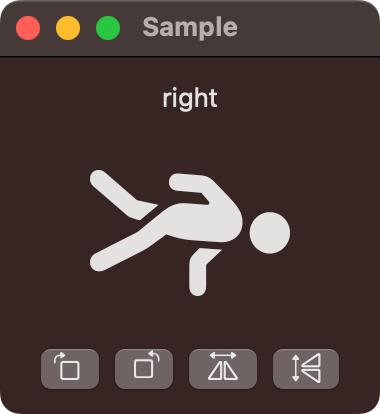 |
 |
 |
| upMirrored | rightMirrored | downMirrored | leftMirrored |
 |
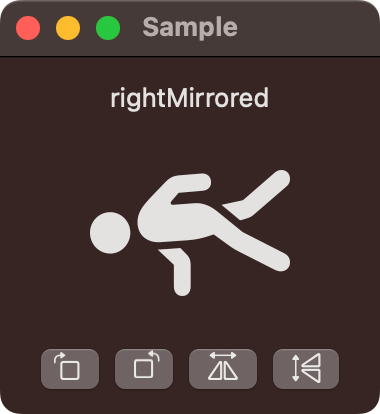 |
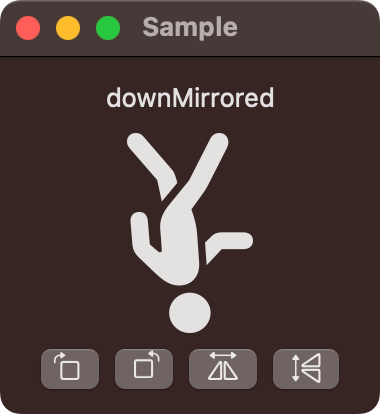 |
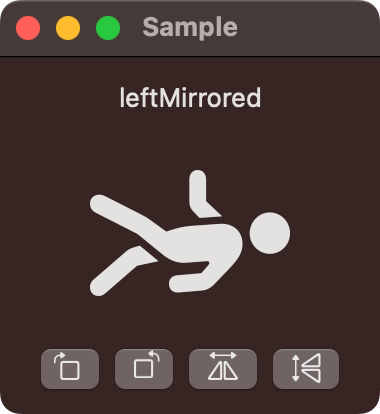 |
.rotation3DEffect()はangleとaxisを引数に取り、指定した回転軸に合わせて回転します。ちなみに、macOSの場合は軸の方向は下の図のような感じでした。

Image.Orientationという便利そうな列挙型を見つけたので、こいつからangleとaxisが取得できるようにしつつ、回転した時や反転した時にどのOrientationになるのか対応付けましょう。
コマンド
- rotateRight
- rotateLeft
- flipHorizontal
- flipVertical
対応表
| initial | command | result |
|---|---|---|
| up | rotateRight | right |
| right | rotateRight | down |
| down | rotateRight | left |
| left | rotateRight | up |
| upMirrored | rotateRight | leftMirrored |
| rightMirrored | rotateRight | upMirrored |
| downMirrored | rotateRight | rightMirrored |
| leftMirrored | rotateRight | downMirrored |
| initial | command | result |
|---|---|---|
| up | rotateLeft | left |
| right | rotateLeft | up |
| down | rotateLeft | right |
| left | rotateLeft | down |
| upMirrored | rotateLeft | rightMirrored |
| rightMirrored | rotateLeft | downMirrored |
| downMirrored | rotateLeft | leftMirrored |
| leftMirrored | rotateLeft | upMirrored |
| initial | command | result |
|---|---|---|
| up | flipHorizontal | upMirrored |
| right | flipHorizontal | rightMirrored |
| down | flipHorizontal | downMirrored |
| left | flipHorizontal | leftMirrored |
| upMirrored | flipHorizontal | up |
| rightMirrored | flipHorizontal | right |
| downMirrored | flipHorizontal | down |
| leftMirrored | flipHorizontal | left |
| initial | command | result |
|---|---|---|
| up | flipVertical | downMirrored |
| right | flipVertical | leftMirrored |
| down | flipVertical | upMirrored |
| left | flipVertical | rightMirrored |
| upMirrored | flipVertical | down |
| rightMirrored | flipVertical | left |
| downMirrored | flipVertical | up |
| leftMirrored | flipVertical | right |
上の対応表をもとにImage.Orientationを拡張します。
extension Image.Orientation {
    var angle: Angle {
        switch self {
        case .up:            return Angle(degrees: 0)
        case .right:         return Angle(degrees: 90)
        case .down:          return Angle(degrees: 180)
        case .left:          return Angle(degrees: 270)
        case .upMirrored:    return Angle(degrees: 180)
        case .rightMirrored: return Angle(degrees: 180)
        case .downMirrored:  return Angle(degrees: 180)
        case .leftMirrored:  return Angle(degrees: 180)
        }
    }

    var axis: (x: CGFloat, y: CGFloat, z: CGFloat) {
        switch self {
        case .up:            return (x: 0, y: 0, z: 1)
        case .right:         return (x: 0, y: 0, z: 1)
        case .down:          return (x: 0, y: 0, z: 1)
        case .left:          return (x: 0, y: 0, z: 1)
        case .upMirrored:    return (x: 0, y: 1, z: 0)
        case .rightMirrored: return (x: 1, y: 1, z: 0)
        case .downMirrored:  return (x: 1, y: 0, z: 0)
        case .leftMirrored:  return (x: -1, y: 1, z: 0)
        }
    }

    func rotateRight() -> Self {
        switch self {
        case .up:            return .right
        case .right:         return .down
        case .down:          return .left
        case .left:          return .up
        case .upMirrored:    return .leftMirrored
        case .rightMirrored: return .upMirrored
        case .downMirrored:  return .rightMirrored
        case .leftMirrored:  return .downMirrored
        }
    }

    func rotateLeft() -> Self {
        switch self {
        case .up:            return .left
        case .right:         return .up
        case .down:          return .right
        case .left:          return .down
        case .upMirrored:    return .rightMirrored
        case .rightMirrored: return .downMirrored
        case .downMirrored:  return .leftMirrored
        case .leftMirrored:  return .upMirrored
        }
    }

    func flipHorizontal() -> Self {
        switch self {
        case .up:            return .upMirrored
        case .right:         return .rightMirrored
        case .down:          return .downMirrored
        case .left:          return .leftMirrored
        case .upMirrored:    return .up
        case .rightMirrored: return .right
        case .downMirrored:  return .down
        case .leftMirrored:  return .left
        }
    }

    func flipVertical() -> Self {
        switch self {
        case .up:            return .downMirrored
        case .right:         return .leftMirrored
        case .down:          return .upMirrored
        case .left:          return .rightMirrored
        case .upMirrored:    return .down
        case .rightMirrored: return .left
        case .downMirrored:  return .up
        case .leftMirrored:  return .right
        }
    }
}
あとはよしなにUIを作ればOKです。
import SwiftUI

struct ContentView: View {
    @State var orientation: Image.Orientation = .up

    var body: some View {
        VStack {
            Text(String(describing: orientation))
            Image(systemName: "figure.walk")
                .resizable()
                .scaledToFit()
                .frame(width: 100, height: 100)
                .rotation3DEffect(orientation.angle, axis: orientation.axis)
            HStack {
                Button {
                    orientation = orientation.rotateRight()
                } label: {
                    Image(systemName: "rotate.right")
                }
                Button {
                    orientation = orientation.rotateLeft()
                } label: {
                    Image(systemName: "rotate.left")
                }
                Button {
                    orientation = orientation.flipHorizontal()
                } label: {
                    Image(systemName: "arrow.left.and.right.righttriangle.left.righttriangle.right")
                }
                Button {
                    orientation = orientation.flipVertical()
                } label: {
                    Image(systemName: "arrow.up.and.down.righttriangle.up.righttriangle.down")
                }
            }
        }
        .padding(20)
    }
}
Discussion