amazon-cognito-identity-jsを利用してCognitoにサインアップ・コード検証・サインイン・サインアウトしてみる(フォームあり)
 kazu.o
ブラウザ
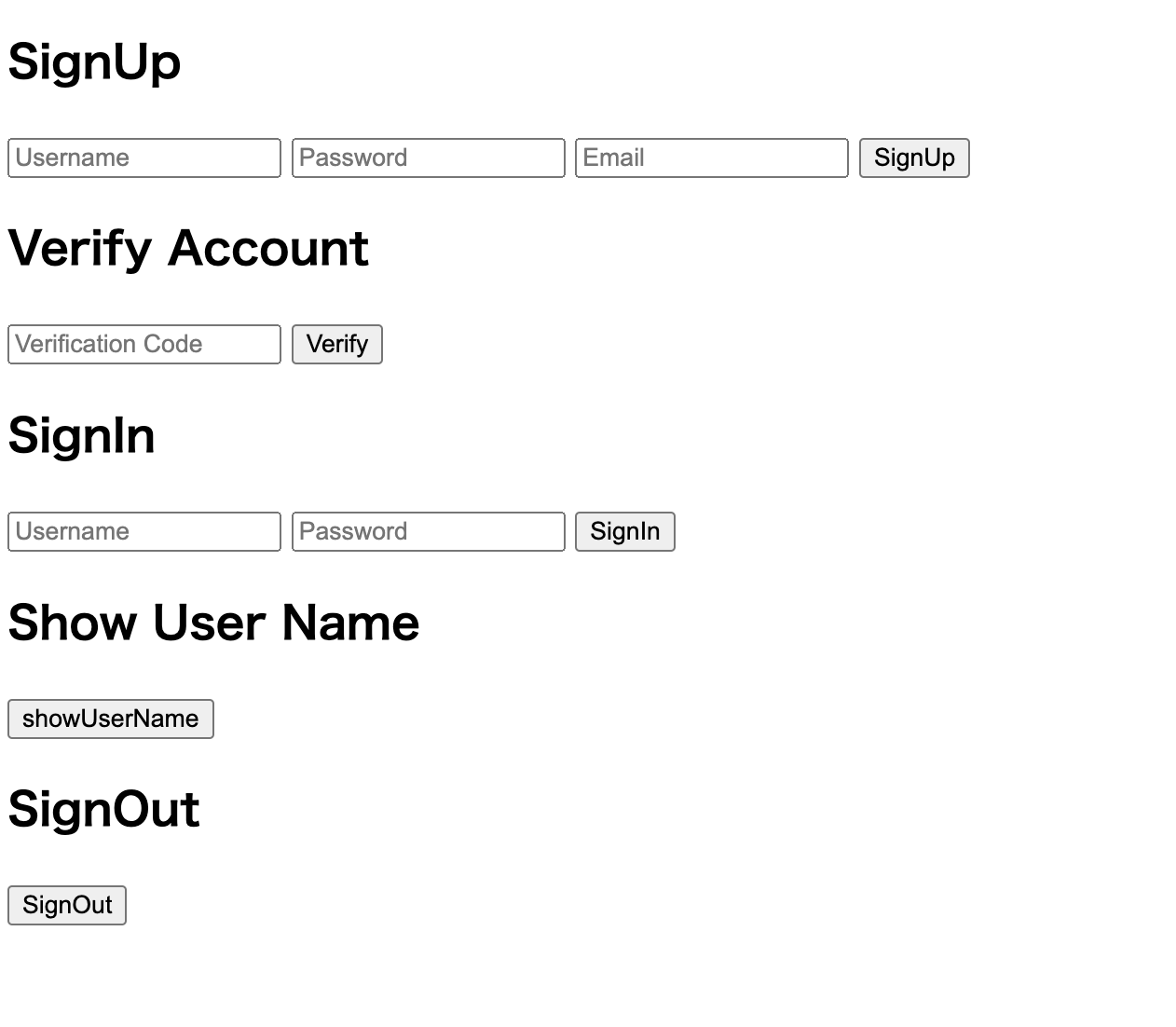
前提
Cognitoユーザープールは作成済み。
ソースコードはほとんど変更しているが以下スクラップの続き
用途説明
SignUp
アカウントの登録
Verify Account
アカウント登録の際に入力したメールアドレス宛にCognitoから検証コードが含まれたメールが送信されるので、その検証コードを入力する
SignIn
サインイン
Show User Name
現在サインインしているユーザー名を表示させる
SignOut
サインアウト
kazu.oソースコード
<!DOCTYPE html>
<html>
    <head>
        <meta charset="UTF-8" />
        <title>Cognito Test</title>
        <script src="./node_modules/amazon-cognito-identity-js/dist/amazon-cognito-identity.min.js"></script>
    </head>
    <body>
        <!-- SignUp フォーム -->
        <h2>SignUp</h2>
        <input type="text" id="signup-username" placeholder="Username">
        <input type="password" id="signup-password" placeholder="Password">
        <input type="email" id="signup-email" placeholder="Email">
        <button onclick="signUp()">SignUp</button>

        <!-- 検証コード入力フォーム -->
        <h2>Verify Account</h2>
        <input type="text" id="verify-code" placeholder="Verification Code">
        <button onclick="verifyAccount()">Verify</button>

        <!-- SignIn フォーム -->
        <h2>SignIn</h2>
        <input type="text" id="signin-username" placeholder="Username">
        <input type="password" id="signin-password" placeholder="Password">
        <button onclick="signIn()">SignIn</button>

        <!-- ユーザー名を表示 -->
        <h2>Show User Name</h2>
        <button onclick="showUsername()">showUserName</button>
        <p id="show-username"></p>

        <!-- SignOut フォーム -->
        <h2>SignOut</h2>
        <button onclick="signOut()">SignOut</button>
        <script>
            const poolData = {
                UserPoolId: 'xxx', // Your user pool id here
                ClientId: 'xxx', // Your client id here
            };
            const userPool = new AmazonCognitoIdentity.CognitoUserPool(poolData);
            let cognitoUser;

            function signUp() {
                const username = document.getElementById('signup-username').value;
                const password = document.getElementById('signup-password').value;
                const email = document.getElementById('signup-email').value;

                let attributeList = [];
                const dataEmail = {
                    Name: 'email',
                    Value: email
                };
                const attributeEmail = new AmazonCognitoIdentity.CognitoUserAttribute(dataEmail);
                attributeList.push(attributeEmail);

                userPool.signUp(username, password, attributeList, null, function(
                        err,
                        result
                    ) {
                        if (err) {
                            alert(err.message || JSON.stringify(err));
                            return;
                        }
                        cognitoUser = result.user;
                        console.log('user name is ' + cognitoUser.getUsername());
                    });
            }

            function verifyAccount() {
                var verificationCode = document.getElementById('verify-code').value;
                cognitoUser.confirmRegistration(verificationCode, true, function(err, result) {
                    if (err) {
                        console.error(err);
                        return;
                    }
                    alert('Verification successful');
                });
            }

            function signIn() {
                var username = document.getElementById('signin-username').value;
                var password = document.getElementById('signin-password').value;

                var authenticationData = {
                    Username: username,
                    Password: password
                };
                var authenticationDetails = new AmazonCognitoIdentity.AuthenticationDetails (authenticationData);

                var userData = {
                    Username: username,
                    Pool: userPool
                };
                cognitoUser = new AmazonCognitoIdentity.CognitoUser(userData);

                cognitoUser.authenticateUser(authenticationDetails, {
                    onSuccess: function(result) {
                        console.log('Authentication successful');
                        console.log('Access token: ' + result.getAccessToken().getJwtToken());
                    },
                    onFailure: function(err) {
                        console.error(err);
                    }
                });
            }

            function showUsername(){
                const currentUser = userPool.getCurrentUser();
                if (currentUser) {
                    console.log('username is ' + currentUser.getUsername());
                    document.getElementById("show-username").textContent = currentUser.getUsername()
                } else {
                    document.getElementById("show-username").textContent = 'no signin'
                }

            }

            function signOut() {
                if (cognitoUser) {
                    cognitoUser.signOut();
                    console.log('Signed out successfully');
                } else {
                    console.log('No user signed in');
                }
            }

        </script>
    </body>
</html>
SignUp
            function signUp() {
                const username = document.getElementById('signup-username').value;
                const password = document.getElementById('signup-password').value;
                const email = document.getElementById('signup-email').value;

                let attributeList = [];
                const dataEmail = {
                    Name: 'email',
                    Value: email
                };
                const attributeEmail = new AmazonCognitoIdentity.CognitoUserAttribute(dataEmail);
                attributeList.push(attributeEmail);

                userPool.signUp(username, password, attributeList, null, function(
                        err,
                        result
                    ) {
                        if (err) {
                            alert(err.message || JSON.stringify(err));
                            return;
                        }
                        cognitoUser = result.user;
                        console.log('user name is ' + cognitoUser.getUsername());
                    });
            }
フォームにユーザー名・パスワード・メールアドレスを入力してsignUpをクリックすると、上記のコードが実行されてアカウントが作成される。
アカウントが作成されることは Cognito ユーザープールから確認可能
この段階ではユーザーの確認ステータスは未確認
開発者ツールから確認
X-Amz-Target: AWSCognitoIdentityProviderService.SignUp
リクエストペイロード
{"ClientId":"xxx","Username":"test","Password":"xxx","UserAttributes":[{"Name":"email","Value":"xxx@xxx.com"}],"ValidationData":null}
レスポンス
{"CodeDeliveryDetails":{"AttributeName":"email","DeliveryMedium":"EMAIL","Destination":"***@***"},"UserConfirmed":false,"UserSub":"538d678b-353a-4fd5-91dc-4191aba83e88"}
sub はユーザープール内で一意のユーザー識別子
SignUp API
GitHub
kazu.oVerify Account
            function verifyAccount() {
                var verificationCode = document.getElementById('verify-code').value;
                cognitoUser.confirmRegistration(verificationCode, true, function(err, result) {
                    if (err) {
                        console.error(err);
                        return;
                    }
                    alert('Verification successful');
                });
            }
サインアップ後にメールアドレス宛に検証コードが届くので、同コードをフォームに入力することで、ユーザーが確認済みとなる
確認済みにしないとユーザーはサインインできない
確認済みにしない状態でサインインしようとすると、以下のエラーとなる
{"__type":"UserNotConfirmedException","message":"User is not confirmed."}
開発者ツールから確認
X-Amz-Target: AWSCognitoIdentityProviderService.ConfirmSignUp
リクエストペイロード
{"ClientId":"xxx","ConfirmationCode":"953186","Username":"test","ForceAliasCreation":true}
レスポンス
{}
ConfirmSignUp API
GitHub
kazu.oSignIn
            function signIn() {
                var username = document.getElementById('signin-username').value;
                var password = document.getElementById('signin-password').value;

                var authenticationData = {
                    Username: username,
                    Password: password
                };
                var authenticationDetails = new AmazonCognitoIdentity.AuthenticationDetails (authenticationData);

                var userData = {
                    Username: username,
                    Pool: userPool
                };
                cognitoUser = new AmazonCognitoIdentity.CognitoUser(userData);

                cognitoUser.authenticateUser(authenticationDetails, {
                    onSuccess: function(result) {
                        console.log('Authentication successful');
                        console.log('Access token: ' + result.getAccessToken().getJwtToken());
                    },
                    onFailure: function(err) {
                        console.error(err);
                    }
                });
            }
フォームにユーザー名とパスワードを入力してクリックすることでサインインできる
開発者ツールから確認
今回は2回に分けてリクエストされている
認証のフローにより、さらにリクエスト回数が増える場合もあると思われる
X-Amz-Target: AWSCognitoIdentityProviderService.InitiateAuth
X-Amz-Target: AWSCognitoIdentityProviderService.RespondToAuthChallenge
{"AuthFlow":"USER_SRP_AUTH","ClientId":"xxx","AuthParameters":{"USERNAME":"test","SRP_A":"xxx"},"ClientMetadata":{}}

{"ChallengeName":"PASSWORD_VERIFIER","ClientId":"xxx","ChallengeResponses":{"USERNAME":"test","PASSWORD_CLAIM_SECRET_BLOCK":"xxx,"TIMESTAMP":"Mon Feb 12 13:24:24 UTC 2024","PASSWORD_CLAIM_SIGNATURE":"xxx"},"ClientMetadata":{}}
レスポンス
{"ChallengeName":"PASSWORD_VERIFIER","ChallengeParameters":{"SALT":"xxx","SECRET_BLOCK":"xxx","SRP_B":"xxx","USERNAME":"test","USER_ID_FOR_SRP":"test"}}

{"AuthenticationResult":{"AccessToken":"xxx","ExpiresIn":3600,"IdToken":"xxx","RefreshToken":"xxx","TokenType":"Bearer"},"ChallengeParameters":{}}
サインインに成功すると、ブラウザの LocalStorage に以下のトークン等の情報が保存される
CognitoIdentityServiceProvider.<アプリクライアントID>.LastAuthUser: test
CognitoIdentityServiceProvider.<アプリクライアントID>.test.clockDrift: 0
CognitoIdentityServiceProvider.<アプリクライアントID>.test.accessToken: 省略
CognitoIdentityServiceProvider.<アプリクライアントID>.test.idToken: 省略
CognitoIdentityServiceProvider.<アプリクライアントID>.test.refreshToken: 省略
InitiateAuth API サインインを開始
RespondToAuthChallenge API サインインに必要なデータを送信する
GitHub
kazu.oShow User Name
            function showUsername(){
                const currentUser = userPool.getCurrentUser();
                if (currentUser) {
                    console.log('username is ' + currentUser.username);
                    document.getElementById("show-username").textContent = currentUser.username
                } else {
                    document.getElementById("show-username").textContent = 'no signin'
                }
            }
getCurrentUserメソッドによりブラウザのストレージ内のユーザー情報を取得している
上記ではcurrentUser.usernameでユーザー名を取得している。その他に参照できる情報を確認したい場合は console.log から確認できる
ブラウザ内の情報を取得しているだけなので、API はリクエストしていない
GitHub
kazu.oSignOut
            function signOut() {
                if (userPool.getCurrentUser()) {
                    userPool.getCurrentUser().signOut();
                    console.log('Signed out successfully');
                } else {
                    console.log('No user signed in');
                }
            }
SignOut をクリックすることで、ブラウザのストレージに保存している情報がクリアされ、サインアウトできる
GitHub