swagger_parserを使ってみた!






概要
openapi_generatorというyamlからDartのソースコードを自動生成するライブラリがあるのですが、バージョンの依存関係のエラーがFlutter3.38.1を使用しているときに出てしまい代用品がないか探していたところFlutter MCP Serverから取得した情報を元に、ClaudeCodeが提案してくれたswagger_parserを使ってみたところ意外と使いやすそうと思い記事にしてみようと思いました。
- 記事の対象者
- riverpodとfreezedに慣れている人
- 自動生成するコマンドを使ったことがある
- SwaggerやOpenAPIを使ってみたことがある
どんなものか?
コード生成するとRetrofitとfreezedのソースコードが自動生成されます。生成されたコードは、api ディレクトリに全て格納されております。
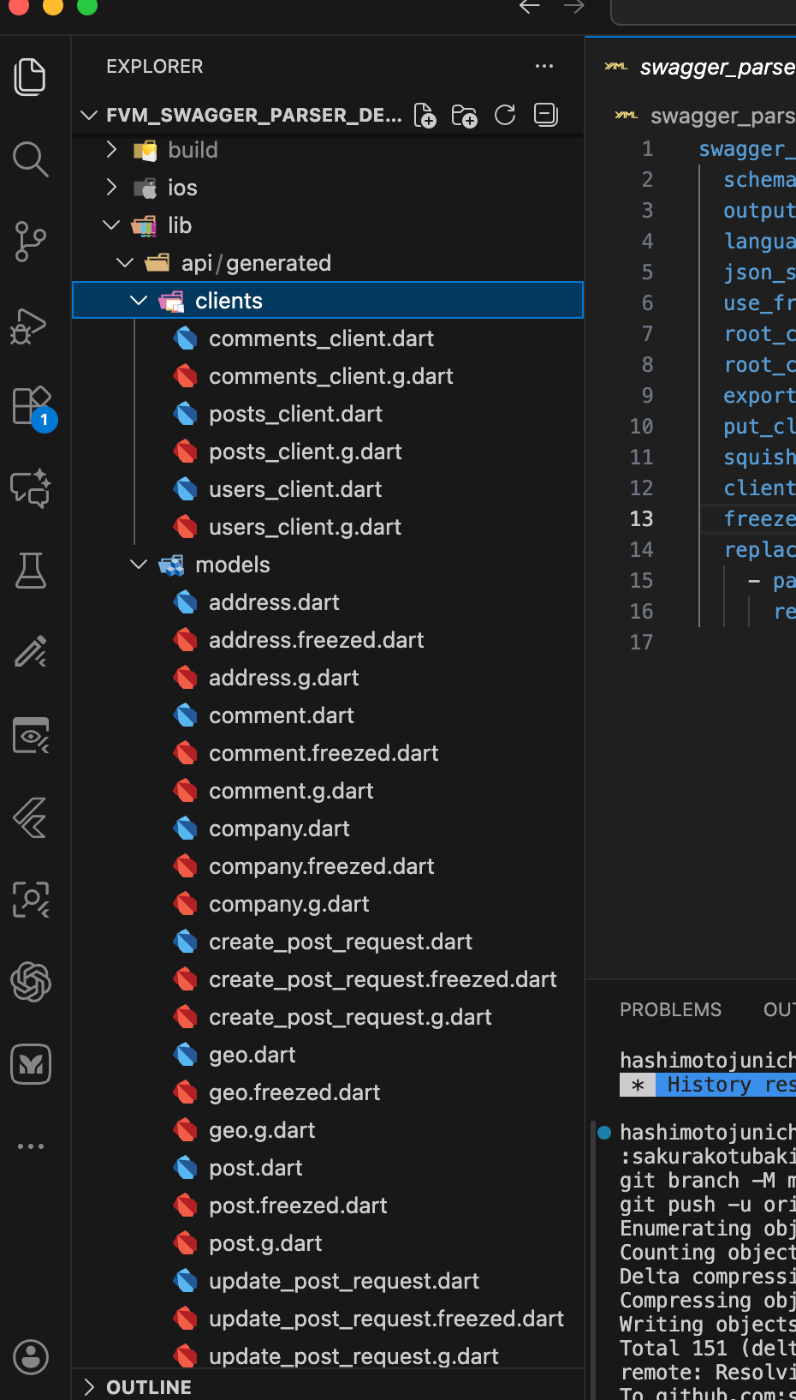
以下は、pub.devの解説を翻訳してものになります。
OpenAPI定義ファイルまたはリンクから、RESTクライアントとデータクラスを生成するDartパッケージです。
特徴:
- OpenAPI v2、v3.0、v3.1をサポート
- JSONとYAML形式をサポート
- リンクによる生成をサポート
- 複数のスキーマをサポート
- RetrofitをベースにしたRESTクライアントファイルを生成
- 以下のシリアライザのいずれかを使用してデータクラスを生成:
- json_serializable
- freezed
- dart_mappable
- 複数の言語をサポート (Dart, Kotlin)
- Webインターフェース: https://carapacik.github.io/swagger_parser
導入方法
こちらに完成品があるので参考に作ってみてください。
Flutterのプロジェクトを作成後に必要なライブラリを導入してください。riverpodは試すだけならなくても良いです。FutureBuilderでも表示できますので。
配置はこんな感じ

pubspec.yaml
name: fvm_swagger_parser_demo
description: "A new Flutter project."
publish_to: 'none'
version: 0.1.0

environment:
  sdk: ^3.10.0

dependencies:
  flutter:
    sdk: flutter
  flutter_riverpod: ^3.0.3
  riverpod_annotation: ^3.0.3
  dio: ^5.9.0
  retrofit: ^4.9.1
  freezed_annotation: ^3.1.0
  json_annotation: ^4.9.0

dev_dependencies:
  riverpod_generator: ^3.0.3
  custom_lint: ^0.8.1
  riverpod_lint: ^3.0.3
  swagger_parser: ^1.37.0
  retrofit_generator: ^10.2.0
  freezed: ^3.2.3
  json_serializable: ^6.11.2
  build_runner: ^2.10.4
  flutter_lints: ^6.0.0

flutter:
  uses-material-design: true
私の場合は作り過ぎてしまったが、無料で提供されているREST APIのエンドポイントが一つあれば十分です。schemes/jsonplaceholder.yamlを作成します。これがOpenAPIの仕様書になります。
schemes
openapi: 3.0.3
info:
  title: JSONPlaceholder API
  description: Free fake API for testing and prototyping
  version: 1.0.0
servers:
  - url: https://jsonplaceholder.typicode.com
paths:
  /posts:
    get:
      summary: Get all posts
      operationId: getPosts
      tags:
        - Posts
      responses:
        '200':
          description: A list of posts
          content:
            application/json:
              schema:
                type: array
                items:
                  $ref: '#/components/schemas/Post'
    post:
      summary: Create a new post
      operationId: createPost
      tags:
        - Posts
      requestBody:
        required: true
        content:
          application/json:
            schema:
              $ref: '#/components/schemas/CreatePostRequest'
      responses:
        '201':
          description: Created post
          content:
            application/json:
              schema:
                $ref: '#/components/schemas/Post'
  /posts/{id}:
    get:
      summary: Get a post by ID
      operationId: getPost
      tags:
        - Posts
      parameters:
        - name: id
          in: path
          required: true
          schema:
            type: integer
      responses:
        '200':
          description: A post
          content:
            application/json:
              schema:
                $ref: '#/components/schemas/Post'
    put:
      summary: Update a post
      operationId: updatePost
      tags:
        - Posts
      parameters:
        - name: id
          in: path
          required: true
          schema:
            type: integer
      requestBody:
        required: true
        content:
          application/json:
            schema:
              $ref: '#/components/schemas/UpdatePostRequest'
      responses:
        '200':
          description: Updated post
          content:
            application/json:
              schema:
                $ref: '#/components/schemas/Post'
    delete:
      summary: Delete a post
      operationId: deletePost
      tags:
        - Posts
      parameters:
        - name: id
          in: path
          required: true
          schema:
            type: integer
      responses:
        '200':
          description: Deleted successfully
  /users:
    get:
      summary: Get all users
      operationId: getUsers
      tags:
        - Users
      responses:
        '200':
          description: A list of users
          content:
            application/json:
              schema:
                type: array
                items:
                  $ref: '#/components/schemas/User'
  /users/{id}:
    get:
      summary: Get a user by ID
      operationId: getUser
      tags:
        - Users
      parameters:
        - name: id
          in: path
          required: true
          schema:
            type: integer
      responses:
        '200':
          description: A user
          content:
            application/json:
              schema:
                $ref: '#/components/schemas/User'
  /comments:
    get:
      summary: Get all comments
      operationId: getComments
      tags:
        - Comments
      parameters:
        - name: postId
          in: query
          required: false
          schema:
            type: integer
      responses:
        '200':
          description: A list of comments
          content:
            application/json:
              schema:
                type: array
                items:
                  $ref: '#/components/schemas/Comment'
components:
  schemas:
    Post:
      type: object
      required:
        - userId
        - id
        - title
        - body
      properties:
        userId:
          type: integer
        id:
          type: integer
        title:
          type: string
        body:
          type: string
    CreatePostRequest:
      type: object
      required:
        - userId
        - title
        - body
      properties:
        userId:
          type: integer
        title:
          type: string
        body:
          type: string
    UpdatePostRequest:
      type: object
      required:
        - userId
        - id
        - title
        - body
      properties:
        userId:
          type: integer
        id:
          type: integer
        title:
          type: string
        body:
          type: string
    User:
      type: object
      required:
        - id
        - name
        - username
        - email
      properties:
        id:
          type: integer
        name:
          type: string
        username:
          type: string
        email:
          type: string
        address:
          $ref: '#/components/schemas/Address'
        phone:
          type: string
        website:
          type: string
        company:
          $ref: '#/components/schemas/Company'
    Address:
      type: object
      properties:
        street:
          type: string
        suite:
          type: string
        city:
          type: string
        zipcode:
          type: string
        geo:
          $ref: '#/components/schemas/Geo'
    Geo:
      type: object
      properties:
        lat:
          type: string
        lng:
          type: string
    Company:
      type: object
      properties:
        name:
          type: string
        catchPhrase:
          type: string
        bs:
          type: string
    Comment:
      type: object
      required:
        - postId
        - id
        - name
        - email
        - body
      properties:
        postId:
          type: integer
        id:
          type: integer
        name:
          type: string
        email:
          type: string
        body:
          type: string
build.yamlを作成する。
global_options:
  freezed:
    runs_before:
      - json_serializable
  json_serializable:
    runs_before:
      - retrofit_generator
swagger_parser.yaml を作成後に自動生成のコマンドを実行します。
swagger_parser:
  schema_path: schemes/jsonplaceholder.yaml
  output_directory: lib/api/generated
  language: dart
  json_serializer: freezed
  use_freezed3: true
  root_client: true
  root_client_name: JsonPlaceholderClient
  export_file: true
  put_clients_in_folder: true
  squish_clients: true
  clients_folder: clients
  freezed_union_fallback_case: true
  replacement_rules:
    - pattern: DTO
      replacement: ''
fvm使ってない人は、外して実行してください。
fvm dart run swagger_parser
fvm flutter pub run build_runner watch --delete-conflicting-outputs
こちらが自動生成されたソースコードの一部となります。
// coverage:ignore-file
// GENERATED CODE - DO NOT MODIFY BY HAND
// ignore_for_file: type=lint, unused_import, invalid_annotation_target, unnecessary_import
import 'package:dio/dio.dart';
import 'package:retrofit/retrofit.dart';
import '../models/create_post_request.dart';
import '../models/post.dart';
import '../models/update_post_request.dart';
part 'posts_client.g.dart';
()
abstract class PostsClient {
factory PostsClient(Dio dio, {String? baseUrl}) = _PostsClient;
/// Get all posts
('/posts')
Future<List<Post>> getPosts();
/// Create a new post
('/posts')
Future<Post> createPost({
() required CreatePostRequest body,
});
/// Get a post by ID
('/posts/{id}')
Future<Post> getPost({
('id') required int id,
});
/// Update a post
('/posts/{id}')
Future<Post> updatePost({
('id') required int id,
() required UpdatePostRequest body,
});
/// Delete a post
('/posts/{id}')
Future<void> deletePost({
('id') required int id,
});
}
Screen Shot
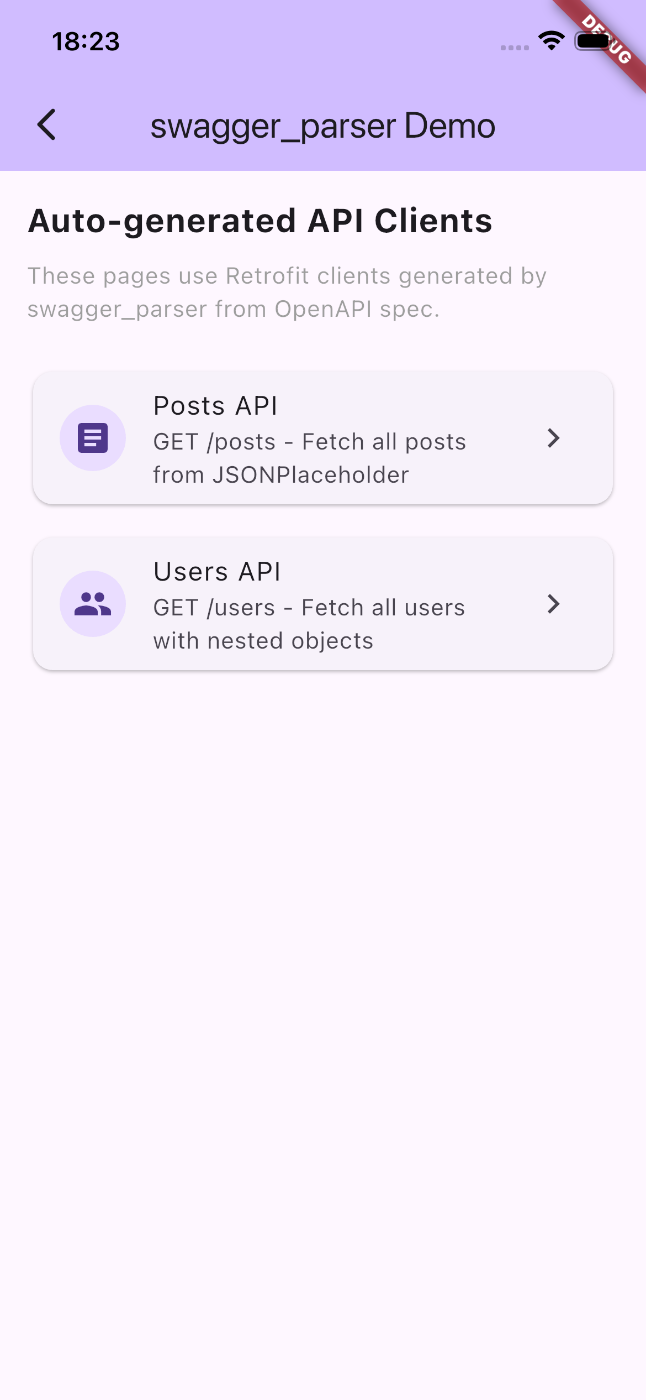
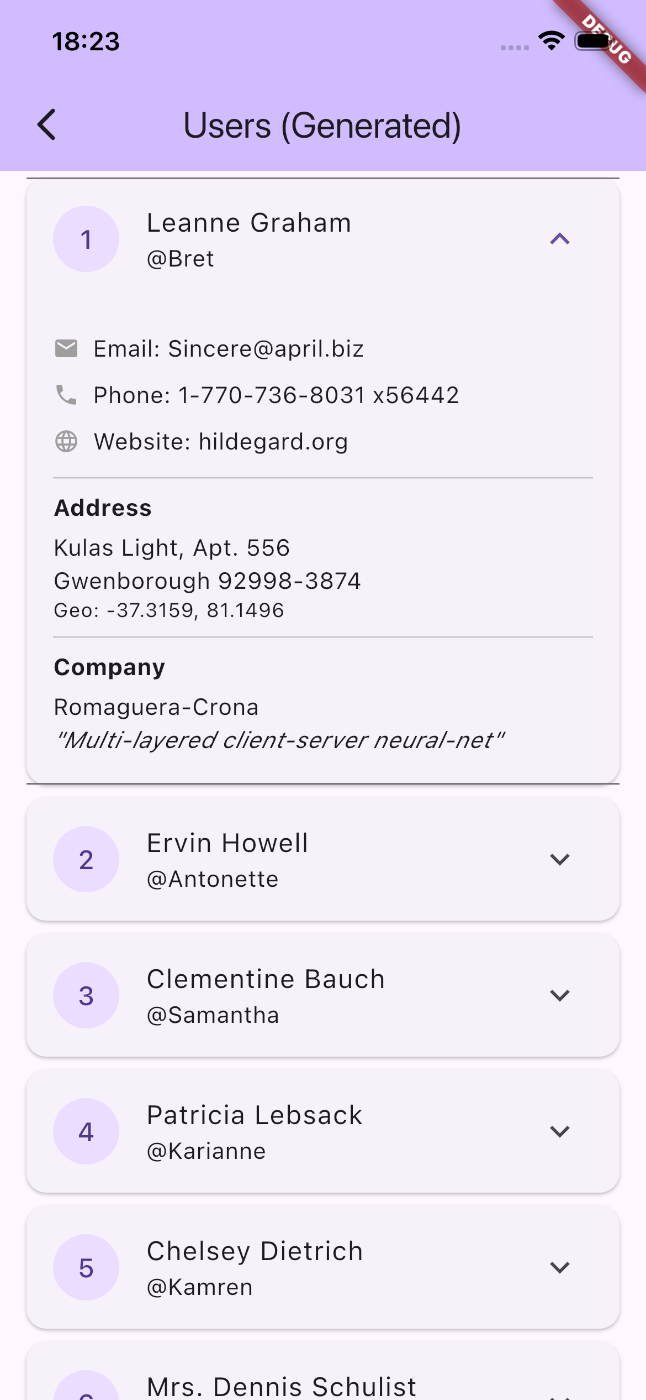
最後に
開発現場では、httpやdioを使うだけだと開発体験が快適ではないことがありバックエンド側が作成したOpenAPIのyamlファイルをもらって、ライブラリを使用してDartのソースコードを自動生成することが近年は技術に強い現場ほど使っている印象でした。今の現場は、Retrofitでしたが😅
規模の大きな開発だと、FirebaseやSupabaseよりもBaasではなくREST API/Graph QL/gRpcが使われることが多いです。
クッキー、セッション、JWT、セッションID覚えることは他にも多くありますが、ソフトウェアエンジニアには当然の知識なので、知っておく必要はありますね。ネットワークの本が参考になるので読んでみると良いでしょう。
ソースコード多過ぎて、記事に全て書けませんでしがサンプルコード用意したので活用してみてください。
Discussion