Open9
Flutter 入門【2023/1/19~】
 ishiki
やってみたいこと
よくある企業アプリのコピー
ishiki現時点での難しそうと思うポイント
- 見た目を作るところ
- デザイン→画面の部分
- 状態管理
- APIを叩いた結果をFlutter側でどう管理するか
- CI
- テスト
- データ管理
ishikiflutter upgradeで出た
[!] Xcode - develop for iOS and macOS (Xcode 14.2)
    ✗ Xcode end user license agreement not signed; open Xcode or run the command 'sudo xcodebuild -license'.
    ✗ Xcode requires additional components to be installed in order to run.
      Launch Xcode and install additional required components when prompted or run:
        sudo xcodebuild -runFirstLaunch
    ✗ CocoaPods installed but not working.
        You appear to have CocoaPods installed but it is not working.
        This can happen if the version of Ruby that CocoaPods was installed with is different from the one being used to invoke it.
        This can usually be fixed by re-installing CocoaPods.
      To re-install see https://guides.cocoapods.org/using/getting-started.html#installation for instructions.
やったこと
- Xcode開いてプロジェクト選べるところまでいく
-
Xcode end user license agreement not signed; open Xcode or run the command 'sudo xcodebuild -license'.に対応した形 - これだけで flutter doctorが問題なくなった
-
ishikiimport 'package:image_picker/image_picker.dart' のためにinfo.plistを触ったときのメモ
下記記事を参考にinfo.plistに加筆していたところ、
Module 'image_picker_ios' not found
が発生。
これとか、
これ
を参考にしたけどうまくいかなかった。しかしエラーが変わり、info.plistの●行目がおかしい という内容だったのでよく見てみると
	<key>UIViewControllerBasedStatusBarAppearance</key>
	<false/>
</dict>
となっていたところの<false/>の上に<key></key>と<string></string>を足しており、読み込めなくなっていた模様
これは気づかなかった
<false/>ってなんだろうとは思ったけど、まさか上の行とセットとは思わなかった
ishikiflutter --version で下記エラー
Downloading Darwin arm64 Dart SDK from Flutter engine <<<<<<< HEAD
3316dd8728419ad3534e3f6112aa6291f587078a
=======
b24591ed328a2d4ce6505819e2f5898a78132f7f
>>>>>>> b06b8b2710955028a6b562f5aa6fe62941d6febf...
curl: (3) URL using bad/illegal format or missing URL
/Users/名前/development/flutter/bin/internal/update_dart_sdk.sh: line 156: return: can only `return' from a function or sourced script
curl: (3) URL using bad/illegal format or missing URL

Failed to retrieve the Dart SDK from: https://storage.googleapis.com/flutter_infra_release/flutter/<<<<<<< HEAD
3316dd8728419ad3534e3f6112aa6291f587078a
=======
b24591ed328a2d4ce6505819e2f5898a78132f7f
>>>>>>> b06b8b2710955028a6b562f5aa6fe62941d6febf/dart-sdk-darwin-arm64.zip
If you're located in China, please see this page:
  https://flutter.dev/community/china
わからないのでFlutterのインストールからやり直してみる
- インストールやり直したところ、該当エラーは消えた
- ついでにバージョンが最新になった
- 画像のエラーが出てデバッグに失敗
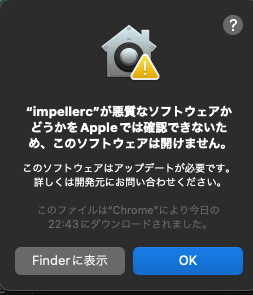
- apple公式の方法で解決
- finderで該当アプリケーションを開くだけ
ishikifirebase設定でエラー
Target of URI doesn't exist: 'package:firebase_core/firebase_core.dart'.
Try creating the file referenced by the URI, or try using a URI for a file that does exist.
VSCode再起動で直った
一体なんだったんだ...?
ishikiVSCodeがiPhone実機を認識しない
- 一度Xcodeでビルドしたら直る
ビルドが通っても認識しない
- flutter devicesで認識されているならVSCode再起動
ishikiModule 'firebase_auth' not found
- Podfile, Podfile.lockを削除
- flutter clean
- flutter run
ishikiMacOS Firestoreでエラー
FirebaseException ([cloud_firestore/unavailable] The service is currently unavailable. This is a most likely a transient condition and may be corrected by retrying with a backoff.)
firebaseの設定見た感じ、MacOSだけ認識されていないっぽい
チュートリアルで触っているだけなので、Firebaseプロジェクト作り直しにて対応
Firebaseプロジェクト作り直し
途中、このプロジェクトに対して Firestore を有効にできません 不明なエラーが発生しましたとエラーが出たが、実際は作成できていた
Firebaseプロジェクト再作成後
FirebaseException ([core/duplicate-app] A Firebase App named "[DEFAULT]" already exists)
以下記事の方法にて一旦解決
再実行後また同じ例外
FirebaseException ([cloud_firestore/unavailable] The service is currently unavailable. This is a most likely a transient condition and may be corrected by retrying with a backoff.)
Firestoreのリージョンが関係してる可能性があるみたい
iPhoneから試してみたところ別のエラー
FirebaseException ([cloud_firestore/permission-denied] The caller does not have permission to execute the specified operation.)
以下記事を参考に解決