

はじめに
こんにちは、kenです。お仕事ではGoを書いています。
突然ですが、みなさんはPRを出す前のセルフレビューの最中や実装作業中に、「あ、3つ前のコミットにtypoがあった...」とか「軽微な修正を1つ目のコミットに混ぜ込みたい...」と思ったことはありませんか?
直前のコミットであればgit commit --amendで簡単に修正できますが、数コミット前のものとなると、git rebase -iで手動でコミットを編集して...と、なかなか面倒な作業になりますよね。
しかし、git commit --fixup と git rebase --autosquash を組み合わせることで、この作業が少し楽になります!今回はこの便利な機能について紹介したいなと思います。
この記事はHRBrainアドベントカレンダー5日目の記事になります。
従来の方法:手動でrebaseする
まず、過去のコミットに修正を加えるときの一般的な方法を確認しておきましょう。
以下のような3つのコミットがある状態を想定します。
$ git log --oneline
6b3a95b (HEAD -> feature/user-profile) Add user settings page
b16d15c Add user profile page
0e7647f Add user model
a8927ac (main) Initial commit
この状態で、Add user profile pageのコミット(b16d15c)にtypoを見つけたとします。従来の方法では以下の手順が必要でした。
-
git rebase -i 0e7647fを実行 - エディタが開いたら、該当コミットを
editに変更 - エディタを保存して閉じる
- rebaseが一時停止するので、修正をステージング
-
git commit --amendで修正を追加 -
git rebase --continueで完了
$ git rebase -i 0e7647f

# エディタが開く
pick b16d15c Add user profile page
pick 6b3a95b Add user settings page

# ↓ editに変更
edit b16d15c Add user profile page
pick 6b3a95b Add user settings page

# 保存して閉じると、該当コミットで一時停止する
Stopped at b16d15c...  Add user profile page
You can amend the commit now, with

  git commit --amend

Once you are satisfied with your changes, run

  git rebase --continue

# ここで修正を行う
$ git add .
$ git commit --amend
$ git rebase --continue
これでも十分に機能しますし、そんなに複雑な手順でもありません。
ただ個人的には、rebase中に一時停止してから修正を加えるという流れが少し不自然に感じていました。「修正を見つけた→その場でコミット→後でまとめる」という流れの方が作業しやすいと思います。
今回紹介したい方法:fixupとautosquashを組み合わせる
それでは、git commit --fixupとgit rebase --autosquashを使った方法を見ていきましょう。同じ状況でも、こちらの方が作業の流れが自然で、rebase中に一時停止する必要もありません。
ステップ1: 修正をfixupコミットとして作成
まず、修正内容をステージングします。そして、git commit --fixupに修正したいコミットのハッシュ値を指定します。
$ git add .
$ git commit --fixup b16d15c
[feature/user-profile 561f60b] fixup! Add user profile page
 1 file changed, 1 insertion(+), 1 deletion(-)
これだけで、特別なコミットメッセージを持つコミットが作成されます。
$ git log --oneline
561f60b (HEAD -> feature/user-profile) fixup! Add user profile page
6b3a95b Add user settings page
b16d15c Add user profile page
0e7647f Add user model
a8927ac (main) Initial commit
コミットメッセージの先頭にfixup!が自動で付与されているのがわかりますね。この接頭辞が重要なポイントです。
ステップ2: autosquashでコミットをまとめる
次に、git rebase -i --autosquashを実行します。引数には、rebaseの起点となるコミットを指定します。指定したコミットより後のコミットが全て編集対象になります。
今回の例では、featureブランチ上で作業していると仮定して、mainブランチを起点に指定します。
$ git rebase -i --autosquash main
すると、エディタが開きますが、なんと自動的に並び替えとfixup指定がされています。
pick b16d15c Add user profile page
fixup 561f60b fixup! Add user profile page
pick 6b3a95b Add user settings page

# Rebase 0e7647f..561f60b onto 0e7647f (3 commands)
#
# Commands:
# p, pick <commit> = use commit
# r, reword <commit> = use commit, but edit the commit message
# e, edit <commit> = use commit, but stop for amending
# s, squash <commit> = use commit, but meld into previous commit
# f, fixup [-C | -c] <commit> = like "squash" but keep only the previous
#   commit's log message, unless -C is used, in which case
#   keep only this commit's message; -c is same as -C but
#   opens the editor

fixupコミットが自動的に元のコミットの直後に配置され、fixupコマンドが指定されています。これで、何も編集せずにそのままエディタを閉じるだけでコミットがまとめられます!
$ git log --oneline
fae0189 (HEAD -> feature/user-profile) Add user settings page
c6da2c7 Add user profile page
0e7647f Add user model
a8927ac (main) Initial commit
fixupコミットが消えて、修正内容がAdd user profile pageのコミットに統合されました。
実際の開発フローでの使い方
実際のプロジェクトでの使い方をもう少し具体的に見てみましょう。
シナリオ:Pull Requestでレビュー指摘を受けた場合
以下のようなコミット履歴でPull Requestを作成したとします。
$ git log --oneline
f955a83 (HEAD -> feature/api-endpoints) Add DELETE /users/:id endpoint
95b02fa Add PUT /users/:id endpoint
355affc Add GET /users/:id endpoint
df60e5d Add POST /users endpoint
2d8f2b8 (main) Initial commit
そしてレビュアーから以下のような指摘を受けたとします。
-
Add GET /users/:id endpointのコミットでエラーハンドリングが不足している -
Add POST /users endpointのコミットでバリデーションロジックにtypoがある
1つ目の指摘に対応する
まず、GETエンドポイントのエラーハンドリングを修正します。
$ git add api/users.go
$ git commit --fixup 355affc
[feature/api-endpoints s6t7u8v] fixup! Add GET /users/:id endpoint
 1 file changed, 5 insertions(+), 1 deletion(-)
2つ目の指摘に対応する
次に、POSTエンドポイントのtypoを修正します。
$ git add api/validation.go
$ git commit --fixup df60e5d
[feature/api-endpoints w9x0y1z] fixup! Add POST /users endpoint
 1 file changed, 1 insertion(+), 1 deletion(-)
現在のコミット履歴はこうなっています。
$ git log --oneline
a6c34c9 (HEAD -> feature/api-endpoints) fixup! Add POST /users endpoint
2973877 fixup! Add GET /users/:id endpoint
f955a83 Add DELETE /users/:id endpoint
95b02fa Add PUT /users/:id endpoint
355affc Add GET /users/:id endpoint
df60e5d Add POST /users endpoint
2d8f2b8 (main) Initial commit
まとめてrebase
最後に、autosquashでまとめます。
$ git rebase -i --autosquash main
エディタが開くと、自動的に以下のように整理されています。
pick df60e5d Add POST /users endpoint
fixup w9x0y1z fixup! Add POST /users endpoint
pick 355affc Add GET /users/:id endpoint
fixup s6t7u8v fixup! Add GET /users/:id endpoint
pick 95b02fa Add PUT /users/:id endpoint
pick f955a83 Add DELETE /users/:id endpoint
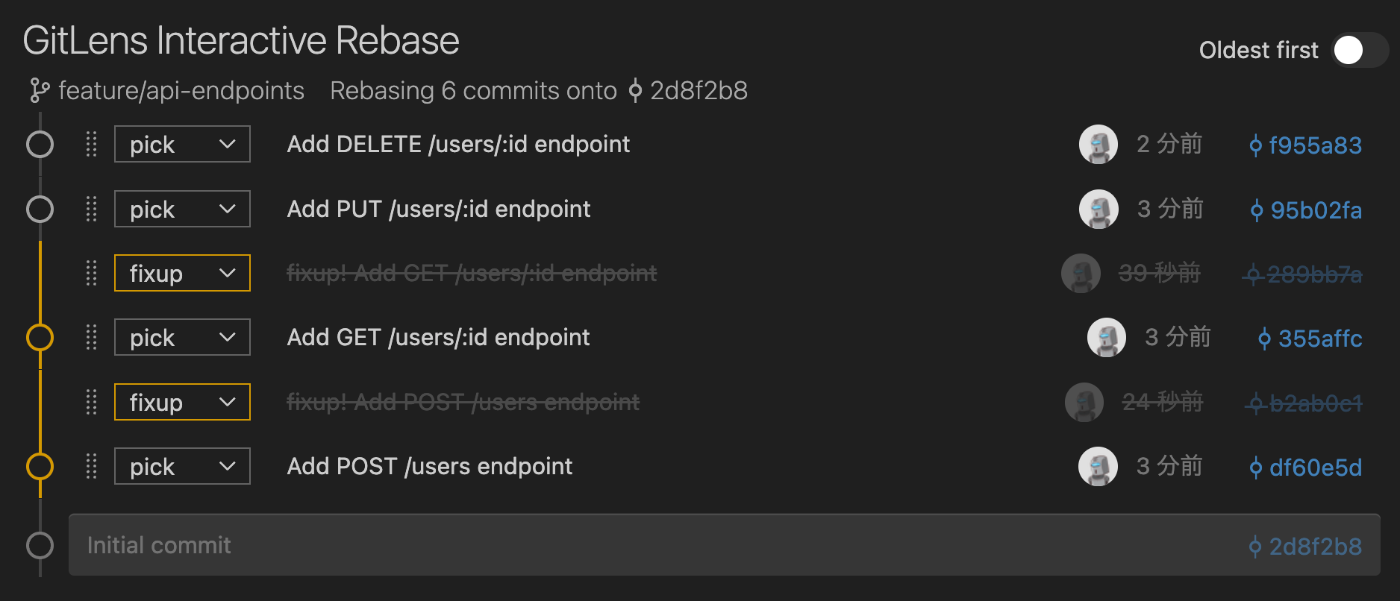
そのまま保存して閉じれば、綺麗なコミット履歴の完成です。
$ git log --oneline
03db675 (HEAD -> feature/api-endpoints) Add DELETE /users/:id endpoint
247dc23 Add PUT /users/:id endpoint
f071175 Add GET /users/:id endpoint
c0473bb Add POST /users endpoint
2d8f2b8 (main) Initial commit
fixupコミットがすべて元のコミットに統合され、レビュー指摘がすべて反映された状態になりました!
ちなみに:設定でautosquashをデフォルトにできる
毎回--autosquashオプションを付けるのが面倒な場合は、Gitの設定でデフォルトで有効化できます。
$ git config --global rebase.autoSquash true
この設定をしておけば、git rebase -iを実行するだけで自動的にautosquashが有効になります。
さいごに
この記事ではgit commit --fixupとgit rebase --autosquashの組み合わせで、過去のコミットに変更を加えたい場合でも簡単に対応できることをご紹介しました。
従来の手動rebaseもいいですが、個人的にはこちらの方法のほうが手順がシンプルで覚えやすい気がしています。
「修正コミットを別で作ってしまったけど、本当は元のコミットに含めたかった...」という経験がある方は、ぜひ一度試してみてください!
間違いなどありましたら、コメントにてご指摘ください。ここまで読んでいただき、ありがとうございました!
株式会社HRBrainでは新しいメンバーを募集中です!
ご興味ある方はぜひチェックしてみてください!

Discussion