[iOS] Lightship ARDKをUnity as a Library(UaaL環境下)で動かす





はじめに
iOSのUnity as a LibraryのみLightship ARDKを動かすのにいくつかの手順が必要。都度遭遇するエラーと共に一歩ずつ進めていく。
no such fileエラー
/Runner.app/Frameworks/LightshipARDK.framework/LightshipARDK' (no such file)
原因
これはLightship ARDKをRunnerのFrameworksへの参照に追加していないことが原因である。
これはLighitshipに限らず他のプラグインでも発生するので参照追加の方法は把握しておいた方が良い。
自動で追加する方法があれば良いのだが...良い方法をご存知の方いたらご教授ください。
flutter_unity_widgetでも手順に書かれている
Unity plugins that make use of native code (Vuforia, openCV, etc.) might need to be added to Runner like UnityFramework.
Check the contents of the /ios/UnityLibrary/Frameworks/ directory. Any <name>.framework located in (subdirectories of) this directory is a framework that you can add to Runner.
解決
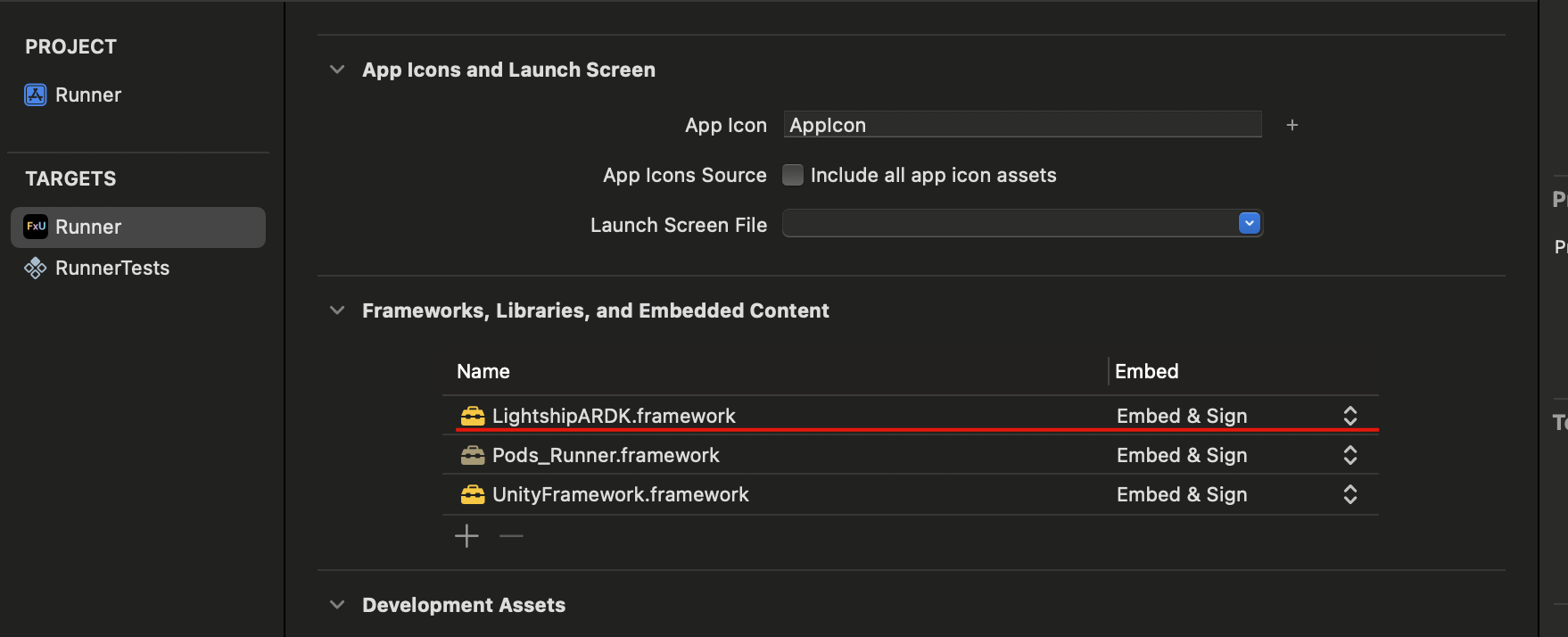
RunnerにLighitshipARDK.frameworkを追加すればOK。
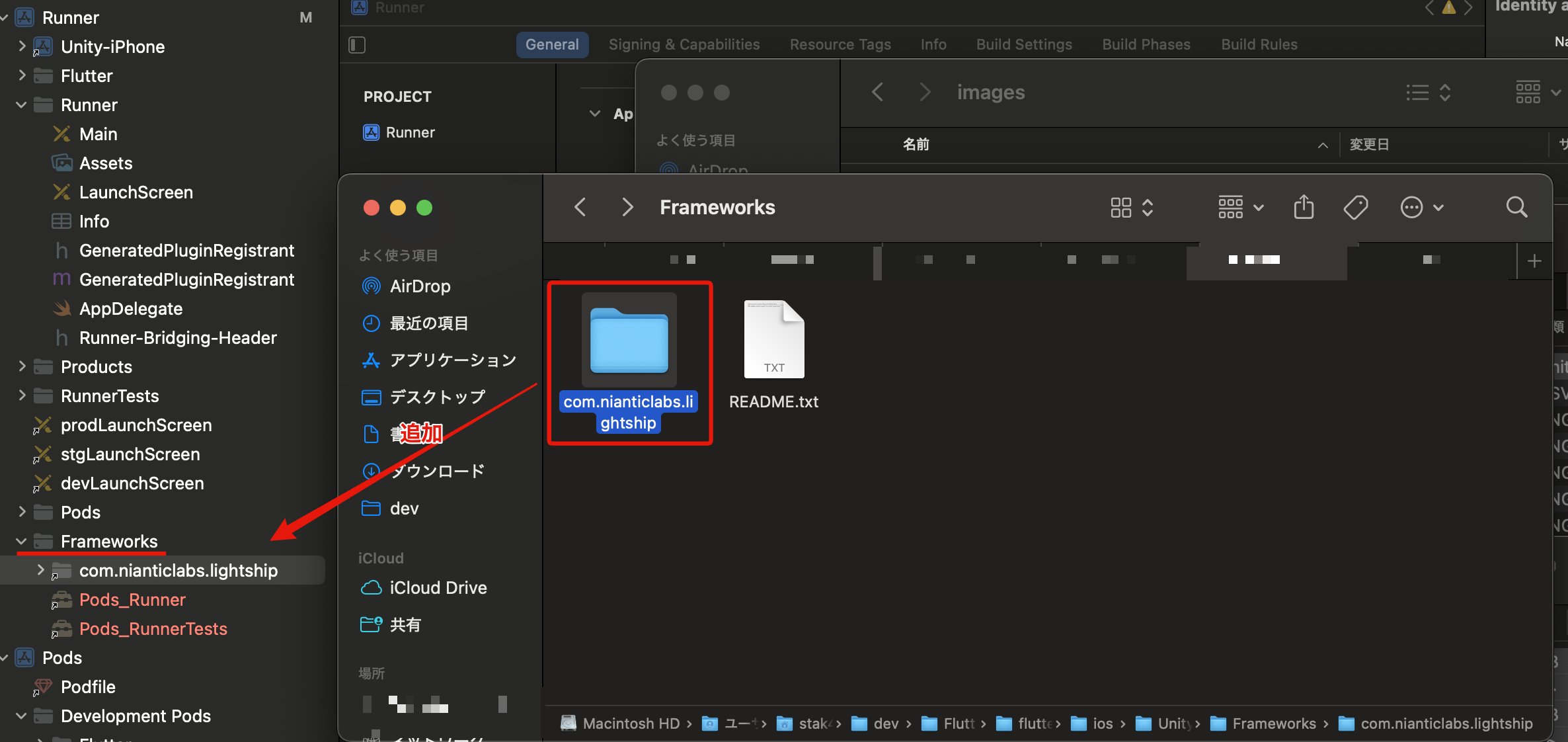
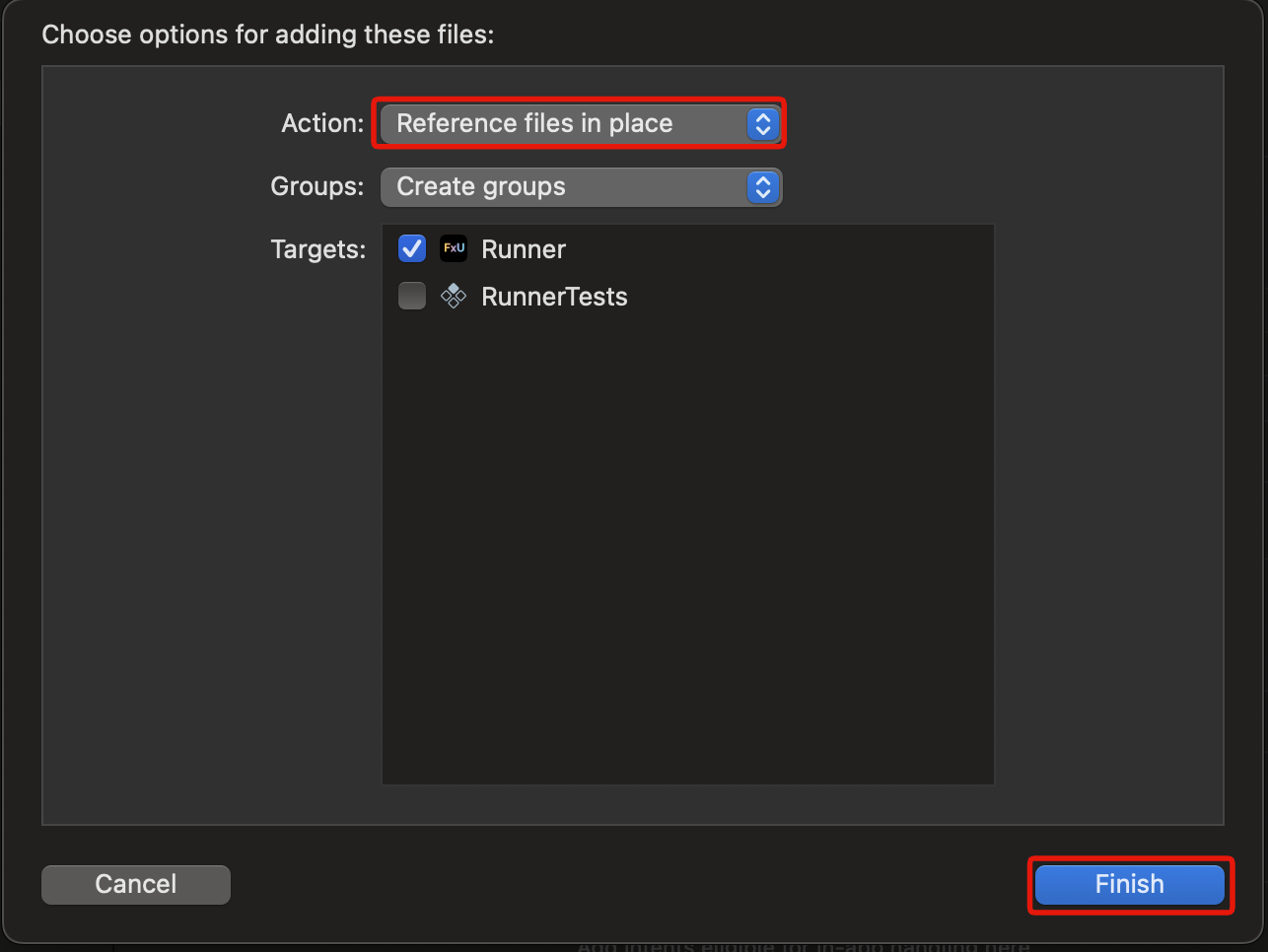
参照の追加方法
(flutter_unity_widgetの場合)ios/UnityFramework/にLightshipARDKがあるのでこれをRunner/Frameworksに参照を追加する。
これでRunnerのFrameworks,Libraries...に追加されていればOK.念の為Embed & Signにしている。
Unity起動直後にクラッシュする(EXC_BAD_ACCESS)
通常のプラグインであれば参照を追加すれば解決するのだが、Lightshipの場合起動直後にクラッシュする問題がある。
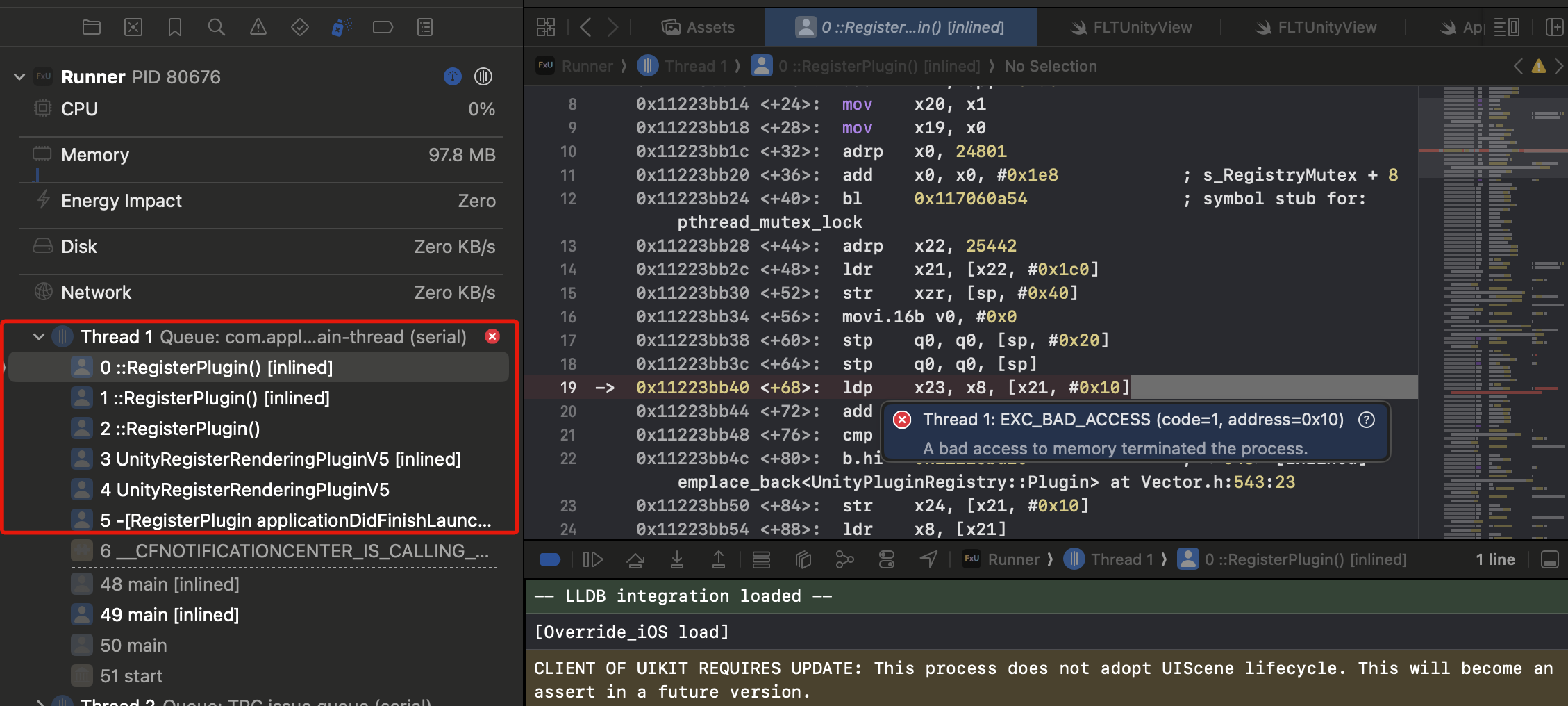
EXC_BAD_ACCESS自体はUnityにおけるNullReferenceみたいなタイミングで起こるものなので頻繁に見かけるので、スタットレースを見て原因を推測する必要がある。
原因
何やらRegisterPluginで発生している様子。通常は「どのプラグインの話だ...?」となるが、今回はLightshipARDKを導入したタイミングから発生していることからLightshipARDKのRegisterのタイミングでクラッシュしていると推測できる。
ここで、スタックトレースで出ていた部分をスクリプトで見てみる。
com.nianticlabs.lightship/Runtime/Plugins/iOS/RegisterPlugin.mmを見るとapplicationDidFinishLaunching内でUnityRegisterRenderingPluginV5を呼び出している。
(省略)
-(void)applicationDidFinishLaunching:(NSNotification*) notification
{
    NSLog(@"[Override_iOS applicationDidFinishLaunching:%@]", notification);
    UnityRegisterRenderingPluginV5(&UnityPluginLoad, &UnityPluginUnload);
}
@end
UnityRegisterRenderingPluginV5はUnityが公開しているプラグインの登録用のメソッドのようだ。
しかし、これをapplicationDidFinishLaunchingというアプリの起動直後に行っているため、UaaLにおいてはアプリの起動→起動完了→Unityの起動→Unityの起動完了という流れであるため、Unity起動前に呼び出され、EXC_BAD_ACCESSになる。 ...と考えられる。
解決
Lightship ARDKのフォーラムに解決策を載せてくれた方がいた。Kei Hasegawaさん、JK1さん,NianticのMaverickさんに感謝申し上げたい。
1. LightshipARDKをカスタマイズする準備(Custom Package化)
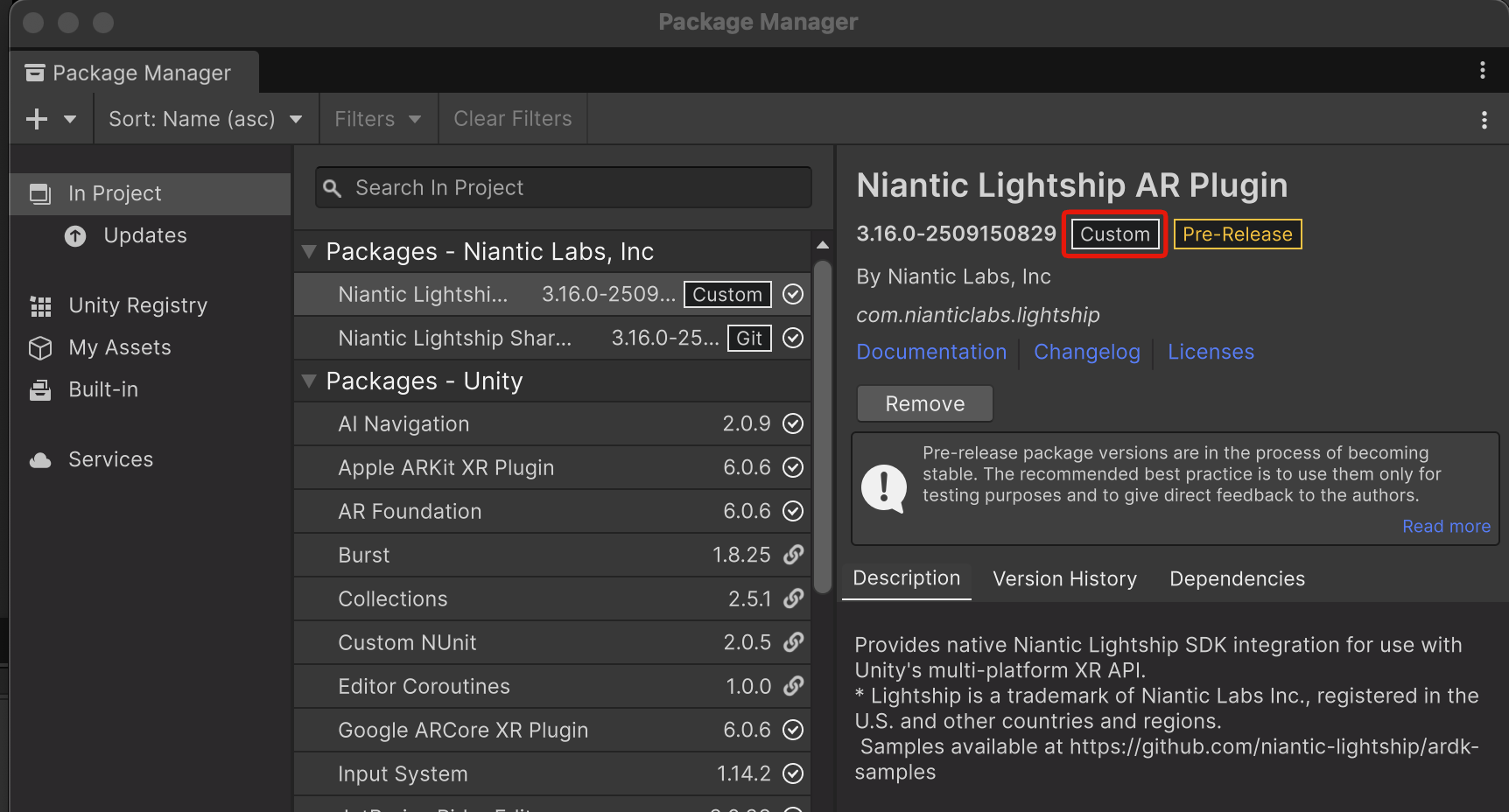
通常、UnityPackageManagerで入れたパッケージは変更しても戻ってしまうのでカスタムパッケージにして変更を保存できるようにする。
Library/PackageCache/com.nianticlabs.lightshipをPackages/に移動する。
@以降を消しパッケージ名のみのフォルダにするとUnityの警告が出ないのでリネームする。
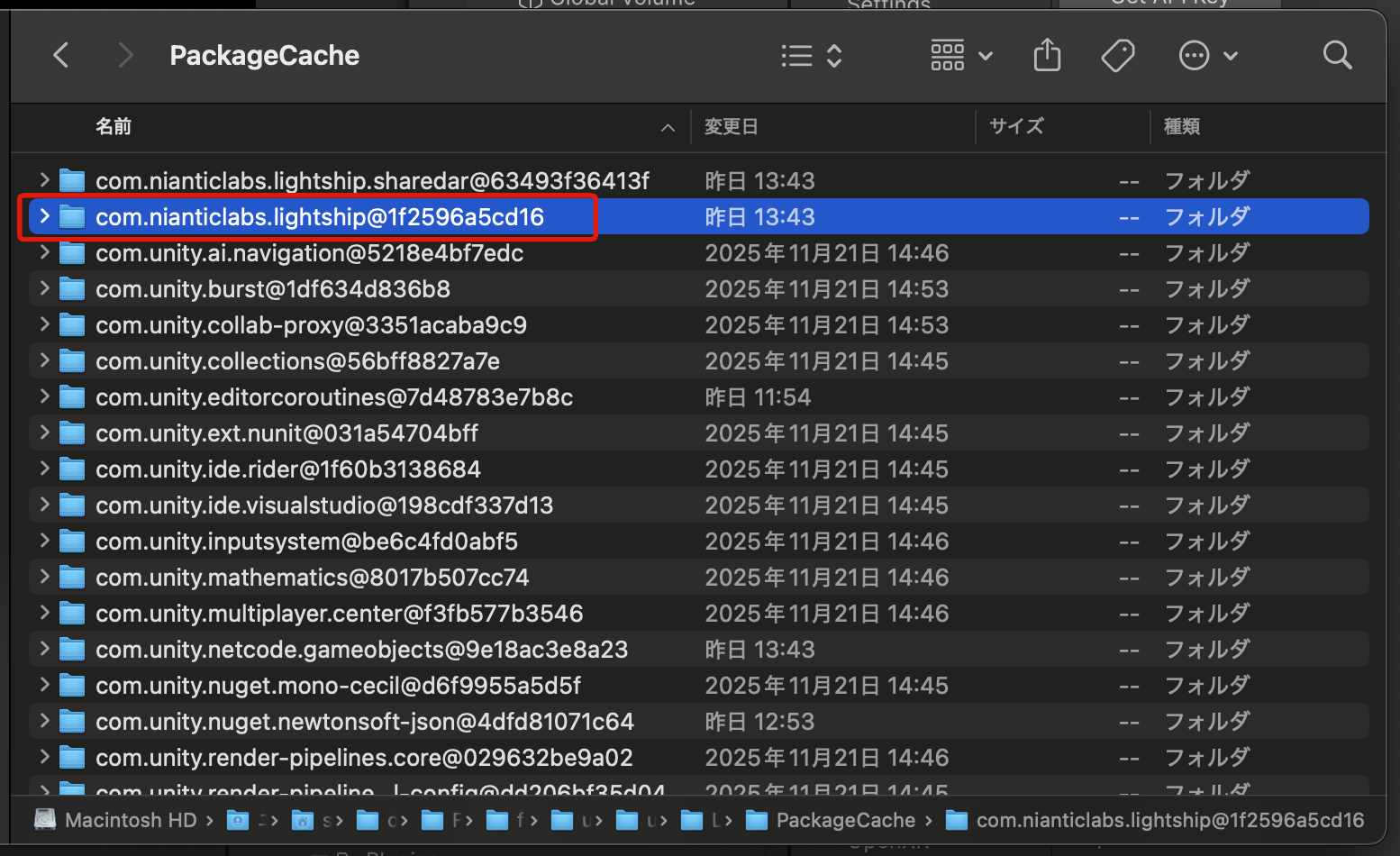
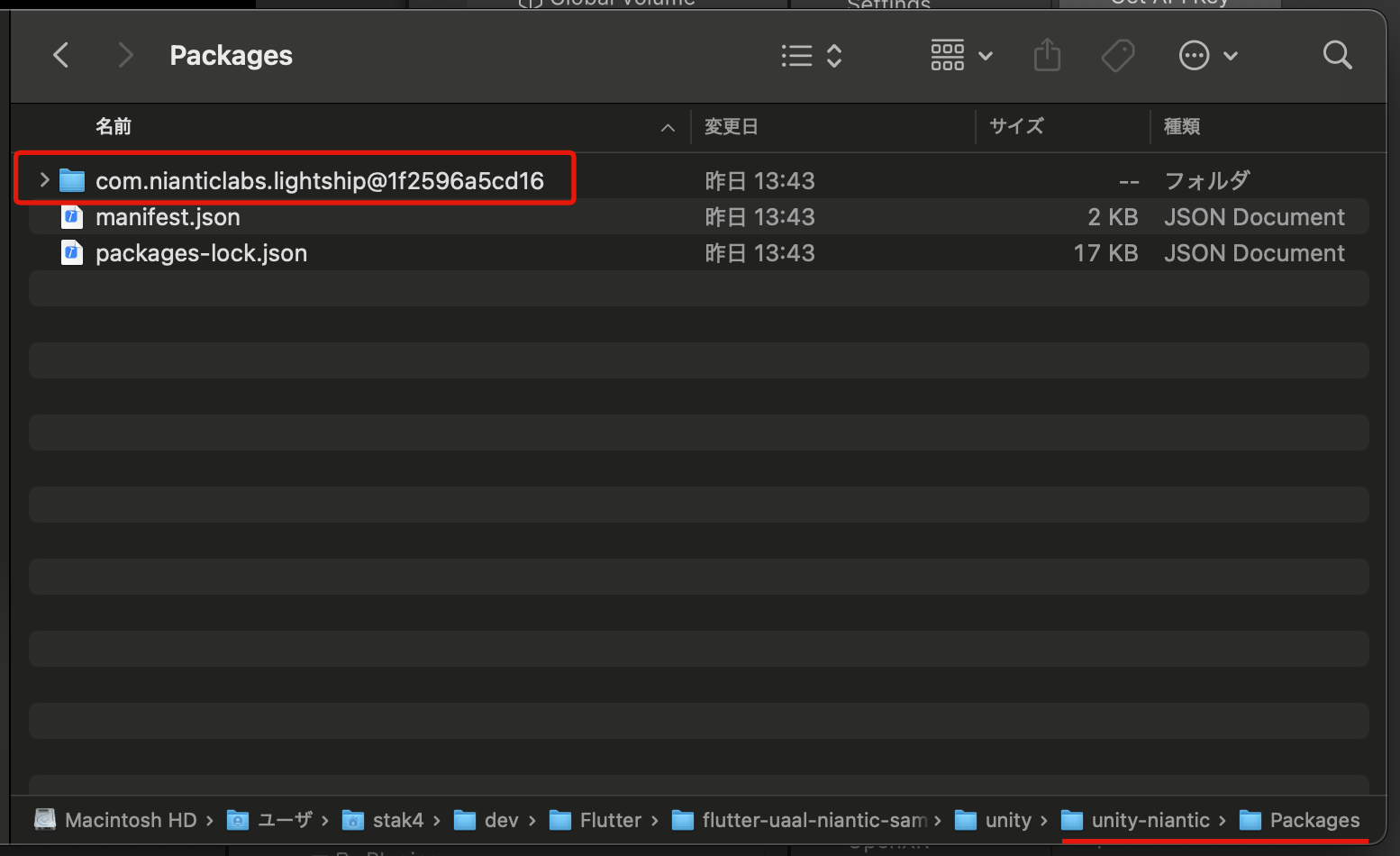
Unity Package Manager上で「Custom」になっていたら成功している。
2. RegisterPlugin処理を変更し、C#側からロードできる関数を用意する
com.nianticlabs.lightship/Runtime/Plugins/iOS/RegisterPlugin.mm
このプラグインの処理を見ると、applicationDidFinishLaunchingがUnityRegisterRenderingPluginV5を呼び出しているのでクラッシュ時のスタックトレースと一致している。
LightshipARDK_LoadPluginFromUnity()という関数を用意して、extern CでC#側から呼び出せる形にする。
// Put this into LightshipArPlugin/Runtime/Plugins/iOS

#import <Foundation/Foundation.h>
#import <UIKit/UIKit.h>

#import "IUnityInterface.h"

// $EDIT: add function for load plugin from Unity
#ifdef __cplusplus
extern "C" {
#endif
void UNITY_INTERFACE_EXPORT UNITY_INTERFACE_API LightshipARDK_LoadPluginFromUnity()
{
    NSLog(@"LightshipARDK_LoadPluginFromUnity");
    UnityRegisterRenderingPluginV5(&UnityPluginLoad, &UnityPluginUnload);
}
#ifdef __cplusplus
} // extern "C"
#endif

// UI loaded observer from https://blog.eppz.eu/override-app-delegate-unity-ios-macos-2/
@interface RegisterPlugin : NSObject
@end

__strong RegisterPlugin *_instance;

@implementation RegisterPlugin
+(void)load
{
    NSLog(@"[Override_iOS load]");
    _instance = [RegisterPlugin new];
    [[NSNotificationCenter defaultCenter] addObserver:_instance
                                             selector:@selector(applicationDidFinishLaunching:)
                                                 name:UIApplicationDidFinishLaunchingNotification
                                               object:nil];
}
-(void)applicationDidFinishLaunching:(NSNotification*) notification
{
    NSLog(@"[Override_iOS applicationDidFinishLaunching:%@]", notification);
    // $EDIT: for manual load plugin from Unity
    // UnityRegisterRenderingPluginV5(&UnityPluginLoad, &UnityPluginUnload);
}
@end
3. 作成した関数をUnityスクリプトから呼び出す
Obj-Cで作成した関数をC#からInitializeのタイミングで呼び出すようにする。
com.nianticlabs.lightship/Runtime/Core/LightshipUnityContext.cs
コード全文
// Copyright 2022-2025 Niantic.
using System;
using System.IO;
using System.Runtime.InteropServices;
using System.Text;
using Niantic.Lightship.AR.Utilities.Logging;
using Niantic.Lightship.AR.Loader;
using UnityEngine;
using Niantic.Lightship.AR.PAM;
using Niantic.Lightship.AR.Utilities.Profiling;
using Niantic.Lightship.AR.Settings;
using Niantic.Lightship.AR.Telemetry;
using Niantic.Lightship.Utilities.UnityAssets;

namespace Niantic.Lightship.AR.Core
{
    /// <summary>
    /// [Experimental] <c>LightshipUnityContext</c> contains Lightship system components which are required by multiple modules.  This class should only be accessed by lightship packages
    ///
    /// This Interface is experimental so may change or be removed from future versions without warning.
    /// </summary>
    public class LightshipUnityContext
    {
# if UNITY_IOS && !UNITY_EDITOR
        /// <summary>
        /// $EDIT: Manual load plugin by added function
        /// https://community.nianticspatial.com/t/ardk3-crashes-app-with-failed-to-load-plugin-plugin-loading-is-only-allowed-on-main-thread/5527/22
        /// </summary>
        /// <returns></returns>
        [DllImport("__Internal", EntryPoint = "LightshipARDK_LoadPluginFromUnity")]
        public static extern void LoadPluginFromUnity();
#endif

        /// <summary>
        /// <c>UnityContextHandle</c> holds a pointer to the native Lightship Unity context.  This is intended to be used only by Lightship packages.
        /// </summary>
        public static IntPtr UnityContextHandle { get; private set; } = IntPtr.Zero;

        internal static PlatformAdapterManager PlatformAdapterManager { get; private set; }
        private static EnvironmentConfig s_environmentConfig;
        private static UserConfig s_userConfig;
        private static TelemetryService s_telemetryService;
        internal static bool s_isDeviceLidarSupported = false;
        internal const string featureFlagFileName = "featureFlag.json";

        // Event triggered right before the context is destroyed. Used by internal code its lifecycle is not managed
        // by native UnityContext
        internal static event Action OnDeinitialized;
        internal static event Action OnUnityContextHandleInitialized;

        // Function that an external plugin can use to register its own PlatformDataAcquirer with PAM
        internal static Func<IntPtr, bool, bool, PlatformAdapterManager> CreatePamWithPlugin;

        internal static void Initialize(bool isDeviceLidarSupported, bool disableTelemetry = false, string featureFlagFilePath = "")
        {
#if NIANTIC_LIGHTSHIP_AR_LOADER_ENABLED
# if UNITY_IOS && !UNITY_EDITOR
            // $EDIT: load plugin on initialize
            Debug.Log("LoadPluginFromUnity start");
            LoadPluginFromUnity();
            Debug.Log("LoadPluginFromUnity end");
#endif

            s_isDeviceLidarSupported = isDeviceLidarSupported;

            if (UnityContextHandle != IntPtr.Zero)
            {
                Log.Warning($"Cannot initialize {nameof(LightshipUnityContext)} as it is already initialized");
                return;
            }

            var settings = LightshipSettingsHelper.ActiveSettings;

            Log.Info($"Initializing {nameof(LightshipUnityContext)}");
            s_environmentConfig = new EnvironmentConfig
            {
                ScanningEndpoint = settings.EndpointSettings.ScanningEndpoint,
                ScanningSqcEndpoint = settings.EndpointSettings.ScanningSqcEndpoint,
                SharedArEndpoint = settings.EndpointSettings.SharedArEndpoint,
                VpsEndpoint = settings.EndpointSettings.VpsEndpoint,
                VpsCoverageEndpoint = settings.EndpointSettings.VpsCoverageEndpoint,
                FastDepthEndpoint = settings.EndpointSettings.FastDepthSemanticsEndpoint,
                MediumDepthEndpoint = settings.EndpointSettings.DefaultDepthSemanticsEndpoint,
                SmoothDepthEndpoint = settings.EndpointSettings.SmoothDepthSemanticsEndpoint,
                FastSemanticsEndpoint = settings.EndpointSettings.FastDepthSemanticsEndpoint,
                MediumSemanticsEndpoint = settings.EndpointSettings.DefaultDepthSemanticsEndpoint,
                SmoothSemanticsEndpoint = settings.EndpointSettings.SmoothDepthSemanticsEndpoint,
                ObjectDetectionEndpoint = settings.EndpointSettings.ObjectDetectionEndpoint,
                TelemetryEndpoint = "",
                TelemetryKey = "",
            };

            s_userConfig = new UserConfig
            {
                ApiKey = settings.ApiKey,
                FeatureFlagFilePath = string.IsNullOrEmpty(featureFlagFilePath) ? GetFeatureFlagPath() : featureFlagFilePath,
            };

            var deviceInfo = new DeviceInfo
            {
                AppId = Metadata.ApplicationId,
                Platform = Metadata.Platform,
                Manufacturer = Metadata.Manufacturer,
                ClientId = Metadata.ClientId,
                DeviceModel = Metadata.DeviceModel,
                Version = Metadata.Version,
                AppInstanceId = Metadata.AppInstanceId,
                DeviceLidarSupported = isDeviceLidarSupported,
            };

            UnityContextHandle = NativeApi.Lightship_ARDK_Unity_Context_Create(false, ref deviceInfo, ref s_environmentConfig, ref s_userConfig);

            Log.ConfigureLogger
            (
                UnityContextHandle,
                settings.UnityLightshipLogLevel,
                settings.FileLightshipLogLevel,
                settings.StdOutLightshipLogLevel
            );

            if (!disableTelemetry)
            {
                // Cannot use Application.persistentDataPath in testing
                try
                {
                    AnalyticsTelemetryPublisher telemetryPublisher =
                        new AnalyticsTelemetryPublisher
                        (
                            endpoint: settings.EndpointSettings.TelemetryEndpoint,
                            directoryPath: Path.Combine(Application.persistentDataPath, "telemetry"),
                            key: settings.EndpointSettings.TelemetryApiKey,
                            registerLogger: false
                        );

                    s_telemetryService = new TelemetryService(UnityContextHandle, telemetryPublisher, settings.ApiKey);
                }
                catch (Exception e)
                {
                    Log.Debug($"Failed to initialize telemetry service with exception {e}");
                }
            }
            else
            {
                Log.Debug("Detected a test run. Keeping telemetry disabled.");
            }
            OnUnityContextHandleInitialized?.Invoke();

            ProfilerUtility.RegisterProfiler(new UnityProfiler());
            ProfilerUtility.RegisterProfiler(new CTraceProfiler());

            CreatePam(settings);
#endif
        }

        private static void CreatePam(RuntimeLightshipSettings settings)
        {
            if (PlatformAdapterManager != null)
            {
                Log.Warning("Cannot create PAM as it is already created");
                return;
            }

            var isLidarEnabled = settings.PreferLidarIfAvailable && s_isDeviceLidarSupported;
            Log.Info($"Creating PAM (lidar enabled: {isLidarEnabled})");

            // Check if another Lightship plugin has registered with its own PlatformDataAcquirer.
            // Except if we're using playback, in which case we always use the SubsystemsDataAcquirer to read the dataset.
            if (null != CreatePamWithPlugin && !settings.UsePlayback)
            {
                PlatformAdapterManager =
                    CreatePamWithPlugin
                    (
                        UnityContextHandle,
                        isLidarEnabled,
                        settings.TestSettings.TickPamOnUpdate
                    );
            }
            else
            {
                PlatformAdapterManager =
                    PlatformAdapterManager.Create<PAM.NativeApi, SubsystemsDataAcquirer>
                    (
                        UnityContextHandle,
                        isLidarEnabled,
                        trySendOnUpdate: settings.TestSettings.TickPamOnUpdate
                    );
            }
        }

        private static void DisposePam()
        {
            Log.Info("Disposing PAM");

            PlatformAdapterManager?.Dispose();
            PlatformAdapterManager = null;
        }

        internal static void Deinitialize()
        {
            OnDeinitialized?.Invoke();
#if NIANTIC_LIGHTSHIP_AR_LOADER_ENABLED
            if (UnityContextHandle != IntPtr.Zero)
            {
                Log.Info($"Shutting down {nameof(LightshipUnityContext)}");

                DisposePam();

                s_telemetryService?.Dispose();
                s_telemetryService = null;

                if (!CheckUnityContext(UnityContextHandle))
                {
                    return;
                }

                NativeApi.Lightship_ARDK_Unity_Context_Shutdown(UnityContextHandle);
                UnityContextHandle = IntPtr.Zero;

                ProfilerUtility.ShutdownAll();
            }
#endif
        }

        internal static bool FeatureEnabled(string featureName)
        {
            if (!UnityContextHandle.IsValidHandle())
            {
                return false;
            }

            return NativeApi.Lightship_ARDK_Unity_Context_FeatureEnabled(UnityContextHandle, featureName);
        }

        private static string GetFeatureFlagPath()
        {
            var pathInPersistentData = Path.Combine(Application.persistentDataPath, featureFlagFileName);
            var pathInStreamingAsset = Path.Combine(Application.streamingAssetsPath, featureFlagFileName);
            var pathInTempCache = Path.Combine(Application.temporaryCachePath, featureFlagFileName);

            // Use if file exists in the persistent data path
            if (File.Exists(pathInPersistentData))
            {
                return pathInPersistentData;
            }

            // Use if file exists in the streaming asset path
            if (pathInStreamingAsset.Contains("://"))
            {
                // the file path is file URL e.g. on Android. copy to temp and use it
                bool fileRead = FileUtilities.TryReadAllText(pathInStreamingAsset, out var jsonString);
                if (fileRead)
                {
                    File.WriteAllText(pathInTempCache, jsonString);
                    return pathInTempCache;
                }
            }
            else
            {
                if (File.Exists(pathInStreamingAsset))
                {
                    return pathInStreamingAsset;
                }
            }

            // Write default setting to temp and use it
            const string defaultFeatureFlagSetting = @"{
                }";
            File.WriteAllText(pathInTempCache, defaultFeatureFlagSetting);
            return pathInTempCache;
        }

        public static IntPtr GetCoreContext(IntPtr unityContext)
        {
            if (!CheckUnityContext(unityContext))
            {
                return IntPtr.Zero;
            }
            return NativeApi.Lightship_ARDK_Unity_Context_GetCoreContext(unityContext);
        }

        public static IntPtr GetCommonContext(IntPtr unityContext)
        {
            if (!CheckUnityContext(unityContext))
            {
                return IntPtr.Zero;
            }
            return NativeApi.Lightship_ARDK_Unity_Context_GetCommonContext(unityContext);
        }

        public static IntPtr GetARDKHandle(IntPtr unityContext)
        {
            if (!CheckUnityContext(unityContext))
            {
                return IntPtr.Zero;
            }
            return NativeApi.Lightship_ARDK_Unity_Context_GetARDKHandle(unityContext);
        }

        // Release the resource allocated in native side
        internal static void ReleaseNativeResource(IntPtr handle)
        {
            NativeApi.ARDK_Release_Resource(handle);
        }

        public static bool CheckUnityContext(IntPtr unityContext)
        {
            if (unityContext == IntPtr.Zero)
            {
                Log.Error("Lightship Unity Context is null.");
                return false;
            }

            return true;
        }

        /// <summary>
        /// Container to wrap the native Lightship C APIs
        /// </summary>
        private static class NativeApi
        {
            [DllImport(LightshipPlugin.Name)]
            public static extern IntPtr Lightship_ARDK_Unity_Context_Create(
                bool disableCtrace, ref DeviceInfo deviceInfo, ref EnvironmentConfig environmentConfig, ref UserConfig userConfig);

            [DllImport(LightshipPlugin.Name)]
            public static extern void Lightship_ARDK_Unity_Context_Shutdown(IntPtr unityContext);

            [DllImport(LightshipPlugin.Name)]
            public static extern bool Lightship_ARDK_Unity_Context_FeatureEnabled(IntPtr unityContext, string featureName);

            [DllImport(LightshipPlugin.Name)]
            public static extern IntPtr Lightship_ARDK_Unity_Context_GetCoreContext(IntPtr unityContext);

            [DllImport(LightshipPlugin.Name)]
            public static extern IntPtr Lightship_ARDK_Unity_Context_GetCommonContext(IntPtr unityContext);

            [DllImport(LightshipPlugin.Name)]
            public static extern IntPtr Lightship_ARDK_Unity_Context_GetARDKHandle(IntPtr unityContext);

            [DllImport(LightshipPlugin.Name)]
            public static extern void ARDK_Release_Resource(IntPtr resource);
        }


        // PLEASE NOTE: Do NOT add feature flags in this struct.
        [StructLayout(LayoutKind.Sequential)]
        private struct EnvironmentConfig
        {
            public string VpsEndpoint;
            public string VpsCoverageEndpoint;
            public string SharedArEndpoint;
            public string FastDepthEndpoint;
            public string MediumDepthEndpoint;
            public string SmoothDepthEndpoint;
            public string FastSemanticsEndpoint;
            public string MediumSemanticsEndpoint;
            public string SmoothSemanticsEndpoint;
            public string ScanningEndpoint;
            public string ScanningSqcEndpoint;
            public string ObjectDetectionEndpoint;
            public string TelemetryEndpoint;
            public string TelemetryKey;
        }

        // PLEASE NOTE: Do NOT add feature flags in this struct.
        [StructLayout(LayoutKind.Sequential)]
        private struct UserConfig
        {
            public string ApiKey;
            public string FeatureFlagFilePath;
        }

        [StructLayout(LayoutKind.Sequential)]
        private struct DeviceInfo
        {
            public string AppId;
            public string Platform;
            public string Manufacturer;
            public string DeviceModel;
            public string ClientId;
            public string Version;
            public string AppInstanceId;
            public bool DeviceLidarSupported;
        }
    }
}
4. Unityエディタおよび実機でエラーが発生しないことを確認する。
Unity再起動、エディタ実行、実機ビルドでクラッシュしなければ成功。
おわりに
Flutter x Unity as a Libraryの環境構築が非常に骨が折れる上、毎回構築するのは大変に時間がかかるのでテンプレートプロジェクトを用意した。
一応各種タグから段階に応じたプロジェクトを参照できるが、十分にテストしていないので問題があれば是非issueを立ててください。
皆でUaaLの知見を集めていきましょう。
Discussion