


Azure Portal上で、Log Analyticsを連携すれば見ることができるが、エラーになるタイミングでWebアプリ上にも見せたい。
診断系の機能がいくつかあるので紹介
通話前診断
この機能では、以下の情報を取得できます。
- 各デバイス(カメラ・マイク・スピーカー)へのアクセス許可がされているか
- 開いているブラウザとPCのOSがサポートしているか
- 帯域幅品質
- 音声とビデオの品質状態
通話をかける前に処理を走らせると良いかと思います。
実装
use-call-control.ts
import { useEffect, useState } from "react";
import {
  CallClient,
  LocalVideoStream,
  VideoStreamRenderer,
  // インポート
  Features,
  ...
} from "@azure/communication-calling";
import { AzureCommunicationTokenCredential } from "@azure/communication-common";

export const useCallControl = (role: Role) => {
  const [callClient, setCallClient] = useState<CallClient | null>(null);
  ...

  // 追加
  const [preCallDiagnosticsInProgress, setPreCallDiagnosticsInProgress] = useState(false);
  const [preCallDiagnosticsMessage, setPreCallDiagnosticsMessage] = useState<string | null>(null);

  // 追加
  const runPreCallDiagnostics = async () => {
    if (!callClient) return;

    try {
      setPreCallDiagnosticsInProgress(true);
      setPreCallDiagnosticsMessage(null);

      const { token } = await fetchAcsTokenAndUserId();
      const tokenCredential = new AzureCommunicationTokenCredential(token.trim());

      const preCallFeature = callClient.feature(Features.PreCallDiagnostics);
      const result = await preCallFeature.startTest(tokenCredential);

      console.log("[PreCallDiagnostics] raw result", result);

      const [deviceAccess, deviceEnumeration, inCallDiagnostics, browserSupport, mediaStats] = await Promise.all([
        result.deviceAccess.catch((e: unknown) => {
          console.error("[PreCallDiagnostics] deviceAccess error", e);
          return undefined;
        }),
        result.deviceEnumeration.catch((e: unknown) => {
          console.error("[PreCallDiagnostics] deviceEnumeration error", e);
          return undefined;
        }),
        result.inCallDiagnostics.catch((e: unknown) => {
          console.error("[PreCallDiagnostics] inCallDiagnostics error", e);
          return undefined;
        }),
        result.browserSupport?.catch((e: unknown) => {
          console.error("[PreCallDiagnostics] browserSupport error", e);
          return undefined;
        }),
        result.callMediaStatistics?.catch((e: unknown) => {
          console.error("[PreCallDiagnostics] callMediaStatistics error", e);
          return undefined;
        }),
      ]);

      console.log("[PreCallDiagnostics] deviceAccess", deviceAccess);
      console.log("[PreCallDiagnostics] deviceEnumeration", deviceEnumeration);
      console.log("[PreCallDiagnostics] inCallDiagnostics", inCallDiagnostics);
      console.log("[PreCallDiagnostics] browserSupport", browserSupport);
      console.log("[PreCallDiagnostics] callMediaStatistics", mediaStats);

      const messages: string[] = [];

      if (browserSupport) {
        messages.push(`ブラウザ: ${browserSupport.browser} / OS: ${browserSupport.os}`);
      }

      if (deviceAccess) {
        if (!deviceAccess.audio || !deviceAccess.video) {
          messages.push("マイクまたはカメラのアクセス許可がありません");
        } else {
          messages.push("マイク・カメラのアクセス許可はOKです");
        }
      }

      if (deviceEnumeration) {
        if (deviceEnumeration.microphone !== "Available" || deviceEnumeration.camera !== "Available") {
          messages.push("マイクまたはカメラが検出されていません");
        }
      }

      if (inCallDiagnostics) {
        messages.push(`接続: ${inCallDiagnostics.connected ? "OK" : "NG"}`);
        if (inCallDiagnostics.bandWidth) {
          messages.push(`帯域幅品質: ${inCallDiagnostics.bandWidth}`);
        }
      }

      setPreCallDiagnosticsMessage(messages.join(" / ") || "通話前診断が完了しました");
    } catch (error) {
      console.error("[PreCallDiagnostics] failed", error);
      setPreCallDiagnosticsMessage("通話前診断に失敗しました");
    } finally {
      setPreCallDiagnosticsInProgress(false);
    }
  };

  return {
    // 状態
    ...

    // 通話前診断
    preCallDiagnosticsInProgress,
    preCallDiagnosticsMessage,
    runPreCallDiagnostics,
  } as const;
};
検証
取れました。
診断結果はすぐ取得できるわけではないので、通話のタイミングよりアプリを起動した時のほうが良さそうです。

取得できるパラメータ
deviceAccess.json
deviceAccess: {
    audio: true, // オーディオ情報にアクセスできるか
    video: true  // ビデオ情報にアクセスできるか
}
deviceEnumeration.json
deviceEnumeration: {
    microphone: 'Available',  // デバイスのマイクを使える状態か
    camera: 'Available',      // デバイスのカメラを使える状態か
    speaker: 'Available'      // デバイスのスピーカーを使える状態か
}
inCallDiagnostics.json
inCallDiagnostics: {
    connected: true,   // 接続できているか
    diagnostics: {
        audio: {
            jitter: 'Good', // 安定性
            packetLoss: 'Average', // 欠損度
            rtt: 'Good' // 遅延性
        },
        video: {
            jitter: 'Good',
            packetLoss: 'Average',
            rtt: 'Good'
        },
    },
    bandWidth: 'Good' // 帯域幅品質
}
browserSupport.json
browserSupport: {
    browser: 'Supported', // 開いているブラウザがサポートされているか
    os: 'Supported' // 使用PCのOSがサポートされているか
}
callMediaStatistics.json
// 現在のACS接続情報
callMediaStatistics: {
    disposed: true,
    call: CallImpl,
    callAgent: CallAgentImpl,
    callInfo: CallInfoCommonImpl,
    eventEmitter: EventEmitter,
    …
}
各診断情報について
普段通話サービスをあまり作らないのであまり聞き覚えのない用語が出てきたので整理
- 帯域幅品質 ... ネットワークの安定性、スムーズに通信できる状態かを知れる
- jitter ... データが届くタイミングのバラつきのこと。リアルタイムに届いたり、ちょっと遅れて届いたりすることが発生しそうかを知れる
- packet-loss ... 送ったデータが1部届かないこと。音声がブツっと切れたり、映像が固まったりすることが発生しそうかを知れる
- rtt(Round-Trip-Time) ... 相手にデータを送ってから返ってくるまでの時間のこと。遅延が発生して、しゃべった内容が相手には2秒ごとに届くということが発生しそうかを知れる。
通話中診断
自分の状況と通話相手の状況どちらも取得できます。
一定間隔で取得というより、何かイベントが発生した際にキャッチできるようです。
この機能では以下の情報が取得できます。
◾️ ネットワーク系
- ネットワーク接続が切れた時
- ネットワークに再接続中の時
- ネットワークが不安定な時
- ファイアウォール等でネットワークが到達できない時
- 通話相手がネットワーク問題により切断された時
◾️ オーディオ系
- デバイススピーカーがなくて、音声出力ができない時
- デバイスマイクがなくて、音声入力ができない時
- ミュート状態で喋っている時
- ユーザーが予期せずミュート状態になった時
- デバイスマイクの使用が拒否された時
◾️ カメラ系
- カメラの映像が5秒以上フリーズしている時
- デバイスカメラが無効になった時
- カメラの使用が拒否された時
- カメラが予期せず停止した時
◾️ その他
- 画面共有が無効になった時
- 画面録画の開始に失敗した時
- 画面録画が予期せず停止した時
実装
useCallControl.ts
import { useEffect, useState } from "react";
import {
  ...
  DiagnosticQuality,
  ...
} from "@azure/communication-calling";

export const useCallControl = (role: Role) => {
  const [callClient, setCallClient] = useState<CallClient | null>(null);

  ...

  const subscribeToCall = (currentCall: Call) => {
    try {
      console.log(`通話ID: ${currentCall.id}`);
      currentCall.on("idChanged", () => {
        console.log(`通話IDが変更されました: ${currentCall.id}`);
      });

      console.log(`通話状態: ${currentCall.state}`);
      currentCall.on("stateChanged", async () => {
        console.log(`通話状態が変更されました: ${currentCall.state}`);
        if (currentCall.state === "Connected") {
          await currentCall.mute();
          setIsLocalMuted(true);
        } else if (currentCall.state === "Disconnected") {
          console.log(`通話が終了しました: code=${currentCall.callEndReason!.code}, subCode=${currentCall.callEndReason!.subCode}`);
        }
      });

      currentCall.localVideoStreams.forEach(async (lvs) => {
        localVideoStream = lvs as LocalVideoStream;
        await displayLocalVideoStream();
      });

      currentCall.on("localVideoStreamsUpdated", (e) => {
        e.added.forEach(async (lvs) => {
          localVideoStream = lvs as LocalVideoStream;
          await displayLocalVideoStream();
        });
        e.removed.forEach(() => {
          removeLocalVideoStream();
        });
      });

      currentCall.remoteParticipants.forEach((remoteParticipant: RemoteParticipant) => {
        subscribeToRemoteParticipant(remoteParticipant);
      });

      currentCall.on("remoteParticipantsUpdated", (e) => {
        e.added.forEach((remoteParticipant: RemoteParticipant) => {
          subscribeToRemoteParticipant(remoteParticipant);
        });
      });

      // 追加
      try {
        const userFacingDiagnostics: any = currentCall.feature((Features as any).UserFacingDiagnostics ?? "UserFacingDiagnostics");

        const localDiagnosticChangedListener = (diagnosticInfo: any) => {
          console.log("[UFD][local] ローカル診断が更新されました:", "診断=", diagnosticInfo.diagnostic, "値=", diagnosticInfo.value, "値の種類=", diagnosticInfo.valueType);

          if (diagnosticInfo.valueType === "DiagnosticQuality") {
            if (diagnosticInfo.value === DiagnosticQuality.Bad) {
              console.error(`[UFD][local] ${diagnosticInfo.diagnostic} の品質が悪い状態です`);
            } else if (diagnosticInfo.value === DiagnosticQuality.Poor) {
              console.warn(`[UFD][local] ${diagnosticInfo.diagnostic} の品質が低下しています`);
            }
          } else if (diagnosticInfo.valueType === "DiagnosticFlag") {
            if (diagnosticInfo.value === true) {
              console.warn(`[UFD][local] フラグが検出されました: ${diagnosticInfo.diagnostic}`);
            }
          }
        };

        userFacingDiagnostics.network.on("diagnosticChanged", localDiagnosticChangedListener);
        userFacingDiagnostics.media.on("diagnosticChanged", localDiagnosticChangedListener);

        const remoteDiagnosticChangedListener = (diagnosticInfo: any) => {
          const diagnostics: any[] = diagnosticInfo.diagnostics ?? [];
          diagnostics.forEach((d) => {
            console.log("[UFD][remote] リモート診断が更新されました:", d);
            if (d.valueType === "DiagnosticQuality") {
              if (d.value === DiagnosticQuality.Bad) {
                console.error(`[UFD][remote] ${d.diagnostic} の品質が悪い状態です (participant=${d.rawId})`);
              } else if (d.value === DiagnosticQuality.Poor) {
                console.warn(`[UFD][remote] ${d.diagnostic} の品質が低下しています (participant=${d.rawId})`);
              }
            } else if (d.valueType === "DiagnosticFlag") {
              console.warn(`[UFD][remote] フラグが検出されました: ${d.diagnostic} (participant=${d.rawId})`);
            }
          });
        };

        // Enable sending local diagnostics to remote participants and listen for remote diagnostics.
        userFacingDiagnostics.remote.startSendingDiagnostics();
        userFacingDiagnostics.remote.on("diagnosticChanged", remoteDiagnosticChangedListener);

        console.log("[UFD] この通話に対する診断イベントリスナーを登録しました", currentCall.id);
      } catch (ufdError) {
        console.warn("[UFD] UserFacingDiagnostics 機能が利用できません", ufdError);
      }
    } catch (error) {
      console.error(error);
    }
  };

  ...

  return {
    ...
  } as const;
};
検証
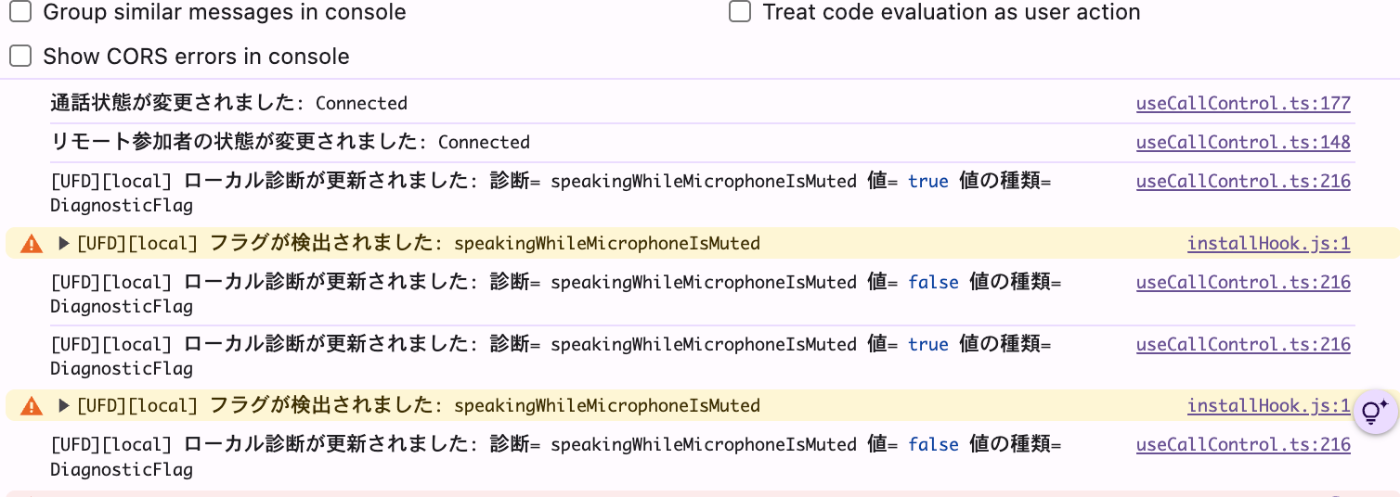
意図的にネットワーク環境を悪くすることができなくて、実際にキャッチできているのか検証できなかったのですが、マイクミュート時に喋っていると検知することはできました。
複数ブラウザで立ち上げてないか診断
予期せぬ不具合に発生するので、推奨されていません。
複数タブで開くと検知できる仕組みがあるそうです。
実装
useCallControl.ts
import { useEffect, useState } from "react";

...

import { AzureCommunicationTokenCredential } from "@azure/communication-common";

const ROOM_ID = "demo-room-1";

type CallingStatus = "waiting" | "incoming" | "calling";

type Role = "caller" | "receiver";

export const useCallControl = (role: Role) => {
  const [callClient, setCallClient] = useState<CallClient | null>(null);
  // 追加
  const [isActiveInAnotherTab, setIsActiveInAnotherTab] = useState(false);

  ...

  const handleInitialCallAgent = async () => {
    try {
      const { token, userId } = await fetchAcsTokenAndUserId();
      const { client, agent } = await initializeCallClientAndAgent(token);
      await registerReceiverIfNeeded(userId);
      subscribeToCallAgentEvents(agent);

      // 追加
      try {
        const debugInfoFeature: any = (client as any).feature((Features as any).DebugInfo ?? "debugInfo");
        const current = debugInfoFeature.isCallClientActiveInAnotherTab as boolean | undefined;
        if (typeof current === "boolean") {
          setIsActiveInAnotherTab(current);
        }

        const handler = () => {
          const updated = debugInfoFeature.isCallClientActiveInAnotherTab as boolean | undefined;
          if (typeof updated === "boolean") {
            setIsActiveInAnotherTab(updated);
          }
        };

        debugInfoFeature.on("isCallClientActiveInAnotherTabChanged", handler);
        console.log("複数タブで開かれてます!!");
      } catch (e) {
        console.warn("DebugInfo", e);
      }
    } catch (error) {
      console.error("Error initializing CallAgent", error);
    }
  };
  ...

  return {
    ...

    // マルチタブ検知
    isActiveInAnotherTab,
  } as const;
};
検証
できた


Discussion