




最後に使用した時はv0.5.4でした。
今はv0.11.1になっていて変わらず活発にアップデートしているようです。
1. tools機能
元々Controllerとして提供されていた機能ですが、toolsという名前に変わったようです。
機能自体もアップグレードしていて出来ることが増えているのでいくつか紹介します。
1. Human-in-the-loopの実現
AIが判断できない時、追加で情報を集めたいときにユーザーに一度返すことが可能。
tools = Tools()

@tools.action(description='追加でユーザーに質問をする')
def ask_human(question: str) -> ActionResult:
    answer = input(f'{question} > ')
    return f'The human responded with: {answer}'

agent = Agent(
    task=task_input,
    llm=ChatAzureOpenAI(model=model, temperature=temperature),
    browser=browser,
    tools=tools,
)
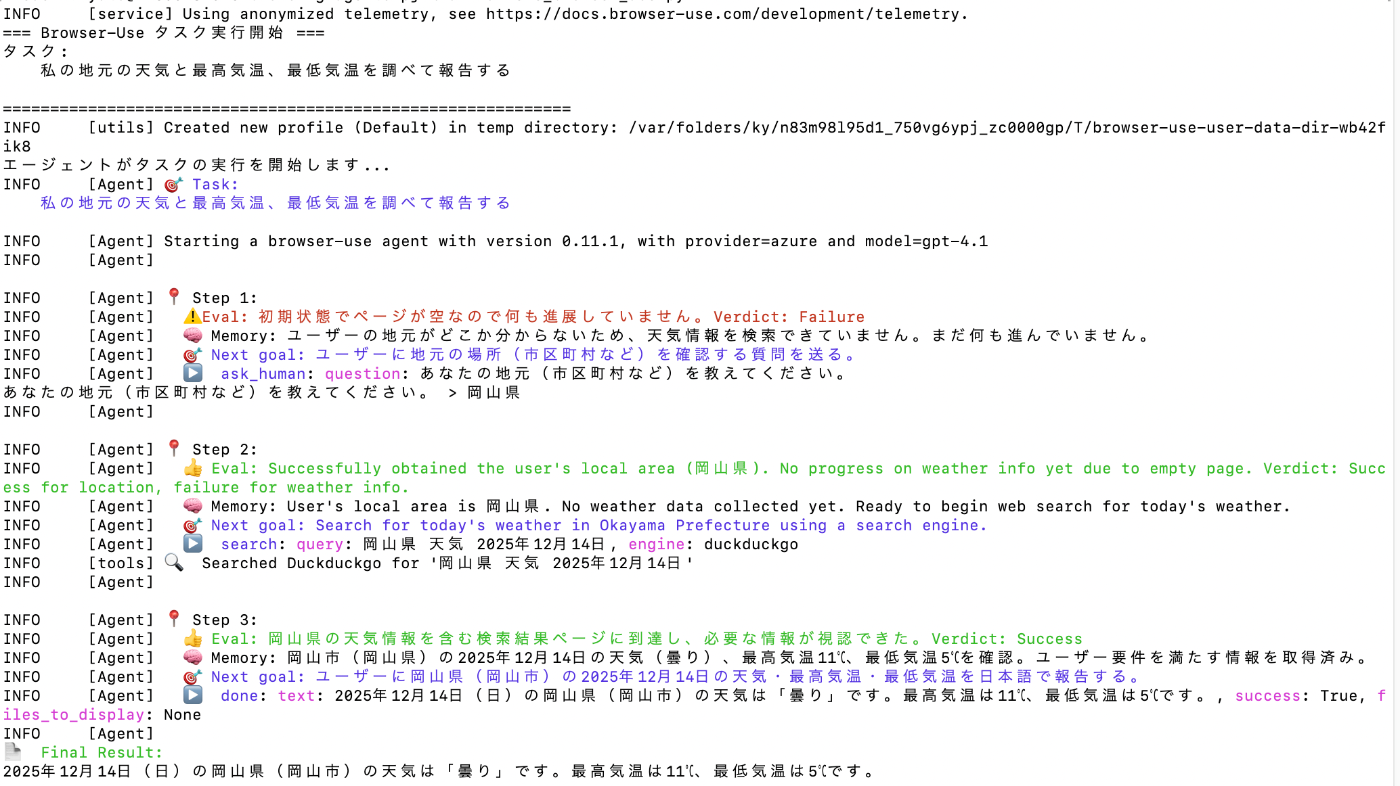
デモとしてタスクを「私の地元の天気」にしてみたら、ちゃんと質問がきた。
2. 指定の要素を直接操作
こちらは元々あった機能ですが、今回新しくLLMを使って自然言語での要素抽出が可能になりました。
tools = Tools()

@tools.action(description='対象のボタンをクリックする')
async def click_submit_button(browser_session: BrowserSession):
    page = await browser_session.must_get_current_page()

    element = await page.get_element_by_prompt("接続と書かれているボタンを探してください。")
    print("要素の詳細:", element)

    if not element:
        return ActionResult(extracted_content='ボタンが見つかりませんでした。')

    await element.click()

    return ActionResult(extracted_content='対象のボタンがクリックされました。')

agent = Agent(
    task=task_input,
    llm=ChatAzureOpenAI(model=model, temperature=temperature),
    browser=browser,
    tools=tools,
)
3. ファイル操作
tools = Tools()

@tools.action(description='Save weather info to file')
def save_to_file(weather_info: WeatherInfo) -> str:
    if isinstance(weather_info, dict):
        weather_info = WeatherInfo(**weather_info)

    filename = f'{weather_info.location}_weather.json'
    with open(filename, 'w') as f:
        json.dump(weather_info.model_dump(), f, ensure_ascii=False, indent=2)

    print("天気情報がファイルに保存されました:", filename)
    return 'Saved to file'

agent = Agent(
    task=task_input,
    llm=ChatAzureOpenAI(model=model, temperature=temperature),
    browser=browser,
    tools=tools,
)

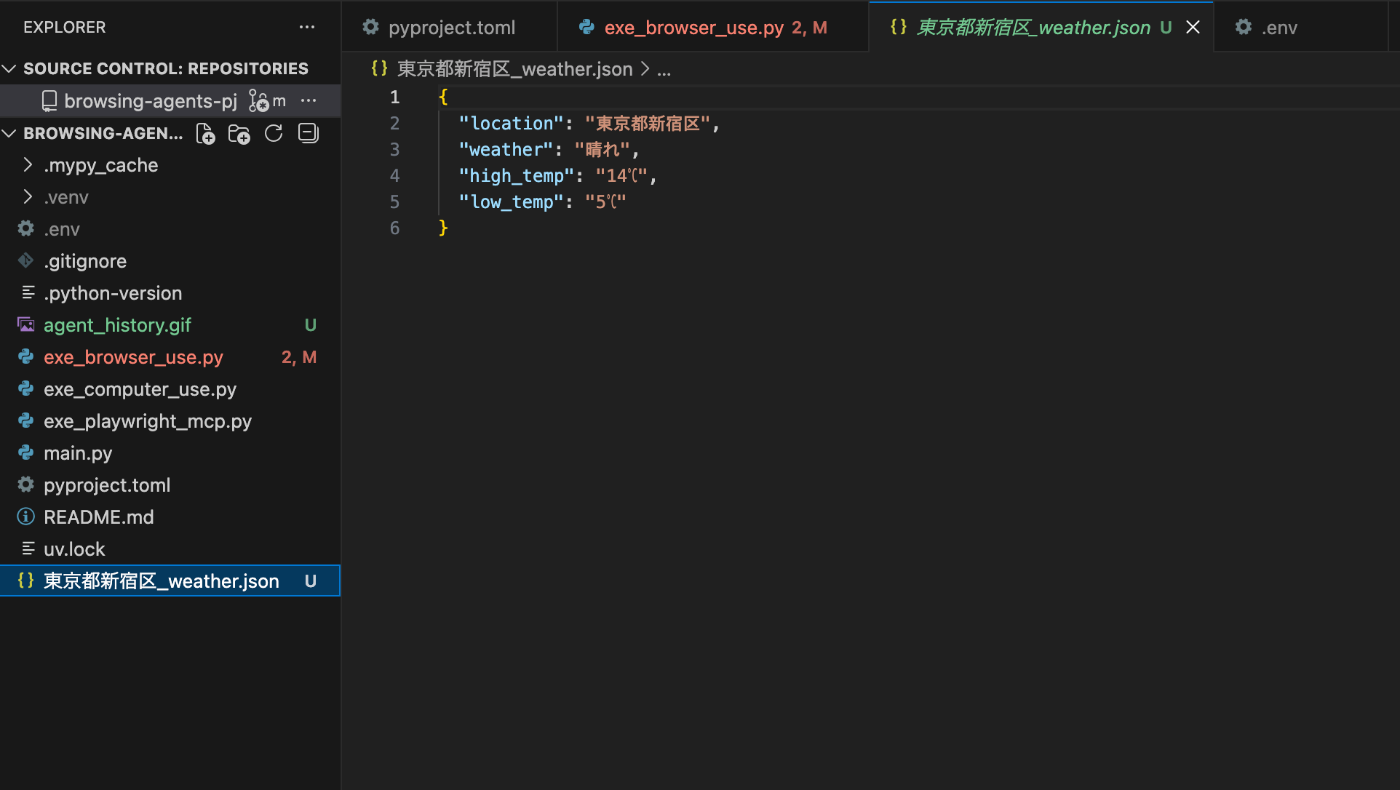
普通のLLMにtoolsを付けるのと同じように、自然言語でtoolsを実行する目的を指定できたら外部APIコールができるようになりました。
2. skills機能
これが直近で最も大きいアップデート内容。
ブラウザ操作を登録すれば、そのワークフローをAPIとして発行して繰り返し使えるようです。
以下で紹介しているworkflow-useの発展系という感じですかね。
フォーム入力操作などでめちゃくちゃ活躍しそうです。
ドキュメントだけを読むとどういう機能かわからなかったのですが、以下の動画を見るとわかりやすい。
3. 構造化出力
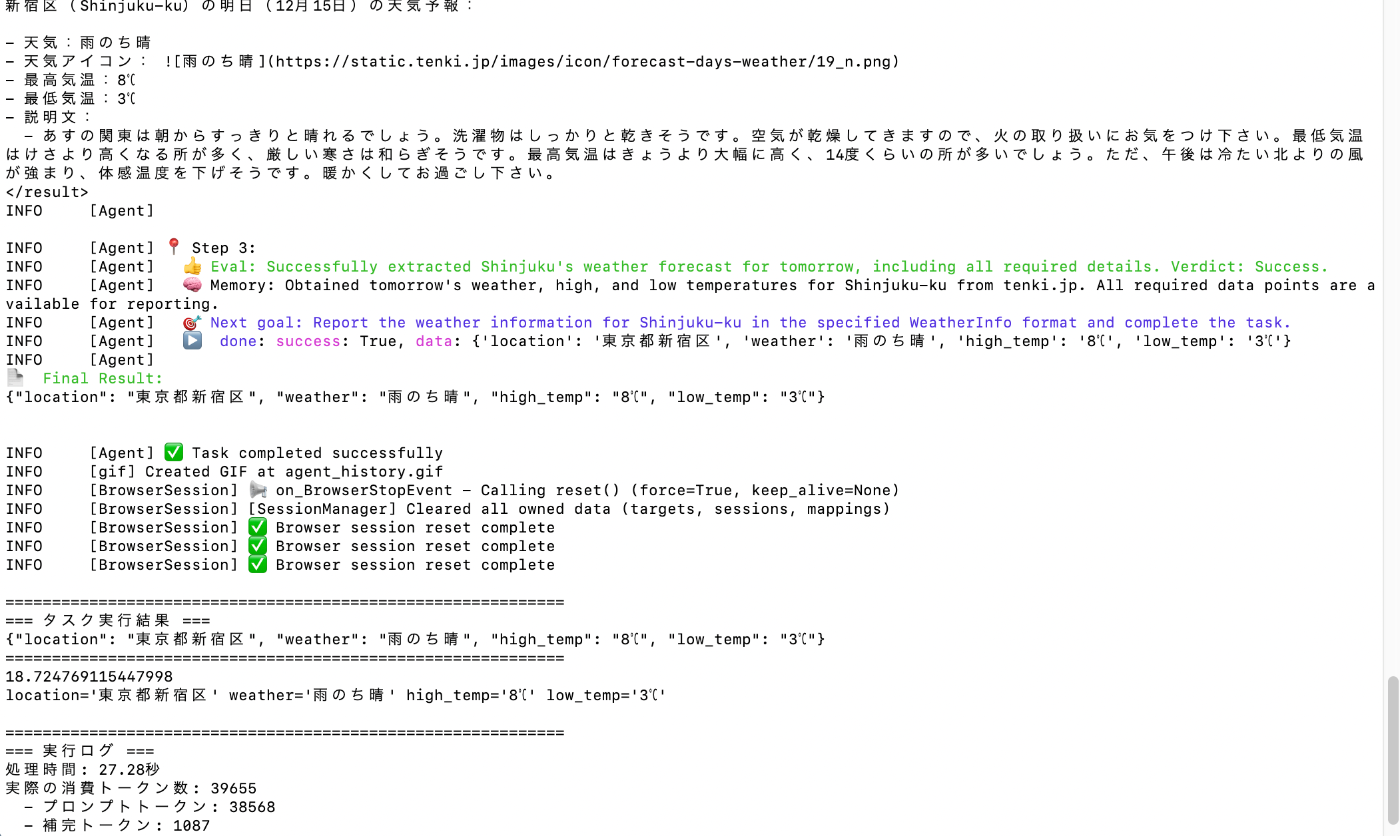
Agentにoutput_model_schemaを設定することで構造化出力が可能になりました。
class WeatherInfo(BaseModel):
    location: str = Field(description='The location for which the weather is reported, e.g. "Tokyo"')
    weather: str = Field(description='The weather description, e.g. "sunny"')
    high_temp: str = Field(description='The high temperature, e.g. "25°C"')
    low_temp: str = Field(description='The low temperature, e.g. "15°C"')


try:
    # エージェントの作成と実行
    agent = Agent(
        task=task_input,
        llm=ChatAzureOpenAI(model=model, temperature=temperature),
        browser=browser,
        generate_gif=True,
        calculate_cost=True,
        tools=tools,
        output_model_schema=WeatherInfo
    )
4. 推論と情報抽出の分離
Agentにpage_extraction_llmを設定することで、ブラウザから情報を抽出する箇所は設定したモデルが担当するようにできます。
メインのタスク推論処理と分離させることでトークン費用を抑えたり、処理の高速化が可能になりました。
try:
    # エージェントの作成と実行
    agent = Agent(
        task=task_input,
        llm=ChatAzureOpenAI(model=model, temperature=temperature),
        browser=browser,
        generate_gif=True,
        calculate_cost=True,
        tools=tools,
        page_extraction_llm=ChatAzureOpenAI(model="gpt-4.1-nano", temperature=0.0),
        fallback_llm=ChatAzureOpenAI(model="gpt-4.1-mini", temperature=0.0),
    )
5. 代替LLMの設定
Agentにfallback_llmを設定することで、メインで設定しているLLMがタスクの実行に複数回失敗したり429エラーでレート制限に引っかかった際に代わりに実行してくれます。
try:
    # エージェントの作成と実行
    agent = Agent(
        task=task_input,
        llm=ChatAzureOpenAI(model=model, temperature=temperature),
        browser=browser,
        generate_gif=True,
        calculate_cost=True,
        tools=tools,
        page_extraction_llm=ChatAzureOpenAI(model="gpt-4.1-nano", temperature=0.0),
    )
6. gif出力機能
generate_gifをTrueにすることでgifの出力が可能
↓試してみたらこんなのが出力された

7. コスト算出
Agentのcalculate_costをTrueにすることで使用モデルのトークンコストと消費トークンから掛かった費用を算出してくれる
8. コードエージェント機能
ローカル環境でpythonのコードを生成→実行することでデータ抽出タスクなどを自動化することが可能。
こちらはBrowser-useが提供しているChatBrowserUseモデルのみで使えるらしいので試せず..
9. パフォーマンス向上
処理速度も向上しているようです。
主にキャッシュやコンテキストの管理、LLMの待機時間の最適化などによる結果だと思われますが、以前からどのくらい速くなっているの試してみます。
前回と同じタスクで比較してみます。
前回のbrowser-useの秒数は約41秒でした。
今回は24.17秒でした!
何回か試しても20秒前後になるので、速度が上がってそうです。
============================================================
=== タスク実行結果 ===
【2025年12月14日(日)東京都新宿区の天気予報】

・天気:雨一時雪
・最高気温:10℃
・最低気温:2℃

出典:tenki.jp(https://tenki.jp/forecast/3/16/4410/13104/)
============================================================

============================================================
=== 実行ログ ===
処理時間: 24.17秒
実際の消費トークン数: 18435
  - プロンプトトークン: 17664
  - 補完トークン: 771
  - 総コスト: $0.0
  - API呼び出し回数: 3
============================================================
さらにシステムプロンプトに処理を高速化する旨を追記するともう少し速くなります。
SPEED_OPTIMIZATION_PROMPT = """
Speed optimization instructions:
- Be extremely concise and direct in your responses
- Get to the goal as quickly as possible
- Use multi-action sequences whenever possible to reduce steps
"""

try:
    # エージェントの作成と実行
    agent = Agent(
        task=task_input,
        llm=ChatAzureOpenAI(model=model, temperature=temperature),
        browser=browser,
        extend_system_message=SPEED_OPTIMIZATION_PROMPT,
    )
約16秒まで短くなりました!
============================================================
=== タスク実行結果 ===
東京都新宿区の明日の天気は「くもり」、最高気温は14℃、最低気温は9℃です。
============================================================

============================================================
=== 実行ログ ===
処理時間: 16.27秒
実際の消費トークン数: 19194
  - プロンプトトークン: 18594
  - 補完トークン: 600
  - 総コスト: $0.031876
  - API呼び出し回数: 3
============================================================
その他
アクセスできるURLと許可しないURLを設定できたり、playwrightを組み合わせることができたり、機能はどんどん増えていってるようです。
Manusとかその他のブラウザ操作系サービスの根幹はbrowser-useが使われていることがほとんどなので、これからの機能拡張も楽しみですね。
ちょっとしたアプリとかサンプルコードとかユースケースなどもたくさん載っているので、ぜひ参考に。

Discussion