Excelっぽい操作がしたい
 FruitRiin
「エクセルみたいに操作したいです!」で欲しいのは多分エクセルじゃない
あなたが営業からエクセルみたいな機能が欲しい!と言われたら真っ先に拒絶反応がでませんか?
分かります。エクセルは非常に機能が多く、魔境と言っても差し支えないでしょう。
しかし、実際には表形式であり、入力が終われば次のセルに移ることができ、欲を言えば範囲選択してコピペできればいいなあという程度のことが多く、無限の行や列、エクセル関数などは必要ないのではないでしょうか。それが必要ならExcelでやれ。
ということでVue3-excel-editorというコンポーネントライブラリの紹介です。………
FruitRiinVue3 Vue2
FruitRiinGetting started
パッケージのInstall
npm install vue3-excel-editor
VueExcelEditorをアプリに登録する
import { createApp } from 'vue'
import App from './App.vue'
import VueExcelEditor from 'vue3-excel-editor'

const app = createApp(App)
app.use(VueExcelEditor)
コンポーネントに以下のようなコードを置く
<template>
    <vue-excel-editor v-model="jsondata">
        <vue-excel-column field="user"   label="User ID"       type="string" width="80px" />
        <vue-excel-column field="name"   label="Name"          type="string" width="150px" />
        <vue-excel-column field="phone"  label="Contact"       type="string" width="130px" />
        <vue-excel-column field="gender" label="Gender"        type="select" width="50px" :options="['F','M','U']" />
        <vue-excel-column field="age"    label="Age"           type="number" width="70px" />
        <vue-excel-column field="birth"  label="Date Of Birth" type="date"   width="80px" />
    </vue-excel-editor>
</template>
するとこのような見た目になる
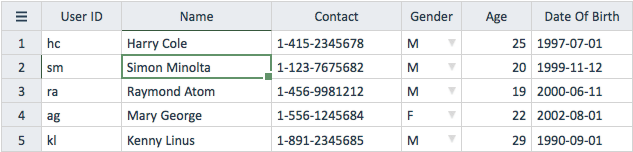 FruitRiin
<vue-excel-editor v-model="jsondata">
このjsondataはArray in Objectならなんでもよい
v-modelなのでUI上での操作もJSからこのjsondataに対して変更を行っても双方向にリアクティブに反映される
FruitRiin<vue-excel-column field="user" label="User ID" type="string" width="80px" />
fieldはオブジェクトのキーを指定する
FruitRiin <vue-excel-column field="phone" label="Contact" type="string" width="130px" />
<vue-excel-column field="gender" label="Gender" type="select" width="50px" :options="['F','M','U']" />
<vue-excel-column field="age" label="Age" type="number" width="70px" />
<vue-excel-column field="birth" label="Date Of Birth" type="date" width="80px" />
type によってセルの振る舞いが変更される
FruitRiin行の追加と削除もできる
methods: {
    newRecord () {
        const rec = {
            user: 'nm',
            name: 'Norman Morris',
            phone: '1-222-3333333',
            gender: 'M',
            age: 28,
            birth: '1993-05-16'
        }
        // Call this to new record
        this.$refs.grid.newRecord(rec)
    }
}
After the record created, a set of @update events will be fired. If you undo a newRecord transaction, component will generate the corresponding @delete events. In case you do not care about the undo, you may skip this by appending the new record in v-model variable (jsondata array) directly.
Delete row
methods: {
    delRecord () {
        this.$refs.grid.deleteRecord(0) // delete the 1st record: Harry Cole
    }
}
The component will generate the corresponding @delete events. You may also interest in the deleteSelectedRecords() method.
FruitRiinCSVにもxlsxにもexportできるらしい
The following provides the button to export the grid content.
<template>
    <button @click="exportAsExcel"> Export Excel </button>
    <button @click="exportAsCsv"> Export CSV </button>
    <vue-excel-editor ref="grid" ...>
        ...
    </vue-excel-editor>
</template>
methods: {
    exportAsExcel () {
        const format = 'xlsx'
        const exportSelectedOnly = true
        const filename = 'test'
        this.$refs.grid.exportTable(format, exportSelectedOnly, filename)
    }
    exportAsCsv () {
        const format = 'csv'
        const exportSelectedOnly = true
        const filename = 'test'
        this.$refs.grid.exportTable(format, exportSelectedOnly, filename)
    }
}
その他にもフィルタしたりソートしたりとかできるみたい
FruitRiin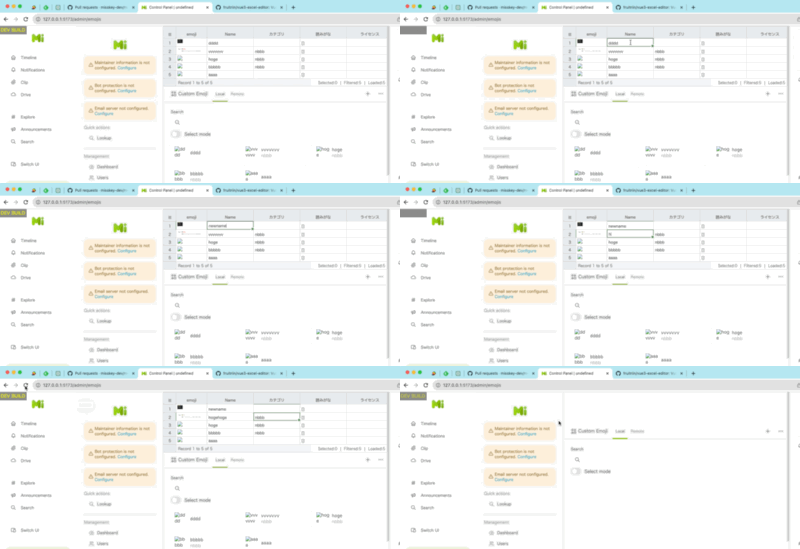
というわけで作りかけているもの。
現在は @changeイベントで都度API通信を走らせているが、実際にはv-model で UIとJSの値が同期しているので、一括してUpdateするとより体験がいいだろう