UE Remote Controlプラグインでハマった



はじめに
今年もあと1か月ってまじかよ~っ!アドカレの季節ですね!おかずさんいつもありがとうございます。
UEアドカレ2025 シリーズ1 1日目の記事です。最近Remote Controlプラグインでハマってしまったので共有です!!!!
Remote Controlプラグインとは?
UEの外からhttpリクエストを介して、指定したUObjectの関数を呼び出したり変数の値を取得したりできる機能です。
公式ドキュメント:
使い始める準備としては、[Edit (編集)] > [Plugins (プラグイン)] から [Remote Control API] を有効化してエディタを再起動するだけです。
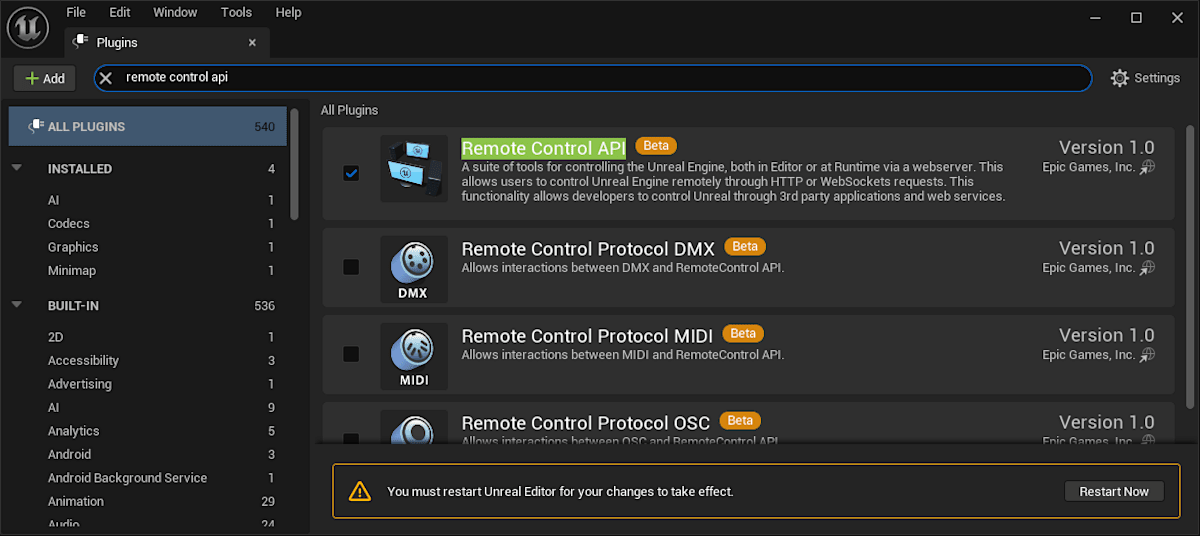
環境
- Unreal Engine 5.3.2
- Remote Control Plug-in 1.0
コード
この記事のコードは全てGitHubで公開されています。
やりたいこと
Remote Controlプラグインで、BPで実装されたシングルトン的なクラスの機能を呼びたい。
ここでのシングルトン的なクラスというのは
- Blueprint Function Library
- Subsystem
- Game Mode
- Player Controller
といった、基本どこからでもアクセスできて常に存在するようなクラスを指します。
仕様に則ってhttpリクエスト送るだけでしょ?簡単じゃん?と思いますよね。。
C++のBlueprintFunctionLibraryを使う
まずは公式ドキュメントにも載っているC++のBlueprintFunctionLibraryの関数を呼び出してみましょう。
「RemoteControlTestPrj」という名前で新規C++プロジェクトを作成し、「RemoteControlTestLibrary」というC++クラスを追加し、BlueprintCallableなUFUNCTIONを実装します。
#pragma once
#include "CoreMinimal.h"
#include "Kismet/BlueprintFunctionLibrary.h"
#include "RemoteControlTestLibrary.generated.h"

UCLASS()
class REMOTECONTROLTESTPRJ_API URemoteControlTestLibrary : public UBlueprintFunctionLibrary
{
    GENERATED_BODY()
public:
    UFUNCTION(BlueprintCallable, Category = "RemoteControlTest")
    static FString TestCall(FString message)
    {
        return message + " Hello from UE!";
    }
};
これはPythonだと下記のようなコードで呼び出せます。
import requests
url = "http://localhost:30010/remote/object/call"
params = {
    "objectPath" : "/Script/RemoteControlTestPrj.Default__RemoteControlTestLibrary",
    "functionName" : "TestCall",
    "parameters" : { "message" : "Hello from Python!" },
    "generateTransaction" : False
}
api_response = requests.put(url, json=params)
print(api_response.json())

# 下記がプリントされる
# {'ReturnValue': 'Hello from Python! Hello from UE!'}
ここまではなんの問題もなかったんですよね…。
BPのBlueprintFunctionLibraryを使う
同じことをBPでもやればいいじゃんということで、「BP_RemoteControlTestLibrary」というBPクラスを追加し、関数を実装します。
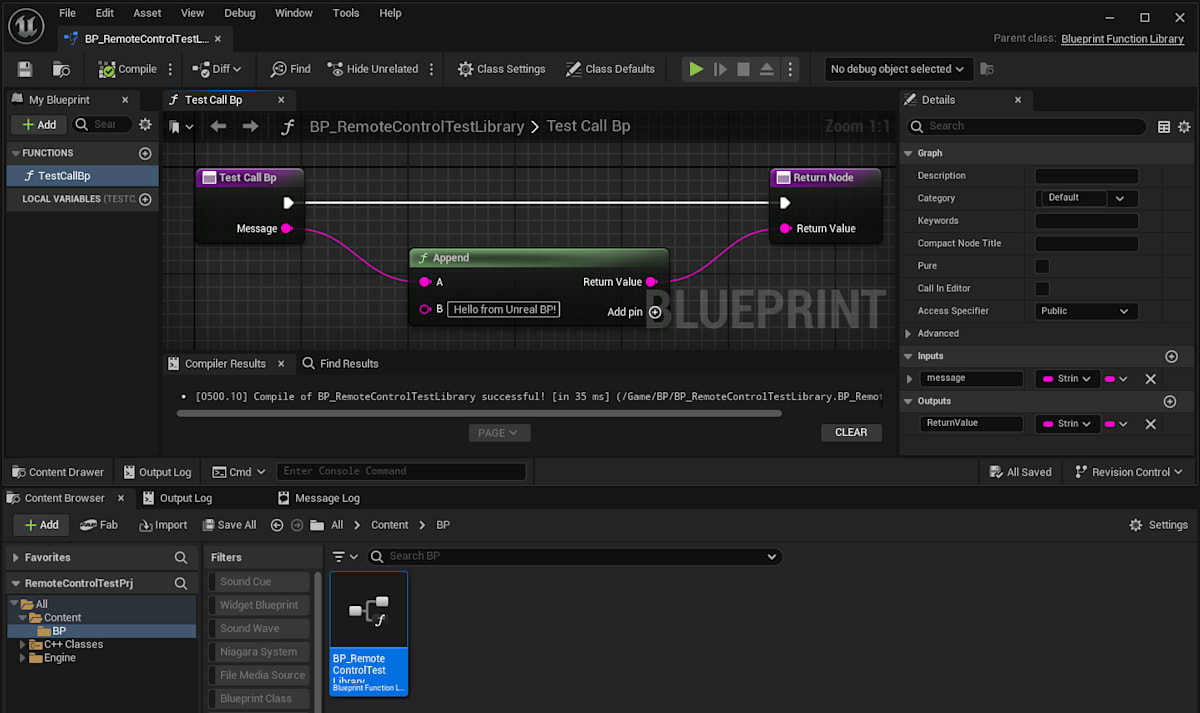
これを呼び出したいのだけど…
パスがわからん
objectPathに指定するパスがどうなるのか、ドキュメントに細かい記載がない!
が、Class Default Object (CDO)を指定せよとは言っている。
ということで、下記のような関数を先ほどのC++のライブラリに追加して呼び出してみます。
    UFUNCTION(BlueprintCallable, Category = "RemoteControlTest")
    UObject* GetCDO(FString path)
    {
        UClass* Class = TSoftClassPtr<UObject>(FSoftObjectPath(*path)).LoadSynchronous();
        return Class->GetDefaultObject<UObject>();
    }
params = {
    "objectPath" : "/Script/RemoteControlTestPrj.Default__RemoteControlTestLibrary",
    "functionName" : "GetCDO",
    "parameters" : { "path": "/Game/BP/BP_RemoteControlTestLibrary.BP_RemoteControlTestLibrary_C"},
    "generateTransaction" : False
}
api_response = requests.put(url, json=params)
print(api_response.json())

# 下記がプリントされる
# {'ReturnValue': '/Game/BP/BP_RemoteControlTestLibrary.Default__BP_RemoteControlTestLibrary_C'}
それっぽい値が帰ってきました。というかUObject*を返すとRemoteControlプラグインはこういう文字列に変換するんですね~。
ということで、どうやらBPのBlueprintFunctionLibraryのパスは「/<Module名>/path/to/the/bp/<BP名>.Default__<BP名>_C」ということみたいです。
呼べる…が
ということで、エディタを起動して先ほどのパスで関数を呼んでみます。
params = {
    "objectPath" : "/Game/BP/BP_RemoteControlTestLibrary.Default__BP_RemoteControlTestLibrary_C",
    "functionName" : "TestCallBp",
    "parameters" : { "message" : "Hello from Python!" },
    "generateTransaction" : False
}
api_response = requests.put(url, json=params)
print(api_response.json())

# 下記がプリントされる場合(失敗)と
# {'errorMessage': 'Object: /Game/BP/BP_RemoteControlTestLibrary.Default__BP_RemoteControlTestLibrary_C does not exist.'}
# 下記がプリントされる場合(成功)がある
# {'ReturnValue': 'Hello from Python! Hello from Unreal BP!'}
あれ?失敗する場合と成功する場合がある?
どうやらエディタ上で当該のBPの編集画面を一度開いておくと成功するようです。なので、おそらくCDOが生成されるにはBPがメモリ上に一度読み込まれる必要があるみたいですね。
(CDOのライフサイクルがエンジン側でどのように管理されているのか、有識者の方教えてください…!)
おそらく起動時にLoadSynchronousとかで当該のBPを読み込む処理をどこかに入れればこれでOKなのですが、なんとなくやだなぁ…
Game Modeとか、Player Controllerを使う
じゃあ、Play時に必ず読み込まれるクラスであるGame ModeとかPlayer Controllerとかを使えばいいのでは?
さっきと同じノリで、これらのパスを見つけてくる関数をURemoteControlTestLibraryに追加します。
    static UWorld* GetGameWorld()
    {
        if (GEngine)
        {
            for (const FWorldContext& context : GEngine->GetWorldContexts())
            {
                // Return the first Game/PIE world
                if (context.WorldType == EWorldType::Game || context.WorldType == EWorldType::PIE)
                {
                    return context.World();
                }
            }
        }
        return nullptr;
    }

    UFUNCTION(BlueprintCallable, Category = "RemoteControlTest")
    static AGameModeBase* GetGameMode()
    {
        return UGameplayStatics::GetGameMode(GetGameWorld());
    }

    UFUNCTION(BlueprintCallable, Category = "RemoteControlTest")
    static APlayerController* GetPlayerController(int32 PlayerIndex)
    {
        return UGameplayStatics::GetPlayerController(GetGameWorld(), PlayerIndex);
    }
これらのパスはPlayの度に変わる可能性があるので、つど取得してそのパスに対して関数を実行してやります。
###########################
# Game mode のパスを取得
params = {
    "objectPath" : "/Script/RemoteControlTestPrj.Default__RemoteControlTestLibrary",
    "functionName" : "GetGameMode",
    "parameters" : {},
    "generateTransaction" : False
}
api_response = requests.put(url, json=params)
game_mode_path = api_response.json()["ReturnValue"]

# 取得したパスに対して関数を実行!
params = {
    "objectPath" : game_mode_path,
    "functionName" : "TestCallGm",
    "parameters" : { "message" : "Hello from Python!" },
    "generateTransaction" : False
}
api_response = requests.put(url, json=params)
print(api_response.json())

# 下記がプリントされる
# {'ReturnValue': 'Hello from Python! Hello from BP Game Mode!'}

###########################
# Player Controller のパスを取得
params = {
    "objectPath" : "/Script/RemoteControlTestPrj.Default__RemoteControlTestLibrary",
    "functionName" : "GetPlayerController",
    "parameters" : { "PlayerIndex" : 0 },
    "generateTransaction" : False
}
api_response = requests.put(url, json=params)
player_controller_path = api_response.json()["ReturnValue"]

# 取得したパスに対して関数を実行!
params = {
    "objectPath" : player_controller_path,
    "functionName" : "TestCallPc",
    "parameters" : { "message" : "Hello from Python!" },
    "generateTransaction" : False
}
api_response = requests.put(url, json=params)
print(api_response.json())

# 下記がプリントされる
# {'ReturnValue': 'Hello from Python! Hello from BP Player Controller!'}
BP側の実装はこんな感じ。
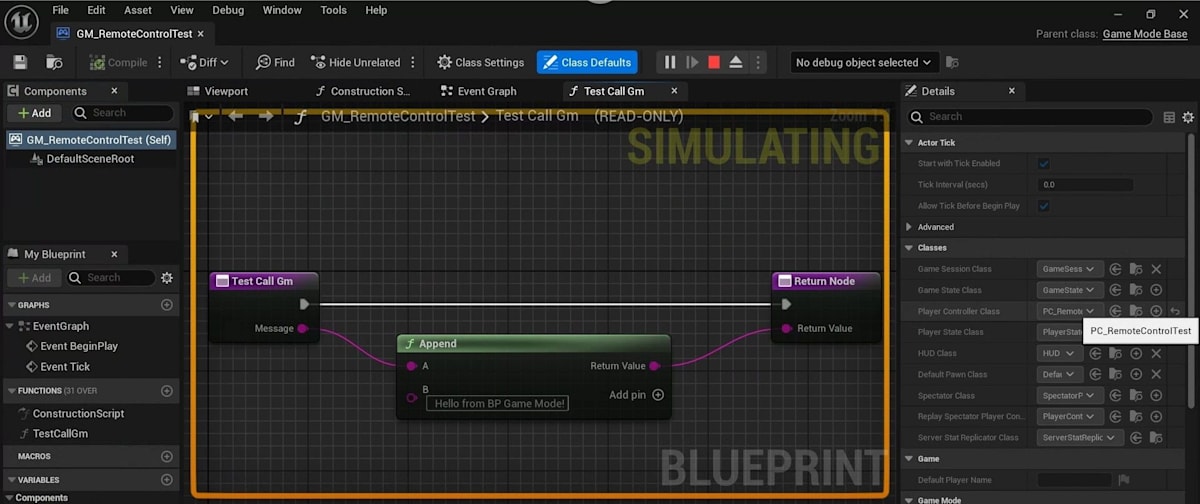
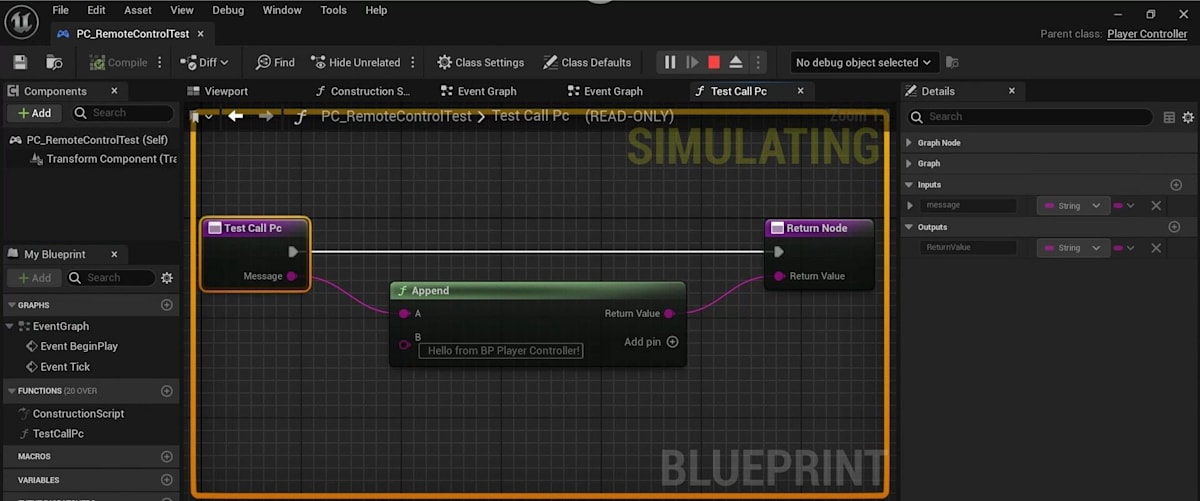
なお、上記を実行する際はUEはエディタを起動するだけでなくてPlayしてやる必要があります。(でないと、Game Worldが取得できず動作しません)
Subsystemを使う
でも、Game Modeとかって既に神クラスになっていて、処理をここに追加するの嫌なんだよね~ということ、ありますよね。
そんなときはSubsystemを使えばいいんじゃないか!
C++のGameInstanceSubsystemを使う
C++のFunction Library経由とかでパスを取ってくればいけることはGame Modeとかと同じ。
#pragma once
#include "CoreMinimal.h"
#include "Subsystems/GameInstanceSubsystem.h"
#include "RemoteControlTestSubsystem.generated.h"
UCLASS()
class REMOTECONTROLTESTPRJ_API URemoteControlTestSubsystem : public UGameInstanceSubsystem
{
    GENERATED_BODY()
public:
    UFUNCTION(BlueprintCallable, Category = "RemoteControlTest")
    static FString TestCall(FString message)
    {
        return message + " Hello from C++ Subsystem!";
    }
};
    template<typename TSubsystemClass>
    static TSubsystemClass* GetGameInstanceSubsystem()
    {
        if (UWorld* gameWorld = GetGameWorld())
        {
            if (UGameInstance* gameInstance = gameWorld->GetGameInstance())
            {
                return gameInstance->GetSubsystem<TSubsystemClass>();
            }
        }
        return nullptr;
    }

    UFUNCTION(BlueprintCallable, Category = "RemoteControlTest")
    static URemoteControlTestSubsystem* GetGameInstanceSubsystemCpp()
    {
        return GetGameInstanceSubsystem<URemoteControlTestSubsystem>();
    }
# Game Instance Subsystem のパスを取得
params = {
    "objectPath" : "/Script/RemoteControlTestPrj.Default__RemoteControlTestLibrary",
    "functionName" : "GetGameInstanceSubsystemCpp",
    "parameters" : {},
    "generateTransaction" : False
}
api_response = requests.put(url, json=params)
game_instance_subsystem_path = api_response.json()["ReturnValue"]

# 取得したパスに対して関数を実行!
params = {
    "objectPath" : game_instance_subsystem_path,
    "functionName" : "TestCall",
    "parameters" : { "message" : "Hello from Python!" },
    "generateTransaction" : False
}
api_response = requests.put(url, json=params)
print(api_response.json())

# 下記がプリントされる
# {'ReturnValue': 'Hello from Python! Hello from C++ Subsystem!'}
よし、これをBPで継承してそっちに実装すればいいな!!
BPのGameInstanceSubsystemを使う
UCLASS(Abstract, Blueprintable)を付けたURemoteControlTestSubsystemBaseを作ります。
UCLASS(Abstract, Blueprintable)
class REMOTECONTROLTESTPRJ_API URemoteControlTestSubsystemBase : public UGameInstanceSubsystem
{
    GENERATED_BODY()
};
BPで継承して
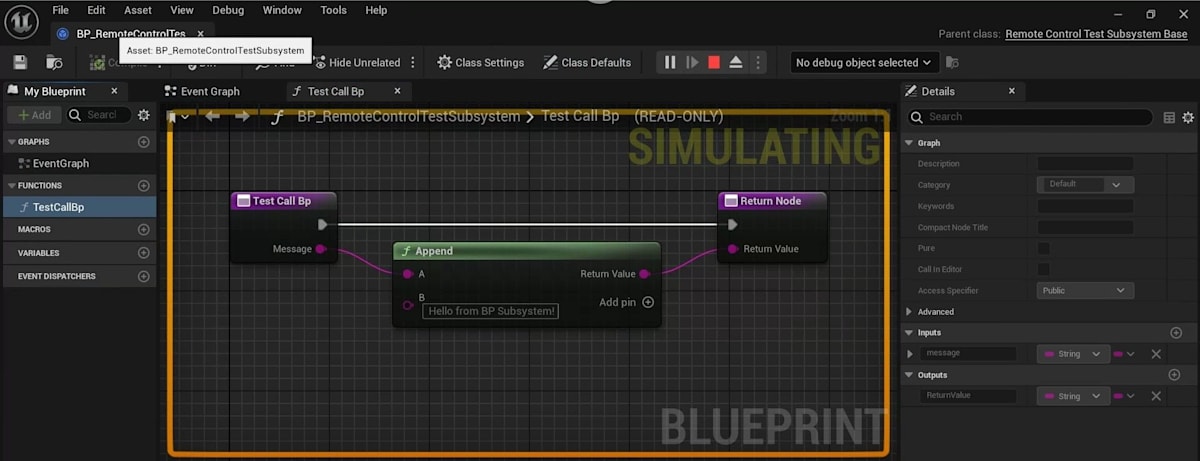
これを取得する処理を追加して
    UFUNCTION(BlueprintCallable, Category = "RemoteControlTest")
    static URemoteControlTestSubsystemBase* GetGameInstanceSubsystemBp()
    {
        return GetGameInstanceSubsystem<URemoteControlTestSubsystemBase>();
    }
Remoteで呼び出し!
# Game Instance Subsystem のパスを取得
params = {
    "objectPath" : "/Script/RemoteControlTestPrj.Default__RemoteControlTestLibrary",
    "functionName" : "GetGameInstanceSubsystemBp",
    "parameters" : {},
    "generateTransaction" : False
}
api_response = requests.put(url, json=params)
game_instance_subsystem_path = api_response.json()["ReturnValue"]

# 取得したパスに対して関数を実行!
params = {
    "objectPath" : game_instance_subsystem_path,
    "functionName" : "TestCallBp",
    "parameters" : { "message" : "Hello from Python!" },
    "generateTransaction" : False
}
api_response = requests.put(url, json=params)
print(api_response.json())

# 下記がプリントされる場合(失敗)と
# {'errorMessage': 'Object:  does not exist.'}
# 下記がプリントされる場合(成功)がある
# {'ReturnValue': 'Hello from Python! Hello from BP Subsystem!'}
んん?読み込まれてない場合がある?先にBPの編集画面を開くと動くので、BPのFunction Libraryのときと同じですね。
おかずさんの資料をみると、手動でメモリに乗せないといけないっぽいし、そもそもBPでSubsystemを継承するのは推奨されていない…。
上記資料に載っているトリックを使う
ということで、上記資料で推奨されているようにSubsystemにUObjectを持たせます。
    UPROPERTY(Transient, BlueprintReadOnly)
    UObject* SubsystemHelper = nullptr;

    //~ Begin USubsystem Interface
    virtual void Initialize(FSubsystemCollectionBase& Collection) override
    {
        if (UClass* SubsystemHelperClass = TSoftClassPtr<UObject>(FSoftObjectPath("/Game/BP/BP_SubsystemHelper.BP_SubsystemHelper_C")).LoadSynchronous())
        {
            SubsystemHelper = NewObject<UObject>(/*Outer*/ this, /*Class*/ SubsystemHelperClass);
        }
    }
    virtual void Deinitialize() override
    {
        SubsystemHelper = nullptr;
    }
    //~ End USubsystem Interface
BP_SubsystemHelperを実装し、
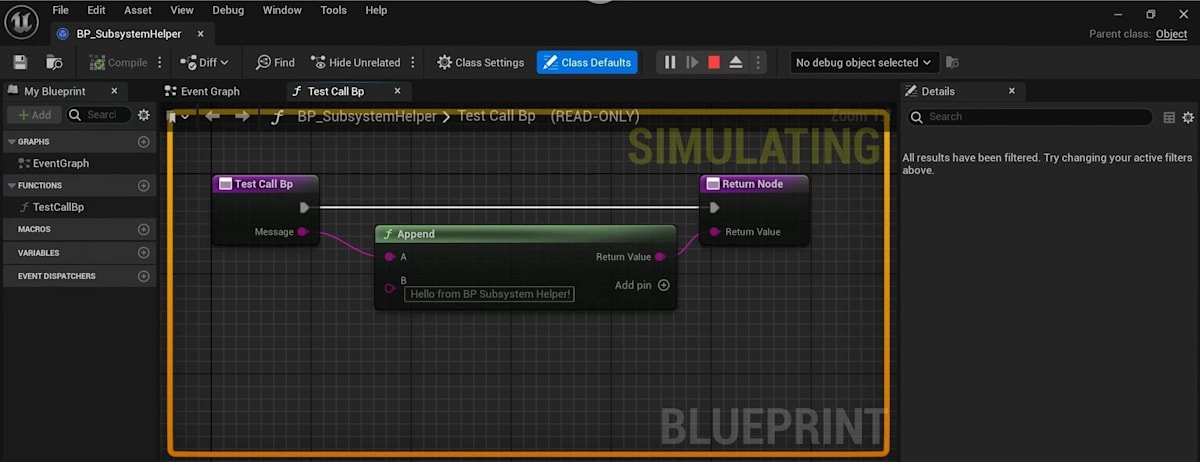
これのパスを取得する処理を作成し、
    UFUNCTION(BlueprintCallable, Category = "RemoteControlTest")
    static UObject* GetSubsystemHelper()
    {
        if (URemoteControlTestSubsystem* remoteControlTestSubsystem = GetGameInstanceSubsystem<URemoteControlTestSubsystem>())
        {
            return remoteControlTestSubsystem->SubsystemHelper;
        }
        return nullptr;
    }
Remote呼び出し!
# Subsystem Helper のパスを取得
params = {
    "objectPath" : "/Script/RemoteControlTestPrj.Default__RemoteControlTestLibrary",
    "functionName" : "GetSubsystemHelper",
    "parameters" : {},
    "generateTransaction" : False
}
api_response = requests.put(url, json=params)
subsystem_helper_path = api_response.json()["ReturnValue"]

# 取得したパスに対して関数を実行!
params = {
    "objectPath" : subsystem_helper_path,
    "functionName" : "TestCallBp",
    "parameters" : { "message" : "Hello from Python!" },
    "generateTransaction" : False
}
api_response = requests.put(url, json=params)
print(api_response.json())

# 下記がプリントされる
# {'ReturnValue': 'Hello from Python! Hello from BP Subsystem Helper!'}
これでやりたかったことができました。めでたしめでたし。
思ったより苦労したな…!
Discussion