




はじめに
必ず守るべき注意事項
Claude Artifactの使い方
Claude Artifactsを使うと静的なコンテンツを簡単に作成することができます。
動的で複雑なコーディングに苦手意識がある方は、まずはClaude Artifactsを使うことをオススメします。

Claude Artifactsを使っている様子
具体的な手順
それでは、具体的な手順を見ていきましょう。
まずは、Claudeを開きます。
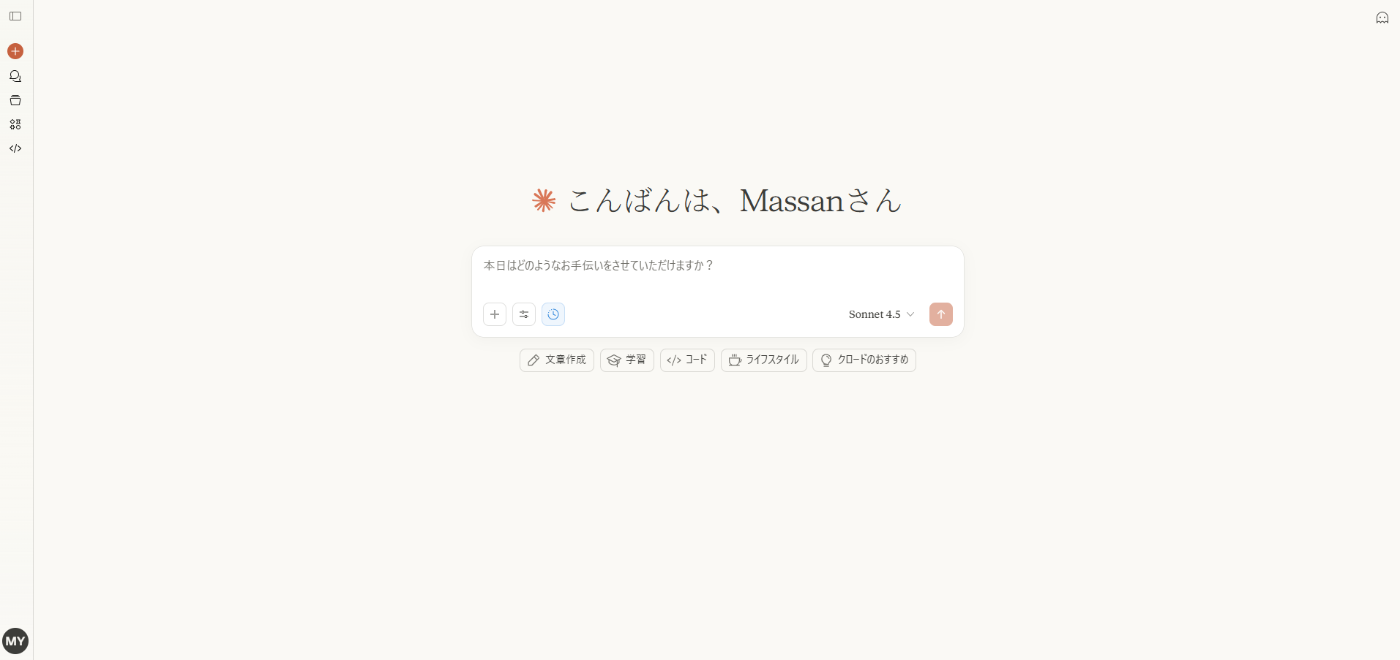
Claudeを開いた
次に下記のようなプロンプトを入力します。
ポイントなのは確実にArtifactsで出力してもらえるように、最初に「Artifactsにアウトプットしてほしい。」と記載することです。
Artifactsにアウトプットしてほしい。マルバツゲームを作ってください。

Claudeが処理している
しばらく待つと、右にArtifactsの画面が表示されてClaudeが作ったコンテンツが表示されます。
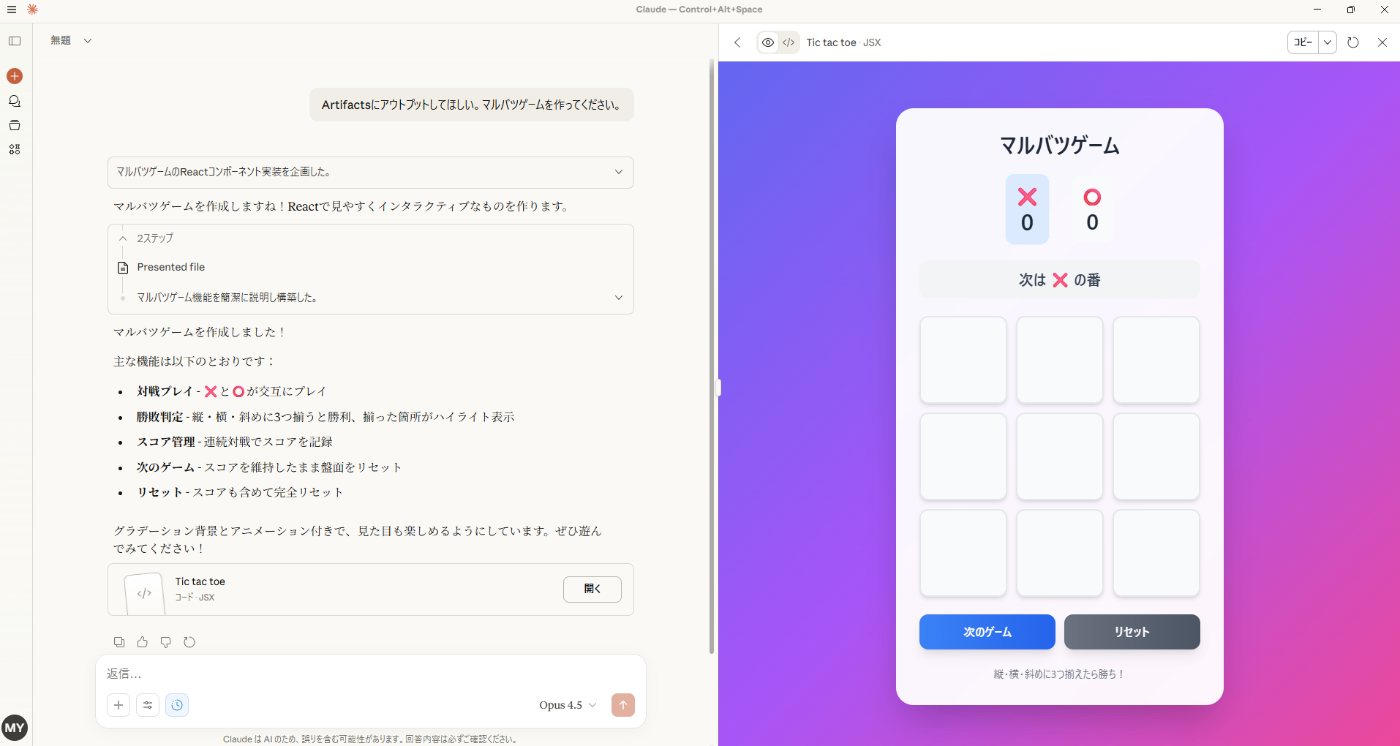
Claudeが作ったArtifacts
なお、「アーティファクトを公開」をクリックすると世界中の人に共有できます。具体的には共有用のリンクが生成されます。

「アーティファクトを公開」をクリック
Gemini Code Assist (Gemini CLI)の使い方
Gemini CLIは、コマンドラインから直接Gemini AIにアクセスできるオープンソースのAIエージェントツールです。それぞれのOSでのインストールと使用方法をご説明します。
事前準備(Windows・Mac共通)
Node.jsのインストール:
- Node.js公式サイトにアクセス
- LTS(推奨版)をダウンロードしてインストール
- インストール確認:
node --version
npm --version
★Windows版の使用方法★
インストール手順
-
PowerShellを開く
- Windowsキー + X → 「Windows PowerShell」を選択
-
Gemini CLIをインストール
npm install -g @google/gemini-cli -
インストール確認
gemini --version
初期設定と起動
-
Gemini CLIを起動
gemini -
初回設定
- テーマを選択(カーソルキーで選択してEnterで決定)
- 認証方法で「Login with Google」を選択し、ブラウザで認証を完了
- これにより無料のGemini Code Assistライセンスが付与され、Gemini 2.5 Proへのアクセスが可能になります
★Mac版の使用方法★
インストール手順
-
ターミナルを開く
- Spotlight検索(Command + Space)で「ターミナル」と入力
-
Gemini CLIをインストール
方法1: npmを使用(推奨)
npm install -g @google/gemini-cli方法2: Homebrewを使用する場合
brew install gemini-cli -
インストール確認
gemini --version
初期設定と起動
-
Gemini CLIを起動
gemini -
初回設定
- テーマを選択
- 「Login with Google」を選択してブラウザで認証
基本的な使い方(Windows・Mac共通)
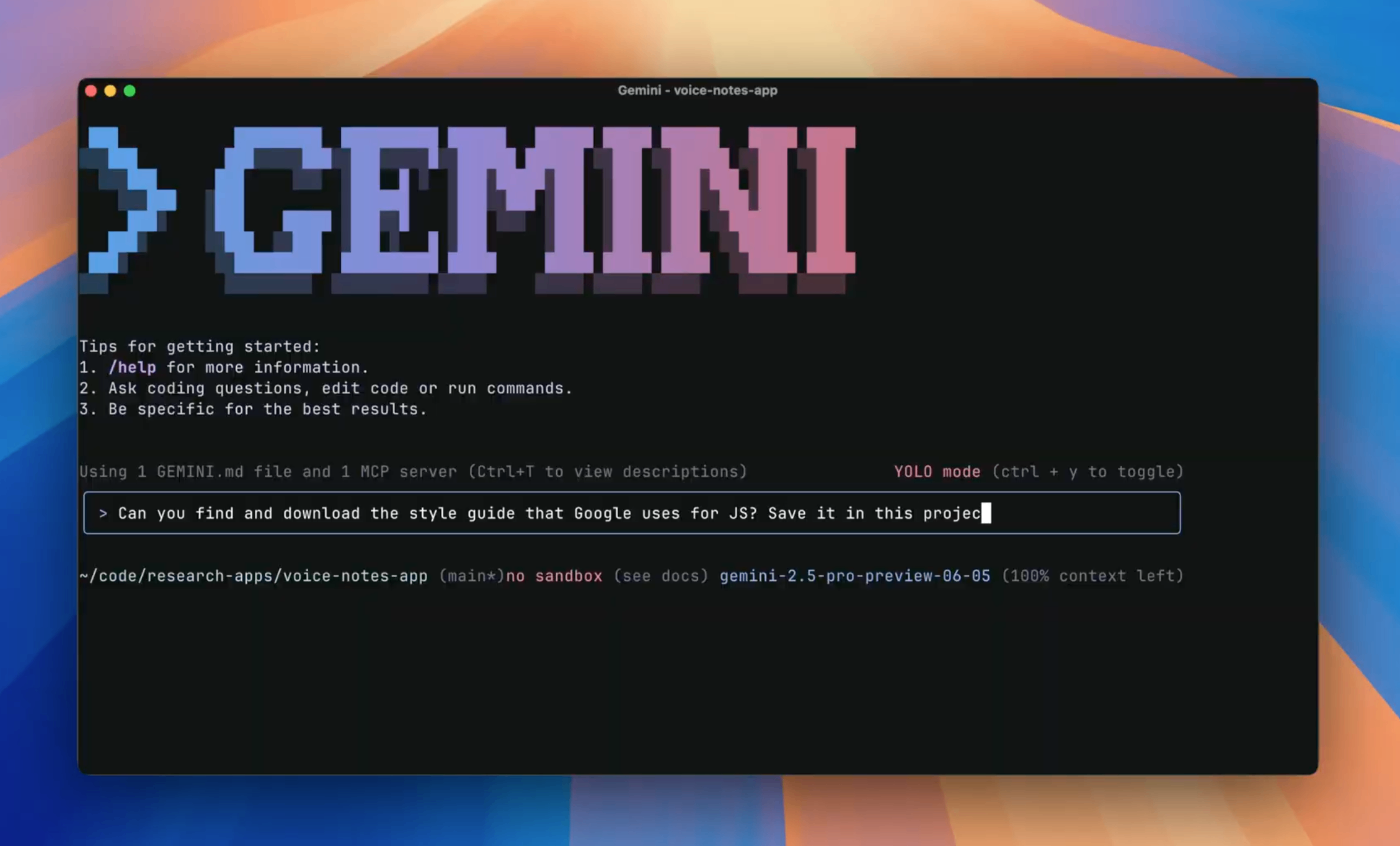
起動画面
対話モード
gemini
起動後、プロンプト(>>)が表示されたら質問や指示を入力できます。
非対話モード(単発実行)
gemini "AIについて説明して"
ファイルを参照(単発実行例)
gemini "@ファイル名 このコードを説明して"
終了
対話モード内で以下のコマンドを入力:
/exit
【参考】
利用制限について
無料版では、1日あたり6,000回のコード関連リクエストと240回のチャットリクエストが可能です。Google Workspace アカウントは利用できず、個人のGoogleアカウントが必要です。
トラブルシューティング
「geminiコマンドが見つからない」場合:
- Node.jsとnpmが正しくインストールされているか確認
- グローバルインストールのパスが環境変数に含まれているか確認
- ターミナル/PowerShellを再起動
GitHub Pagesの使い方
GitHub Pages は、GitHub のリポジトリから HTML、CSS、および JavaScript ファイル を直接取得し、任意でビルドプロセスを通じてファイルを実行し、ウェブサイトを公開できる静的なサイトホスティングサービスです。ファイルを直接編集したり資源管理しながら公開できるので、ClaudeのArtifactsより柔軟に実装できるのが強みです。
具体的な手順
それでは具体的な手順を見ていきましょう。Claudeで静的コンテンツを作成して、それをGitHub上に格納して公開する手順となります。
ClaudeでHTMLを生成する
HTMLの生成はClaudeが便利です。下記プロンプトでいい感じに作ってくれます。
GitHub Pagesで、コーヒー店のブランディングページを作りたい。
生成された結果は下記の様子は下記の通り。
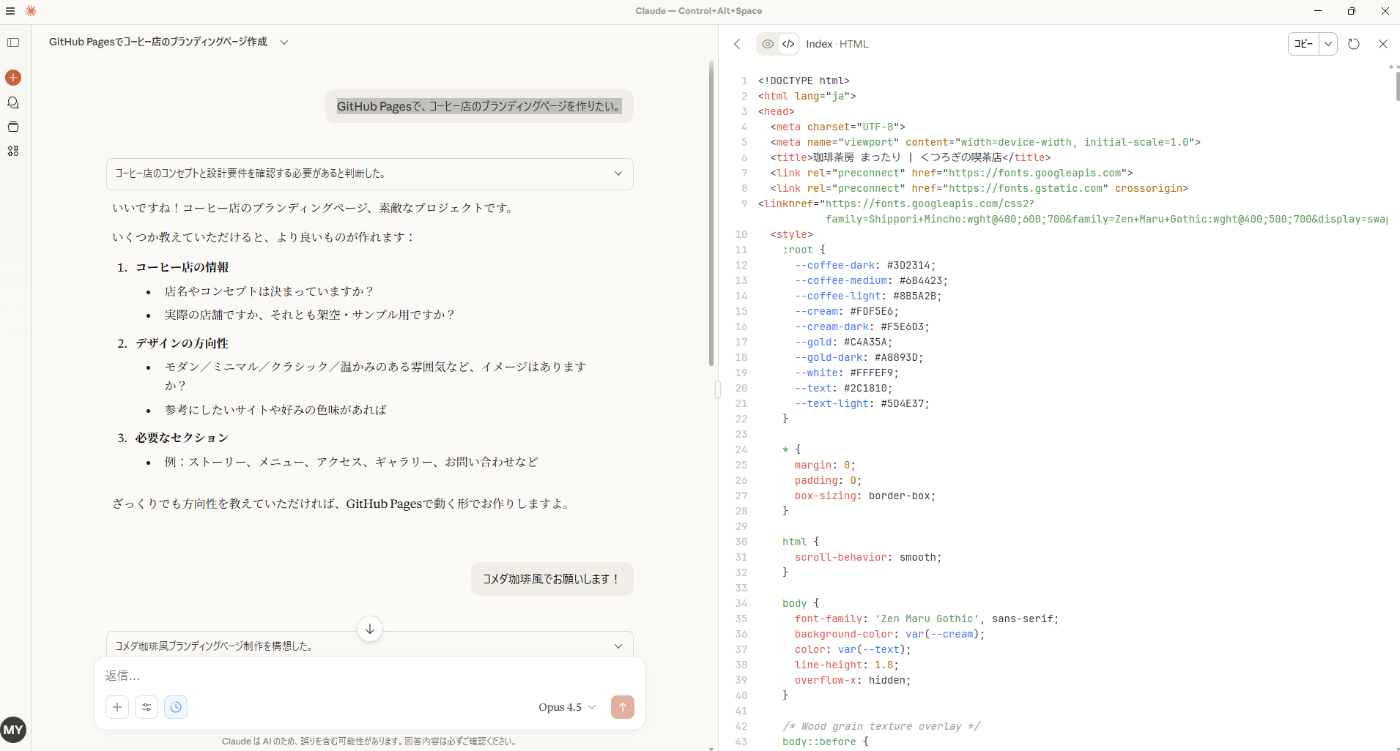
ClaudeでHTMLを生成
念のため、具体的なソースコードもご紹介します。
Claudeが生成したHTML
<!DOCTYPE html>
<html lang="ja">
<head>
<meta charset="UTF-8">
<meta name="viewport" content="width=device-width, initial-scale=1.0">
<title>珈琲茶房 まったり | くつろぎの喫茶店</title>
<link rel="preconnect" href="https://fonts.googleapis.com">
<link rel="preconnect" href="https://fonts.gstatic.com" crossorigin>
<link href="https://fonts.googleapis.com/css2?family=Shippori+Mincho:wght@400;600;700&family=Zen+Maru+Gothic:wght@400;500;700&display=swap" rel="stylesheet">
<style>
:root {
--coffee-dark: #3D2314;
--coffee-medium: #6B4423;
--coffee-light: #8B5A2B;
--cream: #FDF5E6;
--cream-dark: #F5E6D3;
--gold: #C4A35A;
--gold-dark: #A8893D;
--white: #FFFEF9;
--text: #2C1810;
--text-light: #5D4E37;
}
* {
margin: 0;
padding: 0;
box-sizing: border-box;
}
html {
scroll-behavior: smooth;
}
body {
font-family: 'Zen Maru Gothic', sans-serif;
background-color: var(--cream);
color: var(--text);
line-height: 1.8;
overflow-x: hidden;
}
/* Wood grain texture overlay */
body::before {
content: '';
position: fixed;
top: 0;
left: 0;
width: 100%;
height: 100%;
background-image:
repeating-linear-gradient(
90deg,
transparent,
transparent 2px,
rgba(139, 90, 43, 0.03) 2px,
rgba(139, 90, 43, 0.03) 4px
);
pointer-events: none;
z-index: 1000;
}
.mincho {
font-family: 'Shippori Mincho', serif;
}
/* Header */
header {
background: linear-gradient(180deg, var(--coffee-dark) 0%, var(--coffee-medium) 100%);
padding: 1rem 2rem;
position: fixed;
width: 100%;
top: 0;
z-index: 100;
box-shadow: 0 4px 20px rgba(61, 35, 20, 0.3);
}
nav {
max-width: 1200px;
margin: 0 auto;
display: flex;
justify-content: space-between;
align-items: center;
}
.logo {
display: flex;
align-items: center;
gap: 1rem;
}
.logo-icon {
width: 50px;
height: 50px;
background: var(--gold);
border-radius: 50%;
display: flex;
align-items: center;
justify-content: center;
font-size: 1.5rem;
box-shadow: inset 0 2px 4px rgba(255,255,255,0.3), 0 2px 8px rgba(0,0,0,0.2);
}
.logo-text {
color: var(--cream);
font-family: 'Shippori Mincho', serif;
font-size: 1.5rem;
font-weight: 600;
letter-spacing: 0.1em;
}
.nav-links {
display: flex;
gap: 2rem;
list-style: none;
}
.nav-links a {
color: var(--cream);
text-decoration: none;
font-size: 0.95rem;
letter-spacing: 0.05em;
transition: color 0.3s ease;
position: relative;
}
.nav-links a::after {
content: '';
position: absolute;
bottom: -4px;
left: 0;
width: 0;
height: 2px;
background: var(--gold);
transition: width 0.3s ease;
}
.nav-links a:hover::after {
width: 100%;
}
.nav-links a:hover {
color: var(--gold);
}
/* Hero Section */
.hero {
min-height: 100vh;
display: flex;
align-items: center;
justify-content: center;
background:
linear-gradient(rgba(61, 35, 20, 0.7), rgba(61, 35, 20, 0.8)),
url('data:image/svg+xml,<svg xmlns="http://www.w3.org/2000/svg" viewBox="0 0 100 100"><defs><pattern id="grain" width="100" height="100" patternUnits="userSpaceOnUse"><circle cx="25" cy="25" r="1" fill="%23000" opacity="0.03"/><circle cx="75" cy="75" r="1" fill="%23000" opacity="0.03"/><circle cx="50" cy="10" r="0.5" fill="%23000" opacity="0.02"/></pattern></defs><rect width="100" height="100" fill="url(%23grain)"/></svg>'),
linear-gradient(135deg, var(--coffee-medium) 0%, var(--coffee-dark) 50%, #1a0f0a 100%);
text-align: center;
padding: 2rem;
position: relative;
}
.hero::before {
content: '';
position: absolute;
top: 0;
left: 0;
right: 0;
bottom: 0;
background:
radial-gradient(ellipse at 20% 80%, rgba(196, 163, 90, 0.1) 0%, transparent 50%),
radial-gradient(ellipse at 80% 20%, rgba(196, 163, 90, 0.08) 0%, transparent 40%);
pointer-events: none;
}
.hero-content {
position: relative;
z-index: 1;
animation: fadeInUp 1.2s ease-out;
}
@keyframes fadeInUp {
from {
opacity: 0;
transform: translateY(40px);
}
to {
opacity: 1;
transform: translateY(0);
}
}
.hero-badge {
display: inline-block;
background: var(--gold);
color: var(--coffee-dark);
padding: 0.5rem 1.5rem;
border-radius: 30px;
font-size: 0.85rem;
letter-spacing: 0.15em;
margin-bottom: 2rem;
box-shadow: 0 4px 15px rgba(196, 163, 90, 0.4);
}
.hero h1 {
font-family: 'Shippori Mincho', serif;
font-size: clamp(2.5rem, 8vw, 5rem);
color: var(--cream);
margin-bottom: 1rem;
letter-spacing: 0.2em;
text-shadow: 2px 2px 20px rgba(0,0,0,0.5);
}
.hero-subtitle {
font-size: clamp(1rem, 3vw, 1.3rem);
color: var(--cream-dark);
margin-bottom: 1rem;
letter-spacing: 0.3em;
opacity: 0.9;
}
.hero-tagline {
font-family: 'Shippori Mincho', serif;
font-size: clamp(1.1rem, 2.5vw, 1.5rem);
color: var(--gold);
margin-bottom: 3rem;
font-style: italic;
}
.hero-cta {
display: inline-flex;
align-items: center;
gap: 0.8rem;
background: var(--cream);
color: var(--coffee-dark);
padding: 1rem 2.5rem;
border-radius: 50px;
text-decoration: none;
font-weight: 500;
letter-spacing: 0.1em;
transition: all 0.3s ease;
box-shadow: 0 8px 30px rgba(0,0,0,0.3);
}
.hero-cta:hover {
background: var(--gold);
transform: translateY(-3px);
box-shadow: 0 12px 40px rgba(0,0,0,0.4);
}
/* Coffee cup decoration */
.coffee-steam {
position: absolute;
bottom: 10%;
right: 10%;
font-size: 8rem;
opacity: 0.1;
animation: float 4s ease-in-out infinite;
}
@keyframes float {
0%, 100% { transform: translateY(0); }
50% { transform: translateY(-20px); }
}
/* Section common styles */
section {
padding: 6rem 2rem;
}
.section-title {
font-family: 'Shippori Mincho', serif;
font-size: clamp(1.8rem, 4vw, 2.5rem);
text-align: center;
margin-bottom: 1rem;
color: var(--coffee-dark);
letter-spacing: 0.15em;
}
.section-subtitle {
text-align: center;
color: var(--text-light);
margin-bottom: 4rem;
font-size: 0.95rem;
letter-spacing: 0.1em;
}
/* About Section */
.about {
background: var(--white);
position: relative;
}
.about::before {
content: '';
position: absolute;
top: 0;
left: 0;
right: 0;
height: 6px;
background: linear-gradient(90deg, var(--coffee-dark), var(--gold), var(--coffee-dark));
}
.about-content {
max-width: 900px;
margin: 0 auto;
display: grid;
grid-template-columns: 1fr 1fr;
gap: 4rem;
align-items: center;
}
.about-image {
position: relative;
}
.about-image-frame {
background: linear-gradient(135deg, var(--coffee-medium), var(--coffee-dark));
padding: 1.5rem;
border-radius: 20px;
box-shadow: 0 20px 60px rgba(61, 35, 20, 0.3);
transform: rotate(-2deg);
transition: transform 0.5s ease;
}
.about-image-frame:hover {
transform: rotate(0deg);
}
.about-image-inner {
background: var(--cream);
border-radius: 12px;
height: 350px;
display: flex;
align-items: center;
justify-content: center;
font-size: 6rem;
position: relative;
overflow: hidden;
}
.about-image-inner::before {
content: '☕';
position: absolute;
font-size: 8rem;
opacity: 0.1;
top: -20px;
right: -20px;
}
.about-text h3 {
font-family: 'Shippori Mincho', serif;
font-size: 1.8rem;
color: var(--coffee-dark);
margin-bottom: 1.5rem;
letter-spacing: 0.1em;
}
.about-text p {
color: var(--text-light);
margin-bottom: 1.5rem;
line-height: 2;
}
.about-features {
display: flex;
gap: 2rem;
margin-top: 2rem;
}
.feature-item {
text-align: center;
}
.feature-icon {
width: 60px;
height: 60px;
background: var(--cream-dark);
border-radius: 50%;
display: flex;
align-items: center;
justify-content: center;
font-size: 1.5rem;
margin: 0 auto 0.8rem;
box-shadow: inset 0 2px 8px rgba(0,0,0,0.1);
}
.feature-item span {
font-size: 0.85rem;
color: var(--text-light);
letter-spacing: 0.05em;
}
/* Menu Section */
.menu {
background:
linear-gradient(rgba(253, 245, 230, 0.95), rgba(253, 245, 230, 0.95)),
url('data:image/svg+xml,<svg xmlns="http://www.w3.org/2000/svg" viewBox="0 0 60 60"><path d="M0 0h60v60H0z" fill="none"/><path d="M30 5c-2 0-3 1-3 3v4c0 2 1 3 3 3s3-1 3-3V8c0-2-1-3-3-3z" fill="%238B5A2B" opacity="0.03"/></svg>');
}
.menu-grid {
max-width: 1100px;
margin: 0 auto;
display: grid;
grid-template-columns: repeat(auto-fit, minmax(300px, 1fr));
gap: 2rem;
}
.menu-card {
background: var(--white);
border-radius: 20px;
padding: 2rem;
box-shadow: 0 10px 40px rgba(61, 35, 20, 0.1);
transition: all 0.4s ease;
position: relative;
overflow: hidden;
}
.menu-card::before {
content: '';
position: absolute;
top: 0;
left: 0;
right: 0;
height: 4px;
background: linear-gradient(90deg, var(--gold), var(--coffee-light));
}
.menu-card:hover {
transform: translateY(-8px);
box-shadow: 0 20px 60px rgba(61, 35, 20, 0.2);
}
.menu-card-icon {
width: 80px;
height: 80px;
background: linear-gradient(135deg, var(--cream-dark), var(--cream));
border-radius: 50%;
display: flex;
align-items: center;
justify-content: center;
font-size: 2.5rem;
margin-bottom: 1.5rem;
box-shadow: 0 4px 15px rgba(0,0,0,0.1);
}
.menu-card h3 {
font-family: 'Shippori Mincho', serif;
font-size: 1.4rem;
color: var(--coffee-dark);
margin-bottom: 0.5rem;
letter-spacing: 0.1em;
}
.menu-card .price {
color: var(--gold-dark);
font-weight: 700;
font-size: 1.1rem;
margin-bottom: 1rem;
}
.menu-card p {
color: var(--text-light);
font-size: 0.9rem;
line-height: 1.8;
}
.menu-badge {
position: absolute;
top: 1.5rem;
right: 1.5rem;
background: var(--gold);
color: var(--coffee-dark);
padding: 0.3rem 0.8rem;
border-radius: 20px;
font-size: 0.75rem;
font-weight: 700;
letter-spacing: 0.05em;
}
/* Atmosphere Section */
.atmosphere {
background: var(--coffee-dark);
color: var(--cream);
position: relative;
overflow: hidden;
}
.atmosphere::before {
content: '';
position: absolute;
top: 0;
left: 0;
right: 0;
bottom: 0;
background:
radial-gradient(ellipse at 30% 70%, rgba(196, 163, 90, 0.15) 0%, transparent 50%),
radial-gradient(ellipse at 70% 30%, rgba(139, 90, 43, 0.2) 0%, transparent 40%);
}
.atmosphere .section-title {
color: var(--cream);
}
.atmosphere .section-subtitle {
color: rgba(253, 245, 230, 0.7);
}
.atmosphere-grid {
max-width: 1000px;
margin: 0 auto;
display: grid;
grid-template-columns: repeat(3, 1fr);
gap: 2rem;
position: relative;
z-index: 1;
}
.atmosphere-item {
text-align: center;
padding: 2rem;
background: rgba(255, 255, 255, 0.05);
border-radius: 20px;
backdrop-filter: blur(10px);
border: 1px solid rgba(196, 163, 90, 0.2);
transition: all 0.4s ease;
}
.atmosphere-item:hover {
background: rgba(255, 255, 255, 0.1);
transform: scale(1.05);
}
.atmosphere-item-icon {
font-size: 3rem;
margin-bottom: 1rem;
}
.atmosphere-item h4 {
font-family: 'Shippori Mincho', serif;
font-size: 1.2rem;
margin-bottom: 0.8rem;
color: var(--gold);
letter-spacing: 0.1em;
}
.atmosphere-item p {
font-size: 0.9rem;
opacity: 0.8;
line-height: 1.8;
}
/* Access Section */
.access {
background: var(--white);
}
.access-content {
max-width: 900px;
margin: 0 auto;
display: grid;
grid-template-columns: 1fr 1fr;
gap: 4rem;
align-items: start;
}
.access-info h3 {
font-family: 'Shippori Mincho', serif;
font-size: 1.5rem;
color: var(--coffee-dark);
margin-bottom: 2rem;
padding-bottom: 1rem;
border-bottom: 2px solid var(--gold);
}
.access-detail {
display: flex;
align-items: flex-start;
gap: 1rem;
margin-bottom: 1.5rem;
}
.access-detail-icon {
width: 40px;
height: 40px;
background: var(--cream-dark);
border-radius: 10px;
display: flex;
align-items: center;
justify-content: center;
font-size: 1.2rem;
flex-shrink: 0;
}
.access-detail-text h4 {
font-size: 0.9rem;
color: var(--coffee-dark);
margin-bottom: 0.3rem;
letter-spacing: 0.05em;
}
.access-detail-text p {
color: var(--text-light);
font-size: 0.95rem;
}
.access-map {
background: var(--cream-dark);
border-radius: 20px;
height: 350px;
display: flex;
align-items: center;
justify-content: center;
font-size: 4rem;
position: relative;
box-shadow: 0 10px 40px rgba(61, 35, 20, 0.15);
overflow: hidden;
}
.access-map::before {
content: '地図';
position: absolute;
bottom: 1rem;
font-size: 1rem;
color: var(--text-light);
letter-spacing: 0.2em;
}
/* Footer */
footer {
background: linear-gradient(180deg, var(--coffee-medium) 0%, var(--coffee-dark) 100%);
color: var(--cream);
padding: 4rem 2rem 2rem;
text-align: center;
}
.footer-logo {
font-family: 'Shippori Mincho', serif;
font-size: 2rem;
margin-bottom: 1rem;
letter-spacing: 0.2em;
}
.footer-tagline {
color: var(--gold);
margin-bottom: 2rem;
letter-spacing: 0.15em;
}
.footer-links {
display: flex;
justify-content: center;
gap: 2rem;
margin-bottom: 2rem;
flex-wrap: wrap;
}
.footer-links a {
color: var(--cream);
text-decoration: none;
font-size: 0.9rem;
opacity: 0.8;
transition: opacity 0.3s ease;
}
.footer-links a:hover {
opacity: 1;
color: var(--gold);
}
.footer-copyright {
font-size: 0.8rem;
opacity: 0.6;
padding-top: 2rem;
border-top: 1px solid rgba(253, 245, 230, 0.1);
}
/* Mobile hamburger */
.hamburger {
display: none;
flex-direction: column;
gap: 5px;
cursor: pointer;
padding: 0.5rem;
}
.hamburger span {
width: 25px;
height: 2px;
background: var(--cream);
transition: all 0.3s ease;
}
/* Responsive */
@media (max-width: 768px) {
.hamburger {
display: flex;
}
.nav-links {
display: none;
position: absolute;
top: 100%;
left: 0;
right: 0;
background: var(--coffee-dark);
flex-direction: column;
padding: 2rem;
gap: 1.5rem;
text-align: center;
}
.nav-links.active {
display: flex;
}
.about-content,
.access-content {
grid-template-columns: 1fr;
gap: 2rem;
}
.about-image {
order: -1;
}
.about-features {
justify-content: center;
}
.atmosphere-grid {
grid-template-columns: 1fr;
}
.coffee-steam {
display: none;
}
}
/* Scroll animations */
.fade-in {
opacity: 0;
transform: translateY(30px);
transition: all 0.8s ease;
}
.fade-in.visible {
opacity: 1;
transform: translateY(0);
}
</style>
</head>
<body>
<header>
<nav>
<div class="logo">
<div class="logo-icon">☕</div>
<span class="logo-text">珈琲茶房 まったり</span>
</div>
<ul class="nav-links" id="navLinks">
<li><a href="#about">当店について</a></li>
<li><a href="#menu">メニュー</a></li>
<li><a href="#atmosphere">こだわり</a></li>
<li><a href="#access">アクセス</a></li>
</ul>
<div class="hamburger" id="hamburger">
<span></span>
<span></span>
<span></span>
</div>
</nav>
</header>
<section class="hero">
<div class="hero-content">
<span class="hero-badge">EST. 1985</span>
<h1 class="mincho">珈琲茶房 まったり</h1>
<p class="hero-subtitle">― くつろぎの喫茶店 ―</p>
<p class="hero-tagline">「ここに来れば、時間がゆっくり流れる」</p>
<a href="#menu" class="hero-cta">
<span>メニューを見る</span>
<span>→</span>
</a>
</div>
<div class="coffee-steam">☕</div>
</section>
<section class="about" id="about">
<h2 class="section-title">当店について</h2>
<p class="section-subtitle">About Us</p>
<div class="about-content">
<div class="about-image fade-in">
<div class="about-image-frame">
<div class="about-image-inner">🏠</div>
</div>
</div>
<div class="about-text fade-in">
<h3 class="mincho">心やすらぐ、<br>昔ながらの喫茶店</h3>
<p>
1985年の創業以来、変わらぬ味とおもてなしで皆様をお迎えしております。
木のぬくもりに包まれた店内で、丁寧に淹れた一杯のコーヒーとともに、
ゆったりとしたひとときをお過ごしください。
</p>
<p>
お一人様でも、ご家族連れでも、どなたでも気兼ねなくくつろげる。
そんな「街の茶房」であり続けたいと願っております。
</p>
<div class="about-features">
<div class="feature-item">
<div class="feature-icon">🪑</div>
<span>全席ゆったり</span>
</div>
<div class="feature-item">
<div class="feature-icon">🚭</div>
<span>完全分煙</span>
</div>
<div class="feature-item">
<div class="feature-icon">🅿️</div>
<span>駐車場完備</span>
</div>
</div>
</div>
</div>
</section>
<section class="menu" id="menu">
<h2 class="section-title">おすすめメニュー</h2>
<p class="section-subtitle">Signature Menu</p>
<div class="menu-grid">
<div class="menu-card fade-in">
<span class="menu-badge">人気No.1</span>
<div class="menu-card-icon">🍩</div>
<h3 class="mincho">まったりノワール</h3>
<p class="price">¥780</p>
<p>
温かいデニッシュパンの上にソフトクリームをのせた当店自慢のデザート。
メープルシロップをたっぷりかけてお召し上がりください。
</p>
</div>
<div class="menu-card fade-in">
<span class="menu-badge">定番</span>
<div class="menu-card-icon">☕</div>
<h3 class="mincho">まったりブレンド</h3>
<p class="price">¥480</p>
<p>
厳選した豆を自家焙煎。まろやかな口当たりと深いコクが特徴の、
創業以来変わらぬ味わいです。
</p>
</div>
<div class="menu-card fade-in">
<div class="menu-card-icon">🥪</div>
<h3 class="mincho">小倉トースト</h3>
<p class="price">¥550</p>
<p>
厚切りトーストにたっぷりのバターと自家製小倉あん。
名古屋喫茶の定番をお楽しみください。
</p>
</div>
<div class="menu-card fade-in">
<div class="menu-card-icon">🍳</div>
<h3 class="mincho">モーニングセット</h3>
<p class="price">ドリンク代のみ</p>
<p>
開店〜11時まで、ドリンクご注文で厚切りトーストとゆで卵が無料!
お得な朝のサービスです。
</p>
</div>
<div class="menu-card fade-in">
<div class="menu-card-icon">🍝</div>
<h3 class="mincho">鉄板ナポリタン</h3>
<p class="price">¥880</p>
<p>
熱々の鉄板でお出しする昔ながらのナポリタン。
とろとろ卵を絡めてお召し上がりください。
</p>
</div>
<div class="menu-card fade-in">
<div class="menu-card-icon">🥤</div>
<h3 class="mincho">クリームソーダ</h3>
<p class="price">¥580</p>
<p>
鮮やかなメロンソーダにバニラアイスをのせた、
どこか懐かしい喫茶店の定番ドリンク。
</p>
</div>
</div>
</section>
<section class="atmosphere" id="atmosphere">
<h2 class="section-title">当店のこだわり</h2>
<p class="section-subtitle">Our Commitment</p>
<div class="atmosphere-grid">
<div class="atmosphere-item fade-in">
<div class="atmosphere-item-icon">🫘</div>
<h4 class="mincho">自家焙煎</h4>
<p>毎朝、熟練の焙煎士が豆の状態を見極めながら丁寧に焙煎。香り高い一杯をお届けします。</p>
</div>
<div class="atmosphere-item fade-in">
<div class="atmosphere-item-icon">🪵</div>
<h4 class="mincho">木のぬくもり</h4>
<p>天然木をふんだんに使った店内。落ち着いた雰囲気の中でゆっくりとお過ごしいただけます。</p>
</div>
<div class="atmosphere-item fade-in">
<div class="atmosphere-item-icon">⏰</div>
<h4 class="mincho">時間を忘れて</h4>
<p>お席の時間制限はございません。読書に、おしゃべりに、思い思いの時間をお楽しみください。</p>
</div>
</div>
</section>
<section class="access" id="access">
<h2 class="section-title">アクセス</h2>
<p class="section-subtitle">Access</p>
<div class="access-content">
<div class="access-info fade-in">
<h3 class="mincho">店舗情報</h3>
<div class="access-detail">
<div class="access-detail-icon">📍</div>
<div class="access-detail-text">
<h4>住所</h4>
<p>〒000-0000<br>東京都○○区△△1-2-3<br>まったりビル 1F</p>
</div>
</div>
<div class="access-detail">
<div class="access-detail-icon">🚃</div>
<div class="access-detail-text">
<h4>アクセス</h4>
<p>○○線「△△駅」徒歩3分</p>
</div>
</div>
<div class="access-detail">
<div class="access-detail-icon">🕐</div>
<div class="access-detail-text">
<h4>営業時間</h4>
<p>7:00〜22:00(L.O. 21:30)<br>モーニング 7:00〜11:00</p>
</div>
</div>
<div class="access-detail">
<div class="access-detail-icon">📅</div>
<div class="access-detail-text">
<h4>定休日</h4>
<p>年中無休(年末年始を除く)</p>
</div>
</div>
<div class="access-detail">
<div class="access-detail-icon">📞</div>
<div class="access-detail-text">
<h4>お電話</h4>
<p>03-0000-0000</p>
</div>
</div>
</div>
<div class="access-map fade-in">
🗺️
</div>
</div>
</section>
<footer>
<div class="footer-logo">珈琲茶房 まったり</div>
<p class="footer-tagline">― くつろぎの喫茶店 ―</p>
<div class="footer-links">
<a href="#about">当店について</a>
<a href="#menu">メニュー</a>
<a href="#atmosphere">こだわり</a>
<a href="#access">アクセス</a>
</div>
<p class="footer-copyright">© 2024 珈琲茶房 まったり All Rights Reserved.</p>
</footer>
<script>
// Mobile navigation
const hamburger = document.getElementById('hamburger');
const navLinks = document.getElementById('navLinks');
hamburger.addEventListener('click', () => {
navLinks.classList.toggle('active');
});
// Smooth scroll for navigation links
document.querySelectorAll('a[href^="#"]').forEach(anchor => {
anchor.addEventListener('click', function (e) {
e.preventDefault();
const target = document.querySelector(this.getAttribute('href'));
if (target) {
target.scrollIntoView({
behavior: 'smooth',
block: 'start'
});
navLinks.classList.remove('active');
}
});
});
// Scroll animations
const observerOptions = {
threshold: 0.1,
rootMargin: '0px 0px -50px 0px'
};
const observer = new IntersectionObserver((entries) => {
entries.forEach(entry => {
if (entry.isIntersecting) {
entry.target.classList.add('visible');
}
});
}, observerOptions);
document.querySelectorAll('.fade-in').forEach(el => {
observer.observe(el);
});
// Header scroll effect
let lastScroll = 0;
window.addEventListener('scroll', () => {
const header = document.querySelector('header');
const currentScroll = window.pageYOffset;
if (currentScroll > 100) {
header.style.background = 'rgba(61, 35, 20, 0.98)';
} else {
header.style.background = 'linear-gradient(180deg, #3D2314 0%, #6B4423 100%)';
}
lastScroll = currentScroll;
});
</script>
</body>
</html>
GitHubの設定
まずは、GitHubにアクセスします。
次に「New」ボタンをクリックして新しいリポジトリを作成します。

「New」ボタンをクリック
リポジトリ名を入力して、「Create repository」をクリックします。今回は「Page_test」という名称にしています。
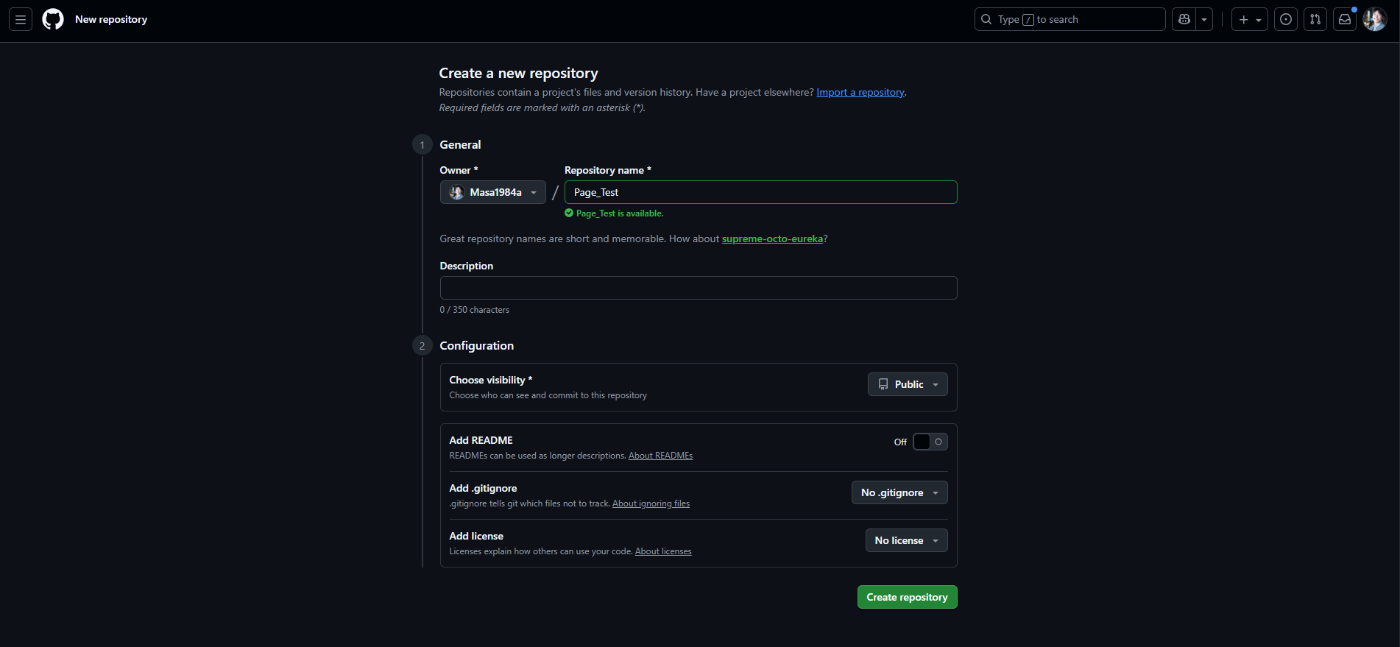
リポジトリを作成
次に「Create a codespace」ボタンをクリックします。
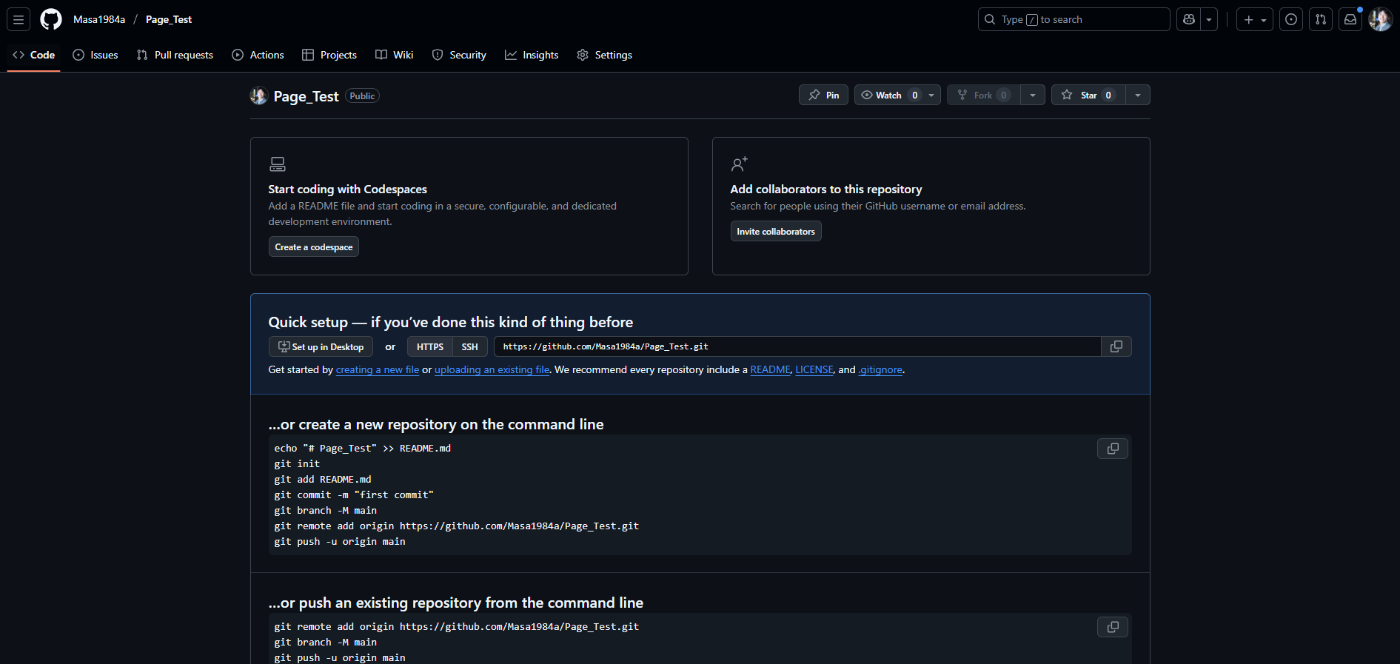
「Create a codespace」ボタンをクリック
「Create new codespace」ボタンをクリックします。

「Create new codespace」ボタンをクリック
VS Codeが開きました。

VS Codeが開いた
「+」をクリックしてファイルを作成します。ファイル名は「index.html」にしましょう。

「index.html」を作成
先ほどClaudeで作ったソースコードを貼り付けます。
作成したあと、CommitおよびSyncをしてGitHubのRepositoryへ反映しましょう。
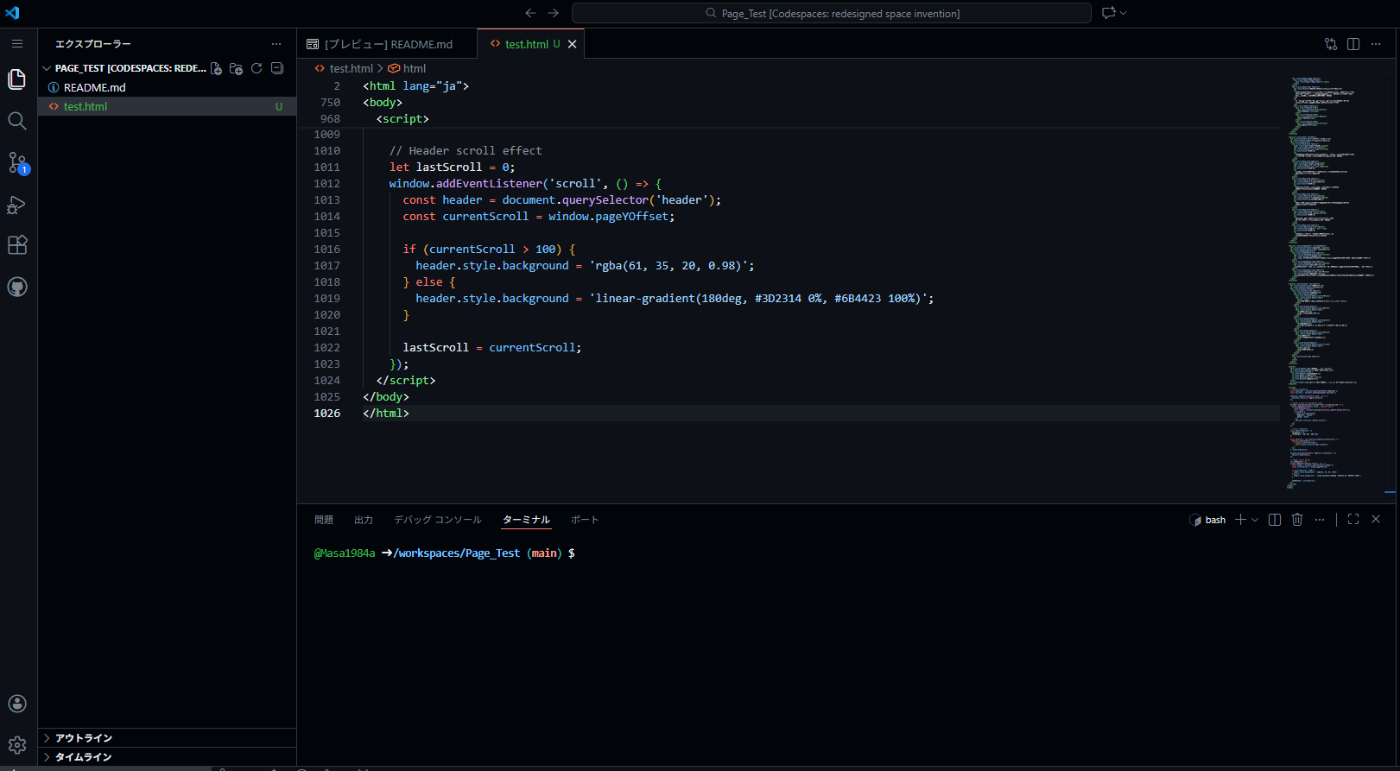
index.htmlにソースコードを貼り付けてGitHubのRepogitoryへ反映
GitHubのRepository画面に戻ります。「Setting」をクリックします。
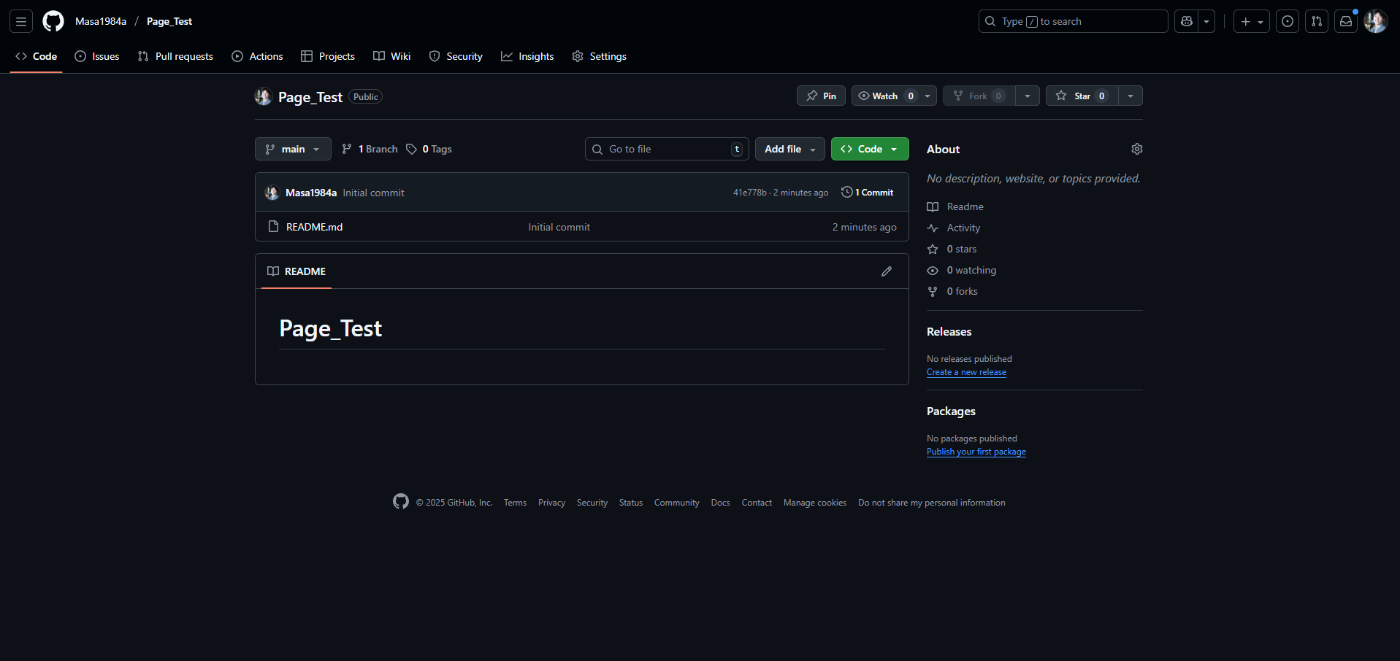
「Setting」をクリック
「Pages」をクリックします。
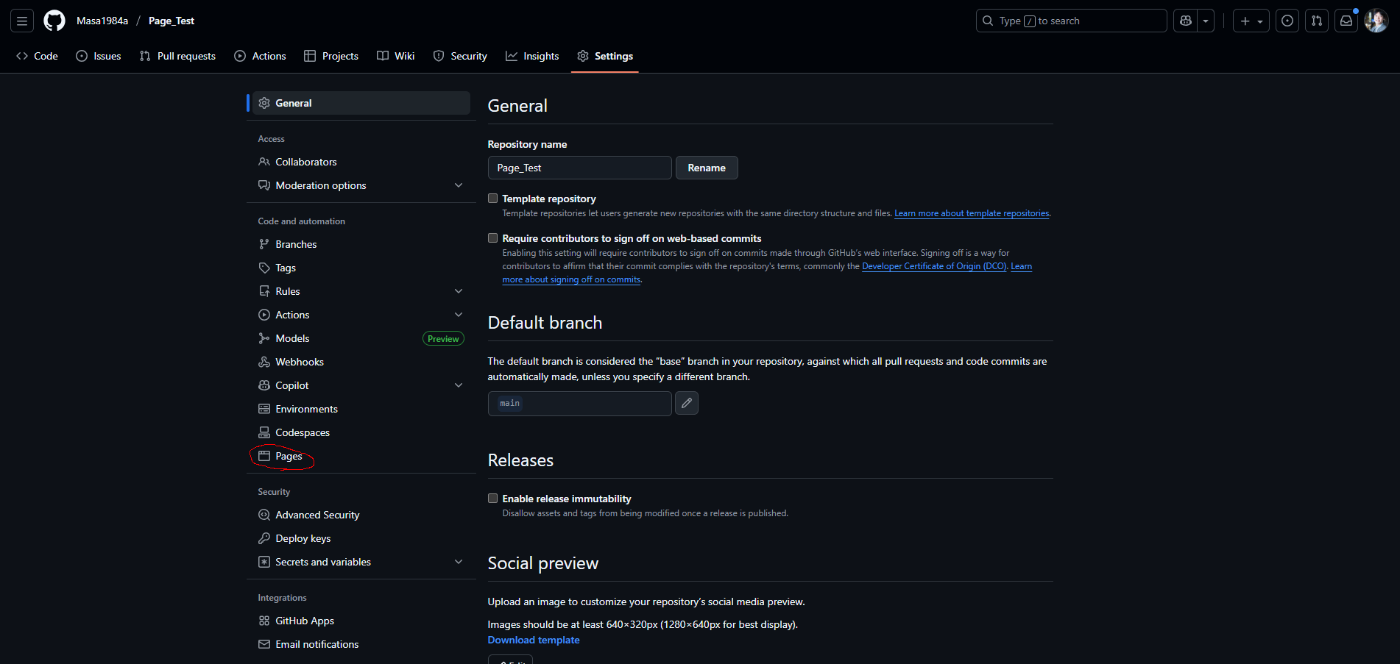
「Pages」をクリック
Branchを「main」に指定して「Save」ボタンをクリックしたうえで、再読み込みします。
すると、URLが表示されて「Visit site」ボタンも表示されるのでクリックします。
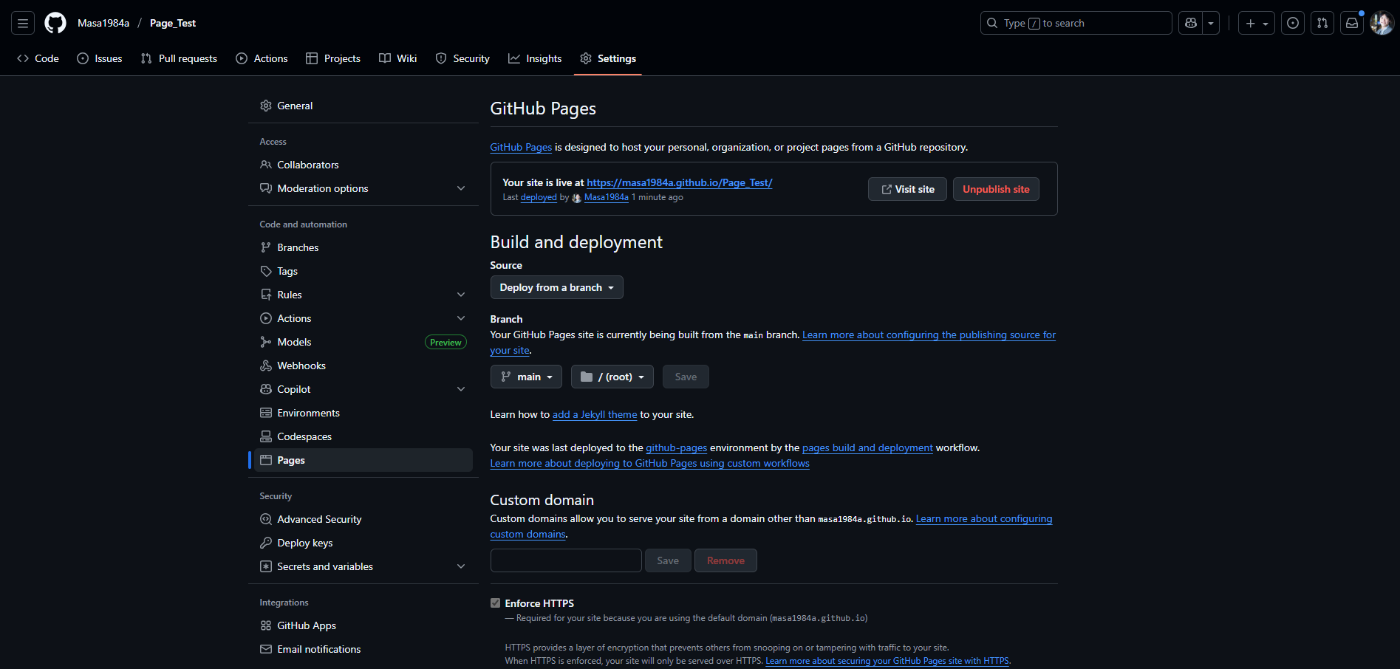
URLを生成して「Visit site」ボタンをクリック
https://masa1984a.github.io/Page_Test/index.htmlにアクセスする。

ブランディングページが表示される
【参考】そのほかのツール
- ChatGPT
- Claude Code
- Gemini
- Cursor
- Cline
etc.

アクセンチュア株式会社に所属する社員有志による運営です。アクセンチュアの社員による様々な発信をまとめています。なお、投稿内容は社員個人の見解であり、所属する組織を代表するものではありません。
Discussion