iTranslated by AI
Optimizing GitHub Actions Testing by Splitting Jobs





I have been using GitHub Actions for a long time during the development of Markuplint based on a vague understanding, but this time I decided to investigate and improve it properly. Here is a record of that.
Conclusion
- Use
actions/cache/restoreandactions/cache/saveeffectively to create caches - Cache build results
- Cache the results of dependency package installations
- Split processes into
jobs - Use
needsto establish the order of processes - Run tests in parallel using the
shardoption
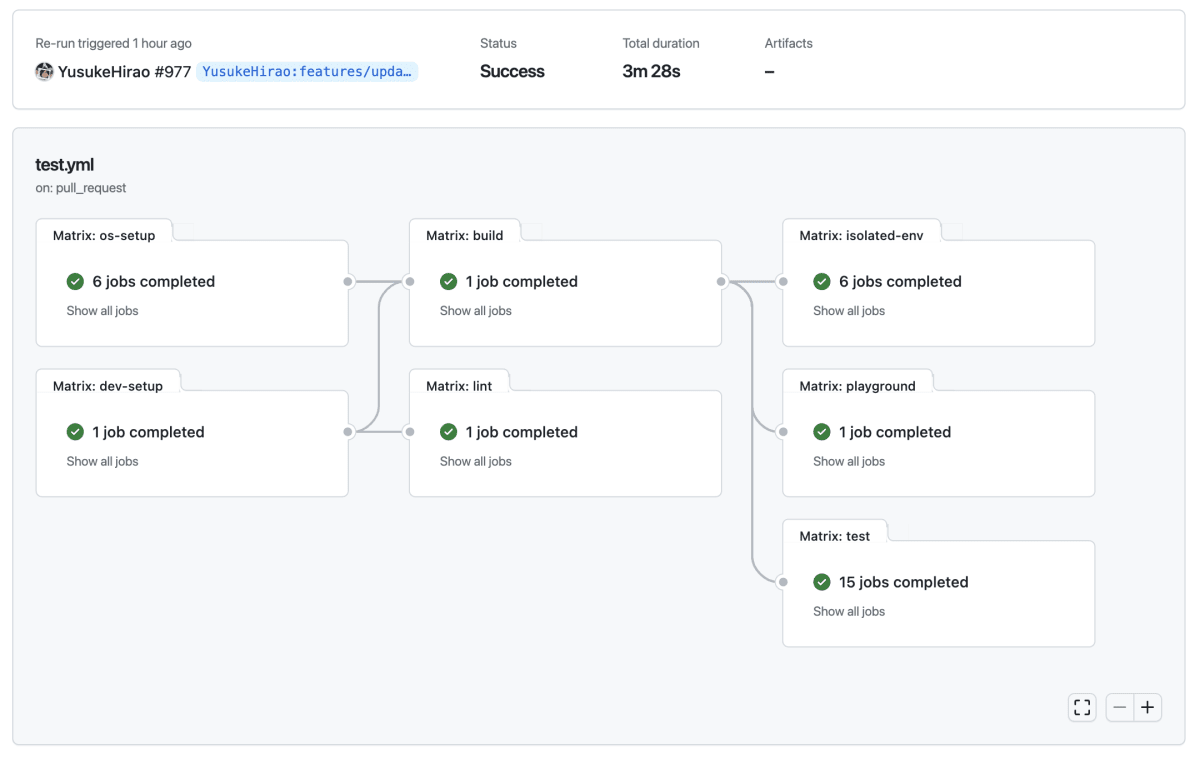
There are seven jobs—os-setup, dev-setup, build, lint, test, isolated-env, and playground—forming a partially dependent flow.
Issues before improvement
By nature, I tend to create PRs somewhat loosely, so the time taken by the test workflow that runs each time was becoming a source of stress. Additionally, there were problems that couldn't be detected with current tests, so I needed to improve the tests themselves and increase the variety of test environments. Furthermore, the fact that Node.js v14 reached its end of life on April 30th provided an opportunity to think about these things. The issues can be summarized as follows:
- It takes too much time
- Development is fine with Node.js v18, but tests for v14 must be maintained until the next major version update of Markuplint [^because I don't want to introduce breaking changes within the same major version]
- There is a lot of waste because dependency installation, building, and testing were performed for all matrices (described later)
- There is an issue where tests do not fail because development dependencies (
devDependencies) are installed during test execution - Caching is not handled efficiently (or rather, I didn't properly understand caching)
- I had virtually zero knowledge of GitHub Actions to begin with
The matrix for the test target was as follows:
| OS | Node.js Version |
|---|---|
| Linux | 18 |
| Linux | 14 |
| macOS | 14 |
| Windows | 14 |
However, with the end of v14 and the arrival of v20, I wanted to support the following comprehensively:
| OS | Node.js Version |
|---|---|
| Linux | 20 |
| Linux | 18 |
| Linux | 16 |
| Linux | 14 |
| macOS | 18 |
| Windows | 18 |
Improvement Strategy
Although it fluctuates depending on the execution timing, GitHub's status, and the network conditions of the dependency servers, it takes about 7 minutes at the fastest and generally around 10 to 15 minutes. Whether that is fast or slow is hard to say since the content and situation differ from other projects, but my personal impression was that it is "slow." More importantly, since I hadn't made any effort to optimize it, I thought it should be possible to make it faster.
Sharing Built Files Across Multiple Environments
There are three main processes that take time within the overall execution:
- Installing dependency packages
- Building
- Testing
Furthermore, there was one of the issues mentioned earlier: "Tests do not fail because development dependencies (devDependencies) are installed during test execution." This needed to be added to the process:
- Install development dependencies
- Build
- Remove all dependencies once
- Install production dependencies
- Test
Doing this across all six target environments would be extremely inefficient.
In particular, the "build" process is truly wasteful. Since the files actually published to NPM are the transpiled JavaScript files after the build, they should be fine to share across the different OS and Node.js environments.
Therefore, I attempted a method to create a cache using actions/cache and reuse it in each environment.
- Prepare only the Linux + Node.js v18 environment
- Install development dependencies
- Build
- Cache the build results
- Restore the cache in each environment
- Install production dependencies in each environment
- Run tests in each environment
The workflow file looks like this:
jobs:
  # Job for building
  build:
    # Run on Linux
    runs-on: ubuntu-latest
    steps:
      # Checkout the repository
      - uses: actions/checkout@v3

      - name: Prepare only the Linux + Node.js v18 environment
        uses: actions/setup-node@v3
        with:
          node-version: 18

      - name: Install development dependencies
        run: yarn install

      - name: Build
        run: yarn build

      - name: Cache build results
        uses: actions/cache/save@v3
        with:
          # Enable cross-OS sharing
          enableCrossOsArchive: true
          # Path to cache
          path: "packages/**/lib"
          # Cache key (cache filename)
          key: prod-node18-${{ github.sha }}

  # Job for testing
  test:
    # Run after the `build` job finishes
    needs: build
    # Run on each OS
    runs-on: ${{ matrix.os }}
    strategy:
      # Matrix definition for this job
      matrix:
        os: [ubuntu-latest, macos-latest, windows-latest]
        node: [18]
        include:
          - node: 14
            os: ubuntu-latest
          - node: 16
            os: ubuntu-latest
          - node: 20
            os: ubuntu-latest
    steps:
      # Checkout the repository
      - uses: actions/checkout@v3

      # Prepare each environment
      - name: Prepare environment for ${{ runner.os }} + Node.js v${{ matrix.node }}
        uses: actions/setup-node@v3
        with:
          node-version: ${{ matrix.node }}

      # Restore cache in each environment
      - name: Restore cache
        uses: actions/cache/restore@v3
        with:
          # Enable cross-OS sharing
          enableCrossOsArchive: true
          # Path to cache
          path: "packages/**/lib"
          # Cache key (cache filename)
          key: prod-node18-${{ github.sha }}

      # Install production dependencies in each environment
      - name: Install production dependencies
        run: yarn install --production

      # Run tests in each environment
      - name: Test
        run: yarn test
The key configuration points are as follows:
- Use
actions/cache/saveandactions/cache/restorefromactions/cacheappropriately. - By enabling
enableCrossOsArchive, files created in a Linux environment can be used on Windows as well. If this is not enabled, you cannot restore them on Windows. -
github.shais used for the key. This prevents the reuse of old cached results by ensuring build files are created for each commit, which would otherwise stop you from testing files from the latest commit. Since we simply need to share files within this workflow, thegithub.shahash value, which is unique per commit, works fine.
Creating a cache that can be reused in subsequent workflows
- Installing development dependencies
- Installing production dependencies for each environment
It is better to cache these two types of dependency packages. As long as the dependencies are not updated (i.e., they stay on the same version), the results can be reused across different workflow runs. Package installation on Windows is especially slow; while Linux or macOS might finish in about a minute, Windows can take around five. Restoring from a cache takes only a few seconds.
The process involves:
- Restore from cache if it exists
- Install if there is no cache
- Save the installed packages if there was no cache
You would create steps like the following in the workflow:
steps:
  - name: Restore dependency packages
    uses: actions/cache/restore@v3
    # Define ID for conditional branching (used in steps.cache-restore-prod-depends.outputs.cache-hit)
    id: cache-restore-prod-depends
    with:
      # Path to cache (using ** to target deep layers recursively)
      path: "**/node_modules"
      # Cache key (cache filename)
      key: depends-${{ matrix.os }}-node${{ matrix.node }}-${{ hashFiles('yarn.lock') }}

  - name: Install dependency packages
    # Run if restoration of dependency packages fails (i.e., if no cache exists)
    if: steps.cache-restore-prod-depends.outputs.cache-hit != 'true'
    run: yarn install --production

  - name: Save dependency packages
    # Run if restoration of dependency packages fails (i.e., if no cache exists)
    if: steps.cache-restore-prod-depends.outputs.cache-hit != 'true'
    uses: actions/cache/save@v3
    with:
      path: "**/node_modules"
      key: depends-${{ matrix.os }}-node${{ matrix.node }}-${{ hashFiles('yarn.lock') }}
Since the files for installed packages can differ depending on the OS or Node.js version, a cache needs to be created for each combination. Therefore, the cache key includes both the OS and the Node.js version. Additionally, since the cache can be reused if the dependency packages have not been updated, you can determine any changes by hashing the yarn.lock file[1] for the cache key.
Split tests using Jest's shard feature
While I was worrying about execution speed during the improvement of the workflow, I received a PR from @dqn. (Thank you so much!)
This is a feature of Jest called shard, which is a splitting function for CI. The person who thought of this is a genius.
By defining the arguments to be passed to the shard option in the matrix and executing it, you can run a large number of tests in parallel. Markuplint relies on a massive number of tests[2] for maintenance, so this is extremely helpful.
strategy:
  matrix:
    os: [ubuntu-latest, macos-latest, windows-latest]
    node: [18]
    include:
      - node: 14
        os: ubuntu-latest
      - node: 16
        os: ubuntu-latest
      - node: 20
        os: ubuntu-latest
    # Define the shard option
    shard: [1/4, 2/4, 3/4, 4/4]

  steps:
    - name: Test
      # Use the shard option defined in the matrix
      run: yarn jest --shard ${{ matrix.shard }}
Further splitting jobs to increase reusability
Since we've found that these three things—development dependency files, build results, and production package files—are reusable, we can now build workflows with high extensibility, such as by dividing tests and other jobs into smaller pieces or adding new jobs.
At this stage, the flow looks like this:
I'll paste the actual configuration I set for Markuplint below. It has become more complex as some parts require finer settings, but the basic concept is the same as the flow above. (Since the preview only shows up to 200 lines, please follow the link for details.)
Summary
As a result, if a cache exists, it now takes about 3 to 5 minutes to run even more tests than before. Even without a cache, it can be completed within 10 minutes (depending on Windows). I think this has become quite efficient.
I'm still a beginner with GitHub Actions, but I think this is a passing grade for now. Anyway, since tests can now be executed quickly, I can increase the frequency and number of tests. I still have some concerns, so I want to add more and more tests. For now, I've managed to build the foundation for that.
Discussion