iTranslated by AI
Part 2: Integrating Cognito into Gatsby and Customizing the Login Screen


In the previous [Part 1], we used @aws-amplify/cli to implement the Cognito authentication infrastructure into a Gatsby project.
In Part 2, we will create the UI for the login screen we introduced and handle Japanese localization.
Introducing Amplify UI React
Something called AWS Amplify UI is already available, and by using this UI library, you can easily create a rich UI.
Installing @aws-amplify/ui-react and aws-amplify
yarn add @aws-amplify/ui-react aws-amplify
Creating the Login UI
For the login screen, we use <Authenticator>.
At this time, by loading @aws-amplify/ui-react/styles.css, you can apply the well-prepared styles, so please import it if necessary.
import { Authenticator } from '@aws-amplify/ui-react'
import '@aws-amplify/ui-react/styles.css'

const IndexPage = () => {
	return (
		<>
			<Authenticator>
			{({ signOut, user}) => (
				<main>
				  <p>Hello, {user?.username}</p>
				  <button onClick={signOut}>Logout</button>
				</main>
			)}
			</Authenticator>
		</>
	)
}

export default IndexPage
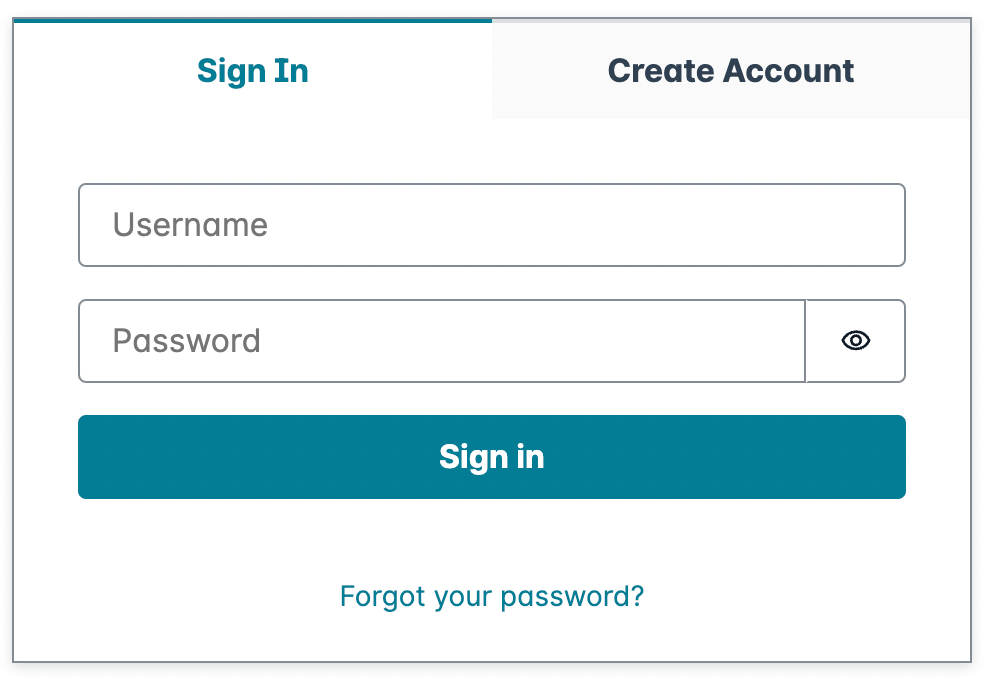
A rich UI was completed in no time!
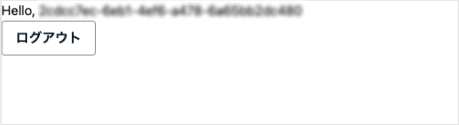
When authentication is completed with the account created last time, the elements described under <Authenticator> will be displayed.
Japanese Localization of Amplify UI
We have a good-looking UI screen now, but the display is in English, so next, we will handle Japanese localization.
The I18n API from aws-amplify is available, so we will make use of it.
Since we want the Japanese localization to apply to the entire project, we will write the settings in gatsby-browser.js.
import { Amplify, I18n } from 'aws-amplify'
import { translations } from '@aws-amplify/ui-react'
import awsConfig from "./src/aws-exports"
import './src/styles/global.css'

Amplify.configure(awsConfig)

I18n.putVocabularies(translations);
I18n.setLanguage('ja');
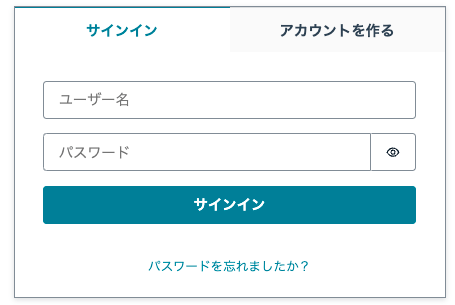
Japanese localization complete!
Handling Missing Translations
However, for some reason, the "Send code" for password reset was not translated...
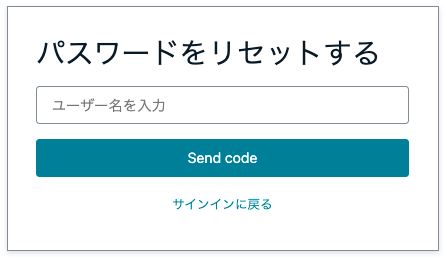
It seems that while Send Code exists, Send code is missing. Well, it is what it is...
For now, I translated it using the I18n.putVocabulariesForLanguage API.
/* Omitting... */

I18n.putVocabulariesForLanguage('ja', {
	'Send code': 'コードを送信する'
})
Japanese Localization for Server Errors
By this point, the Japanese localization on the front-end should be mostly complete. However, server errors when logging in with non-existent account information, etc., are not translated.
While thinking it might be unavoidable, I wished I could check a list of commonly used messages. I finally found this.
Since I plan to create the UI from scratch this time, I just borrowed the list and handled it with I18n.putVocabulariesForLanguage.
/* Omitting... */

I18n.putVocabulariesForLanguage('ja', {
  'Your passwords must match': 'パスワードが一致していません',
  'User does not exist.': 'ユーザーが存在しません',
  'Incorrect username or password.': 'ユーザー名またはパスワードが違います',
  'User is not confirmed.': 'ユーザーは検証されていません',
  'User already exists': 'ユーザーは既に存在します',
  'Invalid verification code provided, please try again.': '指定された確認コードが無効です。もう一度お試しください',
  'Invalid password format': 'パスワードのフォーマットが不正です',
  'Account recovery requires verified contact information': 'アカウントの復元には確認済みの連絡先情報が必要です',
  'Invalid phone number format': '不正な電話番号フォーマットです。 電話番号は次のフォーマットで入力してください: +12345678900',
  'An account with the given email already exists.': 'そのメールアドレスは既に存在します',
  'Username cannot be empty': 'ユーザー名は必須です',
  'Password attempts exceeded': 'パスワード試行回数が超過しました',
  'Attempt limit exceeded, please try after some time.': '試行制限を超過しました。しばらくしてからもう一度お試しください',
  'Username/client id combination not found.': 'ユーザーが存在しません',
  'CUSTOM_AUTH is not enabled for the client.': 'パスワードは必須です',
  'Password did not conform with policy: Password not long enough': 'パスワードは8文字以上を入力してください (8文字以上の大文字小文字を含む英数字)',
  'Password did not conform with policy: Password must have uppercase characters': 'パスワードには大文字を含めてください (8文字以上の大文字小文字を含む英数字)',
  'Password did not conform with policy: Password must have lowercase characters': 'パスワードには小文字を含めてください (8文字以上の大文字小文字を含む英数字)',
  'Password did not conform with policy: Password must have numeric characters': 'パスワードには数字を含めてください (8文字以上の大文字小文字を含む英数字)',
  "1 validation error detected: Value at 'password' failed to satisfy constraint: Member must have length greater than or equal to 6": 'パスワードは8文字以上、大文字小文字を含む英数字を指定してください',
  "2 validation errors detected: Value at 'password' failed to satisfy constraint: Member must have length greater than or equal to 6; Value at 'password' failed to satisfy constraint: Member must satisfy regular expression pattern: ^[\\S]+.*[\\S]+$": 'パスワードは8文字以上、大文字小文字を含む英数字を指定してください',
  'Email cannot be empty': 'メールアドレスが入力されていません',
  'Phone number cannot be empty': '電話番号が入力されていません',
  'Password cannot be empty': 'パスワードが入力されていません',
  'Confirmation code cannot be empty': '認証コードが入力されていません',
  'Error creating account': 'アカウント作成時のエラーが発生しました',
  'Network Error': 'ネットワークエラーが発生しました',
  'Please use your credentials to sign in': '認証情報を使ってログインしてください',
  'Custom auth lambda trigger is not configured for the user pool.': 'パスワードが入力されていません',
  'Send code': 'コードを送信する'
})
For now, I've introduced what seems to be the bare minimum. However, it seems there are other server errors in use, and as I continue testing, I occasionally see messages that aren't translated.
I wonder if I just have to squash them one by one as I encounter them...
Despite some lingering discomfort about this, I've decided to call the Japanese localization complete for now. (Please let me know if anyone knows anything about this. 🙏)
Next time, I'd like to work on customizing the forms and applying an original design!
References
Discussion