iTranslated by AI
AWS Certified Cloud Practitioner Exam Report



I took the AWS Certified Cloud Practitioner exam and passed! 🎉

I'm leaving this exam record here as it might be useful to someone.
AWS Certified Cloud Practitioner
AWS Certified Cloud Practitioner (abbreviated as CLF) is an AWS certification. The content requires an understanding of the cloud and basic knowledge of AWS.
The AWS certification path, including professional and specialty levels, looks like this (quoted from the website).
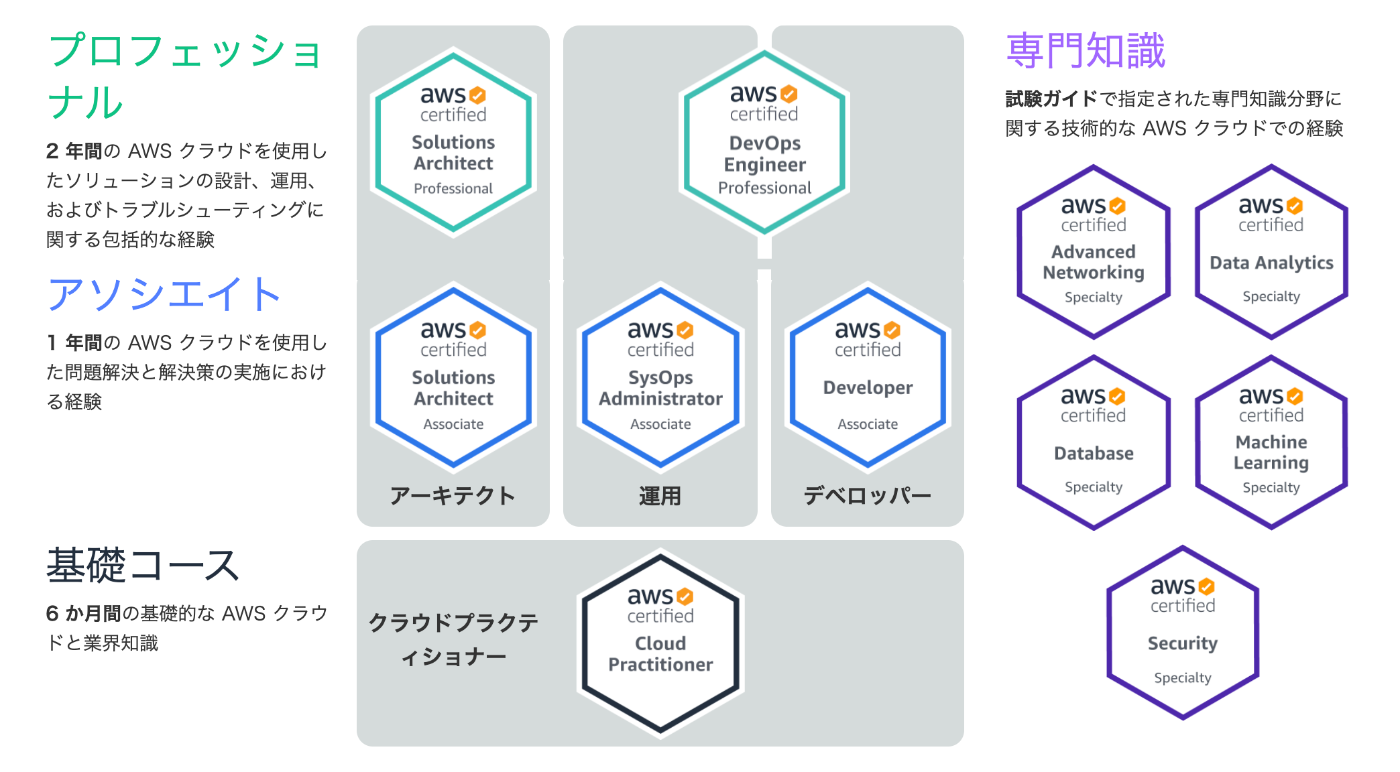
The certification has an expiration date and seems to require renewal every three years.
Motivation for taking the exam
The trigger was that I became involved in a system using AWS in my current job. I only had a brief experience with AWS and almost no knowledge, so I decided to get the certification to learn comprehensively and efficiently.
Having actually taken the exam, it was very beneficial as it deepened my understanding of the core concepts such as AWS design philosophy, architecture, and best practices.
Exam Preparation
In addition to the official learning materials provided by AWS, I used the following practice questions:
The study period was about one week, spending about one hour a day on the practice questions mentioned above.
Based on my personal impression, comparing the level of difficulty between these materials and the actual exam:
Actual exam questions ≒ Kindle book ≒ Applied level questions in Udemy materials > Basic level questions in Udemy materials
It felt like this. The actual exam questions were harder than I expected. My impression was that there were many applied questions that assumed basic knowledge.
About Registration
For the exam, you choose between a Testing Center or an Online Exam. The online exam is conducted by installing dedicated software. At a center, you can take the exam with peace of mind without equipment trouble, but given the current situation, I chose the online option.
The companies that conduct the exam are Pearson VUE and PSI, and you need to select one. For the online exam, there is interaction with a proctor, and since Pearson VUE supports Japanese for this interaction, I chose them.
Notes on things I was concerned about during registration:
- On the account registration screen for the exam, you need to enter your name in English.
- I panicked because the notes regarding identification documents to be presented on the day said: The name on the ID presented at the time of the exam must be the same as the name used for the exam reservation. If the names differ, you will not be allowed to take the exam. I don't have an ID written in English.
- Looking at the support page, it said that for Pearson VUE, an ID with Kanji characters is fine.
-
https://support.aws.amazon.com/#/contacts/aws-training
- Q: Can I change my name to Kanji?
- A: The certification account can only accept names in English. Therefore, your name cannot be changed to Kanji. Regarding the ID to be brought on the day, IDs in Kanji are not a problem. However, please note that for PSI online proctored exams, an ID in Roman characters is required.
- On the day, there was no problem presenting my driver's license.
- You can perform a system check using the application used for the actual exam, so check if there are any issues. I used macOS, but the application's behavior was heavy.
- The built-in camera on my MacBook was fine (no problems during the actual exam either); a microphone is also required.
The information above is as of August 2021 when I took the exam, so please check the latest information when you take yours.
On the Day of the Exam
Here is a brief note on the flow of the exam day:
- Check in.
- Take photos of your license and surroundings with your smartphone and send them.
- Interact with the proctor via chat (if you select Japanese during registration, you can communicate in Japanese).
- You will be asked to show the area around your desk using your computer, so lift your MacBook and show the surroundings.
- Confirm that you are not wearing a wristwatch, etc.
- Just before the exam started after finishing the confirmation with the proctor, the app cursor kept spinning and it felt like it was freezing, which made me quite anxious.
- It stayed like that for about 30 to 60 seconds, and even the chat response became poor, which was stressful.
- It's likely that the app became heavy because it started downloading the exam questions.
- When I waited calmly, the cursor returned to normal and started moving.
- After finishing the exam and answering a survey, the pass/fail result is displayed on the spot.
- A short message like "You passed, congratulations."
- After a while, you will be notified of the result by email.
- You will be able to download the exam results and score report from the management screen.
- You can access benefits for successful candidates.
- You get a free practice exam voucher and a 50% discount exam voucher.
Conclusion
That's it for my AWS Certified Cloud Practitioner online exam record. Thank you for reading until the end. Since it was my first time taking the exam and it was online, I was anxious until I actually took it, but I'm glad I passed safely. Next, I'd like to take the SAA (Solutions Architect – Associate), but since the difficulty level will increase, I want to take the exam after I've studied thoroughly and am well-prepared.
Discussion