iTranslated by AI
Using p5.js with Next.js and React


Introduction
I've wanted to use p5.js for a while now, but about a year passed while I was hesitating.
When searching for p5.js, many results show how to use it with standalone JS, but there aren't many technical articles on integrating it into web applications.
Therefore, in this article, I will describe how to use p5.js on Next.js for display.
(Using p5.js as a React component on Next.js would likely expand the range of expression.)
What you can achieve in the end
The goal is to run the code from a p5.js example on Next.js.
I will skip the environment setup for Next.js, but if you create it using create-next-app, you will have a nearly identical environment.
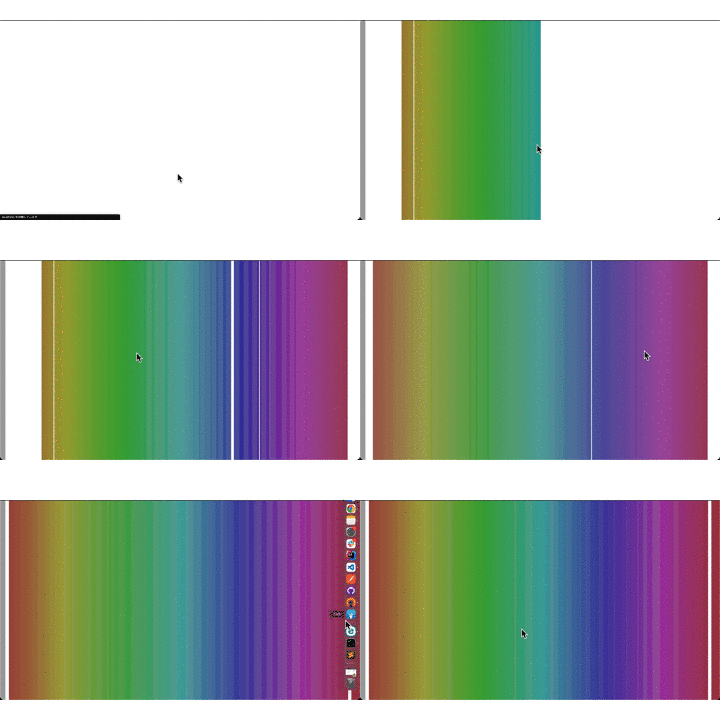
Ultimately, we aim to achieve a display like the following.
What is p5.js in the first place?
Since this has been explained many times in similar articles, I'll keep it brief.
Please skip this if you don't need it.
There is a Java-based programming language called Processing, which served as the basis for p5.js.
Processing was developed by MIT students in 2001 to enable "visual expression through programming."
p5.js is the library that allows that same Processing to run on JavaScript.
Rather than explaining in text, you can understand what's possible more intuitively by actually interacting with the following site.
While there are examples on the official site, this site focuses on generative art, making it more enjoyable to look at.
Using it with Next.js
From here, I'll actually start using it on Next.js.
I basically referred to this article.
Steps
- Installing p5.js
- A practical tip when using with Next.js
- Creating a template component
- Displaying a p5.js sample
- Completion
Installing p5.js
First, install p5.js.
Since I want to use it as a component in React, I will install react-p5.
yarn add react-p5
A practical tip when using with Next.js
As mentioned in the reference article, using p5.js as-is will cause a window is not defined error.
p5.js uses window internally, but the cause is that window can only be executed on the client side.
You can avoid this error by setting ssr to false using Next.js's next/dynamic.
import dynamic from 'next/dynamic'
import p5Types from 'p5'

const Sketch = dynamic(import('react-p5'), {
  loading: () => <></>,
  ssr: false
})
Now p5.js is ready to use.
Creating a template component
This is also mentioned in the original article, but by first creating a component template, you can clarify which p5.js functions to write where.
export const SketchComponent = () => {
  const preload = (p5: p5Types) => {
    // Load images, etc.
  };

  const setup = (p5: p5Types, canvasParentRef: Element) => {
    p5.createCanvas(p5.windowWidth, p5.windowHeight).parent(canvasParentRef);
    // Write setup processing for p5
  };

  const draw = (p5: p5Types) => {
    // Write draw processing for p5
  };

  const windowResized = (p5: p5Types) => {
    // Make component responsive
    p5.resizeCanvas(p5.windowWidth, p5.windowHeight);
  };

  return (
    <Sketch
      preload={preload}
      setup={setup}
      draw={draw}
      windowResized={windowResized}
    />
  );
};

export default SketchComponent;
Preparation is now complete.
From here, we will display a p5.js sample.
Displaying a p5.js sample
This time, we will display this sample.
The code is listed on the example site above.
const barWidth = 20;
let lastBar = -1;

function setup() {
  createCanvas(720, 400);
  colorMode(HSB, width, height, 100);
  noStroke();
}

function draw() {
  let whichBar = mouseX / barWidth;
  if (whichBar !== lastBar) {
    let barX = whichBar * barWidth;
    fill(barX, mouseY, 66);
    rect(barX, 0, barWidth, height);
    lastBar = whichBar;
  }
}
Interpreting this within the template component created earlier results in the following:
import dynamic from "next/dynamic";
import p5Types from "p5";

const Sketch = dynamic(import("react-p5"), {
  loading: () => <></>,
  ssr: false,
});

export const SketchComponent = () => {
  const preload = (p5: p5Types) => {
    // Not used this time
  };

  const setup = (p5: p5Types, canvasParentRef: Element) => {
    p5.createCanvas(p5.windowWidth, p5.windowHeight).parent(canvasParentRef);
    p5.colorMode(p5.HSB, p5.width, p5.height, 100);
    p5.noStroke();
  };

  const barWidth = 20;
  let lastBar = -1;

  const draw = (p5: p5Types) => {
    let whichBar = p5.mouseX / barWidth;
    if (whichBar !== lastBar) {
      let barX = whichBar * barWidth;
      p5.fill(barX, p5.mouseY, 66);
      p5.rect(barX, 0, barWidth, p5.height);
      lastBar = whichBar;
    }
  };

  const windowResized = (p5: p5Types) => {
    p5.resizeCanvas(p5.windowWidth, p5.windowHeight);
  };

  return (
    <Sketch
      preload={preload}
      setup={setup}
      draw={draw}
      windowResized={windowResized}
    />
  );
};

export default SketchComponent;
The coding is now complete.
Let's take a look at the actual screen.
Completion
It's done.
Similarly, by interpreting p5.js example code on the component side, it seems we can run p5.js on Next.js.
Side Note
Artistic works using p5.js are generally referred to as generative art, and activities in that community are quite vibrant.
Events like PCD TOKYO (Processing Community Day Tokyo) are held, and on Twitter (X), people publish their works using the hashtag #つぶやきprocessing (tweeting processing).
Generative art also has good compatibility with NFTs, and there are sites originating from Japan like NEORT and GenerativeMasks.
Following the site of Mr. Tadokoro (yoppa.org), who has authored books in this field, reveals exciting book recommendations for Processing and other topics.
Someday, I'd like to write an article summarizing the knowledge and key people in this field.
Conclusion
In this article, we were able to display p5.js on Next.js.
Initially, I had an image that setting up the environment and using functions would be difficult, but by creating a component template, I could easily verify the behavior, which also boosted my motivation.
Also, since you can deploy Next.js on Vercel, it seems easy to publish your own collection of works as a portfolio.
References
Discussion
まずこちらの記事とても参考になりました。ありがとうございます。
以下、問題が発生し、その後修正方法が分かったため情報の共有になります。
以下のコードで実行したところ、 nextjs の strict mode がオンの場合に
SketchComponentコンポーネント内のsetup関数が二度実行され、canvas が二つ描画されるという現象が起きました。react-p5 の公式で紹介されているコードに変更したところその問題は発生しませんでした。
最低限の確認はしたのですが、こちらの環境特有の問題の可能性もあるため、お時間あれば確認して頂ければと思います。よろしくお願いします。