iTranslated by AI
Processing Large Data Sets Recursively with Google Cloud Functions and Pub/Sub Triggers [Node.js]


FaaS such as Google Cloud Functions are convenient when used in coordination with other Google Cloud services. Common use cases include retrieving a list of files from Cloud Storage to perform some action, or calling a BigQuery API to repeatedly fetch records.
How to Traverse a Large Number of Files in Cloud Storage?
A common pattern in such processes is repeatedly fetching data using a nextToken because all data cannot be retrieved in a single SDK/API call. The code to retrieve all file paths in a Cloud Storage bucket would look like this:
import { File, Storage } from '@google-cloud/storage';

const BucketName = process.env.BUCKET_NAME!;
const gcs = new Storage();
const imageBucket = gcs.bucket(BucketName);

/**
 * Retrieves all files on Cloud Storage.
 */
async function getAllFiles(): Promise<string[]> {
    const result = [];
    let nextToken: string | undefined = undefined;
    do {
        // Arguments other than 'files' are not clearly documented. The type is also 'any'.
        // I confirmed that the nextToken exists in the second return value, so I'm using it.
        let files: File[], query: any;
        [files, query] = await imageBucket.getFiles({
            autoPaginate: false,
            prefix: '',
            maxResults: 100,
            pageToken: nextToken,
        });

        const chunk = await Promise.all(files.map((f) => f.name));
        result.push(...chunk);
        nextToken = query?.pageToken;
    } while (nextToken);

    return result;
}

getAllFiles().then(console.log);
You can see that it performs paging using maxResults and pageToken. It retrieves data repeatedly and returns it as an array at the end.
This is Fine for Small File Counts, but...
Depending on the processing content, while Cloud Functions can be executed easily, they do have limitations. When processing Cloud Storage files in bulk as in this case, you must be mindful of memory and execution time.
- Maximum function execution time: 540 seconds
- Maximum function memory: 8192 MiB
Therefore, in cases where there are so many files that they cannot be counted, or where the number of files continues to increase, the method of processing everything at once leaves some challenges. Let's consider several methods.
- Parallel execution using fan-out
- Splitting and submitting tasks to Cloud Tasks
- Recursive calling (what we will do this time)
Fan-out
This is a method where one function splits a large amount of data and submits it to a Cloud Pub/Sub topic, and a separate function is prepared to process the submitted data.
This is useful when you want to keep the total execution time short. The number of concurrent executions will increase.
Please also refer to this:
Reasons for not adopting it this time:
- It's a hassle to prepare two separate functions for submission and processing.
- As data continues to increase, the execution time for the submission side (which scans everything) must be considered.
- There are no strict requirements for execution time.
Splitting and Submitting Tasks to Cloud Tasks
This approach involves a function that splits large amounts of data and submits them as tasks to Cloud Tasks, with a separate function prepared to process those submitted tasks.
This is useful when you want fine-grained control over concurrency, retry counts, etc.
Reasons for not adopting it this time:
- It's a hassle to prepare two separate functions for submission and processing.
- As data continues to increase, the execution time for the submission side (which scans everything) must be considered.
- There is no requirement for fine-grained control over task execution frequency.
Recursive Calling
This is what we will adopt this time. We will publish messages to a Cloud Pub/Sub topic and subscribe to the same topic.
As you can imagine, it will loop infinitely if you are not careful with the implementation.
Reasons for adopting it this time:
- Architecture is simple as only one function is required.
- Even with large amounts of data, it only extends the total execution time. The function processes the same amount each time, and the number of concurrent executions does not increase.
Implementing Recursive Calling for Cloud Pub/Sub Triggered Functions
The flow of processing is as follows.
- Publish the initial message to the topic via gcloud command or another application.
- The function is triggered.
- The function retrieves a set range of files from the Cloud Storage bucket and processes them one by one.
- When retrieving from the bucket, check for the pageToken, which is the indicator that the next data exists.
- If it exists, publish
nextToken=pageTokento the Pub/Sub topic and terminate. - If it does not exist, terminate without doing anything.
- If it exists, publish
Function to Output Object Metadata to Logs
As a sample implementation, let's create a function that records all object metadata in a Google Cloud Storage bucket to Cloud Logging.
import { File, Storage } from '@google-cloud/storage';
import { FileTypeResult } from 'file-type';
import { PubSub } from '@google-cloud/pubsub';
import { google } from '@google-cloud/pubsub/build/protos/protos';
import { Metadata } from '@google-cloud/common/build/src/service-object';
import PubsubMessage = google.pubsub.v1.PubsubMessage;

const BucketName = process.env.BUCKET_NAME!;
const gcs = new Storage();
const imageBucket = gcs.bucket(BucketName);
const pubsub = new PubSub();

// A Pub/Sub message that can be freely structured.
// It holds the next Cloud Storage file list token and the number of file lists to retrieve at once.
type NextProps = {
    nextToken?: string;
    maxResults: number;
};

// When publishing messages to a topic in a recursive process, we need the topic name, so we extract it from the context.
// https://cloud.google.com/functions/docs/writing/background#function_parameters
type PubSubContext = {
    eventId: string;
    timestamp: string;
    eventType: string;
    resource: {
        service: string;
        name: string;
    };
};

/**
 * A recursive function that calls itself via Pub/Sub.
 * Processes the range defined in NextProps and calls itself again for the next process.
 * @param message Message passed from Pub/Sub
 * @param context Trigger context. Used to send messages to the topic in subsequent steps.
 *   */
export async function cloudStorageMetaDataLogging(
    message: PubsubMessage,
    context: PubSubContext
): Promise<void> {
    // The Base64-encoded message body is stored in 'data'; terminate if it's missing.
    if (!message.data) {
        return;
    }

    // Decode NextProps
    const props = JSON.parse(
        Buffer.from(message.data as string, 'base64').toString()
    ) as NextProps;

    // The Pub/Sub message contains information about the range to be processed.
    // Retrieve the file names within the defined range from Cloud Storage.
    const [fileNames, nextToken] = await getImageFileNames(props);

    // Iterate through assigned files
    for (const gcsFilePath of fileNames) {
        const remoteFile = imageBucket.file(gcsFilePath);

        // Cloud Storage object metadata
        // ref: https://cloud.google.com/storage/docs/viewing-editing-metadata#storage-set-object-metadata-nodejs
        const [metadata] = await remoteFile.getMetadata();

        await cloudLogging(
            'INFO',
            ` Metadata for ${gcsFilePath}`,
            metadata,
        );
    }

    // If nextToken exists, send a message to the topic to call the next function.
    // If it doesn't exist, do nothing (end).
    if (nextToken) {
        // 'projects/my-project/topics/cloud-storage-token-topic'
        const topicName = context.resource.name;
        const topic = pubsub.topic(topicName);
        const messageObject: NextProps = {
            nextToken,
            maxResults: props.maxResults,
        };
        const messageBuffer = Buffer.from(JSON.stringify(messageObject), 'utf8');
        await topic.publish(messageBuffer);
    }
}
Decodes the Pub/Sub message, uses those parameters to retrieve the list from the bucket, and after iterating through the list, pushes a message into the topic to hand over the processing to the next function. Note the if (nextToken) { part at the end. It performs the action: "When data is retrieved from Cloud Storage, if there is a next token, push a message into the topic." This is the recursion point. The topic name is obtained from the context. The implementations of getImageFileNames and cloudLogging are provided below.
Implementation of getImageFileNames
/**
 * Extracts the list of file names within the parameter range from Cloud Storage
 * @returns [Array of file names, next token]
 */
async function getImageFileNames(
    nextProps: NextProps
): Promise<[string[], string]> {
    // Arguments other than 'files' are not clearly documented. The type is also 'any'.
    // As a result of actual testing, I confirmed that the nextToken exists in the second return value, so I'm using it.
    let files: File[], query: any;
    [files, query] = await imageBucket.getFiles({
        autoPaginate: false,
        prefix: '',
        maxResults: nextProps.maxResults,
        pageToken: nextProps.nextToken,
    });

    const fileNames = await Promise.all(files.map((f) => f.name));

    return [fileNames, query?.pageToken];
}
Implementation of cloudLogging
/**
 * Outputs structured logs.
 */
async function cloudLogging(
    severity: 'INFO' | 'WARNING',
    text: string,
    gcsMetadata: Metadata,
    fileTypeResult?: FileTypeResult
): Promise<void> {
    const {Logging} = require('@google-cloud/logging-min');
    const projectId = process.env.GCP_PROJECT || 'my-project';
    const logging = new Logging({projectId});
    const logger = logging.logSync('cloud-storage-meta-data-logging');

    const metadata = {
        severity, // https://cloud.google.com/logging/docs/reference/v2/rest/v2/LogEntry#logseverity
        resource: {type: 'cloud_function'}, // https://cloud.google.com/monitoring/api/resources#tag_cloud_function
    };

    const message = {
        infoMessage: text,
        gcsMetadata: gcsMetadata,
        fileTypeResult: fileTypeResult,
    };

    // Prepares a log entry
    const entry = logger.entry(metadata, message);
    logger.write(entry);
}
Deployment and Execution
Deploy the function. When deploying Cloud Functions, include the option indicating it's a Pub/Sub trigger. If the Pub/Sub topic doesn't exist, it will be automatically created. Very convenient.
#!/bin/bash

# Deploy to myproject

my_project=$MY_PROJECT
my_bucket=$MY_BUCKET

gcloud functions deploy cloudStorageMetaDataLogging \
  --runtime=nodejs16 \
  --source=.\
  --region=asia-northeast1 \
  --entry-point=cloudStorageMetaDataLogging \
  --memory=512\
  --timeout=300s\
  --project=${my_project}\
  --trigger-topic=cloud-storage-token-topic\
  --set-env-vars=BUCKET_NAME=${my_bucket}
Execute the deployment.
MY_PROJECT=my-project-develop MY_BUCKET=uploads-dev ./deploy-logger.sh

Deploying function (may take a while - up to 2 minutes)...⠛
For Cloud Build Logs, visit: https://console.cloud.google.com/cloud-build/builds;region=asia-northeast1/
Deploying function (may take a while - up to 2 minutes)...done.
Actively Pushing Data to Pub/Sub for the Initial Trigger
It's like a chain of dominoes. Let's try calling it from Cloud Shell using the gcloud command.
DATA=$(printf '{ "maxResults": 50 }'|base64)
gcloud functions call cloudStorageMetaDataLogging --region asia-northeast1 --data '{"data":"'$DATA'"}'
Specify maxResults as 50 to send a message to process 50 objects in the bucket at a time. In this scenario, there are about 300 objects in the bucket.
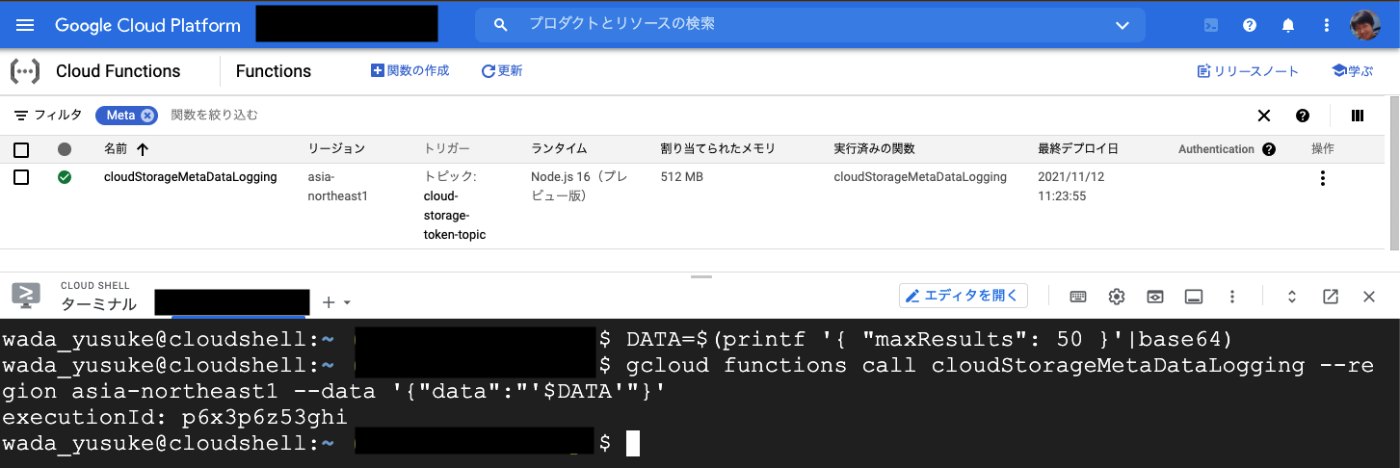
Upon execution, the result returns fairly quickly. Since this command executes the initial Cloud Function, the recursive executions will run as background processes. Let's check if the logs are being output to Cloud Logging.
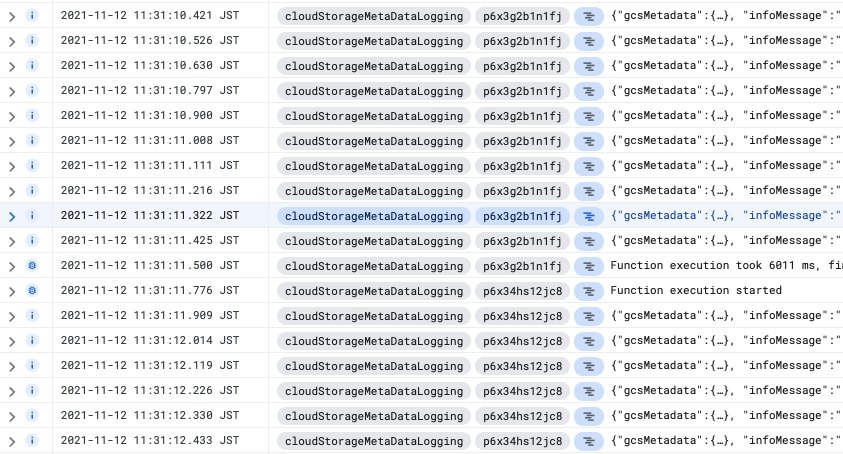
Metadata is being output as implemented. Since the execution ID changes partway through, we can see that different Cloud Functions instances are taking over due to recursive execution. This is exactly as intended.
Conclusion
I have demonstrated that for requirements where total execution time is not strictly constrained, recursive execution using Cloud Functions' Pub/Sub trigger is a viable method. As long as you are careful about the number of items processed at once, you don't need to worry about memory shortages or the execution time limit per function. If you encounter a similar situation, please give it a try. The source code is available on GitHub.
References
Discussion