iTranslated by AI
Allowing Shortcuts to Execute System Events on macOS Sonoma




Overview
Since updating to Sonoma, shortcuts incorporating AppleScript that use System Events have started throwing errors. Since these shortcuts worked correctly up until Ventura, I suspected either a change in how permissions are handled in Sonoma or that the settings had been reset.
System Events got an error: Shortcuts is not allowed assistive access.

Incidentally, this shortcut executes the following script. It enables GUI scripting to operate the menu bar via System Events.
tell application "System Events"
	click menu item "メニューを消去" of ¬
		menu 1 of menu item "最近使った項目" of ¬
		menu 1 of menu bar item "Apple" of ¬
		menu bar 1 of application process "Finder"
end tell
Workaround: Granting Assistive Access to Control Center as well
Open "Accessibility" in System Settings (Privacy & Security → Accessibility). Alternatively, you can run the following command in Terminal to do the same.
open "x-apple.systempreferences:com.apple.preference.security?Privacy_Accessibility"
This list shows programs that have attempted to access assistive devices. Those with the switch turned on are permitted.
If an execution error has occurred at least once, the following programs should be listed, so grant them permission as well. It seems necessary to grant permission to Control Center too. This is required for running shortcuts from the menu bar.
- siriactionsd
- Control Center
- Shortcuts
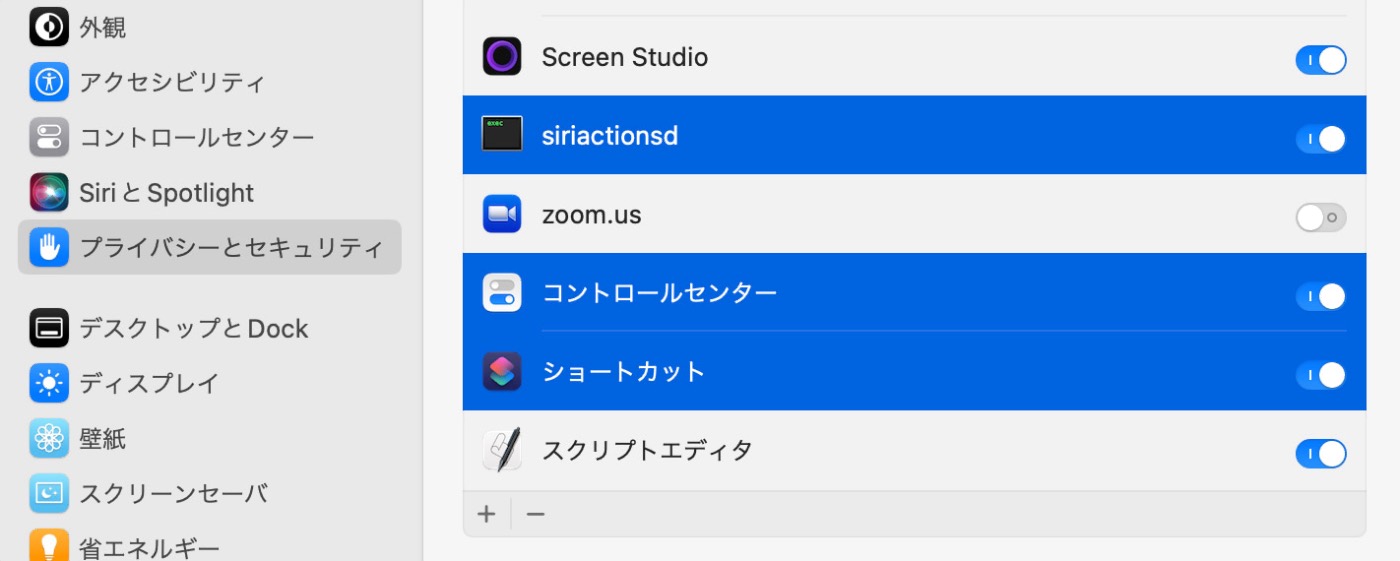
This should solve the issue.
Related
Discussion