iTranslated by AI
Extending shadcn/ui Forms with useFormState and useFormStatus


Motivation for Writing
I often use shadcn/ui as a UI library, but regarding the content of the already closed issue below (supporting useFormState and useFormStatus in the Form component):
I was waiting for an update to the shadcn/ui documentation, but since it wasn't coming, I decided to extend it myself. (I expect the documentation to be updated around the time of React v19's major update, but what will happen? 🤔 And why was it closed...)
About useFormState and useFormStatus
As their names suggest, these hooks are for managing form state and are React's standard hooks for Actions, including Server Actions and Client Actions.
Especially, utilizing useFormState offers a significant advantage in maintaining Progressive Enhancement. This allows forms to be submitted even in environments where JavaScript is not executed.
This article will briefly introduce how to use them, but please refer to the documentation for more details.
Extending the Document Sample Code
Below is the link to the documentation for shadcn/ui's Form component.
I will extend this sample to manage the form state using useFormState and useFormStatus.
The complete code for the final ProfileForm component and Server Actions is shown below.
Full Code for ProfileForm
'use client';

import React, { useRef, useTransition } from 'react';
import { actions } from '@/actions/contact';
import { zodResolver } from '@hookform/resolvers/zod';
import { Loader } from 'lucide-react';
import { useFormState } from 'react-dom';
import { useForm } from 'react-hook-form';
import { type z } from 'zod';

import {
  Form,
  FormControl,
  FormDescription,
  FormField,
  FormItem,
  FormLabel,
  FormMessage,
} from '@/components/ui/form';
import { FormErrorMessage } from '@/components/form-error-message';
import { FormSuccess } from '@/components/form-success-message';
import { ActionStatus } from '@/app/validations/enums';
import { formSchema } from '@/app/validations/schemas';

import { Button } from './ui/button';
import { Input } from './ui/input';

function ProfileForm() {
  const [state, formAction] = useFormState(actions, {
    status: ActionStatus.Idle,
    fields: {
      username: '',
    },
  });

  const [isPending, startTransition] = useTransition();

  const form = useForm<z.infer<typeof formSchema>>({
    resolver: zodResolver(formSchema),
    defaultValues: {
      ...state.fields,
    },
  });

  const formRef = useRef<HTMLFormElement>(null);

  return (
    <Form {...form}>
      <form
        className='space-y-8'
        ref={formRef}
        action={formAction}
        onSubmit={form.handleSubmit(() => {
          if (formRef.current) {
            const formData = new FormData(formRef.current);
            startTransition(() => {
              formAction(formData);
            });
          }
        })}
      >
        <FormField
          control={form.control}
          name='username'
          render={({ field }) => (
            <FormItem>
              <FormLabel>Username</FormLabel>
              <FormControl>
                <Input placeholder='shadcn' {...field} />
              </FormControl>
              <FormDescription>
                This is your public display name.
              </FormDescription>
              <FormMessage />
            </FormItem>
          )}
        />
        <Button type='submit' disabled={isPending}>
          {isPending && (
            <Loader
              size={16}
              color='white'
              className='mr-2 animate-spin'
              aria-hidden='true'
            />
          )}
          Submit
        </Button>
      </form>

      <div className='mt-4 flex justify-end'>
        {/* 成功メッセージ */}
        {state?.status === ActionStatus.Success && (
          <FormSuccess message={state.message} />
        )}
        {/* エラーメッセージ */}
        {state?.status === ActionStatus.Error && (
          <div className='w-fit'>
            <ul className='space-y-2'>
              {state.issues.map((issue, index) => (
                <li key={index}>
                  <FormErrorMessage message={issue} />
                </li>
              ))}
            </ul>
          </div>
        )}
      </div>
    </Form>
  );
}

export default ProfileForm;
Full Code for Server Actions
'use server';

export type FormState =
  | {
      status: ActionStatus.Success;
      fields?: Record<string, string>;
      message: string;
    }
  | {
      status: ActionStatus.Error;
      issues: string[];
      fields?: Record<string, string>;
    }
  | {
      status: ActionStatus.Idle;
      fields?: Record<string, string>;
    };

export async function actions(
  _: FormState,
  data: FormData
): Promise<FormState> {
  const formData = Object.fromEntries(data);
  const parsed = formSchema.safeParse(formData);

  await new Promise((resolve) => setTimeout(resolve, 1000));

  if (!parsed.success) {
    const fields: Record<string, string> = {};
    for (const key of Object.keys(formData)) {
      // eslint-disable-next-line @typescript-eslint/no-base-to-string
      fields[key] = formData[key].toString();
    }

    return {
      status: ActionStatus.Error,
      fields,
      issues: parsed.error.issues.map((issue) => issue.message),
    };
  }

  if (parsed.data.username == 'shadcn') {
    return {
      status: ActionStatus.Error,
      fields: parsed.data,
      issues: ['The user name is already in use'],
    };
  }

  return {
    status: ActionStatus.Success,
    fields: {
      username: '',
    },
    message: 'Success!',
  };
}
Now, let's explain how it was specifically extended, by partially extracting the internal code.
ProfileForm Starter Code
'use client';

import React from 'react';
import { actions } from '@/actions/contact';
import { zodResolver } from '@hookform/resolvers/zod';
import { Loader } from 'lucide-react';
import { useFormState, useFormStatus } from 'react-dom';
import { useForm } from 'react-hook-form';
import { type z } from 'zod';

import {
  Form,
  FormControl,
  FormDescription,
  FormField,
  FormItem,
  FormLabel,
  FormMessage,
} from '@/components/ui/form';
import { ActionStatus } from '@/app/validations/enums';
import { formSchema } from '@/app/validations/schemas';

import { Button } from './ui/button';
import { Input } from './ui/input';

function ProfileForm() {
  const [state, formAction] = useFormState(actions, {
    status: ActionStatus.Idle,
    fields: {
      username: '',
    },
  });

  const form = useForm<z.infer<typeof formSchema>>({
    resolver: zodResolver(formSchema),
    defaultValues: {
      ...state.fields,
    },
  });

  return (
    <Form {...form}>
      <form className='space-y-8' action={formAction}>
        <FormField
          control={form.control}
          name='username'
          render={({ field }) => (
            <FormItem>
              <FormLabel>Username</FormLabel>
              <FormControl>
                <Input placeholder='shadcn' {...field} />
              </FormControl>
              <FormDescription>
                This is your public display name.
              </FormDescription>
              <FormMessage />
            </FormItem>
          )}
        />
        <SubmitButton />
      </form>
    </Form>
  );
}

export default ProfileForm;

const SubmitButton = () => {
  const { pending } = useFormStatus();

  return (
    <Button type='submit' disabled={pending}>
      {pending && (
        <Loader
          size={16}
          color='white'
          className='mr-2 animate-spin'
          aria-hidden='true'
        />
      )}
      Submit
    </Button>
  );
};
Server Actions Starter Code
'use server';

export type FormState =
  | {
      status: ActionStatus.Success;
      fields?: Record<string, string>;
      message: string;
    }
  | {
      status: ActionStatus.Error;
      issues: string[];
      fields?: Record<string, string>;
    }
  | {
      status: ActionStatus.Idle;
      fields?: Record<string, string>;
    };

export async function actions(_: FormState, __: FormData): Promise<FormState> {
  await new Promise((resolve) => setTimeout(resolve, 1000));

  return {
    status: ActionStatus.Success,
    message: 'Success!',
  };
}
useFormState Usage
const [state, formAction] = useFormState(actions, {
  status: ActionStatus.Idle,
  fields: {
    username: '',
  },
});
Return Value
useFormState returns an array containing two elements.
| Element | Description |
|---|---|
| state | The current state. It is equal to the initialState argument on the initial render, and becomes the value returned by the action after the action is called. |
| formAction | A new action that can be passed as the action attribute of the form component. |
Arguments
The following arguments can be passed to useFormState.
| Argument | Description |
|---|---|
| actions | Specifies React Actions. It is called when the form is submitted. |
| initialState | The initial state. It is used as the form's state until an action is called. Here, ActionStatus.Idle is specified as the status, and username as the fields. |
Server Actions Implementation
Since the shadcn/ui documentation's sample code does not include an implementation for Actions, we will implement it as Server Actions as follows in this article.
"use server"

export async function actions(_: FormState, __: FormData): Promise<FormState> {
  await new Promise((resolve) => setTimeout(resolve, 1000))

  return {
    status: ActionStatus.Success,
    message: "Success!",
  }
}
FormState can be defined uniquely here, and is defined as follows:
export type FormState =
  | {
      status: ActionStatus.Success
      fields?: Record<string, string>
      message: string
    }
  | {
      status: ActionStatus.Error
      issues: string[]
      fields?: Record<string, string>
    }
  | {
      status: ActionStatus.Idle
      fields?: Record<string, string>
    }
useFormStatus Usage
useFormStatus is used within the SubmitButton component.
const SubmitButton = () => {
  const { pending } = useFormStatus();

  return (
    <Button type='submit' disabled={pending}>
      {pending && (
        <Loader
          size={16}
          color='white'
          className='mr-2 animate-spin'
          aria-hidden='true'
        />
      )}
      Submit
    </Button>
  );
};
Return Value
useFormStatus returns an object with the following properties:
| Property | Description |
|---|---|
| pending | If true, it means the parent <form> is submitting. Otherwise, it is false. |
With the implementation so far, the Submit button should be disabled while the form is being submitted, confirming that useFormStatus is functioning.
Displaying Success Messages
Next, let's extend the form to display a success message based on the server's response after form submission. Specifically, we will display the FormSuccess component when the state returned by useFormState after form submission indicates success (status is ActionStatus.Success).
    <Form {...form}>
      <form action={formAction} className="space-y-8">
        <FormField
          control={form.control}
          name="username"
          render={({ field }) => (
            <FormItem>
              <FormLabel>Username</FormLabel>
              <FormControl>
                <Input placeholder="shadcn" {...field} />
              </FormControl>
              <FormDescription>
                This is your public display name.
              </FormDescription>
              <FormMessage />
            </FormItem>
          )}
        />
        <SubmitButton />
      </form>

+     <div className="mt-4 flex justify-end">
+       {/* Success Message */}
+       {state?.status === ActionStatus.Success && (
+         <FormSuccess message={state.message} />
+       )}
+     </div>
    </Form>
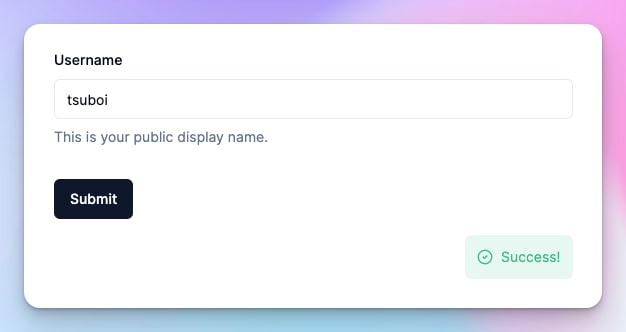
Performing Client-side Validation
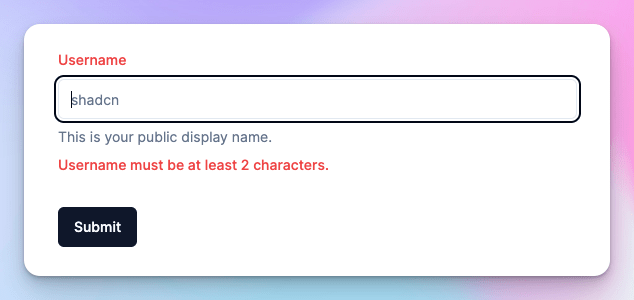
As you may have noticed with the implementation so far, if there is no input, Zod validation is not executed, and the server process is executed instead. This means that client-side validation is not performed, and unnecessary requests are sent to the server. This is because the action attribute is used to directly call Server Actions without performing validation in the form's onSubmit event handler. Originally, useFormState is a hook to enable form submission before JavaScript is executed on the client, and it does not handle client-side validation.
To perform client-side validation in the form's onSubmit event handler, we will use RHF (React Hook Form)'s handleSubmit method. We will also use useRef to obtain a reference to the form element. This Ref will be used to submit the form to the server when client-side validation passes.
In the following process, within the onSubmit event handler, if formRef.current is true (i.e., client-side validation passes), form data is obtained from the event object and passed to formAction returned by useFormState to execute the server process.
function ProfileForm() {
  const [state, formAction] = useFormState(actions, {
    status: ActionStatus.Idle,
    fields: {
      username: "",
    },
  })

  const form = useForm<z.infer<typeof formSchema>>({
    resolver: zodResolver(formSchema),
    defaultValues: {
      ...state.fields,
    },
  })

+ const formRef = useRef<HTMLFormElement>(null)

  return (
    <Form {...form}>
      <form
        className="space-y-8"
        action={formAction}
+       ref={formRef}
+       onSubmit={form.handleSubmit(() => {
+         if (formRef.current) {
+           const formData = new FormData(formRef.current)
+           formAction(formData)
+         }
+       })}
      >
        <FormField
          control={form.control}
          name="username"
          render={({ field }) => (
            <FormItem>
              <FormLabel>Username</FormLabel>
              <FormControl>
                <Input placeholder="shadcn" {...field} />
              </FormControl>
              <FormDescription>
                This is your public display name.
              </FormDescription>
              <FormMessage />
            </FormItem>
          )}
        />
        <SubmitButton />
      </form>

     ...

    </Form>
  )
}
With the implementation so far, client-side validation messages are now displayed when there is no input, similar to the sample code.
Performing Server-side Validation
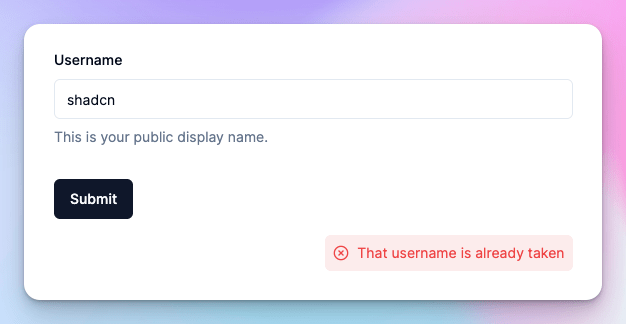
Now that the form is submitted to the server after client-side validation, let's modify the Server Actions implementation to perform server-side validation. As an example, we will return an error message if the username conflicts with one already stored in the database (let's assume it's "shadcn").
export async function actions(
  prevState: FormState,
  data: FormData
): Promise<FormState> {
+ const formData = Object.fromEntries(data)
- const username = formData.username
+ const username = formData.username as string

  await new Promise((resolve) => setTimeout(resolve, 1000))

+ if (username == "shadcn") {
+   return {
+     status: ActionStatus.Error,
+     issues: ["The user name is already taken"],
+   }
+ }

  return {
    status: ActionStatus.Success,
    message: "Success!",
  }
}
Displaying Server-side Validation Error Messages
Returning to the ProfileForm component, let's extend it to display server-side validation error messages.
      <div className="mt-4 flex justify-end">
        {/* Success Message */}
        {state?.status === ActionStatus.Success && (
          <FormSuccess message={state.message} />
        )}
        {/* Error Message */}
+       {state?.status === ActionStatus.Error && (
+         <div className="w-fit">
+           <ul className="space-y-2">
+             {state.issues.map((issue, index) => (
+               <li key={index}>
+                 <FormErrorMessage message={issue} />
+               </li>
+             ))}
+           </ul>
+         </div>
+       )}
      </div>
This will now display server-side validation error messages.
Handling Validation in Environments where JavaScript Execution is Disabled
With the implementation so far, we can perform both client-side and server-side validation. Furthermore, by extending the Form using useFormState, we can now submit the form even in environments where JavaScript execution is disabled, maintaining progressive enhancement.
How to verify in an environment with JavaScript execution disabled
Here's how to disable JavaScript in Chrome DevTools to verify in an environment where JS execution is disabled:
- Open DevTools
- Press Command + Shift + P to open the Command Palette
- Type
Disable JavaScriptand selectDisable JavaScript
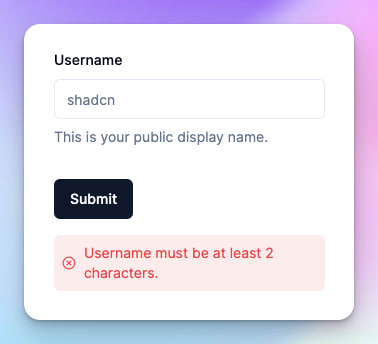
However, with the current implementation, if the form is submitted in an environment where JavaScript execution is disabled, client-side validation will not be performed (due to JS being disabled), and the process will proceed to the server. As a result, only the username duplicate check will occur, and Zod validation will not be executed.
To resolve this issue, we will extend the server-side process so that Zod validation is executed even in environments where JavaScript execution is disabled.
export async function actions(
  prevState: FormState,
  data: FormData
): Promise<FormState> {
+ const formData = Object.fromEntries(data)
- const username = formData.username as string
+ const parsed = formSchema.safeParse(formData)

  await new Promise((resolve) => setTimeout(resolve, 1000))

+ if (!parsed.success) {
+   const fields: Record<string, string> = {}
+   for (const key of Object.keys(formData)) {
+     // eslint-disable-next-line @typescript-eslint/no-base-to-string
+     fields[key] = formData[key].toString()
+   }
+
+   return {
+     status: ActionStatus.Error,
+     fields,
+     issues: parsed.error.issues.map((issue) => issue.message),
+   }
+ }


- if (username == "shadcn") {
+ if (parsed.data.username == "shadcn") {
    return {
      status: ActionStatus.Error,
      fields: parsed.data,
      issues: ["The user name is already taken"],
    }
  }

  return {
    status: ActionStatus.Success,
    message: "Success!",
  }
}
With the implementation above, Zod validation, similar to client-side validation, is now executed when the form is submitted even in environments where JavaScript execution is disabled.
Realization: useFormStatus is not functioning
With the implementations so far, we can now distinguish between client-side errors and server-side errors. However, regardless of the JavaScript execution environment, we notice that useFormStatus, which was used to disable the Submit button during form submission, is not functioning. Observing the pending property of useFormStatus, it consistently returns false.
Cause
It is believed that because a Ref is used as the reference to the form, when the form's reference changes, the reference of useFormStatus also changes, leading to useFormStatus not functioning.
↑
My analysis was incorrect.
It is believed that useFormStatus is not functioning as expected because React Hook Form (RHF)'s handleSubmit() function is not compatible with React Actions.
For details, please refer to the comments posted in this article's Discussions. @koichik, I would like to express my gratitude here. 🙏
Also, although not directly related to this issue, considering the efforts to useActionState introduced at the beginning of this article and articles like Avoid using React's useFormStatus, it seems better to use startTransition instead of useFormStatus at this point.
Solution
Therefore, this can be resolved by managing the pending state using useTransition.
function ProfileForm() {
  const [state, formAction] = useFormState(actions, {
    status: ActionStatus.Idle,
    fields: {
      username: "",
    },
  })
+ const [isPending, startTransition] = useTransition()

  const form = useForm<z.infer<typeof formSchema>>({
    resolver: zodResolver(formSchema),
    defaultValues: {
      ...state.fields,
    },
  })

  const formRef = useRef<HTMLFormElement>(null)

  return (
    <Form {...form}>
      <form
        className="space-y-8"
        ref={formRef}
        action={formAction}
        onSubmit={form.handleSubmit(() => {
          if (formRef.current) {
            const formData = new FormData(formRef.current)
+           startTransition(() => {
              formAction(formData)
+           })
          }
        })}
      >
        <FormField
          control={form.control}
          name="username"
          render={({ field }) => (
            <FormItem>
              <FormLabel>Username</FormLabel>
              <FormControl>
                <Input placeholder="shadcn" {...field} />
              </FormControl>
              <FormDescription>
                This is your public display name.
              </FormDescription>
              <FormMessage />
            </FormItem>
          )}
        />
+       <Button type="submit" disabled={isPending}>
+          {isPending && (
+           <Loader
+             size={16}
+             color="white"
+             className="mr-2 animate-spin"
+             aria-hidden="true"
+           />
+         )}
+         Submit
+       </Button>
-       <SubmitButton />
      </form>

    ...
    </Form>
  )
}
Summary
Ultimately, although useFormStatus was not used, we were able to extend shadcn/ui's Form using useFormState.
This extension provides the following benefits:
- The form can be submitted even in environments where JavaScript execution is disabled.
- State management for receiving server results on the client becomes easier.
- Form data can be validated on both the client and server sides.
That's all!
Bonus: Displaying Server Results with Toasts
Finally, let's extend the functionality to display server results using toasts.
As confirmed at the beginning of the article, the current code using useFormState is as follows:
The first argument directly passes Server Actions.
const [state, formAction] = useFormState(actions, {
  status: ActionStatus.Idle,
  fields: {
    username: '',
  },
});
This code will be changed as follows:
An anonymous function will be used to call Server Actions from within Client Actions.
  const [state, formAction] = useFormState(
-   actions,
+   async (prev: FormState, action: FormData) => {
+     const result = await actions(prev, action)
+
+     return result
+   },
    {
      status: ActionStatus.Idle,
      fields: {
        username: "",
      },
    }
  )
This change allows additional processing to be performed before and after the function call.
Here, to display the server results as toasts, we will modify it as follows:
  const [state, formAction] = useFormState(
    async (prev: FormState, action: FormData) => {
      const result = await actions(prev, action)

+     if (result.status === ActionStatus.Success) {
+       toast.success(result.message)
+     } else if (result.status === ActionStatus.Error) {
+       result.issues.forEach((issue) => {
+         toast.error(issue)
+       })
+     }

      return result
    },
    {
      status: ActionStatus.Idle,
      fields: {
        username: "",
      },
    }
  )
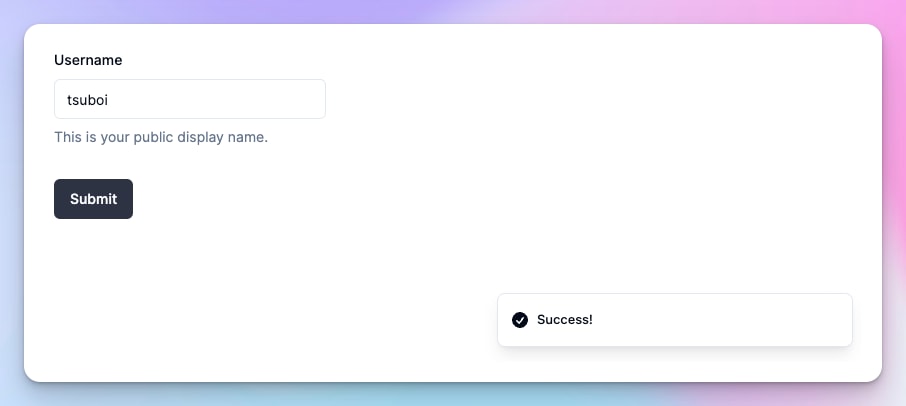
With the above implementation, server results are now displayed as toasts.
Discussion
執筆お疲れ様です!
「ここで気づく:useFormStatus が機能していない」の以下ですが、、、
shadcn/uiの
<Form>コンポーネントが何をやってるとか全然知らなくて本記事を眺めただけの推測ですが、原因はそれではなく、React Hook Form(以下RHF)のhandleSubmit()関数を使っているためではないかと思います(RHFのhandleSubmit()はReact Actions未対応)RHFの
handleSubmit()関数は、内部で(ほぼ)無条件にevent.preventDefault()を呼び出してしまいますこのため、
handleSubmit()関数を設定してしまうと<form>要素自体がサブミットされることはありません(react-domが提供する<form>コンポーネントにsubmitイベントが伝わらない)そのため本記事のように
handleSubmit()の引数に渡す関数の中でReact Actionを明示的に呼び出すことになってしまいます(Custom Invocation)その状況で
useFormState()を機能させるため、更にstartTransition()を使う必要もあるというのが今ココですねここまでやっても結局
<form>はサブミットされておらず、useFormStatus()はそれを呼び出しているコンポーネントの祖先であるところの<form>コンポーネントの状態を反映するため機能していない、というのがこの記事で起きていることだと思いますonSubmitイベントのハンドラを使ったうえでuseFormStatus()を機能させるには、event.preventDefault()を呼び出さない(クライアントサイドバリデーションの失敗時のみevent.preventDefault()を呼び出す)ようにする必要があります
RHFでもそのような動作をサポートするためのPRがあり、着手はされていたのですが、、、
残念ながら停滞してしまってますね、、、
ということで、最近はRemixおよびNext.js App Router(React Actions)に対応したConformというライブラリが注目されているようです
Conformの
onSubmitイベントハンドラは前述のように実装されていますこのため、Conformでは以下のドキュメントのように
onSubmit()はクライアントサイドバリデーションを行うだけになっていますReact Actionの実行は
<form>要素に任せられるため、明示的に呼び出すCustom Invocationの必要はありません(もちろんstartTransition()の明示的な呼び出しも不要です)そしてクライアントサイドバリデーションが成功すれば
<form>要素がサブミットされるため、useFormStatus()も正しく動作するはずです(と偉そうに書いてるけど自分ではまだConformを動かしたことはありません😇)
コメントありがとうございます!
先ほど、記事に対する修正を施しました。
Conform に関しては以前から認識していましたが、ご提示いただいたような(RHFとの)実装の差異があるんですね...
この点については、私も時間を見つけて検証してみようと思います!改めて貴重なご指摘をいただき、ありがとうございました 🙇♂️