iTranslated by AI
Realizing the Data Mesh Vision with Snowflake Organization Listing Approval Workflows



Introduction
Snowflake's largest annual event, "Snowflake Summit 2025," will be held starting June 2, 2025! I will also be there in San Francisco, so I would love to see you all! This time, instead of my usual topics like Generative AI or Streamlit, I would like to share updates about data collaboration.
Snowflake provides a platform that supports all patterns of data architecture, making it possible to realize a "Data Mesh" vision where each organization takes responsibility for managing its data while other organizations can discover and utilize it. However, realizing a Data Mesh involves not only technical hurdles but also many operational challenges, such as inter-departmental coordination and access management, and the reality is that many companies struggle to achieve it.
In this context, a Request Approval Workflow has been added to Snowflake's Organization Listing! This feature makes internal data sharing easier and more secure, allowing for the easy implementation of a Data Mesh or an internal data catalog on Snowflake.
In this article, I will introduce this approval workflow feature for Organization Listing, covering its actual value, its aspect as a data catalog, and even simple operation methods.
Relationship between Organization Listing and Internal Marketplace
First, let's clarify the relationship between Organization Listing and Internal Marketplace. Understanding this relationship will make the value of the new approval workflow feature clearer.
What is Organization Listing?
Organization Listing is a mechanism for securely sharing data products within a Snowflake organization. It refers to a listing (a unit of data sharing) created and managed by a data provider.
What is Internal Marketplace?
Internal Marketplace is a platform where shared Organization Listings within an organization are displayed centrally. It has the following characteristics:
- Internal only: Similar to the public Snowflake Marketplace, but exclusively for internal use within the organization.
- Data catalog functionality: Aggregates and organizes data products available within the organization.
- Secure access management: Managed through account targeting and role-based access control (RBAC).
- Self-service discovery: Allows users to discover and utilize internal resources without navigating external marketplaces.
Two Sides of the Same Coin
| Element | Description | Role |
|---|---|---|
| Organization Listing | Data products (content) shared within the organization | The unit of sharing created and managed by the data provider |
| Internal Marketplace | The platform (place) where Organization Listings are displayed | The place where data consumers discover and access listings |
In other words, Organization Listing is the "content," and Internal Marketplace is the "platform to display and manage it"—they are two sides of the same coin.
Overview of the Approval Workflow Feature
The recently added approval workflow feature significantly simplifies access management for Organization Listings. Previously, access permissions had to be configured manually, but this feature enables the following workflow:
1. Request-Based Access Management
- Data Consumers can send an access request with a single click from Snowsight when they want to access data.
- Data Providers receive the request and decide whether to approve or reject it.
- Once approved, access permissions are automatically granted.
2. Two Types of Approval Methods
| Approval Method | Features | Use Cases |
|---|---|---|
| Manage requests in Snowflake | Approval flow contained within Snowsight | When rapid approval is needed |
| Manage requests externally | Approval flow via email or URL | When integrating with existing approval processes |
3. Flexible Access Control Settings
- All Organization Access: Accessible by anyone within the organization.
- Selected Accounts/Roles Only: Accessible only by specified accounts or roles.
- Approval Required: No one can access without prior approval (Default).
Value in Realizing the Data Mesh Vision
The true value of this approval workflow feature lies in its ability to practically implement the principles of Data Mesh.
1. Promoting Distributed Data Ownership
In a traditional data warehouse approach, IT or data management departments often centrally managed all data. However, with Organization Listings:
- Each department can take responsibility for its own data.
- Data domain experts function as data providers.
- The people who best understand the quality and meaning of the data manage it.
2. Self-Service Data Discovery
With the approval workflow feature:
- Data consumers can proactively discover data.
- They can interact directly with data providers without going through IT or data management departments.
- It functions as a data catalog, making data assets across the entire organization visible.
3. Balancing Governance and Agility
Until now, "strengthening governance" and "speeding up data utilization" were often seen as contradictory, but:
- While maintaining governance through the approval flow,
- Access requests are made easy through Snowsight,
- Significantly reducing the time to data utilization.
Actual Ease of Operation
One of the major attractions of the approval workflow feature is its ease of operation. With a UI that is fully contained within Snowsight, it can be operated intuitively even by non-technical users.
Data Provider Operations
- Create an Organization Listing in Provider Studio.
- Configure the approval workflow in the Access control section.
- Select the approval method (In Snowflake or External).
- Specify the approver (email address or role).
- Publish to complete the listing.

Configure access control settings in Provider Studio

Click "Set up request approval flow" in the "Allow discovery" section

Selecting "Manage requests in Snowflake" sets up the managed approval workflow

Finally, complete the necessary settings and click "Publish" in the top right to make the Organization Listing public
Data Consumer Operations
- Search and discover data in the Internal Marketplace.
- Click the Request access button.
- Enter the reason for access and submit.
- After receiving the approval notification, start accessing immediately.

Find a list published within the organization in the Internal Marketplace and make an access request
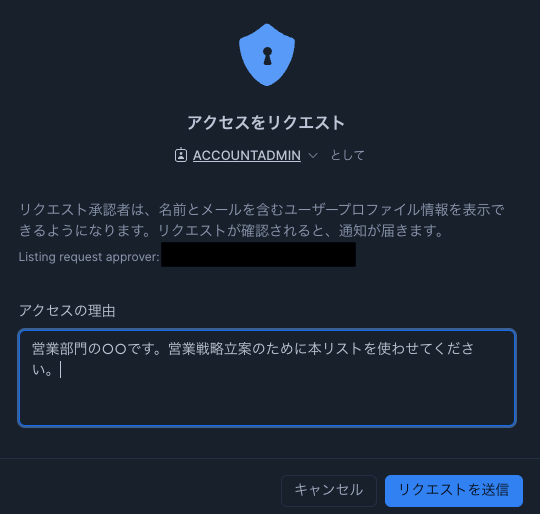
Submit the request along with the reason for the request
Approver Operations
- Receive email notification or check in Snowsight.
- Review request details on the Internal Requests page.
- Execute the approval/rejection decision with a single click.
- Access permissions are automatically granted.

Requests are notified to administrators via email

A list of current requests can be viewed in Provider Studio

Once approved with an approval reason, the consumer can start using the list
All these operations are completed entirely on a GUI basis, and no knowledge of SQL is required. This allows anyone, not just data engineers, to share and utilize data.
Specific Business Scenario Examples
Scenario 1: Collaboration between Marketing and Sales Departments
Background: The sales department wants to utilize lead information held by the marketing department.
- The marketing department publishes lead data as an Organization Listing.
- The sales department discovers the data in the Internal Marketplace.
- They send an access request, and the marketing department approves it.
- They start utilizing it for sales activities in real-time.
Scenario 2: Reporting between Finance and Business Departments
Background: Each business department wants to perform its own unique analysis using financial data.
- The financial department publishes financial data as an Organization Listing with an approval requirement.
- Each business department requests access as needed.
- The financial department evaluates the appropriateness and approves or rejects the request.
- Data utilization is achieved while maintaining compliance.
Scenario 3: Collaboration between Data Science and Business Teams
Background: Business teams want to utilize analysis results from the data science team.
- The data science team shares analysis results through an Organization Listing.
- The business team discovers the relevant dataset.
- Access is granted immediately through a rapid approval process.
- Data-driven decision-making is accelerated.
Traditional Challenges and Solutions
| Traditional Challenges | Organization Listing's Solution |
|---|---|
| Unknown existence of data | Centralized data catalog in Internal Marketplace |
| Complicated access request process | One-click application via Snowsight |
| Approval takes time | Automated approval workflow |
| Concern about security risks | Approval-based and Role-Based Access Control |
| Unknown data quality | Descriptions and metadata provided by the data provider |
Detailed Features of Organization Listing
Furthermore, for information on the basic features and detailed configuration of Organization Listing, please refer to the excellent article written by Matsubara-san:
Conclusion
I believe Snowflake's Organization Listing approval workflow feature is a game changer that can practically implement the philosophy of Data Mesh.
Specifically, it fundamentally solves previous challenges in internal data sharing in the following ways:
- Significantly lower technical hurdles: Intuitive GUI-based operations.
- Balancing governance and agility: Appropriate control through approval flows.
- Promoting cross-organizational data utilization: Easy data sharing across account boundaries.
- Functioning as a data catalog: Visualizing data assets across the entire organization.
The Data Mesh vision, which has often been considered "idealistic," can now be realized practically and easily on Snowflake. This is undoubtedly a high-value feature for companies looking to accelerate data utilization across their entire organization.
I hope you will leverage this feature in your organization to promote the building of a data-driven culture!
Promotion
Delivered a virtual hands-on at SNOWFLAKE DISCOVER!
At the large-scale webinar for Snowflake engineers, "SNOWFLAKE DISCOVER Part 2" held on July 8-9, 2025, I delivered a practical virtual hands-on titled "Next-Generation VoC (Voice of the Customer) Analysis with Snowflake Cortex AI." You can experience how to analyze customer feedback, which is relevant to many industries, using Snowflake's latest features. If you are looking for hints on analyzing unstructured data, I would be delighted if you watched it!
By registering at the link below, you can watch it on-demand immediately.

Spoke at SNOWFLAKE DISCOVER!
At the large-scale webinar for Snowflake engineers, "SNOWFLAKE DISCOVER" held on April 24-25, 2025, I spoke in the very first session, "Snowflake from Scratch: Building a Modern Data & AI Platform." I explained everything from an overview of Snowflake to its latest status as clearly as possible, so I hope you find it useful for catching up!
By registering at the link below, you can watch it on-demand immediately.

Spoke at a Webinar by Generative AI Conf!
I gave a Lightning Talk (LT) on the theme of Data * AI as a Snowflake employee at a webinar themed "Platforms Supporting the Generative AI Era," alongside NVIDIA and my former employer, AWS! Below is the video archive, and I hope you enjoy watching it!
Distributing Snowflake "What's New" on X
I am distributing Snowflake "What's New" update information on X, so please feel free to follow me.
Japanese Version
Snowflake What's New Bot (Japanese Version)
English Version
Snowflake What's New Bot (English Version)
Change Log
(20250531) New post
(20250629) Updated promotion section
(20250927) Updated promotion section
Discussion