iTranslated by AI
How to Create Call Trees and Sequence Diagrams in Text Editors: Structured Documentation (3)





Structured Documentation
- Part 1: Introduction to Agile Note-taking
- Part 2: 13 Rules for Writing Agile Procedure Manuals
- Part 3: How to Quickly Draw Diagrams in VSCode to Help Understand Large-Scale Programs
- Part 4: What Was I Supposed to Do Today? Writing Ticket Management to Lead Your Thoughts
I Want a Map to Overlook the Program
When you start handling a large-scale program, you probably first want to read the overview or diagrams of the entire system architecture. These describe information about the roles of each component, their relationships, and data flow, but the information is often very ambiguous. What exactly constitutes a "component"—whether it's a server, container, library, database, class, or module—varies from system to system. Without mapping this state to the program's code and configuration files, a programmer cannot even begin coding.
As the scale of a program grows, just finding the target code becomes difficult. In such cases, the basic approach is to use a global search (grep) to jump to the definition of a function or similar element. However, even if you can find it, you cannot understand the big picture. Even if you find the dots, the dots do not connect to form lines. Without that connection, comprehensive design and improvement are impossible. In the past, there was what we called "spaghetti code" full of goto statements, but a similar situation can occur even if code is split into too many classes.
To understand how dots connect into lines, it is necessary to have a bird's-eye view. Taking a bird's-eye view means seeing a processing flow where the function before jumping and the function after jumping (and the function after that...) are displayed on the same screen. By doing this, you memorize the structure as a mental image. If the location changes because you jump to a different place, the brain stores it as a separate image.
A list of APIs or other items arranged alphabetically is just a collection of dots. It's easy to find if you know the name, but you can't search with the mindset of "it seems like it would be around here." You might be familiar with a call tree, which is a diagram that lists processes in the order of function calls, branching out into a tree where the leaves represent the called functions. Since a call tree is arranged according to the processing order or timeline, you can search for something with the idea that "it should be near this." Information arranged chronologically is easy to remember, much like what is known as episodic memory. Furthermore, looking at a tree structure allows you to remember it as a spatial image, more so than looking at a linear list. However, simply listing function names in a tree format is not enough for retention. You need supplemental information to aid memory.
When people think of diagrams representing programs, they think of UML. But even without going that far, if you can represent the call tree and data structures, you can express 80% of a program. Programs have long been referred to as "algorithms and data structures," and this remains true today. Classes are only a part of that. It becomes simpler than dividing everything into classes (this doesn't mean object-oriented programming is obsolete, as some design elements are simpler when made into classes).
Here, I will explain text-based call trees, sequence diagrams, and data structure diagrams using structured documentation. Since this is an application of structured documentation using Visual Studio Code (VSCode), they will be colorful and easy to read, can be collapsed, and allow you to jump from the diagram to related information—or from any location into the diagram. Since they are in text format, they can be version-controlled with Git. I will explain at the end why version-controlling documents is even more important than versioning code. You cannot see diffs in graphical editors like PowerPoint or draw.io. While you can generate UML images by writing in a text format called Mermaid, Mermaid text tends to have scattered layouts, making it difficult to edit as information increases even slightly.
Call Tree
Sequence Diagram

Data Structure Diagram
How to Write a Call Tree in YAML
You might be familiar with call trees, which are diagrams that list processes in a tree structure following the function call order, with the leaf nodes representing the functions being called.
First, write the function or method names that provide useful information as YAML mapping names (field names).
fillRelatedData:
Search for caller and callee functions using IDE browsing features or by checking the call stack, and write the call tree. However, you don't need to dig down into functions whose details are unnecessary. Whether something is necessary depends on the task at hand and your level of knowledge, so it varies from person to person.
    main:
        fillRelatedData:
            getBaseData:
            setRelatedData:
For unimportant parts where functions are called several levels deep within a library, you can omit them with ...:. However, do not omit them to just :. Doing so will prevent VSCode's breadcrumb list from being displayed.
    main:
        ...:
            getBaseData:
For functions you want to stand out, you can add colored emojis in the comments.
    main:
        fillRelatedData: #⭐️
            getBaseData:
            setRelatedData:
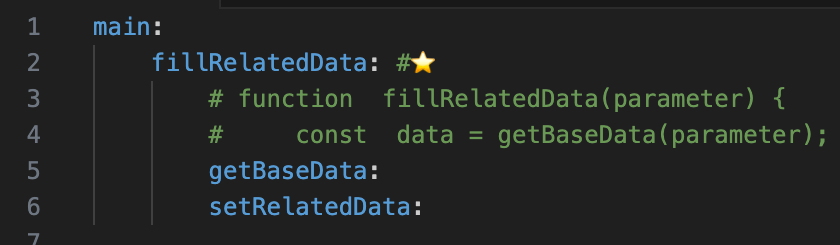
From here, we move to writing styles unique to structured documentation. To show the content of a function's processing, copy a part of the function definition code into a comment. Write it at a deeper indentation level. Place the code for the function being called on the line immediately above its field name. Since comments appear in a light color, the visual intensity makes it clear that the function name is primary and the code is secondary.
(With color)
(No color, for copying)
    main:
        fillRelatedData: #⭐️
            # function  fillRelatedData(parameter) {
            #     const  data = getBaseData(parameter);
            getBaseData:
            setRelatedData:
When adding the comment symbol # to multiple lines in VSCode, select the lines and press Ctrl + /.
However, if there are empty lines in the code, please remove them. Empty lines serve to separate blocks, but since we are copy-pasting fragments, the separation often becomes inappropriate. Another reason is that when using Ctrl + /, the indentation depth of # may not be as expected. To adjust indentation later, first remove the # using Ctrl + /.
When writing code that calls the second or subsequent function, such as setRelatedData, place it on the line immediately above that function's field name.
    main:
        fillRelatedData: #⭐️
            # function  fillRelatedData(parameter) {
            #     const  data = getBaseData(parameter);
            getBaseData:
            #     setRelatedData(data);
            setRelatedData:
For names and code of functions called further down from a callee, write them at a deeper indentation level.
(With color)
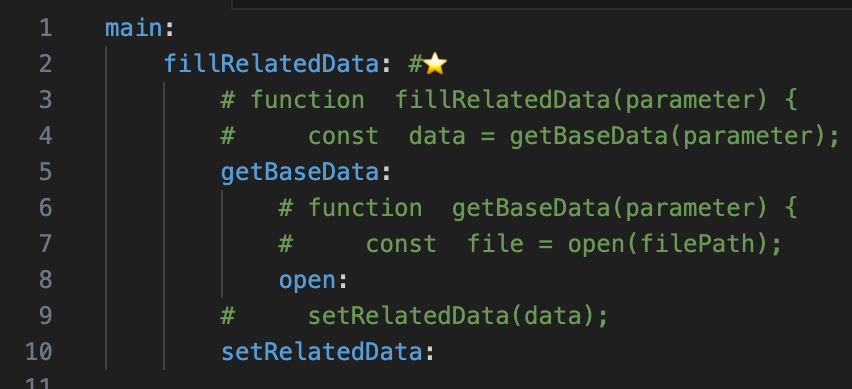
(No color, for copying)
    main:
        fillRelatedData: #⭐️
            # function  fillRelatedData(parameter) {
            #     const  data = getBaseData(parameter);
            getBaseData:
                # function  getBaseData(parameter) {
                #     const  file = open(filePath);
                open:
            #     setRelatedData(data);
            setRelatedData:
Writing this much might seem complicated at first glance, but as you read through it, you will gradually be able to overlook the necessary information, just like looking at a map. Even with a map, everything looks cluttered when you first see it, so it's better not to judge based on the first impression.
The trick to viewing a call tree is to first filter with your eyes so that you only see the field names where the function names are written. In other words, look at the whole picture while focusing only on the colors of the field names. The call relationships will then come into view. Since function names alone don't provide much information, reading the code in the comments will reveal the specific relationships.
If you click or double-click a function name, the function name in the calling code will also be highlighted, so you can immediately see how it is being called.
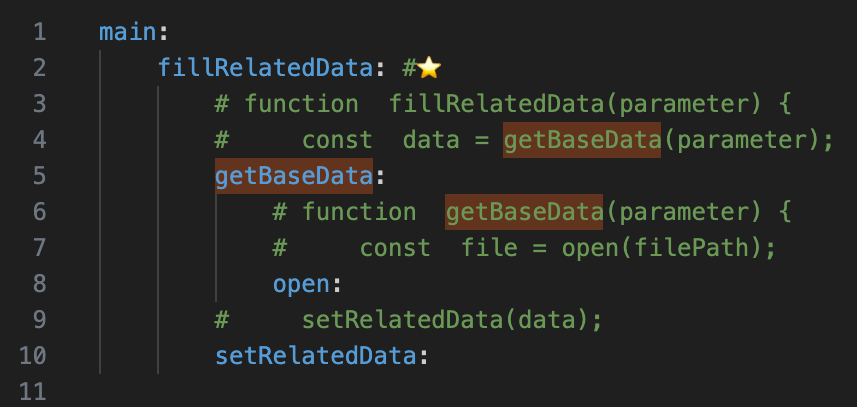
Regarding library functions (such as open above), you probably won't write the library's implementation code in the call tree, but writing the library's function name in a field makes it stand out and helps you stay conscious of the library. Library functions (such as open, read, write, etc.) are designed to be easy to understand, have a proven track record, and are known by many people, so explicitly stating them is very meaningful.
Let's see what happens if you don't write open in a field.
        _:
            # function  fillRelatedData(parameter) {
            #     const  data = getBaseData(parameter);
            getBaseData:
                # function  getBaseData(parameter) {
                #     const  file = open(filePath);
            #     setRelatedData(data);
            setRelatedData:
The library function name is written in the code comments, but it has become harder to recognize, hasn't it? Of course, even if it's not a library, you can write fields for only those function names for similar purposes.
You might feel that the code for calling the second and subsequent function setRelatedData has become separated from the code for the first function call, making it a bit harder to see. In that case, remember that lines with the # at the same position (depth) constitute a single function definition, so focus on the lines where the # is at the same depth. In editors like VSCode, thin vertical lines appear, making it easy to see that they are at the same depth.
Also, by folding the first function getBaseData, you can return to the original appearance. The ability to open and close the tree is a major advantage.
    main:
        fillRelatedData: #⭐️
            # function  fillRelatedData(parameter) {
            #     const  data = getBaseData(parameter);
            getBaseData:
            #     setRelatedData(data);
            setRelatedData:
You can also group the function name fields together so that the code doesn't appear immediately above each function name field.
        _:
            # function  fillRelatedData(parameter) {
            #     const  data = getBaseData(parameter);
            #     setRelatedData(data);
            getBaseData:
            setRelatedData:
You can also write supplemental information in the comments. You can include links to related documents. It's best to write them like comments. Adding typrm tags is also a good idea. Some people dislike Git commits that only involve minor edits to comments, but you can write a call tree as a way to avoid complaints from such people.
        _:
            # function  fillRelatedData(parameter) {
            #     const  data = getBaseData(parameter);
            #         // Requires DB server. http:...
            #         // #keyword: base data
Including the code brings another benefit: you become able to jump to function definitions immediately. By performing a global search for the entire first line of a function definition (the function prototype), you can search (jump) easily because other parts won't appear in the search results. If you search by function name alone, a large number of function calls will appear in the results along with the definition, making it easy to get lost.
function fillRelatedData(parameter) {
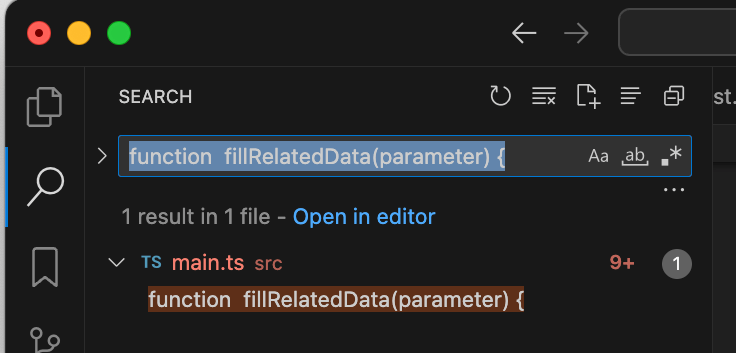
Searching only for the function name will result in matches in other places. Of course, even if there are many methods with abstract names like do, which would lead to matches elsewhere, in such cases the class name usually represents the process name (whether that's good design or not is another matter). In that scenario, you should perform a global search for the first line of the class definition.
class FillRelatedData {
When writing code for such a class in a call tree, include the line containing the class name in the comments. It's like the recently popular Sticky Scroll being collapsed. You write the method name in the field, but if the method name alone is unclear, you can supplement it with the class name.
    do (FillRelatedData):
        # class  FillRelatedData {
        #     do() {
        #         const  data = getBaseData(this.parameter);
Although call trees can be automatically generated from source files, generated call trees are not very readable because they lack sufficient supplemental information. In an IDE's call tree, you have to open it level by level, meaning you must understand the meaning of each function and choose it to reach your destination. The same goes for browsing features that jump to function definitions. It would be fine if function names were appropriately assigned and functions were properly structured, but most programs are not like that. In the code of intermediate developers, mysterious abstract functions often appear, causing an inner-platform effect (a negative effect) that makes it quite difficult to understand.
Create individual call trees depending on your purpose. You can make specific call trees for business logic, server communication, library usage, or processes like loading, generation, and post-generation handling when initializing a UI.
Writing a call tree allows you to understand the code even if the design is poor and without having to refactor it.
How to Write a Sequence Diagram in YAML
As you may know, a sequence diagram is used to explain the exchange of messages (such as requests, handshakes, or data) in chronological order.
By writing the path of the file where a definition resides, you can often tell which component it is based on the folder name. In the sample below, #ref: is a typrm tag; it has no deep meaning and is just a comment attached to a URL or path. At the very least, you must use # to comment out the path, or it will result in a YAML syntax error.
notify: #ref: ~/__Project__/app/notify.ts
In the case below, app, storage, and mailer are the component names.
(With color)

(No color, for copying)
    notify:  #ref: ~/__Project__/app/notify.ts
        getFromStorage:  #ref: ~/__Project__/storage/db.ts
        sendMail:  #ref: ~/__Project__/mailer/send.ts
            getAddress:  #ref: ~/__Project__/storage/address.ts
By writing and reading paths like this, you can understand the hierarchical structure regarding component types. If you just look at a list of folder names and files representing categories and their contents, you might just think "I see," without really understanding what they are. However, viewing them alongside a call tree that closely resembles the ownership hierarchy of components allows you to understand what kind of component it is more deeply through the hierarchy of types. For example, rather than just looking at CustomerList, if you see that its parent folder is UIBlock, you can imagine it's a UI component. If it's DBSchema, you can imagine it's a database part for CustomerList.
By writing indents quite deeply for components, it starts to look like a sequence diagram. You could write vertical bars |, but that would prevent you from folding the tree and make it difficult to change indentation later, so it's better not to.
    notify:
                getFromStorage:
                                sendMail:
                getAddress:
Furthermore, insert fields for the arrow lines. Writing arrows clarifies the relationship between components. Write the lines for arrows and parentheses as YAML field names, and don't write anything other than the arrows and parentheses. If you align the depth of the left side of the arrow with the component, the right side's position won't look too messy even if it varies slightly. Additionally, writing the component relationship (__From__->>__To__) to the right of the arrow makes it easier to understand.
    notify:
    ---->> (app->>storage):
                getFromStorage:
    ---------------->> (app->>mailer):
                .               sendMail:
                <<---------- (mailer->>storage):
                getAddress:
Adding code comments to this results in the following:
(With color)
(No color, for copying)
    notify:
        # function  notify() {
        #     const  data = getFromStorage();
    ---->> (app->>storage):
                getFromStorage:
                    # function  getFromStorage() {
                    #     sendMail();
    ---------------------->> (app->>mailer):
                .               sendMail:
                                    # function  sendMail() {
                                    #     const  address = getAddress();
                <<---------- (mailer->>storage):
                getAddress:
                    # function  getAddress() {
If you look closely, there is a period on the line below the app->>mailer arrow. This is a period to avoid YAML syntax errors. You need to write the period at the shallowest indentation level among the lines that are deeper than the left edge of the arrow. It doesn't strictly have to be a period, but it's less conspicuous than other characters.
The format (__From__->>__To__) to the right of the arrow is aligned with Mermaid. Even for right-to-left arrows, please write in the direction of (root of arrow->>tip of arrow). This is because it's a Mermaid specification. Mermaid is a notation for generating graphical diagrams from text; if you want to generate a diagram, you can copy and paste directly from the call tree into Mermaid.
You can, of course, write Mermaid text in a text editor like VSCode, but to understand the component relationships from that text, you have to carefully read the component names before and after the arrows. This becomes an issue when editing the text. For example, it's quite difficult to edit a diagram generated by Mermaid by looking at the image and adding a new arrow. This is because, while you can edit a graphical diagram based on spatial relationships, in Mermaid text, you have to search through a list of arrows by reading names from the top. Also, when creating something from scratch, you're editing while the relationships aren't yet visible, which is also difficult.
Regarding the types of arrows, sometimes sending a message is used instead of a function call when executing a component's process, but you don't really need to be too conscious of distinguishing them. If it's important, adding a supplemental comment is sufficient.
How to Write Data Structures
YAML is inherently a notation for representing data structures, so if you know how to write YAML, you can express data structures. However, to represent object structures like class diagrams, it is better to extend the notation slightly.
When representing classes, it is easier to understand if you separate attributes from relationships. In database terms, it is easier to understand if you separate normal columns from foreign keys when representing a table.
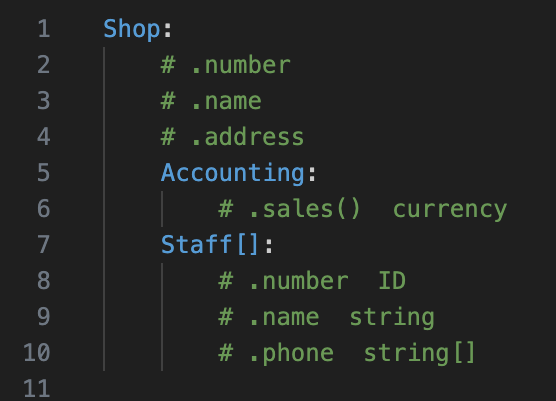
Make classes and structs stand out by using them as YAML field names. Write attributes in comments, starting with a period, and include the type if necessary. You do not need to be exhaustive with attributes. Related global variables do not start with a period. For multiple items such as arrays, append [] to the name. For methods and derived attributes, append () to the name. Relationships are expressed through the parent-child hierarchy of the YAML fields.
(With color)
(No color, for copying)
    Shop:
        # .number
        # .name
        # .address
        Accounting:
            # .sales()  currency
        Staff[]:
            # .number  ID
            # .name  string
            # .phone  string[]
Enclose superclasses or interfaces in parentheses ( ). Start subclasses with ^. It is also useful to add the superclass as supplemental information for a class. For generics, represent the T part using < >, but use a concrete sample class instead of just T. Factory methods, being more abstract data than simple methods, are represented as <__Name__()> in the YAML fields.
    Shop:
        (Accounting):
            ^FoodShopAccounting:
                # .tax
            CommonData:
                # .sales()
        Staff<FoodStaff>[]:
    <CreateStaff()>:
        FoodStaff:
        SalesStaff:
Format:
    class:
        # .attribute  int or str  #ref: __PathOfToRefer__
        class:  #// .attribute  #ref: ____
        class2:  #ref: __PathOfDefine__
            # .attribute  #ref: __PathOfToRefer__
            # variable   #ref: __PathOfToDeclare__
        class[]:  #// .attribute
        class( super ):  #// .attribute
        (super):  #// (.attribute)
            memberClass:  #// .memberAttribute
            ^subClass:    #// .attribute
        class< T >:  #// .attribute or variable
        <method()>:
            class:  #// variable
        <factory>:  #// .attribute
            class:  #// variable
Organizing Structured Diagrams into a Portal-like specifications.yaml
Even if you write call trees and data structures, they are meaningless if you cannot find them when needed.
There are two major conditions for being able to find them when necessary. The most common method is full-text search. However, you need to know the keywords. It requires memory. If you search with multiple words but in the wrong order, or if you enter synonyms or use a different language, you won't find it. Using advanced search tools like typrm might help you find what you're looking for.
Another common method is selecting from a functional list or file list, such as those found in a manual. You can write a tree with the same structure as the public manual and include your call trees within it. With the same structure, you can locate the corresponding call tree by looking it up in the easy-to-read manual.
Sometimes you might search for call trees starting from REST API entry points or user operation events. In this case, arranging them in the chronological order of expected API calls or events makes them easier to understand.
How to structure the content to find the target document is a major topic in itself, so I intend to explain it on another occasion.
By naming the files containing these diagrams with a standard name like specifications.yaml (specifications YAML), the files themselves become easier to find.
Documents Start to Rot Immediately, but Writing Them is Still Useful
The documents handled in structured documentation are documents that explain the target, so if the target (the code) is updated, they become incorrect. Some people call this phenomenon "document rot." Since code is changed more frequently than the product itself, it starts to rot quickly. Therefore, synchronization is necessary, and version control for documentation is essential.
You often see surveys at the end of support documents asking, "Was this helpful?" This is also a way for users to help find where the documentation has rotted. It would be ideal to keep everything synchronized, but since most document files cannot be version-controlled as strictly as Git, synchronization is difficult. The advantage of diagrams in structured documentation is that they allow for synchronous updates as soon as or shortly after the need for an update is recognized.
Some people believe that because documents rot quickly, they shouldn't be written at all, but even if they have rotted slightly, they can still provide hints to solve problems. For example, even if the information is old, if you know the structure well, you can find the target function quickly, and if the function name is the same in the latest version, you can obtain search keywords from it.
Revisiting the code while updating the documentation deepens your understanding of it. Even for code you wrote yourself, you tend to forget it over time. Through the process of updating documents, you can re-verify the code. Updating documentation also provides an opportunity to rethink the code's design and structure. You might notice areas for improvement during the documentation process. As a result, this leads to an improvement in code quality. Documents updated with the latest information facilitate smooth information sharing and communication within the team. They can also serve as handover materials for new members. In situations like handling inquiries, they enable you to provide accurate information. Making document updates a habit might feel like a burden in the short term. However, in the long run, it will significantly contribute to the productivity of the entire development team through better code understanding, quality improvement, and smooth communication.
(The final section only is output from Claude Opus AI)
Discussion