iTranslated by AI
Built a CLI Tool to Automate Ghostty Pane Splitting





TL;DR
I have created a CLI tool called ghostty-layout that allows you to split the Ghostty terminal panes with a single command.
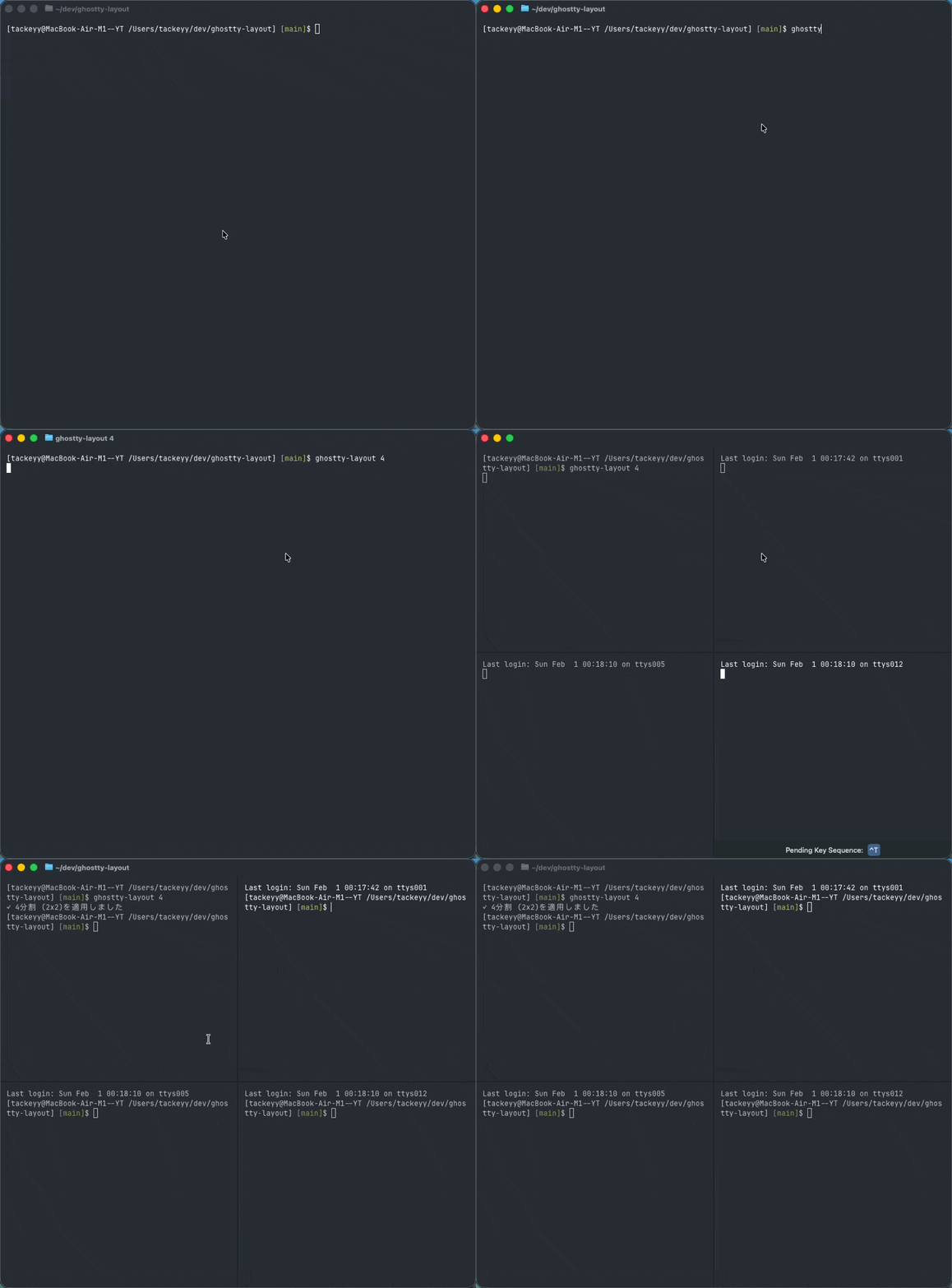
ghostty-layout 4   # 2x2 grid split
ghostty-layout 3x2 # 3 columns, 2 rows (6 splits)
Motivation: The Compatibility Issue between tmux and Claude Code
Recently, I have been using Claude Code in my terminal more often. However, running Claude Code within tmux resulted in a frustratingly subtle issue where Shift + Enter did not trigger a line break.
This led me to reconsider whether tmux was truly necessary. I realized that the features I was primarily using in tmux were just screen splitting and pane navigation.
From tmux to Native Ghostty
Ghostty has a built-in pane splitting feature. After porting my tmux keybindings to the Ghostty configuration, I found that I could get by perfectly well without tmux.
# ~/.config/ghostty/config
keybind = ctrl+t>shift+backslash=new_split:right
keybind = ctrl+t>minus=new_split:down
keybind = ctrl+t>h=goto_split:left
keybind = ctrl+t>l=goto_split:right
keybind = ctrl+t>k=goto_split:up
keybind = ctrl+t>j=goto_split:down
keybind = ctrl+t>=equalize_splits
By removing tmux, the Shift + Enter issue with Claude Code was resolved, and terminal startup became faster.
New Challenge: Manual Splitting is Tedious
While I felt comfortable after graduating from tmux, a new dissatisfaction emerged.
It is tedious to manually split panes every time.
For instance, if you want to split into four, you have to hit keybindings repeatedly: split right → move to left pane → split down → move to right pane → split down... While I could have scripted this by combining tmux split-window in tmux, Ghostty does not offer such a CLI.
"It would be great if I could set up my favorite layout with a single command."
That is why I created ghostty-layout.
Introducing ghostty-layout
Installation
# Build from source
git clone https://github.com/tackeyy/ghostty-layout.git
cd ghostty-layout
swift build -c release
sudo cp .build/release/ghostty-layout /usr/local/bin/

# Or download the release binary
curl -sL https://github.com/tackeyy/ghostty-layout/releases/latest/download/ghostty-layout \
  -o /usr/local/bin/ghostty-layout && chmod +x /usr/local/bin/ghostty-layout
Basic Usage
You can use preset layouts immediately.
| Command | Layout |
|---|---|
ghostty-layout h |
2 columns side-by-side |
ghostty-layout v |
2 rows stacked |
ghostty-layout 4 |
2x2 grid |
ghostty-layout 6 |
2x3 grid |
ghostty-layout 9 |
3x3 grid |
Custom grids can also be created freely using the CxR notation.
ghostty-layout 3x2  # 3 columns, 2 rows
ghostty-layout 4x3  # 4 columns, 3 rows
It supports up to 8x8 grids.
Automatic Detection of Ghostty Settings
ghostty-layout automatically reads keybinding settings from ~/.config/ghostty/config. The configuration file is automatically generated upon the first execution, so manual setup is generally unnecessary.
# Sync if you change Ghostty keybindings
ghostty-layout --sync-config

# You can also apply a layout while syncing
ghostty-layout --sync-config 3x2
It also supports prefix keys (e.g., ctrl+t > h).
Integration with Raycast
By registering it as a Raycast script command, you can apply layouts instantly from your launcher.
#!/bin/bash
# @raycast.schemaVersion 1
# @raycast.title Ghostty 4-split
# @raycast.mode silent

/usr/local/bin/ghostty-layout 4
Mechanism
ghostty-layout works by simulating keystrokes using macOS's Accessibility API. It reads the Ghostty keybinding settings and automatically executes key operations like split → move → split...
It is written in Swift to natively handle the macOS Accessibility API.
Accessibility permissions are required on the first execution.
Please grant permission from System Settings > Privacy & Security > Accessibility.
Summary
| Before | After |
|---|---|
| tmux + Ghostty | Ghostty only |
| Claude Code Shift+Enter does not work | No issues |
| Screen splitting requires many manual steps | One command with ghostty-layout 4
|
By migrating from tmux to native Ghostty, I resolved the compatibility issues with Claude Code and solved the remaining annoyance of manual splitting with ghostty-layout.
If you are a Ghostty user with the same problem, please give it a try.
GitHub: https://github.com/tackeyy/ghostty-layout
Stars are appreciated and encourage me to keep going!
Discussion