iTranslated by AI
Created markdown-it-safe-jsx to enable JSX in Markdown


To start off, I created a markdown-it plugin that allows you to use JSX within Markdown.
As shown in the image below, you will be able to use JSX within Markdown.
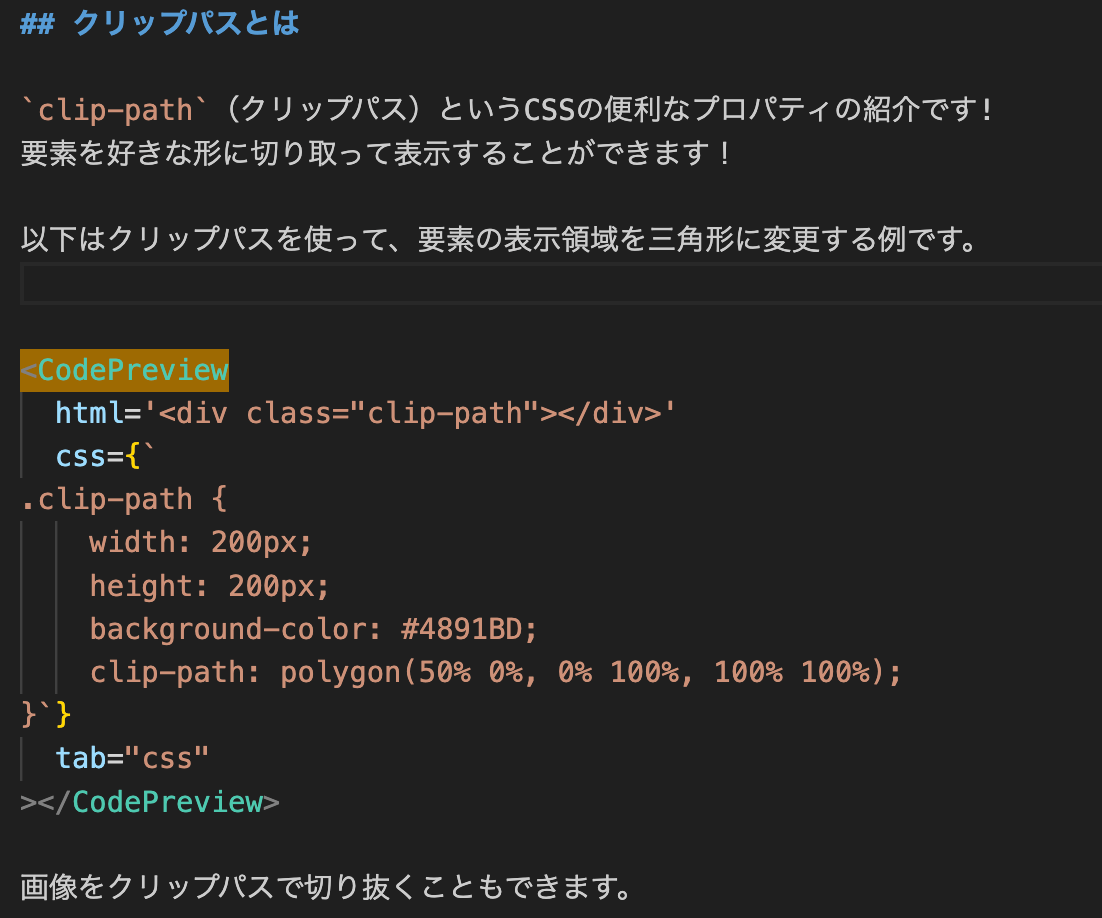
This allows you to embed interactive components into your articles, like the one shown in the image below.

You can see the result in action on the blog of "mosya.dev," a programming learning service I developed 👇
I think this mechanism for writing JSX is perfect for personal technical blogs!
Why I made it
After reading this article from abroad, I realized that technical articles need interactivity, not just text and images.
It was so much fun to interact with, and it made me want to keep reading. I felt that I had to write articles that are fun to read and fun to touch!!
So, I thought about whether I could embed React inside Markdown.
Initially, I considered mounting React components onto the rendered Markdown after the fact. However, this causes a "jump" in the display, which negatively impacts CLS (Cumulative Layout Shift), one of the performance metrics.
Therefore, I worked hard to create a system that outputs the content as standard HTML from the server side and then "hydrates" it on the frontend to make it interactive.
I'm very satisfied that I could create a markdown-it plugin with performance in mind (lol).
How to use
Using it is very simple!
I've made it so that you can register components to be used with markdown-it, as shown in the code below. Only pre-registered components can be used in Markdown, which makes it secure!
import MarkdownIt from "markdown-it";
import { safeJsx } from "markdown-it-safe-jsx";

const md = new MarkdownIt();
md.use(safeJsx, {
  MyComponent: ({ text }) => <MyComponent text={text} />,
});

const html = md.render(`
# Hello

<MyComponent text="Hello" />
`);
Hydrating components
However, with this alone, the JSX written in Markdown is only output as a string!
Therefore, I provide a hook-style API called useHydrate.
Using useHydrate converts the JSX written in Markdown into actually functioning components!
import MarkdownIt from 'markdown-it'
import { safeJsx, useHydrateJsx } from 'markdown-it-safe-jsx'

import { TestComponent } from './TestComponent'

const components = {
  TestComponent,
}

function Markdown({ text }: { text: string }) {
  const ref = useRef<HTMLDivElement>(null);

  useHydrateJsx({
    components,
    ref,
    unsafeHydrateFunction: true,
  }, []);

  const result = useMemo(() => {
    const md = markdownIt({
      breaks: true,
      linkify: true,
      html: true,
    });
    md.use(safeJsx, components, {
      unsafeRenderFunction: true,
    })
    return md.render(text);
  }, [text]);

  return (
    <div dangerouslySetInnerHTML={{ __html: result }} ref={ref}></div>
  )
}
Differences from other approaches
Difference from MDX
There are already several approaches to allow writing JSX inside Markdown.
For example, a famous library is MDX.
This approach treats Markdown files as Webpack modules and converts them into JSX at compile time.
However, this doesn't work if the Markdown data is fetched from an API, for instance.
I'm developing a programming learning service called mosya.dev, and the Markdown data required for its course materials is fetched from an API.
Therefore, I found MDX, which assumes bundling, a bit difficult to use and decided against adopting it.
Update 👇
According to the method in this article, it seems JSX can be used within Markdown even without bundling!
Difference from next-mdx-remote
I also considered next-mdx-remote, a library that converts Markdown fetched from an API into JSX.
However, I'm personally used to customizing Markdown based on markdown-it (which is also used here on Zenn), and I really wanted to find a way to use JSX as a plugin for markdown-it (lol).
Since I had a period where I helped a little with Zenn's development, I was familiar with creating markdown-it plugins.
Furthermore, markdown-it has many plugins due to its extensibility, and I wanted to be able to use it in combination with those plugins, so I decided not to use next-mdx-remote.
How it works
Initially, I considered using the TypeScript parser, but I decided against it because using the TypeScript parser would make the bundle size far too large. So this time, I adopted a JavaScript parser called acorn!
acorn is a parser created by marijnh, whom I respect, and who is also the author of the CodeMirror editor.
acorn converts JavaScript code into a data structure called an AST (Abstract Syntax Tree). By using this data structure, we can identify which props are being used in the JSX code.
Compared to TypeScript, it's quite lightweight at 118KB, which makes it very convenient to use easily in the browser.

Using acorn to get JSX props
First, to enable acorn to parse JSX, we use a library called acorn-jsx.
import { Node, Parser } from "acorn";
import jsx from "acorn-jsx";

const JSXParser = Parser.extend(jsx()); // Enable parsing of JSX
Next, we use a library called acorn-walk. This is a library for recursively traversing the AST.
import { extend } from "acorn-jsx-walk";
import { base, simple } from "acorn-walk";

extend(base);
We parse the JSX code captured by regular expressions within the Markdown using acorn. Using a function called simple, we can recursively traverse the AST, and when we find a node called JSXOpeningElement, we extract the props from it.
function extractPropsFromJSX(jsxString: string) {
  const JSXParser = Parser.extend(jsx());
  const ast = JSXParser.parse(jsxString, {
    ecmaVersion: 2020,
    sourceType: "module",
  });
  const props: Record<string, unknown> = {};

  simple(ast, {
    JSXOpeningElement: (node) => {
      node.attributes.forEach((attr) => {
        if (attr.type === "JSXAttribute" && attr.value) {
          const propName = attr.name.name;
          let propValue;

          if (attr.value.type === "JSXExpressionContainer") {
            propValue = evaluateExpression(attr.value.expression, jsxString);
          } else {
            propValue = evaluateExpression(attr.value, jsxString);
          }

          props[propName] = propValue;
        }
      });
    },
  });

  return props;
}
We create a function called evaluateExpression to retrieve the contents of the props within the JSX.
function evaluateExpression(node: Node, source: string) {
  if (node.type === "Literal") {
    return node.value;
  }
  if (node.type === "ArrayExpression") {
    return node.elements.map((element) =>
      evaluateExpression(element, source)
    );
  }
  if (node.type === "ObjectExpression") {
    const obj: Record<string, unknown> = {};
    node.properties.forEach((prop) => {
      if (prop.type === "Property") {
        obj[prop.key.value] = evaluateExpression(prop.value, source);
      }
    });
    return obj;
  }
  if (node.type === "ArrowFunctionExpression" || node.type === "FunctionExpression") {
    const functionString = getSourceCode(node, source);
    const func = new Function(`return ${functionString}`)();
    return func;
  }
  if (node.type === "TemplateLiteral") {
    let templateValue = "";
    node.quasis.forEach((part, index) => {
      templateValue += part.value.raw;
      if (index < node.expressions.length) {
        const exprValue = evaluateExpression(node.expressions[index], source);
        templateValue += exprValue;
      }
    });
    return templateValue;
  }
  return undefined;
}
With this, we can retrieve props of most types.
Based on this result, we perform renderToString and output the result as a string.
const props = extractPropsFromJSX(allMatch);
const renderedComponent = ReactDOMServer.renderToString(
  <Component {...props} />
);
Bringing it to life on the frontend using hydrate
We were able to output JSX as a string from the server side. Furthermore, we want to make this JSX actually work on the frontend. However, as it stands, only the result is output as a string, so we don't know what to rely on to make the JSX interactive. Therefore, I decided to embed hints in the Markdown on the markdown-it side beforehand.
const renderedComponent = ReactDOMServer.renderToString(
  <div
    data-component={componentName}
    data-props={JSON.stringify(props)}
  >
    <Component {...props} />
  </div>
);
With this, on the frontend, we can refer to data-component and data-props to know which component was called with which props.
Based on this information, I was able to actually make the JSX work using the hydrateRoot function.
import { hydrateRoot } from "react-dom/client";

export function useHydrateJsx(
  options: {
    components: Record<string, React.ComponentType<any>>;
    ref: React.RefObject<HTMLElement>;
    unsafeHydrateFunction?: boolean;
  },
  deps: React.DependencyList
) {
  const { components, ref, unsafeHydrateFunction } = options;
  useEffect(() => {
    if (!ref.current) return;
    const elements = ref.current.querySelectorAll("[data-component]");
    elements.forEach((element) => {
      const componentName = element.getAttribute("data-component");
      if (!componentName) return;
      const propsString = element.getAttribute("data-props");
      const Component = components[componentName];
      const props = propsString
        ? JSON.parse(propsString)
        : {};
      if (Component) {
        hydrateRoot(element, <Component {...props} />);
      }
    });
  }, deps);
}
The hydrateRoot function can be used similarly to ReactDOM.render, but unlike ReactDOM.render, it expects the DOM to already exist and allows it to be reused. Furthermore, that existing DOM must perfectly match the HTML of the component you are trying to render again.
It was my first time using it, but since it's designed with CLS in mind, being able to reuse HTML previously output from the server side was very convenient.
Constraints
The following features are not yet implemented:
- Self-closing tag support
- Nested JSX support
- No error handling for broken JSX...
Self-closing tag support
JSX like the following cannot be used in Markdown.
<MyComponent />
Instead, you need to write it like this:
<MyComponent></MyComponent>
Nested JSX support
It is not yet possible to nest JSX as follows.
<MyComponent>
  <MyComponent2 />
</MyComponent>
This would involve recursively searching the AST, which was a bit tedious, so I've left it as a future task.
No error handling for broken JSX...
If you write broken JSX in Markdown, an error will occur when loading that Markdown, so please use it at your own risk. It might be most suitable for personal blogs.
Summary
In this article, I created a markdown-it plugin to allow the use of JSX within Markdown. acorn, which can parse JavaScript, was very useful. I think being able to use libraries that handle ASTs opens up many possibilities beyond this specific use case, so please give it a try!
Tests haven't been written yet, and types are incomplete, so if you're interested, I'd be happy if you sent a PR!
Discussion
誤解を生みそうなので一応コメントしておくと、next-mdx-remoteも不要でMDX自体がこの機能を提供しています。なのでMDXのみで可能ではあります。
(ただ、最終的にGodaiさん的なモチベーションがmarkdown-itのプラグインを作りたい、だったので否定するわけではないです🙆♂)
おぉそうだったのですね!教えていただいてありがとうございます!
追記しました!