iTranslated by AI
Troubleshooting Notes for Building an Android App from Scratch


Here are some points I ran into while making this.
Forgetting suspend in Retrofit
java.lang.IllegalArgumentException: Could not locate call adapter for retrofit2.Response<com.example.network.data.ListScreenReponse>.
  Tried:
   * retrofit2.CompletableFutureCallAdapterFactory
   * retrofit2.DefaultCallAdapterFactory
I was baffled by this exception.
Since I brought the DI-related code from a project I made a long time ago, and the Response data class was also a simple one, I was lost...
I saw Jake-god mention on the official Retrofit issue tracker that coroutine support is quite a task, and I realized I had forgotten to add suspend and was able to fix it.
NG Code (Forgot suspend)
interface ListService {
    @Mock
    @MockResponse(body = "{\"location\":\"421 Lewis Ave,aaaaaaaaaaaa\",\"chips\":[{\"id\":0,\"title\":\"TITLE0\"},{\"id\":1,\"title\":\"TITLE1\"},{\"id\":2,\"title\":\"TITLE2\"},{\"id\":3,\"title\":\"TITLE3\"},{\"id\":4,\"title\":\"TITLE4\"},{\"id\":5,\"title\":\"TITLE5\"},{\"id\":6,\"title\":\"TITLE6\"},{\"id\":7,\"title\":\"TITLE7\"},{\"id\":8,\"title\":\"TITLE8\"},{\"id\":9,\"title\":\"TITLE9\"},{\"id\":10,\"title\":\"TITLE10\"}],\"campaign\":{\"title\":\"Unlimited \$0 delivery fees\",\"target\":\"\$0 delivery\"},\"populars\":[{\"imageUrl\":\"https://github.com/fanzeyi/pokemon.json/blob/master/images/000.png\",\"stars\":\"4.8 (2.9k ratings)\",\"title\":\"TITLE0\",\"time\":\"25-35 mins\"},{\"imageUrl\":\"https://github.com/fanzeyi/pokemon.json/blob/master/images/001.png\",\"stars\":\"4.8 (2.9k ratings)\",\"title\":\"TITLE1\",\"time\":\"25-35 mins\"},{\"imageUrl\":\"https://github.com/fanzeyi/pokemon.json/blob/master/images/002.png\",\"stars\":\"4.8 (2.9k ratings)\",\"title\":\"TITLE2\",\"time\":\"25-35 mins\"},{\"imageUrl\":\"https://github.com/fanzeyi/pokemon.json/blob/master/images/003.png\",\"stars\":\"4.8 (2.9k ratings)\",\"title\":\"TITLE3\",\"time\":\"25-35 mins\"},{\"imageUrl\":\"https://github.com/fanzeyi/pokemon.json/blob/master/images/004.png\",\"stars\":\"4.8 (2.9k ratings)\",\"title\":\"TITLE4\",\"time\":\"25-35 mins\"},{\"imageUrl\":\"https://github.com/fanzeyi/pokemon.json/blob/master/images/005.png\",\"stars\":\"4.8 (2.9k ratings)\",\"title\":\"TITLE5\",\"time\":\"25-35 mins\"},{\"imageUrl\":\"https://github.com/fanzeyi/pokemon.json/blob/master/images/006.png\",\"stars\":\"4.8 (2.9k ratings)\",\"title\":\"TITLE6\",\"time\":\"25-35 mins\"},{\"imageUrl\":\"https://github.com/fanzeyi/pokemon.json/blob/master/images/007.png\",\"stars\":\"4.8 (2.9k ratings)\",\"title\":\"TITLE7\",\"time\":\"25-35 mins\"},{\"imageUrl\":\"https://github.com/fanzeyi/pokemon.json/blob/master/images/008.png\",\"stars\":\"4.8 (2.9k ratings)\",\"title\":\"TITLE8\",\"time\":\"25-35 mins\"},{\"imageUrl\":\"https://github.com/fanzeyi/pokemon.json/blob/master/images/009.png\",\"stars\":\"4.8 (2.9k ratings)\",\"title\":\"TITLE9\",\"time\":\"25-35 mins\"}],\"perks\":[{\"imageUrl\":\"https://github.com/fanzeyi/pokemon.json/blob/master/images/000.png\",\"stars\":\"4.8 (2.9k ratings)\",\"title\":\"TITLE0\",\"time\":\"25-35 mins\"},{\"imageUrl\":\"https://github.com/fanzeyi/pokemon.json/blob/master/images/001.png\",\"stars\":\"4.8 (2.9k ratings)\",\"title\":\"TITLE1\",\"time\":\"25-35 mins\"},{\"imageUrl\":\"https://github.com/fanzeyi/pokemon.json/blob/master/images/002.png\",\"stars\":\"4.8 (2.9k ratings)\",\"title\":\"TITLE2\",\"time\":\"25-35 mins\"},{\"imageUrl\":\"https://github.com/fanzeyi/pokemon.json/blob/master/images/003.png\",\"stars\":\"4.8 (2.9k ratings)\",\"title\":\"TITLE3\",\"time\":\"25-35 mins\"},{\"imageUrl\":\"https://github.com/fanzeyi/pokemon.json/blob/master/images/004.png\",\"stars\":\"4.8 (2.9k ratings)\",\"title\":\"TITLE4\",\"time\":\"25-35 mins\"},{\"imageUrl\":\"https://github.com/fanzeyi/pokemon.json/blob/master/images/005.png\",\"stars\":\"4.8 (2.9k ratings)\",\"title\":\"TITLE5\",\"time\":\"25-35 mins\"},{\"imageUrl\":\"https://github.com/fanzeyi/pokemon.json/blob/master/images/006.png\",\"stars\":\"4.8 (2.9k ratings)\",\"title\":\"TITLE6\",\"time\":\"25-35 mins\"},{\"imageUrl\":\"https://github.com/fanzeyi/pokemon.json/blob/master/images/007.png\",\"stars\":\"4.8 (2.9k ratings)\",\"title\":\"TITLE7\",\"time\":\"25-35 mins\"},{\"imageUrl\":\"https://github.com/fanzeyi/pokemon.json/blob/master/images/008.png\",\"stars\":\"4.8 (2.9k ratings)\",\"title\":\"TITLE8\",\"time\":\"25-35 mins\"},{\"imageUrl\":\"https://github.com/fanzeyi/pokemon.json/blob/master/images/009.png\",\"stars\":\"4.8 (2.9k ratings)\",\"title\":\"TITLE9\",\"time\":\"25-35 mins\"}]}")
    @GET("localhost/list")
    fun getListScreenData(): Response<ListScreenReponse>
}
Forgetting to specify kotlinx-serialization
kotlinx.serialization.SerializationException: Serializer for class 'ListScreenReponse' is not found.
Mark the class as @Serializable or provide the serializer explicitly.
Once the issue with the missing suspend in Retrofit was solved, I got a JSON-related error.
I was puzzled because I hadn't forgotten the @Serializable annotation...
However, when I checked build.gradle, the word serialization didn't exist even once.
- Note: It was specified in dependencies, but since it was bundled using VersionCatalogs, the word
serializationwas not present in the script.
Danger is in "Danger"
/opt/hostedtoolcache/Ruby/2.6.10/x64/lib/ruby/gems/2.6.0/gems/octokit-4.22.0/lib/octokit/response/raise_error.rb:14:in `on_complete': PATCH https://api.github.com/repos/sobaya-0141/sample202207/issues/comments/1224036023: 401 - Requires authentication // See: https://docs.github.com/rest/reference/issues#update-an-issue-comment (Octokit::Unauthorized)
At first glance, it looks like Danger couldn't post a comment due to a 401 error.
This is a trap that occurs when using an old version of Danger.
When it failed
gem install danger:6.2.0
I solved it by removing the version specification because it was a hassle.
What should I specify for Workload Identity Federation?
- id: 'auth'
  name: 'Authenticate to Google Cloud'
  uses: 'google-github-actions/auth@v0'
  with:
    workload_identity_provider: ${{ secrets.WIF }}
    service_account: ${{ secrets.SERVICE_ACCOUNT }}
It was unclear what to specify for secrets.WIF, but...
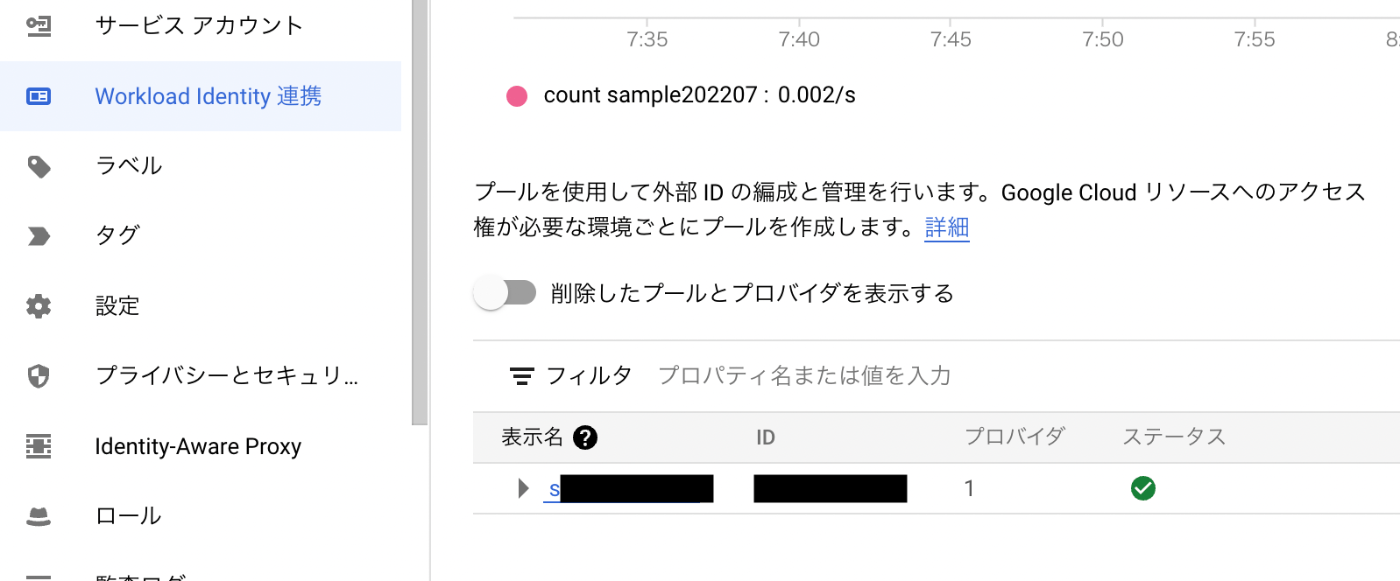
Click on the ID on this screen.
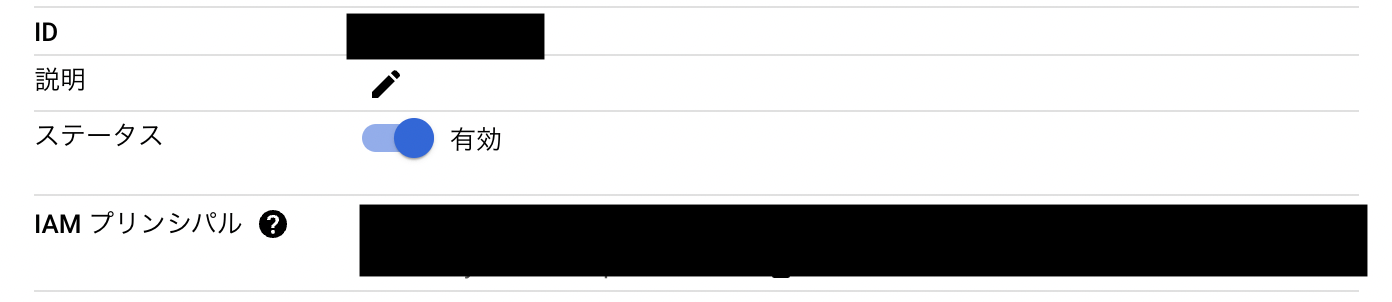
Copying and pasting the IAM principal starting with projects/~ from this screen worked fine.
Discussion