iTranslated by AI
Configuring Dependencies and Health Checks to Prevent Log Loss in FireLens




TL;DR
- Using FireLens makes it easy to implement log forwarding for applications running on ECS.
- However, simply using the configuration examples from the documentation actually resulted in logs being dropped.
- To prevent log loss, I configured container dependencies and Healthchecks.
What is FireLens?
To put it simply, FireLens is a feature that allows you to use a sidecar container for log forwarding using Fluent Bit or Fluentd just by defining it in the ECS task definition. It seems that FireLens itself is not a standalone service or software.
See below for details:
Symptoms
In a project I was involved with, we used ECS to run our application, and application logs were forwarded via FireLens using Fluent Bit.
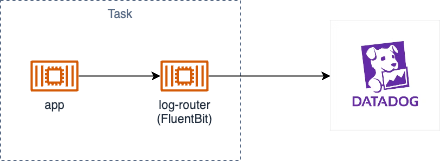
Log forwarding configuration
The logs were sent to Datadog, where we monitored that ScheduledTasks were running during their expected time slots via log monitoring.
Occasionally, we found that logs weren't being detected, triggering monitoring alerts. However, when we checked the container status on the ECS side, there was evidence that the ScheduledTask had run at the expected time, and we could confirm the resulting data updates in the database. This gave rise to the theory that Fluent Bit was dropping logs.
Cause (Likely)
When using FireLens, a log forwarding container starts up in a single Task separately from the application container, as shown in the diagram below.
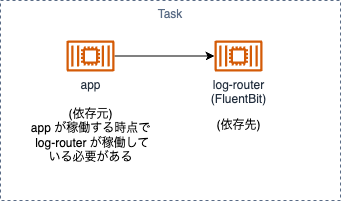
Dependencies between containers running within a Task
If you have used Docker in a development environment, you might know that when there are dependencies between multiple containers, you can set dependencies in compose.yml to control the startup order. Otherwise, there is a probabilistic chance that the dependent container hasn't started when the source container starts, leading to unstable container startup.
It was thought that the same thing was happening on ECS.
Solution
Setting container dependencies
In an ECS task definition, you can set dependencies between containers using dependsOn.
Below is an excerpt from the task definition. Here, the log-router container refers to the container running Fluent Bit.
      "containerDefinitions": [
        {
          "name": "app",
          "dependsOn": [
            {
              "condition": "HEALTHY",
              "containerName": "log-router"
            }
          ],
          ... omitted
        },
        {
          "name": "log-router",
          ... omitted
        }
      ]
- Declares that the
appcontainer depends on thelog-routercontainer. - Indicates waiting until the
log-routerreaches aHEALTHYstate.
This completes the dependency settings for the app container, but now we need to configure the Healthcheck for the log-router container.
Configure Healthcheck for Fluent Bit container
Fluent Bit configuration
Setting up the Healthcheck on the Fluent Bit side is a bit tedious as it requires preparing a separate configuration file. In this case, I decided to prepare the following configuration file and place it in S3. (The filename can be anything, but for various reasons, I named it parse-json.conf this time.)
 [SERVICE]
     Parsers_File /fluent-bit/parsers/parsers.conf
     Flush 1
     Grace 30
+    HTTP_Server  On
+    HTTP_Listen  0.0.0.0
+    HTTP_PORT    2020
HTTP_Server, HTTP_Listen, and HTTP_Port are the settings added for the Healthcheck.
I referred to the following for these settings:
log-router container configuration
Configure the healthCheck in the log-router container of the task definition as follows:
        {
          "name": "log-router",
          "firelensConfiguration": {
            "type": "fluentbit"
          },
          "environment": [
              {
                "name": "aws_fluent_bit_init_s3_1",
                "value": "arn:aws:s3:::(S3 bucket where the fluentbit config file is placed)/parse-json.conf"
              }
          ],
          "healthCheck": {
            "command": [
              "CMD-SHELL",
              "curl -f http://127.0.0.1:2020/api/v1/uptime || exit 1"
            ],
            "interval": 10,
            "retries": 3,
            "startPeriod": 30,
            "timeout": 5
          },
          ... omitted
        }
- The
environmentsection indicates the location of the S3 bucket where the Fluent Bit configuration is placed. - The
healthChecksection declares the health check method (the configuration content was based on the Example in the official repository).
Results
After adding these settings, it seems that the alerts from log monitoring have subsided for now, so it appears that these measures have improved the situation.
Since only a few days have passed since the implementation, it's not yet possible to determine for certain whether this is due to the measures or just a coincidence... (I'd like to update the status here after a while.)
Conclusion
It is highly likely that the cause of the occasional log monitoring alerts was log loss, although I haven't been able to verify it. However, based on the circumstantial evidence that the number of alerts has definitely decreased, it seems highly probable.
In this infrastructure build, using FireLens reduced the number of things we had to think about in advance regarding the implementation of log forwarding, but I think it was a case where we overlooked something that should have been considered on the user side.
It was a basic mistake, so to speak (perhaps that's why?), but since I don't see many articles like this online, I'm publishing it as a post.
Discussion