iTranslated by AI
The content below is an AI-generated translation. This is an experimental feature, and may contain errors. View original article
🐅
Registering a Domain on Onamae.com and Configuring DNS with AWS Route 53




Introduction
I registered a domain on Onamae.com and tried to set up DNS with AWS Route53. However, I got a bit stuck because I forgot to change the Name Server settings on Onamae.com to the AWS Name Servers.
I am writing this as a reminder for myself and to help ensure that others don't run into the same issue.
TL;DR
Steps
- Register a domain on Onamae.com
- Create a hosted zone for the target domain in Route53
- Copy the Name Servers from the hosted zone created in step 2

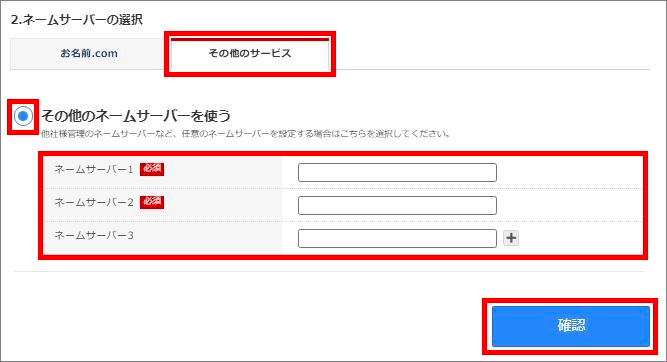
- Paste the Name Servers copied in step 3 into the Onamae.com Name Server settings section
Conclusion
I had trouble finding the cause even after searching on Google, so I am listing some errors that can occur when you forget to configure the Name Servers, in hopes that this will help others find the solution.
- I configured the domain in AWS or GCP, but name resolution is not working.
- I configured the domain in AWS or GCP, but I cannot obtain a certificate via ACM (or Google SSL Certificate).
- In the case of ACM, the
Statusdoes not change toSuccess. This is what I was struggling with.
- In the case of ACM, the
Reference
Discussion