iTranslated by AI
How Microsoft Entra Private Access Bends Packets (I Couldn't Quite Figure It Out)




TL;DR
- I want to clarify what Microsoft Entra Private Access is actually doing
- I couldn't figure out most of it, but maybe I understood a little bit
- Troubleshooting seems like it would be a pain if packets are bent using methods other than routing
Introduction
One service I've personally liked recently is Microsoft Entra Private Access (MEPA).
In general terms, it is Zero Trust Network Access (ZTNA), which allows remote access without using a VPN.
You can refer to the documentation Learn about Microsoft Entra Private Access, though it might be a bit hard to grasp.
Imagine you are at home, your PC's private IP address is 192.168.0.5/24, and you can remotely connect via Desktop to a server at your company with a private IP address of 192.168.11.200/24 as is, without establishing a VPN.
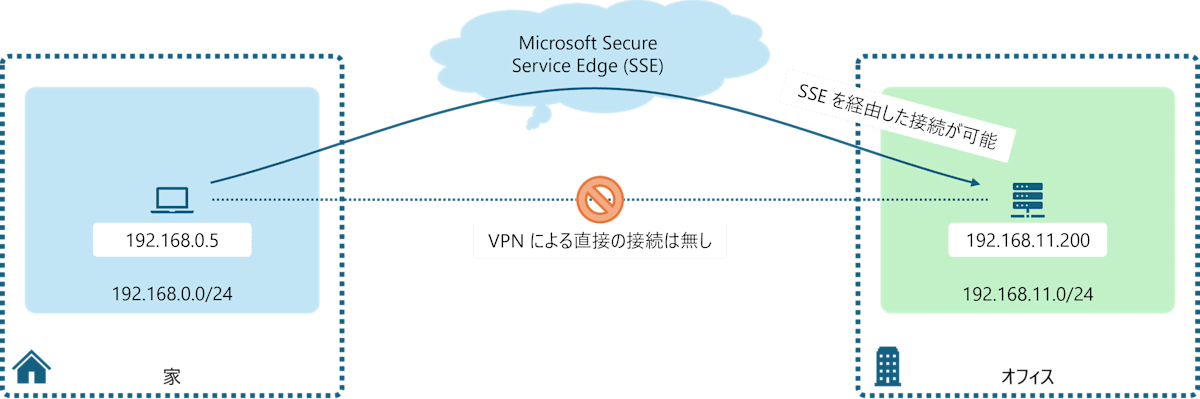
remote access with SSE
Although it doesn't use a VPN, you do need to install a dedicated agent-like component, so it feels like that agent is doing something behind the scenes.
With a VPN, if you look at the routing table, you can say, "Ah, that makes sense," and what's happening is clear. However, from my brief testing with MEPA, there were no changes in the routing table. I wondered why, so I decided to dig a little deeper.
Trying out various Get-Net* commands
Nothing shows up in route print, and it doesn't look like any interfaces have been added for MEPA, so I have no clue at all...
For now, I'll just type Get-Net, press tab, and look for commands that seem relevant...
After trying several things, I found "Global Secure Access Client" in the results of Get-NetAdapterBinding.
Here is the output from my PC (partially omitted).
PS C:\Users\ikko> Get-NetAdapterBinding

Name                           DisplayName                                        ComponentID          Enabled
----                           -----------                                        -----------          -------
Wi-Fi                          File and Printer Sharing for Microsoft Networks    ms_server            True
Wi-Fi                          Microsoft LLDP Protocol Driver                     ms_lldp              True
Wi-Fi                          Client for Microsoft Networks                      ms_msclient          True
Wi-Fi                          Microsoft Network Adapter Multiplexor Protocol     ms_implat            False
Wi-Fi                          Internet Protocol Version 6 (TCP/IPv6)             ms_tcpip6            True
Wi-Fi                          Internet Protocol Version 4 (TCP/IPv4)             ms_tcpip             True
Wi-Fi                          Link-Layer Topology Discovery Mapper I/O Driver    ms_lltdio            True
Wi-Fi                          Hyper-V Extensible Virtual Switch                  vms_pp               False
Wi-Fi                          Link-Layer Topology Discovery Responder            ms_rspndr            True
Wi-Fi                          Npcap Packet Driver (NPCAP)                        INSECURE_NPCAP       True
Wi-Fi                          Global Secure Access Client                        GlobalSecureAccessD… True
Wi-Fi                          Bridge Driver                                      ms_l2bridge          True
Wi-Fi                          QoS Packet Scheduler                               ms_pacer             True
<snipped>
In the GUI, this corresponds to going to Control Panel > Network and Internet > Network and Sharing Center, clicking "Change adapter settings" on the left to show the list of interfaces, right-clicking a relevant interface like Wi-Fi, and then displaying the Properties.
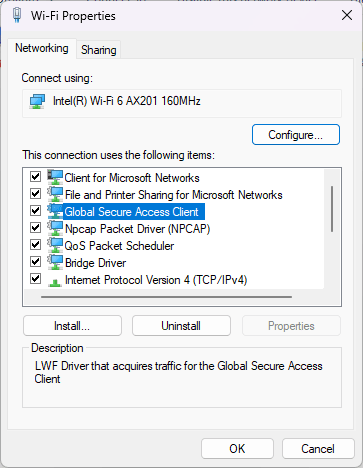
Wi-Fi properties
Where are the settings located?
So, I tried to track things down by staring at procmon.
Registry
First, I arrived at the registry key: Computer\HKEY_LOCAL_MACHINE\SOFTWARE\Microsoft\Global Secure Access Client\ForwardingProfile.
When MEPA is active, a nicely formatted JSON is stored here, which seems to match the configuration in the Entra admin center.
In this case, I've set up 192.168.11.0/24 as the remote network and directed 22/tcp, 80/tcp, 443/tcp, and 3389/tcp toward it.
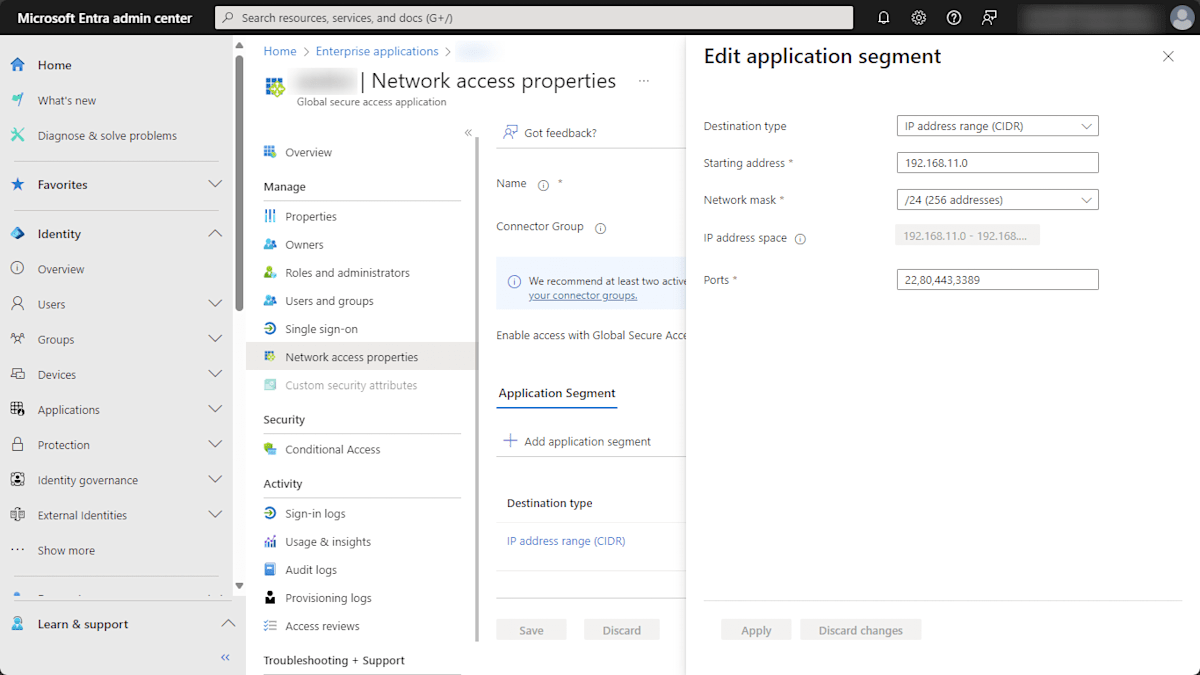
Entra admin center - Network access properties
ForwardingProfile
{
    "policy": {
        "id": "xxxxxxxx-xxxx-xxxx-xxxx-92d6d4889ec8",
        "tenantId": "xxxxxxxx-xxxx-xxxx-xxxx-92d6d4889ec8",
        "channels": [
            {
                "id": "xxxxxxxx-xxxx-xxxx-xxxx-2a8ff07f474c",
                "name": "Private",
                "naasAuthorizationTokenContext": {
                    "clientAppId": "xxxxxxxx-xxxx-xxxx-xxxx-c8e0298fee16",
                    "audienceScope": "xxxxxxxx-xxxx-xxxx-xxxx-168f2376341c/NetworkProfile.Private",
                    "clientRedirectUri": "https://login.microsoftonline.com/common/oauth2/nativeclient"
                },
                "edgesSettings": {
                    "primaryEdges": [
                        {
                            "edgeAddress": "xxxxxxxx-xxxx-xxxx-xxxx-92d6d4889ec8.private.client.globalsecureaccess.microsoft.com",
                            "edgePort": 443,
                            "isSecure": true
                        }
                    ],
                    "secondaryEdges": []
                },
                "diagnosticUri": "https://private.edgediagnostic.globalsecureaccess.microsoft.com/connectivitytest/ping"
            }
        ],
        "rules": [
            {
                "id": "xxxxxxxx-xxxx-xxxx-xxxx-111111111111",
                "channelId": "xxxxxxxx-xxxx-xxxx-xxxx-2a8ff07f474c",
                "order": 0.0,
                "action": "Bypass",
                "hardening": "Bypass",
                "matchingCriteria": {
                    "address": {
                        "ips": [],
                        "fqdns": [
                            ".+\\.client\\.globalsecureaccess\\.microsoft\\.com",
                            ".+\\.client\\.globalsecureaccess\\.microsoft\\.com\\..+",
                            "aps\\.globalsecureaccess\\.microsoft\\.com"
                        ]
                    },
                    "ports": [
                        {
                            "start": 0,
                            "end": 65535
                        }
                    ],
                    "protocol": "Tcp"
                },
                "appAuthorizationTokenContext": null
            },
            {
                "id": "xxxxxxxx-xxxx-xxxx-xxxx-333333333333",
                "channelId": "xxxxxxxx-xxxx-xxxx-xxxx-2a8ff07f474c",
                "order": 1.0,
                "action": "Tunnel",
                "hardening": "Bypass",
                "matchingCriteria": {
                    "address": {
                        "ips": [],
                        "fqdns": [
                            "private\\.edgediagnostic\\.globalsecureaccess\\.microsoft\\.com"
                        ]
                    },
                    "ports": [
                        {
                            "start": 0,
                            "end": 65535
                        }
                    ],
                    "protocol": "Tcp"
                },
                "appAuthorizationTokenContext": null
            },
            {
                "id": "xxxxxxxx-xxxx-xxxx-xxxx-a7240ed867b4",
                "channelId": "xxxxxxxx-xxxx-xxxx-xxxx-2a8ff07f474c",
                "order": 2.0,
                "action": "Tunnel",
                "hardening": "Bypass",
                "matchingCriteria": {
                    "address": {
                        "ips": [
                            {
                                "start": 3232238336,
                                "end": 3232238591
                            }
                        ],
                        "fqdns": []
                    },
                    "ports": [
                        {
                            "start": 22,
                            "end": 22
                        },
                        {
                            "start": 80,
                            "end": 80
                        },
                        {
                            "start": 443,
                            "end": 443
                        },
                        {
                            "start": 3389,
                            "end": 3389
                        }
                    ],
                    "protocol": "Tcp"
                },
                "appAuthorizationTokenContext": {
                    "clientAppId": "xxxxxxxx-xxxx-xxxx-xxxx-c8e0298fee16",
                    "audienceScope": "api://xxxxxxxx-xxxx-xxxx-xxxx-0ec73e857d9e/user_impersonation",
                    "clientRedirectUri": "https://login.microsoftonline.com/common/oauth2/nativeclient"
                }
            }
        ],
        "privateDnsRules": []
    },
    "configuration": {
        "apsSettings": {
            "requestPollingIntervalInSeconds": 300
        },
        "flowHandler": {
            "graceTimeInMs": 3500
        },
        "userModeLogs": {
            "logSizeInMB": 2.0,
            "fileCount": 3,
            "directoryPath": "c:\\naaslogs"
        },
        "managementService": {
            "hostAcquisitionInternalSubNet": {
                "subnetAddress": 101056512,
                "subnetMask": 4294901760
            },
            "policyUpdateFlushOsCache": false,
            "cacheAuthenticationToken": true,
            "authenticationCacheRefreshIntervalInSeconds": 20
        },
        "edsSettings": {
            "pollingIntervalInSeconds": 10
        }
    },
    "settingsVersion": "CPV:RV:2024-06-11T08:12:31.9106340Z_CPLM:20240611081007.000_NAV:CommonVersion_14",
    "controlPlanePoliciesVersion": "20240611081007.000",
    "apsContextData": "{\"LastModifiedAt\":\"2024-06-16T07:47:14.2347672+00:00\",\"AttemptsCountOnConfigSyncInProgress\":0,\"LastResponseStatus\":\"SettingsNotModified\",\"AssignedGSAApplicationsIds\":[\"xxxxxxxx-xxxx-xxxx-xxxx-f1b4b9798fe0\"],\"InternetIpBasedCatchAllRuleInjected\":false,\"InjectorsResults\":{\"InternetIpBasedAcquireAllRuleInjector\":{\"NewDataInjected\":false,\"InjectorSettingsJson\":\"{\\\"IpSubnets\\\":[{\\\"Value\":\\\"0.0.0.0/0\\\"}],\\\"IpRanges\":null}\"},\"InternetFqdnBaseAcquireAllRuleInjector\":{\"NewDataInjected\":false,\"InjectorSettingsJson\":\"{\\\"Regex\":\\\"\\\"}\"}}}"
}
3232238336 mentioned below is, after various calculations, the decimal representation of 192.168.11.0, and 3232238591 represents 192.168.11.255.
The ports and protocol sections are straightforward, so they are easy to understand.
                "matchingCriteria": {
                    "address": {
                        "ips": [
                            {
                                "start": 3232238336,
                                "end": 3232238591
                            }
                        ],
                        "fqdns": []
                    },
                    "ports": [
                        {
                            "start": 22,
                            "end": 22
                        },
                        {
                            "start": 80,
                            "end": 80
                        },
                        {
                            "start": 443,
                            "end": 443
                        },
                        {
                            "start": 3389,
                            "end": 3389
                        }
                    ],
                    "protocol": "Tcp"
                },
NDIS lightweight filter (LWF)
The description in the previous screenshot says "LWF Driver that acquires traffic for the Global Secure Access Client," which suggests it's using something called "LWF."
Looking into it, the documentation for Using Virtual Switch Filtering says, "These layers are accessed from a type of NDIS lightweight filter (LWF) driver called a virtual switch extension filter."
While it's still a bit obscure, it seems to be "something" like a packet filter, and it likely processes packets passing through the interface by intercepting them via this filter.
Filter Drivers also features a diagram showing that multiple filter modules can be chained together.
It seems MEPA has been inserted as one of these modules.
netcfg
While investigating further, I found that netcfg is a command used to manage these LWFs.
I couldn't figure out the full details, but it seems like you create an .inf file and install it using the netcfg command.
GlobalSecureAccessDriver.inf
So, I went looking for a likely .inf file and found it at "C:\Program Files\Global Secure Access Client\GlobalSecureAccessDriver.inf".
I couldn't grasp the specific details, but GlobalSecureAccessDriver.sys in the same folder seems to be the core of the filter.
<snipped>
;-------------------------------------------------------------------------
; Installation Section
;-------------------------------------------------------------------------
[Install]
AddReg=Inst_Ndi
; All LWFs must include the 0x40000 bit (NCF_LW_FILTER). Unlike miniports, you
; don't usually need to customize this value.
Characteristics=0x40000
NetCfgInstanceId="{000062a1-04c5-4758-8497-5d7e655dc0d3}"
Copyfiles = globalsecureaccessdriver.copyfiles.sys

[SourceDisksNames]
1=%Mnap_Desc%,"",,

[SourceDisksFiles]
; TODO: Customize the name of your binary here.
; Also include any related files that should be installed with your driver.
globalsecureaccessdriver.sys=1

[DestinationDirs]
DefaultDestDir=12
globalsecureaccessdriver.copyfiles.sys=12

[globalsecureaccessdriver.copyfiles.sys]
; Customize the name of your binary here.
globalsecureaccessdriver.sys,,,2
<snipped>
Since GlobalSecureAccessDriver.sys is a binary file, I couldn't open it and read its contents...
GlobalSecureAccessStartServices.ps1
Also, several PowerShell scripts, including C:\Program Files\Global Secure Access Client\GlobalSecureAccessStartServices.ps1, were located in the same folder.
$tunnelingServiceReturnCode = StartService -ServiceName "GlobalSecureAccessTunnelingService"
$pluginInstanceHostReturnCode = StartService -ServiceName "GlobalSecureAccessManagementService"
$policyProviderDaemonReturnCode = StartService -ServiceName "GlobalSecureAccessPolicyRetrieverService"
Judging from the names, it feels like GlobalSecureAccessTunnelingService is the core of MEPA, and GlobalSecureAccessPolicyRetrieverService is responsible for retrieving the content written to the registry.
Troubleshooting seems difficult
That's the impression you get, isn't it? Yes, I completely agree.
Perhaps because of this, the Microsoft Entra Global Secure Access application comes with various features, ranging from status display to log acquisition and viewing.
Rather than executing commands or checking the Control Panel as before, it seems like troubleshooting will involve looking at the content displayed in this application and the Entra admin center.
In fact, if you log in as a local user rather than a Microsoft Entra user, a message saying "disabled by your organization" appears from Global Secure Access, and it's quite hard to tell which tenant it's referring to...
Summary
My understanding so far is as follows:
-
GlobalSecureAccessPolicyRetrieverServiceretrieves the relevant settings from Microsoft Entra.- The retrieved content is written to the registry around
Computer\HKEY_LOCAL_MACHINE\SOFTWARE\Microsoft\Global Secure Access Client\ForwardingProfile. - I confirmed this behavior using procmon, so it's certain.
- The retrieved content is written to the registry around
-
GlobalSecureAccessTunnelingServiceis likely the core of MEPA.- I'm not sure, but it might be changing LWF settings based on the retrieved content.
- Looking at procmon, I can see
GlobalSecureAccessTunnelingServiceaccessing150.x.x.x:https, which is likely the MEPA endpoint.
-
GlobalSecureAccessDriver.sysis installed viaC:\Program Files\Global Secure Access Client\GlobalSecureAccessDriver.inf.- This seems to be the core of the LWF.
- This is probably what you see when you go to the interface properties from the Control Panel.
- Using the filter driver mechanism, various processes can be added to packets passing through the interface.
- After the registry is updated by
GlobalSecureAccessPolicyRetrieverService,GlobalSecureAccessManagementServiceseems to restartGlobalSecureAccessTunnelingService, but I haven't seen the registry being read during that process in procmon yet...
It seems it was also mentioned in the documentation for Global Secure Access client.
The Global Secure Access client uses Lightweight Filter (LWF) drivers to capture traffic, whereas many other Security Service Edge (SSE) solutions integrate as a Virtual Private Network (VPN) connection. This difference allows the Global Secure Access client to coexist with these other solutions. The Global Secure Access client captures traffic based on the configured traffic forwarding profiles.
There are several services that claim to be ZTNA, and ZTNA often implies being "VPN-free," so other implementations might be similar. I'd like to look into Zscaler or Prisma Access as well.
References
-
The Exit of Microsoft Entra Private Access
In this article, I investigate the exit side of MEPA.
-
Differences between ZTNA and VPN (With Microsoft Entra Private Access in mind)
I briefly summarized what the differences between ZTNA and VPN are and why they are beneficial.
- Learn about Microsoft Entra Private Access
- Global Secure Access client
- procmon
Get-NetAdapterBinding
netcfg
- Using virtual switch filtering
- Filter Drivers
- Components of a Driver Package
- Getting started with Microsoft Entra Global Secure Access (Private Access Edition)
- Wireshark
Update log
- Added docs link for Global Secure Access client - 2024/06/17
- Added image of Secure Service Edge (SSE) - 2024/06/17
- Added screenshot of Entra admin center - 2024/06/17
- Added points about similarity to Wireshark, etc. - 2024/07/14
Discussion
大変勉強になります!私もリリース当初に仕組みが気になり、ログ漁っていろいろ調べてました。Zscaler も Windows フィルタ ドライバーが使えるようになっているようです。(以前は仮想 NIC + ルーティングだった)
お互いに他のソリューションと共存を謳っていますが、フィルタ ドライバー同士の場合にどうなるか気になりますね。
わーい!お返事ありがとうございます!
そう、仕組みが気になっちゃうのでいろいろ調べてみました!聞いてる感じだと Cisco の Secure Access も filter らしいので全然かち合いそうだなという気がしています。。試せる範囲で組み合わせて検証してみたいと思っていますー!