iTranslated by AI
Building a CLI in 90 Minutes with Claude Code and Vibe Coding


Introduction
Recently, I've been eager to push Claude Code to its limits.
I've actually started feeling that my output has increased quite a bit, but when I wanted to check the changes in my output at a glance, I thought my only option was looking at things like "Insights" on repositories.
However, even with Insights, you're often working on multiple projects simultaneously.
If I wanted to see the increase or decrease, I realized I wanted to see everything across the board.
While I figured a search would probably yield results quickly, I thought I might as well try to build something with Claude Code to generate it, so I started creating.
And this is what I came up with:
From here on, based on the Claude Code work logs, I'll record the flow of how I brought this CLI to completion.
"I want to make a site to check GitHub activity..."
A project that started with that single sentence was released about 1 hour and 20 minutes later as a CLI tool installable via npm. What's more, everything from coding to release was done together with AI.
This time, I'll talk about my experience developing "gh-receipt," a CLI tool that displays GitHub activity in a receipt-like style, using Claude Code and Vibe Coding.
Why I Chose CLI
Initially, I was thinking of creating a "Web site to check GitHub activity." However, considering permission issues with private repositories, I pivoted to a CLI tool.
The AI suggested implementing it as a gh CLI extension. The reasons were:
- Easy authentication (uses authentication already configured via
gh auth login) - High affinity with the GitHub ecosystem
- Easy access to the GraphQL API using the
gh apicommand
Since it was a small CLI, the technical selection went very smoothly.
Development Flow
16:20 - Initial Implementation (v1.0.0)
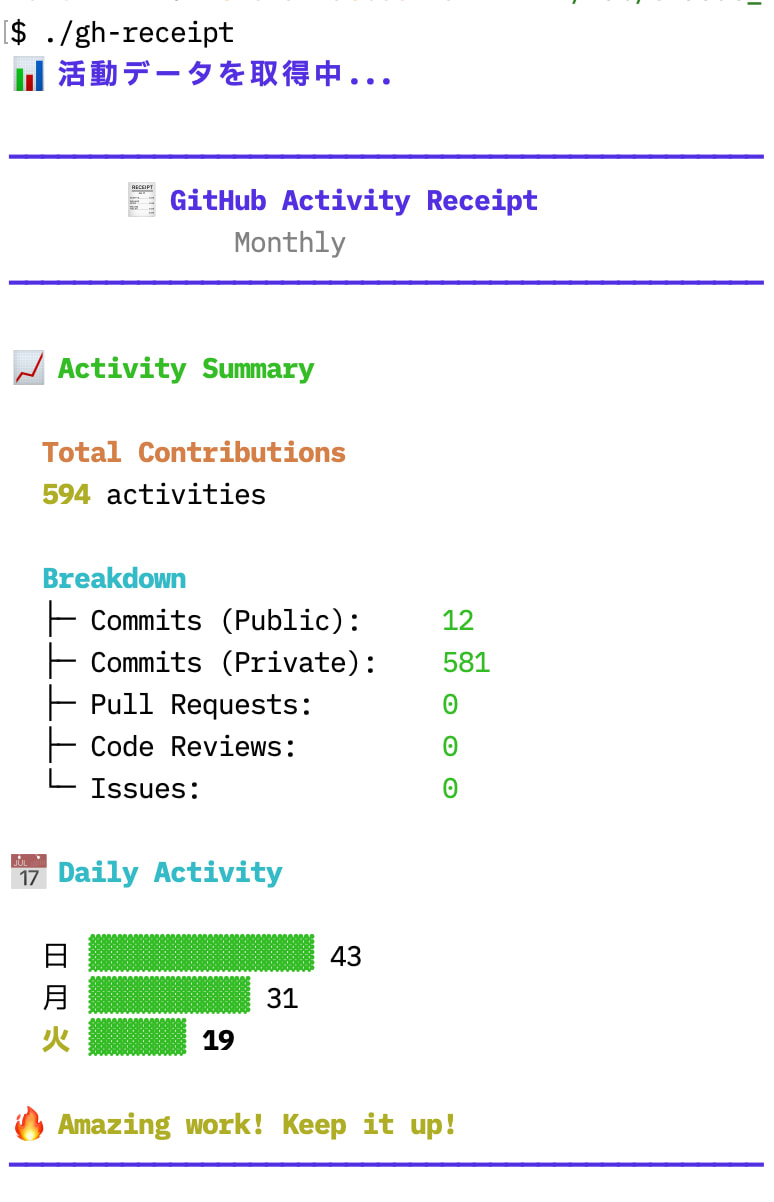
The first version only had basic activity display features. It featured colorful graphs showing summaries by period (Today/This Week/This Month) and active repository rankings.
gh-activity nano72mkn
17:01 - Adding Period Options (v1.1.0)
-w, --weekly    # Weekly report (7 days)
-m, --monthly   # Monthly report (30 days)
-y, --yearly    # Yearly report (365 days)
-d, --days N    # Custom period
17:25 - Moving to a Receipt-style Design (v2.0.0)
This was the turning point. When I asked to "make it look like a receipt," it produced a wonderful design on the first try.
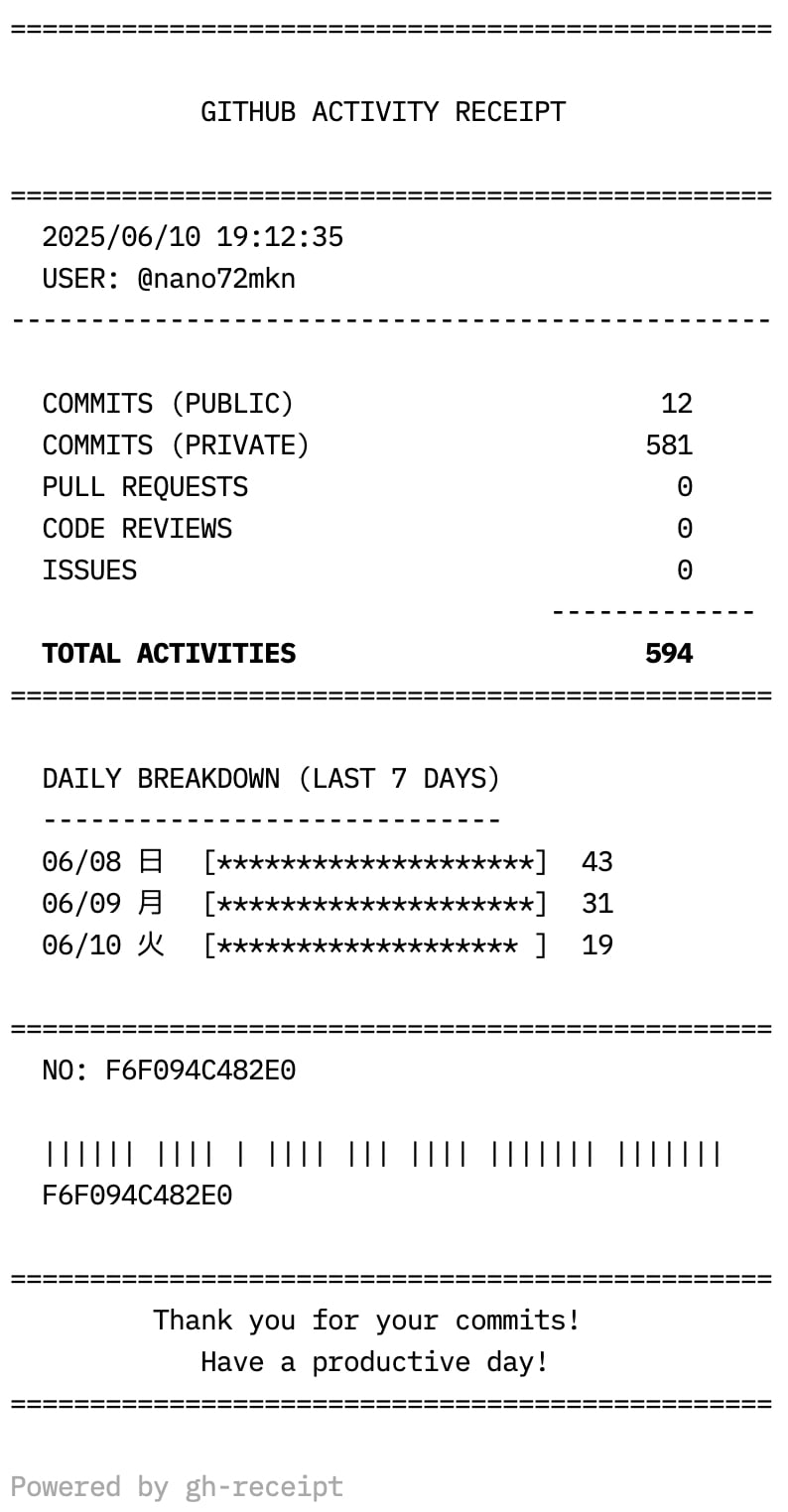
Moreover, the design didn't break during subsequent feature additions, and the look and feel remained consistent.
17:32 - Diff Comparison Feature (v2.1.0)
gh-receipt -w --diff # Comparing this week vs. last week
Added a feature where increases are shown in green (+) and decreases in red (-).
17:41 - Privacy Mode (v3.1.0)
Added the --public option to exclude private repositories, keeping SNS posts in mind.
Technical Ingenuity
There are several technical cleverness that the AI implemented:
Cross-platform Compatibility
Automatically resolved the issue where the date command format differs between macOS and Linux:
if date -v -1d >/dev/null 2>&1; then
    # macOS
    FROM_DATE=$(date -v-${DAYS}d -u +%Y-%m-%dT%H:%M:%SZ)
else
    # Linux
    FROM_DATE=$(date -u -d "${DAYS} days ago" +%Y-%m-%dT%H:%M:%SZ)
fi
Leveraging GitHub GraphQL API
Efficiently fetching only the minimum required data:
query($username: String!, $from: DateTime!, $to: DateTime!) {
  user(login: $username) {
    contributionsCollection(from: $from, to: $to) {
      totalCommitContributions
      restrictedContributionsCount
      contributionCalendar {
        totalContributions
      }
    }
  }
}
Key Points for Using Claude Code and Vibe Coding
1. Just Communicate Your Requests
Simply by saying "I want to make X...", the AI acts on its own. I could entrust everything from conception to implementation.
2. As a Consultant for Technical Selection
It made appropriate decisions on what mechanisms to use (whether to use shell or Node.js, etc.) and selected technologies suitable for the concept.
3. As a Design Partner
It presented multiple design proposals, and choosing from them felt just like consulting with a human designer.
4. Continuous Improvement
Even when adding features for each version update, it implemented them while maintaining overall consistency.
Lessons Learned
- The importance of starting small: Precisely because it was a small scope like a CLI, the development progressed smoothly.
- How to interact with AI: If you communicate specific requests, the AI will propose appropriate implementation methods.
- Consistency in design: Text-based CLIs were an area where AI truly excels.
Summary
With Claude Code and Vibe Coding, you can go from an idea to implementation and release in a surprisingly short amount of time. This time, I was able to complete the CLI tool in about 1 hour and 20 minutes.
The key is not to strive for too much perfection and to "just try communicating what you want to make." The AI will support everything from technical selection to implementation.
If you are interested, please give it a try:
npx gh-receipt
Repository: https://github.com/nano72mkn/gh-receipt
Discussion