iTranslated by AI
My AI Coding Journey in 2025




In 2024, my coding volume had already decreased significantly due to heavy AI-assisted coding. In 2025, with the improved quality of AI-generated code, I've honestly barely written any code myself. Since Cursor generated a summary of my usage for this year, I'll use it to look back at my AI coding journey over the past year.

Cursor usage statistics; the 99-day streak is related to the Expo (did I code on New Year's Day...?). The blacked-out sections represent times when I was using other CLI tools.

History of models used in Cursor: Claude 3.5 Sonnet → 3.7 Sonnet → (break) → Composer 1 → Opus 4.5.
January - March
Tools used: Cursor 0.4x (Claude 3.5 Sonnet, 3.7 Sonnet)
Osaka Healthcare Pavilion
Right in the middle of content implementation for the Osaka Healthcare Pavilion. I remember writing some server-side Python code myself. For the front-end Unity code, I did some manual extraction since large-scale refactoring wasn't quite working yet. AI was extremely helpful in understanding code written by other team members. It also generated pre-processing scripts for assets, boilerplate ffmpeg processing scripts for validation videos, large-scale log analysis scripts, and server status check scripts. Surprisingly, it also creates PowerShell scripts.
Zap (Unreleased)
I created a file transfer app running on Cloudflare Workers because transferring files to PCs on different network segments on-site was a hassle. By setting a room ID, you can join from another PC to enter a chat room, making file transfers easy. I implemented full end-to-end encryption using libsodium and public-key cryptography, which was completed in just a matter of minutes (by the AI). It seems I built this during about a week of New Year's holidays.

The mysterious copy added is typical of AI
April
Tools used: Cursor 0.4x (3.7 Sonnet)
Build System Update
Updating a complex build system assembled with Bazel and Gradle. Since leaving it outdated causes issues with OS updates, it needs periodic maintenance, but it's a pain—so I left it all to the AI. I just kept fixing the build scripts until it could build without issues.
May
Tools used: Cursor 0.4x (3.7 Sonnet)
BudouX-CSharp
Since the Expo work settled down, I tried out Devin. I wanted to use BudouX in C#, so I had Devin create it. Since there was already a Python implementation of BudouX, making it easy to verify the correct output, I just gave the instruction "implement this so it produces the exact same results as the Python version," and it was done immediately. Well, the original implementation wasn't that difficult, but this was one of those moments where I thought, "AI is amazing."
mcp-unity
I started Unity game implementation, and since I needed an MCP server to let Claude Code read Unity Editor logs, I introduced mcp-unity. However, the read-related features were a bit weak, so I submitted a few PRs. I left both the implementation and the PR text to the AI, so I was a bit nervous, but it was merged properly. Another PR using an unofficial Unity 6 API was predictably rejected lol (I'm now using a different MCP server, MCP for Unity).
I had Claude Code handle PR creation, but it ended up submitting some strange PRs (several times), which left some weird stuff behind and was embarrassing.
June
Tools used: Claude Code (Claude Opus 4)
Silent Cleaning
This month, Claude Code was becoming popular, so I switched over completely from Cursor. The main project was the "Silent Cleaning" Unity game implementation, and by this time, I was leaving almost all code to the AI. However, the AI quality at this point was still limited (depending on how you used it, of course); there were redundant similar classes, architectural issues, and difficulties in fixing complex mechanisms that didn't fit entirely within the context. There were painful moments where fixing one thing would break another. While PR reviews by Claude Code Action were sometimes annoying, the points raised were generally accurate and helped improve quality.
As a related tool, I created one that triggers a build on Unity Cloud Build when code is merged into the GitHub release branch. Once the build completes, it fetches the diff from GitHub, summarizes it with Gemini, and posts it to Slack. I remember running another Claude Code instance in the background while implementing the game, which was mentally exhausting. (Later, this tool was extended for other projects to integrate with the App Store and add summaries to TestFlight.)
unity-docs-mcp
I thought it would be nice to have an MCP for Unity documentation, but Contex7 didn't have good documentation for it. So, I tried having it create an MCP server that directly turns the Unity documentation site into an MCP server. I had it analyze the search system, and it turned out the search index was a single massive file that the client used via JS, so I could implement it without putting load on the server. (Though I haven't really used it much.)
ccusage-menubar
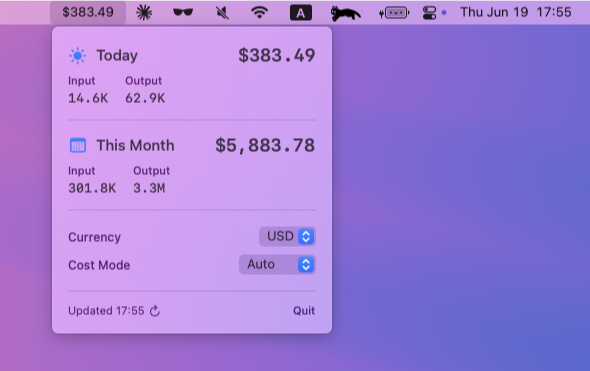
As I was doing this, the usage costs for Claude Code shot up (it's a fixed price for the Pro plan so it doesn't matter, but it became interesting), so I built a tool to check usage on the macOS menu bar. There was an existing CLI tool called ccusage, so I had the AI analyze how it works. You can build a Swift app without using Xcode, and if you leave packaging and notarization to the AI, it works. Amazing. And it was done in almost a day, while managing another project simultaneously. (Though I don't use it anymore.)
ccusage-iterm2

Claude Code's billing calculation changed so often that it became annoying to track, so I decided it was better to just show the ccusage output directly in the iTerm status bar and created ccusage-iterm2. It took a few hours. (Though I don't use it anymore.)
curtain-bot
I also had it create a bot that allows me to operate office roller blinds from Slack. The Aqara roller blinds don't have much public information, but I told the AI to find the documentation and implement it, and it worked. I can open and close them using natural language.

July
Tools used: Claude Code (Claude Opus 4)
everies
I had the AI implement the native plugins for macOS/iOS/Android used in everies (currently under development) in Rust. Implementing it myself would be too much of a hassle, but the AI handles it smoothly, which is great. I also left the Web app for prompt adjustment, TTS streaming, the logging system via Firebase, and real-time log monitoring entirely to the AI.
roslyn-mcp
lsmcp seemed like a good MCP server for connecting LSP to agents, but it didn't support Unity C#, so I started analyzing it to see if I could modify it. It started working halfway through, but the Roslyn LSP is quite specific, so I decided it might be better to create it separately. I had it reference the C# Dev Kit source code and generate a ton of unit tests for Roslyn LSP, and it started working reasonably well. However, in the end, using MCP for Unity to build and read the error console was sufficient, so I don't use it. lol (And just recently, Claude Code Plugin supposedly officially added LSP support...)
JDL-Live-Start-Detector
I created a tool that detects the race start sound from archive footage of JAPAN DRONE LEAGUE live broadcasts and generates a link to jump directly to that time. I have no idea how the sound detection works in detail, but it generates links with 99% accuracy.
August
Tools used: Codex CLI (GPT-5), CodeRabbit
Codex CLI has gotten better, so I switched from Claude Code. Subscribed to ChatGPT Pro. Introduced CodeRabbit. Reviews via Claude Code Action are not bad, but since it's a dedicated review service, the quality is higher. I wrote a script to collect CodeRabbit PR comments on GitHub and pass them to an Agent to batch-apply review corrections. Humans are now just assistants in the interactions between AIs.
YourLaps 2.0
I decided to properly support Windows for the AruCo marker-based drone race lap measurement system, YourLaps, so I reconstructed it from scratch. By clarifying goals—such as selecting inference runtimes for running image recognition tasks in a macOS/Windows Electron environment and model training—and setting up performance measurement methods, I managed to make it perform better than the previous version almost entirely via AI. (But development stalled while I struggled with screen design...)
Nano-Banana-Slack-Bot
Since Nano Banana can be used quite freely via API, I turned it into a Slack bot. It was completed quickly in one day.
September
Tools used: Codex CLI (GPT-5)
Bihin-Bot
An internal Slack-integrated supply management system. The plan was for it to answer inventory inquiries or tell you where items are using natural language, but I reconsidered and thought, "wouldn't a Web app be better?" I started building one, but minor design adjustments and testing didn't go well with Codex and Playwright MCP, so I found it annoying and left it unfinished... (It might work now since the built-in browser in Cursor has improved significantly.)
October
Tools used: Codex CLI (GPT-5)
Home System
I had it build a mechanism to operate the home Switchbot LED from a macOS shortcut using Cloudflare Workers. It's great that things I "wish were possible" can be built so quickly.
November
Tools used: Cursor 2 (Composer 1), Warp
Cursor had a major version upgrade to 2.0, which looked promising, so I switched from Codex CLI. The Composer 1 model baked into Cursor generates code quite quickly, so it has become my main tool.
EPDEnvClock
An ESP32 Arduino project. Fully AI-coded. I barely looked at the code. After this article, I had it collect granular data and perform compensation calculations to correct slight RTC time drifts, and it's working quite well now. (More on this in another article.)
WordPress Optimization
WordPress was incredibly slow, and there was an issue where specific pages wouldn't display correctly, so I used the Warp terminal to log into the server and consulted the AI on what to do while looking at the source code. It analyzed that this way of calling the wp-json REST API was heavy, so it had me install memcached plugins and change how it was called, which improved performance. Making it touch the OS side is a bit scary, but you can proceed while checking each command, so it's okay. (Though I usually get used to it, get lazy, and end up running it in "no-approval needed" mode lol.)
GitHub Cleanup
Cleaning up GitHub repositories for finished projects. If you leave LFS enabled, you keep getting charged, so I needed to download the entire repository, save it as a ZIP, clean out only the LFS objects, delete them, and archive them. Since I couldn't do this manually for dozens of repositories, I gave instructions to the Warp terminal to handle it. It quickly creates shell scripts to do the job. Warp is convenient for these types of tasks and server-side system research/configuration tasks. Cursor can do it too, but it's easier when the AI agent runs directly on the terminal.
December
Tools used: Cursor 2 (Opus 4.5), Warp
Claude Opus 4.5 was released, and while it's slower than Composer 1, the quality is better, so it's my main model. I also switched Cursor to the Pro plan, but I hit the limit immediately and am now paying usage-based fees, which is getting a bit pricey. I know it's not good to do everything with Opus 4.5, but switching to Auto mode every time is annoying...
SPNFY
Another ESP32 Arduino project. Fully AI-coded. I barely looked at the code.
Real-time Race Result Web App (In Development)
I built a Web app (in development) that allows comprehensive, real-time viewing of lap times and race conditions for a certain drone race. It links with RotorHazard to save real-time data to a Cloudflare D1 database and uses Durable Objects to reflect it in the Web app in real-time. The basics were done in about two days over a weekend. When I checked the number of lines of code, it had generated about 10,000 lines. I remembered a genius programmer named Daiyuu Nobori once saying he wrote about 10,000 lines a day; I thought he was a freak of nature back then, but thanks to AI, I'm now able to generate that much code myself. I thought, "AI is seriously insane" (the quality is another story...).
Writing This Article
I had the AI write a script to aggregate how much code I wrote each month using the GitHub API, and had it analyze all my diary entries to summarize what tools I used during which periods. It's really convenient to accumulate data where AI can access it later. (I haven't been writing in my diary much since October, so I need to bring that back...)


Commit volume has doubled compared to 2024
Summary
By the second half of 2025, I was barely writing code, and honestly, I've even given up on reading through all of it. Yet, things are getting built, output volume is increasing, and above all, I feel that I'm enjoying the building process even more. This leads to the thought that perhaps what I love is the creative process, and the act of writing code itself isn't that central—a sentiment I've heard echoed by a few people around me. This trend will only accelerate, so I'm looking forward to next year's evolution.
Discussion