手を動かして理解するA2Aプロトコル


先日 Google から A2A プロトコルなるものが発表されました。
エンタープライズにおける AI 導入の最大の課題の一つは、異なるフレームワークやベンダーで構築されたエージェント同士を連携させることです。
この課題を解決するために、私たちは Agent2Agent(A2A)プロトコルというオープンな仕組みを開発しました。これは、異なるエコシス テム間のエージェント同士が協調して通信できるようにするための共通の手段です。Google はこのオープンプロトコルの業界標準化を推進しています。なぜなら、どのフレームワークやベンダー上に構築されたエージェントであっても、共通言語を持たせることでマルチエージェントの通信を支える鍵になると信じているからです。
A2A を使えば、エージェント同士が互いの機能を示し合い、ユーザーとのやりとり(テキスト、フォーム、双方向の音声・映像など)の方法を交渉することができます。しかも、それらはすべてセキュアに連携しながら行われます。
- 公式リポジトリ より(日本語訳は ChatGPT)
仕様の策定にあたっては50以上ものパートナー企業と連携しているとのことで、Googleの本気度が伺えます。LangChainの名前もあります。

今回は公開されているサンプルコードを元に実際に簡単なエージェントを作ってみながら、プロトコルの中身について見ていきます。
公式資料
公式リファレンス
Github リポジトリ
公式リファレンスに基本的な概念が一通りまとまっています。分量も多くないので 1-2 時間程度で読めると思います。
ただ、実際に動かして見た方が理解も進むと思うので、まずはリポジトリのサンプルコードを動かしてみるのが良いでしょう。リポジトリの samples に JS / Python のサンプルコードが置かれています。
レシピ提案エージェントを作る
サンプルを動かすだけでは面白くないので、実際に A2A プロトコルを使った簡単なエージェントを実装してみます。
今回はWeb 検索を行い、料理のレシピを考えてくれる簡単なエージェントとしました。
コードは以下に置いています。JS 版を使っているので Python ユーザーの方は雰囲気だけでも掴んで頂ければと思います。
SDK
まずはじめに、現時点では公式の SDK にあたるものは存在していないようで、サンプルに置かれているものを使うことになります。
A2A プロトコルで定義された各種スキーマ、プロトコルに準拠したサーバー・クライアントの実装が置かれています。サンプルではありますがデモ程度であれば十分な機能が揃っています。
SDK にあたるコードと利用側が混ざっているとややこしいので、今回は別パッケージに切り出しました。サンプルのコードをコピーして一部型のエラーを修正しただけです。
npm に公開しているので、以下のコマンドでインストールできます。(利用の際は自己責任でお願いします。)
npm install a2a-sdk-ryukez
今回はこちらのサンプルコードを便宜的に SDK と呼ぶことにします。
AgentCard
さて、A2A プロトコルにおけるエージェントは、標準的な HTTP サーバーとして実装されます。サーバーの SDK では、Express という Typescript で標準的なサーバーフレームワークが使われています。
// sdk/server/server.ts
export class A2AServer {
  start(port = 41241): express.Express {
    const app = express();

    // Configure CORS
    if (this.corsOptions !== false) {
      const options =
        typeof this.corsOptions === "string"
          ? { origin: this.corsOptions }
          : this.corsOptions === true
          ? undefined // Use default cors options if true
          : this.corsOptions;
      app.use(cors(options));
    }

    // Middleware
    app.use(express.json()); // Parse JSON bodies

    app.get("/.well-known/agent.json", (req, res) => {
      if (!this.card) {
        throw A2AError.internalError("Agent card not set.");
      }
      res.json(this.card);
    });

    // Mount the endpoint handler
    app.post(this.basePath, this.endpoint());

    // Basic error handler
    app.use(this.errorHandler);

    // Start listening
    app.listen(port, () => {
      console.log(
        `A2A Server listening on port ${port} at path ${this.basePath}`
      );
    });

    return app;
  }
}
普通のサーバーのセットアップですが、まず目に留まるのは /.well-known/agent.json というパスが定義されていることです。
これは AgentCard と呼ばれる A2A プロトコルの概念の一つで、エージェントのメタデータを記述した JSON です。
クライアントがどのエージェントにタスクを依頼するかを判断するのに使われるもので、ツールでいう description に相当します。
クライアントは各サーバーのこの固定パスを参照することで、サーバーが A2A 準拠のエージェントを実装しているか、どんなことができるのかを確認し、適切なエージェントにタスクを依頼することができます。 (Agent Discovery)
エージェントの実装においては、まずこの AgentCard を実装していきます。
// src/recipe_agent.ts
export const recipeAgentCard: schema.AgentCard = {
  name: "Recipe Agent",
  description:
    "An agent that suggests cooking recipes based on natural language instructions",
  url: "http://localhost:41241",
  version: "0.0.1",
  capabilities: {
    streaming: true,
    pushNotifications: false,
    stateTransitionHistory: true,
  },
  authentication: null,
  defaultInputModes: ["text"],
  defaultOutputModes: ["text"],
  skills: [
    {
      id: "recipe_suggestion",
      name: "Recipe Suggestion",
      description:
        "Suggests cooking recipes based on user requests, streaming the results.",
      tags: ["cooking", "recipe", "food"],
      examples: [
        "I want to cook a pasta dish",
        "Tell me a recipe for a pasta dish, using ingredients of chicken and tomato",
      ],
    },
  ],
};
capacities はエージェントのサポートする操作を表します。
streaming は SSE (Server-Sent Events) を使ったストリーミング通信をサポートすることを表します。 (Streaming Support)
pushNotifications では長時間実行されるタスクにおいて、クライアントが指定した通知先 URL に通知を送る機能のことです。(Push Notifications) 今回は詳細な説明は省略します。
stateTransitionHistory は GetTask などのメソッドにおいて過去の履歴を取得できるか(=履歴が永続化されているか)を表します。 (Get a Task)
skills は tool の description 本体にあたるもので、クライアント側でどのエージェントを使うかを判断するためのメタデータ情報を入れるようです。
その他認証の有無、入力・出力でサポートされているデータ形式(ファイルや画像など)も指定できるようになっています。
エンドポイント
次に、 A2AServer.endpoint() で定義されているエンドポイントの一覧を見てみましょう。
// sdk/server/server.ts
export class A2AServer {
  /**
   * Returns an Express RequestHandler function to handle A2A requests.
   */
  endpoint(): RequestHandler {
    return async (req: Request, res: Response, next: NextFunction) => {
      const requestBody = req.body;
      let taskId: string | undefined; // For error context

      try {
        // 1. Validate basic JSON-RPC structure
        if (!this.isValidJsonRpcRequest(requestBody)) {
          throw A2AError.invalidRequest("Invalid JSON-RPC request structure.");
        }
        // Attempt to get task ID early for error context. Cast params to any to access id.
        // Proper validation happens within specific handlers.
        taskId = (requestBody.params as any)?.id;

        // 2. Route based on method
        switch (requestBody.method) {
          case "tasks/send":
            await this.handleTaskSend(
              requestBody as schema.SendTaskRequest,
              res
            );
            break;
          case "tasks/sendSubscribe":
            await this.handleTaskSendSubscribe(
              requestBody as schema.SendTaskStreamingRequest,
              res
            );
            break;
          case "tasks/get":
            await this.handleTaskGet(requestBody as schema.GetTaskRequest, res);
            break;
          case "tasks/cancel":
            await this.handleTaskCancel(
              requestBody as schema.CancelTaskRequest,
              res
            );
            break;
          // Add other methods like tasks/pushNotification/*, tasks/resubscribe later if needed
          default:
            throw A2AError.methodNotFound(requestBody.method);
        }
      } catch (error) {
        // Forward errors to the Express error handler
        if (error instanceof A2AError && taskId && !error.taskId) {
          error.taskId = taskId; // Add task ID context if missing
        }
        next(this.normalizeError(error, requestBody?.id ?? null));
      }
    };
  }
}
tasks/send, tasks/get, tasks/cancel の 3 つにtasks/sendSubscribe を加えた 4 つのエンドポイントが定義されていることがわかります。
A2A でのやり取りは Task を介して行われます。パスからわかるようにそれぞれ Task の送信(実行)や進行状況の取得、キャンセルがサポートされています。
task/sendSubscribe はストリーミング用のエンドポイントで、 streaming の capacity を ON にした場合には実装されている必要があります。他の 3 つは通常の HTTP 通信、tasks/sendSubscribe では SSE を使ったストリーミング通信が行われます。
Task
A2A では Taskを介した通信が行われると書きました。そこで、まず Task の実際の型を見てみましょう。 (Core Objects)
// sdk/schema.ts
/**
 * Represents a task being processed by an agent.
 */
export interface Task {
  /**
   * Unique identifier for the task.
   */
  id: string;

  /**
   * Optional identifier for the session this task belongs to.
   * @default null
   */
  sessionId?: string | null;

  /**
   * The current status of the task.
   */
  status: TaskStatus;

  /**
   * Optional list of artifacts associated with the task (e.g., outputs, intermediate files).
   * @default null
   */
  artifacts?: Artifact[] | null;

  /**
   * Optional metadata associated with the task.
   * @default null
   */
  metadata?: Record<string, unknown> | null;
}

/**
 * Represents the status of a task at a specific point in time.
 */
export interface TaskStatus {
  /**
   * The current state of the task.
   */
  state: TaskState; // submitted, working, input-required, completed, canceled, failed, unknown

  ...
}

/**
 * Represents an artifact generated or used by a task, potentially composed of multiple parts.
 */
export interface Artifact {
  /**
   * Optional name for the artifact.
   * @default null
   */
  name?: string | null;

  /**
   * Optional description of the artifact.
   * @default null
   */
  description?: string | null;

  /**
   * The constituent parts of the artifact.
   */
  parts: Part[];

  ...
}

export type Part = TextPart | FilePart | DataPart;
まず、Task の Status でタスクの状態が管理されています。エージェントの目的はタスクを完了 (completed) することで、完了すると会話は基本的には終了します。(完了後も追加でリクエストを送ることもできます)
また、進行中を表す working や、ユーザーの追加の入力を求める input-required といった値を入れることもできます。
もう一つ重要なのが Artifact です。これはタスクの成果物を表し、生成されたコードファイルや画像、テキストなどを入れることができます。今回の例でいえばエージェントが提案したレシピが Artifact にあたりますね。
Artifact は さらに Part という細かいデータの塊を含むことができ、これによってテキストや画像を混合した Artifact も表現することができるようになっています。
以上で主要なオブジェクトについて紹介しました。エージェントのやるべきことは、クライアントからリクエストされた Task を適切に処理し、status や artifacts を更新しながらタスクの完了を目指すことです。タスクが完了するまでにはinput-required を使ってクライアント側に追加の入力を要求したり、ストリーミングで部分的な結果を返したりと 1 回きりの通信以外に様々なインタラクションが表現できるようになっています。^1
エージェントの実装
説明が長くなってしまいましたが、いよいよエージェントの実装を見ていきましょう。
上では複数のエンドポイントが必要と説明しましたが、実際にはサーバー SDK で cancel や get はすでに実装されています。加えて tasks/send に関しても以下のような抽象化されたインターフェースを実装するだけで、 tasks/sendSubscribe と合わせていい感じにエンドポイントが動くようになっています。^2
/**
 * @param context - The TaskContext object containing task details, cancellation status, and store access.
 * @yields {TaskYieldUpdate} - Updates to the task's status or artifacts.
 * @returns {Promise<schema.Task | void>} - Optionally returns the final complete Task object
 *   (needed for non-streaming 'tasks/send'). If void is returned, the server uses the
 *   last known state from the store after processing all yields.
 */
export type TaskHandler = (
  context: TaskContext
) => AsyncGenerator<TaskYieldUpdate, schema.Task | void, unknown>;
というわけで、サーバーの実装に必要なものは次の 2 つだけです。
1. エージェントのメタデータを表す AgentCard
2. タスクの処理を記述する TaskHandler
AgentCard の内容は上ですでに説明したので、ここでは TaskHandler の中身を見ていきます。
LLM エージェントの実装は mastra を使っており、次の挙動になるように実装しています。
- ユーザーの要望を受けて、まず候補の料理一覧を返し、その中から料理を選んでもらう
- ユーザーが選んだ料理のレシピを返す
リストアップとレシピ詳細それぞれで別々のデータを返すことを指示し、ツールを与えて Web 検索ができるようにしています。
// src/mastra/recipe_agent.ts
export const recipeAgent = new Agent({
  name: "Recipe Agent",
  instructions: `あなたは料理のエキスパートです。
ユーザーの要望に応じて、Web検索を行い、レシピを提案します。
ユーザーとの対話状況に応じて、あなたは次のいずれかの応答を返す必要があります。

1. 料理名のリストアップ

{ "response_type": "recipe_list", "list": ["料理名1", "料理名2", "料理名3", ...] }

2. レシピの詳細を返す

{ "response_type": "recipe_detail", "recipe": "レシピの詳細" }

レシピの詳細は以下の形式としてください。

【料理名】
【材料】(2人分)
- 材料1
- 材料2
...

【手順】
1. 手順1
2. 手順2

【コツ・ポイント】
- ポイント1
- ポイント2

会話の中では、まずはじめにユーザーの要望をもとに候補レシピ名のリストアップを行い、次にユーザーの選択に応じてレシピの詳細を返してください。
...`,
  model: openai("gpt-4o-mini"),
  tools: {
    tavilySearch: tavilySearchTool,
  },
});
// src/mastra/tools.ts
export const tavilySearchTool = createTool({
  id: "tavily_search",
  description: "Tavilyを使用してWeb検索を行います。",
  inputSchema: z.object({
    query: z.string().describe("検索クエリ"),
  }),
  execute: async ({ context }) => {
    const response = await fetch("https://api.tavily.com/search", {
      method: "POST",
      headers: {
        "Content-Type": "application/json",
        Authorization: `Bearer ${env.TAVILY_API_KEY}`,
      },
      body: JSON.stringify({
        query: context.query,
        search_depth: "basic",
        include_answer: true,
        include_raw_content: false,
        max_results: 100,
      }),
    });

    if (!response.ok) {
      throw new Error(`Tavily API error: ${response.statusText}`);
    }

    const data = await response.json();
    return data;
  },
});
これを使って TaskHandler を実装していきます。
// src/recipe_agent.ts
export async function* recipeAgent({
  task,
  history,
}: TaskContext): AsyncGenerator<TaskYieldUpdate, schema.Task | void, unknown> {
  console.log(`task: ${JSON.stringify(task)}`);
  console.log(`history: ${JSON.stringify(history)}`);

  // タスクを開始し、ステータスをworkingに更新 (Status Update)
  yield {
    state: "working",
    message: {
      role: "agent",
      parts: [{ type: "text", text: "レシピを検索中です..." }],
    },
  };

  // タスクの処理
  try {
    const agent = mastra.getAgent("recipeAgent");

    // historyからメッセージ履歴を復元
    const messages: CoreMessage[] = (history ?? []).flatMap((m) =>
      m.parts
        .filter((p): p is schema.TextPart => !!(p as schema.TextPart).text)
        .map((p) => {
          return {
            role: m.role === "agent" ? "assistant" : "user",
            content: p.text,
          };
        })
    );

    // mastraで定義したLLMエージェントでレスポンスを生成
    const response = await agent.generate(messages, {
      output: z.object({
        response_type: z.enum(["recipe_list", "recipe_detail"]),
        list: z.array(z.string()).optional(),
        recipe: z.string().optional(),
      }),
    });

    switch (response.object.response_type) {
      // レシピリストが返ってきた場合は、内容をユーザーに返して追加の入力を求める
      case "recipe_list":
        // Status Updte
        yield {
          state: "input-required",
          message: {
            role: "agent",
            parts: [
              {
                type: "text",
                text: `次の候補の中から料理を選んでください: ${(
                  response.object.list ?? []
                ).join(", ")}`,
              },
            ],
          },
        };
        break;
      // レシピの本文が返ってきた場合は、内容をArtifactとして登録し、タスクを完了する
      case "recipe_detail":
        // Artifact
        yield {
          name: "recipe",
          parts: [
            {
              type: "text",
              text: response.object.recipe ?? "",
            },
          ],
        };

        // Status Updte
        yield {
          state: "completed",
          message: {
            role: "agent",
            parts: [
              {
                type: "text",
                text: "こちらのレシピはいかがでしょうか?何かご要望があればお知らせください!",
              },
            ],
          },
        };
        break;
      default:
        throw new Error("Invalid response type");
    }
  } catch (error) {
    console.error("エラーが発生しました:", error);
    // タスクの失敗を通知 (Status Update)
    yield {
      state: "failed",
      message: {
        role: "agent",
        parts: [
          { type: "text", text: "レシピの検索中にエラーが発生しました。" },
        ],
      },
    };
  }
}
TaskHandler のインターフェースに従い、Generator で複数のレスポンスを返します。
レスポンスは更新後の Task を丸ごと返す他、status の更新か Artifact の更新ができるようになっています。
上の例では次のような流れでタスクが進行します。
- status を working に更新し、タスクが開始されたことをユーザーに伝える
- 候補の料理一覧を返すとともに status を input-required に更新し、ユーザーに追加の入力を促す
- ユーザーが料理を選択すると、レシピの本文を Artifact として登録する
- status を completed に更新し、タスクを完了して返す
なお、ストリーミング通信では上記の更新が都度クライアント側にストリーミングされます。非同期通信 (tasks/send) の場合は、Generatorが返した全てのレスポンスが完了した段階でまとめてクライアント側に返されます。
最後に TaskHandler と AgentCard を使ってサーバーを起動すれば、上記を実装したエージェントが Web サーバーとして動くようになります。
// src/index.ts
const server = new A2AServer(recipeAgent, {
  card: recipeAgentCard,
});

server.start(); // Default port 41241
クライアント
最後にクライアントですが、こちらも SDK が用意されており普通の API サーバーと同様に tasks/send や tasks/get に対応するメソッドを叩くだけです。
今回はサンプル実装の CLI をそのまま使いました。ユーザーの入力を受け取るごとにsendSubscribe でストリーミング接続し、結果を for await で順次処理するだけです。とてもシンプルですね。
// src/cli.ts
async function main() {
  ...
  rl.on("line", async (line) => {
    ...
    // Construct just the params for the request
    const params: schema.TaskSendParams = {
      // Use the specific Params type
      id: currentTaskId, // The actual Task ID
      message: {
        role: "user",
        parts: [{ type: "text", text: input }], // Ensure type: "text" is included if your schema needs it
      },
    };

    try {
      console.log(colorize("gray", "Sending...")); // Indicate request is sent
      // Pass only the params object to the client method
      const stream = client.sendTaskSubscribe(params);
      // Iterate over the unwrapped event payloads
      for await (const event of stream) {
        printAgentEvent(event); // Use the updated handler function
      }
      // Add a small visual cue that the stream for *this* message ended
      console.log(colorize("dim", `--- End of response for this input ---`));
    } catch (error: any) {
        ...
実行
サーバーをローカルで起動し、別ターミナルで開いたCLI のクライアントで接続することで以下のような感じで動きます。
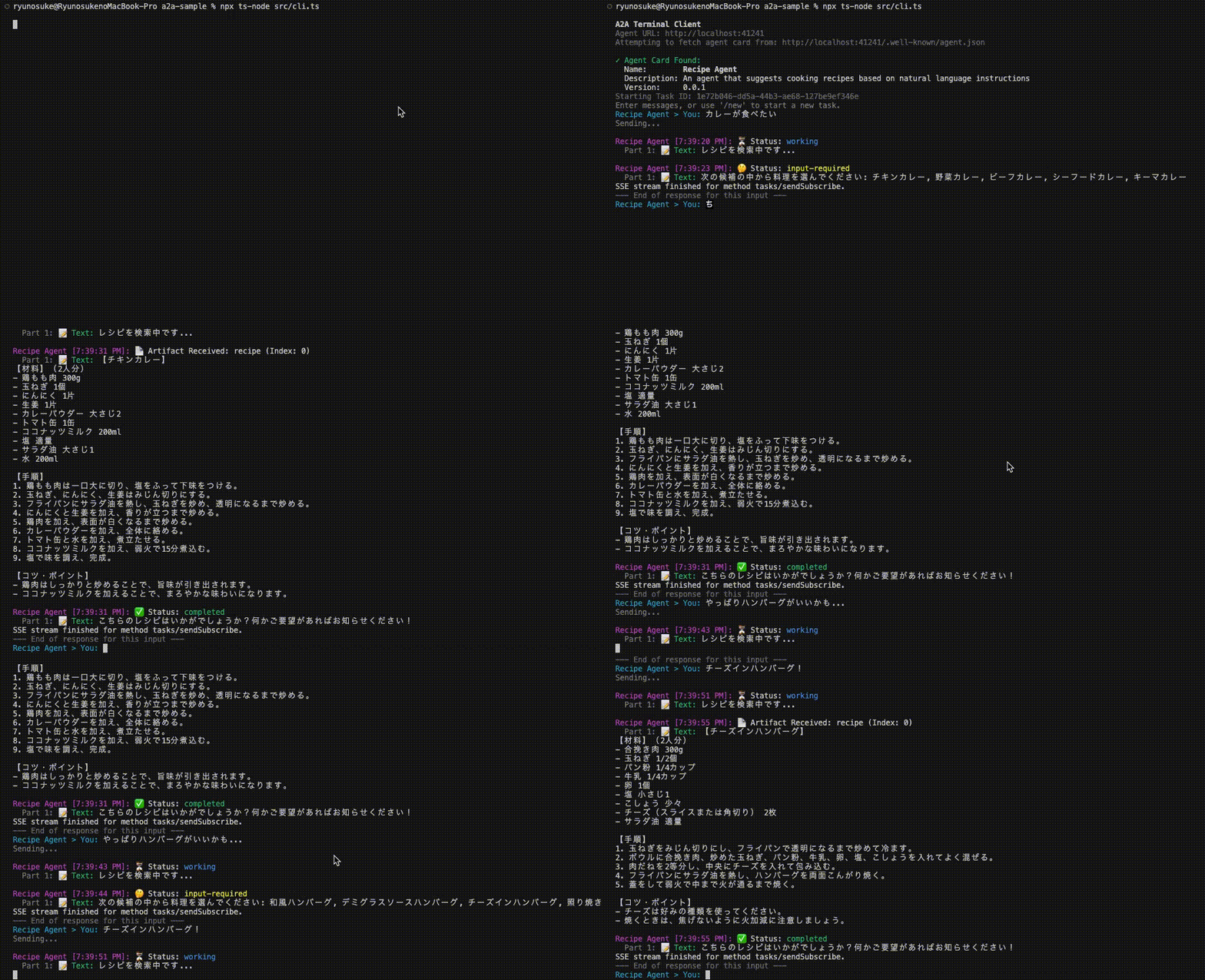
最初に /.well-known/agent.json で取得した AgentCard が表示されていることがわかります。
一度ユーザーに入力を促し、最終的な返答を生成する流れが自然に表現されています。また、完了後も別のリクエストを送ることでユーザーのわがままな要望にも答えてくれていますね。
コンソールで出力した task や history を見ると、Artifact やメッセージ履歴が正しく入っていることがわかります。
task
{"id":"3fdc2c5e-e4ed-4ed1-814b-77b7fad1e92b","status":{"state":"submitted","timestamp":"2025-04-12T10:41:52.165Z","message":null},"artifacts":[{"name":"recipe","parts":[{"type":"text","text":"【チーズインハンバーグ】\n【材料】(2人分)\n- 合挽き肉 300g\n- 玉ねぎ 1/2個\n- パン粉 1/4カップ\n- 牛乳 1/4カップ\n- 卵 1個\n- 塩 小さじ1/2\n- こしょう 少々\n- チーズ(とろけるタイプ) 2枚\n- サラダ油 適量\n- デミグラスソース(お好みで)\n\n【手順】\n1. 玉ねぎをみじん切りにし、フライパンで透明になるまで炒めて冷ます。\n2. ボウルに合挽き肉、炒めた玉ねぎ、パン粉、牛乳、卵、塩、こしょうを入れてよく混ぜる。\n3. 肉だねを2等分し、中央にチーズを入れて包み込む。\n4. フライパンにサラダ油を熱し、ハンバーグを両面こんがり焼く。\n5. 中まで火が通ったら、お好みでデミグラスソースをかけて完成。\n\n【コツ・ポイント】\n- チーズはお好みの種類を使ってください。\n- 焼く際は中火でじっくり焼くと、ふっくら仕上がります。"}]}]}
history
[
    {"role":"user","parts":[{"type":"text","text":"カレーが食べたい"}]},
    {"role":"agent","parts":[{"type":"text","text":"レシピを検索中です..."}]},
    {"role":"agent","parts":[{"type":"text","text":"次の候補の中から料理を選んでください: チキンカレー, 野菜カレー, ビーフカレー, シーフードカレー, キーマカレー"}]},
    {"role":"user","parts":[{"type":"text","text":"チキンカレーがいい!"}]},
    {"role":"agent","parts":[{"type":"text","text":"レシピを検索中です..."}]},
    {"role":"agent","parts":[{"type":"text","text":"こちらのレシピはいかがでしょうか?何かご要望があればお知らせください!"}]},{"role":"user","parts":[{"type":"text","text":"やっぱりハンバーグがいいかも..."}]},
    {"role":"agent","parts":[{"type":"text","text":"レシピを検索中です..."}]},
    {"role":"agent","parts":[{"type":"text","text":"次の候補の中から料理を選んでください: 和風ハンバーグ, デミグラスソースハンバーグ, チーズインハンバーグ, 照り焼きハンバーグ, 洋風ハンバーグ"}]},
    {"role":"user","parts":[{"type":"text","text":"チーズインハンバーグ!"}]},
    {"role":"agent","parts":[{"type":"text","text":"レシピを検索中です..."}]},
    {"role":"agent","parts":[{"type":"text","text":"こちらのレシピはいかがでしょうか?何かご要望があればお知らせください!"}]},
]
おわりに
ということで今回は実際に手を動かしながら A2A プロトコルの主要な要素について一通り触ってみました。
より詳しく知りたい方は、ぜひ 公式リファレンス や サンプルコード を覗いてみてください。
A2A プロトコルは AI 時代の HTML ともいえる存在となっていくポテンシャルを秘めていると思っており、個人的にとても注目しています。Push Notification やインメモリなど今回触れなかった要素もまだまだあるので、今後のアップデートを待ちつつ引き続きキャッチアップしていきたいと思います。
Discussion