iTranslated by AI
Running Stable Diffusion on AMD Ryzen AI Max+ 395




Introduction
Who is this article for?
- Those interested in Generative AI
- Those who want to run Stable Diffusion on AMD Ryzen AI Max+ 395
- Those who want to know thoughts on the EVO-X2
Ubuntu 24.04.2 LTS@EVO-X2(AMD Ryzen AI Max+ 395, 128GB)# ★Newly purchased★
Purchased an EVO-X2!
I recently purchased GMKTec's EVO-X2.
My purpose and reasons for selection are as follows.
- Purpose
- Migrating my main machine that I've used for nearly 8 years
- Reasons for selection
- Ubuntu can be chosen as the OS
- This is the most important item for me, as I love Ubuntu
- Good cost performance
- Equipped with 128GB of unified memory for about 270,000 yen (a Mac would cost over 500,000 yen)
- Compact and power-saving
- Can eventually be operated as a high-performance home server
- Ubuntu can be chosen as the OS
Specifications
Excerpted from the Official Homepage, listing only the options I selected.
| Parameter | Details |
|---|---|
| CPU | AMD Ryzen™ AI Max+ 395 • 16 cores / 32 threads • TSMC 4nm FinFET process • Up to 5.1 GHz (Max) • 16 MB L2 cache / 64 MB L3 cache • TDP: Stable operation at 120W (up to 140W peak) |
| Graphics | Radeon 8060S Graphics • 40-core RDNA 3.5 architecture |
| Memory (RAM) | Onboard LPDDR5X (non-upgradable) • 128GB • Speed: 8000MHz |
| Storage | PCIe 4.0 M.2 2280 SSD • Capacity: 2TB |
| Video Output | Available via HDMI, DisplayPort, and USB4 • Max supported resolution: 7680×4320 @ 60Hz |
| Network | WiFi: • Wi-Fi 7: RZ717 (MT7925) Ethernet: • 1 × RJ45 Gigabit LAN (2.5G, 8125BG) |
| Bluetooth | Bluetooth 5.4 |
| Power Supply | DC 19.5V, 11.8A (approx. 230.1W) • AC Input: 100–240V, 50/60Hz, 4.0A |
| Front Panel I/O | • 2 × USB-A 3.2 Gen2 • 1 × Audio combo (3.5mm jack) • 1 × USB Type-C (USB4.0) • 1 × SD card reader (supports SD4.0, SDXC) • Buttons: Power, System fan lighting control, Performance mode switch |
| Rear Panel I/O | • 1 × DisplayPort 1.4 HBR3 (8.1 Gbps) • 1 × HDMI 2.1 (FRL at 8 Gbps) • 1 × USB-A 3.2 Gen2 • 2 × USB-A 2.0 • 1 × USB Type-C (USB4.0) • 1 × Audio (3.5mm CTIA) • 1 × DC IN (5525 interface) • 1 × RJ45 Gigabit LAN (2.5G, 8125BG) |
| OS | Windows 11 Pro → Replaced with Ubuntu on the storage level |
| Size | • Dimensions: 193 mm x 185.8 mm x 77 mm |
Running Stable Diffusion on Ubuntu
In this article, I will summarize how to run Stable Diffusion on the EVO-X2 as a memorandum.
However, since I am running it on Ubuntu, it might not be helpful for Windows users.
Also, please note that there might be some missing or extra information in the steps shown in this article, as I went through a lot of trial and error during the environment setup process.
Below are the steps that seem necessary for setting up the environment.
Installing ROCm and the AMDGPU driver
Follow the steps in ROCm installation for Linux.
- ROCm installation
wget https://repo.radeon.com/amdgpu-install/6.4.1/ubuntu/noble/amdgpu-install_6.4.60401-1_all.deb
sudo apt install ./amdgpu-install_6.4.60401-1_all.deb
sudo apt update
sudo apt install python3-setuptools python3-wheel
sudo usermod -a -G render,video $LOGNAME # Add the current user to the render and video groups
sudo apt install rocm
- AMDGPU driver installation
wget https://repo.radeon.com/amdgpu-install/6.4.1/ubuntu/noble/amdgpu-install_6.4.60401-1_all.deb
sudo apt install ./amdgpu-install_6.4.60401-1_all.deb
sudo apt update
sudo apt install "linux-headers-$(uname -r)" "linux-modules-extra-$(uname -r)"
sudo apt install amdgpu-dkms
Once the installation is complete, commands like amd-smi and rocminfo should be available.
Setting up Stable Diffusion
First Attempt (Defeat)
I first set up the environment following this article, but the result was sad: I managed to get it running, but the generation speed was incredibly slow.
It didn't work as-is, and I had to change to ROCm 6.4.0 and make various fixes, but as mentioned, it didn't go well, so I'll omit the details here.
Victory
However, the above article provided the insight that AMD GPUs do have the potential for image generation.
In other words, I decided to continue my investigation with the belief that if the environment could be set up properly, it should run much faster—more specifically, at a speed equivalent to or better than an RTX 3060.
As a result, I stumbled upon a Reddit thread from over two months ago.
This thread hasn't gained much traction, but the title is Working Stable Diffusion WebUI for Strix Halo (gfx1151) on Linux, which is exactly what I was looking for.
I immediately tried setting up the environment as described.
The procedure is very simple: just copy the following file to any directory and execute it.
$ wget https://raw.githubusercontent.com/scottt/rocm-TheRock/dc0b3a9963c0b4e064e503b1e9ffe6f70575c026/dockerfiles/apps/stable-diffusion-webui/run-stable-diffusion-webui
$ chmod a+x run-stable-diffusion-webui
$ ./run-stable-diffusion-webui
However, you will likely encounter the following error during execution.
$ ./run-stable-diffusion-webui
Error: short-name "stable-diffusion-webui:latest" did not resolve to an alias and no unqualified-search registries are defined in "/etc/containers/registries.conf"
I consulted Gemini 2.5 Pro and resolved it by modifying run-stable-diffusion-webui as follows.
#!/bin/bash

mkdir -p $HOME/.cache/stable-diffusion-webui/{repositories,models,cache,miopen}
# MIOpen usually uses $HOME/.config/miopen
mkdir -p $HOME/Pictures

BIND_MOUNT_FLAG=
if getenforce 2>/dev/null | grep Enforcing > /dev/null; then
	if getsebool container_use_devices | grep ' off$' > /dev/null ; then
		printf 'Grant container GPU access with:\n\tsudo setsebool container_use_devices 1\n'>&2
		exit 1
	fi
	# SELinux is in enforcing mode, see https://discussion.fedoraproject.org/t/how-do-i-give-rootless-podman-permissions-to-a-directory/22066/5
	BIND_MOUNT_FLAG=:z
fi

podman run \
        --name stable-diffusion-webui \
	--replace \
	-v $HOME/.cache/stable-diffusion-webui/repositories:/opt/stable-diffusion-webui/repositories$BIND_MOUNT_FLAG \
	-v $HOME/.cache/stable-diffusion-webui/models:/opt/stable-diffusion-webui/models$BIND_MOUNT_FLAG \
	-v $HOME/.cache/stable-diffusion-webui/cache:/opt/stable-diffusion-webui/cache$BIND_MOUNT_FLAG \
	-v $HOME/.cache/stable-diffusion-webui/miopen:/root/.config/miopen$BIND_MOUNT_FLAG \
	-v $HOME/Pictures:/opt/stable-diffusion-webui/log/images$BIND_MOUNT_FLAG \
	--device /dev/kfd --device /dev/dri --net=host --security-opt=no-new-privileges \
	docker.io/scottt/stable-diffusion-webui:gfx1151
Also, as mentioned in the Reddit thread, you need to change the permissions of /dev/kfd and /dev/dri. To do this, I created a shell script like the one below.
sudo chmod 777 /dev/kfd /dev/dri
./run-stable-diffusion-webui
After that, running sh server.sh in bash should allow you to execute Stable Diffusion without any problems.
If no error occurs, wait a while as the models and other files will be downloaded.
Finally, when the message Running on local URL: http://127.0.0.1:7860 is output, you can use the Stable Diffusion WebUI by accessing that address.
By the way, models are placed in $HOME/.cache/stable-diffusion-webui/models and are persisted.
Comparison with RTX 3060
As mentioned in this post regarding the comparison with the RTX 3060, under the same parameter conditions, the Radeon 8060S was found to be faster than the RTX 3060.
However, compared to the RTX 3060 using Forge, the speeds are about the same.
Issues
For now, image generation should be working, but several issues surfaced while using it.
These issues are summarized below. Here, resolved items are checked.
-
Persistence: Issue where the environment is initialized upon Docker restart
- Configuration files
- Previous prompts/parameters: Wanting to load previous settings using the arrow button in the figure below
- Output images
- extensions
-
When changing parameters to values used for the first time, compilation takes time only at first.
- This seems to be a specification and is unavoidable. Changing prompts is fine. Previously used parameters are also OK.
- Unable to output images above a certain high resolution
- Operation becomes unstable during compilation
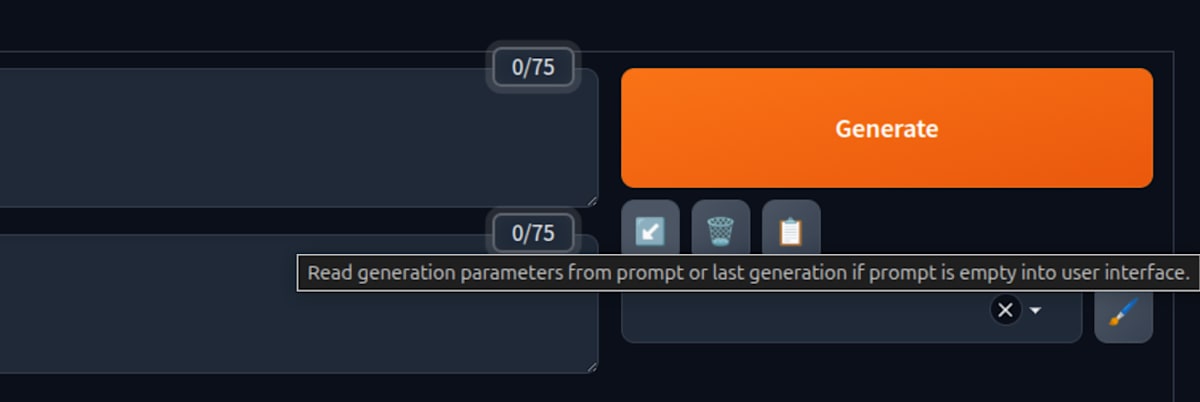
Some issues have already been resolved, and the methods are shown below.
Persistence (Resolved)
As mentioned above, even if you have gone through the trouble of setting up the UI, prompts, and parameters, they get reset when Docker is restarted, which makes it very inconvenient to use.
Also, output images and extensions are reset every time Docker is restarted.
To solve this, here is the final run-stable-diffusion-webui script, modified after consulting with Gemini 2.5 Pro.
#!/bin/bash

mkdir -p $HOME/.cache/stable-diffusion-webui/{repositories,models,cache,miopen}
# MIOpen usually uses $HOME/.config/miopen
mkdir -p $HOME/Pictures
# Create a directory for saving settings on the host side
mkdir -p $HOME/.config/stable-diffusion-webui
# --- Initial creation of configuration files (only if they don't exist) ---
CONFIG_FILE="$HOME/.config/stable-diffusion-webui/config.json"
UI_CONFIG_FILE="$HOME/.config/stable-diffusion-webui/ui-config.json"
STYLES_FILE="$HOME/.config/stable-diffusion-webui/styles.csv"
PARAMS_FILE="$HOME/.config/stable-diffusion-webui/params.txt"

if [ ! -f "$CONFIG_FILE" ]; then
  echo "{}" > "$CONFIG_FILE"
  echo "Created initial empty config.json"
fi

if [ ! -f "$UI_CONFIG_FILE" ]; then
  echo "{}" > "$UI_CONFIG_FILE"
  echo "Created initial empty ui-config.json"
fi

if [ ! -f "$STYLES_FILE" ]; then
  touch "$STYLES_FILE"
  echo "Created initial empty styles.csv"
fi

if [ ! -f "$PARAMS_FILE" ]; then
  touch "$PARAMS_FILE"
  echo "Created initial empty params.txt"
fi

# --- End of initial configuration file creation ---


BIND_MOUNT_FLAG=
if getenforce 2>/dev/null | grep Enforcing > /dev/null; then
	if getsebool container_use_devices | grep ' off$' > /dev/null ; then
		printf 'Grant container GPU access with:\n\tsudo setsebool container_use_devices 1\n'>&2
		exit 1
	fi
	# SELinux is in enforcing mode, see https://discussion.fedoraproject.org/t/how-do-i-give-rootless-podman-permissions-to-a-directory/22066/5
	BIND_MOUNT_FLAG=:z
fi

podman run \
        --name stable-diffusion-webui \
	--replace \
	-v $HOME/.cache/stable-diffusion-webui/repositories:/opt/stable-diffusion-webui/repositories$BIND_MOUNT_FLAG \
	-v $HOME/.cache/stable-diffusion-webui/models:/opt/stable-diffusion-webui/models$BIND_MOUNT_FLAG \
	-v $HOME/.cache/stable-diffusion-webui/cache:/opt/stable-diffusion-webui/cache$BIND_MOUNT_FLAG \
	-v $HOME/.cache/stable-diffusion-webui/outputs:/opt/stable-diffusion-webui/outputs$BIND_MOUNT_FLAG \
	-v $HOME/.cache/stable-diffusion-webui/extensions:/opt/stable-diffusion-webui/extensions$BIND_MOUNT_FLAG \
	-v $HOME/.cache/stable-diffusion-webui/miopen:/root/.config/miopen$BIND_MOUNT_FLAG \
	-v $HOME/Pictures:/opt/stable-diffusion-webui/log/images$BIND_MOUNT_FLAG \
	-v $HOME/.config/stable-diffusion-webui/config.json:/opt/stable-diffusion-webui/config.json$BIND_MOUNT_FLAG \
	-v $HOME/.config/stable-diffusion-webui/ui-config.json:/opt/stable-diffusion-webui/ui-config.json$BIND_MOUNT_FLAG \
	-v $HOME/.config/stable-diffusion-webui/styles.csv:/opt/stable-diffusion-webui/styles.csv$BIND_MOUNT_FLAG \
	-v $HOME/.config/stable-diffusion-webui/params.txt:/opt/stable-diffusion-webui/params.txt$BIND_MOUNT_FLAG \
	--device /dev/kfd --device /dev/dri --net=host --security-opt=no-new-privileges \
	docker.io/scottt/stable-diffusion-webui:gfx1151
This should resolve the persistence issue.
Issue with being unable to create high-resolution images (Unresolved)
This is also related to the issue mentioned earlier where the operation becomes unstable during compilation.
As described above, when parameters including resolution are changed, a compilation process runs first, making the operation unstable.
Furthermore, as the resolution increases, the compilation takes more time.
As an example, a 1216x832 image can be output without problems, but when trying to apply Hires. fix to increase the resolution by 1.5 times, the OS hangs up and a reboot is forced, or I am forcibly logged out and have to start over from the login screen.
Since there is plenty of both memory and VRAM, the reason for the hang-ups is not clear. I would like it to operate stably, even if it takes a bit of time.
Impressions after using the EVO-X2 for a week
I'll jot down some impressions that came to mind while writing this article in bullet points.
-
Disappointing points
- Although Ryzen AI Max claims to be for AI PCs, support has not caught up yet, so it's better to refrain from purchasing it with AI usage as the primary purpose at this stage.
- Furthermore, the fact that they prioritize Windows support over Linux makes me feel it's more for gamers than for AI users.
- Currently, there is overwhelmingly little information on the combination of AMD GPUs and Generative AI. I didn't expect it to be even less than for Macs, which don't even have discrete GPUs.
-
Good points
- High versatility and cost performance: When comparing within the constraint of "128GB Unified Memory," the biggest merit is that it is more versatile and lower cost than a Mac Studio or machines equipped with NVIDIA GB10 (such as the upcoming DGX Spark).
- Compactness and power-saving performance are also better than expected.
For reference, if I were to recommend one of the following three products, it would look something like this (though opinions may vary).
| Model | Recommended for |
|---|---|
| Mac Studio (Apple silicon) | ・Apple lovers ・Satisfied if Generative AI can perform local LLM inference ・Concerned about resale value ・Not confident in solving troubles independently when they occur |
| DGX Spark (GB10) | ・AI experts ・Feel that a machine that cannot use CUDA is worthless ・Want to perform training ・Want to perform video and image generation ・AI performance >> Versatility |
| EVO-X2 (Ryzen AI MAX+ 395) | ・Focus on cost performance ・Focus on versatility ・Want to use Windows/Linux ・Considering server operation |
Extra
Finally, I'll introduce a tool I found for visualizing GPU usage.
amdgpu_top
Summary
In this article, I summarized the following:
- How to run Stable Diffusion on AMD Ryzen AI Max+ 395
- Issues and solutions for some of them
- Impressions after using the EVO-X2 for a week
In conclusion, while I was able to confirm that it runs as fast as or faster than an RTX 3060, setting it up without official support and with limited information makes stability a major challenge.
As for the EVO-X2, because it is a product that prioritizes versatility and cost performance, it has an unavoidable sense of being somewhat halfway, but it holds the potential to be used as a main machine or server for many years, and I am very satisfied with it.
I also dabbled a bit with local LLMs, though I didn't mention it in this article. I might write a separate post about it if I have the chance.
Thank you for reading to the end. I look forward to seeing you in the next post.
Discussion