iTranslated by AI
Running HunyuanVideo Locally




Introduction
Who is this article for?
- Those who want to generate videos with HunyuanVideo using an Nvidia GPU with about 12GB of VRAM
- Those who want to generate videos with HunyuanVideo on a Mac
- Those who want to know the video generation speeds of M2 Ultra and RTX 3060
1. Mac Studio (M2 Ultra 128GB)
2. Windows 11 (96GB Main Memory + RTX 3060 12GB)
Overview
In this article, I will summarize how to generate videos with the GGUF version of HunyuanVideo using ComfyUI as a memo.
The article below covers running Flux.1 using ComfyUI, but this time additional settings are required.
Therefore, I believe this article is for intermediate users and above.
Preparation
Set up the environment by referring to the following.
ComfyUI
- Installation of ComfyUI (skip if already installed)
$ git clone https://github.com/comfyanonymous/ComfyUI.git
$ cd ComfyUI
$ python -m venv venv
$ source venv/bin/activate # For Mac or Ubuntu
$ .\venv\Scripts\activate # For Windows
(venv)$ pip install -r requirements.txt
In an Nvidia environment, assuming the driver and CUDA installation are complete, please execute the following additional command (only if not already installed).
(venv)$ pip install torch torchvision torchaudio --extra-index-url https://download.pytorch.org/whl/cu124
- Updating ComfyUI (skip if you installed it above)
- Installing ComfyUI-Manager and ComfyUI-GGUF (skip if already installed)
$ cd ComfyUI/custom_nodes
$ git clone https://github.com/ltdrdata/ComfyUI-Manager.git
$ git clone https://github.com/city96/ComfyUI-GGUF.git
Models
Downloading and Placing Files
-
Nvidia environment
-
clip_l.safetensors ->
models\clip -
llava_llama3_fp8_scaled.safetensors ->
models\text_encoders -
hunyuan-video-t2v-720p-Q4_K_M.gguf ->
models\unet -
hunyuan_video_vae_bf16.safetensors ->
models\vae
-
clip_l.safetensors ->
-
Mac environment
-
clip_l.safetensors ->
models/clip -
llava_llama3_fp16.safetensors ->
models/text_encoders -
hunyuan-video-t2v-720p-Q8_0.gguf ->
models/unet -
hunyuan_video_vae_bf16.safetensors ->
models/vae
-
clip_l.safetensors ->
Execution
Launching ComfyUI
(venv)$ python main.py
You can use ComfyUI by accessing http://localhost:8188 in your web browser.
Loading the Workflow
Download the following json file.
Drag and drop it onto the ComfyUI screen to load the HunyuanVideo workflow.

However, video generation will not work yet at this stage because the GGUF version of the model is not being used.
[Important] Replacing Nodes
The "Load Diffusion Model" node uses a bf16 model, which cannot be executed on GPUs with small VRAM like the RTX 3060 (12GB).
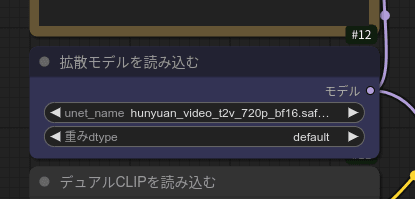
Therefore, we will add a node to use the GGUF model we downloaded this time.
Right-click in an empty space -> Add Node -> bootleg -> Unet Loader (GGUF). This will bring up a node that can load GGUF models. Select the GGUF quantized model you downloaded earlier.
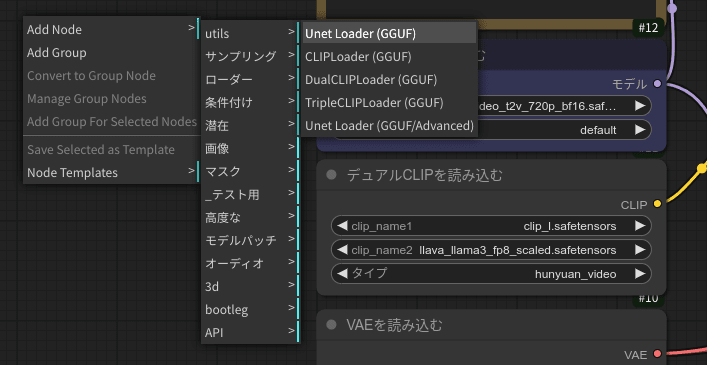

Finally, reconnect the edges (arrows) that were connected to "Load Diffusion Model" to "Unet Loader (GGUF)", and delete "Load Diffusion Model".

I recommend saving the workflow in this state.
After that, clicking the execution button at the bottom of the screen should start the video generation. If you check the console, you should see a progress bar like this:
100%|██████████████████████████████████████████████████████████████████████████████████████████████████████████████████████████████████████████████████| 20/20 [47:50<00:00, 143.50s/it]
If it is progressing, it's a success. However, it takes quite a while for a single bar to advance. For reference, the above result is from when I generated it on an M2 Ultra.
Video Generation Results
I haven't experimented much with the video generation itself yet, but here is a video I posted on X.
I've only played with it a little, but my impression is that the prompt following is quite good.
Reference: Videos generated with other video generation AI
- LTXV
However, this is image-to-video.
It's amazing that it can generate in less than 3 minutes even on a Mac. However, the prompt following doesn't seem to be that high.
- Pyramid Flow
Similarly, the prompt following doesn't seem to be very high. Also, the video often didn't move very dynamically.
Generation Speed
It's not a fair comparison because the number of frames and quantization sizes don't match, but I'll summarize the generation speed for reference. The resolution is 848x480 in all cases.
| GPU | Quantization Size | Number of Frames | Generation Time |
|---|---|---|---|
| M2 Ultra (128GB) | Q8_0 | 73 | Approx. 53 min |
| RTX 3060 (12GB) | Q4_K_M | 69 | Approx. 20 min |
Even considering the entire system, the Mac costs several times more, yet it lost overwhelmingly to the RTX 3060 in terms of speed, which is a bit of a sad result.
Conclusion
In this article, I summarized how to run the GGUF version of HunyuanVideo in a local environment.
Partly because I made this article compatible with both Windows (Nvidia) and Mac environments, it was a challenge to write since subtle differences in settings can currently prevent it from working.
In conclusion, HunyuanVideo has high prompt following, and with LoRAs starting to appear little by little, I think it's a promising model for the future.
Although I was able to get it running on a Mac, it requires an enormous amount of VRAM, and I was shown a speed difference of nearly 2.5 times compared even to the RTX 3060. Therefore, if you want to use it mainly for image or video generation, it seems better to choose an Nvidia GPU after all.
Thank you for reading to the end. I hope to see you in the next one.
Discussion
HunyuanVideoのローカル環境での実行、お疲れ様です。 VRAM使用量を削減するために、ComfyUIのVAEDecodeTiledノードを使用し、タイルサイズを256に設定すると効果的です。 私も12GBのVRAM向けに最適化したワークフローを使用しています。 ご希望であれば、そのワークフローを共有いたしますので、お気軽にお知らせください。
shigewotaさん
貴重な情報をいただきありがとうございます!時間があるときに試してみたいと思います。
記事に書いた通り12GBのVRAMでも一応動かせるのですが、まだ色んなプロンプトやloraを試すには1回の生成時間が長い印象で、現状はあまり使いこなせてないですね😅
本日NVIDIAから正式発表されたRTX 50シリーズの購入も検討しているので、本格的に動画生成の世界へ入門するのはマシンを新調してからにしようかなと思ってます。改めて、コメント頂きありがとうございました!