iTranslated by AI
PSRule for Azure for IaC (ARM Template/Bicep)! #2 [CI Pipeline Edition]




This is a continuation of the PSRule for Azure article I wrote the other day. In this post, I would like to introduce how to integrate PSRule for Azure into GitHub Actions and its collaboration with Azure Monitor.
Please refer to the previous article for an overview of PSRule for Azure and how to use it in a local environment.
Integrating into CI Pipelines
To integrate PSRule into a CI pipeline, use the following actions:
- GitHub Actions: https://github.com/marketplace/actions/psrule
- Azure Pipelines: https://marketplace.visualstudio.com/items?itemName=bewhite.ps-rule
In this article, I will briefly explain the integration method using GitHub Actions, which I am personally familiar with (though it is very simple, so there are no particularly difficult points).
Preparation
The only things you need to prepare before introducing the pipeline are designing the directory structure and placing ps-rule.yaml. The directory structure and ps-rule.yaml assumed this time are as follows (these are the same as in the previous article, but I'll repost them just in case).
.
├── .devcontainer/
├── .ps-rule/ <------------------------- Directory for defining custom rules
├── .vscode/
├── azure/
│   ├── deployment/
│   │   ├── project01/
│   │   │   └── main.bicep <------------ Bicep file for project01
│   │   └── project02/
│   │       └── main.bicep <------------ Bicep file for project02
│   └── modules/
│       └── my-module/
│           ├── main.bicep <------------ Bicep Module definition file
│           └── .tests/
│               └── main.tests.bicep <-- Bicep Module test
└── ps-rule.yaml <---------------------- PSRule configuration
ps-rule.yaml
#
# PSRule for Azure configuration
#

# Please see the documentation for all configuration options:
# https://aka.ms/ps-rule/options
# https://aka.ms/ps-rule-azure/options

# Configure binding for local rules.
binding:
  preferTargetInfo: true
  targetType:
    - type
    - resourceType

# Require minimum versions of modules.
requires:
  PSRule: "@pre >=2.2.0"
  PSRule.Rules.Azure: "@pre >=1.17.1"

# Use PSRule for Azure.
include:
  module:
    - PSRule.Rules.Azure

output:
  culture:
    - "ja-JP"

input:
  pathIgnore:
    # Ignore other files in the repository.
    - ".devcontainer/"
    - ".vscode/"
    - ".github/"
    - "*.md"

    # Exclude modules but not tests.
    - "azure/modules/**/*.bicep"
    - "!azure/modules/**/*.tests.bicep"

configuration:
  # Enable automatic expansion of Azure parameter files.
  AZURE_PARAMETER_FILE_EXPANSION: true

  # Enable automatic expansion of Azure Bicep source files.
  AZURE_BICEP_FILE_EXPANSION: true

  # Configures the number of seconds to wait for build Bicep files.
  AZURE_BICEP_FILE_EXPANSION_TIMEOUT: 10
Action Definition
I defined an action in .github/workflows/test-azure-infra-code.yaml by referring to information like the following. This action performs validation of Bicep / ARM Templates when a Pull Request is created.
- https://github.com/marketplace/actions/psrule
- https://github.com/Azure/PSRule.Rules.Azure-quickstart/blob/main/.github/workflows/azure-analyze.yaml
name: Test Azure Infra code with PSRule

on:
  pull_request:
    branches:
      - main
    paths:
      - ".github/workflows/*"
      - "azure/**.bicep"
      - "azure/**.json"

permissions:
  contents: read

jobs:
  psrule_for_azure:
    name: Analyze templates
    runs-on: ubuntu-latest
    steps:
      - name: Checkout
        uses: actions/checkout@v3
      - name: Analyze Azure template files
        uses: microsoft/ps-rule@main
        with:
          modules: "PSRule.Rules.Azure"
One "gotcha" regarding microsoft/ps-rule@main: for some reason, it doesn't seem to read and execute the PSRule config file ps-rule.yaml (even if explicitly specified with with.path). Unless you explicitly specify the module to use (PSRule.Rules.Azure) in with.modules, it will run without any preset rules. While this behavior is a bit confusing, this configuration works fine for simply running PSRule for Azure, so let's proceed with it.
Operation Check during Pull Request
Now that the GitHub Action is set up, let's verify its operation. I'll push the following Bicep file to a temporary branch and create a Pull Request.
Bicep code used for operation check
@description('Location for all resources.')
param location string = resourceGroup().location

var vnetName = 'vnet-test'

resource vnet 'Microsoft.Network/virtualNetworks@2021-05-01' = {
  name: vnetName
  location: location
  properties: {
    addressSpace: {
      addressPrefixes: [
        '10.0.0.0/16'
      ]
    }
    subnets: [
      {
        name: 'default'
        properties: {
          addressPrefix: '10.0.2.0/24'
        }
      }
    ]
  }
}
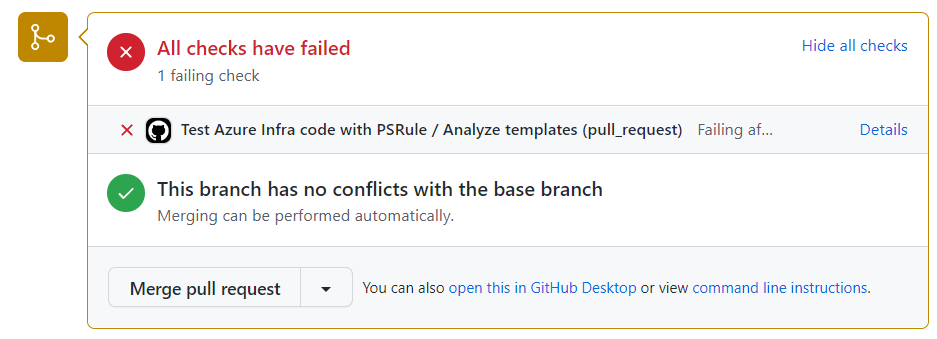
The test failed as expected (?).
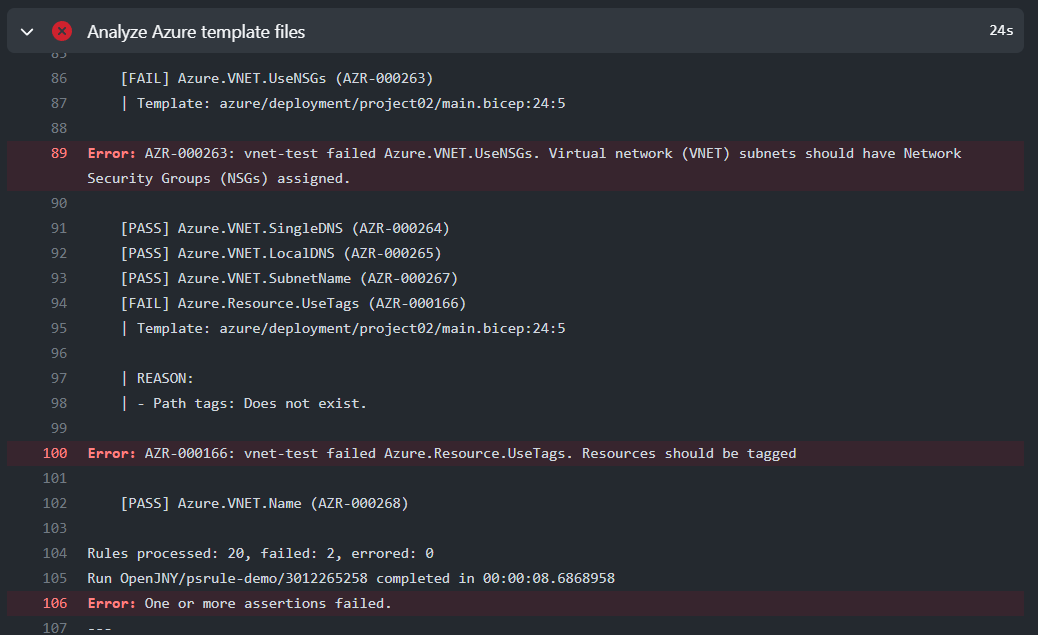
Looking at the logs, it seems to be complaining about not having an NSG associated with the subnet and the absence of tags.
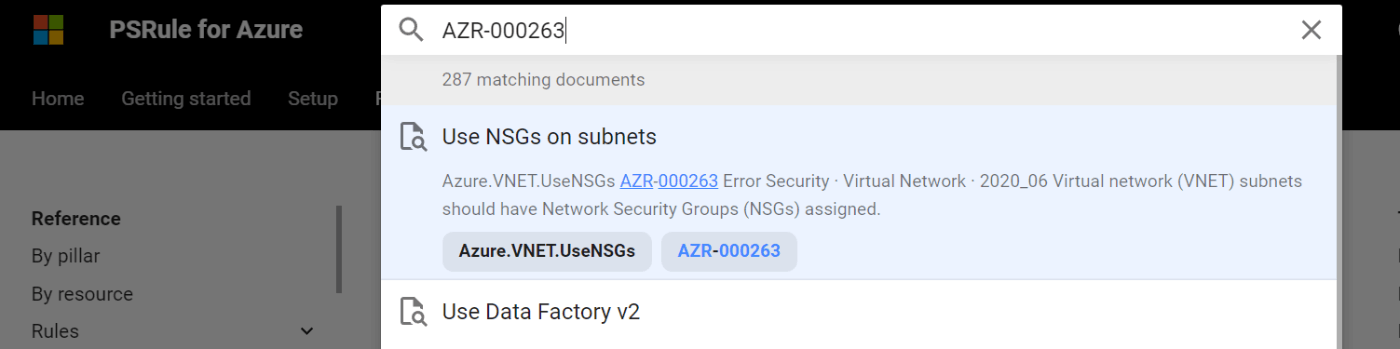
By searching for the Rule ID (for example, AZR-000263) in the official documentation, you can jump to the rule's details page. This is useful when fixing rules where errors occurred.
Advanced: Integration with Azure Monitor
PSRule provides a module called PSRule.Monitor to output validation results to Azure Monitor (Log Analytics Workspace). In this section, I will try out the functionality to log CI pipeline test results to a Log Analytics Workspace.
Step 1: Create a Log Analytics Workspace
First, create a Log Analytics Workspace.
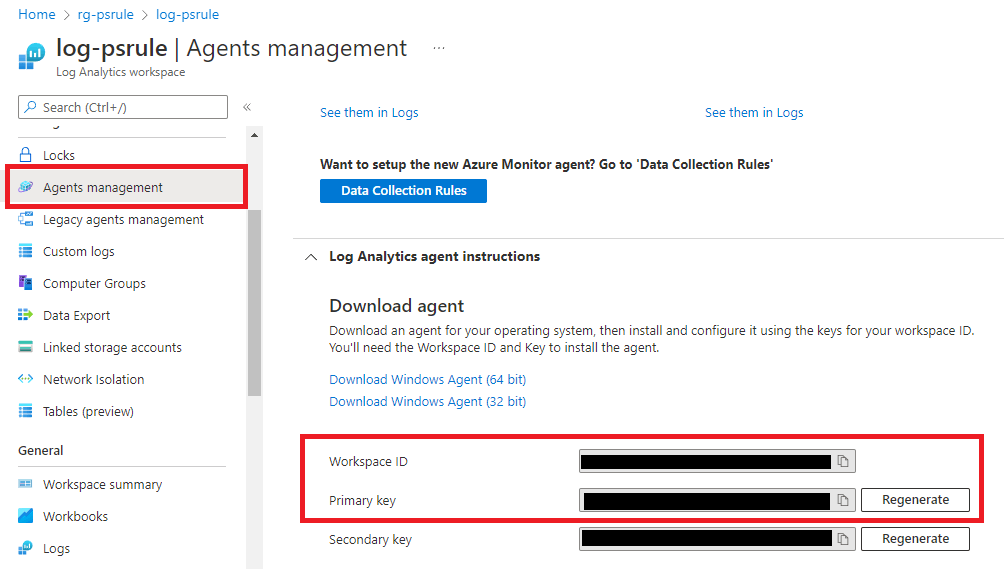
Once created, take note of the Workspace ID and access key (either Primary or Secondary) to be used for integration. These values can be found on the Agent management page in the Azure portal.
Step 2: Add the PSRule.Monitor module
Edit the GitHub Actions configuration as described in the official documentation guide. Specifically, configure microsoft/ps-rule to load PSRule.Monitor and set the Workspace ID and access key as environment variables.
  psrule_for_azure:
    name: Analyze templates
    runs-on: ubuntu-latest
+   environment: psrule-for-azure
    steps:
      - name: Checkout
        uses: actions/checkout@v3
      - name: Analyze Azure template files
        uses: microsoft/ps-rule@main
        with:
-         modules: "PSRule.Rules.Azure"
+         modules: PSRule.Rules.Azure,PSRule.Monitor
+         conventions: Monitor.LogAnalytics.Import
+       env:
+         PSRULE_CONFIGURATION_MONITOR_WORKSPACE_ID: ${{ secrets.MONITOR_WORKSPACE_ID }}
+         PSRULE_CONFIGURATION_MONITOR_WORKSPACE_KEY: ${{ secrets.MONITOR_WORKSPACE_KEY }}
Step 3: Create Secrets
Finally, save the Workspace ID and access key as secrets to complete the setup. Add them from the GitHub repository settings screen (in this case, I've set the Environment name to psrule-for-azure).
| GitHub Secret Name | Value |
|---|---|
| MONITOR_WORKSPACE_ID | The Workspace ID of the Log Analytics Workspace |
| MONITOR_WORKSPACE_KEY | The access key of the Log Analytics Workspace |
Verifying Log Output
Once you have completed the above steps, results will be automatically logged to Azure Monitor every time you run a pipeline on GitHub.
From my experience, there is about a 5-minute data ingestion latency, so it is recommended to wait a little before checking. Try searching for logs in the PSRule_CL table from the [Logs] page of your Log Analytics Workspace.
- Table name:
PSRule_CL - Schema
| Column Name | Description | Example |
|---|---|---|
| TimeGenerated | Time the data was generated | 9/8/2022, 5:35:49.822 AM (UTC) |
| RuleId_s | Official ID of the rule. For PSRule for Azure, it will be PSRule.Rules.Azure\...
|
PSRule.Rules.Azure\Azure.VNET.UseNSGs |
| RuleName_s | Rule name | Azure.VNET.UseNSGs |
| DisplayName_s | User-friendly name of the rule. It seems similar to the rule name | Azure.VNET.UseNSGs |
| TargetName_s | Name of the resource being validated | vnet-test |
| TargetType_s | Resource type of the resource being validated | Microsoft.Network/virtualNetworks |
| Outcome_s | Validation result. Pass or Fail | Fail |
| Duration_d | Execution time (ms) | 1 |
| RunId_s | Execution ID. When run from GitHub Actions, it becomes <username>/<repo-name>/<unique-id>
|
OpenJNY/psrule-demo/3012702015 |
| CorrelationId | UUID synonymous with the execution ID | aa1cb324-d815-4f1b-b86a-d0bfc922eb56 |
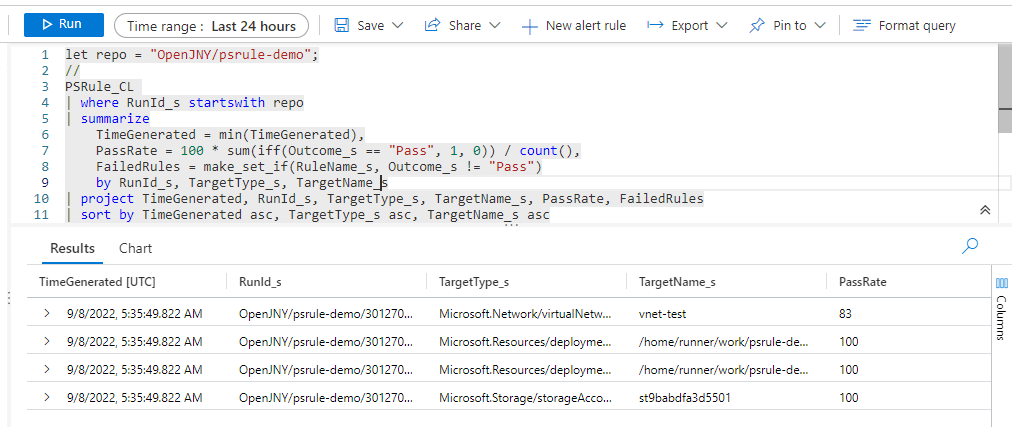
For example, if you want to display the pass rate per resource and a list of failed rules, you can run the following query:
let repo = "OpenJNY/psrule-demo";
//
PSRule_CL
| where RunId_s startswith repo
| summarize
    TimeGenerated = min(TimeGenerated),
    PassRate = 100 * sum(iff(Outcome_s == "Pass", 1, 0)) / count(),
    FailedRules = make_set_if(RuleName_s, Outcome_s != "Pass")
    by RunId_s, TargetType_s, TargetName_s
| project TimeGenerated, RunId_s, TargetType_s, TargetName_s, PassRate, FailedRules
| sort by TimeGenerated asc, TargetType_s asc, TargetName_s asc
Execution Results
Summary
In conclusion, that was the method for introducing PSRule for Azure when using GitHub Actions.
Along with the previous article, I have briefly covered how to use PSRule for Azure, and I was very impressed by how easily it could be implemented. If you are wondering how to handle automated testing for Azure ARM Templates or Bicep, please give it a try.
Furthermore, there are various features and products available for ensuring governance in Azure, such as IAM, Resource Locks, Azure Policy, and Azure Blueprints. You can get a quick overview through the following MSLearn module, so please enjoy it as a dessert 🍰.
References
Discussion